Facebook BugBounty — Disclosing page members
Two privacy leaks on Facebook pages allowed the identity of page members to be disclosed. Clicking a 'Get messages' button on a post leaked the creator's profile ID in a response, and replying to a visitor's message leaked the replying member's profile ID.
 Published on medium.com
Because of some privacy reasons, identity of page members (admins/mods/analysts) is kept secret by facebook and normal page visitors cannot find the details about these members. But.. back in July 2018, when I was hunting for bugs in Facebook, I found multiple ways to disclose members of a facebook page.
The full write-up lives on its author's site
It belongs to its author, so we link to it rather than copy it. The other two tabs are our own rewrites, checked against it.
Context
Facebook keeps the identity of page members (admins, moderators and analysts) hidden from ordinary visitors for privacy reasons. A normal visitor to a page cannot see who runs it or who answers its messages. In July 2018, while hunting on Facebook, Nirmal Thapa (@tnirmalz) found two separate ways to disclose members of a page, both of which leaked numeric profile IDs through responses that are not shown in the normal interface.
The first issue concerns the "Get Messages" feature, which pages can attach to a post. It is mainly used by e-commerce and online shopping pages, which enable it on a product post so that a visitor who wants to know more about that product can click a "Send message" button and start a conversation with the page.
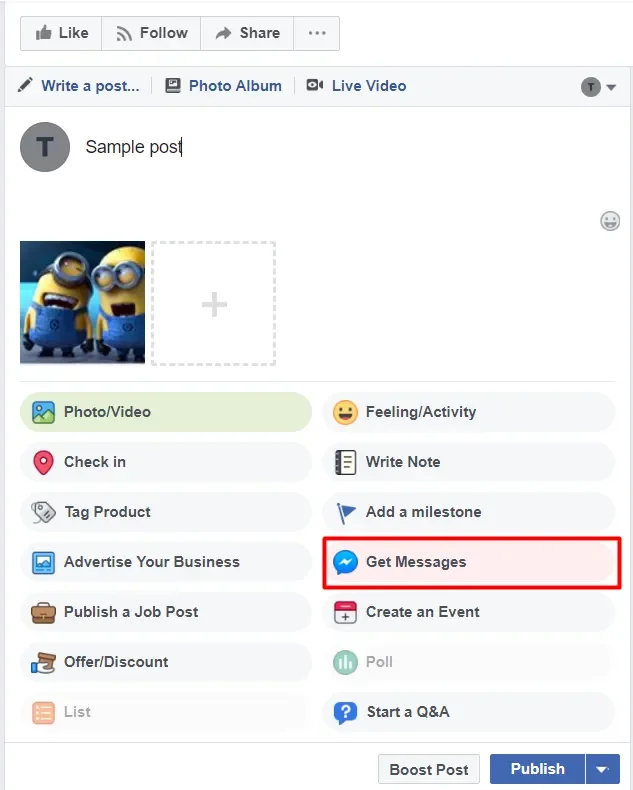
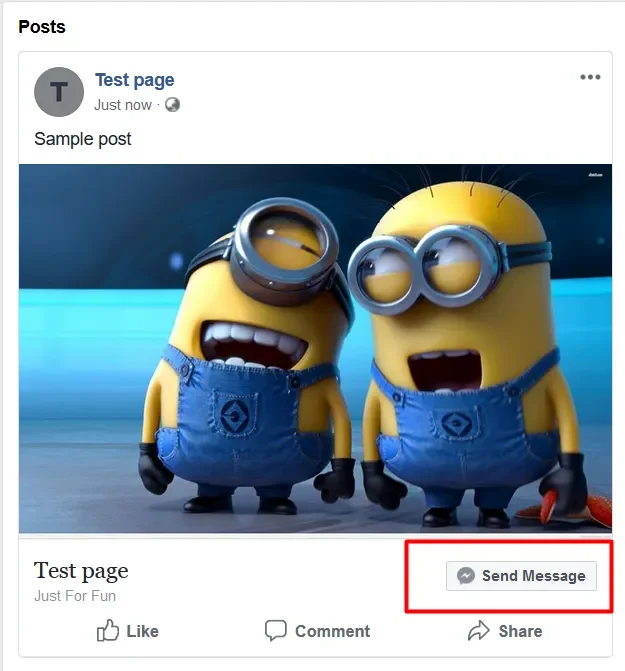
The screenshot above shows the "Get Messages" option as it appears when a page uploads a post. Once enabled, the post carries a "Send message" button, as in the next screenshot.
The second issue concerns ordinary page messaging: a visitor sends a message to a page, and a member of the page replies.
Setup
The researcher used a test account and Burp Suite to inspect the traffic. The test account's profile ID, visible in one of the screenshots, is 100027117349417. No other tooling, versions or preconditions are described. The only requirement for the first issue is a page that has a post with the "Get Messages" feature enabled; for the second, a page whose members read and reply to messages.
Finding it
The first observation was that clicking the "Send message" button on such a post causes the profile ID of the post's creator to appear in one of the responses coming from the host https://x-edge-chat.facebook.com. That response is not visible in general, so nothing appears wrong in the browser.
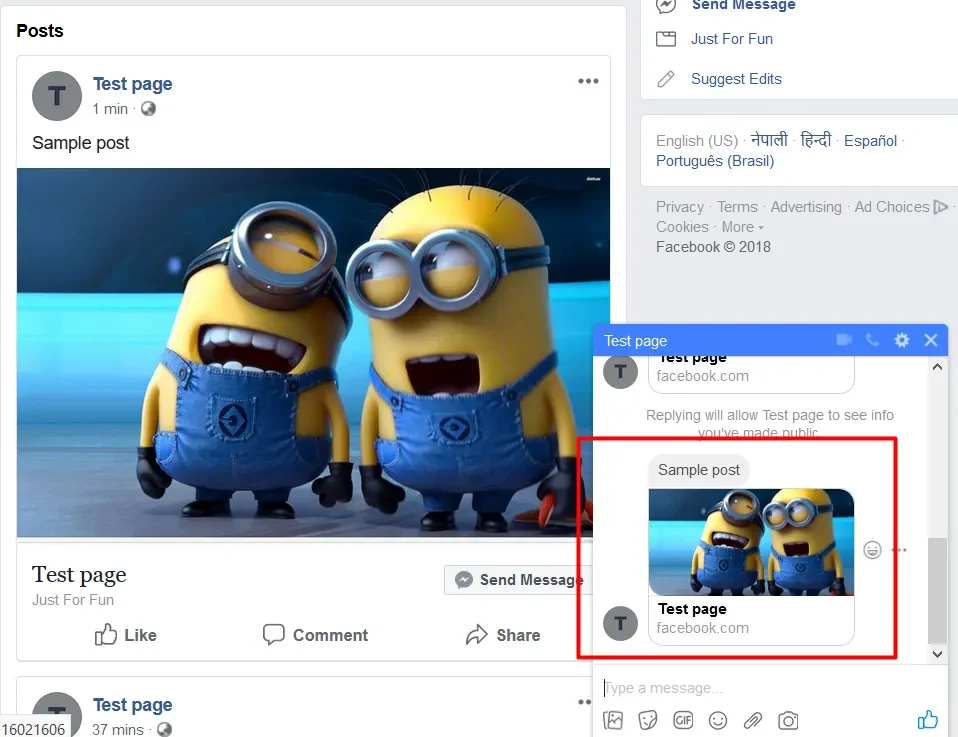
The inbox view above is what a visitor sees. The leak only becomes apparent when the Burp Suite logs are inspected: the creator's ID is present in the response.
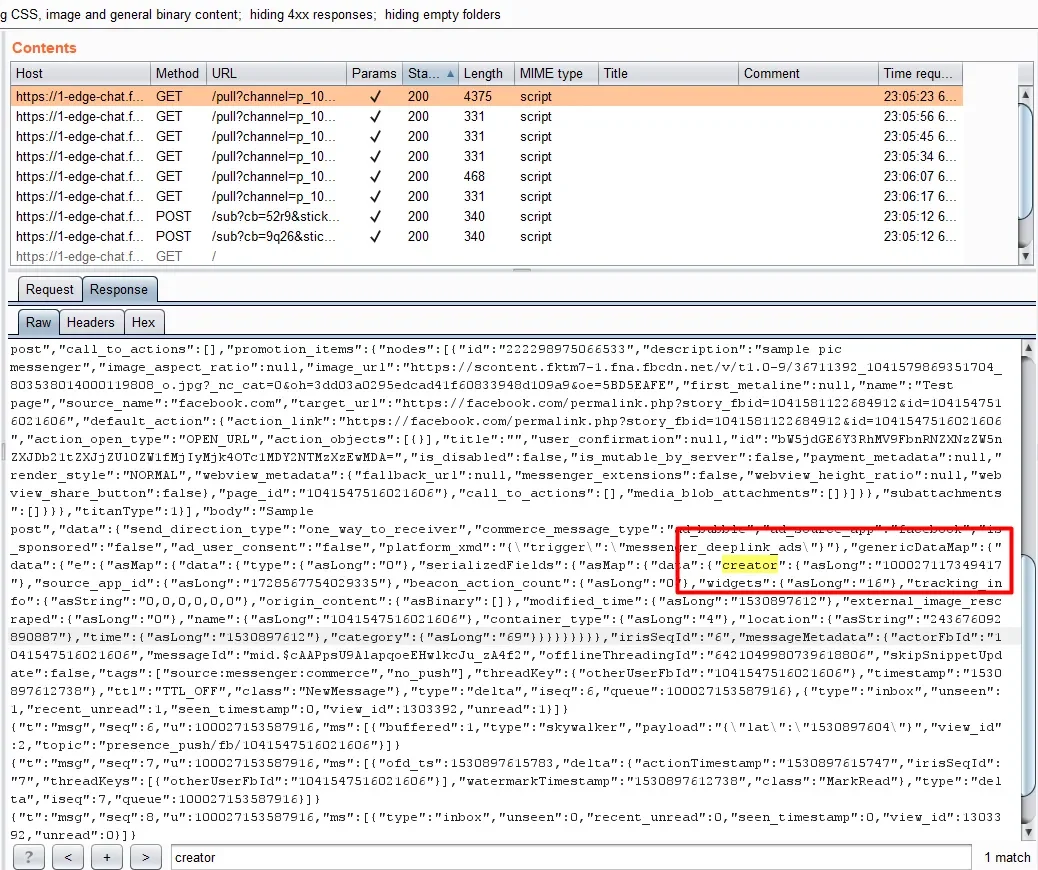
In that screenshot, 100027117349417 is the ID of the researcher's test account.
While going through the Burp Suite logs to report the first issue, the researcher noticed a second, different response that looked odd.
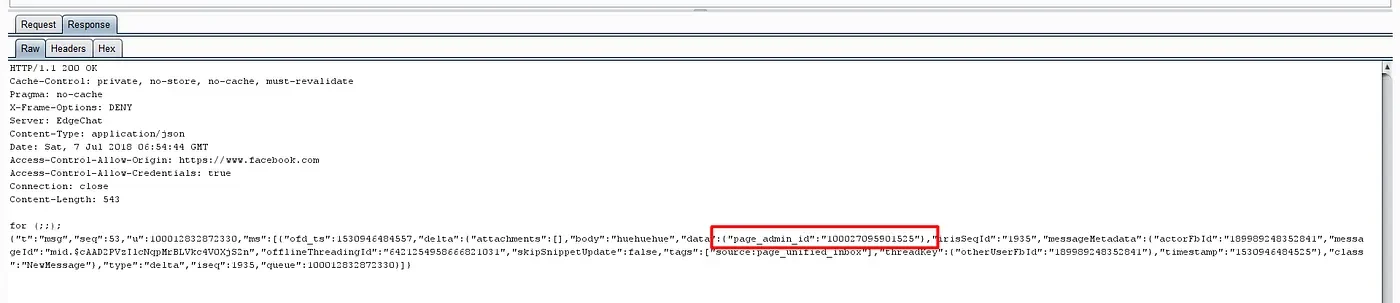
He was fairly sure it was something else that could lead to another leak, so he saved the screenshot and decided to look into it later. A week later he came back to it.
Exploitation
Step 1: leak the creator of a post
- Go to a Facebook page and find a post that has the "Get Messages" feature enabled, that is, a post with a "Send message" button.
- Click the "Send message" button.
- Inspect the Burp Suite logs for responses from
https://x-edge-chat.facebook.com. - Read the profile ID of the post's creator from the response.
The report does not include the raw request or response for this step; the evidence is the Burp Suite screenshot above, where the creator's ID appears in the logged response. The impact is that an attacker who wants to find the creator of a page can simply visit the page, find a post with this feature enabled, click the button, check the logs, and the profile ID of the creator is disclosed.
Step 2: reproduce the second leak
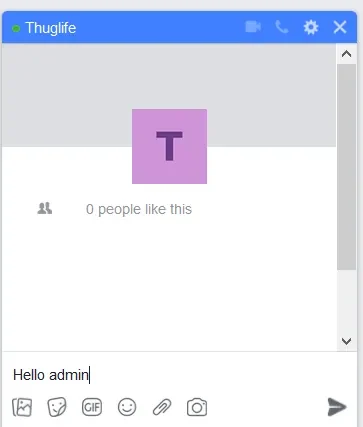
To reproduce the odd response he had seen earlier, the researcher sent a message to the page as a normal visitor.
A member of the page then replied from the page.
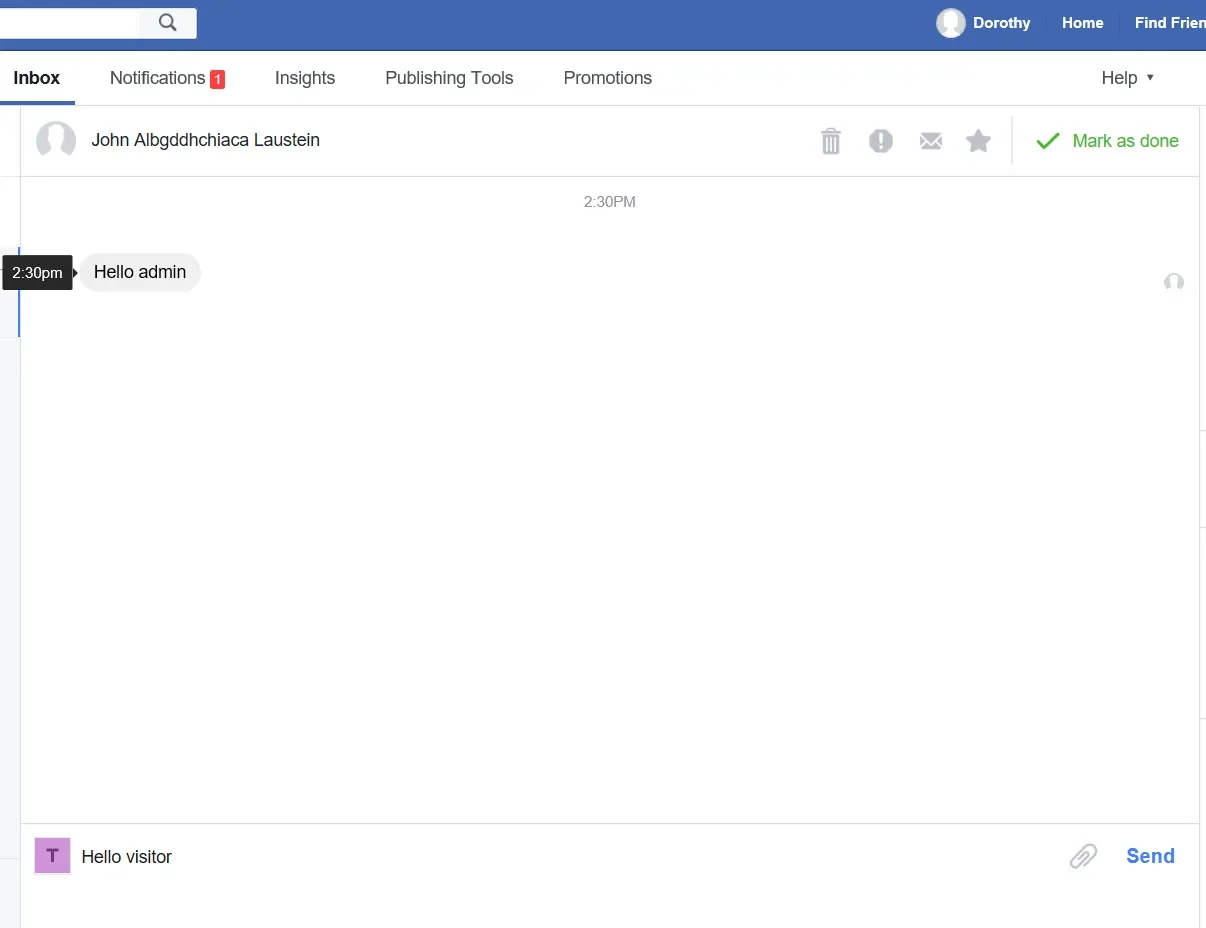
As soon as the "Hello visitor" reply arrived, he checked the Burp Suite logs and saw the exact same response as before.
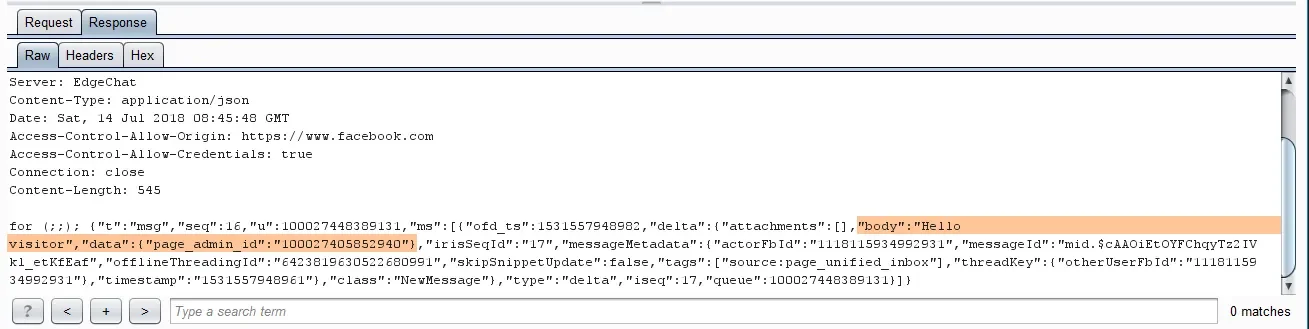
Here 100027405052940 is the profile ID of the page member who replied "Hello visitor". In other words: you send a message to a Facebook page, someone with the ability to read and reply to messages answers you, and that person's profile ID is leaked immediately. Again, the report does not reproduce the raw request or response, only the Burp Suite screenshot showing the leaked ID.
Root cause
Both leaks are information disclosure: a numeric profile ID that identifies a page member is included in a response from https://x-edge-chat.facebook.com that the visitor's browser does not display. The report does not describe the server-side code or explain why the ID was included, so the precise mistake is not stated. What the report does establish is that the profile ID appears in a chat response the visitor's browser does not display, so anyone reading the raw traffic could recover it.
Impact
The report describes both issues as very easy to exploit. For the first, an attacker needs only a page with a post that has the "Get Messages" feature enabled; clicking the button and reading the logs discloses the creator's profile ID. For the second, anyone can send a message to a page at random, wait for a member to reply, and the replying member's profile ID is disclosed. In both cases the disclosure is of a profile ID, which identifies the person behind the page membership that Facebook otherwise keeps private.
Fix
Both issues were fixed by Facebook. The first was reported on 6 July 2018, first answered by Facebook Security on 10 July 2018, triaged on 11 July 2018, fixed on 27 July 2018, and a bounty was awarded on 4 September 2018. The second was discovered on 6 July 2018, the cause of the leak was found and reported on 14 July 2018, triaged on 18 July 2018 at 3:37 AM, fixed on 18 July 2018 at 10:53 PM, and a bounty was awarded on 1 August 2018. The report does not say what was changed in the code.
Variants to test
- A positive result is a numeric or otherwise stable identifier of a page member appearing in a response the browser does not render.
- A positive result is the creator's ID in the traffic after clicking the button.
- A positive result is the member's ID in a response that the visitor's interface does not show.
- A positive result is an ID for a role that the page's public view does not expose.
What happened, in plain words
Facebook pages are the public profiles that businesses, brands and public figures use. A page is run by people: admins, moderators and analysts. Facebook deliberately hides who those people are, so an ordinary visitor to a page cannot see which real person is behind it or who is answering its messages. That is a privacy promise.
In July 2018, Nirmal Thapa (@tnirmalz) found two separate ways to break that promise. Both worked the same way at a high level: when a visitor did something ordinary, such as clicking a button or sending a message, the visitor's browser received a hidden piece of data from Facebook's chat servers. That data contained a numeric profile ID, which is the number Facebook uses internally to identify a person's account. The browser did not show that number on screen, so nothing looked wrong. But anyone who could look at the raw traffic between the browser and Facebook could read it.
To understand the rest of this article you only need to know a few ideas, and each one is explained where it first appears. The important one is that a web page is not a single thing: your browser is constantly sending requests to servers and receiving responses back, and the visible page is only one part of what comes back. Some of those responses carry extra data that the page never displays. That gap between what you see and what your browser actually receives is where both bugs lived.
Background: what a page is, and what a profile ID is
A Facebook page is a public presence. Behind it sit one or more people with roles: admins (full control), moderators (can manage content and comments) and analysts (can see information about the page). Facebook keeps those identities private from visitors. If you visit a page, you see the page's name and posts, not the names of the humans running it.
Every Facebook account also has a numeric profile ID. Think of it like a customer number at a bank: it is not your name, but it uniquely points to your account, and if someone knows it they can identify which account it belongs to. Facebook uses these numbers internally all the time. The privacy problem is not that the number exists, it is that the number should not reach a visitor who is not supposed to know who a page member is.
Background: what Burp Suite is, and why raw traffic matters
When you use a website, your browser and the website's servers exchange messages. Your browser shows you a rendered page, but underneath there is a stream of requests (what your browser asks for) and responses (what the server sends back). Some responses contain data that the page's code never displays. You cannot see that data by looking at the screen.
Burp Suite is a tool that sits between your browser and the internet and records that stream. Think of it as a security camera pointed at the pipe between your browser and the server: it does not change what flows, it just logs it so you can read every request and response afterwards. The researcher used Burp Suite to read those logs. That is the whole trick behind both findings: the leak was invisible on screen but plain in the logs.
The first bug: the "Get Messages" feature on a post
Facebook pages can attach a feature called "Get Messages" to a post. It is mainly used by e-commerce and online shopping pages. The idea is simple: a page posts about a product, enables "Get Messages" on that post, and then a visitor who wants to know more about the product sees a "Send message" button. Clicking it starts a conversation with the page.
The screenshot above shows the "Get Messages" option as it appears when a page uploads a post. Once it is enabled, the post carries a "Send message" button, as in the next screenshot.
The bug is what happens when a visitor clicks that button. The profile ID of the person who created the post is included in one of the responses coming from the host https://x-edge-chat.facebook.com. That response is not shown in the normal interface, so on screen everything looks fine.
The inbox view above is what a visitor sees: an ordinary conversation window, with no hint of who is behind the page. The leak only becomes visible when you inspect the Burp Suite logs, where the creator's ID is present in the response.
In that screenshot, 100027117349417 is the profile ID of the researcher's own test account.
Why this matters
The report describes this as really easy to exploit. An attacker who wants to find out who created a page does not need any special access. They go to the page, find a post with the "Get Messages" feature enabled, click the "Send message" button, check the logs, and the profile ID of the creator is disclosed. The profile ID appears in a chat response the visitor's browser does not display, so anyone reading the raw traffic can recover it.
The second bug: the person who replies to your message
While going through the Burp Suite logs to report the first issue, the researcher noticed a second, different response that looked odd.
He was fairly sure it was something else that could lead to another leak, so he saved the screenshot and decided to look into it later. A week later he came back to it.
To reproduce it, he sent a message to the page as a normal visitor.
A member of the page then replied from the page.
As soon as the "Hello visitor" reply arrived, he checked the Burp Suite logs and saw the exact same response as before.
Here 100027405052940 is the profile ID of the page member who replied "Hello visitor". In other words: you send a message to a Facebook page, someone with the ability to read and reply to messages answers you, and that person's profile ID is leaked immediately. The report does not reproduce the raw request or response for this step either; the evidence is the Burp Suite screenshot showing the leaked ID.
Why this matters
This one is even simpler to trigger. Anyone can send a message to a page at random, wait for a member to reply, and the replying member's profile ID is disclosed. No special feature on a post is needed, only a page whose members read and reply to messages.
What the two bugs have in common
Both leaks are the same kind of problem: information disclosure. That term means a system reveals data to someone who should not have it. Here, a numeric profile ID that identifies a page member is included in a response from https://x-edge-chat.facebook.com that the visitor's browser does not display. The report does not describe the server-side code or explain why the ID was included, so the precise mistake is not stated. What it does establish is that the privacy control (hiding member identity from visitors) was enforced in the interface but not in the underlying chat responses, so anyone reading the raw traffic could recover the ID.
How the researcher found and reported it
The researcher used a test account and Burp Suite to inspect the traffic. The test account's profile ID, visible in one of the screenshots, is 100027117349417. No other tooling, versions or preconditions are described. The only requirement for the first issue is a page that has a post with the "Get Messages" feature enabled; for the second, a page whose members read and reply to messages.
Step 1: leak the creator of a post
- Go to a Facebook page and find a post that has the "Get Messages" feature enabled, that is, a post with a "Send message" button.
- Click the "Send message" button.
- Inspect the Burp Suite logs for responses from
https://x-edge-chat.facebook.com. - Read the profile ID of the post's creator from the response.
The report does not include the raw request or response for this step; the evidence is the Burp Suite screenshot above, where the creator's ID appears in the logged response.
Step 2: reproduce the second leak
- Send a message to the page as a normal visitor.
- Wait for a member of the page to reply from the page.
- Check the Burp Suite logs for the response that arrives with the reply.
- Read the profile ID of the replying member from that response.
Again, the report does not reproduce the raw request or response, only the Burp Suite screenshot showing the leaked ID.
How it was fixed
Both issues were fixed by Facebook. The first was reported on 6 July 2018, first answered by Facebook Security on 10 July 2018, triaged on 11 July 2018, fixed on 27 July 2018, and a bounty was awarded on 4 September 2018. The second was discovered on 6 July 2018, the cause of the leak was found and reported on 14 July 2018, triaged on 18 July 2018 at 3:37 AM, fixed on 18 July 2018 at 10:53 PM, and a bounty was awarded on 1 August 2018. The report does not say what was changed in the code.
Related places to look
- A positive result is a numeric or otherwise stable identifier of a page member appearing in a response the browser does not render.
- A positive result is the creator's ID in the traffic after clicking the button.
- A positive result is the member's ID in a response that the visitor's interface does not show.
- A positive result is an ID for a role that the page's public view does not expose.
Glossary
- Admin: a person with full control over a Facebook page, including settings and other members.
- Analyst: a page role that can see information about the page but has limited control over it.
- API: a way for one piece of software to ask another for data or actions, usually over the web, without a human clicking through a page.
- Bounty: a reward paid by a company to someone who reports a security bug responsibly.
- Browser: the program you use to visit websites, such as Chrome or Firefox.
- Burp Suite: a tool that sits between your browser and the internet and records the requests and responses so you can read them.
- Cookie: a small piece of data a website stores in your browser so it can recognise you on later requests, for example to keep you logged in.
- E-commerce: buying and selling goods online.
- Endpoint: a specific address on a server that accepts requests, such as a particular URL path.
- Host: the server (identified by its domain name) that a request is sent to.
- Information disclosure: a bug where a system reveals data to someone who should not have it.
- Moderator: a page role that can manage content and comments but has less control than an admin.
- Page: a public Facebook presence for a business, brand or public figure, run by one or more people.
- Profile ID: the numeric identifier Facebook uses internally for an account; it points to a specific person's account.
- Request: a message your browser sends to a server asking for something.
- Response: the message a server sends back to your browser.
- Token: a piece of data, often a long string, that proves who you are or authorises an action; it is usually kept secret.
- Traffic: the stream of requests and responses between your browser and servers.
- Triaged: reviewed by the security team and confirmed as a real, valid issue.
- Vulnerability: a weakness in a system that someone could use to do something the system's owners did not intend.