Checkmk: Remote Code Execution by Chaining Multiple Bugs (1/3)
Checkmk's agent-receiver had a limited SSRF that let an unauthenticated attacker reach a localhost-only endpoint, which had a line feed injection in the force_authuser parameter. Chained together, these allowed the attacker to forge arbitrary Livestatus queries to the monitoring core, and the article outlines a full chain to remote code execution.
 Published on blog.sonarsource.com
Checkmk is a modern IT infrastructure monitoring solution developed in Python and C++. According to the vendor’s website, more than 2,000 customers rely on Checkmk.
The full write-up lives on its author's site
It belongs to its author, so we link to it rather than copy it. The other two tabs are our own rewrites, checked against it.
Context
Checkmk is an IT infrastructure monitoring solution written in Python and C++, used to configure and monitor servers, networks and applications through a web interface. The vendor states that more than 2,000 customers rely on it. Because of its role, Checkmk usually sits at a privileged position in a company's network, which makes it a high-value target.
The research covered the open-source edition, which is built on a Nagios monitoring core and integrates NagVis to visualise status data on maps and diagrams. Several vulnerabilities were found in Checkmk and its NagVis integration, and they can be chained by an unauthenticated, remote attacker to take over the server. This first article of a series of three gives an overview of the chain and then goes deep into the first two bugs, which let an external attacker send arbitrary queries to the monitoring core.

Architecture
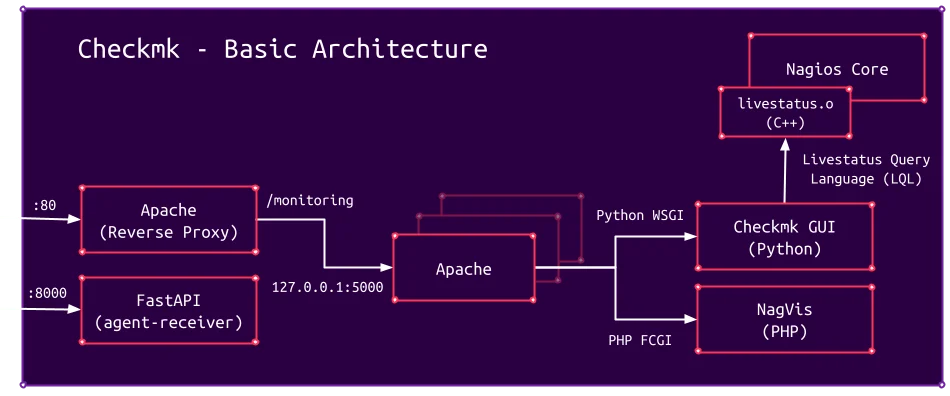
Checkmk exposes two ports on the external interface by default:
- TCP port 80: the actual web interface
- TCP port 8000: the agent-receiver
On port 80 an Apache web server acts as a reverse proxy. Multiple Checkmk instances, called monitoring sites or simply sites, can run on one host. Each site gets its own internal Apache server, and the outer proxy maps requests for a site to the matching internal server. In the example, the site monitoring maps to an Apache server on TCP port 5000, which only listens on localhost and is therefore reachable from outside only through the proxy.
The site Apache server forwards requests either to the Checkmk GUI, a Python WSGI application, or via FCGI to a PHP wrapper that integrates the NagVis PHP component.
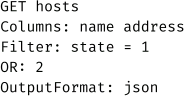
The monitoring core initiates checks, collects data, detects state changes and provides information to the GUI. The Enterprise Editions have their own core; the open-source Raw Edition uses a Nagios core. Data is retrieved through an interface called Livestatus, implemented as a C++ Nagios broker module called livestatus.o. It speaks a proprietary protocol, the Livestatus Query Language (LQL), similar to both HTTP and SQL. A query for the name and IP address of all monitored hosts in DOWN (1) or UNREACH (2) state looks like this:
The response may look like this:
More advanced queries are built with additional headers. Whenever the GUI needs data from the core, it sends an LQL query and the core answers with the requested data.
The second externally reachable component is the agent-receiver, a FastAPI web server on TCP port 8000 with routes for registering agents and collecting their data.
Setup
The work targeted the open-source Raw Edition of Checkmk, version 2.1.0p10 and lower. Exploitation was verified against the Raw Edition by leveraging a specific feature of its monitoring core; the author notes it is likely that similar techniques work against a server running an Enterprise Edition. No accounts are needed: the attacker is unauthenticated and remote.
Finding it
The research covered the Checkmk GUI and the agent-receiver. The GUI exposes only a minimal number of unauthenticated endpoints, which keeps the attack surface small, but one of them, /ajax_graph_images.py, is restricted only by the source address of the request. The agent-receiver, in turn, forwards user input into a URL without sanitisation. Neither bug is dramatic alone; the interest lies in how they combine.
Exploitation
The chain has four links. The following picture summarises what each individual vulnerability yields and how the attacker builds on it to reach the next one, ending in unauthenticated remote code execution:
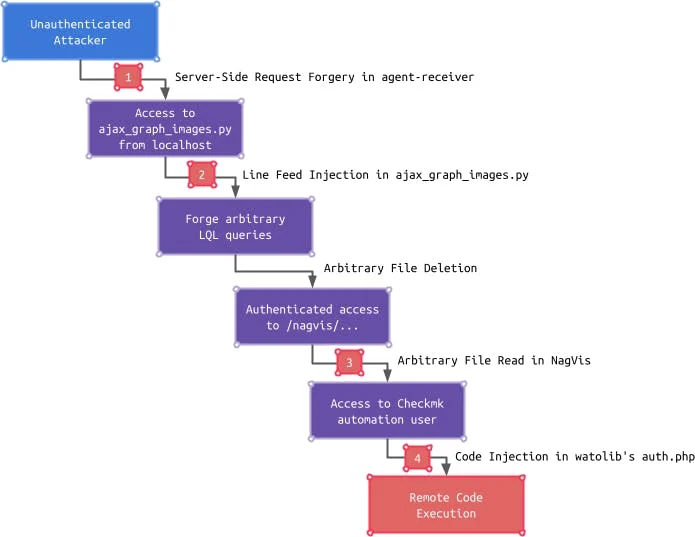
- A Server-Side Request Forgery in the agent-receiver lets the attacker reach an endpoint that is only reachable from localhost.
- That endpoint is vulnerable to a Line Feed Injection, which lets the attacker forge arbitrary LQL queries used by the GUI to retrieve data from the core. This can be used to delete arbitrary files, which in turn bypasses authentication in the NagVis component.
- Once inside NagVis, an authenticated Arbitrary File Read reads a Checkmk configuration file called
automation.secret. Its contents give access to the Checkmk GUI in the context of the automation user. - That access is turned into code execution through a Code Injection in a GUI subcomponent called watolib, which generates a file named
auth.phprequired for the NagVis integration.
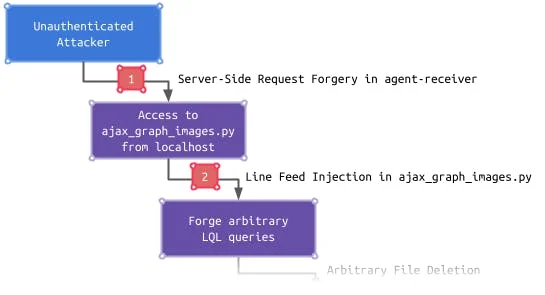
The rest of this article covers links 1 and 2.
Step 1: SSRF in the agent-receiver
The agent-receiver forwards most requests to the Checkmk REST API, part of the GUI on port 80. The endpoint /register_with_hostname expects a POST with HTTP Basic credentials and two JSON-encoded body parameters, uuid and host_name. The handler only checks that some credentials are present and that both parameters exist:
@agent_receiver_app.post(
   "/register_with_hostname",
   status_code=HTTP_204_NO_CONTENT,
)
async def register_with_hostname(
   *,
   credentials: HTTPBasicCredentials = Depends(security),
   registration_body: RegistrationWithHNBody,
) -> Response:
   _validate_registration_request(
       host_configuration(
           credentials,
           registration_body.host_name,
       )
   )
To fetch and validate the host configuration for host_name, the handler calls host_configuration, which forwards the request through _forward_get. The user-supplied host_name is appended to the target URL with no sanitisation or encoding:
def host_configuration(
   credentials: HTTPBasicCredentials,
   host_name: str,
) -> HostConfiguration:
   if (
       response := _forward_get(
           f"objects/host_config_internal/{host_name}",
           credentials,
       )
   ).status_code == HTTPStatus.OK:
This yields a limited SSRF. The impact looks small at first: the request is a GET to the hostname and port of the Checkmk GUI, and the attacker cannot even read the response. What it does give is the ability to reach endpoints that only accept localhost, which is exactly what the next step needs.
Step 2: Line Feed Injection in ajax_graph_images.py
One of the few unauthenticated GUI endpoints is /ajax_graph_images.py, handled by ajax_graph_images_for_notifications. It generates an image with performance data for a given host or service. Access is restricted to requests originating from localhost ([redacted] or ::1):
def ajax_graph_images_for_notifications(
   resolve_combined_single_metric_spec: Callable[
       [CombinedGraphSpec], Sequence[CombinedGraphMetricSpec]
   ],
) -> None:
   """Registered as `noauth:ajax_graph_images`."""
   if request.remote_ip not in ["[redacted]", "::1"]:
       raise MKUnauthenticatedException(
           _("You are not allowed to access this page (%s).") % request.remote_ip
       )

   with SuperUserContext():
       _answer_graph_image_request(resolve_combined_single_metric_spec)
After the localhost check, _answer_graph_image_request requires a host GET parameter and calls get_graph_data_from_livestatus:
def _answer_graph_image_request(
   resolve_combined_single_metric_spec: Callable[
       [CombinedGraphSpec], Sequence[CombinedGraphMetricSpec]
   ],
) -> None:
   try:
       host_name = request.get_ascii_input_mandatory("host")
       if not host_name:
           raise MKGeneralException(_('Missing mandatory "host" parameter'))
       ...
       try:
           row = get_graph_data_from_livestatus(site, host_name, service_description)
That function retrieves performance data through the LQL interface. Walking the call stack, _ensure_connected stood out:
def _ensure_connected(user: Optional[LoggedInUser], force_authuser: Optional[UserId]) -> None:
   ...
   if force_authuser is None:
       request_force_authuser = request.get_str_input("force_authuser")
       force_authuser = UserId(request_force_authuser) if request_force_authuser else None
   ...
   _set_livestatus_auth(user, force_authuser)
This is an internal function in the code that queries the LQL interface, yet it reads a GET parameter called force_authuser. Further down the stack, that parameter is inserted into the AuthUser header of the LQL query without any sanitisation:
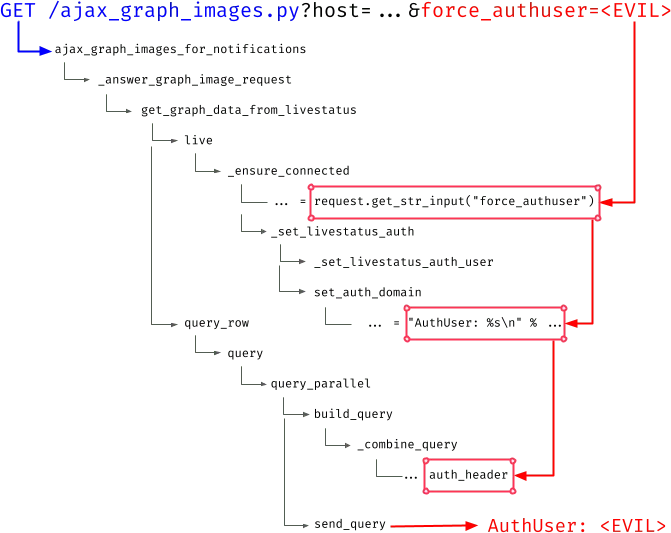
The AuthUser header restricts the response to data the given user may see, which is not essential here. What matters is that the value of force_authuser ends up in the final LQL query sent to the core, and because it is unsanitised, line feed characters (0x0a) can be inserted into that query.
Normally an external attacker cannot reach /ajax_graph_images.py because of the localhost restriction. Combined with the SSRF, that assumption no longer holds. The SSRF can trigger a request with the following GET parameter:
This produces the following LQL query sent to the core:
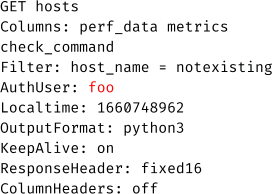
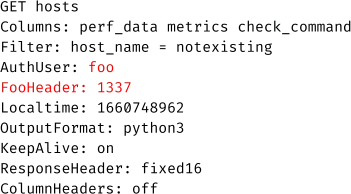
Using a line feed character in force_authuser, additional headers can be injected:
The resulting LQL query contains the additional header:
Injecting a whole new query, to use other tables or commands, would widen the attack surface further. An attacker could try two line feed characters and a new query after them:
But the LQL interface terminates the connection by default when it reads two subsequent line feed characters, which mark the end of a single query, so the second query is not evaluated:
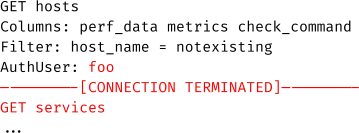
This behaviour can be changed with the KeepAlive header. When it is set to on, the connection stays alive, and whole new LQL queries can be injected:
This results in three distinct LQL queries, processed separately.
Query 1:
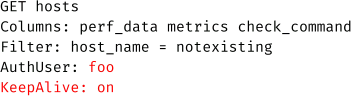
Query 2:
Query 3:
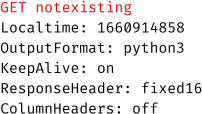
The second query is fully controlled by the attacker. That is the position from which the next article explores the LQL interface as a new attack surface, including how small differences in a developer's implementation can prevent or enable an authentication bypass.
Root cause
The root cause of both bugs is the lack of sanitisation of user-controlled data. In the agent-receiver, host_name is concatenated into a URL path without sanitisation, which leads to a limited SSRF. In the GUI, force_authuser is read from the request by a function deep in the call stack rather than in the endpoint handler, and its value is placed into the AuthUser header of an LQL query without validation, so line feeds break out of the header and into the query structure.
The localhost check on /ajax_graph_images.py restricts access to the injection point, and it assumes that requests arriving from [redacted] or ::1 are trustworthy. The SSRF in a different component on the same host breaks that assumption. The LQL interface closes the connection on two line feeds by default, but the KeepAlive header changes that.
Impact
The four issues were assigned the following CVSS scores by the vendor:
| Score | Issue |
|---|---|
| 9.1 | Code Injection in watolib's auth.php |
| 9.1 | Arbitrary File Read in NagVis |
| 6.8 | Line Feed Injection in ajax_graph_images.py |
| 5.0 | Server-Side Request Forgery in agent-receiver |
Chained, they let an unauthenticated, remote attacker gain code execution on a server running Checkmk 2.1.0p10 or lower. Exploitation was verified on the open-source Raw Edition; the author considers it likely that similar techniques work against Enterprise Editions. The two bugs described here on their own give an external attacker the ability to send arbitrary LQL queries to the monitoring core, which is the foundation for the file deletion, NagVis authentication bypass, secret read and code injection that follow.
Fix
All issues are fixed in Checkmk 2.1.0p12, and updating any instance older than that release is strongly recommended.
The limited SSRF was patched in the agent-receiver in 2.1.0p12. Following the researchers' recommendation, the /register_with_hostname handler now URL-encodes host_name before inserting it into the URL:
from urllib.parse import quote
...

def _url_encode_hostname(host_name: str) -> str:
    ...
    return quote(host_name, safe="")  # '/' is not "safe" here
...

def host_configuration(...):
   ...
       response := _forward_get(
           f"objects/host_config_internal/{_url_encode_hostname(
host_name)}", ...)
   ...
This stops the attacker from reaching endpoints other than the intended one when the request is forwarded to the REST API.
The Line Feed Injection was also patched in 2.1.0p12, by validating the value used for the AuthUser header:
# Pattern for allowed UserId values
validate_user_id_regex = re.compile(r"^[\w_][-\w.@_]*$")
...
   # Set user to be used in certain authorization domain
   def set_auth_user(self, domain: str, user: UserId) -> None:
       # Prevent setting AuthUser to values that would be rejected later. See Werk 14384.
       # Empty value is allowed and used to delete from auth_users dict.
       if user and validate_user_id_regex.match(user) is None:
           raise ValueError("Invalid user ID")
An additional check for injected line feeds was introduced as well:
   def build_query(self, query_obj: Query, add_headers: str) -> str:
       # Prevent injection of further livestatus commands inside AuthUser header.
       if "\n" in self.auth_header[:-1]:
           raise MKLivestatusQueryError("Refusing to build query with invalid AuthUser header.")
Together these prevent line feed characters in force_authuser from reaching the query.
Variants to test
- Path injection in URL-building code. Look for places where a user value is interpolated into a URL path or query string, as with
host_name. A positive result is a request that reaches an endpoint other than the intended one, visible in server logs or in a differing response status. - Request parameters read deep in the call stack. Grep for request accessors such as
get_str_inputorget_ascii_inputinside internal helpers rather than endpoint handlers, as withforce_authuser. A positive result is a parameter that influences a protocol message (header, query, command) without appearing in the endpoint's documented inputs. - Localhost-only endpoints behind an SSRF. Enumerate endpoints that check
remote_ipagainst [redacted] or ::1, then reach them through any SSRF in the same deployment. A positive result is a response or side effect that differs from an external request, such as a 200 instead of an authentication error. - Line feed injection into header-based protocols. Send
%0ain any value that ends up in a header of a text protocol such as LQL. A positive result is an extra header appearing in the query, or a changed response. - KeepAlive to bypass query termination. Where two line feeds end a query, add a
KeepAlive: onheader before the second query. A positive result is the second query being evaluated, for example a command whose effect is observable.
Timeline
| Date | Action |
|---|---|
| 2022-08-22 | All issues reported to Checkmk. |
| 2022-08-23 | Vendor confirms all issues. |
| 2022-09-15 | Vendor releases patched version 2.1.0p12. |
The author thanks the Checkmk team for responding quickly, handling each issue with transparency and providing a comprehensive patch.
What happened, in plain words
Checkmk is a program that companies use to keep an eye on their computers, servers and network equipment. Think of it as a control room with many screens: it watches everything, notices when something breaks, and shows the results on a web page you open in your browser. Because it sits in the middle of a company's network and can see and talk to many machines, breaking into it is very valuable for an attacker. The vendor says more than 2,000 customers rely on it.
A security researcher looked at the free, open-source edition of Checkmk and found four separate weaknesses. Some of them have limited impact on their own, but chained together they let an unauthenticated, remote attacker run their own code on the server. That is called remote code execution, usually shortened to RCE, and it is about as bad as it gets: the attacker effectively becomes the machine.
This article is the first of three. It explains the overall plan, then goes deep into the first two weaknesses, which together let an outside attacker send their own commands to the heart of Checkmk. The other two weaknesses are described here only in outline.
The pieces of Checkmk you need to know
Before the attack makes sense, you need a rough picture of how Checkmk is built. You do not need to be a programmer for this; a few everyday comparisons are enough.
Checkmk opens two doors to the outside world by default:
- TCP port 80: the normal web interface, the page you see in your browser.
- TCP port 8000: a second service called the agent-receiver.
A port is like a numbered door on a computer. One machine can run many services at once, and each listens on its own number so that incoming traffic knows which service it is meant for. Port 80 is the standard door for ordinary websites, which is why the web interface uses it.
Behind port 80 sits an Apache web server. Apache is a very common piece of software whose job is to receive web requests and pass them on to the right program. Here it acts as a reverse proxy: a receptionist at the front desk who does not answer questions personally but forwards each visitor to the correct office inside the building.
One physical machine can host several separate Checkmk installations. Each one is called a monitoring site, or simply a site. For every site, Checkmk starts its own internal Apache server. The outer receptionist looks at which site a request is for and hands it to that site's internal server. In the example used throughout the article, the site called monitoring is served by an internal Apache server on TCP port 5000. That internal server only listens on localhost, meaning it only accepts connections that come from the same machine. From the outside, the only way in is through the receptionist on port 80.
The site's Apache server then forwards each request to one of two places: either the Checkmk GUI, which is a Python application, or, through a connector called FCGI, to a PHP wrapper that integrates NagVis. NagVis is an add-on that draws status information on maps and diagrams. PHP and Python are simply two programming languages; the point is that Checkmk is assembled from parts written in different languages, and each part is a possible place for a bug.
The monitoring core is the heart of Checkmk. It starts the checks, collects the data, notices when something changes state, and hands information to the GUI. The paid Enterprise Editions have their own core. The free Raw Edition uses a well-known open-source core called Nagios. To get data out of the core, Checkmk uses an interface called Livestatus, which is a small add-on module for Nagios written in C++ and named livestatus.o.
Livestatus speaks its own language, the Livestatus Query Language, or LQL. LQL looks a bit like HTTP (the language browsers and web servers use) and a bit like SQL (the language used to talk to databases). A query asking for the name and IP address of every monitored host that is currently DOWN (state 1) or UNREACH (state 2) looks like this:
The answer might look like this:
More complicated queries are built by adding extra headers. A header is a labelled line at the top of a message that tells the receiver something about the request, for example which user it is for. Whenever the GUI needs data from the core, it writes an LQL query, sends it, and the core replies with the requested data.
The second door, port 8000, belongs to the agent-receiver. An agent is a small helper program that companies install on the machines they want to monitor; it reports back to Checkmk. The agent-receiver is a FastAPI web server, FastAPI being a toolkit for building web services in Python. It offers several routes, which are simply addresses (URLs) that accept requests, for registering new agents and for collecting the data they send.
The plan of attack, step by step
Each of the four weaknesses gives the attacker a small new ability, and each ability unlocks the next step. The picture below shows what each weakness yields and how the attacker builds on it, ending in unauthenticated remote code execution:
- A Server-Side Request Forgery in the agent-receiver lets the attacker make the Checkmk server itself send a request to an address that only the server can reach.
- That address is vulnerable to a Line Feed Injection, which lets the attacker write their own LQL queries. Those queries can be used to delete files, and deleting a particular file gets around the login check of NagVis.
- Once inside NagVis, an Arbitrary File Read lets the attacker read a Checkmk configuration file called
automation.secret. Its contents give access to the Checkmk GUI as a special built-in user called the automation user. - That access is turned into code execution through a Code Injection in a part of the GUI called watolib, which creates a file named
auth.phpthat the NagVis integration needs.
The rest of this article covers steps 1 and 2.
Step 1: making the server fetch an address for you
What a Server-Side Request Forgery is
When you type an address into your browser, your computer sends a request to a server. A Server-Side Request Forgery, or SSRF, is when an attacker can make a server send a request of the attacker's choosing. The everyday comparison: you are not allowed into a restricted back room, but you can hand a note to the receptionist and ask them to fetch something from that room for you. The receptionist has access; you do not. If the receptionist fetches whatever address you write on the note, you have borrowed their access.
The vulnerable endpoint
The agent-receiver passes most requests on to the Checkmk REST API. An API is a way for one program to talk to another over the network, using agreed addresses and formats; a REST API is a common style of such an interface. This particular API is part of the GUI on port 80.
The endpoint /register_with_hostname expects a POST request. A POST is the kind of web request used to send data to a server, as opposed to a GET, which is used to ask for a page. The request must carry HTTP Basic credentials, which is a simple way of sending a username and password in a header, and two parameters in the body, uuid and host_name, encoded as JSON. JSON is a plain-text format for structured data, something like {"name": "value"}. The handler, meaning the piece of code that runs when this address is called, only checks that some credentials are present and that both parameters exist:
@agent_receiver_app.post(
   "/register_with_hostname",
   status_code=HTTP_204_NO_CONTENT,
)
async def register_with_hostname(
   *,
   credentials: HTTPBasicCredentials = Depends(security),
   registration_body: RegistrationWithHNBody,
) -> Response:
   _validate_registration_request(
       host_configuration(
           credentials,
           registration_body.host_name,
       )
   )
Line by line:
@agent_receiver_app.post(...)is a decorator, a Python way of attaching extra behaviour to the function below it. Here it says: when a POST request arrives at the address/register_with_hostname, run this function.status_code=HTTP_204_NO_CONTENTsays the reply will be a 204, which is the standard HTTP code for "done, and there is nothing to send back".async def register_with_hostname(...)defines the function that handles the request.asyncmeans it can pause while waiting for slow work, which is normal for web servers.credentials: HTTPBasicCredentials = Depends(security)says: take the username and password from the request's Basic authentication header, and make sure they are present.Dependsis FastAPI's way of saying "run this check first and give me the result".registration_body: RegistrationWithHNBodysays: read the JSON body and check that it has the expected shape, includinguuidandhost_name._validate_registration_request(host_configuration(credentials, registration_body.host_name))is the actual work: it callshost_configurationwith the credentials and the user-supplied host name, then validates whatever comes back.
To fetch and check the configuration of the host named in host_name, the handler calls host_configuration, which forwards the request through a helper called _forward_get. The user-supplied host_name is glued onto the end of the target address with no cleaning or encoding:
def host_configuration(
   credentials: HTTPBasicCredentials,
   host_name: str,
) -> HostConfiguration:
   if (
       response := _forward_get(
           f"objects/host_config_internal/{host_name}",
           credentials,
       )
   ).status_code == HTTPStatus.OK:
Line by line:
def host_configuration(credentials, host_name)defines a function that takes the credentials and the host name._forward_get(f"objects/host_config_internal/{host_name}", credentials)builds an address by pastinghost_nameinto a fixed template, then sends a GET request to it with the credentials. Thef"..."syntax is Python's way of inserting a variable into a string.response := ...stores the reply in a variable namedresponsewhile also using it in the same expression..status_code == HTTPStatus.OKchecks whether the reply was a 200, the standard code for "success".
Why this is a bug
The problem is that host_name is pasted in raw. If the value contains characters that mean something in a web address, such as a slash, the request can be steered to a different address on the Checkmk GUI. That is the SSRF. It is a limited SSRF: the request is always a GET, it always goes to the host and port of the Checkmk GUI, and the attacker cannot even read the reply. On its own it looks almost harmless. What it gives the attacker is the ability to make requests that appear to come from the server itself, and that is exactly what the next step needs.
Step 2: slipping extra lines into a query
What a Line Feed Injection is
A line feed is the invisible character that marks the end of a line in text. In many programs it is written as \n, and in a web address it can be sent as %0a. Many network protocols are line-based: each line is one instruction or one header, and the end of a line tells the receiver "that is the end of this piece". A Line Feed Injection happens when an attacker can put a line feed into a value that later ends up in such a message. The receiver then thinks the attacker's text is a new line, that is, a new instruction or header. The everyday comparison: a form asks for your name, you write your name, then press Enter, then write an extra instruction. If the form simply copies your text into a letter, the reader of the letter sees your extra instruction as a separate line.
The endpoint that is supposed to be local only
The Checkmk GUI deliberately offers very few addresses that work without logging in, which keeps the attack surface small. Attack surface means all the places an attacker could possibly try to break in. One of those few open addresses is /ajax_graph_images.py, handled by a function called ajax_graph_images_for_notifications. Its job is to produce an image showing performance data for a given host or service. Although no login is needed, access is restricted to requests that come from the machine itself, that is, from the addresses [redacted] or ::1. Those two are the standard addresses a computer uses to refer to itself, the IPv4 and IPv6 versions of "localhost".
def ajax_graph_images_for_notifications(
   resolve_combined_single_metric_spec: Callable[
       [CombinedGraphSpec], Sequence[CombinedGraphMetricSpec]
   ],
) -> None:
   """Registered as `noauth:ajax_graph_images`."""
   if request.remote_ip not in ["[redacted]", "::1"]:
       raise MKUnauthenticatedException(
           _("You are not allowed to access this page (%s).") % request.remote_ip
       )

   with SuperUserContext():
       _answer_graph_image_request(resolve_combined_single_metric_spec)
Line by line:
def ajax_graph_images_for_notifications(...)defines the handler. The long parameter is a helper function it will use later to work out which data to draw.- The
"""..."""line is a comment in the form of a string, noting that this handler is registered as one that does not require authentication. if request.remote_ip not in ["[redacted]", "::1"]:looks at the address the request came from. If it is neither of the two localhost addresses, the next lines run.raise MKUnauthenticatedException(...)stops the request with an error saying access is not allowed, and includes the caller's address in the message.with SuperUserContext():runs the following code with full superuser rights, because the handler is trusted to have already checked who is calling._answer_graph_image_request(...)does the actual work of producing the image.
After the localhost check, _answer_graph_image_request insists on a GET parameter called host and then calls get_graph_data_from_livestatus:
def _answer_graph_image_request(
   resolve_combined_single_metric_spec: Callable[
       [CombinedGraphSpec], Sequence[CombinedGraphMetricSpec]
   ],
) -> None:
   try:
       host_name = request.get_ascii_input_mandatory("host")
       if not host_name:
           raise MKGeneralException(_('Missing mandatory "host" parameter'))
       ...
       try:
           row = get_graph_data_from_livestatus(site, host_name, service_description)
Line by line:
host_name = request.get_ascii_input_mandatory("host")reads the value of thehostparameter from the request. The word mandatory means the request is rejected if the parameter is missing.if not host_name:checks whether the value is empty, and if so raises an error saying thehostparameter is required.- The
...stands for code left out of the excerpt. row = get_graph_data_from_livestatus(site, host_name, service_description)fetches the performance data for that host through the Livestatus interface.
The hidden parameter
That last function asks the Livestatus interface for data. While following the chain of functions it calls, the researcher noticed _ensure_connected:
def _ensure_connected(user: Optional[LoggedInUser], force_authuser: Optional[UserId]) -> None:
   ...
   if force_authuser is None:
       request_force_authuser = request.get_str_input("force_authuser")
       force_authuser = UserId(request_force_authuser) if request_force_authuser else None
   ...
   _set_livestatus_auth(user, force_authuser)
Line by line:
def _ensure_connected(user, force_authuser)defines an internal helper.Optional[...]means the value may be present or may be nothing at all.if force_authuser is None:checks whether no user was passed in explicitly.request_force_authuser = request.get_str_input("force_authuser")then reads a GET parameter calledforce_authuserstraight from the incoming request. This is the surprising part: an internal helper, far from the endpoint handler, is reading user input.force_authuser = UserId(request_force_authuser) if request_force_authuser else Noneturns the value into a user identifier, or leaves it empty if nothing was supplied._set_livestatus_auth(user, force_authuser)passes the result on, to be used when talking to Livestatus.
Further down that chain, the value is placed into the AuthUser header of the LQL query with no cleaning at all:
The AuthUser header tells the core to return only data that the named user is allowed to see. That detail does not matter for the attack. What matters is that the value of force_authuser ends up inside the final LQL query sent to the core, and because it is not cleaned, line feed characters (0x0a) can be smuggled into that query.
Putting the two steps together
Normally an outside attacker cannot reach /ajax_graph_images.py at all, because of the localhost restriction. Combined with the SSRF from step 1, that assumption falls apart: the attacker makes the Checkmk server send the request to itself, so the request genuinely comes from 127.0.0.1. The SSRF can, for example, trigger a request with the following GET parameter:
This produces the following LQL query sent to the core:
Using a line feed character in force_authuser, extra headers can be injected:
The resulting LQL query contains the additional header:
Going further: a whole new query
Injecting extra headers is useful, but injecting an entirely new query would be better still, because a new query can use other tables or commands and so widen the attack surface further. An attacker could try two line feed characters followed by a new query:
But the LQL interface closes the connection by default when it reads two line feeds in a row, because that pair marks the end of a single query. So the second query is never evaluated:
This behaviour can be changed with the KeepAlive header. When it is set to on, the connection stays open after a query, and whole new LQL queries can be injected:
This produces three separate LQL queries, which are processed one after another.
Query 1:
Query 2:
Query 3:
The second query is entirely under the attacker's control. That is the position from which the next article explores the LQL interface as a new attack surface, including how small differences in the way a developer writes code can either prevent or allow an attacker to get around authentication.
Why the bugs exist
The root cause of both bugs is the same: user-controlled data is used without being cleaned. In the agent-receiver, host_name is pasted into an address, so address characters in the value send the forwarded request somewhere else. In the GUI, force_authuser is read from the request by a function deep in the chain of calls rather than in the endpoint handler, and its value is placed into the AuthUser header of an LQL query without validation, so a line feed breaks out of the header and into the structure of the query.
The localhost check on /ajax_graph_images.py restricts access to the injection point, and it assumes that anything arriving from [redacted] or ::1 can be trusted. The SSRF in a different component on the same machine breaks that assumption. The LQL interface closes the connection on two line feeds by default, but the KeepAlive header changes that.
How bad it is
The vendor assigned the four issues the following CVSS scores. CVSS is a standard scoring system for the severity of a security flaw, running from 0 to 10, where higher is worse.
| Score | Issue |
|---|---|
| 9.1 | Code Injection in watolib's auth.php |
| 9.1 | Arbitrary File Read in NagVis |
| 6.8 | Line Feed Injection in ajax_graph_images.py |
| 5.0 | Server-Side Request Forgery in agent-receiver |
Chained together, they let an unauthenticated, remote attacker run code on a server running Checkmk 2.1.0p10 or lower. Exploitation was verified on the open-source Raw Edition; the author considers it likely that similar techniques work against Enterprise Editions. The two bugs described here, on their own, give an outside attacker the ability to send arbitrary LQL queries to the monitoring core, which is the foundation for the file deletion, the NagVis authentication bypass, the secret read and the code injection that follow in the later articles.
The fix
All issues are fixed in Checkmk 2.1.0p12, and updating any instance older than that release is strongly recommended.
The limited SSRF was patched in the agent-receiver in 2.1.0p12. Following the researchers' recommendation, the /register_with_hostname handler now URL-encodes host_name before inserting it into the address:
from urllib.parse import quote
...

def _url_encode_hostname(host_name: str) -> str:
    ...
    return quote(host_name, safe="")  # '/' is not "safe" here
...

def host_configuration(...):
   ...
       response := _forward_get(
           f"objects/host_config_internal/{_url_encode_hostname(
host_name)}", ...)
   ...
Line by line:
from urllib.parse import quoteimports a ready-made function for encoding text so that special characters cannot be mistaken for address structure.def _url_encode_hostname(host_name)defines a small helper that does the encoding.return quote(host_name, safe="")encodes every character that has a special meaning, withsafe=""meaning that nothing is left unencoded. The comment notes that even the slash is not treated as safe.- In
host_configuration, the address is now built with_url_encode_hostname(host_name)instead of the raw value.
This stops the attacker from reaching any address other than the intended one when the request is forwarded to the REST API.
The Line Feed Injection was also patched in 2.1.0p12, by validating the value used for the AuthUser header:
# Pattern for allowed UserId values
validate_user_id_regex = re.compile(r"^[\w_][-\w.@_]*$")
...
   # Set user to be used in certain authorization domain
   def set_auth_user(self, domain: str, user: UserId) -> None:
       # Prevent setting AuthUser to values that would be rejected later. See Werk 14384.
       # Empty value is allowed and used to delete from auth_users dict.
       if user and validate_user_id_regex.match(user) is None:
           raise ValueError("Invalid user ID")
Line by line:
validate_user_id_regex = re.compile(r"^[\w_][-\w.@_]*$")defines a regular expression, a pattern that describes which text is allowed. This one allows a word character or underscore first, then any number of word characters, dashes, dots, at signs or underscores, and nothing else. A line feed does not fit the pattern.def set_auth_user(self, domain, user)is the function that sets the user for theAuthUserheader.if user and validate_user_id_regex.match(user) is None:checks whether a user was given and whether it fails the pattern.raise ValueError("Invalid user ID")refuses the value outright if it does not match.
An extra check for injected line feeds was introduced as well:
   def build_query(self, query_obj: Query, add_headers: str) -> str:
       # Prevent injection of further livestatus commands inside AuthUser header.
       if "\n" in self.auth_header[:-1]:
           raise MKLivestatusQueryError("Refusing to build query with invalid AuthUser header.")
Line by line:
def build_query(self, query_obj, add_headers)is the function that assembles the final LQL query.if "\n" in self.auth_header[:-1]:looks for a line feed character anywhere in the storedAuthUserheader except the final character, which is the legitimate line ending.raise MKLivestatusQueryError(...)refuses to build the query at all if one is found.
Together these prevent line feed characters in force_authuser from ever reaching the query.
Things worth testing elsewhere
These are the general lessons, phrased as things to look for in other software:
- Path injection in address-building code. Look for places where a user value is pasted into an address or query string, as with
host_name. A positive result is a request that reaches an address other than the intended one, visible in server logs or in a different response status. - Request parameters read deep in the chain of calls. Search for request-reading functions such as
get_str_inputorget_ascii_inputinside internal helpers rather than endpoint handlers, as withforce_authuser. A positive result is a parameter that influences a protocol message (a header, a query, a command) without appearing in the endpoint's documented inputs. - Localhost-only endpoints behind an SSRF. List the endpoints that check
remote_ipagainst [redacted] or ::1, then reach them through any SSRF in the same deployment. A positive result is a response or side effect that differs from an external request, such as a 200 instead of an authentication error. - Line feed injection into header-based protocols. Send
%0ain any value that ends up in a header of a text protocol such as LQL. A positive result is an extra header appearing in the query, or a changed response. - KeepAlive to bypass query termination. Where two line feeds end a query, add a
KeepAlive: onheader before the second query. A positive result is the second query being evaluated, for example a command whose effect can be observed.
Timeline
| Date | Action |
|---|---|
| 2022-08-22 | All issues reported to Checkmk. |
| 2022-08-23 | Vendor confirms all issues. |
| 2022-09-15 | Vendor releases patched version 2.1.0p12. |
The author thanks the Checkmk team for responding quickly, handling each issue with transparency and providing a comprehensive patch.
Glossary
- Agent: a small program installed on a monitored machine that reports information back to the monitoring system.
- agent-receiver: the Checkmk service on TCP port 8000 that registers agents and collects their data.
- API: an agreed way for one program to talk to another over the network.
- Apache: a widely used web server program that receives web requests and passes them on.
- Arbitrary File Read: a flaw that lets an attacker read files they should not be able to read.
- Attack surface: all the places an attacker could possibly try to break in.
- Authentication: the process of proving who you are, usually with a username and password.
- AuthUser header: an LQL header that restricts the response to data a named user is allowed to see.
- Basic authentication: a simple way of sending a username and password in a web request header.
- Checkmk: an IT infrastructure monitoring solution that watches servers, networks and applications.
- Code Injection: a flaw that lets an attacker insert their own code into a program so that it runs.
- Code review: reading source code carefully to look for mistakes and weaknesses.
- CVSS: a standard scoring system for the severity of a security flaw, from 0 to 10.
- Decorator: in Python, a way of attaching extra behaviour to a function.
- Endpoint: a specific address on a web service that accepts requests.
- FastAPI: a toolkit for building web services in Python.
- FCGI: a connector that lets a web server pass requests to a separate program, here a PHP wrapper.
- GET: the kind of web request used to ask for a page or data.
- GUI: graphical user interface, the part of a program you see and click on.
- Header: a labelled line at the top of a network message that tells the receiver something about the request.
- HTTP: the language browsers and web servers use to exchange requests and replies.
- HTTP 200: the standard reply code meaning success.
- HTTP 204: the standard reply code meaning done, with nothing to send back.
- JSON: a plain-text format for structured data.
- KeepAlive: an LQL header that, when set to
on, keeps the connection open after a query. - Line feed: the invisible character marking the end of a line in text, written
\nor%0a. - Line Feed Injection: a flaw that lets an attacker insert line feed characters into a message so that their text is treated as a new line, header or instruction.
- Livestatus: the interface Checkmk uses to get data out of the monitoring core.
- localhost: the address a computer uses to refer to itself, [redacted] or ::1.
- LQL (Livestatus Query Language): the language used to query the Livestatus interface, similar to HTTP and SQL.
- Monitoring core: the part of Checkmk that runs checks, collects data and detects state changes.
- Monitoring site: one Checkmk installation on a host, also called simply a site.
- Nagios: an open-source monitoring core used by the free Raw Edition of Checkmk.
- NagVis: an add-on that draws monitoring status on maps and diagrams.
- Parameter: a named value sent with a web request, such as
hostorforce_authuser. - PHP: a programming language commonly used for web applications.
- Port: a numbered door on a computer that a particular service listens on.
- POST: the kind of web request used to send data to a server.
- Python: a programming language commonly used for web applications and tools.
- Regular expression: a pattern that describes which text is allowed or should be found.
- Remote code execution (RCE): a flaw that lets an attacker run their own code on someone else's machine.
- REST API: a common style of API built around web addresses and standard request types.
- Reverse proxy: a front-end server that receives requests and forwards them to the right internal server.
- Route: an address on a web service that accepts requests.
- Sanitisation: cleaning user-supplied data so that special characters cannot change the meaning of a message.
- Server-Side Request Forgery (SSRF): a flaw that lets an attacker make a server send a request of the attacker's choosing.
- SQL: the language used to talk to databases.
- TCP: the underlying protocol that carries most web traffic reliably between two machines.
- Unauthenticated: without logging in, that is, without a username or password.
- URL encoding: rewriting special characters in text so they cannot be mistaken for address structure.
- watolib: a part of the Checkmk GUI that, among other things, generates the
auth.phpfile needed by the NagVis integration. - Web server: a program that receives web requests and replies to them.
- WSGI: a standard way for Python web applications to talk to a web server.