SEC-596
Invalid UTF-8 characters in a login parameter caused cPanel to fall back to its Legacy Login page, which failed to encode output. An attacker could inject JavaScript into the rendered page.

Invalid UTF-8 characters could trigger cPanel to use the Legacy Login page. This page did not adequately encode output.
The full write-up lives on its author's site
It belongs to its author, so we link to it rather than copy it. The other two tabs are our own rewrites, checked against it.
What the report shows
The target is cPanel's login interface on port 2083. The researcher found that sending invalid UTF-8 characters in the login request could make cPanel fall back to its Legacy Login page, and that this page did not adequately encode output. The result was a reflected cross-site scripting condition: an attacker could inject arbitrary JavaScript into the rendered page.
The proof of concept is a single URL. The user parameter carries a double quote to break out of an attribute, then an onfocus handler with alert(), an id attribute, and a trailing %ff byte, which is the invalid UTF-8 character that triggers the legacy page. The #xss fragment is presumably there to focus the element, though the report does not explain it.
https://[target]:2083/login?user=sth%22+onfocus=%22alert()%22+id=%22xss%22+%22%ff#xss
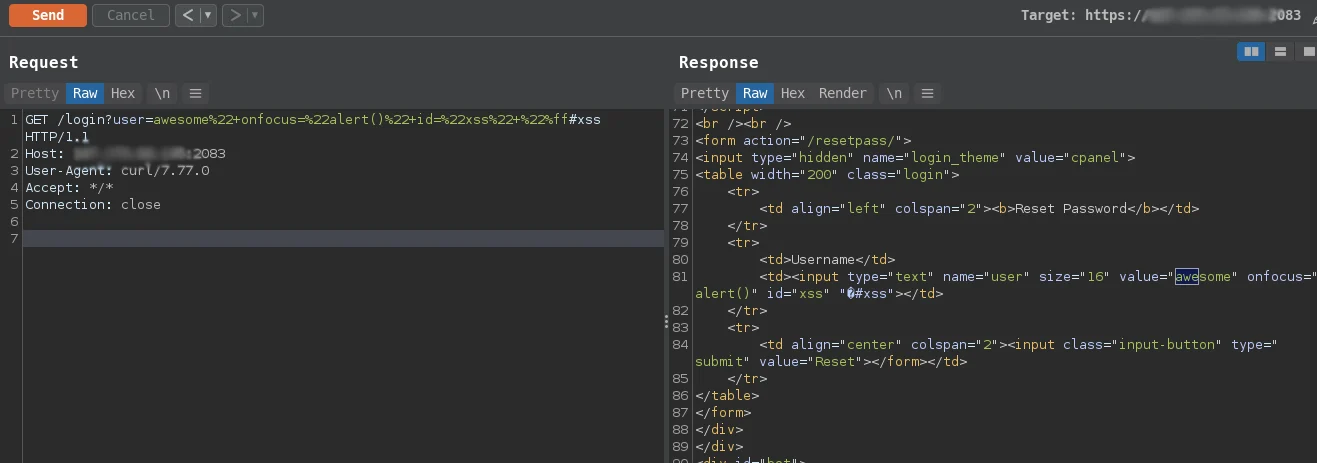
The screenshot shows the request and the response for this payload.
The report links to cPanel's full disclosure, TSR-2021-0005, for the vendor side. It gives no bounty amount, no CVSS score and no severity rating, and it does not describe the fix beyond the fact that the legacy page was the problem.
Root cause
The likely cause is a fallback path. When the normal login handler receives input it cannot process as valid UTF-8, it hands the request to the Legacy Login page, which did not adequately encode output. The invalid byte is the switch that routes the request to the weaker code path, and the missing output encoding on that path is what lets the quote and handler through.
Impact
The report's own framing is that an attacker could inject arbitrary JavaScript into the rendered page. In practice that means script running in the cPanel origin, which for a hosting control panel is a serious position: the panel session is the account's administrative surface. The report does not demonstrate session theft or any specific post-exploitation step, so the concrete impact beyond script execution is not shown.
How this kind of bug works
Reflected XSS happens when an application takes a value from the request and writes it into the response without context-aware encoding. The browser then parses the attacker's characters as markup or script rather than as data. The classic variant here is attribute injection: the value lands inside a quoted HTML attribute, a double quote closes it, and a new attribute such as an event handler is added.
Fallback and legacy paths are a recurring source of this bug because they are often older code that predates a framework's automatic escaping, and because they are reached only by unusual input, so ordinary testing and ordinary regression tests miss them. Input that fails validation, decoding or normalisation is exactly the input that gets routed to code nobody has hardened.
The defences are straightforward: encode output according to the context it lands in (HTML attribute, text, URL, script), use templating engines that escape by default, and apply a restrictive Content Security Policy so that an injected inline handler does not execute. Validating or rejecting malformed input helps, but it is not a substitute for encoding, because the legacy path exists precisely to handle input the main path rejected.
How to test for it
- Map every input that reaches a page: query parameters, form fields, path segments, headers that get echoed (referer, user agent, language), and cookies.
- For each, send a benign marker and find where it appears in the response. Note the context: inside an attribute, between tags, in a script block, in a URL.
- Send context-appropriate break-out characters: a double quote and an event handler for attribute contexts, angle brackets for text contexts, and closing sequences for script contexts.
- Try malformed and edge-case input alongside the normal payload: invalid UTF-8 bytes, overlong sequences, mixed encodings, very long values, and values that fail the application's own validation. Watch for the response changing shape, for example a different template, a different error page, or a legacy interface.
- Confirm execution in a real browser rather than relying on reflection alone.
A positive result is your marker appearing unencoded in a position where the browser treats it as markup, and the handler or script actually running. Common false positives are reflections that are encoded but look alarming in the raw source, payloads that appear only inside a JavaScript string that is itself safely escaped, reflections in responses with a content type the browser will not render as HTML, and input that is reflected but stripped by a server-side sanitiser before reaching the browser. Also check whether a CSP blocks your execution: a blocked payload is a much weaker finding.
How it is fixed
Apply context-aware output encoding everywhere the value is rendered, including legacy and fallback templates. Prefer templating with auto-escaping over string concatenation. Add a Content Security Policy that disallows inline script and inline event handlers. Treat the legacy path as production code: it needs the same review and the same tests as the main login flow. Where a legacy interface is no longer needed, removing it closes the class of problem entirely.
Hunting notes
This bug class hides in secondary interfaces: legacy login pages, mobile or lite versions, error and debug pages, password reset flows, and anything reached only when the main handler rejects input. Encoding mismatches are a strong signal, so look for places where the application switches behaviour based on input validity. On a target, note which parameters cause a different template to load; that switch is worth probing with malformed bytes.
Keep the payload minimal and reproducible, and reference the vendor advisory if one exists, as this report does.
What happened, in plain words
cPanel is a control panel that hosting companies give their customers to manage websites, email and files. It runs a web interface, and the login page is the front door to that interface. In this report the researcher looked at the login page served on port 2083 and found a way to make it run JavaScript of their choosing.
The trick relies on a fallback. cPanel has a normal login page and an older one, called the Legacy Login page. When the normal page receives input it cannot read as valid UTF-8 (a standard way of encoding text as bytes), cPanel hands the request over to the older page. That older page did not adequately encode output. Encoding here means converting characters that have a special meaning in HTML, such as a double quote, into a safe form so the browser treats them as text rather than as part of the page's structure.
Because the value is not encoded, the researcher could send a double quote to close the attribute, then add a new attribute of their own: an event handler, which is a snippet of JavaScript the browser runs when something happens to an element. The result is reflected cross-site scripting (XSS): the attacker's input is reflected back in the page and the browser executes it as code.
The proof of concept is one URL:
https://[target]:2083/login?user=sth%22+onfocus=%22alert()%22+id=%22xss%22+%22%ff#xss
Line by line:
https://[target]:2083/loginis the login page on port 2083, the port cPanel uses for its secure web interface.?user=sthstarts the query string, the part of a URL that carries values to the server. The parameter is nameduserand its value begins withsth.%22is the URL encoding of a double quote. This is the character that breaks out of the attribute the page is building.+is how a space is written in a query string.onfocus=%22alert()%22adds anonfocusevent handler whose value isalert(), a JavaScript call that pops up a dialogue box. The%22characters are the quotes around it.id=%22xss%22gives the element anidofxss, so it can be targeted.%22closes the attribute properly so the rest of the page still parses.%ffis a single byte that is not valid UTF-8. This is the switch that sends the request to the Legacy Login page.#xssis a fragment, the part of a URL after#. It points the browser at the element withid="xss", which is presumably how the element gets focus so the handler fires. The report does not explain this part.
The screenshot shows the request and the response for this payload.
Why each step matters: without %ff the request stays on the normal login page. The invalid byte is what routes the request to the weaker code path. Without the %22 the quote would stay inside the attribute and nothing new would be added. Without the handler there would be no code to run. Each piece depends on the others.
The report links to cPanel's full disclosure, TSR-2021-0005, for the vendor's side. It gives no bounty amount, no CVSS score and no severity rating, and it does not describe the fix beyond identifying the legacy page as the problem.
In general, how this kind of bug works
Reflected XSS happens when an application takes a value from the request and writes it into the response without encoding it for the place where it lands. Think of a form letter where someone's name is typed into a blank: if the name contains instructions like "and also sign here", a careless clerk might follow them. The browser is the clerk, and the quote and handler are the instructions.
The classic variant is attribute injection. The value lands inside a quoted HTML attribute, a double quote closes it early, and a new attribute such as an event handler is added. The browser then treats the attacker's characters as markup rather than as data.
Fallback and legacy paths are a recurring source of this bug. They are often older code written before frameworks escaped output automatically, and they are reached only by unusual input, so ordinary testing and ordinary regression tests miss them. Input that fails validation, decoding or normalisation is exactly the input that gets routed to code nobody has hardened.
The defences are straightforward: encode output according to the context it lands in (HTML attribute, text, URL, script), use templating engines that escape by default, and apply a restrictive Content Security Policy, a browser rule that says which scripts may run, so an injected inline handler does not execute. Rejecting malformed input helps, but it is not a substitute for encoding, because the legacy path exists precisely to handle input the main path rejected.
In general, how to test for it
- Map every input that reaches a page: query parameters, form fields, path segments, headers that get echoed (referer, user agent, language), and cookies.
- For each, send a harmless marker and find where it appears in the response. Note the context: inside an attribute, between tags, in a script block, in a URL.
- Send break-out characters suited to that context: a double quote and an event handler for attributes, angle brackets for text, closing sequences for script blocks.
- Try malformed input alongside the normal payload: invalid UTF-8 bytes, overlong sequences, mixed encodings, very long values, and values that fail the application's own validation. Watch for the response changing shape, for example a different template, a different error page, or a legacy interface.
- Confirm execution in a real browser rather than relying on reflection alone.
A positive result is your marker appearing unencoded where the browser treats it as markup, and the handler actually running. Common false positives are reflections that are encoded but look alarming in the raw source, payloads that appear only inside a JavaScript string that is itself safely escaped, reflections in responses the browser will not render as HTML, and input stripped by a server-side sanitiser before reaching the browser. Also check whether a Content Security Policy blocks execution: a blocked payload is a much weaker finding.
In general, how it is fixed
Apply context-aware output encoding everywhere the value is rendered, including legacy and fallback templates. Prefer templating with auto-escaping over string concatenation. Add a Content Security Policy that disallows inline script and inline event handlers. Treat the legacy path as production code: it needs the same review and the same tests as the main login flow. Where a legacy interface is no longer needed, removing it closes the class of problem entirely.
Glossary
- cPanel: a web control panel used by hosting customers to manage sites, email and files.
- Port: a numbered channel on a server; cPanel's secure interface uses 2083.
- UTF-8: a standard way of encoding text as bytes; some byte values are not valid on their own.
- Legacy Login page: an older login page cPanel falls back to when the normal one cannot process the input.
- Encoding (output encoding): converting characters with special meaning into a safe form so the browser treats them as text.
- Attribute: a setting on an HTML element, such as
idoronfocus, written inside the tag. - Event handler: JavaScript attached to an element that runs when something happens to it, such as gaining focus.
- Reflected XSS: a bug where input from the request is written into the response and executed by the browser as code.
- Query string: the part of a URL after
?that carries values to the server. - URL encoding: writing special characters as
%plus a code, such as%22for a double quote. - Fragment: the part of a URL after
#, used to point at an element on the page. alert(): a JavaScript function that shows a dialogue box, often used to prove code ran.- CVSS: a scoring system for the severity of a vulnerability.
- Content Security Policy: a browser rule that restricts which scripts may run on a page.
- Sanitiser: server-side code that removes dangerous characters from input before it reaches the page.





