Compromising Plesk via its REST API
Plesk's REST API accepted POST requests without any CSRF protection, and the browser automatically attached the Authorization header to HTML form submissions. An attacker could therefore trick a logged-in administrator into visiting a page that silently added API keys, database users, FTP users, extensions, or changed the admin password, leading to full compromise.
 Published on fortbridge.co.uk
Plesk is a commercial web hosting and server data center automation software developed for Linux and Windows-based retail hosting service providers. It’s the main choice of web hosting providers these days being used by 86.7% of the websites that use a web panel for administration.
The full write-up lives on its author's site
It belongs to its author, so we link to it rather than copy it. The other two tabs are our own rewrites, checked against it.
Context
Plesk is a commercial web hosting and server data centre automation product for Linux and Windows hosting providers. The report notes it is used by 86.7% of websites that use a web panel for administration, which is 4.4% of all websites, with around 2M installations in the US alone. The target of this research was the Plesk REST API, and specifically the way it handles authentication and cross-origin requests.
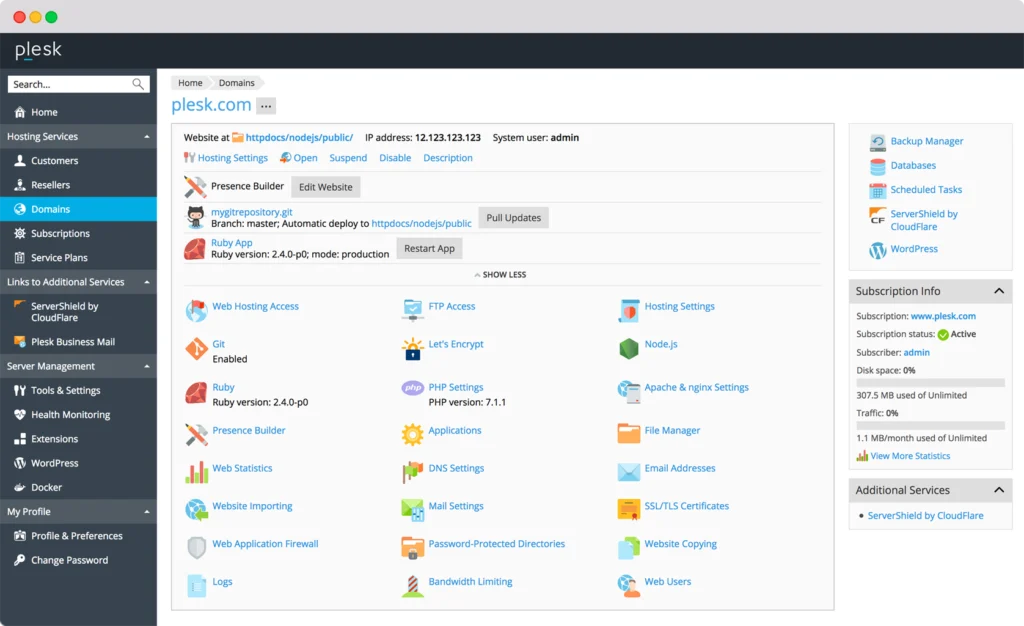
The authors describe Plesk as having a good security posture after several pentests, and note that the source code is heavily obfuscated with a custom PHP extension. They could not find a way to escalate from a limited role, so they turned their attention to the REST API and asked whether it had the same level of security as the rest of the product.
Setup
The work was done against a Plesk installation reachable at https://VICTIMIP:8443. The attack scenario assumes an authenticated Plesk administrator is logged in to the panel in their browser while visiting an attacker-controlled page. The tooling mentioned is Burp Suite, whose CSRF POC generator produced the first payload, and a browser for delivering the HTML forms. No specific Plesk version is given in the report.
Finding it
While reviewing the REST API, the researchers noticed a completely open CORS policy. The response allowed any origin, which on its own suggested the API was worth a closer look.
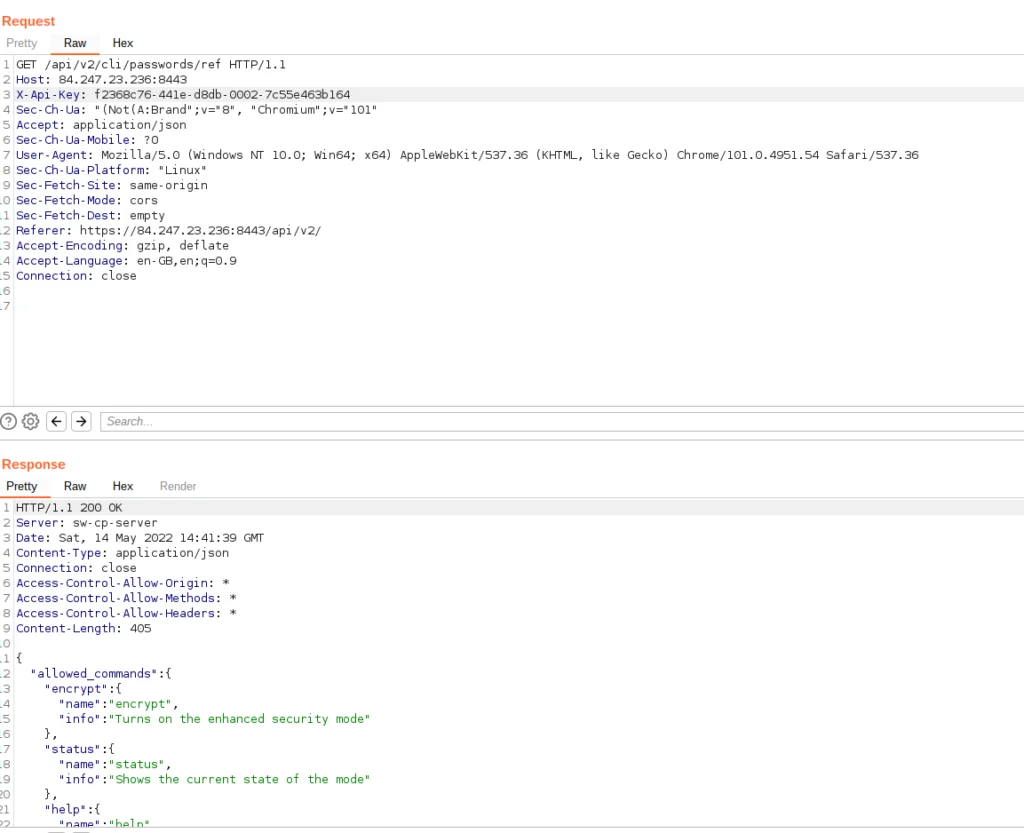
The initial reading was that this would allow sending any request with any method and headers from any origin and reading the response back. The report goes on to show that this assumption did not hold for the attack they wanted, but the open policy was the signal that put them on the right track.
The second observation was that the administrator can call the REST APIs from the browser and that there is no CSRF protection. The report qualifies this as partially correct, and the rest of the article explains why.
Exploitation
Step 1: target the secret key endpoint
Reviewing the REST API, the researchers found the /api/v2/auth/keys endpoint, which adds a secret key. The idea was to abuse it to add a key that grants admin access.
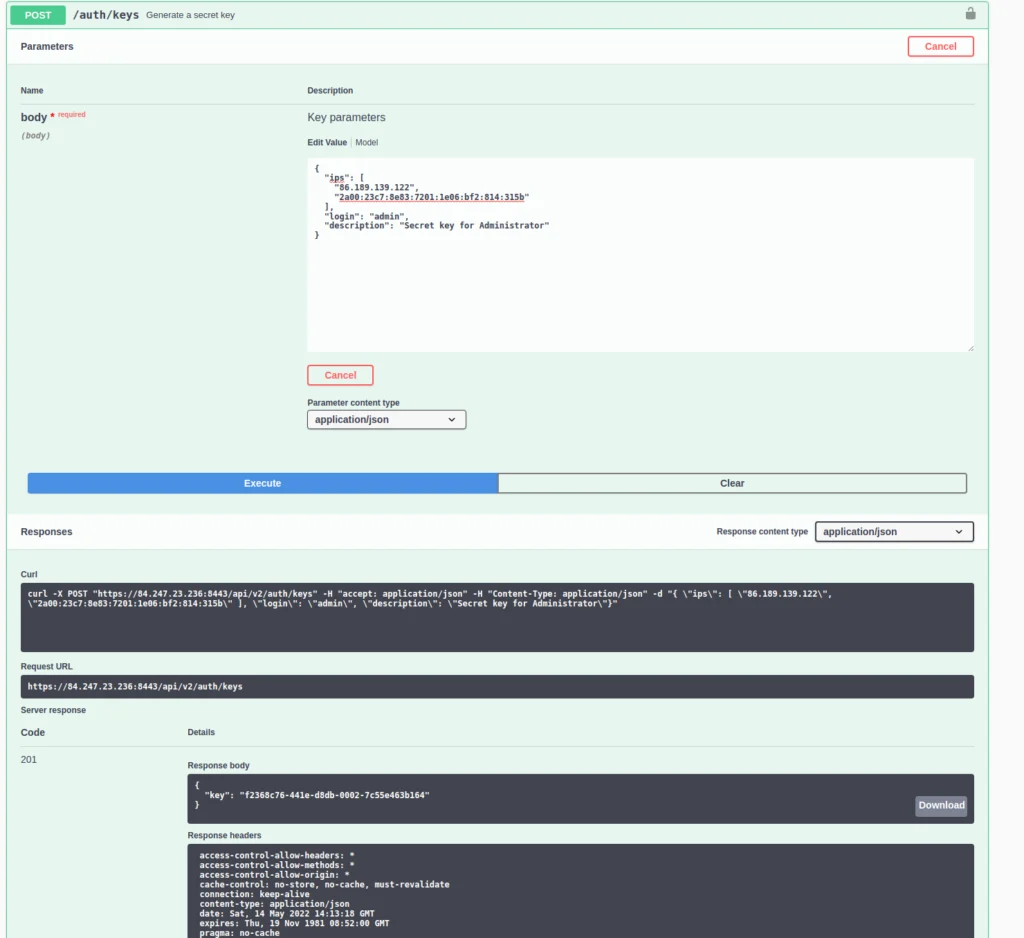
A key created this way can be used to authenticate and call any endpoint afterwards, so a single CSRF would add a backdoor token and give full access without needing CSRF again.
Step 2: first CSRF attempt fails on JSON parsing
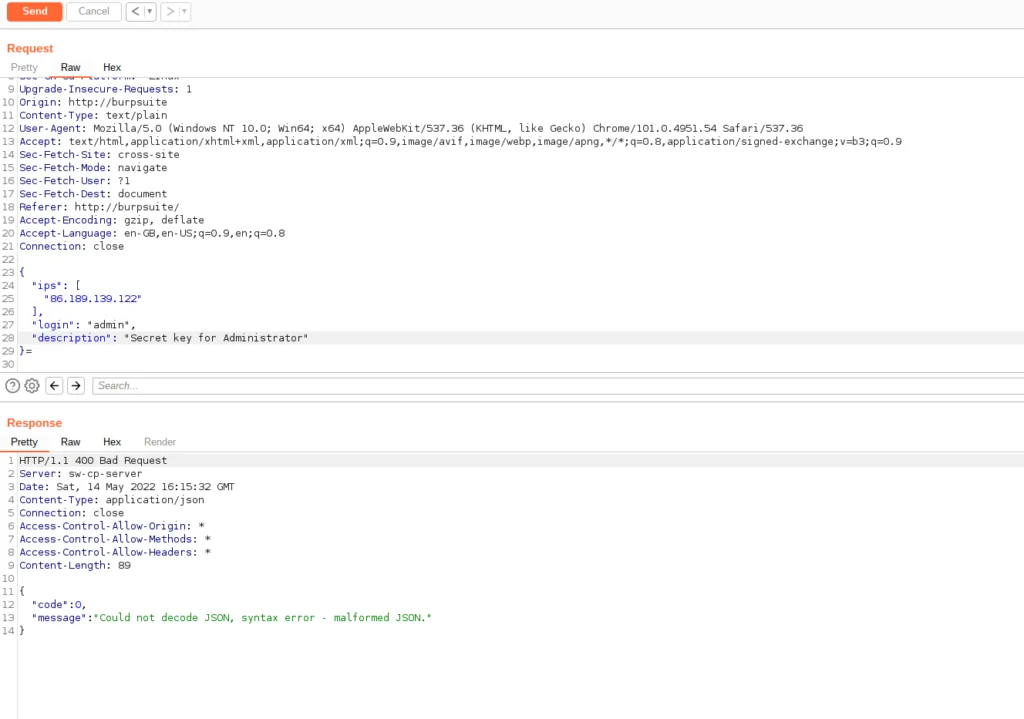
The first payload came from Burp's CSRF POC generator. It failed because of a = added at the end, which meant the server could not parse the JSON.
Step 3: reformat the payload into valid JSON
The fix was to reformat the payload so that the form's name attribute carries most of the JSON and the value attribute supplies the closing fragment. The input's name is HTML encoded and decodes to the start of the JSON object; the value field holds test"} so that concatenation with the name produces valid JSON.
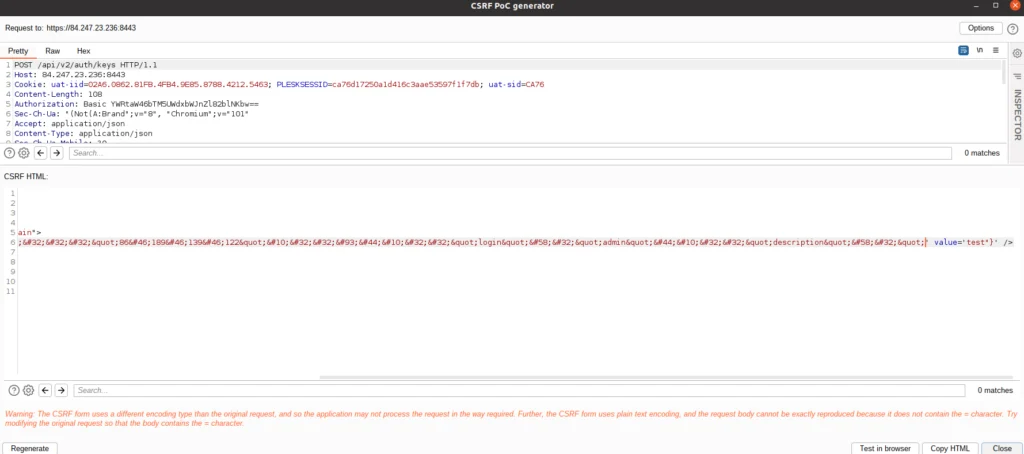
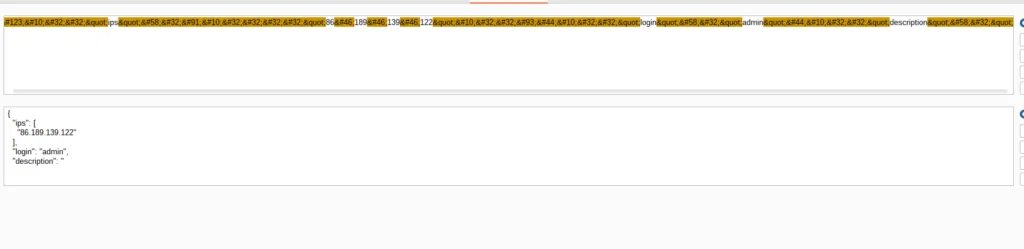
The resulting HTML POC:
<html>
<!-- CSRF PoC -- FORTBRIDGE -- add a secret key-->
<body>
<script>history.pushState('', '', '/')</script>
<form action="https://VICTIMIP:8443/api/v2/auth/keys" method="POST" enctype="text/plain">
<input type="hidden" name='{   "ips": [     "86.189.139.122"   ],   "login": "admin",   "description": "' value='test"}' />
<input type="submit" value="Submit request" />
</form>
</body>
</html>
The form posts to /api/v2/auth/keys with enctype="text/plain", so the browser sends the field name and value as the body without URL encoding. The encoded name decodes to the opening of a JSON object containing an ips array, a login of admin and the start of a description string; the value closes the string and the object. The encoded name decodes to a JSON object containing an ips array with the address [redacted], a login of admin and the start of a description string.
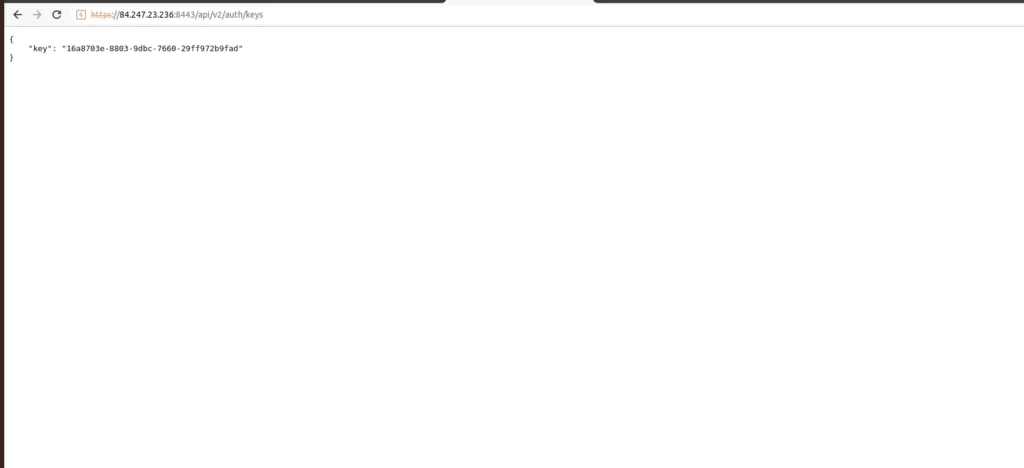
This produced a valid CSRF payload and generated a secret key.
Step 4: the CORS read-back does not work
The open CORS policy suggested the key could be stolen from the response. It could not. The detail missed at first is that the browser adds the Authorization header automatically when an HTML form performs the CSRF POST. When the same request is made with a JavaScript XMLHttpRequest to read the token from the response, the Authorization header is no longer added, so the CSRF fails and the key cannot be read. The researchers then looked for other REST endpoints where a POST-based HTML form CSRF would be impactful without needing to read the response, and found several.
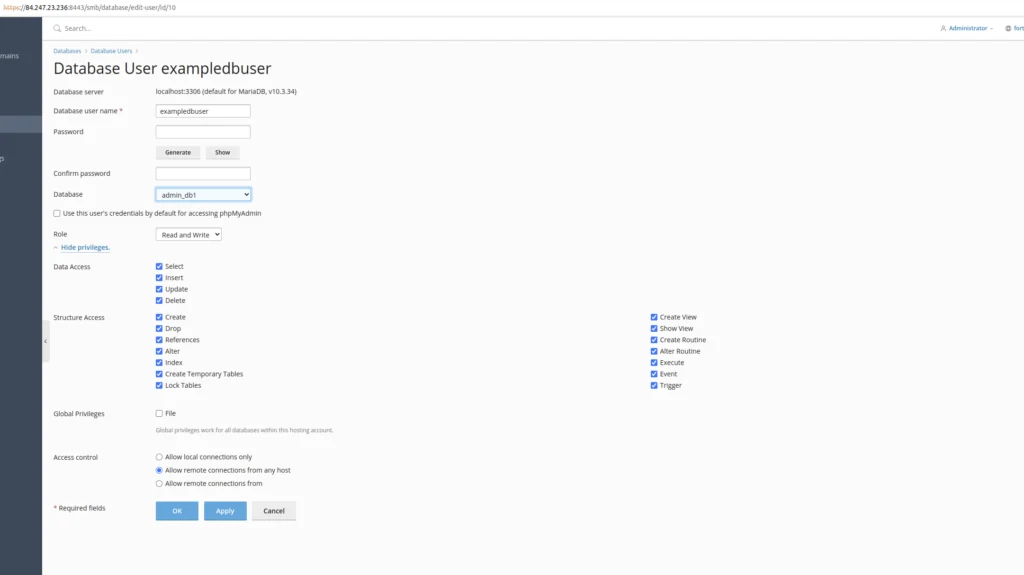
Step 5: add a database user
A REST endpoint allows adding a database user that can connect from any remote host to any database.
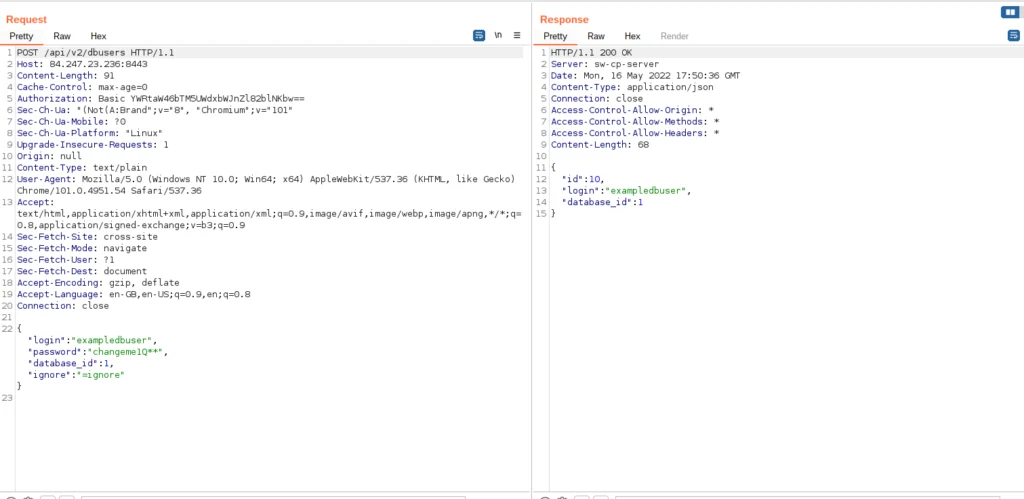
The user was created successfully.
The next idea was to inject a UDF for a quick RCE, but the MySQL port was not accessible.
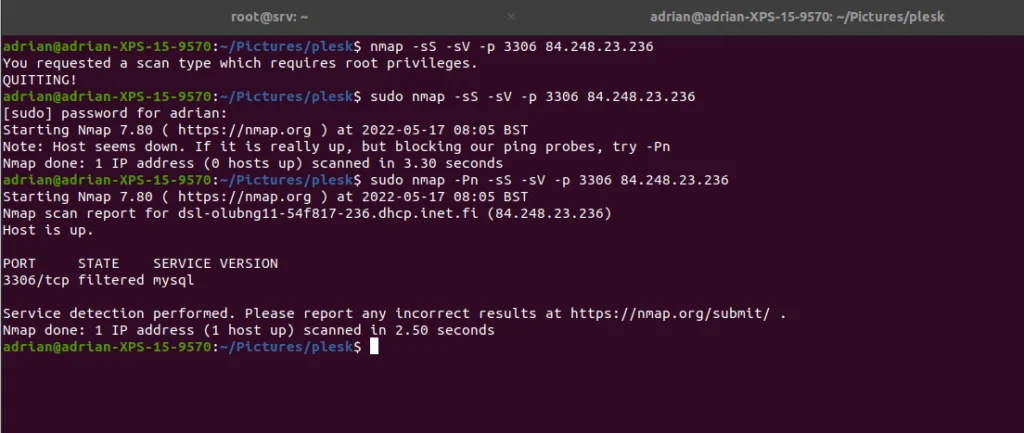
The lesson recorded in the report is to check the port first.
Step 6: add an FTP user
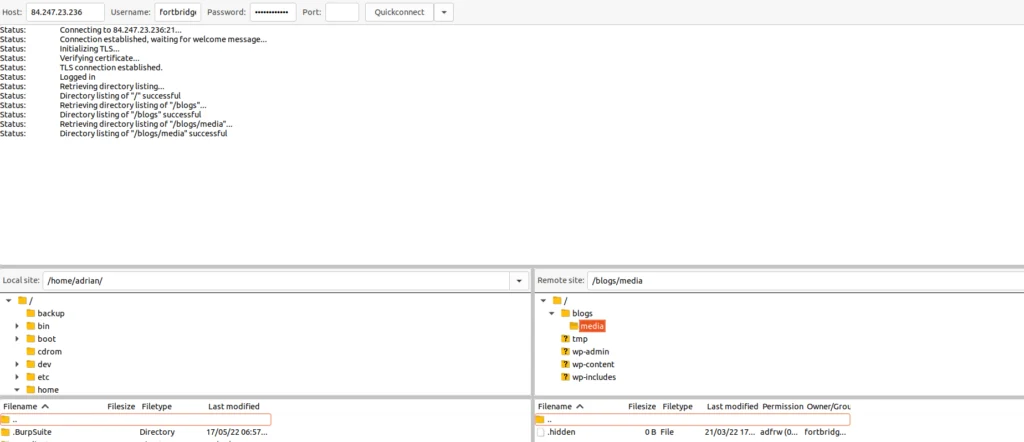
A new FTP user was added with access to any existing domain.
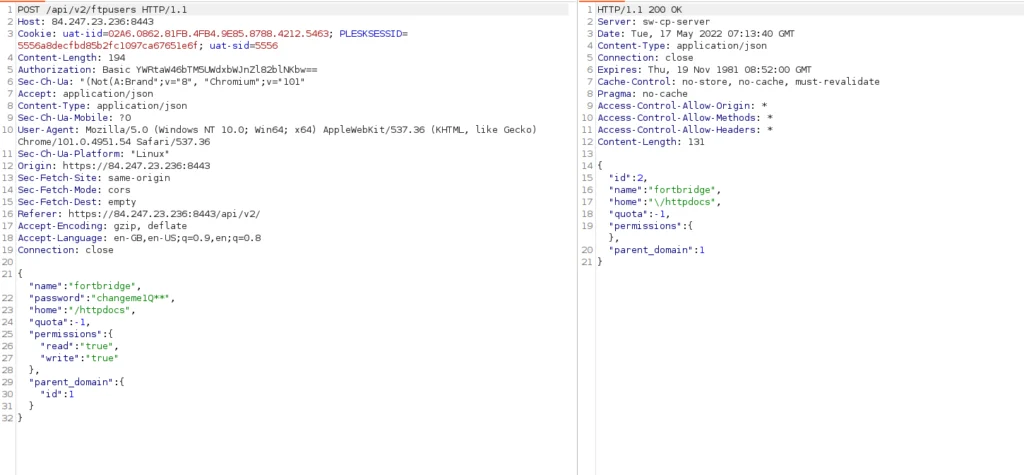
This worked: connecting over FTP gives access to the client's home directory, and further attacks can be conducted from there.
Step 7: upload a malicious Plesk extension
After some quick research into what Plesk extensions are, the researchers backdoored an existing extension and added it via a CSRF upload through the REST API.

The limitation was that authentication in Plesk is still required to access the backdoored extension, so this path did not give the access they wanted on its own.
Step 8: change the administrator password
Plesk implements custom commands internally as an abstraction layer that calls various CLI tools. One of them is the admin command, which does several things including changing the Administrator's password.
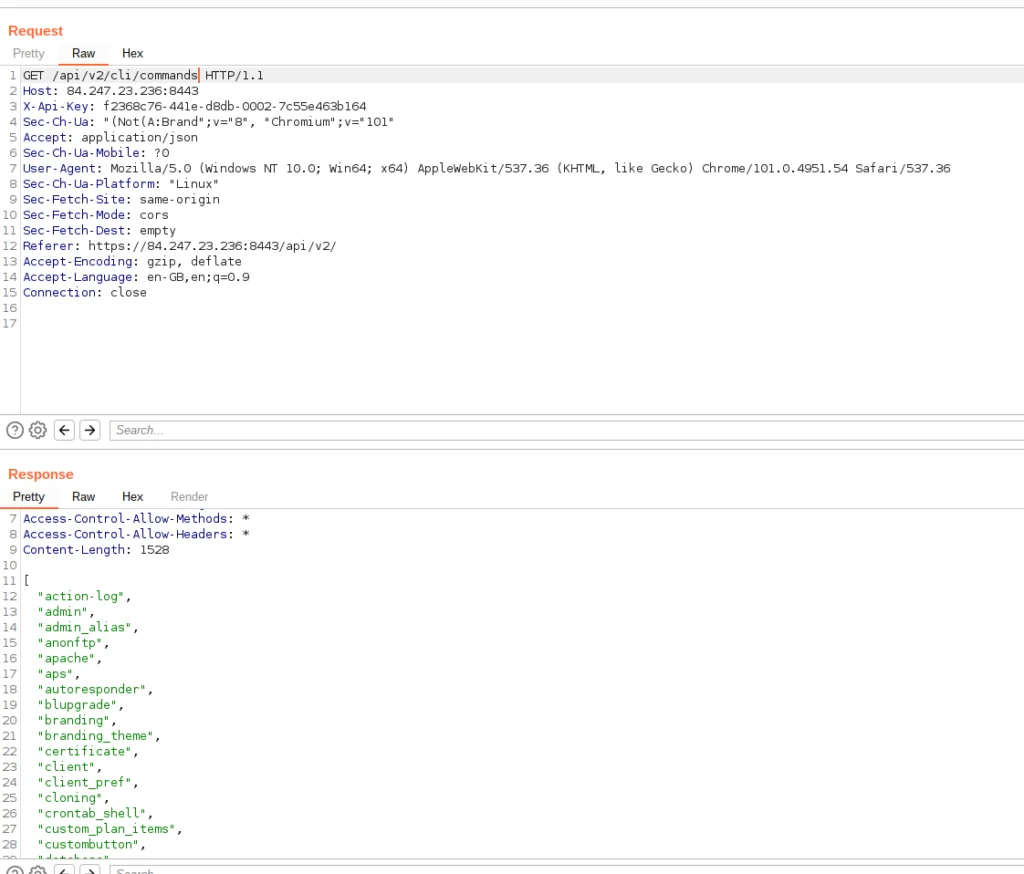
That was the endpoint needed. The final POC:
<html>
<!-- CSRF PoC - FORTBRIDGE - change admin password -->
<body>
<script>history.pushState('', '', '/')</script>
<form action="https://VICTIMIP:8443/api/v2/cli/admin/call" method="POST" enctype="text/plain">
<input type="hidden" name='{ 	"params": [ "--set-admin-password","-passwd" ,"' value='F0rTBr1DG3!@#"] }' />
<input type="submit" value="Submit request" />
</form>
</body>
</html>
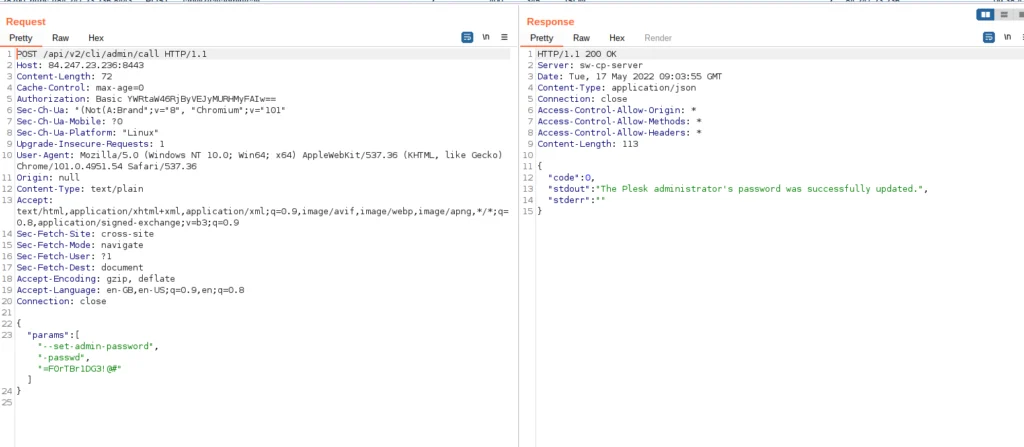
The form posts to /api/v2/cli/admin/call with enctype="text/plain". The encoded name decodes to a JSON object whose params array starts with --set-admin-password, --passwd and the opening of the password string; the value closes the string, the array and the object. The documentation for this feature is described as poor, and working out the payload took a while.
With this request the researchers compromised Plesk through its REST API via CSRF and changed the Administrator's password.
Root cause
The core issue is a design one: all POST requests to the REST API can be CSRF-ed because the browser adds the Authorization header automatically when an HTML form is submitted. The report calls out a common misconception that an application using the Authorization header is protected against CSRF. As long as the attacker does not need to read the response with JavaScript, the attack works. The open CORS policy suggested the key could be read back, but the JavaScript request did not carry the Authorization header, so the key could not be read.
Impact
An attacker who can get a logged-in Plesk administrator to load a page can, without any cookie theft, add a database user reachable from any host, add an FTP user with access to any domain, upload a backdoored extension, and change the Administrator's password. The password change is the end of the chain: full control of the panel. The key could not be read back with the JavaScript approach, and the backdoored extension still required authentication in Plesk; the database user path was limited by the MySQL port being unreachable. The FTP and password paths worked as described.
Fix
Plesk fixed the issue on 03/06/22. The report does not describe the code change. The disclosure was delayed several times at Plesk's request, and the blog post with technical details was released on 08/11/22, with an update on 10/11/22 adding a Plesk call to action.
Variants to test
- Look for REST endpoints that accept POST with
enctype="text/plain"and build a JSON body from the form field name and value. A positive result is a server-side state change (new key, user, extension, password) triggered from a cross-origin page. - Check whether the API relies on the
Authorizationheader for CSRF protection. If a plain HTML form POST succeeds without a token, the protection is absent for write-only attacks. - Test CORS with a wildcard origin and see whether responses are readable from JavaScript. A positive result is a readable response to a cross-origin XHR; a negative result still leaves the write-only CSRF path open.
- Enumerate CLI-backed endpoints such as
/api/v2/cli/.../callfor commands that change credentials or add access. A positive result is a password or key change performed via a forged form. - Check database and FTP user creation endpoints for host restrictions. A positive result is a user that can connect from any remote host.
Timeline
| Date | Event |
|---|---|
| 10/05/22 | FORTBRIDGE reaches out to PLESK for vuln disclosure |
| 11/05/22 | Plesk confirms receipt and starts investigation |
| 19/05/22 | Plesk confirms the vulnerability and starts working on a fix, no ETA offered |
| 03/06/22 | Plesk fixes the issue, but requests delaying the disclosure, FORTBRIDGE accepts |
| 25/07/22 | FORTBRIDGE requests update on the patching progress |
| 27/07/22 | Plesk requests delaying the disclosure again, FORTBRIDGE accepts |
| 03/08/22 | Plesk estimates "no longer than 2 weeks" for disclosure |
| 16/09/22 | FORTBRIDGE requests update |
| 16/09/22 | Plesk requests delaying the disclosure, FORTBRIDGE agrees to delay 2 months max |
| 08/11/22 | FORTBRIDGE releases blogpost with technical details of the Plesk Admin takeover issue |
| 10/11/22 | blog post updated with Plesk Call to Action |
References
- Plesk Call to Action
- RCE & Privesc in cPanel/WHM
- Mass account takeover in Yunmai smartscale by abusing the REST API
- CSRF POCs sent to Plesk

What happened, in plain words
Plesk is a program that hosting companies install on their servers to manage websites, mailboxes, databases and user accounts from one control panel. The researchers who wrote this report looked at the part of Plesk that other software talks to over the network, called the REST API, and found a way to make a logged-in administrator's browser perform actions on the server without the administrator knowing. The trick is called CSRF, short for Cross-Site Request Forgery. In the end they could change the administrator's password, which means taking over the whole panel.
To follow the story you only need a few ideas:
- A browser sends requests for you. When you open a page, your browser asks a server for it. When you submit a form, your browser sends the form's contents to the server. You do not type the request yourself; the browser builds it.
- Your browser also carries your login. After you log in to a site, the browser keeps something that proves who you are and attaches it to every request you make to that site. Without that, every page would ask for your password again.
- An API is a door for programs. A website's normal pages are made for humans to click. An API (Application Programming Interface) is a set of addresses that programs use to do the same things without a screen: create a user, list databases, change a setting. Each address is called an endpoint.
- CSRF abuses the fact that the browser trusts the site. If an attacker can make your browser send a request to a site where you are logged in, the site sees a normal, logged-in request. It cannot tell that you never intended to send it. The everyday comparison: a bank teller who knows you by sight will accept a withdrawal slip handed over by someone wearing your coat, because the teller only checks the coat, not who is inside it.
The picture above shows the Plesk dashboard, the screen an administrator sees after logging in.
The product and why the API was the target
Plesk is commercial software for web hosting and server data centre automation, built for Linux and Windows hosting providers. The report gives its reach: it is used by 86.7% of the websites that use a web panel for administration, which is 4.4% of all websites, with around 2 million Plesk installations in the US alone. Those numbers matter because a flaw in a panel used by that many sites is a flaw in a lot of infrastructure at once.
The researchers say Plesk has clearly been through several penetration tests (paid, authorised attempts to break in) and has a good security posture overall. They tried to escalate privileges from one of the limited roles, meaning to go from a low-privilege account to a more powerful one, but those roles seemed solid. They also note that the source code of Plesk is heavily obfuscated with a custom PHP extension, which makes reading it hard.
So they turned to the REST API and asked a simple question: does the API have the same level of security as the rest of the product? The answer, as the report shows, was no. What they found is described as a design issue: a cookieless CSRF that affects all POST requests, which let them abuse most of the APIs.
Two terms from that sentence need unpacking:
- POST is one of the methods a browser can use to talk to a server. GET is for asking to see something; POST is for sending data that changes something on the server, such as creating a user or submitting a form. A CSRF attack that changes state is usually built on POST.
- Cookieless means the attack does not need to steal or use a cookie. Many people assume CSRF only works by riding on cookies, so an attack that works without them is easy to overlook.
The setup
The work was done against a Plesk installation reachable at https://VICTIMIP:8443. The VICTIMIP part is a placeholder for the address of the machine under test, and 8443 is the network port where the Plesk panel listens. A port is like a numbered door on a single machine: the same computer can run many services, each on its own door.
The attack scenario assumes an authenticated Plesk administrator is logged in to the panel in their browser while visiting a page controlled by the attacker.
The tools mentioned are Burp Suite, a program security testers use to capture and replay web traffic, whose CSRF POC generator produced the first payload, and a browser to deliver the HTML forms. The report does not give a specific Plesk version.
Finding it: the open CORS policy
While reviewing the REST API, the researchers quickly noticed a completely open CORS policy.
CORS stands for Cross-Origin Resource Sharing. It is a rule set that browsers enforce about which websites may read responses from which other websites. An origin is the combination of scheme, host and port, so https://example.com and https://other.example are different origins. By default a browser will not let a page from one origin read the response of a request to another origin, because otherwise any website you visit could quietly read your mail or your bank balance. CORS lets a server say which other origins are allowed to read its responses. A wildcard, written *, means everyone.
The screenshot shows the policy using a wildcard to allow everything.
The first reading was that this would allow sending any request, with any method and any headers, from any origin, and reading the response back. That is a big deal on paper: if any website can read the API's answers, then any website can also read secrets the API returns. The report goes on to show that this assumption did not hold for the attack they wanted, but the open policy was the signal that put them on the right track.
The second observation was that the administrator can call the REST APIs from the browser and that there is no CSRF protection. The report qualifies this as partially correct, and the rest of the article explains why.
Step 1: target the secret key endpoint
Reviewing the REST API, the researchers found the /api/v2/auth/keys endpoint, which adds a secret key. The idea was to abuse it to add a key that grants admin access.
The screenshot shows the API endpoint used to add a secret key for the Administrator.
A secret key here works like a password that a program can use instead of a person. If you have the key, you can authenticate, meaning you can prove to the server that you are allowed in, and then call any endpoint you like. The plan was therefore elegant: perform the CSRF once, add a backdoor token, and get full access forever, with no further CSRF needed. A backdoor is any access route the legitimate owner did not intend to exist.
Step 2: the first CSRF attempt fails on JSON parsing
The first payload came from Burp's CSRF POC generator. It failed because of a = added at the end, which meant the server could not parse the JSON.
The screenshot shows the first attempt failing.
JSON is a text format for structured data, built from names and values in curly braces, like {"login": "admin"}. Servers that speak a REST API usually expect the body of a POST request to be JSON, and they parse it, meaning they read it according to strict rules. A stray character such as = at the end breaks those rules, so the server rejects the request before doing anything.
Step 3: reformat the payload into valid JSON
The fix was to reformat the payload so that the form's name attribute carries most of the JSON and the value attribute supplies the closing fragment. The input's name is HTML encoded and decodes to the start of the JSON object; the value field holds test"} so that concatenation with the name produces valid JSON.
The screenshot shows the name field of the input holding most of the JSON field.
The screenshot shows the same name field after HTML decoding.
HTML encoding is how special characters are written so that a browser does not mistake them for markup. { is the code for {, " is the code for a double quote, and so on. The browser decodes these before sending, so the server receives ordinary characters.
The resulting HTML POC:
<html>
<!-- CSRF PoC -- FORTBRIDGE -- add a secret key-->
<body>
<script>history.pushState('', '', '/')</script>
<form action="https://VICTIMIP:8443/api/v2/auth/keys" method="POST" enctype="text/plain">
<input type="hidden" name='{   "ips": [     "86.189.139.122"   ],   "login": "admin",   "description": "' value='test"}' />
<input type="submit" value="Submit request" />
</form>
</body>
</html>
Line by line:
<html>and<body>open an ordinary web page. Nothing here needs JavaScript to run; it is a plain form.<!-- CSRF PoC -- FORTBRIDGE -- add a secret key-->is an HTML comment, invisible to the browser's rendering, naming the file's purpose.<script>history.pushState('', '', '/')</script>changes the address shown in the browser's address bar to the site root without reloading the page. It is a cosmetic touch that makes the page look less suspicious to a victim who glances at the URL.<form action="https://VICTIMIP:8443/api/v2/auth/keys" method="POST" enctype="text/plain">is the core.actionis the address the form submits to, the endpoint that adds a secret key.method="POST"says the data is sent as a POST.enctype="text/plain"tells the browser to send the field name and value as plain text, with no URL encoding, which is what lets the attacker shape the body into JSON.- The hidden input is the payload. Its
nameattribute, once the browser decodes the HTML entities, becomes the opening of a JSON object: anipsarray containing the address[redacted], aloginofadmin, and the start of adescriptionstring. Itsvalueattribute istest"}, which closes the string and the object. Because a plain-text form body is written asname=value, the browser joins the two with an=, and the trick is that the=lands inside the JSON string, where it is harmless text, rather than at the end where it would break parsing. <input type="submit" value="Submit request" />is the button. The report's page includes it so the researcher can trigger the form by hand; in a real attack the form would be submitted automatically, for example with a line of JavaScript, so the victim never sees a button.- The closing tags end the page.
The encoded name decodes to a JSON object containing an ips array with the address [redacted], a login of admin and the start of a description string.
This produced a valid CSRF payload and generated a secret key.
The screenshot shows the CSRF attack on the Administrator producing a new secret token.
Step 4: the CORS read-back does not work
The open CORS policy suggested the key could be stolen from the response. It could not. The detail missed at first is that the browser adds the Authorization header automatically when an HTML form performs the CSRF POST. When the same request is made with a JavaScript XMLHttpRequest to read the token from the response, the Authorization header is no longer added, so the CSRF fails and the key cannot be read.
A header is a small piece of extra information attached to a request or a response, separate from the body. Authorization is the header a client uses to present its credentials. XMLHttpRequest is the older JavaScript way for a page to send requests in the background and read the answers, which is exactly what an attacker would need to steal the key.
So the researchers looked for other REST endpoints where a POST-based HTML form CSRF would be impactful without needing to read the response, and found several. The lesson is that reading the answer and causing a change are two different powers, and an attacker only needs the second one.
Step 5: add a database user
A REST endpoint allows adding a database user that can connect from any remote host to any database.
The screenshot shows the add database user request, which is CSRF-able.
A database user is an account a program uses to log in to a database. "From any remote host" means the account is not restricted to the server itself; it can be used from anywhere on the network. That turns a small forged request into a way in.
The user was created successfully.
The screenshot shows the database user added.
The next idea was to inject a UDF for a quick RCE, but the MySQL port was not accessible.
The screenshot shows the MySQL port filtered.
Two more terms. A UDF, user-defined function, is a feature of some databases that lets you load your own code into the database server; attackers abuse it to run commands on the machine, which is RCE, remote code execution. MySQL is a popular database program, and its port is the numbered door it listens on. Filtered means network traffic to that door was blocked, so the plan could not be carried out. The lesson recorded in the report is to check the port first.
Step 6: add an FTP user
A new FTP user was added with access to any existing domain.
The screenshot shows the add FTP user request, which is CSRF-able.
FTP is an old protocol for transferring files between computers. An FTP user is an account for that protocol, and a domain here is one of the websites the panel manages. Access to any existing domain means the new account could reach that website's files.
This worked: connecting over FTP gives access to the client's home directory, and further attacks can be conducted from there.
The screenshot shows the FTP connection succeeding.
A home directory is the folder a user starts in, which for a hosting account usually holds the website's files. Being able to read and write there is a serious foothold.
Step 7: upload a malicious Plesk extension
After some quick research into what Plesk extensions are, the researchers backdoored an existing extension and added it via a CSRF upload through the REST API.
The screenshot shows a malicious Plesk extension added via CSRF in the REST API.
An extension is an add-on that plugs extra features into Plesk. Backdooring one means modifying its code so that it also does something the author never intended, in this case giving the attacker a way in.
The limitation was that authentication in Plesk is still required to access the backdoored extension, so this path did not give the access they wanted on its own.
Step 8: change the administrator password
Plesk implements custom commands internally as an abstraction layer that calls various CLI tools. One of them is the admin command, which does several things including changing the Administrator's password.
The screenshot shows Plesk custom commands callable via the REST API.
An abstraction layer is a simplified surface placed over something more complicated. Here, instead of the API running system programs directly, it exposes named commands, and each command runs the underlying CLI tools, meaning programs you would otherwise type into a terminal. The admin command is one of these, and among its abilities is setting the administrator's password.
That was the endpoint needed. The final POC:
<html>
<!-- CSRF PoC - FORTBRIDGE - change admin password -->
<body>
<script>history.pushState('', '', '/')</script>
<form action="https://VICTIMIP:8443/api/v2/cli/admin/call" method="POST" enctype="text/plain">
<input type="hidden" name='{ 	"params": [ "--set-admin-password","-passwd" ,"' value='F0rTBr1DG3!@#"] }' />
<input type="submit" value="Submit request" />
</form>
</body>
</html>
Line by line:
- The page structure, the comment and the
history.pushStateline are the same as before: a plain page with a harmless-looking address. <form action="https://VICTIMIP:8443/api/v2/cli/admin/call" method="POST" enctype="text/plain">points at a different endpoint, the one that calls theadmincommand. It again uses POST and plain-text encoding so the body can be shaped into JSON.- The hidden input's
name, once decoded, opens a JSON object with aparamsarray whose first entries are--set-admin-password, then--passwd, then the opening of the password string. The--prefixes are how command-line options are written, and theadmincommand calls the underlying CLI tools. - The
valueis the rest of the password followed by the characters that close the string, the array and the object. - The submit button and closing tags work as before.
The documentation for this feature is described as poor, and working out the payload took a while.
With this request the researchers compromised Plesk through its REST API via CSRF and changed the Administrator's password.
The screenshot shows the CSRF request changing the Administrator's password.
Why it worked
The core issue is a design one: all POST requests to the REST API can be CSRF-ed because the browser adds the Authorization header automatically when an HTML form is submitted. The report calls out a common misconception that an application using the Authorization header is protected against CSRF. As long as the attacker does not need to read the response with JavaScript, the attack works. The open CORS policy made the API look more exposed than it turned out to be for the read-back case, but it did not prevent the write-only attacks that mattered.
In everyday terms: the server checked that the request carried the right credentials, and it did, because the browser supplied them. What it never checked was whether the person behind the browser meant to send that request.
What an attacker gets
An attacker who can get a logged-in Plesk administrator to load a page can, without any cookie theft, add a database user reachable from any host, add an FTP user with access to any domain, upload a backdoored extension, and change the Administrator's password. The password change is the end of the chain: full control of the panel.
The key could not be read back with the JavaScript approach, and the backdoored extension still required authentication in Plesk; the database user path was limited by the MySQL port being unreachable. The FTP and password paths worked as described.
The fix
Plesk fixed the issue on 03/06/22. The report does not describe the code change. The disclosure was delayed several times at Plesk's request, and the blog post with technical details was released on 08/11/22, with an update on 10/11/22 adding a Plesk call to action.
What to test on other products
- Look for REST endpoints that accept POST with
enctype="text/plain"and build a JSON body from the form field name and value. A positive result is a server-side state change (new key, user, extension, password) triggered from a cross-origin page. - Check whether the API relies on the
Authorizationheader for CSRF protection. If a plain HTML form POST succeeds without a token, the protection is absent for write-only attacks. - Test CORS with a wildcard origin and see whether responses are readable from JavaScript. A positive result is a readable response to a cross-origin XHR; a negative result still leaves the write-only CSRF path open.
- Enumerate CLI-backed endpoints such as
/api/v2/cli/.../callfor commands that change credentials or add access. A positive result is a password or key change performed via a forged form. - Check database and FTP user creation endpoints for host restrictions. A positive result is a user that can connect from any remote host.
Timeline
| Date | Event |
|---|---|
| 10/05/22 | FORTBRIDGE reaches out to PLESK for vuln disclosure |
| 11/05/22 | Plesk confirms receipt and starts investigation |
| 19/05/22 | Plesk confirms the vulnerability and starts working on a fix, no ETA offered |
| 03/06/22 | Plesk fixes the issue, but requests delaying the disclosure, FORTBRIDGE accepts |
| 25/07/22 | FORTBRIDGE requests update on the patching progress |
| 27/07/22 | Plesk requests delaying the disclosure again, FORTBRIDGE accepts |
| 03/08/22 | Plesk estimates "no longer than 2 weeks" for disclosure |
| 16/09/22 | FORTBRIDGE requests update |
| 16/09/22 | Plesk requests delaying the disclosure, FORTBRIDGE agrees to delay 2 months max |
| 08/11/22 | FORTBRIDGE releases blogpost with technical details of the Plesk Admin takeover issue |
| 10/11/22 | blog post updated with Plesk Call to Action |
References
- Plesk Call to Action
- RCE & Privesc in cPanel/WHM
- Mass account takeover in Yunmai smartscale by abusing the REST API
- CSRF POCs sent to Plesk
Glossary
- API (Application Programming Interface): a set of addresses and rules that programs use to talk to a service, without a human clicking pages.
- Endpoint: one specific address in an API that performs one action, such as adding a user.
- REST API: an API style built around web addresses and standard methods such as GET and POST.
- POST: the web method used to send data that changes something on the server.
- GET: the web method used to ask for something to be shown, without changing it.
- CSRF (Cross-Site Request Forgery): making a logged-in user's browser send a request the user did not intend, so the server treats it as legitimate.
- Cookieless CSRF: a CSRF attack that does not rely on cookies, for example because the browser supplies credentials another way.
- CORS (Cross-Origin Resource Sharing): browser rules that decide which websites may read responses from which other websites.
- Origin: the combination of scheme, host and port that identifies a website, such as
https://example.com. - Wildcard (
*): a symbol meaning "anything", so a wildcard CORS policy allows every origin. - Header: a small piece of extra information attached to a web request or response, separate from the body.
- Authorization header: the header a client uses to present its credentials to a server.
- JSON: a text format for structured data, built from names and values in curly braces.
- Parse: to read text according to strict rules, rejecting it if the rules are broken.
- HTML encoding: writing special characters as codes such as
{so a browser does not mistake them for markup. enctype="text/plain": a form setting that sends field names and values as plain text, without URL encoding.- XMLHttpRequest: a JavaScript way for a page to send requests in the background and read the responses.
- Burp Suite: a tool security testers use to capture, inspect and replay web traffic.
- POC (proof of concept): a small, working demonstration that a flaw is real.
- Payload: the crafted data sent to a server to trigger a flaw.
- Port: a numbered door on a machine where a particular service listens, such as 8443 for the Plesk panel.
- Filtered (port): network traffic to a port is blocked, so the service cannot be reached.
- Database user: an account a program uses to log in to a database.
- MySQL: a popular database program.
- UDF (user-defined function): a database feature that lets custom code be loaded into the database server, sometimes abused to run commands.
- RCE (remote code execution): running your own commands on someone else's machine over the network.
- FTP: an old protocol for transferring files between computers.
- Home directory: the folder a user starts in, often holding a website's files.
- Extension: an add-on that plugs extra features into a product such as Plesk.
- Backdoor: an access route the legitimate owner did not intend to exist.
- Abstraction layer: a simplified surface placed over something more complicated, so callers do not deal with the details.
- CLI (command-line interface): programs you run by typing commands in a terminal rather than clicking.
- Privilege escalation: going from a low-privilege account to a more powerful one.
- Penetration test: an authorised attempt to break into a system to find its weaknesses.
- Obfuscation: making code hard to read on purpose.
- Security posture: the overall state of a product's defences.
- Disclosure: making a vulnerability public, usually after the vendor has fixed it.
- ETA: estimated time of arrival, here a promised date for a fix.