Joomla Password Reset Vulnerability And A Stored XSS For Full Compromise
The Joomla password reset link was built using the HTTP Host header, so an attacker could poison it to point to their own server and steal the reset token. Separately, an admin could enable the .html extension for media uploads and upload a file containing stored XSS, which could be used to escalate to super admin and then achieve remote code execution.
 Published on fortbridge.co.uk
Joomla is one of the most popular CMS-es with over 1.5 million installations world-wide. We pentested Joomla 3.9.24 and found a password reset vulnerability which we chained with a set of vulnerabilities and features to achieve full compromise of the underlying server.
The full write-up lives on its author's site
It belongs to its author, so we link to it rather than copy it. The other two tabs are our own rewrites, checked against it.
Context
Joomla is one of the most widely deployed content management systems, with over 1.5 million installations worldwide. The research described here was carried out against Joomla 3.9.24 and produced a chain: a password reset vulnerability, a stored XSS that escalates a regular admin to super admin, and finally remote code execution through a custom plugin. The work was published as a write-up on 7 June 2021 by Adrian Tiron (@Adrian__T).
Joomla has two roles that matter for this chain: admin and super admin. The password reset feature is the standard "forgot password" flow: a user requests a reset, Joomla generates a token, builds a confirmation link and emails it to the account's address. The media upload feature lets an administrator upload files, with restrictions on extensions, MIME types and file names.
From a defensive perspective the codebase is solid. It has a strong OOP architecture, input validation is applied broadly, prepared statements protect against SQL injection, integers are type cast where required, and defence-in-depth measures appear in many places. That is good news for defenders and bad news for testers: the low-hanging fruit has been picked, and anything left requires deep code review.
Setup
The work was done against Joomla 3.9.24. The tools used were a quick Burp scan, Burp Repeater for manual request manipulation, and source code review of the Joomla codebase. The roles involved are a regular admin account, whose password reset is targeted first, and the super admin account, which is the final objective. A quick Burp scan of the target found nothing, which the author attributes to everyone else having scanned the same surface before.
Finding it
The starting point was the password reset functionality. Joomla deliberately removes password reset for super admin accounts entirely, which reduces the attack surface, so the target becomes any other user, in this case a regular admin.
After the automated scan came up empty, the team moved to code review. Reviewing Joomla is not easy because of the size and complexity of the OOP architecture, and the author admits they were close to giving up when they remembered albinowax's old technique of poisoning password reset links.
The reset process starts in the reset.php model, which builds the link and the email template data:
$link = 'index.php?option=com_users&view=reset&layout=confirm&token=' . $token;

// Put together the email template data.
$data = $user->getProperties();
$data['fromname'] = $config->get('fromname');
$data['mailfrom'] = $config->get('mailfrom');
$data['sitename'] = $config->get('sitename');
$data['link_text'] = JRoute::_($link, false, $mode);
$data['link_html'] = JRoute::_($link, true, $mode);
$data['token'] = $token;
The link itself is relative at this stage, so the question becomes how the domain gets prepended. That happens in URI.php:
if (!empty($_SERVER['PHP_SELF']) && !empty($_SERVER['REQUEST_URI']))
{
  // To build the entire URI we need to prepend the protocol, and the http host
  // to the URI string.
   $theURI = 'http' . $https . $_SERVER['HTTP_HOST'] . $_SERVER['REQUEST_URI'];
}
The absolute URI is assembled from HTTP_HOST, which is fully attacker-controlled. That makes the reset link vulnerable to host header poisoning.
Exploitation
Step 1: Poison the Host header
The theory was tested in Burp Repeater by sending the password reset request with a modified Host header.
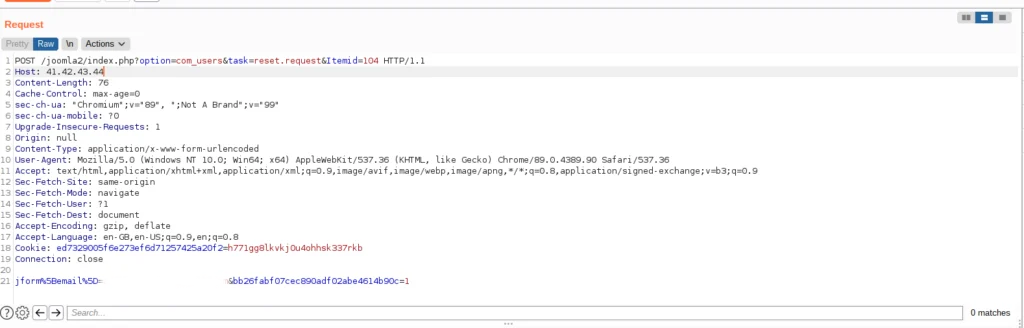
A few moments later the reset email arrived in the researcher's inbox.
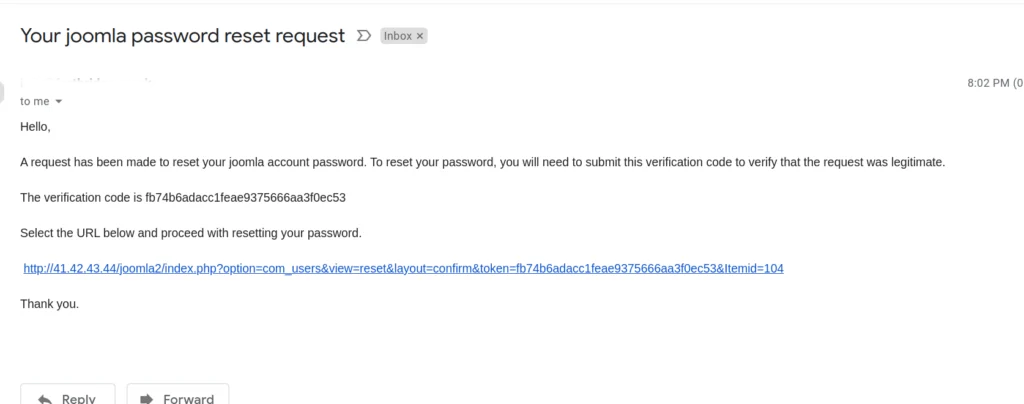
The email confirms that the host in the reset link is under the attacker's control. The malicious server set up by the attacker collects the password reset token when the link is visited, and the attacker then sets a new password. The hostname can be obfuscated, and the author points to the many public resources on doing so.
Once an unsuspecting user clicks the link, or some AV/EDR software scans the user's inbox, the attacker obtains the admin's reset token and resets the password. This does not yet give super admin, because Joomla has two kinds of admin role.
A Python proof of concept for this vulnerability is published in the Fortbridge GitHub repository as joomla-cve-2021-xxxx.py.
Step 2: Understand why scanners miss it
The reset.php file validates the reset scenario, and one of the defence-in-depth measures is a limit on how many times a password can be reset per hour. The $maxCount variable is set to 10 in config.xml:
if ($hoursSinceLastReset > $resetHours)
{
// If it's been long enough, start a new reset count
$user->lastResetTime = JFactory::getDate()->toSql();
$user->resetCount = 1;
}
elseif ($user->resetCount < $maxCount)
{
// If we are under the max count, just increment the counter
++$user->resetCount;
}
else
{
// At this point, we know we have exceeded the maximum resets for the time period
$result = false;
}
This explains the scanner miss. A scanner that sends hundreds or thousands of requests will almost never have the Host header poisoning attempt among the first ten, so the reset counter blocks it before the payload is reached. The author reached out to Burp Suite to discuss the issue. The bug went undiscovered for years, though it is not the first of its kind.
Step 3: Whitelist the .html extension
With a regular admin account in hand, the next step is privilege escalation. The media upload functionality was attacked first. Many tricks to upload a PHP file were tried without success. Code review showed solid validation on file name, extensions and file content.
What the review did reveal is that an admin can disable some of the upload restrictions. Only some: many extensions (.php, php5, php7, phtml and others) are hardcoded and cannot be uploaded, a whitelist of hardcoded extensions is also used, MIME types are validated in a similar way, and the filename has solid alphanumeric validation.
What is not hardcoded in the blacklist is the .html extension. As a regular admin it was possible to add .html as a "legal extension" and to disable "Restrict Uploads".
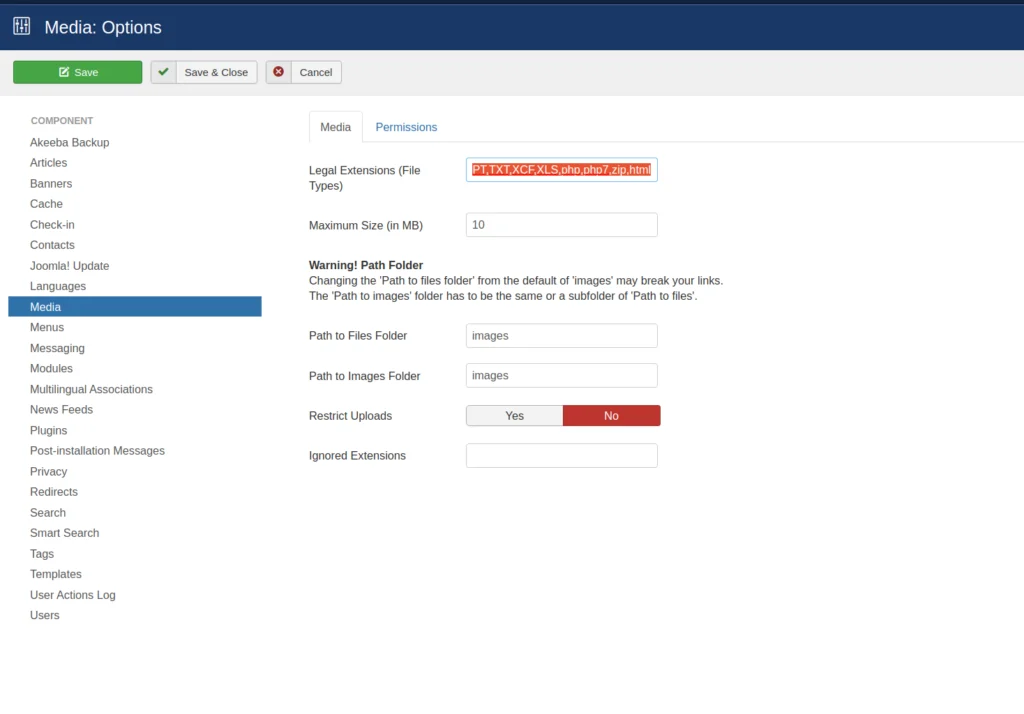
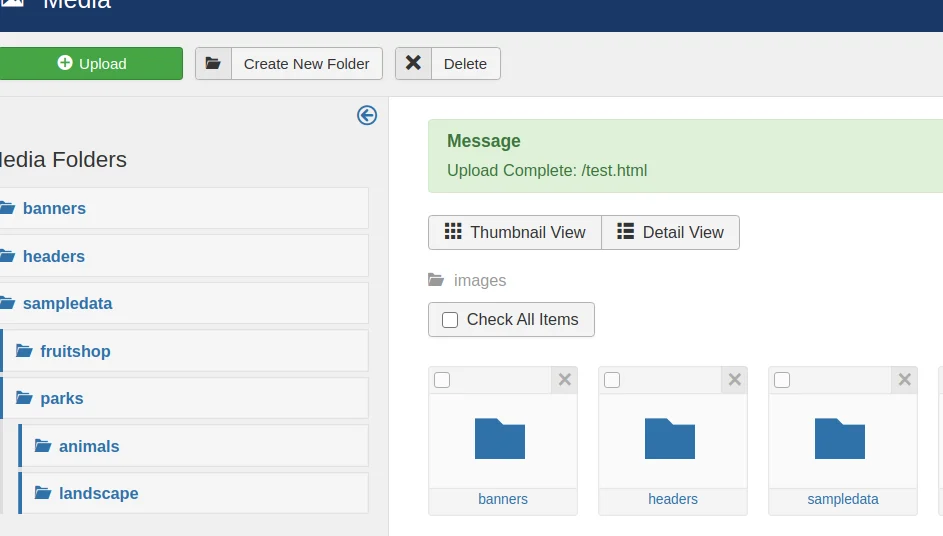
The php extensions that were tried are completely ignored, but .html is accepted. That is enough to upload an HTML file containing an XSS payload aimed at the super admin.
Step 4: Deliver the payload and escalate
The XSS payload can be delivered through the internal messaging feature, or by embedding the link in website articles, comments and similar places. When the super admin visits the link, the exploit elevates the attacker's privileges to super admin.
The proof of concept is published as Joomla_SU_Privesc.html in the Fortbridge GitHub repository. Some variables at the top of the file must be configured with the username and user_id of the admin account that was already compromised. This bug is CVE-2021-26032, and the recommendation is to run Joomla 3.9.27 or later.
Step 5: Full compromise
With super admin, full compromise is straightforward: most CMSes allow uploading custom themes and plugins. A very simple custom plugin was written that gave remote code execution. The author stresses that this is for PoC purposes only and should not be used as-is in a real environment. The PoC is published in the mod_hacker directory of the Fortbridge GitHub repository.
Root cause
The password reset vulnerability is a classic host header poisoning issue. The absolute reset URI is built from $_SERVER['HTTP_HOST'], a value the client controls, so the link emailed to the victim points at whatever host the attacker supplied. The reset token is then sent to the attacker's server, and the attacker uses it to set a new password.
The reason automated scanners did not find it is the per-user reset counter: $maxCount is 10 per hour, so a poisoning attempt buried in a large scan is rejected before it can succeed. The author notes that the Joomla team considers the issue more of an UX improvement than a vulnerability, and that it affects only non-vhost setups.
For the XSS, the root cause is that the media upload blacklist does not include .html, and an admin can add it as a legal extension and disable "Restrict Uploads". The hardcoded blacklist and whitelist stop PHP uploads, but an HTML file containing an XSS payload can be uploaded and aimed at the super admin.
Impact
An attacker who can send a password reset request for a non-super-admin account can redirect the reset link to a host they control and take over that account once the victim clicks the link or an inbox scanner visits it. From a regular admin account, the stored XSS in an uploaded .html file, delivered via internal messaging or embedded in articles or comments, escalates to super admin when the victim visits it. Super admin access allows installing a custom plugin, which gives remote code execution on the underlying server. The password reset issue only affects non-vhost setups according to the Joomla team, and super admin accounts cannot be reset at all.
Fix
After around three months the password reset vulnerability was still not fixed. Joomla plans a PR that fixes the issue by default, but only for new sites, because the team does not want to risk breaking existing installations. The patch will include a post-installation notice warning existing users. The recommended workaround is to set the $live_site variable in configuration.php to the website's domain, which fixes the password reset vulnerability. Joomla later planned to fix it with a trusted_hosts configuration.
The XSS was patched in Joomla 3.9.27, and upgrading to 3.9.27 or later is recommended.
Timeline:
| Date | Event |
|---|---|
| 11.02.2021 | Fortbridge discloses the password reset vulnerability to Joomla |
| 03.03.2021 | Joomla replies that documentation was added and recommends the $live_site variable |
| 08.03.2021 | Fortbridge follows up with the XSS that escalates admin to super admin |
| 26.03.2021 | Joomla agrees to fix the issues in the next release, 13.04.2021 |
| 13.04.2021 | Vulnerabilities still not fixed; Fortbridge allows another extension |
| 25.05.2021 | Joomla patches the XSS in 3.9.27; password reset fix planned with trusted_hosts |
| 07.06.2021 | Fortbridge releases the write-up |
Variants to test
- Host header poisoning on other password reset flows. Send a reset request with a modified
Hostheader and check whether the emailed link points at your host. A positive result is a reset email whose link contains your hostname and the victim's token. - Reset counters as a scanner blind spot. Where a per-user reset limit exists, keep the poisoning attempt within the first few requests, or use a fresh account, and see whether the attempt succeeds where a large scan failed.
- Upload extension blacklists. As an admin, try adding extensions that are not hardcoded, such as
.html, and check whether the upload is accepted. A positive result is a file that executes script in the site's origin. - Upload restriction toggles. Check whether an admin can disable "Restrict Uploads" or equivalent settings, and whether the resulting files are reachable by higher-privileged users.
- Stored XSS delivery paths. Test internal messaging, articles and comments as delivery channels for a stored payload aimed at a super admin, and confirm whether the payload runs when the victim views it.
- Plugin upload for RCE. With super admin, check whether a custom plugin can be installed and whether its code executes on the server. A positive result is command execution from the plugin.
About Post Author

Adrian Tiron is a Cloud Application Security Consultant (OSCP/CRTO/CRTL/AWS/Azure/DevSecOps).
What happened, in plain words
A security team tested a website built with Joomla, a popular program for building and running websites. They found a way to take over the whole server behind it, step by step. First, they tricked the site into sending a password reset email whose link pointed at a server the attacker controls, so the victim's reset code ended up in the attacker's hands. That gave them a normal administrator account. Second, they used that account to upload a small web page containing a script, and got the most powerful user (the super admin) to open it, which quietly upgraded their account to super admin. Third, with super admin rights they installed a small add-on (a plugin) that let them run their own commands on the server. The whole thing is a chain: each step is only possible because of the one before it.
This article walks through that chain in the order the researchers did it, explains every term the first time it appears, and shows the exact code and requests they used.
The product and the two roles that matter
Joomla is a content management system (CMS): software that lets people build and edit a website through a browser without writing code. It is used on more than 1.5 million sites worldwide. The researchers tested version 3.9.24.
Inside Joomla, users have roles, which decide what they are allowed to do. Two roles matter here:
- admin: a normal administrator. Can manage content and settings, but is not the top authority.
- super admin: the top authority. Can do everything, including installing plugins and themes.
The goal of the chain is to get from nothing to super admin, and then to the server itself.
Two Joomla features are used along the way:
- Password reset (the "forgot password" button). A user asks for a reset, Joomla creates a one-time code called a token, builds a confirmation link containing that token, and emails the link to the address on the account. Whoever opens the link can set a new password. A token is like a cloakroom ticket: whoever holds it can collect the coat, no questions asked.
- Media upload. An administrator can upload files (images, documents) to the site. Joomla restricts which file types are allowed, so that nobody can upload a program and run it on the server.
Why this was hard to find
The researchers describe Joomla's code as well built. It uses OOP (object-oriented programming, a way of organising code into reusable building blocks), it checks user input almost everywhere, it uses prepared statements (a database technique that stops attackers from smuggling commands into queries, known as SQL injection), and it converts numbers to the right type where needed. It also applies defence in depth: several independent layers of protection, so that if one fails another still holds. Think of a house with a locked door, a burglar alarm and a safe inside.
Good for defenders, awkward for testers. The easy bugs have already been found and fixed, so anything left needs patient reading of the source code. The researchers first ran an automated scanner (a program that fires many standard attack requests at a site and reports known weaknesses). It found nothing, which did not surprise them: everyone else had scanned the same site before.
So they switched to code review: reading the program's source code by hand, looking for places where something the visitor controls is trusted too much.
Step 1: The password reset link
Joomla deliberately switches off password reset for super admin accounts. That removes an obvious target, so the researchers aimed at a regular admin instead.
While reading the code, they remembered an old technique by the researcher albinowax: poisoning password reset links. The idea is that the reset email contains a link, and if the attacker can influence how that link is built, the victim's browser can be sent somewhere the attacker controls.
The reset process starts in a file called reset.php, which builds the link and the email:
$link = 'index.php?option=com_users&view=reset&layout=confirm&token=' . $token;

// Put together the email template data.
$data = $user->getProperties();
$data['fromname'] = $config->get('fromname');
$data['mailfrom'] = $config->get('mailfrom');
$data['sitename'] = $config->get('sitename');
$data['link_text'] = JRoute::_($link, false, $mode);
$data['link_html'] = JRoute::_($link, true, $mode);
$data['token'] = $token;
Line by line:
$link = 'index.php?option=com_users&view=reset&layout=confirm&token=' . $token;builds a relative link. Relative means it has no domain in front of it: it is like writing "second floor, room 4" instead of a full postal address. Thetokenis the one-time reset code, glued onto the end.$data = $user->getProperties();collects the user's details to fill in the email.- The next three lines copy the sender name, sender address and site name from the site's configuration into the email data.
$data['link_text'] = JRoute::_($link, false, $mode);and$data['link_html'] = JRoute::_($link, true, $mode);turn the relative link into the two versions used in the email: a plain-text version and an HTML (clickable) version.JRouteis Joomla's helper for building addresses.$data['token'] = $token;also puts the token in the email data on its own.
The link is still relative at this point, so the question is: where does the domain come from? The answer is in a file called URI.php:
if (!empty($_SERVER['PHP_SELF']) && !empty($_SERVER['REQUEST_URI']))
{
  // To build the entire URI we need to prepend the protocol, and the http host
  // to the URI string.
   $theURI = 'http' . $https . $_SERVER['HTTP_HOST'] . $_SERVER['REQUEST_URI'];
}
Line by line:
if (!empty($_SERVER['PHP_SELF']) && !empty($_SERVER['REQUEST_URI']))checks that two pieces of information about the current request exist.$_SERVERis a PHP array (a labelled list) filled in by the web server for every request.$theURI = 'http' . $https . $_SERVER['HTTP_HOST'] . $_SERVER['REQUEST_URI'];builds the full address by gluing together the protocol (http, plus answhen the connection is secure), the host, and the path that was requested.
The problem is $_SERVER['HTTP_HOST']. The host is the domain part of an address, the "example.com" in "example.com/shop". It arrives in the Host header, a line the visitor's browser sends with every request to say which site it wants. A header is just a labelled line of text in a request or response. Crucially, the browser fills in the Host header, but nothing stops a tool like Burp from putting anything there instead. The server trusts it when building the reset link. That is host header poisoning: the attacker supplies the host, and the site repeats it back in a link it emails to someone else.
Step 2: Proving it with a modified request
The researchers used Burp Suite, a tool that sits between the browser and the website and lets you read and edit every request. Its Repeater tab lets you send the same request again and again with changes. They sent the password reset request with a modified Host header.
The screenshot shows the reset request in Repeater with a modified Host header.
A few moments later, the reset email arrived in the researcher's inbox.
The email shows the reset link pointing at the attacker's host, with the victim's token in it. That confirms the site builds the link from whatever host the request claims.
What happens next in a real attack: the attacker runs a small server at that host. When the victim clicks the link (or when antivirus or endpoint-protection software scans the inbox and follows links automatically), the victim's browser goes to the attacker's server, and the token is captured. The attacker then uses the token to set a new password on the real site and takes over the admin account. The hostname can be disguised so the link looks less suspicious; the researchers point to public resources on how to do that.
Why did the automated scanner miss this? Because of a limit in reset.php. Joomla allows only a certain number of resets per user per hour. The variable $maxCount is set to 10 in config.xml:
if ($hoursSinceLastReset > $resetHours)
{
// If it's been long enough, start a new reset count
$user->lastResetTime = JFactory::getDate()->toSql();
$user->resetCount = 1;
}
elseif ($user->resetCount < $maxCount)
{
// If we are under the max count, just increment the counter
++$user->resetCount;
}
else
{
// At this point, we know we have exceeded the maximum resets for the time period
$result = false;
}
Line by line:
if ($hoursSinceLastReset > $resetHours)asks: has enough time passed since the last reset? If yes, the counter starts over.$user->lastResetTime = JFactory::getDate()->toSql();records the current time as the new starting point.$user->resetCount = 1;sets the counter to one.elseif ($user->resetCount < $maxCount)is the case where not enough time has passed but the user is still under the limit of 10.++$user->resetCount;adds one to the counter.elseis the case where the limit has been reached.$result = false;refuses the reset.
A scanner sends hundreds or thousands of requests. The poisoning attempt is almost never among the first ten, so by the time it is sent the counter has blocked further resets for that user. The protection that exists to stop abuse also hides the bug from automated tools. The researchers raised this with the Burp Suite team. The bug had gone unnoticed for years, though it is not the first of its kind.
A Python proof of concept for this vulnerability is published in the Fortbridge GitHub repository as joomla-cve-2021-xxxx.py.
At this point the attacker has a regular admin account, not super admin. That is the next problem.
Step 3: Getting past the upload restrictions
With an admin account, the researchers turned to media upload. Their aim was to get a file onto the server that would run code in a victim's browser. They tried many tricks to upload a PHP file (PHP being the programming language Joomla runs on) and failed. Reading the code showed why: file names, extensions and file contents are all checked carefully.
But the code review also showed something useful. An admin is allowed to switch off some of the upload restrictions. Only some: many dangerous extensions (.php, php5, php7, phtml and others) are hardcoded in a blacklist (a list of forbidden things) and cannot be allowed. A whitelist (a list of permitted things) of hardcoded extensions is also used. MIME types (labels that say what kind of file something is, such as image or text) are checked in a similar way, and the file name has strict alphanumeric validation.
One extension is not on the hardcoded blacklist: .html. As a regular admin, the researchers were able to add .html as a "legal extension" and to switch off "Restrict Uploads".
The screenshot shows .html added as a legal extension and "Restrict Uploads" disabled.
The php extensions they tried are completely ignored, but .html is accepted. That is enough. An HTML file is a web page, and a web page can contain a script, a small program that the browser runs. When that page is served from the Joomla site itself, the script runs as if it belonged to the site: it can read the logged-in user's session and act on their behalf. This is stored XSS (cross-site scripting): the attacker stores a script on the site, and it runs in the browser of whoever views it. The target is the super admin.
The screenshot relates to the uploaded HTML file containing the XSS payload aimed at the super admin.
Step 4: Delivering the payload
The file is uploaded, but the super admin has to open it. Joomla offers several ways to get a link in front of someone: the internal messaging feature, or embedding the link in website articles, comments and similar places. When the super admin visits the link, the script runs in their browser and uses their super admin session to upgrade the attacker's account. The researchers describe it simply: once the victim visits the link, it is game over.
The proof of concept is published as Joomla_SU_Privesc.html in the Fortbridge GitHub repository. A few variables at the top of the file must be filled in with the username and user_id of the admin account that was already compromised, so the script knows which account to upgrade. This bug is CVE-2021-26032 (a CVE is a public catalogue number for a known vulnerability), and the recommendation is to run Joomla 3.9.27 or later.
Step 5: From super admin to the server
With super admin, full compromise is straightforward. Most CMSes let an administrator upload custom themes and plugins, and a plugin is code that the server runs. The researchers wrote a very simple custom plugin that gave them RCE (remote code execution): the ability to run their own commands on the server, as the web server's user. They stress that this is for proof-of-concept purposes only and should not be used as-is in a real environment. The proof of concept is published in the mod_hacker directory of the Fortbridge GitHub repository.
Why it worked
The password reset bug is a classic host header poisoning issue. The full reset address is built from $_SERVER['HTTP_HOST'], a value the visitor controls, so the link emailed to the victim points at whatever host the attacker supplied. The token then goes to the attacker's server, and the attacker uses it to set a new password.
Automated scanners missed it because of the per-user reset counter: $maxCount is 10 per hour, so a poisoning attempt buried in a large scan is refused before it can succeed.
The XSS worked because the upload blacklist does not include .html, and an admin can add it as a legal extension and switch off "Restrict Uploads". The hardcoded blacklist and whitelist stop PHP from running, but an HTML file served from the site runs script in the site's own context, which is enough to act as the super admin.
What the impact is
An attacker who can request a password reset for a non-super-admin account can redirect the reset link to a host they control and take over that account once the victim clicks the link or an inbox scanner visits it. From a regular admin account, the stored XSS in an uploaded .html file, delivered through internal messaging or embedded in articles or comments, escalates to super admin when the victim visits it. Super admin access allows installing a custom plugin, which gives remote code execution on the underlying server. According to the Joomla team, the password reset issue only affects non-vhost setups (installations not configured with their own virtual host), and super admin accounts cannot be reset at all.
The fix
After around three months, the password reset vulnerability was still not fixed. Joomla planned a change that fixes the issue by default, but only for new sites, because the team did not want to risk breaking existing installations. The patch was to include a post-installation notice warning existing users. The recommended workaround is to set the $live_site variable in configuration.php to the website's domain, which fixes the password reset vulnerability. Joomla later planned to fix it with a trusted_hosts configuration.
The XSS was patched in Joomla 3.9.27, and upgrading to 3.9.27 or later is recommended.
Timeline:
| Date | Event |
|---|---|
| 11.02.2021 | Fortbridge discloses the password reset vulnerability to Joomla |
| 03.03.2021 | Joomla replies that documentation was added and recommends the $live_site variable |
| 08.03.2021 | Fortbridge follows up with the XSS that escalates admin to super admin |
| 26.03.2021 | Joomla agrees to fix the issues in the next release, 13.04.2021 |
| 13.04.2021 | Vulnerabilities still not fixed; Fortbridge allows another extension |
| 25.05.2021 | Joomla patches the XSS in 3.9.27; password reset fix planned with trusted_hosts |
| 07.06.2021 | Fortbridge releases the write-up |
Things worth testing on your own sites
- Host header poisoning on other password reset flows. Send a reset request with a modified
Hostheader and check whether the emailed link points at your host. A positive result is a reset email whose link contains your hostname and the victim's token. - Reset counters as a scanner blind spot. Where a per-user reset limit exists, keep the poisoning attempt within the first few requests, or use a fresh account, and see whether the attempt succeeds where a large scan failed.
- Upload extension blacklists. As an admin, try adding extensions that are not hardcoded, such as
.html, and check whether the upload is accepted. A positive result is a file that runs script in the site's origin. - Upload restriction toggles. Check whether an admin can disable "Restrict Uploads" or equivalent settings, and whether the resulting files are reachable by higher-privileged users.
- Stored XSS delivery paths. Test internal messaging, articles and comments as delivery channels for a stored payload aimed at a super admin, and confirm whether the payload runs when the victim views it.
- Plugin upload for RCE. With super admin, check whether a custom plugin can be installed and whether its code executes on the server. A positive result is command execution from the plugin.
About Post Author
Adrian Tiron is a Cloud Application Security Consultant (OSCP/CRTO/CRTL/AWS/Azure/DevSecOps).
Glossary
- Admin: a normal Joomla administrator role, below super admin.
- Blacklist: a list of things that are forbidden.
- Burp Suite: a tool that sits between a browser and a website so requests can be read, edited and resent.
- CMS (content management system): software for building and editing a website through a browser.
- Code review: reading a program's source code by hand to find weaknesses.
- CVE: a public catalogue number for a known vulnerability.
- Defence in depth: several independent layers of protection, so one failure does not expose everything.
- Header: a labelled line of text sent with a web request or response.
- Host: the domain part of an address, such as the "example.com" in "example.com/shop".
- Host header poisoning: making a site build links from a host the attacker supplied.
- HTML: the language web pages are written in.
- MIME type: a label saying what kind of file something is, such as image or text.
- OOP (object-oriented programming): a way of organising code into reusable building blocks.
- PHP: the programming language Joomla runs on.
- Plugin: an add-on that extends a CMS and whose code the server runs.
- Prepared statement: a database technique that stops attackers from smuggling commands into queries.
- RCE (remote code execution): running your own commands on someone else's server.
- Repeater: the Burp Suite tab for resending a request with changes.
- Scanner: a program that fires many standard attack requests at a site and reports known weaknesses.
- Script: a small program that a browser runs inside a web page.
- SQL injection: smuggling database commands into a query through unchecked input.
- Stored XSS (cross-site scripting): storing a script on a site so it runs in the browser of whoever views it.
- Super admin: the top Joomla role, able to install plugins and themes.
- Token: a one-time code that proves the holder is allowed to do something, like a cloakroom ticket.
- Vhost (virtual host): a configuration where a server hosts a site under its own domain name.
- Whitelist: a list of things that are permitted.