Bypassing ACLs – IDOR exploitation via HPP
The API used a customer ID path parameter to fetch user details, and adding a duplicate customerId GET parameter bypassed access controls, allowing an attacker to read other customers' personal information. The same flaw affected multiple endpoints, and a later bypass via POST parameter was also found.
 Published on fortbridge.co.uk
During a recent penetration test for a major online retailer, we evaluated their customer API, which had undergone previous security assessments. As expected, there were no obvious vulnerabilities such as XSS or SQL injections, and an automated scan with Burp Suite revealed no high or critical issues.
The full write-up lives on its author's site
It belongs to its author, so we link to it rather than copy it. The other two tabs are our own rewrites, checked against it.
Context
During a penetration test for a major online retailer, the team assessed a customer API that had already been through previous security assessments. The API exposed endpoints for fetching customer details, addresses and return orders. The design stood out as awkward: to fetch the details of the currently logged in user, the client had to pass the current customer id as a path parameter in the URL, rather than the server taking the id from the session or from a signed and verified JWT token. That pattern is a natural candidate for an IDOR/BOLA issue.
Setup
The work was a manual penetration test of the customer API. The team used Burp Suite for automated scanning, which revealed no high or critical issues, and no obvious vulnerabilities such as XSS or SQL injection were present. The report does not describe accounts, roles or specific tool versions beyond Burp Suite. The images in the report were redacted to uphold confidentiality agreements and protect sensitive information.
Finding it
The first attempt was the obvious one: incrementing and decrementing the customer id in the URL. That did not work. The next idea was an HTTP Parameter Pollution (HPP) attack, which here means adding another parameter with the same name as an existing parameter, in this case the customer id. The name has to be guessed exactly. Looking at the JSON response, the team saw the customerId key. Developers tend to be consistent, so they added a new GET parameter called customerId and checked what happened.
Exploitation
Step 1: Fetch another customer's PII via /customers/<<customer_id>>
The team exploited the /customers/<<customer_id>> endpoint to steal PII of another customer by simply adding a GET parameter with the name customerid and a random integer value.
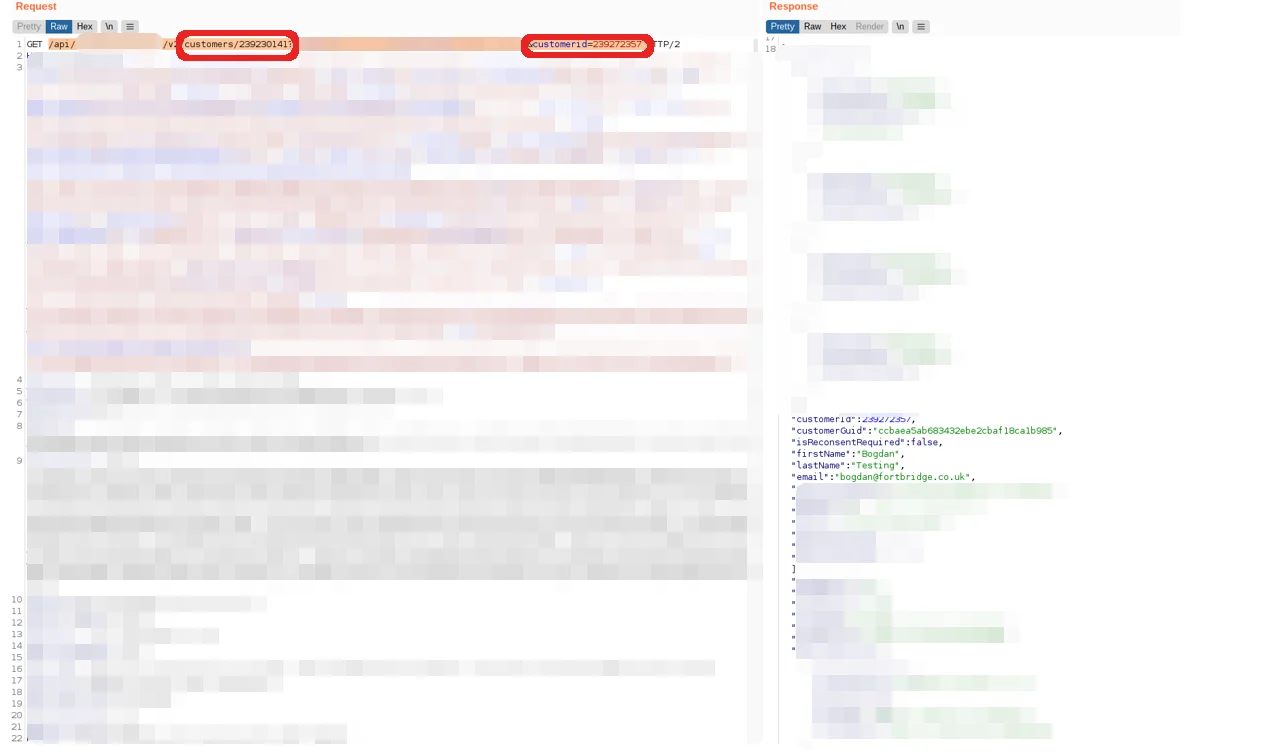
The image shows the customer API endpoint where the IDOR was exploited via HPP to steal PII of another customer.
Step 2: Leak addresses via /addresses/<<customerid>>
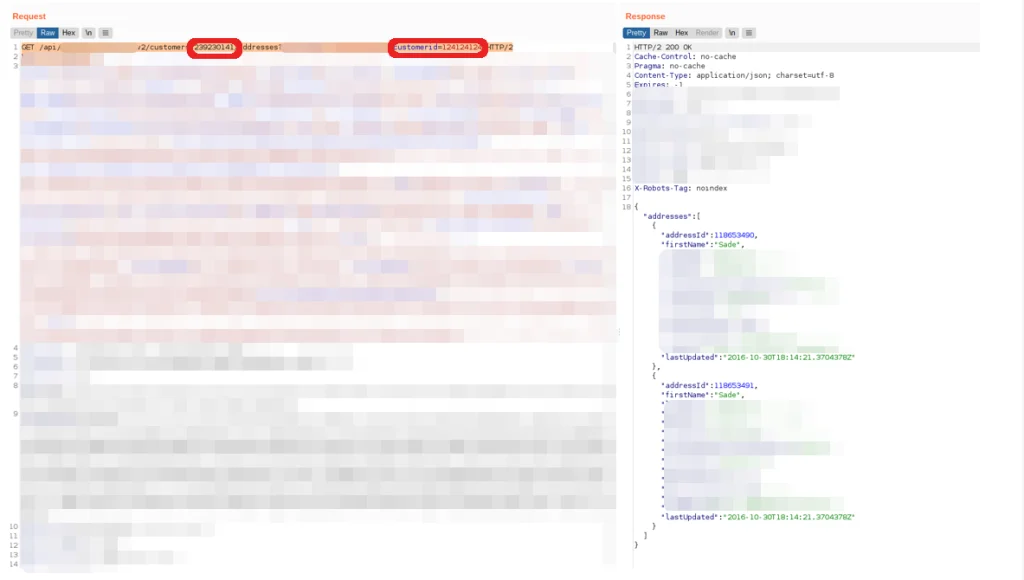
The issue was systemic and affected the entire API, not just one endpoint. The team exploited the /addresses/<<customerid>> endpoint to leak all the registered addresses of any customer.
Step 3: Bypassing the fix by moving the parameter to POST
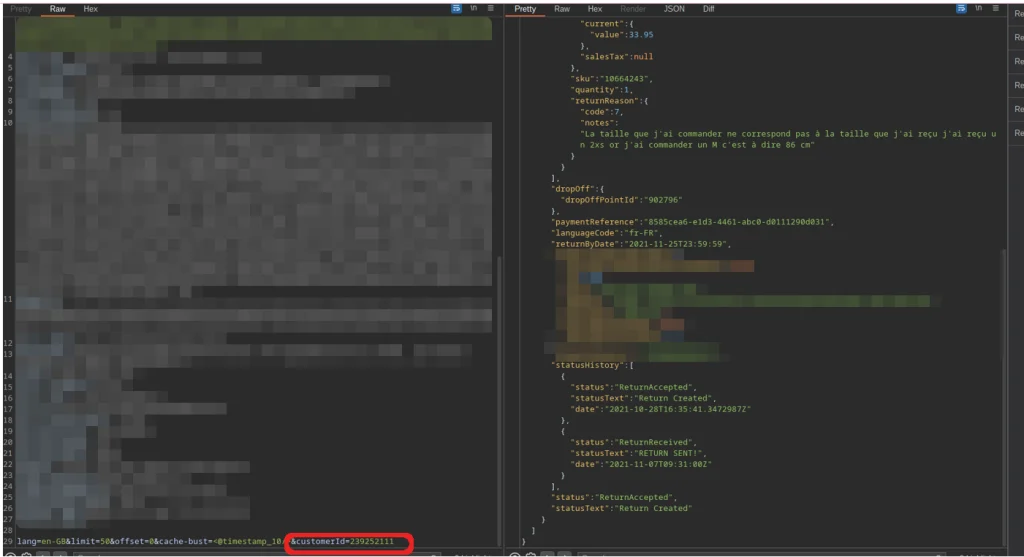
The initial discovery caused a lot of panic and the issue was remediated quickly. Once a fix was in place, the team started looking for a way to bypass it. Out of the many API endpoints that were vulnerable to the previous exploit, there was one where the fix could be bypassed by moving the GET parameter to POST. The likely reason is that multiple teams worked on this API and used a different tech stack. This bypass did not seem as critical, because only limited information was obtained and there was no PII leak this time: the response contained some information about the return orders of an arbitrary client. Their internal decision was nevertheless to treat it as critical and fix it promptly.
Root cause
The API took the customer id from a path parameter supplied by the client instead of deriving it from the session or from the signed and verified JWT token. The report does not describe the parsing behaviour behind the bypass. The exact parsing behaviour is not described in the report, so the mechanism is likely a mismatch between the parameter the ACL check reads and the parameter the data lookup uses. After the fix, one endpoint could still be bypassed by moving the GET parameter to POST, probably because a different tech stack was used there.
Impact
An attacker could read PII of other customers through the /customers/<<customer_id>> endpoint and all registered addresses of any customer through the /addresses/<<customerid>> endpoint. The issue was systemic across the API. After the fix, one endpoint still allowed access to limited information about the return orders of an arbitrary client, without a PII leak.
Fix
The original issue was remediated promptly after discovery. The bypass on the endpoint that accepted the parameter via POST was also treated as critical and fixed promptly. A robust fix would derive the customer id from the authenticated session or verified token rather than from client-supplied input, and apply the same access control consistently across all endpoints and HTTP methods.
Variants to test
- Add a duplicate parameter with the same name as a path or query parameter, using the exact casing seen in the JSON response (for example
customerId), and check whether the response changes to another object. A positive result is data belonging to a different user. - Try the same polluted parameter as a POST body or query parameter on endpoints that use a different tech stack. A positive result is the same IDOR behaviour surviving the original fix.
- Test other identifiers exposed in JSON responses (account ids, order ids, tenant ids) as duplicate parameters. A positive result is access to another tenant's or user's records.
- Compare behaviour across HTTP methods (GET, POST, PUT, PATCH) on the same endpoint. A positive result is one method enforcing the ACL while another does not.
About Post Author

Adrian Tiron is a Cloud Application Security Consultant with OSCP/CRTO/CRTL/AWS/Azure/DevSecOps certifications.
What happened, in plain words
A security team was hired to test the customer API of a large online shop. An API is the part of a website that apps and browsers talk to behind the scenes: instead of sending you a finished web page, it sends raw data, usually in a format called JSON, which looks like a set of labelled boxes. The shop's API had already been tested before, and automated tools found nothing serious. But the team kept looking by hand, and they found a way to read other customers' personal information. The trick was to send an extra parameter with the same name as one the API already used, a technique called HTTP Parameter Pollution. Later, after the shop fixed it, the team found one endpoint where the fix could be bypassed by moving that parameter from a GET request to a POST request.
Background: what the API did and why it looked odd
The API had endpoints for fetching customer details, addresses and return orders. An endpoint is simply a URL path that does one job, like /customers/123 for customer 123. To fetch the details of the currently logged in user, the client had to put the customer id in the URL itself, as a path parameter. A path parameter is the part of the URL after a slash that identifies something, here the customer number.
That design is awkward. Normally the server should work out who you are from your session or from a signed token, not trust a number you type into the URL. A session is a short-lived record the server keeps after you log in, usually referenced by a cookie, which is a small piece of data your browser stores and sends back with every request. A token is a string the server gives you at login and checks on each request; a signed token carries a cryptographic signature so the server can tell it has not been tampered with. A JWT (JSON Web Token) is a common kind of signed token. If the server takes the customer id from the URL instead, anyone can try changing that number, which is the classic setup for an IDOR.
IDOR stands for Insecure Direct Object Reference: the application lets you refer to an object, such as a customer record, by an identifier you control, and it does not check that the object belongs to you. BOLA (Broken Object Level Authorization) is the newer name for the same idea. Think of a cloakroom where the ticket number is just written on a sticky note you can rewrite: if the attendant only reads the number and never checks who you are, you can ask for someone else's coat.
The setup
The work was a manual penetration test of the customer API. A penetration test is an authorised attempt to break into a system, done with permission so the owner can fix what is found. The team used Burp Suite, a tool that sits between your browser and the website so you can inspect and change requests, for automated scanning. The scan revealed no high or critical issues, and there were no obvious vulnerabilities such as XSS or SQL injection. XSS (cross-site scripting) is when an attacker gets their own code to run in another user's browser; SQL injection is when input is smuggled into a database query so the attacker can read or change data. The report does not describe accounts, roles or specific tool versions beyond Burp Suite. The images in the report were redacted to uphold confidentiality agreements and protect sensitive information.
Finding it
The first attempt was the obvious one: incrementing and decrementing the customer id in the URL. That means changing /customers/123 to /customers/124, then /customers/122, and so on, to see whether the API returns someone else's record. It did not work, so the access control was doing its job for that simple case.
The next idea was an HTTP Parameter Pollution (HPP) attack. Here it means adding another parameter with the same name as an existing parameter, in this case the customer id. A parameter is a named value sent with a request, either in the URL after a question mark (a GET parameter, like ?name=value) or in the body of a POST request. When two parameters share a name, different parts of the software may disagree about which one to use: one may take the first, another the last. That disagreement is the opening.
The name has to be guessed exactly. Looking at the JSON response, the team saw the customerId key. A JSON key is the label on one of those boxes of data. Developers tend to be consistent, so they added a new GET parameter called customerId and checked what happened.
Exploitation
Step 1: Fetch another customer's PII via /customers/<<customer_id>>
The team exploited the /customers/<<customer_id>> endpoint to steal PII of another customer by simply adding a GET parameter with the name customerid and a random integer value. PII means personally identifiable information: names, contact details and anything else that points to a real person.
The image shows the customer API endpoint where the IDOR was exploited via HPP to steal PII of another customer.
Step 2: Leak addresses via /addresses/<<customerid>>
The issue was systemic and affected the entire API, not just one endpoint. The team exploited the /addresses/<<customerid>> endpoint to leak all the registered addresses of any customer.
Step 3: Bypassing the fix by moving the parameter to POST
The initial discovery caused a lot of panic and the issue was remediated quickly. Once a fix was in place, the team started looking for a way to bypass it. Out of the many API endpoints that were vulnerable to the previous exploit, there was one where the fix could be bypassed by moving the GET parameter to POST. A POST request is the method normally used to submit data, and its parameters usually travel in the request body rather than the URL. The likely reason is that multiple teams worked on this API and used a different tech stack, meaning different frameworks and libraries, so the fix was applied in one place but not the other.
This bypass did not seem as critical, because only limited information was obtained and there was no PII leak this time: the response contained some information about the return orders of an arbitrary client. Their internal decision was nevertheless to treat it as critical and fix it promptly.
Root cause
The API took the customer id from a path parameter supplied by the client instead of deriving it from the session or from the signed and verified JWT token. The report does not describe the parsing behaviour behind the bypass. The exact parsing behaviour is not described in the report, so the mechanism is likely a mismatch between the parameter the ACL check reads and the parameter the data lookup uses. ACL stands for access control list: the rules that say who may read or change what. After the fix, one endpoint could still be bypassed by moving the GET parameter to POST, probably because a different tech stack was used there.
Impact
An attacker could read PII of other customers through the /customers/<<customer_id>> endpoint and all registered addresses of any customer through the /addresses/<<customerid>> endpoint. The issue was systemic across the API. After the fix, one endpoint still allowed access to limited information about the return orders of an arbitrary client, without a PII leak.
Fix
The original issue was remediated promptly after discovery. The bypass on the endpoint that accepted the parameter via POST was also treated as critical and fixed promptly. A robust fix would derive the customer id from the authenticated session or verified token rather than from client-supplied input, and apply the same access control consistently across all endpoints and HTTP methods.
Variants to test
- Add a duplicate parameter with the same name as a path or query parameter, using the exact casing seen in the JSON response (for example
customerId), and check whether the response changes to another object. A positive result is data belonging to a different user. - Try the same polluted parameter as a POST body or query parameter on endpoints that use a different tech stack. A positive result is the same IDOR behaviour surviving the original fix.
- Test other identifiers exposed in JSON responses (account ids, order ids, tenant ids) as duplicate parameters. A positive result is access to another tenant's or user's records.
- Compare behaviour across HTTP methods (GET, POST, PUT, PATCH) on the same endpoint. A positive result is one method enforcing the ACL while another does not.
About Post Author
Adrian Tiron is a Cloud Application Security Consultant with OSCP/CRTO/CRTL/AWS/Azure/DevSecOps certifications.
Glossary
- API: the interface a website or app uses to exchange raw data with other software, usually in JSON.
- Endpoint: a specific URL path that performs one job, such as
/customers/123. - JSON: a text format for structured data, made of labelled keys and values.
- Path parameter: a value placed inside the URL path, such as the
123in/customers/123. - Query parameter / GET parameter: a named value added to a URL after a question mark, such as
?customerid=456. - POST request: an HTTP method used to submit data, usually in the request body.
- HTTP method: the verb of a request, such as GET (read) or POST (submit).
- Session: a short-lived record the server keeps after you log in, so it can recognise later requests.
- Cookie: a small piece of data your browser stores and sends back with requests, often used to reference a session.
- Token: a string issued at login and checked on each request to identify you.
- JWT (JSON Web Token): a common kind of signed token that the server can verify has not been altered.
- Signed token: a token carrying a cryptographic signature so tampering can be detected.
- IDOR (Insecure Direct Object Reference): letting a user refer to an object by an identifier they control without checking it belongs to them.
- BOLA (Broken Object Level Authorization): the newer name for the same class of flaw.
- HTTP Parameter Pollution (HPP): sending two parameters with the same name so different parts of the software disagree about which one to use.
- ACL (Access Control List): the rules that decide who may read or change what.
- PII (Personally Identifiable Information): data that points to a real person, such as names, addresses or contact details.
- XSS (Cross-Site Scripting): a flaw that lets an attacker run their own code in another user's browser.
- SQL injection: a flaw that lets input be smuggled into a database query to read or change data.
- Burp Suite: a tool that sits between browser and website so requests can be inspected and modified.
- Penetration test: an authorised attempt to break into a system so the owner can fix what is found.
- Tech stack: the set of frameworks and libraries a team uses to build a service.
- Redacted: hidden or blurred to protect confidential information.