CSRF Vulnerability In The NodeJS Ecosystem
The csurf npm package for Node.js stored the CSRF secret in a clear-text cookie and did not validate the token cookie, allowing an attacker to forge a valid CSRF token. By using cookie tossing to set a malicious secret cookie, an attacker could bypass CSRF protection and perform state-changing requests on behalf of a victim.
 Published on fortbridge.co.uk
One of our customers asked us to review one of their pentest reports where one of the issues was that a CSRF cookie was missing the secure flag. Interesting to see that some people are trying to fix the LOW severity findings as well, we didn’t expect that.
The full write-up lives on its author's site
It belongs to its author, so we link to it rather than copy it. The other two tabs are our own rewrites, checked against it.
Context
A customer asked the author's team to review one of their pentest reports. One of the issues in that report was a CSRF cookie missing the secure flag. The team started digging and found that the application was a Node.js application using the csurf npm package to protect against CSRF. The package is popular: more than 400K downloads weekly, 500 dependants, and its last update was 3 years before the research. The code is public on github, so the team reviewed it and found a CSRF vulnerability in a package whose job is to protect against CSRF. The vulnerability affects the entire Node.js ecosystem using the csurf module.
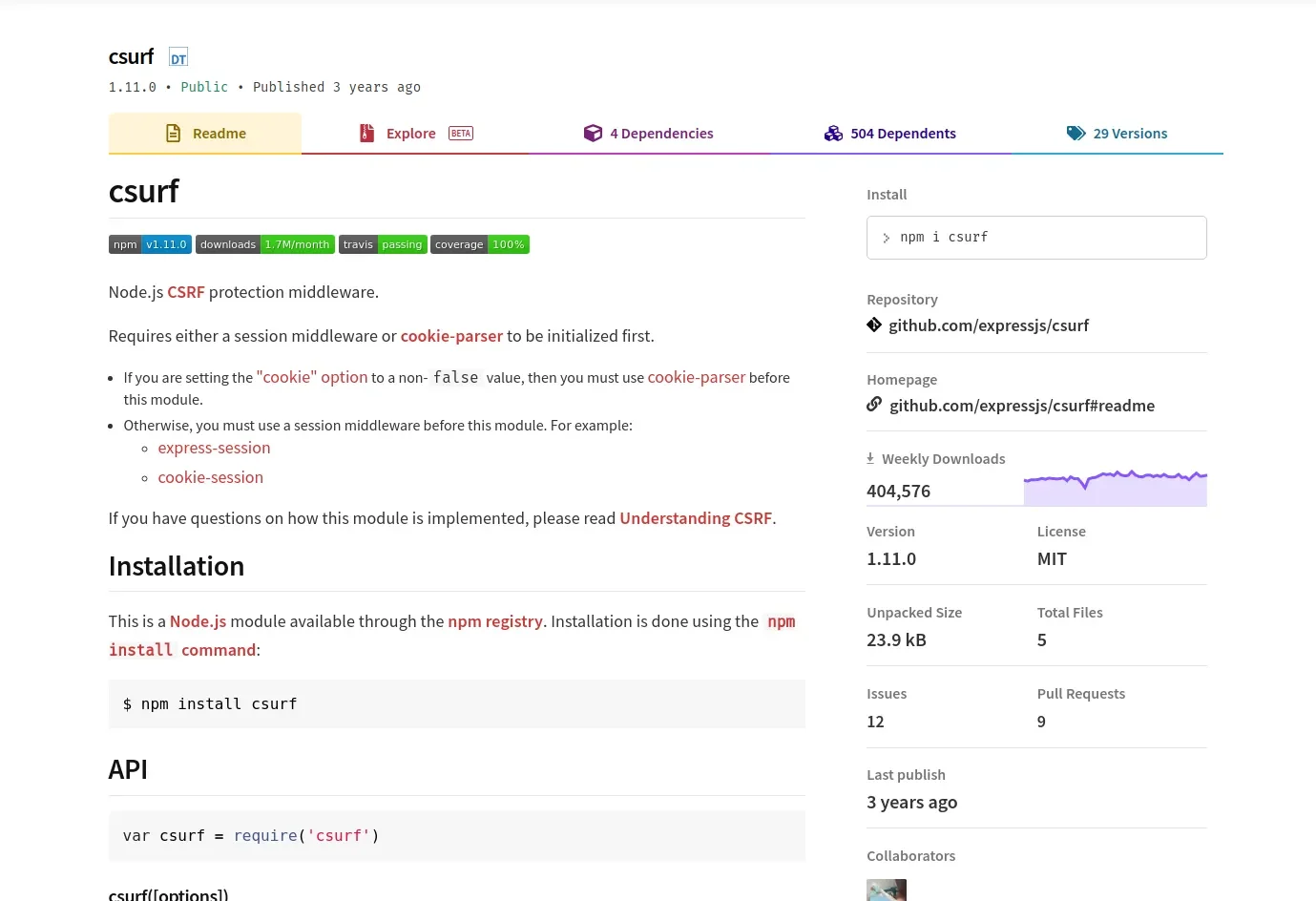
csurf NPM package stats
The author notes that the vulnerability had been there for at least 3 years, when the code was previously updated. Open source software is not necessarily scrutinised from a security perspective, so vulnerabilities can lie around in it. Developer peer reviews are common at some clients, but they are not equivalent to security code reviews. A few issues went unnoticed here, and the team chained them to obtain a CSRF protection bypass in any Node.js app using this library.
Setup
The module offers CSRF protection using sessions or cookies, following the double-submit cookie pattern. The website under review uses cookies, configured like this:
app.use(csrf({ cookie: true }));
axios.defaults.xsrfCookieName = 'XSRF-TOKEN';
The pieces to follow are:
_csrfis a cookie containing a secret; the secret is used to generate and validate the CSRF token.XSRF-TOKENis a cookie (default name changed) containing the CSRF token and needs to be equal to theX-Xsrf-Tokenheader.X-Xsrf-Tokenis also the CSRF token, passed as a custom HTTP header.
So the XSRF-TOKEN cookie is also submitted as a header (X-Xsrf-Token) for POST requests, and the two should match. That is the double-submit cookie pattern. CSURF generates the CSRF token using a secret stored in clear text in the _csrf cookie, and it creates the token using the sha1 algorithm for hashing the secret. Both looked like bad signs to the author.
Finding it
The hash function that is part of the csrf npm package is shown below.
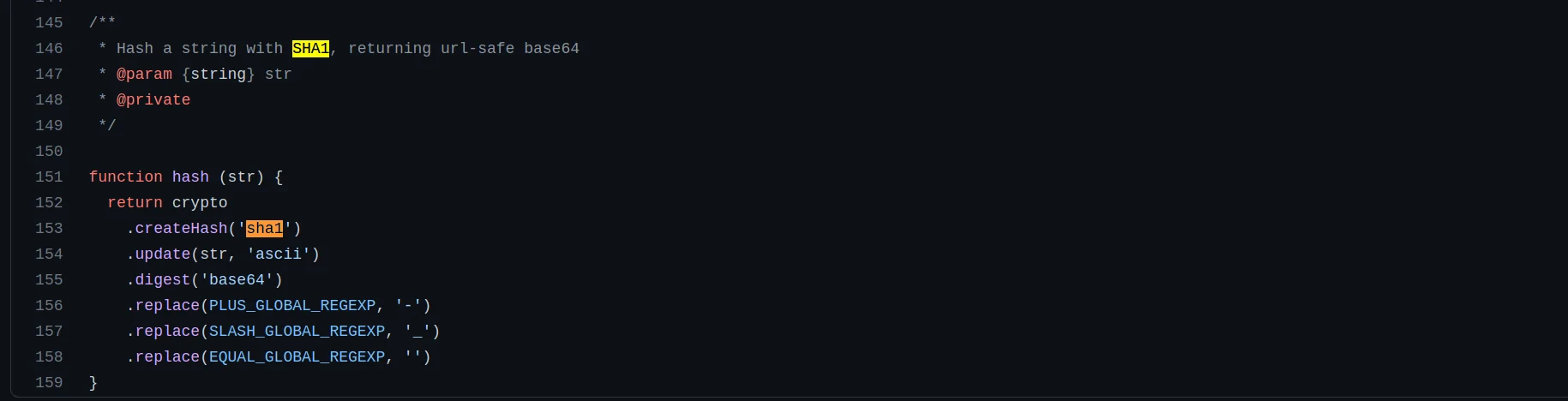
Hash Function used to generate XSRF-TOKEN
The hash() method takes a parameter, the secret (crypto secure). The app stores the secret on the client side in the _csrf cookie, in clear text.
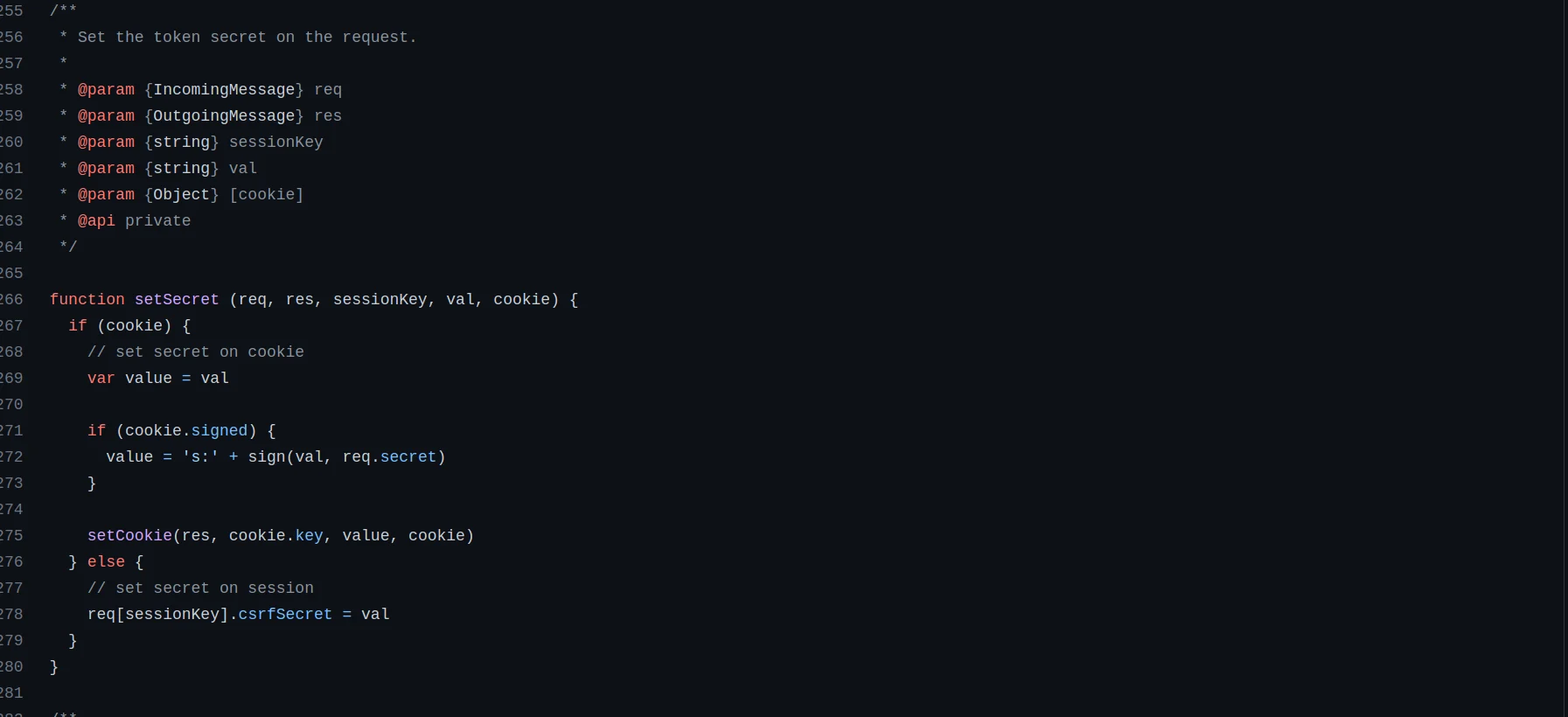
Storing the secret in the _csrf cookie in clear text
There is no signature checking in the default configuration. During initial testing the team noticed odd behaviour: they modified the value of the XSRF-Token cookie and also removed it, and still received a 200 OK status code, with no errors.
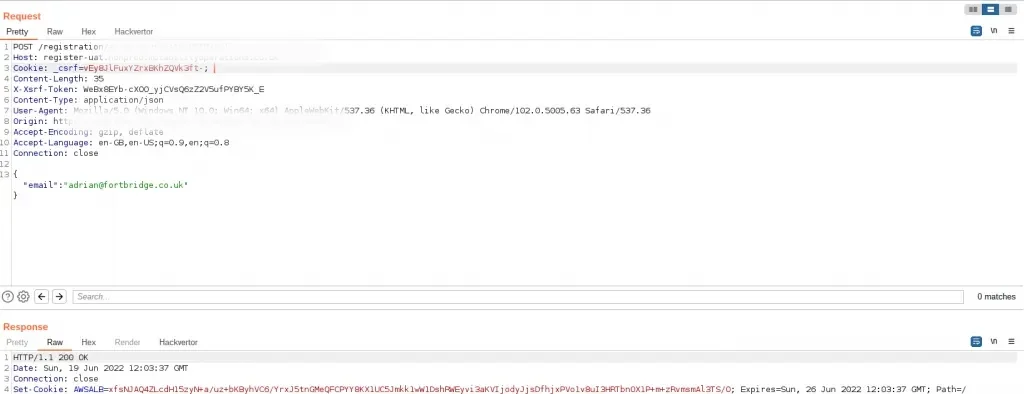
Missing XSRF-TOKEN cookie still returns 200 OK
The application accepts an empty XSRF-Token, so it does not implement the double-submit cookie pattern correctly. When they modified the _csrf cookie (the secret) or the X-Xsrf-Token header (which needs to be equal to the XSRF-TOKEN cookie), they got back a 403 HTTP code with the message "Invalid CSRF Token", which is the proper behaviour.
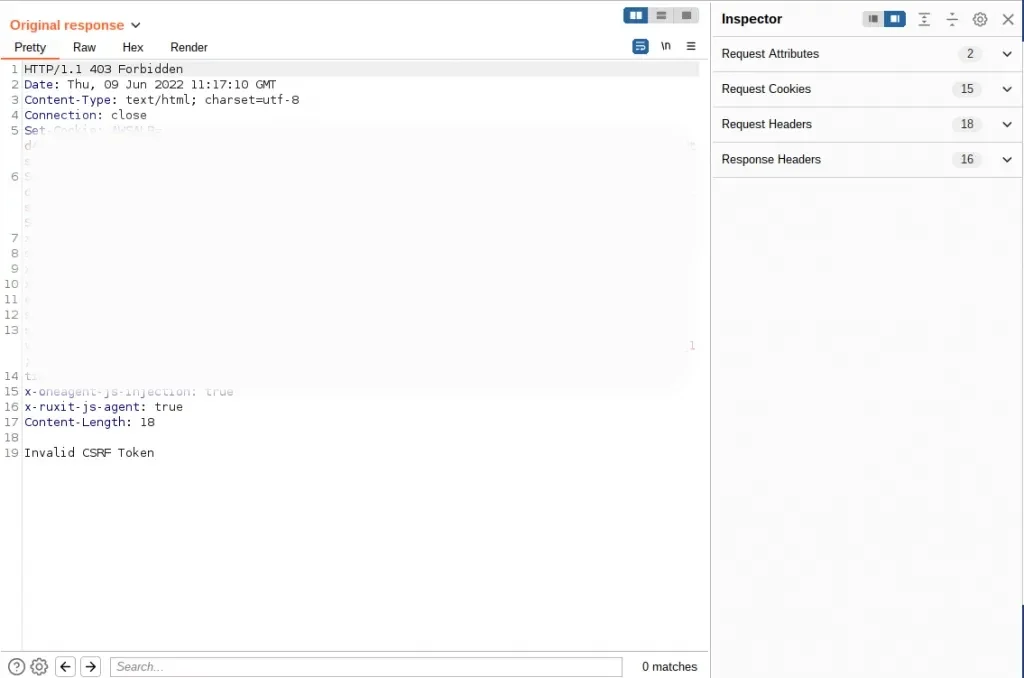
Invalid CSRF Token response
Exploitation
Step 1: read the validation code
The behaviour prompted a look at the public source code. The developers validate the CSRF token like this:
// get the secret from the request
var secret = getSecret(req, sessionKey, cookie)
// verify the incoming token
if (!ignoreMethod[req.method] && !tokens.verify(secret, value(req))) {
      return next(createError(403, 'invalid csrf token', {
        code: 'EBADCSRFTOKEN'
      }))
}
The code reads the secret from the request and then verifies whether the hash based on this secret matches value(req). The verify method is:
/**
* Verify if a given token is valid for a given secret.
*
* @param {string} secret
* @param {string} token
* @public
*/
Tokens.prototype.verify = function verify (secret, token) {
if (!secret || typeof secret !== 'string') {
return false
}
if (!token || typeof token !== 'string') {
return false
}
var index = token.indexOf('-')
if (index === -1) {
return false
}
var salt = token.substr(0, index)
var expected = this._tokenize(secret, salt)
return compare(token, expected)
}
The salt is the first part of the token, up to the first - character. The _tokenize method creates a token from a salt and the secret:
/**
* Tokenize a secret and salt.
* @private
*/
Tokens.prototype._tokenize = function tokenize (secret, salt) {
return salt + '-' + hash(salt + '-' + secret)
}
The value() method returns whatever is in the header in this case:
function defaultValue (req) {
	return (req.body && req.body._csrf) ||
	(req.query && req.query._csrf) ||
	(req.headers['csrf-token']) ||
	(req.headers['xsrf-token']) ||
	(req.headers['x-csrf-token']) ||
	(req.headers['x-xsrf-token'])
}
The issues summarised so far:
- secret stored in clear text in the
_csrfcookie - sha1 is deprecated
- no signature checking for cookies by default
- it only validates the header token against the secret
An attacker can calculate their own CSRF tokens if they can set the salt and the secret, and they can, because everything is done client-side. The application will accept that. The remaining question is how to set them.
Step 2: choose a salt and secret and compute the token
Cookie tossing is an old technique that is not heard about too often. Using it, an attacker can exploit a CSRF vulnerability in the Node.js ecosystem if the application uses a vulnerable version of csurf (<=1.11). The attacker sets the _csrf cookie with their secret and calculates the XSRF token using the algorithm above. The values chosen were:
salt   = 'fortbridge';
secret = 'fortbridge';
console.log(tokenize(secret,salt)); // "fortbridge-pBdvpVWmRdpgaTY_hv7yvjLW3GU"
The resulting XSRF-TOKEN is fortbridge-pBdvpVWmRdpgaTY_hv7yvjLW3GU.
Step 3: toss the cookies
Cookie tossing consists of adding another cookie with the same name and making the application use the attacker's cookie by setting a more specific Path attribute. The cookie can be set for the main domain by finding an XSS vulnerability in a subdomain. The code looks like this:
document.cookie = "_csrf=fortbridge; domain=victim.co.uk; expires=Wed, 16-Aug-2023 22:38:05 GMT; path=/your-specific-path";
document.cookie = "XSRF-[redacted] domain=victim.co.uk;  expires=Wed, 05 Aug 2023 23:00:00 UTC; path=/your-specific-path"
Technically, only the first cookie (_csrf) needed to be tossed, because the XSRF-TOKEN cookie was not validated anyway, as seen above. The browser sends the malicious cookies first and the application accepts the token.
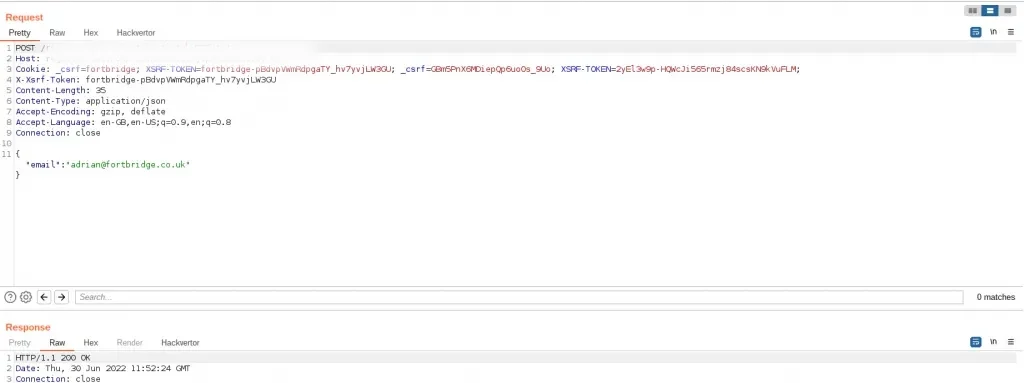
CSRF protection bypass with faked values & cookie tossing
Step 4: avoid the custom header
The previous step cheated a little, because it set the X-Xsrf-Token header to the faked value. In a cross-domain attack the attacker cannot fake that header, especially if there is no misconfigured CORS policy. The value() function shown earlier does not only read the token from the headers: it also reads it from GET/POST params with different names. So the CSRF token header can be passed as a GET param.
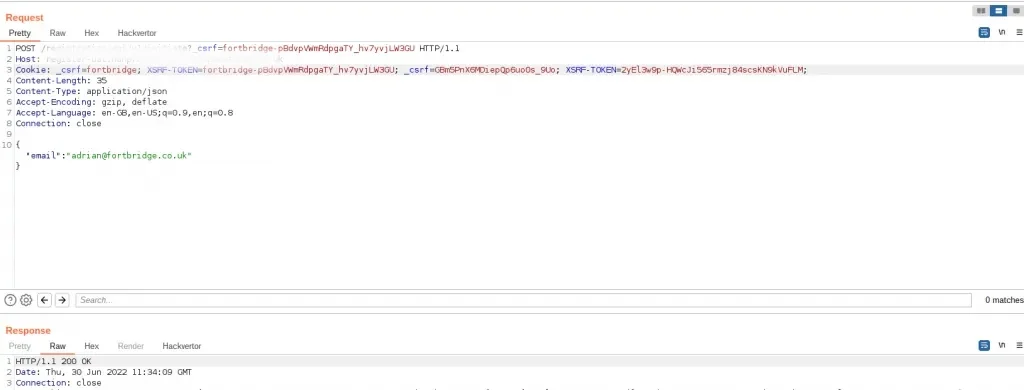
CSRF vulnerability in the nodejs ecosystem, passing the Header as a GET param
In conclusion, a pentester can exploit any CSRF vulnerability in the Node.js ecosystem if the application under test uses csurf <=1.11.0.
Root cause
The design stores the secret in clear text in the _csrf cookie and derives the token from it with sha1, with no signature checking on cookies by default. Because the salt is taken from the token itself and the secret is client-side, an attacker who can set both cookies can compute a valid token. The verify method only checks that the token matches the hash of the supplied secret and salt, so a self-chosen pair passes. The value() function accepts the token from body and query parameters as well as headers, which removes the need to set a custom header in a cross-domain attack. The missing validation of the XSRF-TOKEN cookie (an empty or modified value still returned 200 OK) means the double-submit check is not enforced as intended. The author notes that a few issues went unnoticed here, and that developer peer reviews are not equivalent to security code reviews.
Impact
The author states that a pentester can exploit any CSRF vulnerability in the Node.js ecosystem if the application under test uses csurf <=1.11.0, using cookie tossing and passing the token as a GET parameter. The author states that a pentester can exploit any CSRF vulnerability in the Node.js ecosystem when the application under test uses csurf <=1.11.0.
Fix
The developer decided to deprecate the package completely. The author recommends finding alternative libraries that offer CSRF protection for Node.js applications.
Timeline:
| Date | Event |
|---|---|
| 02.06.2022 | Vulnerability submitted to developer |
| 03.06.2022 | Developer acknowledges the bug |
| 18.07.2022 | Maintainer marks the package as vulnerable and deprecated |
| 28.08.2022 | Blog post released |
Variants to test

About Post Author
What happened, in plain words
A company asked a security team to look over a penetration test report. A penetration test (often shortened to pentest) is a hired, authorised attempt to break into a system, the way a locksmith might be paid to try the locks on your house so you can fix the weak ones. One of the findings in that report was small: a CSRF cookie was missing the secure flag. CSRF stands for Cross-Site Request Forgery, and it is a trick where a malicious website makes your browser send a request to another site where you are already logged in, without you meaning to. The secure flag is a setting on a cookie that tells the browser to send it only over encrypted connections. The team found it interesting that the customer was trying to fix even low severity findings, and they started digging.
Digging led them to a Node.js application. Node.js is a program that lets developers run JavaScript outside the browser, typically on a server. The application was using a package called csurf to protect itself against CSRF. A package (also called a module or library) is a bundle of code written by someone else that a developer can drop into their project instead of writing everything from scratch, a bit like buying a ready-made door lock rather than forging one yourself. csurf is published on npm, the main public catalogue of Node.js packages. The team noted it was very popular: more than 400K downloads weekly, 500 dependants (other packages that rely on it), and its last update was 3 years earlier.
The image shows the csurf package statistics on npm.
Because the code is public on GitHub, the team could read it. GitHub is a website where source code is stored and shared. They ended up finding a CSRF vulnerability inside a package whose whole job is to protect against CSRF vulnerabilities. The vulnerability affects the entire Node.js ecosystem that uses the csurf module, meaning every application built on Node.js that relies on this package.
The author points out that the vulnerability had been there for at least 3 years, since the code was last updated. Open source software, code whose source is publicly readable, is not automatically checked from a security angle just because anyone could look. Vulnerabilities can sit in it for years. Some of the team's clients do developer peer reviews, where one developer reads another developer's code, but the author is clear that this is not the same thing as a security code review. A peer review asks "does this code do what we intended?", while a security review asks "how could someone abuse this?". Several issues went unnoticed here, and the team chained them together, meaning they combined small weaknesses so that each one covered for the next, to obtain a CSRF protection bypass in any Node.js app using this library. A bypass means getting past a protection that is supposed to stop you.
The setup: cookies, secrets and tokens
To follow the rest, you need three everyday ideas.
A cookie is a small piece of text that a website asks your browser to store and to send back with every request to that site. Think of it as a wristband a club gives you at the door: you show it again later and the staff know who you are without asking for your ID every time.
A token is a value that proves something, here that a request really came from the site's own pages. A secret is a value the server and the client share and that an outsider is not supposed to know, used to produce and check the token.
A header is an extra line of information attached to a request or a response, separate from the address and the body. When your browser talks to a server it sends a request with a method (GET for "give me a page", POST for "here is data, please act on it"), an address, headers, and sometimes a body.
The csurf module offers CSRF protection in two ways: using sessions or using cookies. A session is server-side memory of who you are, keyed by an identifier the browser holds. The cookie approach is called the double-submit cookie pattern: the site puts a token in a cookie, the page's JavaScript reads that cookie and copies the value into a request header, and the server checks that the two match. The idea is that a malicious site can cause your browser to send cookies automatically, but it cannot read your cookies or set a custom header on a cross-site request, so it cannot produce the matching pair. The website under review used cookies, configured like this:
app.use(csrf({ cookie: true }));
axios.defaults.xsrfCookieName = 'XSRF-TOKEN';
Line by line:
app.use(csrf({ cookie: true }));switches on the csurf protection for the application and tells it to keep its state in cookies rather than in a server-side session.app.useis how a Node.js web framework (Express) attaches a piece of middleware, code that runs on every request before your own handler. Middleware is like a security guard at the entrance who checks everyone before they reach the reception desk.axios.defaults.xsrfCookieName = 'XSRF-TOKEN';tells axios, a popular JavaScript library for sending requests from the browser, the name of the cookie that holds the CSRF token, so it can copy that value into the request header automatically.defaultsmeans "use this setting for every request unless told otherwise".
The pieces to follow are:
_csrfis a cookie containing a secret; the secret is used to generate and validate the CSRF token.XSRF-TOKENis a cookie (the default name was changed) containing the CSRF token and needs to be equal to theX-Xsrf-Tokenheader.X-Xsrf-Tokenis also the CSRF token, passed as a custom HTTP header.
So the XSRF-TOKEN cookie is also submitted as a header (X-Xsrf-Token) for POST requests, and the two should match. That is the double-submit cookie pattern. CSURF generates the CSRF token using a secret stored in clear text in the _csrf cookie, and it creates the token using the sha1 algorithm for hashing the secret. Both looked like bad signs to the author.
Two more terms. Clear text means stored as readable characters, not scrambled. A hash is the output of a one-way mathematical recipe: you feed in data and get a fixed-length string of characters, and in principle you cannot turn the string back into the data. sha1 is one such recipe, and it is considered outdated for security purposes, which is why the author calls it a bad sign.
Finding it
The hash function that is part of the csrf npm package is shown below.
The image shows the hash function used to generate the XSRF-TOKEN.
The hash() method takes a parameter, the secret (crypto secure). A method is simply a named block of code that does something when called. Crypto secure here means the secret is generated with a proper random source, so it is not guessable. The app stores the secret on the client side in the _csrf cookie, in clear text.
The image shows the secret stored in the _csrf cookie in clear text.
There is no signature checking in the default configuration. A signature is a value computed with a key that only the server knows, attached to a cookie so the server can tell whether the cookie was issued by it or forged by someone else. Without signature checking, a cookie is just a value the browser sends, and anyone who can set a cookie can choose its contents.
During initial testing the team noticed odd behaviour: they modified the value of the XSRF-Token cookie and also removed it, and still received a 200 OK status code, with no errors. A status code is the three-digit number a server sends back to say how the request went: 200 means "fine, here is the result", 403 means "I understood you but you are not allowed".
The image shows that a missing XSRF-TOKEN cookie still returns 200 OK.
The application accepts an empty XSRF-Token, so it does not implement the double-submit cookie pattern correctly. The whole point of the pattern is that the cookie and the header must both be present and equal; accepting an empty one defeats the check.
When they modified the _csrf cookie (the secret) or the X-Xsrf-Token header (which needs to be equal to the XSRF-TOKEN cookie), they got back a 403 HTTP code with the message "Invalid CSRF Token", which is the proper behaviour.
The image shows the 403 response with the message "Invalid CSRF Token".
So the server did check something: it checked the token against the secret. It just did not check the cookie pair the way the pattern requires. That difference is what the team went on to exploit.
Exploitation
Step 1: read the validation code
The behaviour prompted a look at the public source code. The developers validate the CSRF token like this:
// get the secret from the request
var secret = getSecret(req, sessionKey, cookie)
// verify the incoming token
if (!ignoreMethod[req.method] && !tokens.verify(secret, value(req))) {
      return next(createError(403, 'invalid csrf token', {
        code: 'EBADCSRFTOKEN'
      }))
}
Line by line:
var secret = getSecret(req, sessionKey, cookie)fetches the secret for this request.reqis the incoming request object, holding everything the browser sent.sessionKeyandcookietell the function where to look for the secret. The comment says it plainly: get the secret from the request.if (!ignoreMethod[req.method] && !tokens.verify(secret, value(req))) {is the gate.ignoreMethod[req.method]is a lookup that says whether this kind of request (GET, POST and so on) is exempt from the check. The!means "not", so the first part is true when the method is not exempt.tokens.verify(secret, value(req))asks whether the token taken from the request is valid for this secret, and the second!means the whole condition fires when it is not valid. Both parts must be true for the block to run: the method is checked, and the token failed.return next(createError(403, 'invalid csrf token', {stops the request and passes an error onward.nexthands control to the next piece of middleware, which here is the error handler.createErrorbuilds an error object with the HTTP status 403 and the message "invalid csrf token".code: 'EBADCSRFTOKEN'attaches a machine-readable code to the error, so the application can recognise this particular failure.- The closing
}))and}finish the call and theifblock.
The code reads the secret from the request and then verifies whether the hash based on this secret matches value(req). The verify method is:
/**
* Verify if a given token is valid for a given secret.
*
* @param {string} secret
* @param {string} token
* @public
*/
Tokens.prototype.verify = function verify (secret, token) {
if (!secret || typeof secret !== 'string') {
return false
}
if (!token || typeof token !== 'string') {
return false
}
var index = token.indexOf('-')
if (index === -1) {
return false
}
var salt = token.substr(0, index)
var expected = this._tokenize(secret, salt)
return compare(token, expected)
}
Line by line:
- The block between
/**and*/is a comment, documentation for other developers. It says the method checks whether a given token is valid for a given secret, and that both are strings (text).@publicmarks it as usable from outside the package. Tokens.prototype.verify = function verify (secret, token) {defines the method.Tokensis the internal object that holds the token logic,prototypeis how JavaScript attaches a method to every instance of that object, and the function takes the secret and the token.if (!secret || typeof secret !== 'string') { return false }rejects the request if the secret is missing or is not text.typeofreports the type of a value. Returningfalsemeans "not valid".if (!token || typeof token !== 'string') { return false }does the same for the token.var index = token.indexOf('-')finds the position of the first hyphen character in the token.indexOfreturns the position, or -1 if the character is not there.if (index === -1) { return false }rejects a token with no hyphen, because the format requires one.var salt = token.substr(0, index)takes everything before the first hyphen and calls it the salt. A salt is an extra piece of data mixed into a hash so that the same secret produces different outputs; here it is simply the first part of the token.var expected = this._tokenize(secret, salt)recomputes what the token should be, using the secret from the request and the salt taken from the token itself.return compare(token, expected)compares the token the client sent with the one just computed, and returns whether they match.compareis a helper that does the comparison.
The salt is the first part of the token, up to the first - character. The _tokenize method creates a token from a salt and the secret:
/**
* Tokenize a secret and salt.
* @private
*/
Tokens.prototype._tokenize = function tokenize (secret, salt) {
return salt + '-' + hash(salt + '-' + secret)
}
Line by line:
- The comment says the method turns a secret and a salt into a token, and
@privatemarks it as internal to the package. Tokens.prototype._tokenize = function tokenize (secret, salt) {defines the method, taking the secret and the salt.return salt + '-' + hash(salt + '-' + secret)builds the token: the salt, then a hyphen, then the hash of the salt, a hyphen and the secret joined together. The+joins text. So the token literally starts with the salt, which is whyverifycan read the salt back out of it.- The closing
}ends the method.
The value() method returns whatever is in the header in this case:
function defaultValue (req) {
	return (req.body && req.body._csrf) ||
	(req.query && req.query._csrf) ||
	(req.headers['csrf-token']) ||
	(req.headers['xsrf-token']) ||
	(req.headers['x-csrf-token']) ||
	(req.headers['x-xsrf-token'])
}
Line by line:
function defaultValue (req) {defines a function that takes the request and returns the token found in it.return (req.body && req.body._csrf) ||tries the request body first: if there is a body and it contains a field named_csrf, use that. The&&means "and", the||means "or, otherwise try the next".(req.query && req.query._csrf) ||otherwise tries the query string, the part of the address after the?, for a parameter named_csrf.(req.headers['csrf-token']) ||otherwise tries a header namedcsrf-token.(req.headers['xsrf-token']) ||otherwise tries a header namedxsrf-token.(req.headers['x-csrf-token']) ||otherwise tries a header namedx-csrf-token.(req.headers['x-xsrf-token'])finally tries the header namedx-xsrf-token, which is the one the application uses.- The closing
}ends the function.
This is the most important function in the whole story. It accepts the token from the body, from the query string, or from any of four headers. The double-submit pattern assumes the token arrives in a custom header, which a malicious site cannot set on a cross-site request. Accepting it from the query string removes that assumption.
The issues summarised so far:
- secret stored in clear text in the
_csrfcookie - sha1 is deprecated
- no signature checking for cookies by default
- it only validates the header token against the secret
An attacker can calculate their own CSRF tokens if they can set the salt and the secret, and they can, because everything is done client-side. Client-side means in the browser, on the visitor's machine, where the attacker's own code can run. The application will accept that. The remaining question is how to set them.
Step 2: choose a salt and secret and compute the token
Cookie tossing is an old technique that is not heard about too often. It works because a browser can hold several cookies with the same name for the same site if they differ in their Path attribute, the part of the site the cookie applies to, and it sends the more specific one first. Using it, an attacker can exploit a CSRF vulnerability in the Node.js ecosystem if the application uses a vulnerable version of csurf (<=1.11). The attacker sets the _csrf cookie with their secret and calculates the XSRF token using the algorithm above. The values chosen were:
salt   = 'fortbridge';
secret = 'fortbridge';
console.log(tokenize(secret,salt)); // "fortbridge-pBdvpVWmRdpgaTY_hv7yvjLW3GU"
Line by line:
salt = 'fortbridge';sets the salt to the textfortbridge. The attacker can pick any value, because the salt is just the first part of the token.secret = 'fortbridge';sets the secret to the same text. Again, the attacker chooses it, because the secret lives in a cookie the attacker is about to set.console.log(tokenize(secret,salt));runs the same tokenize recipe the package uses and prints the result.console.logprints to the browser's developer console, a panel where you can see messages and run JavaScript. The comment records the output:"fortbridge-pBdvpVWmRdpgaTY_hv7yvjLW3GU".
The resulting XSRF-TOKEN is fortbridge-pBdvpVWmRdpgaTY_hv7yvjLW3GU. Notice the shape: the salt, a hyphen, then the hash. The attacker produced a token that the server will accept, without ever knowing the server's real secret, because the server will read the secret from the cookie the attacker supplies.
Step 3: toss the cookies
Cookie tossing consists of adding another cookie with the same name and making the application use the attacker's cookie by setting a more specific Path attribute. The cookie can be set for the main domain by finding an XSS vulnerability in a subdomain. XSS, Cross-Site Scripting, is a flaw that lets an attacker run their own JavaScript in a page of the victim's site; from a subdomain, that script can set cookies for the wider domain. The code looks like this:
document.cookie = "_csrf=fortbridge; domain=victim.co.uk; expires=Wed, 16-Aug-2023 22:38:05 GMT; path=/your-specific-path";
document.cookie = "XSRF-[redacted] domain=victim.co.uk;  expires=Wed, 05 Aug 2023 23:00:00 UTC; path=/your-specific-path"
Line by line:
document.cookie = "_csrf=fortbridge; ..."writes a cookie named_csrfwith the valuefortbridge.document.cookieis the browser's way of reading and writing cookies from JavaScript. The attributes after the semicolons control the cookie:domain=victim.co.ukmakes it valid for the whole domain,expires=...sets when it disappears, andpath=/your-specific-pathmakes it apply to a specific path, which is what makes the browser prefer it.- The second line does the same for
XSRF-TOKEN, with the value computed in the previous step, so the cookie and the token agree.
Technically, only the first cookie (_csrf) needed to be tossed, because the XSRF-TOKEN cookie was not validated anyway, as seen above. The browser sends the malicious cookies first and the application accepts the token.
The image shows the CSRF protection bypass with faked values and cookie tossing.
Step 4: avoid the custom header
The previous step cheated a little, because it set the X-Xsrf-Token header to the faked value. In a cross-domain attack the attacker cannot fake that header, especially if there is no misconfigured CORS policy. CORS, Cross-Origin Resource Sharing, is the set of rules a site uses to say which other sites may talk to it from a browser; a misconfigured policy can let an attacker's site send custom headers, but you cannot count on that. The value() function shown earlier does not only read the token from the headers: it also reads it from GET/POST params with different names. So the CSRF token header can be passed as a GET param.
The image shows the header being passed as a GET parameter.
In conclusion, a pentester can exploit any CSRF vulnerability in the Node.js ecosystem if the application under test uses csurf <=1.11.0.
Root cause
The design stores the secret in clear text in the _csrf cookie and derives the token from it with sha1, with no signature checking on cookies by default. Because the salt is taken from the token itself and the secret is client-side, an attacker who can set both cookies can compute a valid token. The verify method only checks that the token matches the hash of the supplied secret and salt, so a self-chosen pair passes. The value() function accepts the token from body and query parameters as well as headers, which removes the need to set a custom header in a cross-domain attack. The missing validation of the XSRF-TOKEN cookie (an empty or modified value still returned 200 OK) means the double-submit check is not enforced as intended. The author notes that a few issues went unnoticed here, and that developer peer reviews are not equivalent to security code reviews.
Impact
The author states that a pentester can exploit any CSRF vulnerability in the Node.js ecosystem if the application under test uses csurf <=1.11.0, using cookie tossing and passing the token as a GET parameter. The author states that a pentester can exploit any CSRF vulnerability in the Node.js ecosystem when the application under test uses csurf <=1.11.0.
Fix
The developer decided to deprecate the package completely. Deprecate means marking it as no longer recommended, so that people stop adopting it. The author recommends finding alternative libraries that offer CSRF protection for Node.js applications.
Timeline:
| Date | Event |
|---|---|
| 02.06.2022 | Vulnerability submitted to developer |
| 03.06.2022 | Developer acknowledges the bug |
| 18.07.2022 | Maintainer marks the package as vulnerable and deprecated |
| 28.08.2022 | Blog post released |
Variants to test
The image shows the About Post Author box.
Glossary
- API: a defined way for one piece of software to talk to another, like a service counter with fixed rules about what you can ask for.
- Bypass: getting past a protection that is meant to stop you.
- Clear text: stored as readable characters, not scrambled or encrypted.
- Client-side: happening in the browser, on the visitor's own machine.
- Cookie: a small piece of text a website asks the browser to store and send back with later requests, like a club wristband.
- Cookie tossing: adding a second cookie with the same name but a more specific
Path, so the browser sends the attacker's copy first. - CORS (Cross-Origin Resource Sharing): rules that decide which other sites may make certain requests to a site from a browser.
- CSRF (Cross-Site Request Forgery): a trick that makes your browser send a request to a site where you are logged in, without your intent.
- csurf: a Node.js package whose job is to protect applications against CSRF.
- Custom header: an extra line of information added to a request that is not one of the standard ones, which a malicious cross-site page cannot normally set.
- Dependant: a package that relies on another package to work.
- Deprecate: mark as no longer recommended, so people stop adopting it.
- Double-submit cookie pattern: a CSRF defence where a token is stored in a cookie and also sent in a header, and the server checks that the two match.
- GET / POST: two kinds of request; GET asks for something, POST sends data for the server to act on.
- GitHub: a website where source code is stored and shared.
- Hash: the output of a one-way mathematical recipe that turns data into a fixed-length string you cannot reverse.
- Header: an extra line of information attached to a request or response, separate from the address and the body.
- HTTP status code: the three-digit number a server returns to say how a request went, such as 200 for success and 403 for forbidden.
- JavaScript: the programming language that runs in web browsers and, through Node.js, on servers.
- Method: a named block of code that does something when called.
- Middleware: code that runs on every request before the main handler, like a guard at the entrance.
- Node.js: a program that runs JavaScript outside the browser, usually on a server.
- npm: the main public catalogue of Node.js packages.
- Open source: software whose source code is publicly readable.
- Package (module, library): a bundle of code written by someone else that a developer can reuse.
- Path attribute: the part of a site a cookie applies to; a more specific path is sent first.
- Pentest (penetration test): an authorised, hired attempt to break into a system to find its weaknesses.
- Query string / parameter: the part of an address after the
?, made of name and value pairs. - Salt: extra data mixed into a hash so the same secret produces different outputs; here the first part of the token.
- Secret: a value shared between server and client, used to produce and check a token, and not meant to be known by outsiders.
- Secure flag: a cookie setting that tells the browser to send the cookie only over encrypted connections.
- Session: server-side memory of who you are, keyed by an identifier the browser holds.
- sha1: an old hashing algorithm, considered outdated for security purposes.
- Signature: a value computed with a key only the server knows, attached to a cookie so the server can tell whether it issued it.
- Source code: the human-readable instructions that make up a program.
- Token: a value that proves a request came from the site's own pages.
- XSS (Cross-Site Scripting): a flaw that lets an attacker run their own JavaScript inside a page of the victim's site.