Independently Secure, Together Not So Much – A Story Of 2 WP Plugins
The Contact Form 7 plugin creates a low-entropy random upload directory and deletes it shortly after upload, while the LiteSpeed Cache plugin allows an authenticated user to upload a file with arbitrary content to a chosen path. By overwriting the .htaccess file in the upload directory, an attacker can make uploaded files executable and win a race condition to achieve remote code execution.
 Published on fortbridge.co.uk
Recently we had to do a security assessment on a WordPress website. Obviously when dealing with a WordPress installation the best option is to always target the plugins.
The full write-up lives on its author's site
It belongs to its author, so we link to it rather than copy it. The other two tabs are our own rewrites, checked against it.
Context
This write-up comes from a security assessment of a WordPress website. The target was the plugin attack surface of a WordPress installation, and the goal was to see whether existing plugins could be abused to obtain remote code execution (RCE). Two plugins that support file uploads were studied: Contact Form 7, which lets you add a contact form to any article with an optional file attachment, and LiteSpeed Cache, which performs various optimisations to make a WordPress install load faster.
The central point of the article is that each plugin looks secure on its own, but used together they produce an RCE, because one plugin can be used to circumvent the security mechanisms created by the other. Authentication is needed to exploit this. The researcher reported an insecure randomness vulnerability and an arbitrary file upload vulnerability.
Setup
The plugins were enumerated with WPScan, and the setup was then recreated in a local environment for easier testing and debugging. Contact Form 7 is described as a very popular plugin with over 5+ million installations. The testing was done dynamically, by tracing the code and adding breakpoints in a debugger, and by uploading files through the frontend form.
Finding it
Contact Form 7: the upload directory
A file was uploaded through the contact form to observe how the plugin behaves and what sanitisation it applies to the filename.
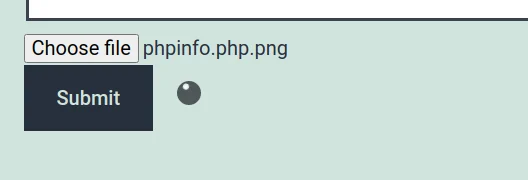
Contact Form 7 file upload form
Tracing the code and adding breakpoints leads to the code where the plugin copies the file to a random directory.

Random dir name creation
The plugin creates a random directory inside /wp-content/uploads/wpcf7_uploads, and it looks like this:
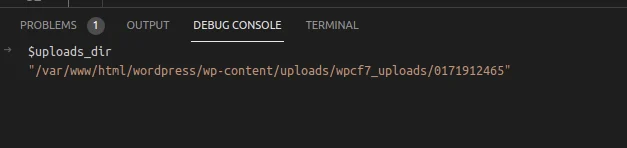
Random dir name, low entropy
Insecure random directory name
The directory name is numeric. The plugin generates it with mt_rand together with a 0 prefix.
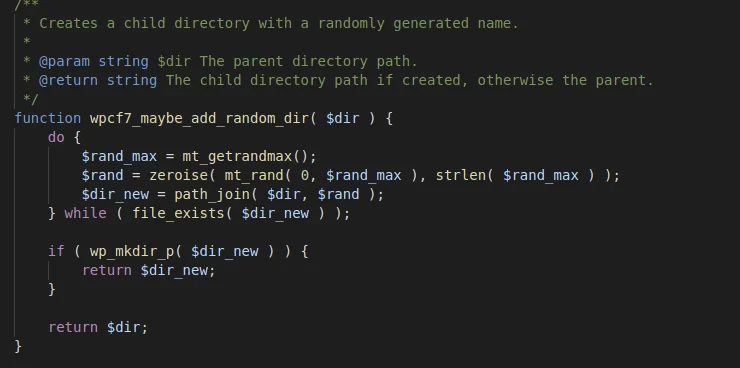
Insecure radom dir name generation
mt_rand is not cryptographically secure, which is the first WordPress plugin vulnerability found here and something that may be usable in an attack later.
Filename sanitisation in the plugin
The plugin calls its own function, wpcf7_antiscript_file_name, to prevent uploading malicious files such as php, sh, py or rb, anything that could result in a direct shell. A filename with a double extension was tested to see what sanitisation does to it.
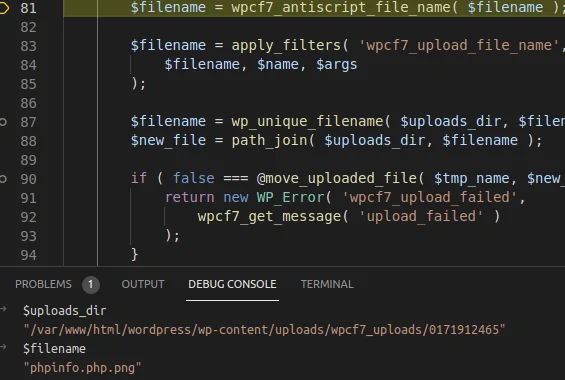
Filename sanitisation method

Filename sanitisation on php extensions
The function adds an underscore to the .php extension to neutralise it. Further testing with the debugger gives more insight.
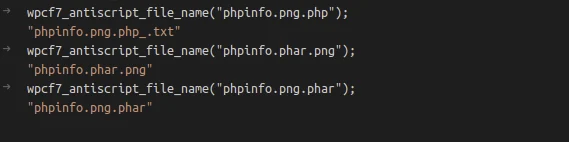
Filename sanitisation behaviour
It sanitises the .php extension by adding an underscore and also adds a .txt extension at the end. With the .phar extension, nothing happens.
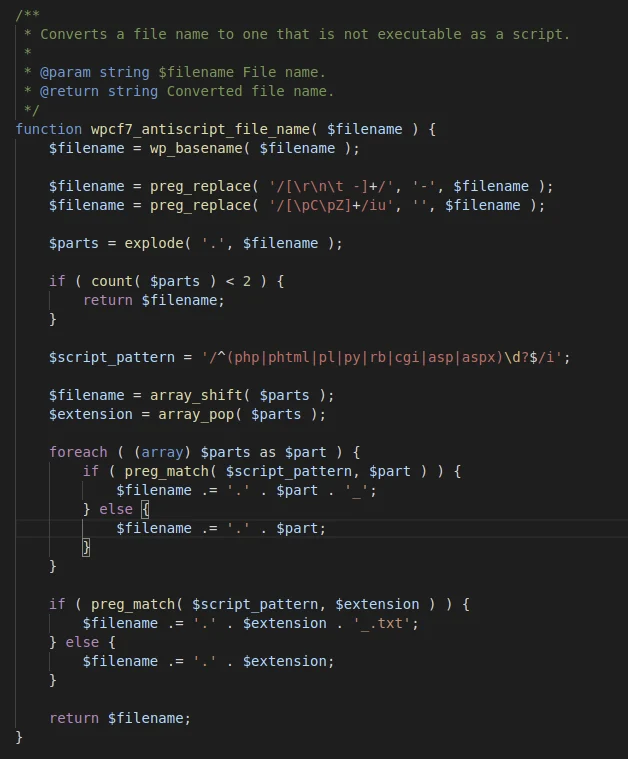
Filename sanitisation, checking for dangerous extensions
The WordPress sanitisation on top
Tracing further reveals that wp_unique_filename is also called. This is a WordPress-specific function that sanitises the filename again and implements an excellent whitelist, so even if an issue were found in wpcf7_antiscript_file_name, this second check would still have to be bypassed.
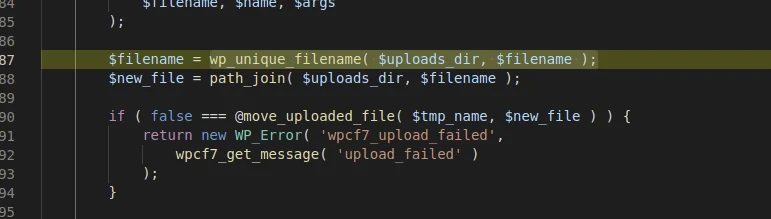
Its behaviour, considering the earlier findings, is as follows:
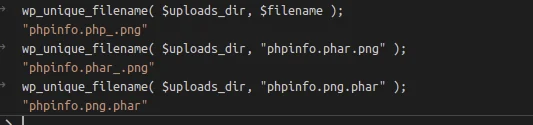
Filename sanitisation
It sanitises the .phar extension if it is the first extension, but ignores it if it is the second extension.
The race condition and the .htaccess
Tracing the code further reveals another challenge: the plugin deletes everything shortly after upload.
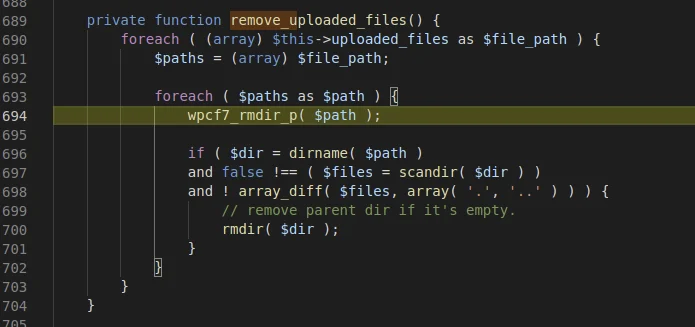
Wordpress plugins vulnerabilities, race condition vulnerability
So a race condition would also have to be exploited. Putting a breakpoint before deletion and trying to access the new directory and its contents shows that access is not possible.
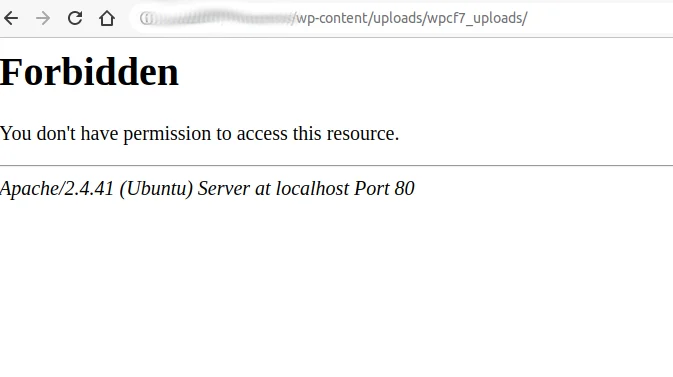
A .htaccess file was suspected, and checking confirms it: there is a Deny from all in the plugin upload directory.

To summarise, the challenges to overcome are:
- guessing a random directory name which holds the newly uploaded file;
- various sanitisation steps on the filename, with the WordPress sanitisation being solid;
- the plugin deleting the random directory and the uploaded file after upload;
.htaccesspreventing access to the directory.
At this point two WordPress plugin vulnerabilities had been found: an insecure directory name creation and a race condition vulnerability.
Exploitation
Step 1: an arbitrary file upload in LiteSpeed Cache
LiteSpeed Cache contains an authenticated arbitrary file upload vulnerability. The researcher controls the path and the file contents. Some strict validation is done on the path (extension), and no bypass was found for that. However, there is no restriction on the file content, so anything can be written there.
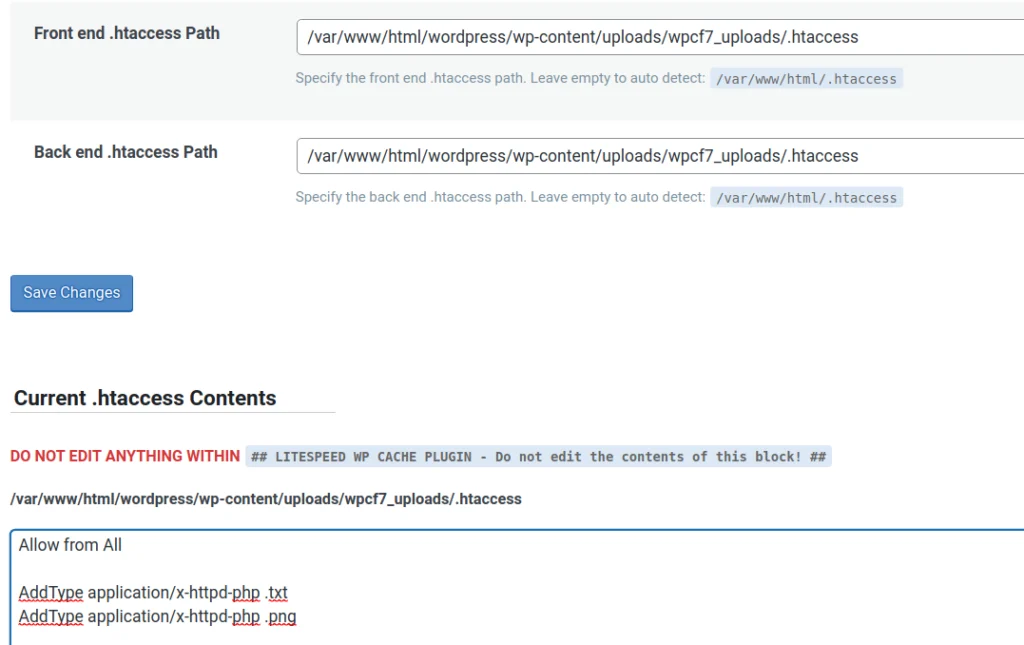
AFU vulnerability in the LiteSpeed Cache
Step 2: overwriting .htaccess
The .htaccess file from the previous plugin is overwritten. The entire folder is made publicly accessible with an Allow from All directive, and .txt and .png files are made executable as php code.
With that, three of the challenges are gone: the random directory name can be leaked, sanitisation on the filename and extension is irrelevant, and only the race condition remains.
Step 3: winning the race
A POC in python was developed for winning the race. It is very simple: it runs a thread that continuously tries to read the name of the newly created random directory. The POC continuously searches for a phpinfo.txt in the created directory, so that is the file that has to be uploaded from the frontend. When the race is won and phpinfo.txt is executed, it writes another file, shell.txt, which becomes the permanent shell on the system.
A phpinfo.txt file gets written and then it is quickly deleted:
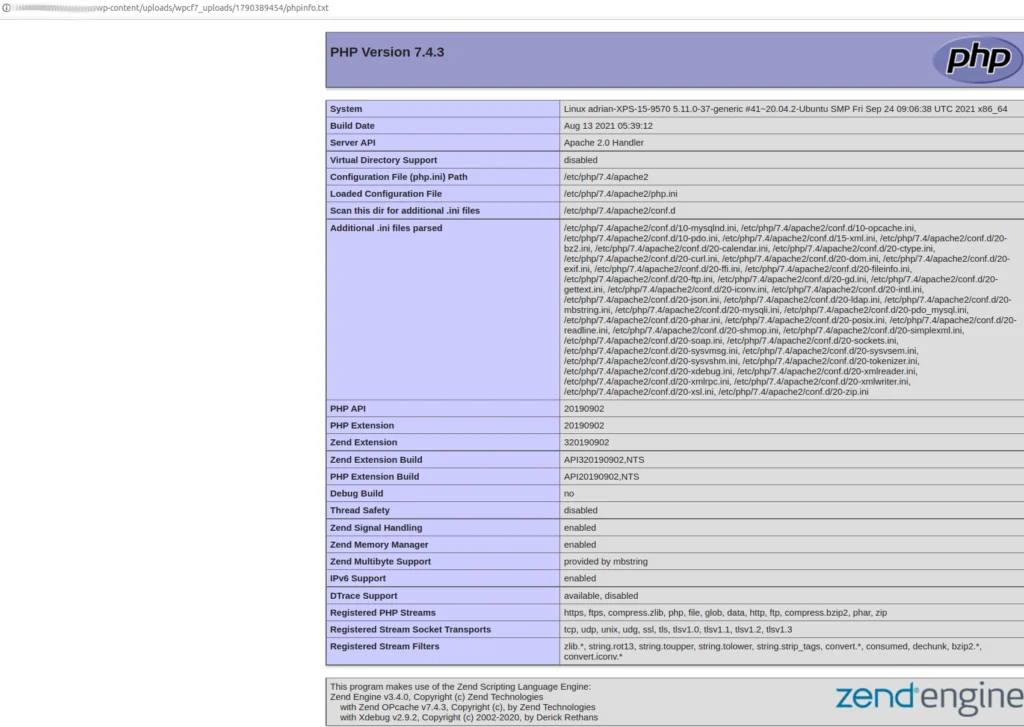
Phpinfo uploaded
Winning the race and executing phpinfo.txt writes shell.txt, a permanent shell.
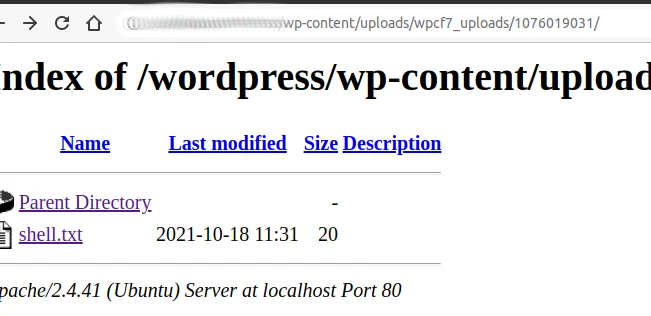
Winning the race and writing a shell
One thing noticed is that the newly written permanent shell (shell.txt) stops the newly random directory from being deleted. For extra help with winning the race condition, the researcher points to a wallarm resource with tips. The shell executing commands:

RCE on the server
Root cause
The insecure randomness is in the directory name: mt_rand with a 0 prefix produces a numeric name that is not cryptographically secure, so the name is not cryptographically secure, something the researcher thought might be usable in an attack later. The plugin's own filename sanitiser, wpcf7_antiscript_file_name, neutralises .php by adding an underscore and appending .txt, but leaves .phar alone. The WordPress wp_unique_filename whitelist sanitises .phar when it is the first extension but ignores it when it is the second extension. The plugin also deletes the uploaded directory shortly after upload, and a Deny from all in the upload directory's .htaccess blocks direct access.
On its own, Contact Form 7 is not directly exploitable: the report explicitly states there is no security issue directly exploitable with the Contact Form 7 plugin. The combination is what breaks it. The arbitrary file upload in LiteSpeed Cache allows the .htaccess to be overwritten with Allow from All and with .txt and .png made executable as php, which removes the access restriction and makes the filename sanitisation irrelevant. What remains is the race condition against the deletion, which the POC wins by continuously reading the new directory name and looking for phpinfo.txt.
Impact
An authenticated attacker can chain the two plugins to obtain RCE on the server. The conditions are: authentication is needed, both plugins must be present, and the race condition must be won before the uploaded directory and file are deleted. The report notes that the vulnerability has been fixed in the latest version of the LiteSpeed Cache plugin, and clarifies that there is no security issue directly exploitable with Contact Form 7.
Fix
The report states that the vulnerability has been fixed in the latest version of the LiteSpeed Cache plugin. It does not describe the code change. The general lessons given are that arbitrary file upload vulnerabilities are still very common, that only the WP plugins that are really needed should be installed, and that blogs containing highly sensitive data should be audited as well.
Variants to test
- Predictable upload directory names. Look for upload directories named with
mt_rand,randor similar non-cryptographic generators, especially with a fixed prefix. A positive result is a directory name you can reproduce or enumerate from the generator's output. - Double-extension sanitisation gaps. Try filenames where a dangerous extension is the second extension, as with
.pharhere. A positive result is a file that survives sanitisation with an executable extension intact. - Upload directories protected only by
.htaccess. Check whether another plugin with a file write primitive can overwrite the.htaccess. A positive result is a directory that becomes publicly accessible and executes the uploaded content. - Short-lived uploads. Where a plugin deletes uploaded files shortly after upload, test a race with a thread that continuously reads the directory name and requests the uploaded file. A positive result is a request that lands before deletion and executes.
- Permanent shell persistence. After winning the race, check whether a written file prevents the directory from being deleted, as
shell.txtdid here. A positive result is a file that survives cleanup and keeps executing commands.
References
- Another race condition in the file upload exploit (double race condition)
- wallarm: race condition in web applications
- POC
About Post Author

Adrian Tiron, Cloud Application Security Consultant / Pentester.
What happened, in plain words
A security researcher was asked to look at a WordPress website and see whether its plugins could be abused to take control of the server. WordPress is a popular system for building websites; a plugin is an add-on that gives the site extra features, like a contact form or a speed booster. Plugins are written by many different people, so each one has to be checked on its own.
The researcher found two plugins that both accept file uploads, which is always interesting functionality to abuse. One is Contact Form 7, which lets you add a contact form to any article and optionally attach a file. The other is LiteSpeed Cache, which performs various optimisations and makes a WordPress install load faster.
Here is the twist. Looked at separately, each plugin seems secure. Used together, they are not: one plugin can be used to circumvent the security mechanisms created by the other, and the result is remote code execution (RCE), meaning an attacker can run their own commands on the server. Authentication is needed to exploit this, so the attacker must already have a way to log in.
The researcher reported an insecure randomness vulnerability and an arbitrary file upload vulnerability. This article walks through how the two fit together.
Setting the scene
Before testing anything, you need to know which plugins a site runs. The researcher enumerated the plugins using WPScan, a tool that inspects a WordPress site and lists what it is built from. Think of it like reading the ingredients list on a packet instead of guessing from the picture.
Then the setup was recreated in a local environment, a copy of the site running on the researcher's own machine. This matters for two reasons: you can break things without harming a real site, and you can attach a debugger, a tool that lets you pause a program mid-run and look at what it is doing. The technique used throughout is dynamic analysis: uploading files through the form and watching the code react, rather than only reading it.
Contact Form 7 is described as a very popular plugin with over 5+ million installations. Popularity is not protection; it just means a lot of sites share whatever weaknesses it has.
Contact Form 7: where do uploaded files go?
The first step is simply to use the feature as a normal visitor would. A file is uploaded through the contact form to observe how the plugin behaves and what sanitisation it applies to the filename. Sanitisation means cleaning up input: removing or altering characters that could be dangerous, the way a receptionist might cross out a suspicious line on a form before passing it on.
Contact Form 7 file upload form
Tracing the code and adding breakpoints leads to the code where the plugin copies the file to a random directory. A breakpoint is a marker you place on a line of code; when the program reaches it, it pauses, and you can inspect the values it is working with.
Random dir name creation
The plugin creates a random directory inside /wp-content/uploads/wpcf7_uploads, and it looks like this:
Random dir name, low entropy
A directory is just a folder. The path /wp-content/uploads/wpcf7_uploads is where WordPress keeps uploaded files; the plugin adds one more folder inside it, with a name it makes up on the spot. The point of a random name is that an outsider should not be able to guess where the file landed.
Insecure random directory name
The directory name is numeric. The plugin generates it with mt_rand together with a 0 prefix.
Insecure radom dir name generation
mt_rand is a function that produces random-looking numbers. The catch is that it is not cryptographically secure: its output is predictable enough that someone who knows how it works can narrow down or reproduce the values. Compare it to shuffling cards badly: the deck looks mixed, but a sharp observer can work out the order. This is the first WordPress plugin vulnerability found here, and something that may be usable in an attack later.
Filename sanitisation in the plugin
The plugin calls its own function, wpcf7_antiscript_file_name, to prevent uploading malicious files such as php, sh, py or rb, anything that could result in a direct shell. A shell here means a way to type commands into the server and have them run. A filename with a double extension was tested to see what sanitisation does to it. A double extension is a name like something.php.txt: two dots, so the file claims two types at once, which is a classic trick for slipping past filters.
Filename sanitisation method
Filename sanitisation on php extensions
The function adds an underscore to the .php extension to neutralise it. In other words, it turns the dangerous ending into something harmless, the way a bouncer might put a sticker over a fake stamp on your hand.
Further testing with the debugger gives more insight.
Filename sanitisation behaviour
It sanitises the .php extension by adding an underscore and also adds a .txt extension at the end. With the .phar extension, nothing happens.
Filename sanitisation, checking for dangerous extensions
.phar is another file type that PHP, the language WordPress is written in, can execute. Leaving it untouched is a gap: the filter knows about .php but not about its cousin.
The WordPress sanitisation on top
Tracing further reveals that wp_unique_filename is also called. This is a WordPress-specific function that sanitises the filename again and implements an excellent whitelist. A whitelist is the opposite of a blacklist: instead of listing what is forbidden, it lists what is allowed, and everything else is refused. That is generally the stronger approach, because you cannot forget an entry you never had to think of.
Because of this, even if an issue were found in wpcf7_antiscript_file_name, this second check would still have to be bypassed.
Its behaviour, considering the earlier findings, is as follows:
Filename sanitisation
It sanitises the .phar extension if it is the first extension, but ignores it if it is the second extension. So the whitelist has a blind spot at the second dot.
The race condition and the .htaccess
Tracing the code further reveals another challenge: the plugin deletes everything shortly after upload.
Wordpress plugins vulnerabilities, race condition vulnerability
So a race condition would also have to be exploited. A race condition is a timing problem: two things happen in parallel, and the attacker wins by acting in the tiny window between them. Picture a shop assistant who puts a parcel on the counter and takes it to the back room a second later; if you grab it in that second, you have it. Here the window is between the file being written and the plugin deleting it.
Putting a breakpoint before deletion and trying to access the new directory and its contents shows that access is not possible.
A .htaccess file was suspected, and checking confirms it: there is a Deny from all in the plugin upload directory.
.htaccess is a small configuration file that a web server reads for a folder, and it can allow or block access. Deny from all means nobody may fetch anything from that folder over the web, even if they know the exact address.
To summarise, the challenges to overcome are:
- guessing a random directory name which holds the newly uploaded file;
- various sanitisation steps on the filename, with the WordPress sanitisation being solid;
- the plugin deleting the random directory and the uploaded file after upload;
.htaccesspreventing access to the directory.
At this point two WordPress plugin vulnerabilities had been found: an insecure directory name creation and a race condition vulnerability. Neither, by itself, gives an attacker a shell.
Exploitation
Step 1: an arbitrary file upload in LiteSpeed Cache
LiteSpeed Cache contains an authenticated arbitrary file upload vulnerability. Arbitrary file upload means the attacker can make the server store a file of their choosing, rather than only the types the feature was designed for. Authenticated means you must be logged in to reach it.
The researcher controls the path and the file contents. Some strict validation is done on the path (extension), and no bypass was found for that. However, there is no restriction on the file content, so anything can be written there. In plain terms: the plugin checks what the file is called, but not what is inside it.
AFU vulnerability in the LiteSpeed Cache
Step 2: overwriting .htaccess
The .htaccess file from the previous plugin is overwritten. The entire folder is made publicly accessible with an Allow from All directive, and .txt and .png files are made executable as php code. A directive is simply an instruction in that configuration file. Allow from All reverses the earlier Deny from all, and telling the server to treat .txt and .png as PHP means a file that looks harmless by its name will actually be run as a program.
With that, three of the challenges are gone: the random directory name can be leaked, sanitisation on the filename and extension is irrelevant, and only the race condition remains. Leaked here means the attacker can now discover the folder name by looking, instead of having to guess it.
Step 3: winning the race
A POC in python was developed for winning the race. POC stands for proof of concept: a small program that demonstrates the attack really works. It is very simple: it runs a thread that continuously tries to read the name of the newly created random directory. A thread is one line of work inside a program; running one in the background lets the program keep trying while other things happen.
The POC continuously searches for a phpinfo.txt in the created directory, so that is the file that has to be uploaded from the frontend. The frontend is the public-facing part of the site, the pages a normal visitor sees. When the race is won and phpinfo.txt is executed, it writes another file, shell.txt, which becomes the permanent shell on the system. Permanent matters because the plugin deletes the folder; a file that writes another file survives that cleanup.
A phpinfo.txt file gets written and then it is quickly deleted:
Phpinfo uploaded
Winning the race and executing phpinfo.txt writes shell.txt, a permanent shell.
Winning the race and writing a shell
One thing noticed is that the newly written permanent shell (shell.txt) stops the newly random directory from being deleted. For extra help with winning the race condition, the researcher points to a wallarm resource with tips. The shell executing commands:
RCE on the server
Why it works
The insecure randomness is in the directory name: mt_rand with a 0 prefix produces a numeric name that is not cryptographically secure, so the name is not cryptographically secure, something the researcher thought might be usable in an attack later. Brute-forcing means trying many possibilities until one works.
The plugin's own filename sanitiser, wpcf7_antiscript_file_name, neutralises .php by adding an underscore and appending .txt, but leaves .phar alone. The WordPress wp_unique_filename whitelist sanitises .phar when it is the first extension but ignores it when it is the second extension. The plugin also deletes the uploaded directory shortly after upload, and a Deny from all in the upload directory's .htaccess blocks direct access.
On its own, Contact Form 7 is not directly exploitable: the report explicitly states there is no security issue directly exploitable with the Contact Form 7 plugin. The combination is what breaks it. The arbitrary file upload in LiteSpeed Cache allows the .htaccess to be overwritten with Allow from All and with .txt and .png made executable as php, which removes the access restriction and makes the filename sanitisation irrelevant. What remains is the race condition against the deletion, which the POC wins by continuously reading the new directory name and looking for phpinfo.txt.
What an attacker gets
An authenticated attacker can chain the two plugins to obtain RCE on the server. The conditions are: authentication is needed, both plugins must be present, and the race condition must be won before the uploaded directory and file are deleted. The report notes that the vulnerability has been fixed in the latest version of the LiteSpeed Cache plugin, and clarifies that there is no security issue directly exploitable with Contact Form 7.
The fix and the lessons
The report states that the vulnerability has been fixed in the latest version of the LiteSpeed Cache plugin. It does not describe the code change. The general lessons given are that arbitrary file upload vulnerabilities are still very common, that only the WP plugins that are really needed should be installed, and that blogs containing highly sensitive data should be audited as well.
Things worth testing elsewhere
- Predictable upload directory names. Look for upload directories named with
mt_rand,randor similar non-cryptographic generators, especially with a fixed prefix. A positive result is a directory name you can reproduce or enumerate from the generator's output. - Double-extension sanitisation gaps. Try filenames where a dangerous extension is the second extension, as with
.pharhere. A positive result is a file that survives sanitisation with an executable extension intact. - Upload directories protected only by
.htaccess. Check whether another plugin with a file write primitive can overwrite the.htaccess. A positive result is a directory that becomes publicly accessible and executes the uploaded content. - Short-lived uploads. Where a plugin deletes uploaded files shortly after upload, test a race with a thread that continuously reads the directory name and requests the uploaded file. A positive result is a request that lands before deletion and executes.
- Permanent shell persistence. After winning the race, check whether a written file prevents the directory from being deleted, as
shell.txtdid here. A positive result is a file that survives cleanup and keeps executing commands.
References
- Another race condition in the file upload exploit (double race condition)
- wallarm: race condition in web applications
- POC
About Post Author
Adrian Tiron, Cloud Application Security Consultant / Pentester.
Glossary
- WordPress: a popular system for building and running websites, extended with add-ons called plugins.
- Plugin: an add-on that gives a website extra features, written by many different authors.
- Remote code execution (RCE): an attacker's ability to run their own commands on a server.
- Authentication: proving who you are, usually by logging in; an authenticated attacker already has valid access.
- WPScan: a tool that inspects a WordPress site and lists the plugins and other components it uses.
- Local environment: a copy of the site running on the researcher's own machine, safe to break and easy to debug.
- Debugger: a tool that pauses a running program so you can inspect what it is doing.
- Breakpoint: a marker on a line of code that pauses the program when reached.
- Dynamic analysis: testing by running the software and observing its behaviour, rather than only reading the code.
- Sanitisation: cleaning up input by removing or altering characters that could be dangerous.
- Directory: a folder.
mt_rand: a function that produces random-looking numbers that are not cryptographically secure.- Cryptographically secure: random enough that the output cannot realistically be predicted or reproduced.
- Entropy: the amount of unpredictability in a value; low entropy means easier to guess.
- Shell: a way to type commands into a server and have them run.
- Double extension: a filename with two dots and two endings, such as
something.php.txt, used to slip past filters. .php: the file type that PHP, the language WordPress is written in, executes..phar: another file type that PHP can execute.- Whitelist: a list of what is allowed, with everything else refused.
- Blacklist: a list of what is forbidden, with everything else allowed.
- Race condition: a timing problem where an attacker acts in the short window between two parallel events.
.htaccess: a small configuration file a web server reads for a folder, able to allow or block access.Deny from all: a directive meaning nobody may fetch anything from that folder over the web.Allow from All: the opposite directive, making a folder publicly accessible.- Directive: an instruction written in a configuration file.
- Arbitrary file upload: a flaw that lets an attacker store a file of their choosing on the server.
- POC (proof of concept): a small program demonstrating that an attack really works.
- Thread: one line of work inside a program, able to run in the background.
- Frontend: the public-facing part of a site, the pages a normal visitor sees.
- Brute-forcing: trying many possibilities until one works.
- Persistence: keeping access after the original opening is closed, for example a file that survives cleanup.