Discord Desktop - Remote Code Execution
The Discord desktop app, built on Electron, had an XSS in a Vimeo embed and a misconfigured new-window handler that allowed opening a new window. By redirecting that window to a different origin, the sandbox was cleared, enabling a V8 exploit to achieve remote code execution.

During our prototype pollution research, BlackFan reported an XSS to an BBP. The XSS report wasn’t getting much attention and was still in triaged state from two months with no response.
The full write-up lives on its author's site
It belongs to its author, so we link to it rather than copy it. The other two tabs are our own rewrites, checked against it.
Context
Discord ships a desktop client built on ElectronJS. The client renders the chat interface, including link embeds, in Chromium, and the report treats the desktop application as the target: the goal was remote code execution on the user's machine, reached through an XSS in an embed rather than through a direct attack on the main Discord frontend.
The author came to this after a prototype pollution research collaboration. In that earlier work, BlackFan reported an XSS to a bug bounty program whose scope also included a desktop application. That application was not Electron based, but the team still managed to escalate to RCE with ptrYudai's help, and the program fixed and paid out. That result is what pushed the author towards hacking desktop applications, and Discord was the natural next target because it was the tool the collaboration used.
Setup
Discord's desktop application is an Electron app, and the report notes that the JavaScript used to build it can be extracted from the packaged archive. The command used was:
1npx asar extract /Applications/Discord.app/Contents/Resources/app.asar ./
This unpacks app.asar into the current directory, giving the application's JavaScript for source code auditing. The author prefers source auditing over black box testing, and notes that for JavaScript targets the source is usually obtainable, whether the target is a web frontend or a JS based desktop application.
The Electron version in use was 9-x-y, built on the relatively old Chrome/83.0.4103.122. The bug was reported on July 10th 2021.
Finding it
After extraction, the main window options showed that the usual Electron misconfigurations were not present: nodeIntegration is disabled and contextIsolation is enabled.
 1 const mainWindowOptions = {
 2    title: 'Discord',
 3    webPreferences: {
 4      blinkFeatures: 'EnumerateDevices,AudioOutputDevices',
 5      nodeIntegration: false,
 6      preload: _path.default.join(__dirname, 'mainScreenPreload.js'),
 7      nativeWindowOpen: true,
 8      enableRemoteModule: false,
 9      spellcheck: true,
10      contextIsolation: true,
11    }
12  };
Masato had previously exploited Discord when contextIsolation was disabled, and his blog is recommended as a starter for ElectronJS work. Here, however, the webPreferences look sound by the standards of earlier Electron RCEs, with one exception: the sandbox flag is missing. If sandbox is not set to true, the app runs without a sandbox by default. Combined with the old Chromium build, this made RCE look achievable, because there were quite a few v8 bugs available in the Chromium patches for that version.
The remaining problem was getting code execution inside the application in the first place. The Discord frontend uses ReactJS, and after a few days the author concluded that finding XSS on the main Discord app was hard, with no interesting ReactJS sinks visible. Taking motivation from Masato's blog, the search moved to Discord embeds.
Exploitation
Step 1: XSS in a Vimeo embed
Working with Harsh Jaiswal, the author found an XSS on one of the Vimeo endpoints used by Discord embeds. Vimeo's CSP made it hard to load an external script to trigger the exploit. The endpoint returned:
1Content-Security-Policy: default-src 'none'; script-src 'unsafe-inline'
Because the Discord Chrome version is old, the author used a CSP bypass previously read on crbug.com to load an external iframe in the Vimeo embed by bypassing frame-src. The following HTML was hosted, and pasting the link into the Discord chat popped an alert box in the Vimeo embed:
1<!DOCTYPE html>
2<html>
3<head>
4 <meta charset="utf-8">
5 <meta property="og:title" content="RCE DEMO">
6 <meta property="og:description" content="asdasdf<b>Description</b<>">
7 <meta property="og:type" content="video">
8 <meta property="og:image" content="https://pbs.twimg.com/profile_images/1313475569426857988/Q0I0VkmF_400x400.jpg">
9 <meta property="og:image:type" content="image/jpg">
10 <meta property="og:image:width" content="1280">
11 <meta property="og:image:height" content="720">
12 <meta property="og:video:url" content="https://redacted/redacted?redacted=x&redacted=javascript://asd.com?f=1%27%250awindow.open(atob(location.search.split(String.fromCharCode(0x26))[2].split(String.fromCharCode(0x3d))[1].substr(5).replace(location.search.split(String.fromCharCode(0x26))[2].split(String.fromCharCode(0x3d))[1].substr(0,5),String.fromCharCode(0x2b)).replace(location.search.split(String.fromCharCode(0x26))[2].split(String.fromCharCode(0x3d))[1].substr(0,5),String.fromCharCode(0x2b))),location.search.split(String.fromCharCode(0x26))[2].split(String.fromCharCode(0x3d))[1].substr(0,5))//&payload=[redacted]">
13 <meta property="og:video:type" content="text/html">
14 <meta property="og:video:width" content="1280">
15 <meta property="og:video:height" content="720">
16</head>
17<body>
18test
19</body>
20</html>
The Open Graph tags describe the page as a video embed and set og:video:url to a crafted URL. The injected value uses a javascript:// URL and a payload parameter carrying base64 data, and the inline script reconstructs the payload from the query string using String.fromCharCode for & and =, then calls window.open with the decoded value.
Step 2: Sandbox bypass by escaping to the main window
The v8 exploit was ready to run in the Vimeo embed, but all iframes in the Discord Desktop Application run in sandbox mode; Electron apparently enables the sandbox in all embeds by default. That looked like the end of the story.
While discussing the issue in the Discord channel, Masato pointed out that a new window could be opened because of insufficient new-window event restriction by Discord.
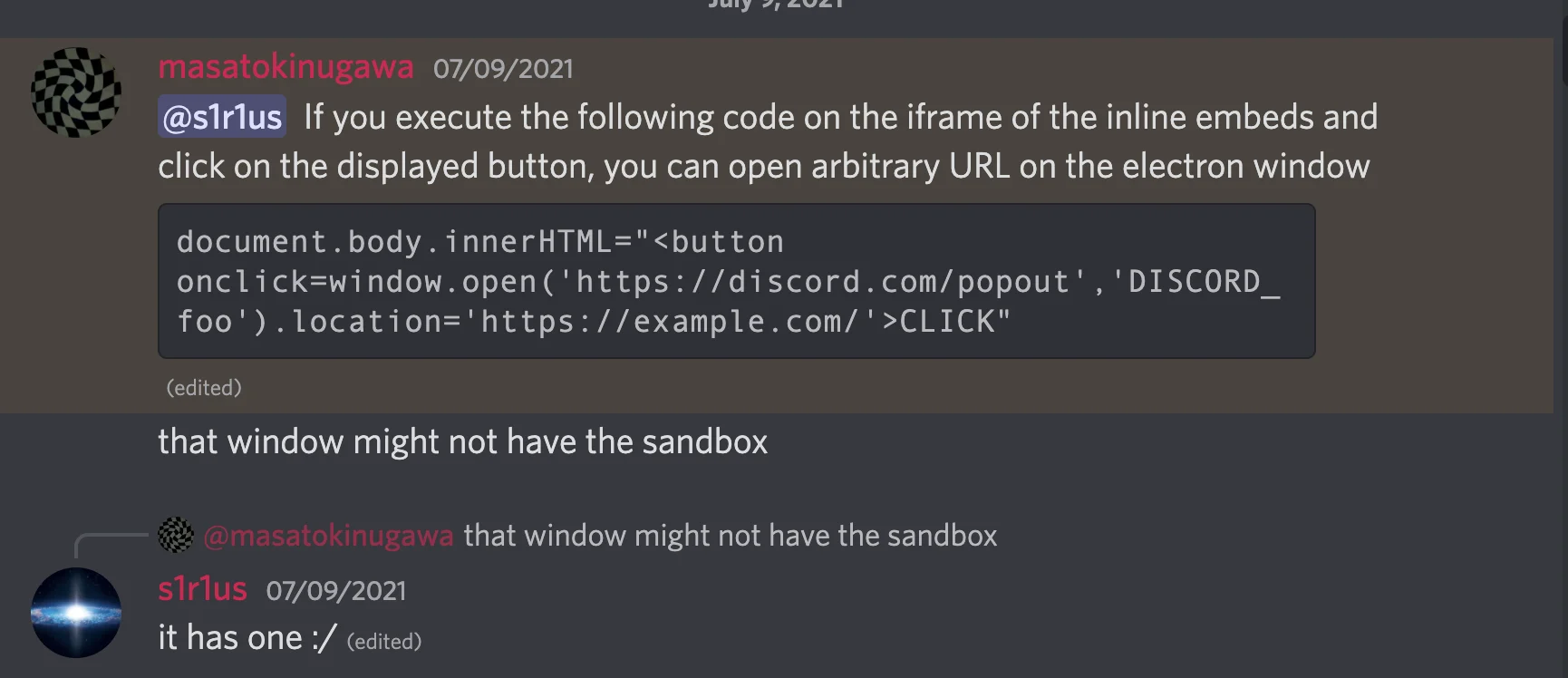
Opening the exploit in a new window still left the sandbox enabled. After some time the author realised that redirecting to a different origin clears the sandbox. The likely explanation given is that the renderer process of the Vimeo embed is reused for the new window, and after the redirect a new process without the sandbox is created.
Step 3: V8 exploit
At the time the author was not confident writing v8 exploits, so ptrYudai helped write one using crbug.com/1196683. After a few trial and error rounds, the calculator was popped.
Step 4: PoC
The PoC that pops the calculator is shown in the video below.
Root cause
Two weaknesses combine. First, the application runs without the Electron sandbox flag, so the renderer is not sandboxed by default, and the bundled Chromium (Chrome/83.0.4103.122 on Electron 9-x-y) is old enough that known v8 bugs apply. Second, the new-window event handler is misconfigured: it does not sufficiently restrict what external sites can do, allowing an embed to open a new window. The sandbox on embeds initially blocks the exploit, but a redirect to a different origin clears the sandbox, possibly because the embed's renderer process is reused for the new window.
Impact
An attacker who can get a crafted link into a Discord chat can achieve remote code execution on the desktop client. The chain requires an XSS in an embed provider (here a Vimeo endpoint), a CSP bypass to load the external exploit page, the new-window weakness to escape the embed, a cross-origin redirect to clear the sandbox, and a v8 exploit for the bundled Chromium.
Fix
Discord upgraded its Electron version to the latest and fixed the new-window event handler misconfiguration by not allowing external sites to be loaded in the new window.
Variants to test
- Check
webPreferencesin extractedapp.asarfor a missingsandbox: true, especially on older Electron majors. A positive result is a renderer that can run native code once a v8 bug is triggered. - Test embed providers for XSS in Open Graph driven embeds, using
og:video:typeoftext/htmland ajavascript:URL. A positive result is script execution inside the embed iframe. - Test whether an embed can open a new window through the
new-windowhandler. A positive result is a new window whose contents are attacker controlled. - From that new window, redirect to a different origin and check whether the sandbox is gone, for example by testing whether a v8 exploit succeeds after the redirect. A positive result is code execution in the new renderer.
- Review the CSP of embed providers for
script-src 'unsafe-inline'withdefault-src 'none', and check whether the bundled Chromium is old enough for a knownframe-srcbypass. A positive result is an external iframe loading despite the policy.
What happened, in plain words
Discord is a chat application. Besides the version you open in a browser, it has a desktop program you install on your computer. That desktop program is built with a toolkit called ElectronJS, which lets a company write a desktop app using the same web technology (HTML, JavaScript, CSS) that websites use. Under the hood, Electron puts a web browser engine, Chromium (the open source core of Google Chrome), inside the app and shows your chat interface with it.
The goal of this research was remote code execution (RCE) on the user's machine. RCE means an attacker gets their own code to run on someone else's computer, not just inside a web page. That is the worst kind of outcome for a chat app, because the attacker's code runs with the same rights as the app itself.
The route taken was not a direct attack on Discord's own chat screens. It went through an embed: when you paste a link into a chat, Discord fetches a small preview of that page (a title, an image, a video player) and shows it inside the message. The plan was to get malicious JavaScript running inside one of those previews, then climb from there to running code on the machine.
The author arrived at this after earlier work on prototype pollution (a class of JavaScript bug where an attacker can tamper with the shared building blocks that a program uses internally). In that earlier project, a researcher called BlackFan reported an XSS (cross-site scripting, meaning getting your own JavaScript to run inside someone else's page) to a bug bounty program. A bug bounty program is a scheme where a company pays researchers for finding and reporting security bugs. That program's scope (the list of things you are allowed to test) also included a desktop application. That app was not built on Electron, but the team still managed to turn the XSS into RCE with ptrYudai's help, and the program fixed the bug and paid a bounty. That success is what pushed the author towards testing desktop applications, and Discord was the obvious next target because it was the tool the team used to collaborate.
Setting up: getting the app's source code
An Electron app is, in large part, JavaScript. The report notes that the JavaScript used to build Discord's desktop app can be pulled out of the packaged archive file. The command used was:
1npx asar extract /Applications/Discord.app/Contents/Resources/app.asar ./
Line by line:
npxis a helper that comes with Node.js (a program that runs JavaScript outside a browser). It runs a command-line tool without you having to install it globally first.asaris the name of the tool. An.asarfile is an archive format used by Electron to bundle an app's files into one package, a bit like a zip file.extracttells the tool to unpack the archive./Applications/Discord.app/Contents/Resources/app.asaris the path to the archive inside the installed Discord app on a Mac. On macOS, an application is really a folder ending in.app, and its resources live inside it../means "put the unpacked files here, in the current directory".
Why do this? Because reading the code is often easier than guessing. The author prefers source code auditing (reading the program's own code) over black box testing (poking at the running program from outside and watching what happens). For anything written in JavaScript, the source is usually obtainable, whether it is a website's frontend or a JavaScript-based desktop app.
The Electron version in use was 9-x-y, built on the relatively old Chrome/83.0.4103.122. The bug was reported on July 10th 2021.
Finding the weakness
After unpacking the app, the author looked at the options used to create the main window, the big window that shows your chats. The usual Electron mistakes were not there: nodeIntegration is disabled and contextIsolation is enabled.
 1 const mainWindowOptions = {
 2    title: 'Discord',
 3    webPreferences: {
 4      blinkFeatures: 'EnumerateDevices,AudioOutputDevices',
 5      nodeIntegration: false,
 6      preload: _path.default.join(__dirname, 'mainScreenPreload.js'),
 7      nativeWindowOpen: true,
 8      enableRemoteModule: false,
 9      spellcheck: true,
10      contextIsolation: true,
11    }
12  };
Line by line:
- Line 1 opens a JavaScript object called
mainWindowOptions, the settings for the main window. - Line 2 sets the window title to
Discord. - Line 3 starts
webPreferences, the block of settings that controls what the embedded web page is allowed to do. This is where most Electron security decisions live. - Line 4,
blinkFeatures, switches on two browser features related to audio devices. Not security relevant here. - Line 5,
nodeIntegration: false, is important. If it weretrue, JavaScript running in the page could directly use Node.js, which can read files and start programs. Setting it tofalseis the safe choice. - Line 6,
preload, names a script that runs before the page loads and can bridge the page and the app in a controlled way. - Line 7,
nativeWindowOpen: true, relates to how new windows are opened. - Line 8,
enableRemoteModule: false, turns off an older Electron feature that let page code reach into the app's internals. Off is good. - Line 9,
spellcheck: true, is just the spell checker. - Line 10,
contextIsolation: true, keeps the page's JavaScript and the preload script's JavaScript in separate worlds so one cannot tamper with the other. On is good. - Lines 11 and 12 close the blocks.
Masato had previously exploited Discord when contextIsolation was disabled, and his blog is recommended as a starter for anyone working on Electron apps. Here, though, the settings look sound by the standards of earlier Electron RCEs, with one exception: the sandbox flag is missing. In Electron, if sandbox is not explicitly set to true, the app runs without a sandbox by default. A sandbox is a cage around a process: even if an attacker gets code running inside it, the cage limits what that code can touch. No cage means a bug in the browser engine can turn into full code execution on the machine.
Combined with the old Chromium build, this made RCE look achievable, because there were quite a few v8 bugs available in the Chromium patches for that version. V8 is the JavaScript engine inside Chromium, the part that reads and runs JavaScript. Like any complex program, it has had bugs, and some of those bugs let an attacker who can run JavaScript break out of the engine and run their own machine code. Chromium patches are the public fixes for those bugs; an old browser that has not received the patches is still vulnerable to them.
The remaining problem was getting code execution inside the app in the first place. The Discord frontend uses ReactJS, a popular JavaScript library for building user interfaces. After a few days, the author concluded that finding XSS on the main Discord app was hard, with no interesting ReactJS sinks visible. A sink is a place in code where data ends up being used in a dangerous way, for example where text gets inserted into the page as HTML. Taking motivation from Masato's blog, the search moved to Discord embeds.
Exploitation
Step 1: XSS in a Vimeo embed
Working with Harsh Jaiswal, the author found an XSS on one of the Vimeo endpoints used by Discord embeds. Vimeo is a video hosting site; Discord shows a Vimeo player when someone pastes a Vimeo link. An endpoint is simply a specific address on a server that does a particular job, like a counter in a shop: you go to the right counter for the service you want.
Vimeo's CSP made it hard to load an external script to trigger the exploit. CSP stands for Content Security Policy. It is a rule set that a website sends to the browser saying which sources of content are allowed. If the policy says scripts may only come from the site itself, the browser refuses to run a script loaded from somewhere else. The endpoint returned:
1Content-Security-Policy: default-src 'none'; script-src 'unsafe-inline'
Line by line:
Content-Security-Policy:is the name of the response header, a line of information the server sends back with the page.default-src 'none'says that, by default, nothing may be loaded from anywhere: no images, no frames, no scripts from external addresses.script-src 'unsafe-inline'makes one exception: scripts written directly inside the page (inline scripts) are allowed. The wordunsafeis the browser's own warning that allowing inline scripts weakens the protection.
So the page could run its own inline JavaScript, but could not pull in a script file from the attacker's server. That is why the author needed a way around the policy.
Because the Discord Chrome version is old, the author used a CSP bypass previously read on crbug.com to load an external iframe in the Vimeo embed by bypassing frame-src. An iframe is a page inside a page, a little window showing another site's content. frame-src is the CSP rule that controls which addresses may be loaded in iframes. crbug.com is Chromium's public bug tracker, where browser bugs and their fixes are discussed.
The following HTML was hosted, and pasting the link into the Discord chat popped an alert box in the Vimeo embed:
1<!DOCTYPE html>
2<html>
3<head>
4 <meta charset="utf-8">
5 <meta property="og:title" content="RCE DEMO">
6 <meta property="og:description" content="asdasdf<b>Description</b<>">
7 <meta property="og:type" content="video">
8 <meta property="og:image" content="https://pbs.twimg.com/profile_images/1313475569426857988/Q0I0VkmF_400x400.jpg">
9 <meta property="og:image:type" content="image/jpg">
10 <meta property="og:image:width" content="1280">
11 <meta property="og:image:height" content="720">
12 <meta property="og:video:url" content="https://redacted/redacted?redacted=x&redacted=javascript://asd.com?f=1%27%250awindow.open(atob(location.search.split(String.fromCharCode(0x26))[2].split(String.fromCharCode(0x3d))[1].substr(5).replace(location.search.split(String.fromCharCode(0x26))[2].split(String.fromCharCode(0x3d))[1].substr(0,5),String.fromCharCode(0x2b)).replace(location.search.split(String.fromCharCode(0x26))[2].split(String.fromCharCode(0x3d))[1].substr(0,5),String.fromCharCode(0x2b))),location.search.split(String.fromCharCode(0x26))[2].split(String.fromCharCode(0x3d))[1].substr(0,5))//&payload=[redacted]">
13 <meta property="og:video:type" content="text/html">
14 <meta property="og:video:width" content="1280">
15 <meta property="og:video:height" content="720">
16</head>
17<body>
18test
19</body>
20</html>
Line by line:
- Line 1,
<!DOCTYPE html>, tells the browser this is an HTML page. - Line 2 opens the page, line 3 opens the
headsection, which holds information about the page rather than visible content. - Line 4 declares the character encoding, so text is read correctly.
- Lines 5 to 15 are Open Graph tags. Open Graph is a small set of standard tags that a page uses to describe itself to other sites, so that when the link is shared, the other site can build a preview. Discord reads these tags to decide what the preview looks like.
- Line 5,
og:title, gives the preview title, hereRCE DEMO. - Line 6,
og:description, gives the preview text. The value contains HTML-looking characters, which is a hint that the preview builder may not treat the text safely. - Line 7,
og:type, says the page is a video. - Lines 8 to 11 describe the preview image: its address, its type, and its width and height.
- Line 12,
og:video:url, is the key line. It points at the Vimeo endpoint, and the query string after the?carries the injected value. The value uses ajavascript://URL and apayloadparameter carrying base64 data. Base64 is a way of writing arbitrary data using only ordinary text characters, so it can travel safely inside a URL. The inline script reconstructs the payload from the query string usingString.fromCharCodefor&and=, then callswindow.openwith the decoded value.String.fromCharCodeturns a number into the character with that code, so0x26is&and0x3dis=.window.openasks the browser to open a new window.srcdocis an attribute that lets you put a whole HTML document directly inside an iframe instead of pointing at a file. - Lines 14 and 15 give the video's width and height.
- Line 16 closes the
head, lines 17 to 19 are the visible body with the wordtest, and line 20 closes the page.
Why this shape? Discord's preview builder trusts the Open Graph tags and builds an embed from them. By making the page claim to be a video with a crafted source URL, the author got Discord to build an embed from attacker-controlled input. The alert box was the proof that JavaScript was running in the context of the Vimeo embed.
Step 2: Sandbox bypass by escaping to the main window
The v8 exploit was ready to run in the Vimeo embed, but all iframes in the Discord Desktop Application run in sandbox mode; Electron apparently enables the sandbox in all embeds by default. That looked like the end of the story: the exploit could run, but the cage around it would stop it from doing anything useful.
While discussing the issue in the Discord channel, Masato pointed out that a new window could be opened because of insufficient new-window event restriction by Discord. In Electron, the app can listen for an event called new-window, which fires when a page tries to open a new window. The app is supposed to decide whether to allow it and what the new window may do. If that handler is too permissive, a page can open a window it should not be able to open.
Opening the exploit in a new window still left the sandbox enabled. After some time the author realised that redirecting to a different origin clears the sandbox. An origin is the combination of scheme, host and port, for example https://example.com on port 443. Two pages with different origins are treated by the browser as belonging to different sites, and the browser keeps them apart. The likely explanation given is that the renderer process of the Vimeo embed is reused for the new window, and after the redirect a new process without the sandbox is created. A renderer process is the separate program the browser uses to draw and run one page; keeping pages in separate processes is part of how browsers isolate sites from each other.
Step 3: V8 exploit
At the time the author was not confident writing v8 exploits, so ptrYudai helped write one using crbug.com/1196683. A v8 exploit is a piece of JavaScript crafted to abuse a specific bug in the JavaScript engine so that, instead of just running JavaScript, it gets the machine to run the attacker's own instructions. After a few trial and error rounds, the calculator was popped. Popping the calculator is the classic harmless demonstration: if the calculator program appears, the attacker's code really ran on the machine.
Step 4: PoC
The PoC that pops the calculator is shown in the video below. PoC stands for proof of concept: a minimal demonstration that the bug is real and exploitable.
Root cause
Two weaknesses combine. First, the application runs without the Electron sandbox flag, so the renderer is not sandboxed by default, and the bundled Chromium (Chrome/83.0.4103.122 on Electron 9-x-y) is old enough that known v8 bugs apply. Second, the new-window event handler is misconfigured: it does not sufficiently restrict what external sites can do, allowing an embed to open a new window. The sandbox on embeds initially blocks the exploit, but a redirect to a different origin clears the sandbox, possibly because the embed's renderer process is reused for the new window.
Impact
An attacker who can get a crafted link into a Discord chat can achieve remote code execution on the desktop client. The chain requires an XSS in an embed provider (here a Vimeo endpoint), a CSP bypass to load the external exploit page, the new-window weakness to escape the embed, a cross-origin redirect to clear the sandbox, and a v8 exploit for the bundled Chromium.
Fix
Discord upgraded its Electron version to the latest and fixed the new-window event handler misconfiguration by not allowing external sites to be loaded in the new window.
Variants to test
- Check
webPreferencesin the extractedapp.asarfor a missingsandbox: true, especially on older Electron majors. A positive result is a renderer that can run native code once a v8 bug is triggered. - Test embed providers for XSS in Open Graph driven embeds, using
og:video:typeoftext/htmland ajavascript:URL. A positive result is script execution inside the embed iframe. - Test whether an embed can open a new window through the
new-windowhandler. A positive result is a new window whose contents are attacker controlled. - From that new window, redirect to a different origin and check whether the sandbox is gone, for example by testing whether a v8 exploit succeeds after the redirect. A positive result is code execution in the new renderer.
- Review the CSP of embed providers for
script-src 'unsafe-inline'withdefault-src 'none', and check whether the bundled Chromium is old enough for a knownframe-srcbypass. A positive result is an external iframe loading despite the policy.
Glossary
- API: a defined way for one program to ask another program to do something, like a service counter with a fixed list of requests it accepts.
- ASAR: an archive format used by Electron to bundle an app's files into a single package, similar in spirit to a zip file.
- Base64: a way of encoding arbitrary data using only ordinary text characters, so it can be carried inside a URL or a text field.
- Black box testing: testing a running program from the outside without reading its code, judging only by what it does.
- Bug bounty program: a scheme where a company pays researchers for finding and reporting security bugs in its products.
- Chromium: the open source browser engine that Google Chrome and many other products, including Electron apps, are built on.
- Content Security Policy (CSP): a set of rules a website sends to the browser saying which sources of content (scripts, images, frames) are allowed.
- Cross-origin: belonging to a different origin, meaning a different combination of scheme, host and port.
- crbug.com: Chromium's public bug tracker, where browser bugs and their fixes are discussed.
- ElectronJS: a toolkit for building desktop applications using web technology (HTML, JavaScript, CSS) and the Chromium engine.
- Embed: a preview of a link shown inside a chat message, built from information the linked page provides about itself.
- Endpoint: a specific address on a server that performs a particular job.
- frame-src: the CSP rule that controls which addresses may be loaded inside iframes.
- Iframe: a page inside a page, a small window showing another site's content.
- Inline script: JavaScript written directly inside an HTML page rather than loaded from a separate file.
- JavaScript: the programming language that web pages use to be interactive, and that Electron apps are largely written in.
- new-window event: an Electron event that fires when a page tries to open a new window, which the app can allow, deny or restrict.
- Node.js: a program that runs JavaScript outside a browser, often used for tooling and servers.
- nodeIntegration: an Electron setting that, when enabled, lets page JavaScript use Node.js directly, which is dangerous.
- Open Graph: a small set of standard tags a page uses to describe itself to other sites so they can build link previews.
- Origin: the combination of scheme, host and port that identifies a site to the browser, for example
https://example.comon port 443. - PoC (proof of concept): a minimal demonstration that a bug is real and exploitable.
- Prototype pollution: a class of JavaScript bug where an attacker tampers with the shared building blocks a program uses internally.
- ReactJS: a popular JavaScript library for building user interfaces.
- Remote code execution (RCE): getting an attacker's own code to run on someone else's computer.
- Renderer process: the separate program a browser uses to draw and run one page, kept apart from other pages for isolation.
- Sandbox: a cage around a process that limits what code running inside it can touch, even if that code is malicious.
- Scope: the list of targets a bug bounty program allows researchers to test.
- Sink: a place in code where data ends up being used in a dangerous way, for example where text is inserted into a page as HTML.
- Source code auditing: reading a program's own code to find weaknesses, rather than poking at it from outside.
- srcdoc: an iframe attribute that lets you put a whole HTML document directly inside the iframe instead of pointing at a file.
- String.fromCharCode: a JavaScript function that turns a number into the character with that code, used here to build
&and=without writing them literally. - V8: the JavaScript engine inside Chromium, the part that reads and runs JavaScript.
- V8 exploit: a piece of JavaScript crafted to abuse a specific bug in the JavaScript engine so the machine runs the attacker's own instructions.
- webPreferences: the Electron settings block that controls what an embedded web page is allowed to do.
- XSS (cross-site scripting): getting your own JavaScript to run inside someone else's page.


