DOM XSS in edoverflow.com/tools/respond due to unsafe usage of the innerHTML property.
 Originally disclosed on HackerOne
- Triaged in under an hour
- Fixed in under an hour
- Disclosed after under an hour
Hi,
There's a DOM XSS vulnerability on edoverflow.com. This cannot be exploited without user-interaction so I had to make a clickjacking PoC to trick the user in triggering the payload her/himself.
#Reproduction Steps
- Open the attached HTML document in FireFox.
- Drag Frog 1 to the other (two) frogs.
- Click on the "Make friends!" button.
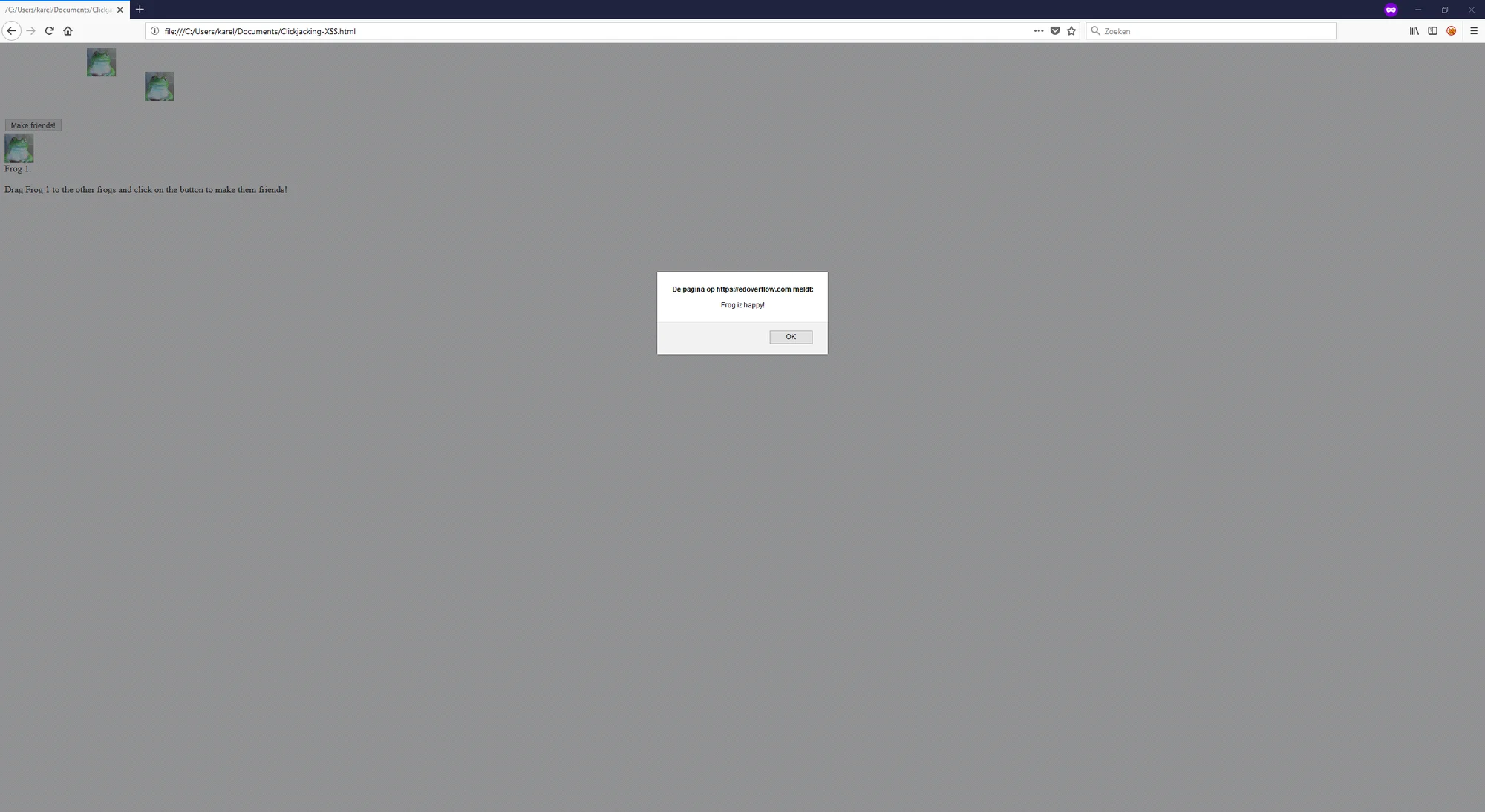
Result:
Vulnerable JavaScript
<html>
<script>
/* ===========================================
  Allow users to submit usernames and store
  them in localStorage for future use.
============================================*/
document.getElementById("form").addEventListener("submit", function(){
    var triager = document.getElementById("triager").value;
    var hacker = document.getElementById("hacker").value;
    console.log(hacker); // Why is this not executing?
    document.body.innerHTML = document.body.innerHTML.replace('{{triager}}', triager);
    document.body.innerHTML = document.body.innerHTML.replace('{{username}}', hacker);
    //localStorage.setItem("triager", triager);

//var retrieve = localStorage.getItem("triager"); // Why does this return "null"?
//document.body.innerHTML = document.body.innerHTML.replace('{{triager}}', retriev
document.getElementById("remove").addEventListener("click", function(){
    localStorage.removeItem("triager");
});
</script>
</html>
#Fix
- <input type="submit" name="submit" class="button">
+ <input type="button" class="button" id="submit">
       Allow users to submit usernames and store
       them in localStorage for future use.
     ============================================*/
-    document.getElementById("form").addEventListener("submit", function(){
-        var triager = document.getElementById("triager").value;
-        var hacker = document.getElementById("hacker").value;
+       elem = document.getElementsByTagName("pre")[0].children[0];
+
+    document.getElementById("submit").addEventListener("click", function(){
+        var trger = document.getElementById("triager").value;
+        var hckr = document.getElementById("hacker").value;
         console.log(hacker); // Why is this not executing?
-        document.body.innerHTML = document.body.innerHTML.replace('{{triager}}', triager);
-        document.body.innerHTML = document.body.innerHTML.replace('{{username}}', hacker);
-        //localStorage.setItem("triager", triager);
+               elem.innerText = elem.innerText.replace("{{username}}", trger).replace("{{triager}}", hckr);
+        localStorage.setItem("triager", trger);
     });

-    //var retrieve = localStorage.getItem("triager"); // Why does this return "null"?
-    //document.body.innerHTML = document.body.innerHTML.replace('{{triager}}', retrieve);
+    if(localStorage.getItem("triager") != null) {
+       var trger = localStorage.getItem("triager"); // Why does this return "null"?
+       elem.innerText = elem.innerText.replace("{{triager}}", trger);
+    }

     document.getElementById("remove").addEventListener("click", function(){
         localStorage.removeItem("triager");
     });
Raw (JS attached)
Impact
There is not much that can be done because it looks like most pages don't require authentication, I also don't think that the owner of this website would fall for something like this. ;)
Thanks, Karel.
The hacker selected the Cross-site Scripting (XSS) - DOM weakness. This vulnerability type requires contextual information from the hacker. They provided the following answers:
URL https://edoverflow.com/tools/respond/
Verified Yes
Context
The target is a tool hosted at https://edoverflow.com/tools/respond/. The page lets a user enter two values, a triager name and a hacker name, and substitutes them into a template shown on the page. The report describes the feature as allowing users to submit usernames and store them in localStorage for future use.
The vulnerability is a DOM-based cross-site scripting issue caused by writing user input into document.body.innerHTML. The researcher notes that it cannot be triggered without user interaction, so the proof of concept relies on clickjacking to make the victim supply and submit the payload themselves.
Setup
The only stated precondition is a browser: the reproduction steps say to open the attached HTML document in Firefox. No account, role or special tooling is mentioned. The researcher supplied a clickjacking page as the proof of concept, so the victim triggers the payload themselves.
Finding it
The researcher identified that the page takes the values of the triager and hacker input fields and performs string replacement directly on document.body.innerHTML. Because the replacement is parsed as HTML, any markup in the submitted value is rendered and executed rather than displayed as text. The report does not describe how the researcher first noticed the pattern; it presents the vulnerable code and the reproduction.
Exploitation
Step 1: Open the clickjacking page
The attached HTML document is opened in Firefox.
Step 2: Drag Frog 1 onto the other frogs
The victim drags "Frog 1" to the other two frogs.
Step 3: Click "Make friends!"
Clicking the button submits the form. The submit handler reads the two field values and writes them into the page body via innerHTML, so the payload executes.
The screenshot shows the result of the reproduction steps.
The vulnerable handler
The report includes the page's JavaScript, reproduced here exactly as given:
<html>
<script>
/* ===========================================
  Allow users to submit usernames and store
  them in localStorage for future use.
============================================*/
document.getElementById("form").addEventListener("submit", function(){
    var triager = document.getElementById("triager").value;
    var hacker = document.getElementById("hacker").value;
    console.log(hacker); // Why is this not executing?
    document.body.innerHTML = document.body.innerHTML.replace('{{triager}}', triager);
    document.body.innerHTML = document.body.innerHTML.replace('{{username}}', hacker);
    //localStorage.setItem("triager", triager);

//var retrieve = localStorage.getItem("triager"); // Why does this return "null"?
//document.body.innerHTML = document.body.innerHTML.replace('{{triager}}', retriev
document.getElementById("remove").addEventListener("click", function(){
    localStorage.removeItem("triager");
});
</script>
</html>
The important parts are the two replace calls. The handler takes the raw value of the triager field and the raw value of the hacker field and substitutes them into the serialised body HTML, then assigns the result back to document.body.innerHTML. The browser re-parses that string, so a value containing an HTML element with an event handler, or a script-bearing element, becomes live markup. The {{triager}} and {{username}} placeholders are the template markers the page renders for the user.
Root cause
The mistake is using innerHTML for a string replacement that includes attacker-controlled input. Assigning to innerHTML serialises the current DOM, performs the substitution, and then parses the whole string again as HTML. Any markup in the substituted value is therefore interpreted by the browser, which is the classic DOM XSS sink. The report does not describe any sanitisation or encoding step between reading the field values and the assignment, so nothing neutralises the markup before it reaches the sink.
Impact
The researcher is explicit that the impact is limited. Most pages on the site do not appear to require authentication, so there is little session-bound state to steal, and the researcher doubts the site owner would fall for the clickjacking lure. The realistic outcome is script execution in the origin of edoverflow.com when a victim is tricked into interacting with the framed page, which is why the report is rated low severity. The report does not claim any specific data exposure or account takeover.
Fix
The report proposes two changes. The first replaces the submit input with a plain button carrying an id, so the handler can be bound to a click instead of a form submission:
- <input type="submit" name="submit" class="button">
+ <input type="button" class="button" id="submit">
The second rewrites the handler so that it no longer touches document.body.innerHTML. Instead it selects the first pre element's first child and updates its innerText, which treats the substituted values as text rather than markup:
       Allow users to submit usernames and store
       them in localStorage for future use.
     ============================================*/
-    document.getElementById("form").addEventListener("submit", function(){
-        var triager = document.getElementById("triager").value;
-        var hacker = document.getElementById("hacker").value;
+       elem = document.getElementsByTagName("pre")[0].children[0];
+
+    document.getElementById("submit").addEventListener("click", function(){
+        var trger = document.getElementById("triager").value;
+        var hckr = document.getElementById("hacker").value;
         console.log(hacker); // Why is this not executing?
-        document.body.innerHTML = document.body.innerHTML.replace('{{triager}}', triager);
-        document.body.innerHTML = document.body.innerHTML.replace('{{username}}', hacker);
-        //localStorage.setItem("triager", triager);
+               elem.innerText = elem.innerText.replace("{{username}}", trger).replace("{{triager}}", hckr);
+        localStorage.setItem("triager", trger);
     });

-    //var retrieve = localStorage.getItem("triager"); // Why does this return "null"?
-    //document.body.innerHTML = document.body.innerHTML.replace('{{triager}}', retrieve);
+    if(localStorage.getItem("triager") != null) {
+       var trger = localStorage.getItem("triager"); // Why does this return "null"?
+       elem.innerText = elem.innerText.replace("{{triager}}", trger);
+    }

     document.getElementById("remove").addEventListener("click", function(){
         localStorage.removeItem("triager");
     });
The key property of the fix is the switch from innerHTML to innerText: the replacement result is inserted as text content, so angle brackets and event handlers in the submitted values are displayed literally instead of being parsed. The report also re-enables the localStorage persistence that the original code had commented out.
Variants to test
- Look for other pages that perform
document.body.innerHTML = document.body.innerHTML.replace(...)style templating. A positive result is that a value containing an element with an event handler renders and fires when the page updates. - Check any tool that echoes a submitted username or name back into the page. A positive result is that the value appears as live markup in the DOM inspector rather than as escaped text.
- Test whether the same substitution can be reached without a form submission, for example through a URL fragment or query parameter that pre-fills the field. A positive result is execution on page load with no click.
- Where a sink is only reachable through interaction, try framing the page and overlaying controls, as here. A positive result is that the victim's drag or click delivers the payload into the real form.
Hunting notes
This class of bug hides in client-side templating code: pages that take a value from an input, a fragment or storage and splice it into innerHTML, outerHTML or document.write. During recon, single-page tools and utilities that render a preview of what the user typed are worth a look, especially where the page source shows placeholder tokens such as {{username}} being replaced at runtime. The signal is a replace call whose result is assigned back to an HTML sink.
Because the sink here needs a user action, the researcher demonstrated reachability with a clickjacking page and a screenshot of the payload executing, which is what made the report verifiable. The researcher's own assessment was that there was little to gain from the origin.
What happened, in plain words
A small web tool on edoverflow.com lets a visitor type two names into a form and then shows those names back on the page. The page does this by taking the text you typed and pasting it into the page's own HTML, the language browsers use to describe what a page looks like. Pasting raw text into HTML is dangerous: if the text contains HTML of its own, the browser treats it as instructions rather than as words. That is the bug. Someone who can get a victim to type a crafted value into the form can make the victim's browser run code that the attacker chose.
The researcher who found it called it a DOM XSS. "DOM" is the Document Object Model, the browser's live in-memory model of the page. "XSS" is cross-site scripting, a class of bug where an attacker gets their own code to run inside someone else's website. Because the tool only misbehaves when someone actually submits the form, the researcher could not trigger it by simply sending a link. Instead they built a second page that frames the tool and puts decoy controls on top of it, so the victim thinks they are dragging frogs around while they are really filling in the form. That trick is called clickjacking.
The report was rated low severity. The researcher explains why: most pages on the site do not seem to require a login, so there is little private state to steal, and the site owner is unlikely to fall for the lure.
The target and the feature
The tool lives at https://edoverflow.com/tools/respond/. It has two input fields, one for a triager name and one for a hacker name, and it substitutes those values into a template that is displayed on the page. The report describes the feature as letting users submit usernames and store them in localStorage for future use. localStorage is a small storage area that browsers give each website, so a site can keep a value on your computer between visits without asking the server. Think of it as a labelled drawer in the browser that only that website can open.
Setup
The only thing the reproduction needs is a browser. The steps say to open the attached HTML document in Firefox. No account, no special role and no extra tooling are mentioned. The researcher supplied a clickjacking page as the proof of concept. A frame is a way for one page to display another page inside a rectangle. The victim interacts with the real page underneath while believing they are doing something else.
Finding it
The page reads the values of the triager and hacker fields and performs a string replacement directly on document.body.innerHTML. document.body is the part of the page you see, and innerHTML is a property that holds that part as an HTML string. When you assign a new string to innerHTML, the browser throws away the old content and parses the new string as HTML. So any markup inside the submitted value is rendered and executed rather than shown as text. The report does not say how the researcher first spotted the pattern; it presents the vulnerable code and the reproduction.
Exploitation
Step 1: Open the clickjacking page
The attached HTML document is opened in Firefox. The reason for this step is that the bug needs a real form submission, so the attacker has to get the victim to submit the form without realising it.
Step 2: Drag Frog 1 onto the other frogs
The victim drags "Frog 1" to the other two frogs.
Step 3: Click "Make friends!"
Clicking the button submits the form. The submit handler reads the two field values and writes them into the page body via innerHTML, so the payload executes. A submit handler is a function the page registers to run when a form is submitted.
The screenshot shows the result of the reproduction steps.
The vulnerable handler
The report includes the page's JavaScript, reproduced here exactly as given:
<html>
<script>
/* ===========================================
  Allow users to submit usernames and store
  them in localStorage for future use.
============================================*/
document.getElementById("form").addEventListener("submit", function(){
    var triager = document.getElementById("triager").value;
    var hacker = document.getElementById("hacker").value;
    console.log(hacker); // Why is this not executing?
    document.body.innerHTML = document.body.innerHTML.replace('{{triager}}', triager);
    document.body.innerHTML = document.body.innerHTML.replace('{{username}}', hacker);
    //localStorage.setItem("triager", triager);

//var retrieve = localStorage.getItem("triager"); // Why does this return "null"?
//document.body.innerHTML = document.body.innerHTML.replace('{{triager}}', retriev
document.getElementById("remove").addEventListener("click", function(){
    localStorage.removeItem("triager");
});
</script>
</html>
Line by line, in plain words:
<html>and<script>open an HTML document and a script block. Everything between the script tags is JavaScript, the language browsers run.- The comment block explains the intent: let users submit usernames and keep them in
localStoragefor later. document.getElementById("form").addEventListener("submit", function(){finds the element whose id isformand tells the browser: when this form is submitted, run the function that follows.addEventListeneris how you attach a reaction to an event such as a click or a submit.var triager = document.getElementById("triager").value;reads whatever is currently in the field with idtriagerand stores it in a variable calledtriager. A variable is just a named box for a value.var hacker = document.getElementById("hacker").value;does the same for the field with idhacker.console.log(hacker);prints the hacker value to the browser's developer console. The comment next to it is the researcher's own puzzled note.document.body.innerHTML = document.body.innerHTML.replace('{{triager}}', triager);is the dangerous line. It takes the whole body of the page as an HTML string, replaces the literal text{{triager}}with the value from the field, and assigns the result back toinnerHTML. Assigning toinnerHTMLmakes the browser parse the string as HTML again.- The next line does the same for
{{username}}and the hacker value. - The commented-out
localStorage.setItemline would have saved the triager value in the browser's storage, but it is disabled. - The commented-out
getItemline and the line below it are an unfinished attempt to read the stored value back. document.getElementById("remove").addEventListener("click", function(){attaches a click handler to an element with idremove.localStorage.removeItem("triager");deletes the stored triager value when that element is clicked.
The important parts are the two replace calls. The handler takes the raw value of the triager field and the raw value of the hacker field and substitutes them into the serialised body HTML, then assigns the result back to document.body.innerHTML. The browser re-parses that string, so a value containing an HTML element with an event handler, or a script-bearing element, becomes live markup. The {{triager}} and {{username}} placeholders are the template markers the page renders for the user. A placeholder is a piece of text that stands in for a value until the real value is filled in, like a blank on a form.
Root cause
The mistake is using innerHTML for a string replacement that includes attacker-controlled input. Assigning to innerHTML serialises the current DOM, performs the substitution, and then parses the whole string again as HTML. Any markup in the substituted value is therefore interpreted by the browser, which is the classic DOM XSS sink. A sink is the place where data finally gets used in a way that can cause harm, in this case the point where a string becomes live HTML. The report does not describe any sanitisation or encoding step between reading the field values and the assignment, so nothing neutralises the markup before it reaches the sink. Sanitising means cleaning input so dangerous parts are removed; encoding means turning special characters into harmless text.
Impact
The researcher is explicit that the impact is limited. Most pages on the site do not appear to require authentication, so there is little session-bound state to steal, and the researcher doubts the site owner would fall for the clickjacking lure. Authentication is the process of proving who you are, usually by logging in. The realistic outcome is script execution in the origin of edoverflow.com when a victim is tricked into interacting with the framed page, which is why the report is rated low severity. An origin is the combination of scheme, host and port that browsers use to decide which pages may touch each other's data. The report does not claim any specific data exposure or account takeover.
Fix
The report proposes two changes. The first replaces the submit input with a plain button carrying an id, so the handler can be bound to a click instead of a form submission:
- <input type="submit" name="submit" class="button">
+ <input type="button" class="button" id="submit">
In plain words: the old line creates a button that submits the form. The new line creates a button that does nothing by itself but has the id submit, so the script can attach its own click handler to it. The reason for the change is to stop the browser's default form submission and take full control of what happens when the button is pressed.
The second rewrites the handler so that it no longer touches document.body.innerHTML. Instead it selects the first pre element's first child and updates its innerText, which treats the substituted values as text rather than markup:
       Allow users to submit usernames and store
       them in localStorage for future use.
     ============================================*/
-    document.getElementById("form").addEventListener("submit", function(){
-        var triager = document.getElementById("triager").value;
-        var hacker = document.getElementById("hacker").value;
+       elem = document.getElementsByTagName("pre")[0].children[0];
+
+    document.getElementById("submit").addEventListener("click", function(){
+        var trger = document.getElementById("triager").value;
+        var hckr = document.getElementById("hacker").value;
         console.log(hacker); // Why is this not executing?
-        document.body.innerHTML = document.body.innerHTML.replace('{{triager}}', triager);
-        document.body.innerHTML = document.body.innerHTML.replace('{{username}}', hacker);
-        //localStorage.setItem("triager", triager);
+               elem.innerText = elem.innerText.replace("{{username}}", trger).replace("{{triager}}", hckr);
+        localStorage.setItem("triager", trger);
     });

-    //var retrieve = localStorage.getItem("triager"); // Why does this return "null"?
-    //document.body.innerHTML = document.body.innerHTML.replace('{{triager}}', retrieve);
+    if(localStorage.getItem("triager") != null) {
+       var trger = localStorage.getItem("triager"); // Why does this return "null"?
+       elem.innerText = elem.innerText.replace("{{triager}}", trger);
+    }

     document.getElementById("remove").addEventListener("click", function(){
         localStorage.removeItem("triager");
     });
Line by line, in plain words:
elem = document.getElementsByTagName("pre")[0].children[0];finds the firstpreelement on the page and takes its first child. Apreelement is a block that displays text with its spacing preserved. The variableelemnow points at the small piece of the page where the template is shown.document.getElementById("submit").addEventListener("click", function(){attaches the handler to the new button's click instead of the form's submit.var trger = document.getElementById("triager").value;andvar hckr = document.getElementById("hacker").value;read the two fields, as before, into variables with slightly different names.elem.innerText = elem.innerText.replace("{{username}}", trger).replace("{{triager}}", hckr);takes the text of that element, swaps the placeholders for the field values, and writes the result back as text.innerTexttreats the value as plain text, so angle brackets and event handlers are shown literally instead of being parsed as HTML.localStorage.setItem("triager", trger);saves the triager value in the browser's storage, which the original code had commented out.if(localStorage.getItem("triager") != null) {checks whether a saved value exists.var trger = localStorage.getItem("triager");reads it back.elem.innerText = elem.innerText.replace("{{triager}}", trger);fills the placeholder with the saved value, again as text.- The final block still removes the stored value when the element with id
removeis clicked.
The key property of the fix is the switch from innerHTML to innerText: the replacement result is inserted as text content, so angle brackets and event handlers in the submitted values are displayed literally instead of being parsed. The report also re-enables the localStorage persistence that the original code had commented out.
Variants to test
- Look for other pages that perform
document.body.innerHTML = document.body.innerHTML.replace(...)style templating. A positive result is that a value containing an element with an event handler renders and fires when the page updates. - Check any tool that echoes a submitted username or name back into the page. A positive result is that the value appears as live markup in the DOM inspector rather than as escaped text. The DOM inspector is the panel in a browser's developer tools that shows the page's current structure.
- Test whether the same substitution can be reached without a form submission, for example through a URL fragment or query parameter that pre-fills the field. A URL fragment is the part after
#in an address; a query parameter is the part after?. A positive result is execution on page load with no click. - Where a sink is only reachable through interaction, try framing the page and overlaying controls, as here. A positive result is that the victim's drag or click delivers the payload into the real form.
Hunting notes
This class of bug hides in client-side templating code: pages that take a value from an input, a fragment or storage and splice it into innerHTML, outerHTML or document.write. Client-side means the work happens in the browser rather than on the server. During recon, single-page tools and utilities that render a preview of what the user typed are worth a look, especially where the page source shows placeholder tokens such as {{username}} being replaced at runtime. Recon is the early phase of looking around a target to see what it is made of. The signal is a replace call whose result is assigned back to an HTML sink.
Because the sink here needs a user action, the researcher demonstrated reachability with a clickjacking page and a screenshot of the payload executing, which is what made the report verifiable. The researcher's own assessment was that there was little to gain from the origin.
Glossary
- DOM: the Document Object Model, the browser's live in-memory tree of the page's elements.
- XSS (cross-site scripting): a bug where an attacker gets their own code to run inside someone else's website.
- DOM XSS: XSS caused by client-side code writing untrusted data into a dangerous place in the page, rather than by the server returning a bad page.
- Clickjacking: tricking a user into clicking or interacting with a page they did not intend to, often by framing it and overlaying decoy controls.
- Frame: a way for one page to display another page inside a rectangle.
localStorage: a small per-website storage area in the browser that keeps values between visits.innerHTML: a property that holds an element's content as an HTML string; assigning to it makes the browser parse the string as HTML.innerText: a property that holds an element's content as plain text; assigning to it inserts text, not markup.- Sink: the place where data is finally used in a way that can cause harm, such as an HTML parser.
- Sanitisation: cleaning input so dangerous parts are removed.
- Encoding: turning special characters into harmless text so they are displayed rather than interpreted.
- Serialise: turn a live structure into a string, for example turning the page's DOM into HTML text.
- Event handler: a function that runs in response to something happening, such as a click or a form submission.
addEventListener: the browser method used to attach an event handler to an element.- Variable: a named box in a program that holds a value.
- Placeholder: a piece of text that stands in for a value until the real value is filled in.
- Template: a page or string with placeholders that get replaced with real values.
- Origin: the combination of scheme, host and port that browsers use to decide which pages may touch each other's data.
- Authentication: the process of proving who you are, usually by logging in.
- Severity: a rating of how much harm a bug could cause, often from low to critical.
- Recon: the early phase of exploring a target to understand what it is made of.
- Client-side: work that happens in the browser rather than on the server.
- DOM inspector: the panel in a browser's developer tools that shows the page's current structure.
- URL fragment: the part of an address after
#. - Query parameter: a name and value pair in an address after
?.