Edmodo Account Deactivation Vulnerability
The account deactivation endpoint trusted a user ID taken from a JWT that the attacker could modify, and a CORS misconfiguration on the unregister API allowed the attacker's password to be accepted for the victim. An attacker could deactivate other users' accounts without any interaction from the victim.

Hi I am Shankar Ramakrishnan (@trapp3rhat) from India. I hope you all doing good.
The full write-up lives on its author's site
It belongs to its author, so we link to it rather than copy it. The other two tabs are our own rewrites, checked against it.
Context
Edmodo is a social learning platform used by teachers and students. The feature in question is the account deactivation flow on https://new.edmodo.com/settings: a signed-in user can choose Deactivate your Account, confirm with their password, and the account is removed. The deactivation itself is carried out by a backend call to api.edmodo.com on the /unregister endpoint, authenticated with a JWT access token.
The researcher, Shankar Ramakrishnan, reported two issues that combine into one attack: improper validation of the JWT and of the account deactivation endpoint on https://new.edmodo.com/settings, and a CORS configuration on https://api.edmodo.com/unregister?access_token=ACCESS_TOKEN that bypasses the same origin policy. Together they let an attacker deactivate another user's account with no interaction from that user.
Setup
Two accounts are needed, both of the teacher account type in the researcher's testing:
| Role | User | UID |
|---|---|---|
| Victim | User1 | 11111111 |
| Attacker | User2 | 22222222 |
The only tool mentioned is Burp Proxy, used to intercept and modify the deactivation traffic. The JWT is decoded and edited with the debugger at https://jwt.io/#debugger-io.
Finding it
The researcher identified two weaknesses that make the attack possible: the JWT and the deactivation endpoint on https://new.edmodo.com/settings are not properly validated, and the /unregister endpoint on api.edmodo.com has a CORS configuration that bypasses the same origin policy. The deactivation request carries the user identity inside the JWT, and that identity can be changed by the client, so the account being deactivated is effectively chosen by whoever holds the token.
Exploitation
Step 1: Open the deactivation page as the attacker
Go to the following URL while signed in as User2 (the attacker) to delete that account:
https://new.edmodo.com/settings
Step 2: Choose the deactivation option
Click Deactivate your Account from User2 (the attacker).
Step 3: Enter the attacker's password
The page asks for the password of the account, that is the attacker's password.
Step 4: Intercept the traffic
Before entering the password and confirming the Deactivate option, make sure Burp Proxy is intercepting the traffic.
Step 5: Submit and capture the POST request
Click the Deactivate button. This generates a POST request, shown below.
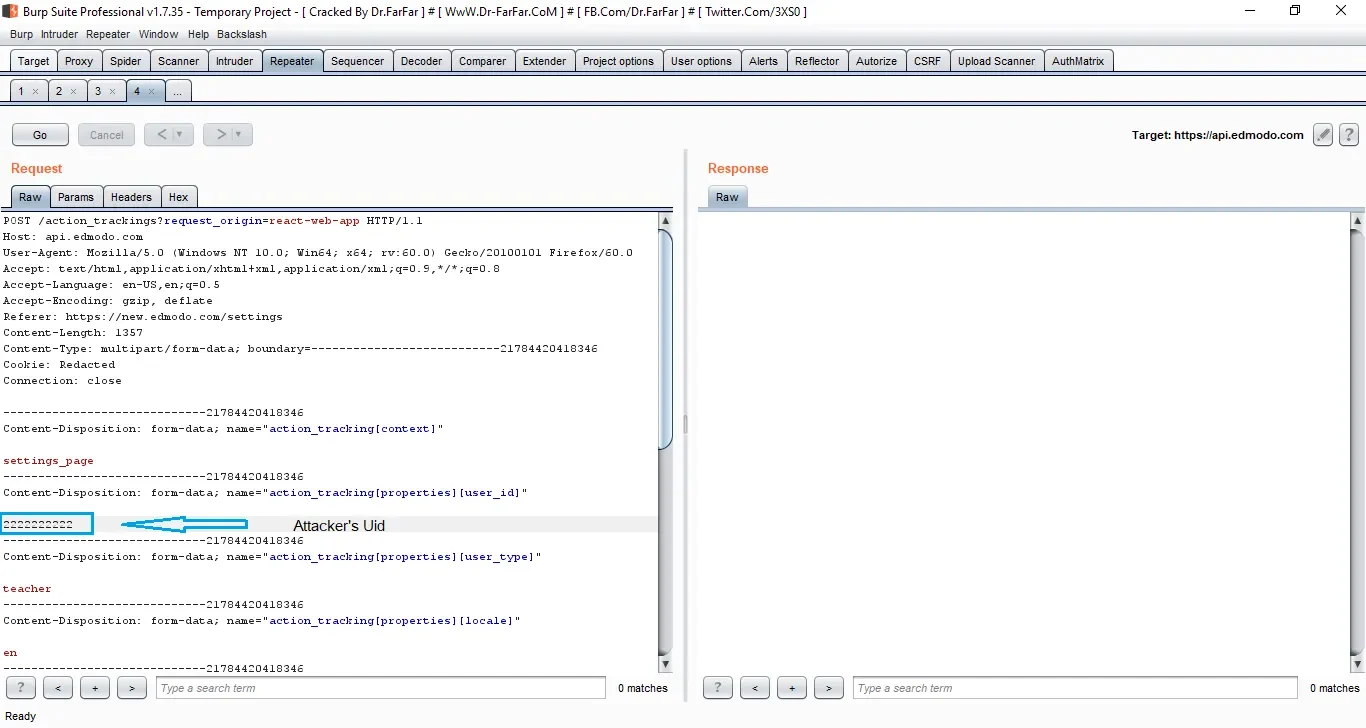
Step 6: Replace the user ID with the victim's
The User ID value in the request is replaced with User1's, the victim's. The forwarded request looks like this.
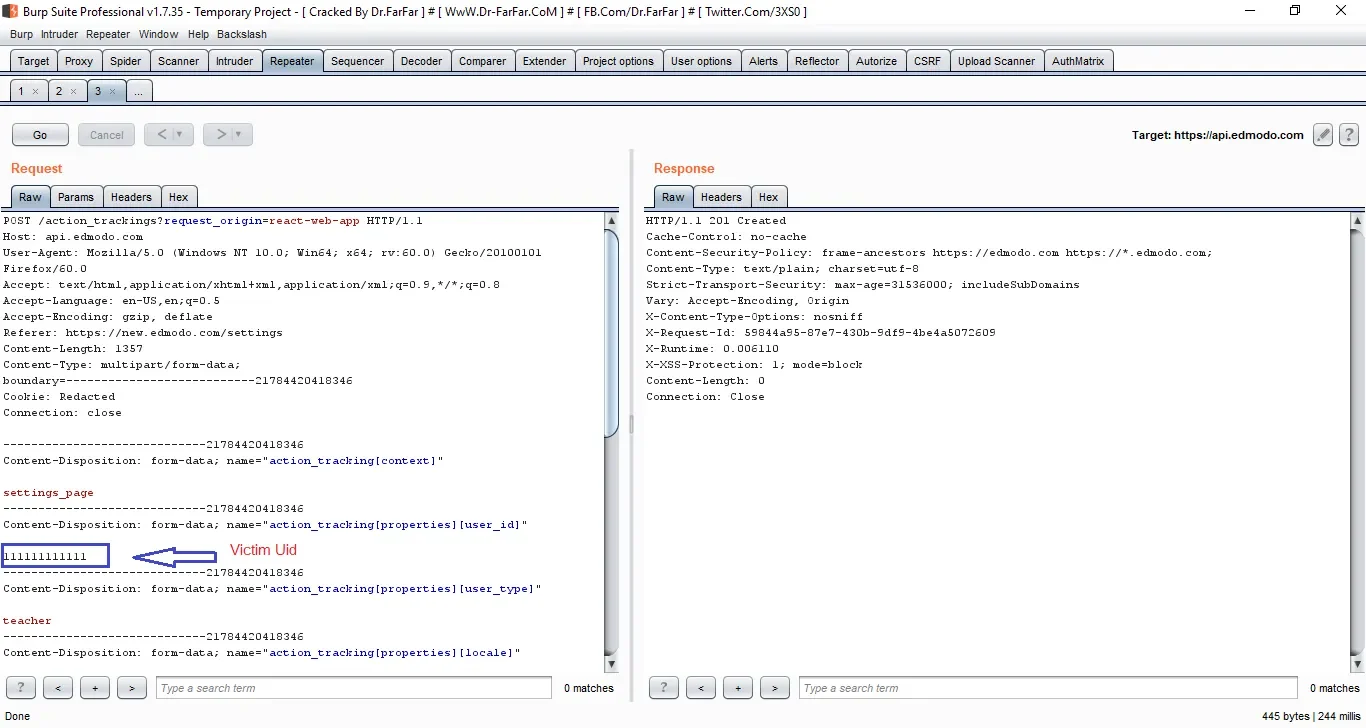
Step 7: The request to api.edmodo.com
Edmodo then makes a request to api.edmodo.com carrying the JWT access token.
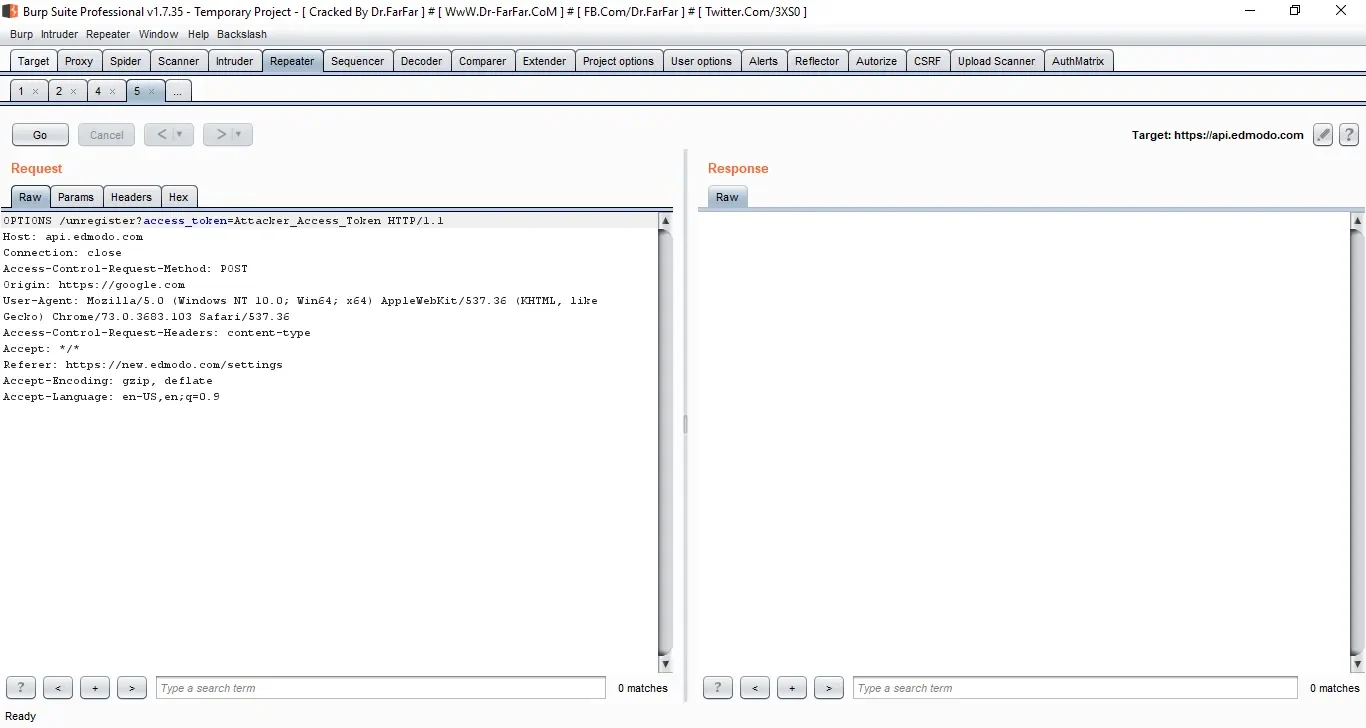
Step 8: Decode the JWT
The token can be decoded and modified with the JWT debugger at https://jwt.io/#debugger-io. Decoding the attacker's (User2) token exposes the user ID that is going to be changed to the victim's.
Step 9: Change the user ID in the token
The User_Id parameter value in the JWT is changed to the victim's User ID, 11111111.
Step 10: Obtain the forged token
With the User_Id value changed, the result is a valid JWT access token carrying the victim's User ID. The researcher calls it NEW_ACCESS_TOKEN_WITH_VICTIM_ID.
Step 11: Send the OPTIONS request
A request is made to api.edmodo.com with the following method and endpoint:
OPTIONS /unregister?access_token=NEW_ACCESS_TOKEN_WITH_VICTIM_ID
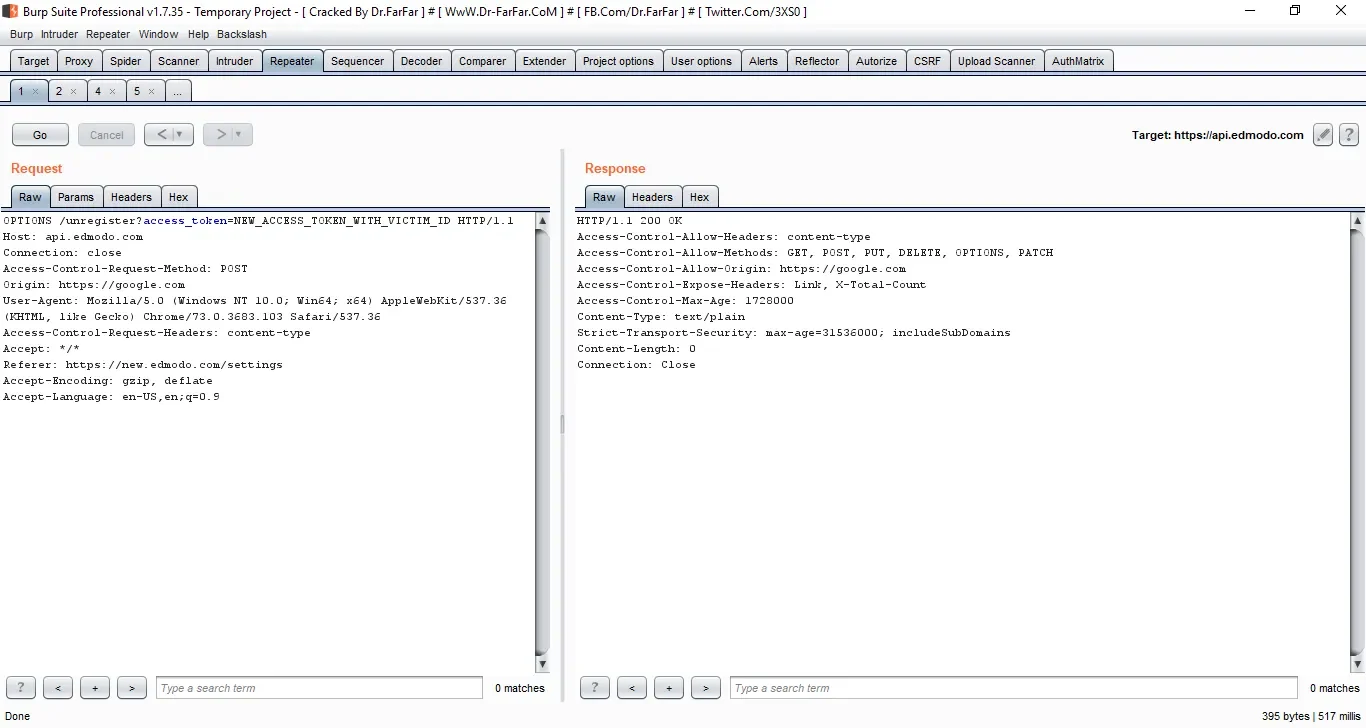
The server answers 200 OK, but the deactivation endpoint has extra protections on the user's account. The same request sent as a POST, with the POST parameter password set to the attacker's password, is shown next.
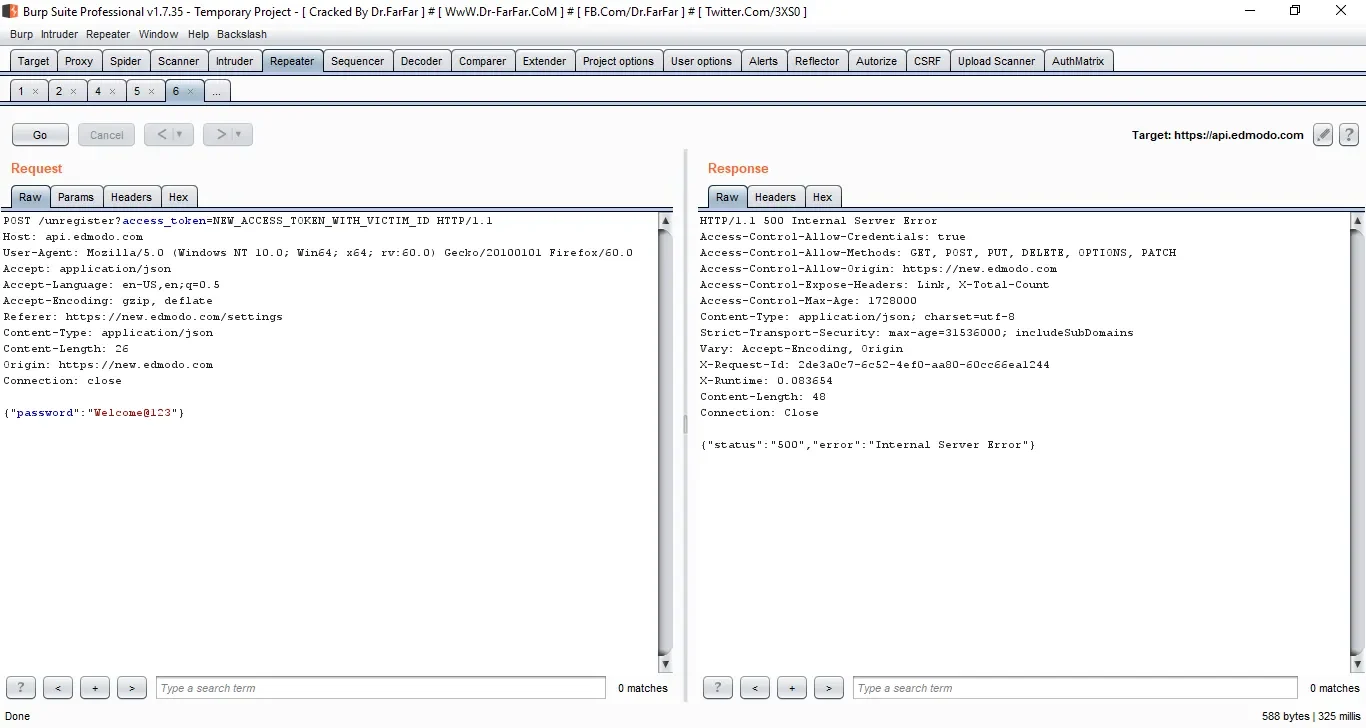
That request returns 500 Internal Server Error.
Step 12: Modify the request to bypass the protection
The request above is modified into the one below.
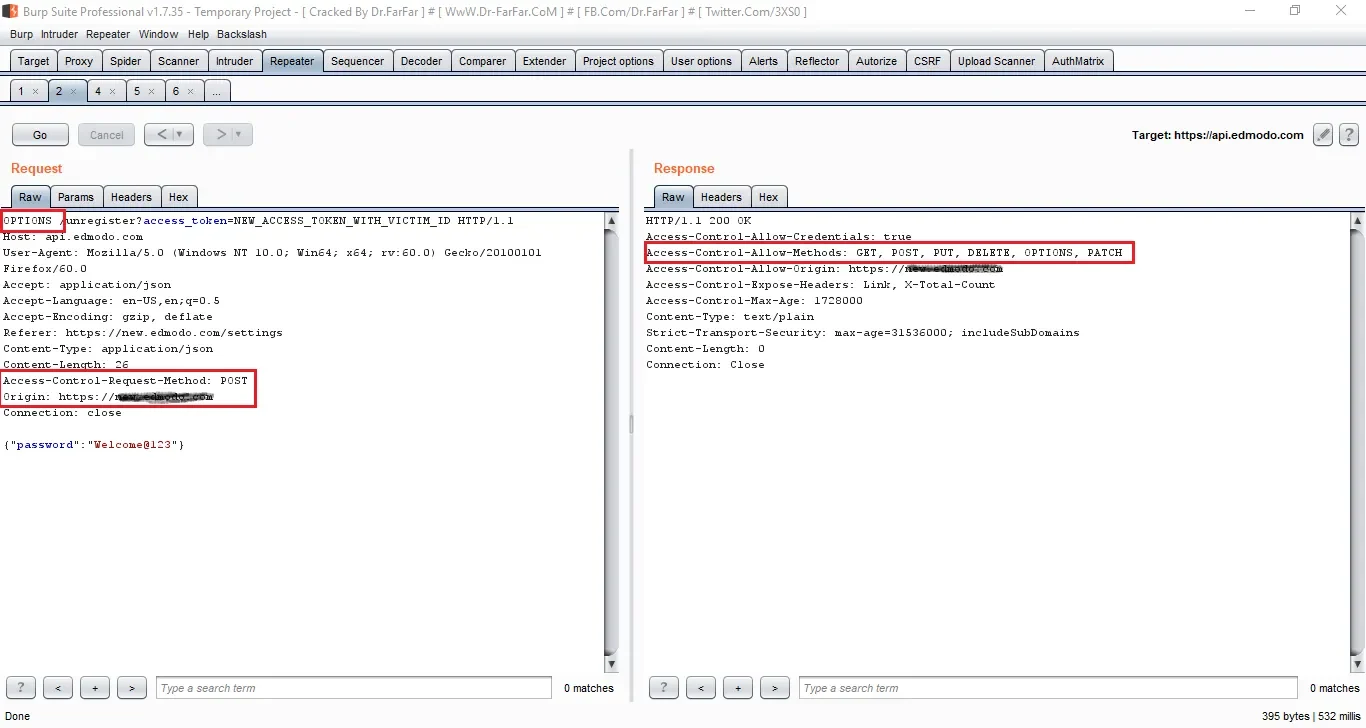
With this modification the protection is bypassed using CORS headers. At this point both the attacker's and the victim's accounts are deactivated.
The same request can be replayed from Burp Repeater again and again with other users' JWTs, so the attacker can deactivate multiple victim accounts.
Root cause
Two design mistakes combine. First, the user identity that decides which account is deactivated lives in the JWT, and the server accepts a token whose User_Id has been edited by the client, so the token is not properly validated. Second, the /unregister endpoint on api.edmodo.com has a CORS configuration that bypasses the same origin policy, which is what allows the cross-origin request carrying the forged token to succeed. The extra protection on the deactivation endpoint stopped the straightforward POST with the attacker's password (the 500 error), but the modified request with CORS headers got past it. The researcher's conclusion is a reminder not to forget to set the JWT algorithm type to None, which leads to severe bugs like this.
Impact
The attacker can deactivate a victim's account without any user interaction, which for genuine Edmodo users means account deletion. The attacker does not need to know the victim's ID in a real scenario: the UserId can be brute-forced and the same steps repeated, deactivating victim accounts one after another. The report notes that the vendor replied that the bug could not be reproduced, and no bounty or swag is mentioned.
Fix
The report does not describe a fix applied by the vendor. The guidance it gives is not to forget to set the JWT algorithm type to None, which leads to severe bugs like this, and to chain CORS with other bugs to raise impact and severity.
Variants to test
- JWT algorithm confusion. Take a valid token, change the user identifier claim, and see whether the backend acts on the modified identity. A positive result is the backend accepting the unsigned token and acting on the modified identity.
- Client-controlled identity in the body. Intercept an account-level action (deactivation, deletion, email change) and swap the user ID for another account's. A positive result is the action applying to the other account.
- CORS on destructive endpoints. Send an
OPTIONSrequest to an endpoint such as/unregisterand observe the response. A positive result is a permissive origin policy on an endpoint that changes state. - Protection bypass by request shape. Where a straightforward POST is rejected, vary the method, headers and parameters as the researcher did. A positive result is the same state change succeeding with the modified request.
- Replay with other users' tokens. Replay the working request from Repeater with different users' JWTs. A positive result is each account being deactivated in turn.
What happened, in plain words
Edmodo is a social learning platform: teachers and students use it to share posts, assignments and messages, a bit like a private social network for a classroom. Every user has an account, and every account has a settings page where you can do things like change your password or close the account.
Closing an account is called deactivation. On Edmodo you go to https://new.edmodo.com/settings, click Deactivate your Account, type your password to prove it is really you, and the account is removed. Behind the scenes the website does not do the removal itself: it asks a separate server, api.edmodo.com, to do it, and it proves who is asking by attaching a token, a small piece of text that acts like a signed pass.
A researcher called Shankar Ramakrishnan found that two mistakes in that flow, added together, let an attacker close somebody else's account without that person doing anything at all. The two mistakes are:
- The token that says which account is being closed is not properly checked, so a user can edit the account number inside it and the server still believes it.
- The server that performs the removal,
api.edmodo.com, has a CORS configuration that bypasses the same origin policy, which is what lets a request carrying the edited token go through.
Neither mistake alone is enough. Chained together, they let the attacker deactivate the victim's account, and then repeat the same request with other users' tokens to deactivate more accounts.
Before going further, a few words that will come up constantly.
- An API (application programming interface) is the way one piece of software talks to another. Think of a restaurant: the dining room (the website you see) does not cook; it passes your order to the kitchen (the API server) through a waiter (the request).
api.edmodo.comis the kitchen here. - A request is a message your browser sends to a server, asking it to do something. A response is the server's reply.
- A token is a short string that stands in for your login, so you do not have to send your password with every request. A JWT (JSON Web Token) is a particular kind of token that carries information inside it, such as your user ID, and a signature that is supposed to prove the information was not tampered with.
- CORS (Cross-Origin Resource Sharing) is a set of rules that decides whether a page on one website is allowed to read the answer from a different website. The same origin policy is the browser rule that normally stops one site from silently using your logged-in session on another site. CORS is the controlled way of relaxing that rule.
- Burp Proxy is a tool that sits between your browser and the server, so you can look at each request before it leaves and change it if you want. Imagine a postal worker who lets you open, read and rewrite every letter you send.
The two accounts used for testing
The researcher set up two accounts, both of the teacher account type:
| Role | User | UID |
|---|---|---|
| Victim | User1 | 11111111 |
| Attacker | User2 | 22222222 |
The UID is the user ID, a number the platform uses internally to tell accounts apart. You normally never see it, but it appears inside requests and inside the token, which is exactly why it matters here.
The only tool mentioned in the report is Burp Proxy, used to intercept and modify the deactivation traffic. The token is decoded and edited with the debugger at https://jwt.io/#debugger-io, a free web page that shows you what is inside a JWT and lets you change it.
Finding it
The researcher identified two weaknesses that make the attack possible: the JWT and the deactivation endpoint on https://new.edmodo.com/settings are not properly validated, and the /unregister endpoint on api.edmodo.com has a CORS configuration that bypasses the same origin policy.
In plain terms: the deactivation request carries the user identity inside the JWT, and that identity can be changed by the client, so the account being deactivated is effectively chosen by whoever holds the token. The server should check that the token really belongs to the account it is acting on, and it does not.
Exploitation
Step 1: Open the deactivation page as the attacker
Go to the following URL while signed in as User2 (the attacker) to delete that account:
https://new.edmodo.com/settings
This is the settings page of the attacker's own account. The point of starting with your own account is that you are allowed to do this, so you can watch exactly what a legitimate deactivation looks like before changing anything.
Step 2: Choose the deactivation option
Click Deactivate your Account from User2 (the attacker).
This is the normal button any user would press. Nothing unusual yet.
Step 3: Enter the attacker's password
The page asks for the password of the account, that is the attacker's password.
This is the site's way of making sure the person at the keyboard really owns the account. It is a sensible protection, and the attack will have to get around it.
Step 4: Intercept the traffic
Before entering the password and confirming the Deactivate option, make sure Burp Proxy is intercepting the traffic.
Why now? Because the interesting request is only created when you press the final button. If Burp is not watching at that moment, the request goes straight to the server and you never get a chance to look at it or change it.
Step 5: Submit and capture the POST request
Click the Deactivate button. This generates a POST request, shown below.
A POST request is one that sends data to the server to change something, as opposed to a GET request, which just asks for a page. The screenshot shows the captured request, with the fields the browser sent, including the user ID.
Step 6: Replace the user ID with the victim's
The User ID value in the request is replaced with User1's, the victim's. The forwarded request looks like this.
This is the first real move of the attack. The browser sent the attacker's own ID because that is the account that was signed in. By editing the request in Burp before forwarding it, the researcher tells the server to act on a different account. If the server trusted this value blindly, the attack would already be done. It is not quite that simple, which is why the next steps exist.
Step 7: The request to api.edmodo.com
Edmodo then makes a request to api.edmodo.com carrying the JWT access token.
Notice the two layers. Your browser talks to new.edmodo.com, the website. That website then talks to api.edmodo.com, the API, and it attaches the JWT so the API knows who is asking. The token is the thing that actually decides whose account is affected, so the token is where the attacker has to make the change.
Step 8: Decode the JWT
The token can be decoded and modified with the JWT debugger at https://jwt.io/#debugger-io. Decoding the attacker's (User2) token exposes the user ID that is going to be changed to the victim's.
A JWT is not encrypted, only encoded. Encoding is like writing a message in a format the other side can read, not like locking it in a safe. Anyone holding the token can read what is inside it, which is why the debugger can show you the fields. The signature at the end is what is supposed to stop you from changing those fields, and that is the part the server fails to check properly.
Step 9: Change the user ID in the token
The User_Id parameter value in the JWT is changed to the victim's User ID, 11111111.
This is the same idea as step 6, but applied to the token instead of the request body. The token now claims to belong to the victim.
Step 10: Obtain the forged token
With the User_Id value changed, the result is a valid JWT access token carrying the victim's User ID. The researcher calls it NEW_ACCESS_TOKEN_WITH_VICTIM_ID.
A forged token is one that was edited by someone who should not have been able to edit it. The name is just a label so the next steps can refer to this particular token without confusion.
Step 11: Send the OPTIONS request
A request is made to api.edmodo.com with the following method and endpoint:
OPTIONS /unregister?access_token=NEW_ACCESS_TOKEN_WITH_VICTIM_ID
Let us take this apart:
OPTIONSis an HTTP method. It does not ask the server to do anything; it asks the server what it would allow. Browsers send it automatically before certain cross-site requests, as a kind of question: may I send the real request, and with which headers?/unregisteris the endpoint, the specific address on the API that handles account removal.?access_token=...is a query parameter, a value passed in the URL itself. Here it carries the forged token.
The server answers 200 OK, but the deactivation endpoint has extra protections on the user's account. The same request sent as a POST, with the POST parameter password set to the attacker's password, is shown next.
So the OPTIONS request was accepted, which tells the attacker the endpoint is reachable and willing to talk. But the actual removal needs a POST, and that POST carries a password field. The POST carries a password field, and with the attacker's password the server returned a 500 error.
That request returns 500 Internal Server Error.
A 500 response means the server hit an unexpected problem while handling the request.
Step 12: Modify the request to bypass the protection
The request above is modified into the one below.
With this modification the protection is bypassed using CORS headers. At this point both the attacker's and the victim's accounts are deactivated.
A header is an extra line of information attached to a request or response, separate from the body. Headers carry things like what format the data is in, or, in the CORS case, which website is allowed to read the answer. By modifying the request, the researcher bypassed the protection using CORS headers.
The same request can be replayed from Burp Repeater again and again with other users' JWTs, so the attacker can deactivate multiple victim accounts. Burp Repeater is the part of Burp that lets you send the same request over and over, changing one thing each time, without redoing all the earlier steps.
Root cause
Two design mistakes combine.
First, the user identity that decides which account is deactivated lives in the JWT, and the server accepts a token whose User_Id has been edited by the client, so the token is not properly validated. A token is only trustworthy if the server checks its signature and refuses anything that was changed after it was issued. Here it does not.
Second, the /unregister endpoint on api.edmodo.com has a CORS configuration that bypasses the same origin policy, which is what allows the cross-origin request carrying the forged token to succeed. CORS exists to let a site say precisely which other sites may talk to it. A configuration that bypasses the same origin policy is effectively saying yes to everyone.
The extra protection on the deactivation endpoint stopped the straightforward POST with the attacker's password (the 500 error), but the modified request with CORS headers got past it. The researcher's conclusion is a reminder not to forget to set the JWT algorithm type to None, which leads to severe bugs like this. The algorithm field in a JWT tells the server how the signature was made. None means no signature at all, and a server that accepts it will believe any token it is handed.
Impact
The attacker can deactivate a victim's account without any user interaction, which for genuine Edmodo users means account deletion. The victim does not have to click a link, open a message or do anything at all.
The attacker does not need to know the victim's ID in a real scenario: the UserId can be brute-forced and the same steps repeated, deactivating victim accounts one after another. Brute-forcing means trying many values in turn, here simply counting through user IDs, until one works.
The report notes that the vendor replied that the bug could not be reproduced, and no bounty or swag is mentioned.
Fix
The report does not describe a fix applied by the vendor. The guidance it gives is not to forget to set the JWT algorithm type to None, which leads to severe bugs like this, and to chain CORS with other bugs to raise impact and severity.
Variants to test
These are the general lessons the researcher draws out, written as things to try on other sites.
- JWT algorithm confusion. Take a valid token, change the user identifier claim, and see whether the backend acts on the modified identity. A positive result is the backend accepting the unsigned token and acting on the modified identity.
- Client-controlled identity in the body. Intercept an account-level action (deactivation, deletion, email change) and swap the user ID for another account's. A positive result is the action applying to the other account.
- CORS on destructive endpoints. Send an
OPTIONSrequest to an endpoint such as/unregisterand observe the response. A positive result is a permissive origin policy on an endpoint that changes state. A preflight is the automatic OPTIONS question a browser asks before a cross-site request;Access-Control-Allow-Originis the header in which the server names the sites it trusts. - Protection bypass by request shape. Where a straightforward POST is rejected, vary the method, headers and parameters as the researcher did. A positive result is the same state change succeeding with the modified request.
- Replay with other users' tokens. Replay the working request from Repeater with different users' JWTs. A positive result is each account being deactivated in turn.
Glossary
- API: the server-side part of a service that other software talks to, as opposed to the pages a person sees.
- Attacker: the person carrying out the attack, here the owner of User2.
- Brute-force: trying many possible values in turn until one works, such as counting through user IDs.
- Burp Proxy: a tool that sits between browser and server so requests can be read and changed before they are sent.
- Burp Repeater: the part of Burp that resends a captured request repeatedly, with edits, without redoing the earlier steps.
- CORS (Cross-Origin Resource Sharing): rules that let a site state which other sites may read its responses.
- Cross-origin request: a request made from one website's address to a different address.
- Endpoint: the specific address on a server that handles a particular action, such as
/unregister. - Forged token: a token that was edited by someone not entitled to edit it.
- GET: an HTTP method that asks for a resource without changing anything.
- Header: an extra line of information attached to a request or response, separate from the body.
- HTTP method: the verb of a request, such as GET, POST or OPTIONS, saying what kind of action is wanted.
- JWT (JSON Web Token): a token that carries information such as a user ID plus a signature meant to prove it was not altered.
- OPTIONS: an HTTP method that asks a server what it would allow, rather than asking it to do something.
- POST: an HTTP method that sends data to the server to change something.
- Preflight: the automatic OPTIONS request a browser sends before certain cross-site requests.
- Query parameter: a value passed in the URL after a
?, such asaccess_token=.... - Request: a message from browser or client to a server asking it to do something.
- Response: the server's reply to a request.
- Same origin policy: the browser rule that normally stops one site from silently using your logged-in session on another site.
- Signature: the part of a token that proves it was issued by the server and not altered afterwards.
- Token: a short string that stands in for a login so the password is not sent with every request.
- UID / User ID: the internal number that identifies an account.
- Victim: the person whose account is attacked, here the owner of User1.
- 200 OK: a response meaning the request was understood and handled.
- 500 Internal Server Error: a response meaning the server hit an unexpected problem while handling the request.


