Stored XSS on edmodo
 Published on medium.com
Today i will be sharing about the exploit i found in Edmodo which could have allowed me to take over the account of any user of my choice.
The full write-up lives on its author's site
It belongs to its author, so we link to it rather than copy it. The other two tabs are our own rewrites, checked against it.
Context
Edmodo is an educational technology company offering a communication, collaboration and coaching platform to K-12 schools and teachers. The network lets teachers share content, distribute quizzes, assignments, and manage communication with students, colleagues and parents.
The researcher found a stored cross-site scripting bug in the sign-up flow, in the step that collects a new user's first name and last name. The payload was accepted at registration but did not execute where it was first reflected. It executed later, when another user viewed the attacker's profile and opened the connection entry.

Setup
The researcher signed up as a normal user and spent time learning the application's workflow before creating a second account to use for attacking. The plan was two accounts: one holding the payload, one acting as the victim who views it.
Sign-up runs through four stages:
- Stage 1: the application asks for an email and password.
- Stage 2: the application asks for a first name and last name. This is the vulnerable endpoint.
- Stage 3: the application asks for the school the user will be teaching from.
- Stage 4: the application asks the user to link another social media account with the Edmodo account.

Finding it
The researcher filled in stage 1 with an email and password and was redirected to stage 2, where the first name and last name are collected. The researcher entered the payload at stage 2, where the first name and last name are collected.
Exploitation
Step 1: submit the payload as the name
At stage 2 the researcher entered the same payload as both the first name and the last name:
<img src=x onerror=alert(1)>
The src=x points the image at a resource that does not exist, so the load fails, and the onerror handler runs alert(1). The server accepted the value without filtering or rejecting it.

Step 2: complete registration and check the obvious pages
The remaining forms were filled in as required and the researcher was logged in. The payload did not execute on the home page, where the first and last name are reflected: they appeared as raw text rather than being parsed as a script. The profile page was checked next, with the same result. The payload was stored, but the places checked so far rendered it safely.

Step 3: trigger it through a connection request
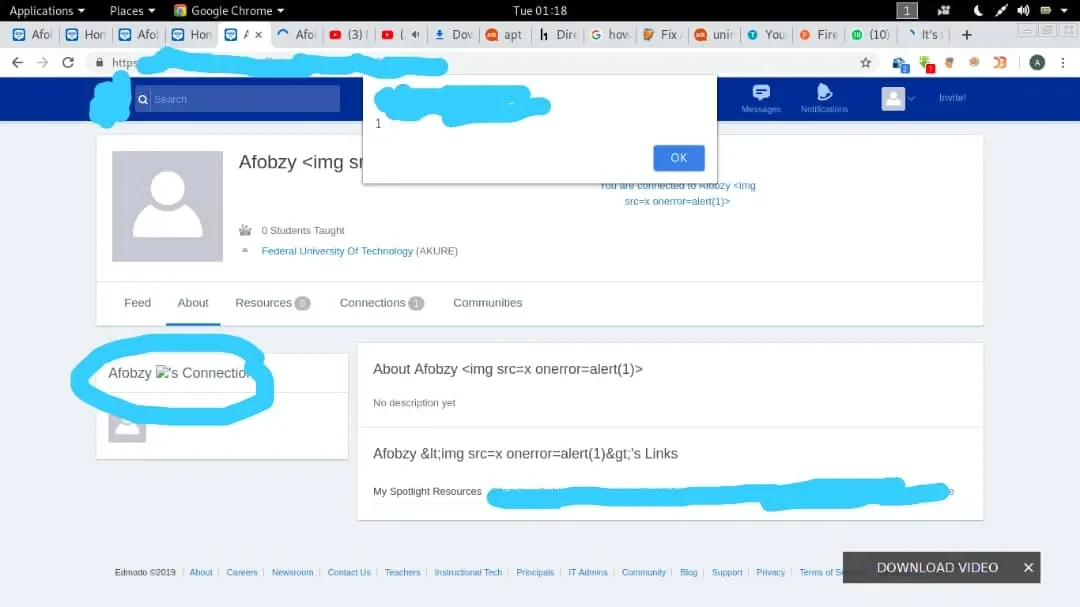
After several days of trying, the researcher searched for Account A from Account B, found Account A, and sent a connection request from Account B to Account A. Logging in to Account A and accepting the request, then viewing the profile, showed a new connection. Clicking on the connection tag executed the payload.

So the execution point was the connection entry on the profile of the account that accepted the request.
Step 4: report
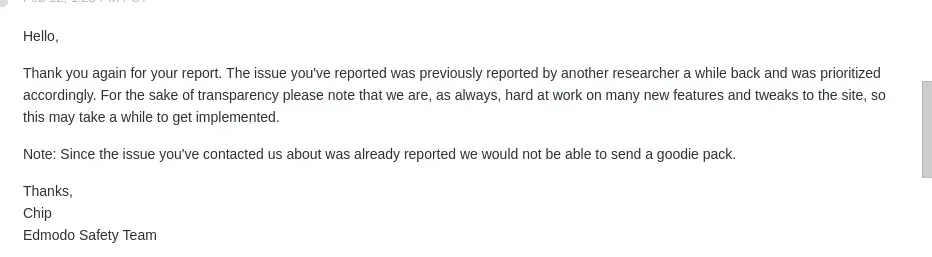
The bug was reported straight away. The researcher did not try to exploit it further, to avoid a duplicate report response. The response was a duplicate report anyway.
Screenshot of the proof of concept:
Response from the triage team:
Root cause
The first name and last name were accepted at registration, and the payload executed in the connection entry on a profile. The sign-up endpoint accepting the payload is not enough on its own: the home page and profile page reflected the value as raw text, so those contexts were encoding it. The connection view was the context that was not.
Impact
An attacker who can get a victim to view the attacker's connection entry can run script in the victim's session on the Edmodo origin. The researcher describes the bug as one that could have allowed taking over the account of any user of the attacker's choice. The condition is that the victim accepts a connection request from the attacker's account and then opens the connection entry; the payload does not fire on the home page or the profile page itself.
Fix
The report does not describe what was changed. Output encoding is the control that matters, because the same stored value is rendered in several places and only some of them were safe.
Variants to test
- Submit the payload in the first name and last name at registration, then walk every page that shows the name: home, profile, connection list, connection entry, search results, notifications and emails. A positive result is the handler running in any of those contexts.
- Repeat with other profile fields collected during sign-up, such as the school in stage 3. A positive result is execution wherever that field is displayed to another user.
- Test the connection flow from both sides: the name of the requester shown to the recipient, and the name of the recipient shown to the requester. A positive result is execution on the accepting or viewing side.
- Try payloads that survive contexts where the value is reflected as raw text, for example inside an attribute or a JavaScript string. A positive result is execution in a context where the plain
<img>payload did not fire. - Check whether the same stored name is rendered in notification emails or other users' feeds. A positive result is the payload arriving unencoded in a context another user opens.
What happened, in plain words
A security researcher found a bug in Edmodo, a website used by schools and teachers to share lessons, quizzes and messages. The bug let someone put a small piece of code into their own name when signing up. That code was stored on the site and later ran in the browser of another user who looked at the researcher's profile and clicked on a connection entry. Running code in someone else's browser like this is called cross-site scripting, or XSS. The researcher says the bug could have allowed taking over the account of any user of his choice. The researcher reported it, but the report was marked as a duplicate, meaning someone else had already reported the same bug.
The target and the plan
Edmodo is an educational technology company. Its network lets teachers share content, give quizzes and assignments, and communicate with students, colleagues and parents. The researcher saw people on Twitter showing off Edmodo swag and decided to try finding a bug there.
He signed up as a normal user and spent time learning how the site works before creating a second account to use for attacking. The plan was to have two accounts: one that holds the malicious code (the attacker account) and one that acts as the victim and views it.
Signing up goes through four stages:
- Stage 1: the site asks for an email and password.
- Stage 2: the site asks for a first name and last name. This is the vulnerable step.
- Stage 3: the site asks for the school the user will be teaching from.
- Stage 4: the site asks the user to link another social media account with the Edmodo account.
Finding the bug
The researcher filled in stage 1 with an email and password and was sent to stage 2, where the first and last name are collected. That name is saved on the account.
Exploitation
Step 1: put the payload in the name
At stage 2 the researcher entered the same payload as both the first name and the last name:
<img src=x onerror=alert(1)>
This is a piece of HTML, the language web pages are written in. It tells the browser to show an image. src=x says the image file is at the address x, which does not exist, so the image fails to load. onerror=alert(1) says: when the image fails to load, run the JavaScript command alert(1), which pops up a small box with the number 1. If the site later inserts this text into a page without cleaning it, the browser will treat it as a real image tag and run the alert.
The server accepted the value without filtering or rejecting it. In other words, the site did not check that the name contained only normal letters.
Step 2: finish signing up and check the obvious pages
The researcher filled in the remaining forms and was logged in. The payload did not run on the home page, where the first and last name are shown: they appeared as raw text, not as an image tag. The profile page was checked next, with the same result. The payload was stored, but the places checked so far displayed it safely, as plain characters.
Step 3: trigger it through a connection request
After several days of trying, the researcher searched for Account A from Account B, found Account A, and sent a connection request from Account B to Account A. He then logged in to Account A, accepted the request, and viewed the profile. A new connection appeared. Clicking on the connection tag ran the payload.
So the place where the code actually ran was the connection entry on the profile of the account that accepted the request.
Step 4: report
The bug was reported straight away. The researcher did not try to exploit it further, to avoid getting a duplicate report response. The response was a duplicate report anyway.
Screenshot of the proof of concept:
Response from the triage team:
Why it happened
The first name and last name were accepted at registration, and the payload ran in the connection entry on a profile. Accepting the payload at sign-up is not enough on its own: the home page and profile page showed the value as raw text, so those places were encoding it. The connection view was the one that was not.
What could be done with it
An attacker who can get a victim to view the attacker's connection entry can run script in the victim's session on the Edmodo site. The researcher describes the bug as one that could have allowed taking over the account of any user of the attacker's choice. The condition is that the victim accepts a connection request from the attacker's account and then opens the connection entry; the payload does not fire on the home page or the profile page itself.
How to fix it
The report does not describe what was changed. Output encoding is the control that matters, because the same stored value is shown in several places and only some of them were safe.
Other things to test
- Submit the payload in the first name and last name at registration, then walk every page that shows the name: home, profile, connection list, connection entry, search results, notifications and emails. A positive result is the handler running in any of those places.
- Repeat with other profile fields collected during sign-up, such as the school in stage 3. A positive result is execution wherever that field is displayed to another user.
- Test the connection flow from both sides: the name of the requester shown to the recipient, and the name of the recipient shown to the requester. A positive result is execution on the accepting or viewing side.
- Try payloads that survive places where the value is shown as raw text, for example inside an attribute or a JavaScript string. A positive result is execution in a place where the plain
<img>payload did not fire. - Check whether the same stored name is shown in notification emails or other users' feeds. A positive result is the payload arriving unencoded in a place another user opens.
Glossary
- XSS (cross-site scripting): a bug where a website lets an attacker's code run in another user's browser as if it were part of the site.
- Stored XSS: an XSS bug where the malicious code is saved on the server and later shown to other users.
- Payload: the piece of code an attacker sends to try to trigger a bug.
- HTML: the language used to build web pages, made of tags like
<img>. - Tag: a piece of HTML that tells the browser what to display, such as an image.
- Attribute: extra information inside an HTML tag, like
srcoronerror. - JavaScript: the programming language that runs in the browser and makes pages interactive.
alert(1): a JavaScript command that shows a pop-up box with the number 1; often used to prove that code can run.- Encoding (HTML encoding): converting special characters like
<and>into safe text so the browser shows them instead of treating them as code. - Sanitisation: cleaning input by removing or neutralising dangerous parts.
- Endpoint: a specific address or step in a web application that accepts input, like the sign-up form.
- Server: the computer that runs the website and stores data.
- Session: the period a user is logged in, identified by a cookie or token.
- Cookie / token: a small piece of data the browser stores and sends back to the site to prove who is logged in.
- Account takeover: when an attacker gains control of another person's account.
- Duplicate report: a bug report that describes a bug someone else has already reported.
- Triage team: the people who review and sort bug reports.
- Reconnaissance: the phase of learning how a target works before attacking.
- Proof of concept (POC): a demonstration that the bug really works, often a screenshot or video.




