XSS in edmodo wihinin 5 mins
A reflected cross-site scripting vulnerability existed in the URL parameter of the bookmarklet-login page, where user input was reflected without validation or filtering. An attacker could inject a script payload that would execute in the victim's browser.
 Published on medium.com
What I will tell you in this article is how I managed to exploit the XSS in Edmodo?
The full write-up lives on its author's site
It belongs to its author, so we link to it rather than copy it. The other two tabs are our own rewrites, checked against it.
Context
Edmodo is an education platform, and the researcher found this issue on a page reached through https://www.edmodo.com/bookmarklet-login. That page is a login screen with a sky blue background, and the researcher describes it as having an outdated layout, with nothing on it except the login form. The interesting part is not the form itself but the request it sends: alongside the username, password and login information, the request carries a parameter called URL. That parameter is reflected back into the page, and it is where the reflected XSS lives.
The researcher credits Parth Shah's write-up on a stored XSS as the inspiration for looking at this target.
Setup
No special tooling, account or role is described. The researcher browsed to the login page, captured the login request, and worked with a random username and password. The only precondition is access to the bookmarklet-login page and the ability to intercept and modify its request.
Finding it
While surfing edmodo.com the researcher came across two or more URLs, one of which was the bookmarklet login page. The first attempts were ordinary input probing: SQL and XSS input into the login form produced nothing. The researcher then moved on to inspecting every parameter of the request sent after logging in.
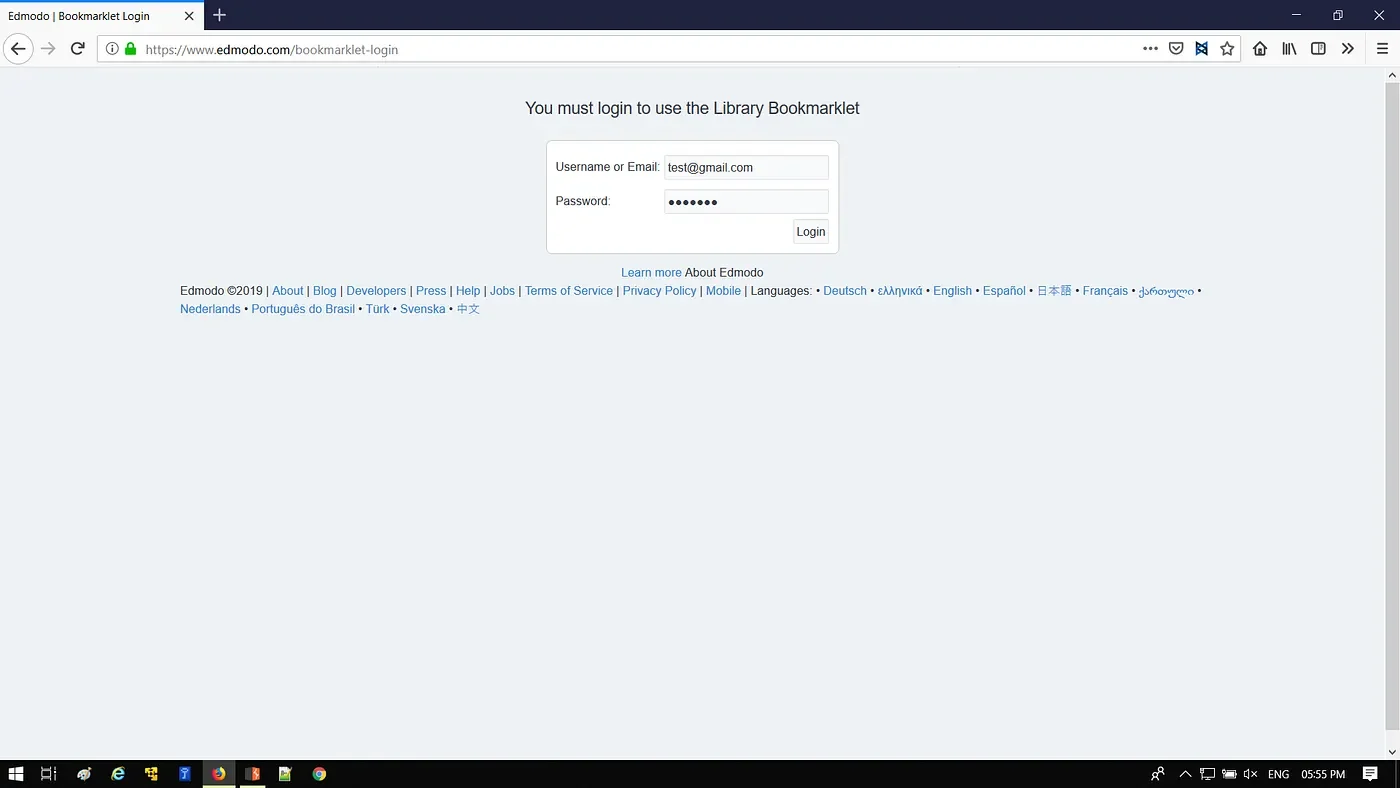
The screenshot shows the login page as it appeared, before any of the parameter work.
In that request, username, password and login information are passed, all of which are submitted when the user logs in. Among them the researcher noticed a parameter named URL.
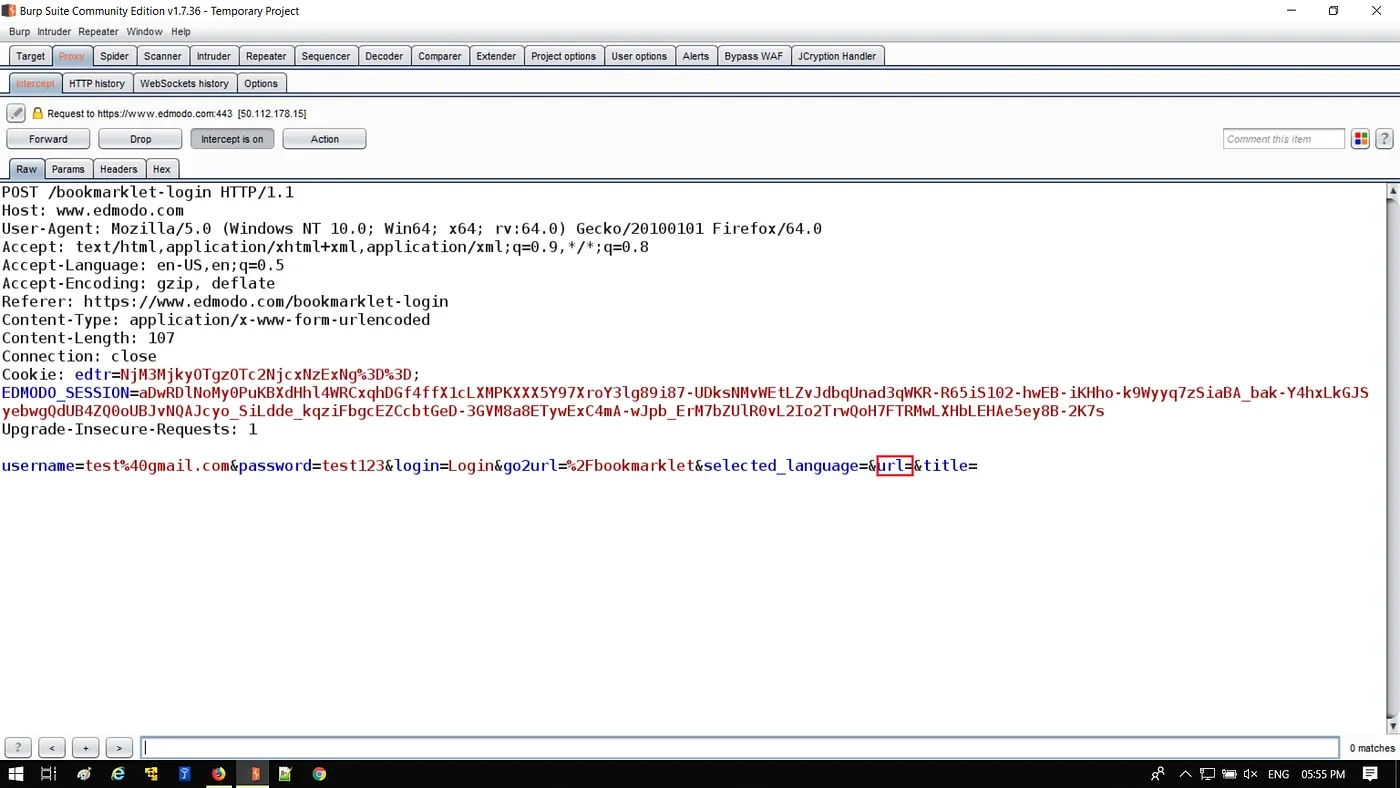
The captured request is what made the parameter visible. A URL parameter in a login request is worth attention because the server has to handle a value the requester can choose.
The researcher describes putting a string such as Test Example into the parameter and showing that it is reflected on the page. Inputs did not involve any validation or filtering. Other payloads were also set correctly, and the payload broke the input tag on the response side. Special characters and XSS payloads were accepted without errors.
Exploitation
The researcher documents the reproduction as five steps.
Step 1: open the login page
Open https://www.edmodo.com/bookmarklet-login and enter a random username and password.
Step 2: capture the request
Note the request and, in particular, the URL parameter being passed in it.
Step 3: inject the payload
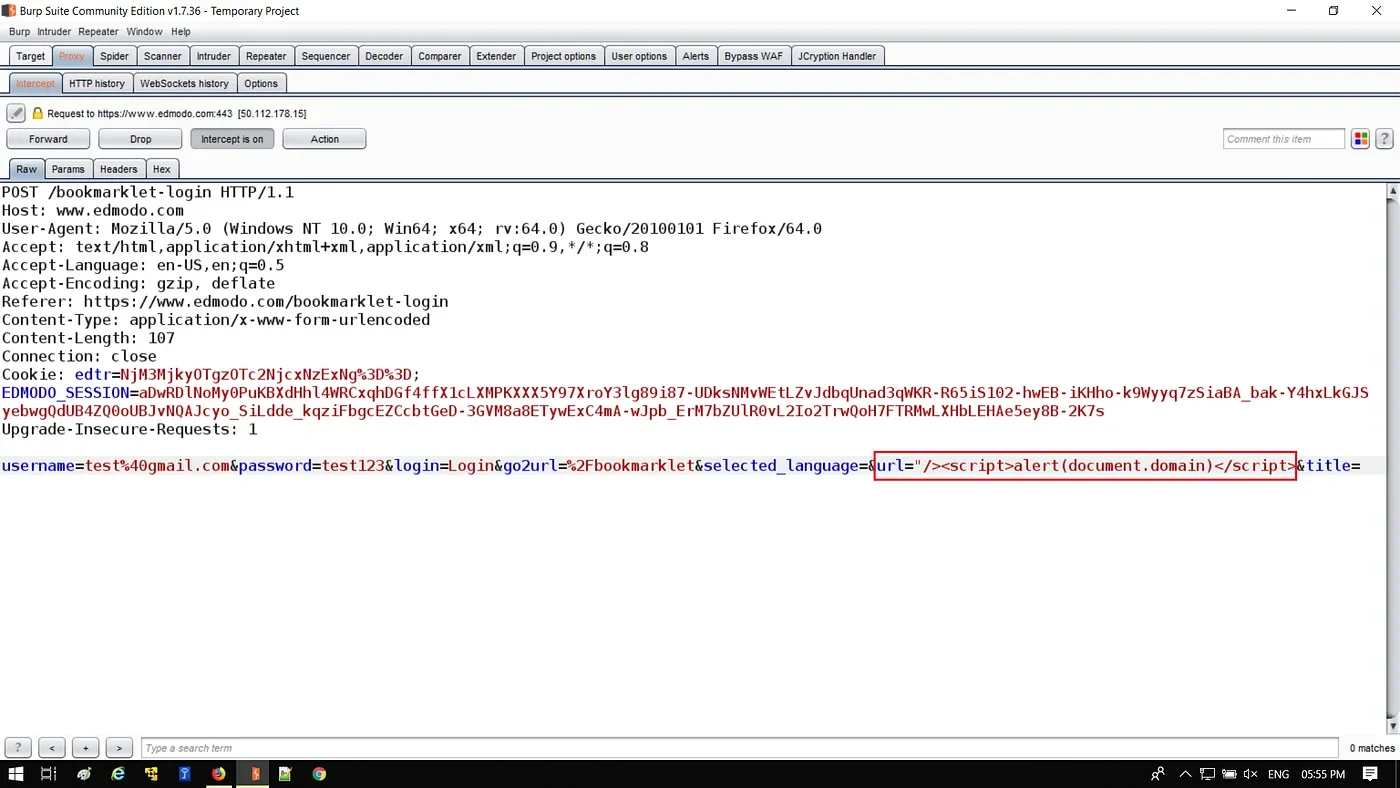
Put the following into the url parameter:
url= "/><script>alert(document.domain)</script>
The payload starts with "/>, which the report says breaks the input tag on the response side, then opens a script element. alert(document.domain) is the proof: it shows which origin the script is running in, which is what distinguishes XSS from a harmless reflection.
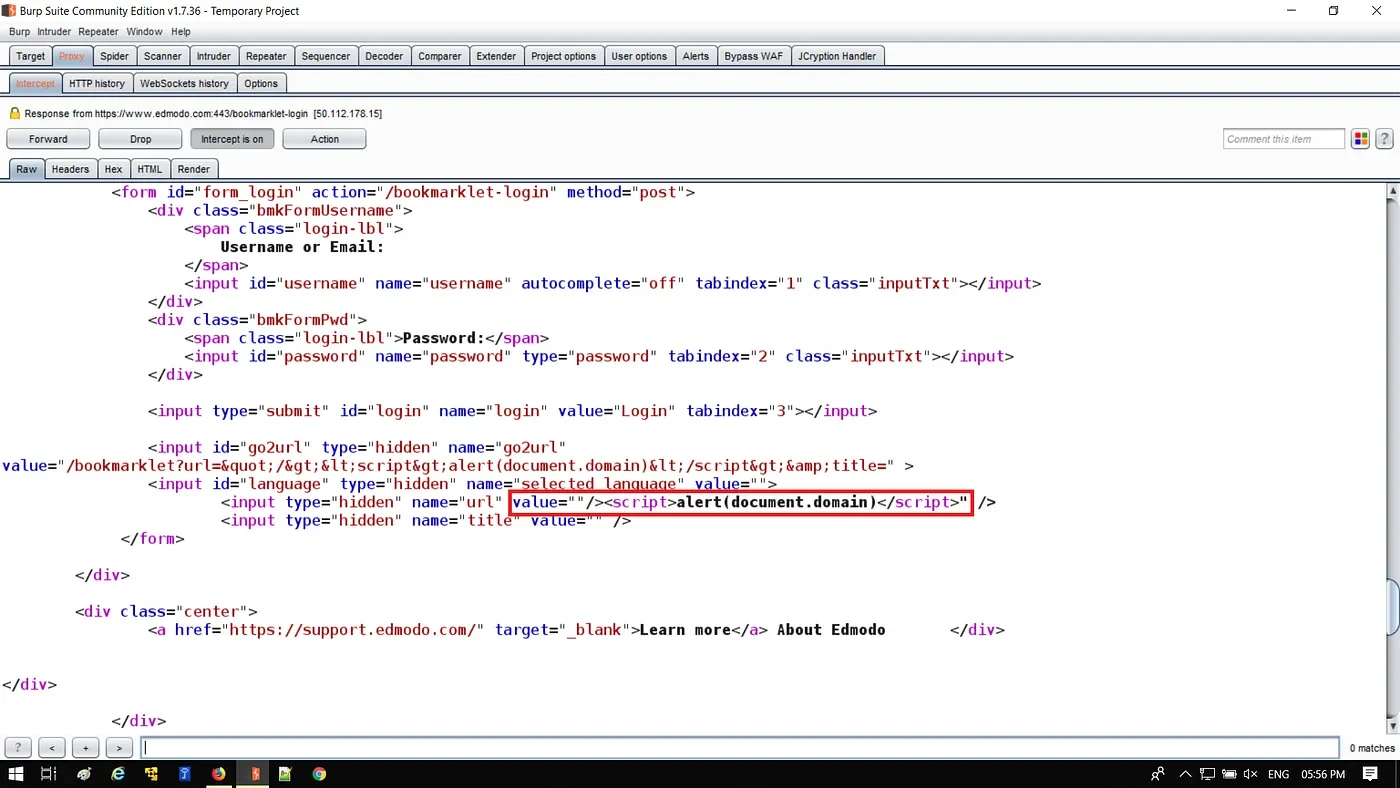
Step 4: check the response
The payload breaks the input tag on the response side. In other words, the payload breaks the input tag on the response side, so the script element that follows is not kept inside it.
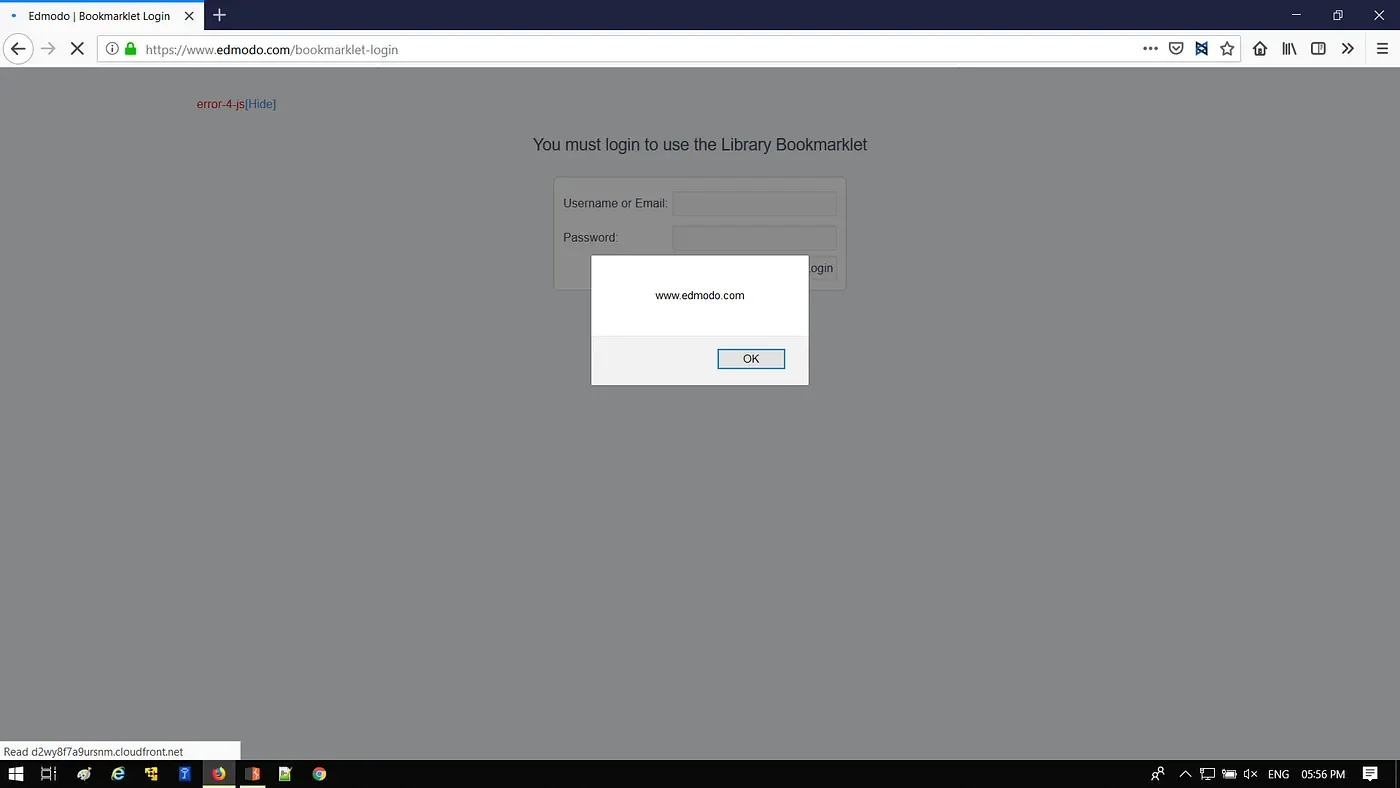
Step 5: confirm execution
The payload executed successfully.
Root cause
The URL parameter is reflected into the login page inside an HTML attribute, and the application applies no validation or filtering to it. The report says the application applies no validation or filtering, and that the payload breaks the input tag on the response side. The report does not show the server-side code, so the exact construction of the response is not documented; what is established is that the reflection is unencoded and that the payload breaks out of the input tag.
The login form itself did not behave this way: SQL and XSS input into the form produced nothing. The weakness is specific to the reflected parameter.
Impact
This is a reflected XSS: the script runs in the origin of the page that reflects the parameter, and alert(document.domain) was used to demonstrate that. Exploitation requires a victim to follow a crafted link to the affected page, and the report does not describe any additional conditions, such as authentication state, that would change that.
Fix
The measure implied by the finding is to HTML-encode the URL value on output so that ", ', < and > cannot terminate the attribute or the tag, and to validate the parameter against the expected shape of a URL. Whether Edmodo applied either is not stated.
Timeline
| Date | Event |
|---|---|
| 09-Jan-2019 | Report sent |
| 10-Jan-2019 | Report in verification process |
| 10-Jan-2019 | Report verified successfully |
| 11-Jan-2019 | Reward sent |
| 20-Jan-2019 | Reward received (swag) |
The researcher made a proof-of-concept video and sent it to the team, which was very responsive. The swag arrived a few weeks later.

Variants to test
- Look for redirect-style parameters (
url,next,return,redirect_uri,continue) on login and logout endpoints, and submit a marker string. A positive result is the marker appearing unencoded in the response body. - Submit
"/>followed by a harmless tag such as<b>test</b>into each reflected parameter. A positive result is the tag being parsed as markup rather than displayed as text. - Try the same value in single-quoted and unquoted attribute contexts, since the escaping characters differ. A positive result is the attribute or tag being terminated in any of the three contexts.
- Test the parameter on pages reached before and after authentication, because a reflection on a pre-login page is reachable by anyone who can be sent a link.
- Check whether the value is also reflected in a
Locationheader or a JavaScript string, where the same characters may need a different escape sequence. A positive result is script execution or a controllable redirect target.
Closing notes
The researcher's own takeaways are to dig deeper into the application, to check every parameter passed in a request, never to give up, and to keep reading books and write-ups. The bug was the researcher's first valid finding.
What happened, in plain words
A security researcher was looking around the Edmodo website, an education platform used by schools, teachers and students. On one of its pages, a login screen, the researcher noticed that the request carried an extra piece of information along with the username and password. That extra piece was called URL. When the researcher put a string such as Test Example into the parameter, the value was reflected on the page. Because the page did not clean that text, the researcher could put a small piece of code in it, and the browser ran that code as if Edmodo itself had written it. This kind of flaw is called reflected cross-site scripting, or reflected XSS. The researcher reported it, the report was verified successfully, and the researcher received swag as a reward. It was the researcher's first valid bug bounty finding.
To follow the rest of this article you only need to know how to use a browser and a computer. Every technical word is explained the first time it appears, and there is a glossary at the end.
Some words you will meet first
A web page is a document your browser downloads from a server and draws on your screen. The browser reads it as HTML, a language made of tags such as <input> (a box you can type in) and <script> (a container for code). Tags can carry extra settings called attributes, written inside the tag, for example value="something". The quotation marks mark where the setting's value starts and ends.
A request is the message your browser sends to a server when you do something, such as submitting a login form. A response is what the server sends back, usually the next page. A parameter is one named piece of data inside a request, like a labelled field on a paper form: the name is the label and the value is what you wrote. When the server takes a value from the request and writes it into the page it sends back, we say the value is reflected.
Validation means checking that a value looks the way it should. Filtering (or encoding) means changing dangerous characters so they cannot do harm, for example turning < into a harmless piece of text that the browser displays instead of treating as the start of a tag. If a page reflects a value without doing this, the value can break out of where it was meant to sit and become part of the page's structure.
XSS, cross-site scripting, is the name for this family of bugs: an attacker gets their own code into a page that other people visit, and the browser runs it as part of that site. In reflected XSS the code is not stored on the server; it travels in a link. The victim has to open the crafted link for the code to run. SQL is a language for talking to databases, and SQL injection is the attempt to sneak database commands into input fields; the researcher tried that too, and it did nothing here.
A bug bounty is a programme in which a company pays people, often in money or in branded merchandise called swag, for reporting security problems responsibly instead of abusing them. A write-up is a public article describing such a finding so others can learn from it.
The target and the inspiration
The researcher had read a write-up by Parth Shah about a stored XSS (a variant where the malicious value is saved on the server and shown to many users later) and was inspired to look at Edmodo.
While browsing edmodo.com, the researcher found two or more URLs, one of which was the page at https://www.edmodo.com/bookmarklet-login. That page had nothing on it except a login form, and the researcher describes its layout as outdated. The plan was simple: see whether anything on this page could be broken.
Finding it
The researcher decided to capture the login request that this page sends. When the page was opened, it showed a login screen with a sky blue background. Here is the screenshot of that page.
The screenshot shows the login page as it looked, before any of the parameter work. The first attempts were ordinary input probing: typing SQL and XSS style input into the login form produced nothing at all. That is a normal result; most fields are handled safely. So the researcher moved on to a different idea: look at every parameter the request carries after logging in, not just the visible fields.
The captured request is what made the extra parameter visible. In that request, the username, the password and login information are passed, and all of them are submitted when the user logs in. Among them the researcher spotted a parameter named URL.
Why does a URL parameter in a login request deserve attention? Because the server has to handle a value the person sending the request can choose. That means the server has to handle a value that the person sending the request can choose. If it later writes that value into a page without cleaning it, the value can change the page's structure. This is the moment the researcher's interest was raised.
To test the idea, the researcher describes putting a string such as Test Example into the parameter and showing that it is reflected on the page. The inputs involved no validation or filtering. Other payloads were also set correctly, and the payload broke the input tag on the response side. Special characters and XSS payloads were accepted without any errors.
In plain words: the server put whatever was in URL into the page it sent back, without validation or filtering. That is the whole precondition for reflected XSS. The next section shows how to turn that copying into running code.
Exploitation
The researcher documents the reproduction as five steps. Each step is listed below with the reason it is taken.
Step 1: open the login page
Open https://www.edmodo.com/bookmarklet-login and enter a random username and password.
Why: you need the page to send its login request so you can look at it. A random username and password are used, as the report's step describes.
Step 2: capture the request
Note the request and, in particular, the URL parameter being passed in it.
Why: the request is the list of everything your browser sends. Reading it tells you which named values the server will receive, and URL is the one that gets reflected. Capturing a request normally means using your browser's developer tools, which every modern browser includes, to watch the network traffic while you submit the form.
Step 3: inject the payload
Put the following into the url parameter:
url= "/><script>alert(document.domain)</script>
Let us go through this line piece by piece.
url=is the name of the parameter and the equals sign that separates it from its value."/>is the escape trick. The"/>characters break theinputtag on the response side, as the report describes. Together they end theinputtag early, so whatever comes next is no longer treated as part of that tag.<script>opens a script element. Everything until</script>is treated by the browser as code, not as text.alert(document.domain)is the code.alertmakes the browser show a pop-up box.document.domainis the address of the site the page belongs to. Showing it proves the code is running as part of Edmodo's own page, which is exactly what separates a real XSS from a harmless reflection of text.</script>closes the script element.
Why this payload: the researcher had already seen that the value is reflected on the page and that the payload breaks the input tag. To get code to run, the value first has to get out of that attribute and out of the tag. The "/> characters do that, and the script element supplies the code.
Step 4: check the response
The payload breaks the input tag on the response side. In other words, the value is written into an HTML attribute without the characters that would keep it inside the attribute, so the injected "/> ends the tag early and the script element that follows is parsed as markup rather than as text.
Why this step matters: you are checking the response, the page the server sent back, to see what the browser will actually be given. The response shows the tag broken open, which the report describes as the payload breaking the input tag. Here the response shows the tag broken open, which tells you the browser will treat the rest as real page structure.
Step 5: confirm execution
The payload executed successfully.
Why: the pop-up is the proof. It shows the site's own address, which means the code ran in the site's origin, the security boundary that decides which site's data a piece of code may touch. The researcher's reaction to the successful execution is captured in the screenshot.
Why it worked
The URL parameter is reflected into the login page inside an HTML attribute, and the application applies no validation or filtering to it. The report says the application applies no validation or filtering, and that the payload breaks the input tag on the response side. The report does not show the server-side code, so the exact construction of the response is not documented; what is established is that the reflection is unencoded and that the payload breaks out of the input tag.
The login form itself did not behave this way: SQL and XSS input into the form produced nothing. The weakness is specific to the reflected parameter.
A useful everyday comparison: imagine a form letter with a blank line that says "Dear ____". If someone writes a name, the letter reads normally. If someone writes a name followed by instructions that end the sentence and start a new paragraph, the letter now contains something the writer of the letter never intended. Encoding is the clerk who rewrites any strange marks so they stay inside the blank line.
What the impact is
This is a reflected XSS: the script runs in the origin of the page that reflects the parameter, and alert(document.domain) was used to demonstrate that. Exploitation requires a victim to follow a crafted link to the affected page, and the report does not describe any additional conditions, such as authentication state, that would change that.
In everyday terms: the attacker cannot make the code run by itself. They have to persuade someone to click a prepared link. Once that person opens it, the code runs inside Edmodo's page, with the same trust the browser gives to Edmodo.
How it should be fixed
The measure implied by the finding is to HTML-encode the URL value on output so that ", ', < and > cannot terminate the attribute or the tag, and to validate the parameter against the expected shape of a URL. Whether Edmodo applied either is not stated.
In plain words: the server should treat the value as text to display, never as page structure, and it should also check that the value really looks like a web address before using it.
Timeline
| Date | Event |
|---|---|
| 09-Jan-2019 | Report sent |
| 10-Jan-2019 | Report in verification process |
| 10-Jan-2019 | Report verified successfully |
| 11-Jan-2019 | Reward sent |
| 20-Jan-2019 | Reward received (swag) |
The researcher made a proof-of-concept video and sent it to the team, which was very responsive. The swag arrived a few weeks later.
Variants to test
These are the same ideas a beginner can try on other sites, in the same order as the technical version.
- Look for redirect-style parameters (
url,next,return,redirect_uri,continue) on login and logout endpoints, and submit a marker string. A positive result is the marker appearing unencoded in the response body. A marker string is just a word you will recognise, such asTest Example, so you can search for it in the response. - Submit
"/>followed by a harmless tag such as<b>test</b>into each reflected parameter. A positive result is the tag being parsed as markup rather than displayed as text. If the wordtestappears bold, the browser treated your tag as structure. - Try the same value in single-quoted and unquoted attribute contexts, since the escaping characters differ. A positive result is the attribute or tag being terminated in any of the three contexts. Attributes can be written with double quotes, with single quotes, or with no quotes at all, and each needs a slightly different escape.
- Test the parameter on pages reached before and after authentication, because a reflection on a pre-login page is reachable by anyone who can be sent a link. Authentication here simply means being logged in.
- Check whether the value is also reflected in a
Locationheader or a JavaScript string, where the same characters may need a different escape sequence. A positive result is script execution or a controllable redirect target. ALocationheader is the part of a server's response that tells the browser to go to another address.
Closing notes
The researcher's own takeaways are to dig deeper into the application, to check every parameter passed in a request, never to give up, and to keep reading books and write-ups. The bug was the researcher's first valid finding.
Glossary
- Attribute: an extra setting written inside an HTML tag, such as
value="...", whose value is usually wrapped in quotation marks. - Authentication: the process of proving who you are, normally by logging in.
- Bug bounty: a programme that rewards people for reporting security problems responsibly.
- Cookie: a small piece of data a site stores in your browser so it can recognise you between requests; not used in this report's payloads but common in session handling.
- Cross-site scripting (XSS): a flaw where an attacker's code ends up running inside another site's page in a victim's browser.
- Encoding (HTML-encoding): rewriting special characters so the browser displays them as text instead of treating them as page structure.
- Endpoint: a specific address on a server that accepts requests, such as a login page.
- Filtering: removing or altering dangerous input before it is used.
- HTML: the language web pages are written in, made of tags.
- Impact: the practical harm a vulnerability could cause.
- Input tag: the HTML element that draws a box you can type into; it can carry a
valueattribute. - JavaScript: the programming language browsers run inside web pages.
- Location header: the part of a server response that tells the browser to navigate to another address.
- Origin: the security boundary made of a site's scheme, host and port; code running in one origin is treated as belonging to that site.
- Parameter: one named piece of data in a request, made of a name and a value.
- Payload: the specific value an attacker sends to try to trigger a flaw.
- Proof of concept (POC): a demonstration that a flaw is real, often a video or a set of steps.
- Reflected: a value that the server copies from the request straight into the response.
- Reflected XSS: XSS where the malicious value travels in a link and is reflected back by the server; the victim must open the crafted link.
- Request: the message a browser sends to a server.
- Response: the message a server sends back to a browser.
- Root cause: the underlying reason a flaw exists.
- Session: the state of being logged in, usually tracked with a cookie or token.
- SQL: a language for querying databases.
- SQL injection: sneaking database commands into input fields.
- Stored XSS: XSS where the malicious value is saved on the server and shown to many users later.
- Swag: branded merchandise given as a reward.
- Tag: a building block of HTML, written between angle brackets, such as
<input>or<script>. - Token: a value used in place of a password to prove a session is valid.
- URL: a web address.
- Validation: checking that a value has the expected shape before using it.
- Vulnerability: a weakness that can be abused to make a system behave in a way its owner did not intend.
- Write-up: a public article describing a security finding so others can learn from it.




