Identifying vulnerabilities in GitHub Actions & AWS OIDC Configurations
AWS IAM roles set up for GitHub Actions OIDC were often given trust policies that did not check the subject claim, so any GitHub repository could assume them. An attacker could then obtain short-lived AWS session credentials and reach the organisation's cloud resources.
 Published on medium.com
In 2021, GitHub released support for OpenID Connect (OIDC) for GitHub Actions (GHA), allowing developers to securely interact with their infrastructure resources in Amazon Web Services (AWS), and other major cloud service providers. The OIDC support allows GHA jobs to retrieve short-lived session tokens on-demand…
The full write-up lives on its author's site
It belongs to its author, so we link to it rather than copy it. The other two tabs are our own rewrites, checked against it.
Context
In 2021 GitHub added OpenID Connect (OIDC) support to GitHub Actions (GHA), letting workflows obtain short-lived credentials from cloud providers such as AWS instead of storing long-lived access keys as repository secrets. A GHA job requests a JWT ID token from GitHub's OIDC provider and presents it to AWS, which exchanges it for a short-term session token for an IAM role. The security of the whole exchange rests on the role's trust policy: the conditions under which AWS will accept a token from GitHub.
Tinder Security Labs analysed how organisations set up OIDC between GHA and AWS and found that certain trust policy configurations let repositories outside the organisation assume its roles and reach its cloud resources. The team also published a black-box assessment tool that flags vulnerable configurations in AWS environments.
Setup
On the GitHub side there is nothing to configure in the repository settings. The only requirement is that the workflow or job has id-token permission set to write, which lets the job fetch and hold a JWT ID token from GitHub's OIDC provider. The job makes a request to an endpoint at https://pipelines.actions.githubusercontent.com, whose address is given by the ACTIONS_ID_TOKEN_REQUEST_URL environment value. The request needs a job JWT, held in the ACTIONS_ID_TOKEN_REQUEST_TOKEN environment value. The response is a JWT ID token, which is then sent to the OIDC-supporting cloud provider, in this case AWS, in exchange for a short-term session token.
The JWT carries a few required pieces of information:
kid,x5tandalgin the header, which cloud providers use to check the JWT is valid and correctly signed.subandaudin the payload.audis the audience value specified in the workflow; by default it is the repository URL, orsts.amazonaws.comin the case of actions such asconfigure-aws-credentials. It is customisable.subis the subject claim, which by default contains the repository namespace and branch reference, in a format such asrepo:org_name/repo_name:ref:branch_ref.
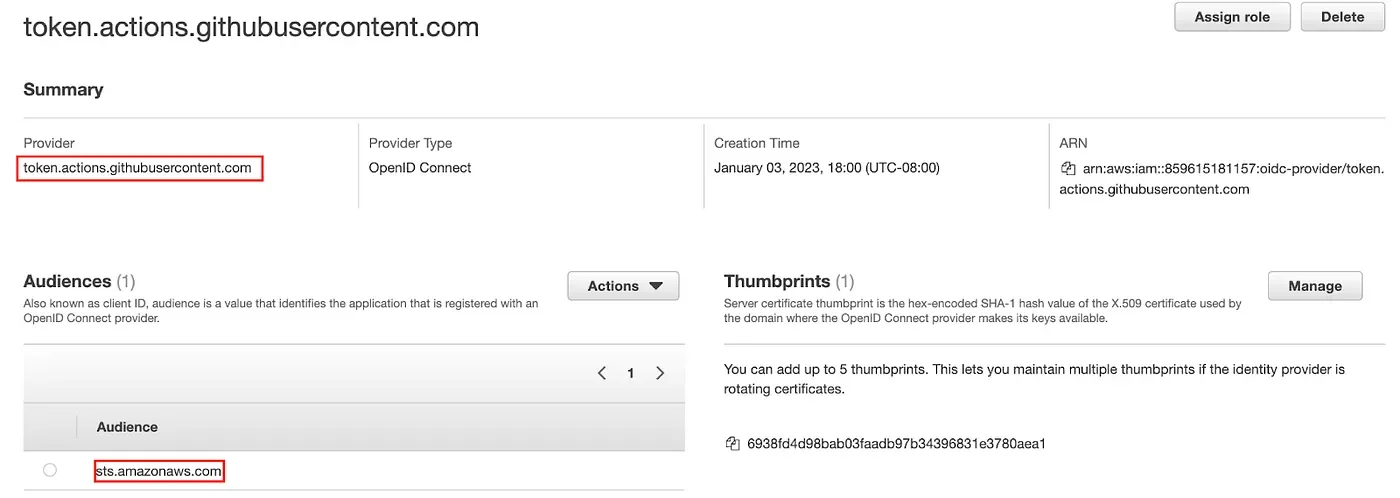
On the AWS side, two things are needed: an IAM role and an identity provider linked to that role. Creating the identity provider requires a client ID and an identity provider URL. For GitHub the identity provider is linked to https://token.actions.githubusercontent.com, which holds the OpenID configuration on GitHub's end; AWS uses it to confirm the originating request is valid and allowed. The audience value defaults to the URL of the GitHub repository trying to assume the role, for example https://github.com/TinderSec/sample_repo, but it is customisable: the configure-aws-credentials action provided by AWS uses sts.amazonaws.com as its default audience. A sample identity provider configuration therefore looks like this:
Once the identity provider exists, multiple IAM roles can be assigned to it. These roles define what resources and permissions a GHA job can use in the AWS account. A trust relationship on the role validates the request GitHub sends when asking for the short-lived session token. It can validate two specific keys, aud and sub, which are the values GitHub puts in the job's JWT. aud is the audience string from the workflow (sts.amazonaws.com by default for configure-aws-credentials, or the repository URL for custom usages). sub is the subject payload, which by default contains the repository namespace and branch, for example repo:org_name/repo_name:ref:branch_ref.
A trust policy that does a direct string match on the audience and a wildcard match on the subject looks like this:
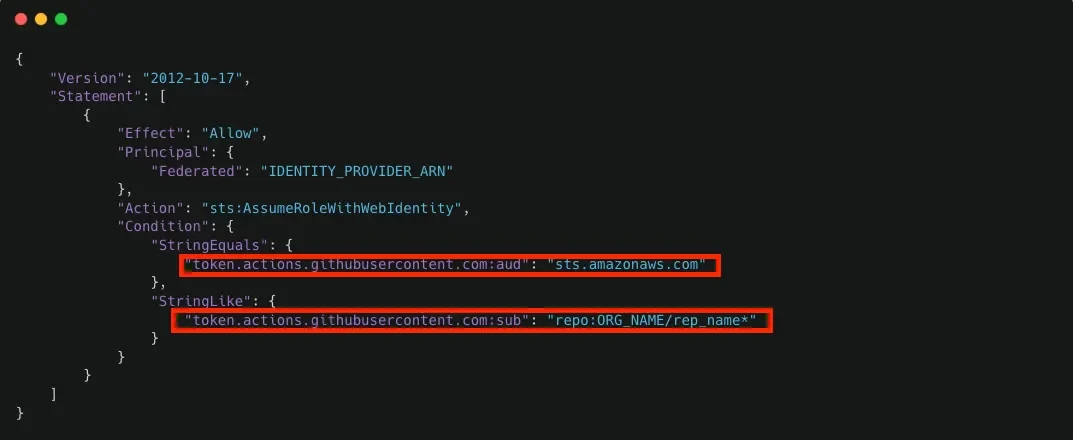
That setting ensures the request arrives with an audience of sts.amazonaws.com and that the repository is locked to any repo beginning with repo_name in the org_name organisation.
Finding it
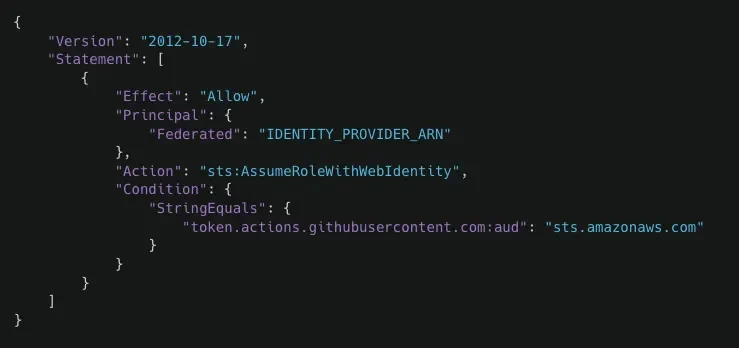
The team's analysis showed a common pattern: the trust policy for the IAM role was misconfigured, so external repositories not associated with the organisation could assume the AWS roles and access the configured resources. The most common occurrence was a missing check on the subject claim, with a trust policy similar to this:
Initially the team did not know how many roles would be misconfigured and hypothesised one or two. Testing began with a workflow built to try the vulnerability manually.
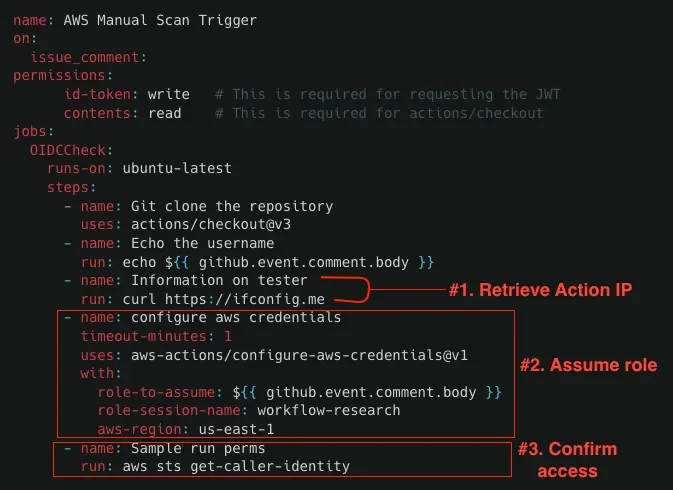
That workflow first identifies the GHA job's IP address, then attempts to assume the role, and finally validates the access. It triggers on a comment in an existing issue and uses the comment text as the role to assume. To find roles worth testing, the team used GitHub's new code search for two cases:
path:.github/workflows configure-aws-credentials, which returns all workflows using the AWS-created actions.path:.github/workflows /AWS_REGEX/, which returns all GitHub workflows containing an AWS role in the workflow file.
After some testing the hypothesis was quickly shown to be wrong: within the first few hours the team identified multiple GitHub organisations with vulnerable configurations, and the problem was more widespread than expected.
Exploitation
Step 1: Obtain a JWT ID token from GitHub
The job requests a token from the URL in ACTIONS_ID_TOKEN_REQUEST_URL, authenticating with the job JWT in ACTIONS_ID_TOKEN_REQUEST_TOKEN. The response is a JWT ID token, which is sent to AWS in exchange for a short-term session token.
Step 2: Present the token to AWS STS
The JWT is sent to AWS to be exchanged for a short-term session token for the target role. AWS validates the token against the identity provider and the role's trust relationship. If the trust policy does not constrain sub, a token issued for an attacker-controlled repository is accepted just as one from the legitimate repository would be.
Step 3: Validate the assumed access
The workflow identifies its own IP address, attempts the role assumption, and then validates the access it obtained.
Step 4: Repeat at scale
Using the two code searches above, the team found roles to test. Multiple organisations were found vulnerable in the first few hours.
Case study: AWS's own repositories
Among the results, multiple roles for AWS's own accounts, used in AWS repositories, were vulnerable. The team reported the vulnerable roles and repositories to AWS, and they have since been remediated.
One vulnerable role was in the awsdocs/aws-doc-sdk-examples repository. AWS publishes docker images of its SDK examples so users can test the SDK with sample API calls; the images let users supply their own AWS credentials, run the examples and see how each resource or API interacts with their account.
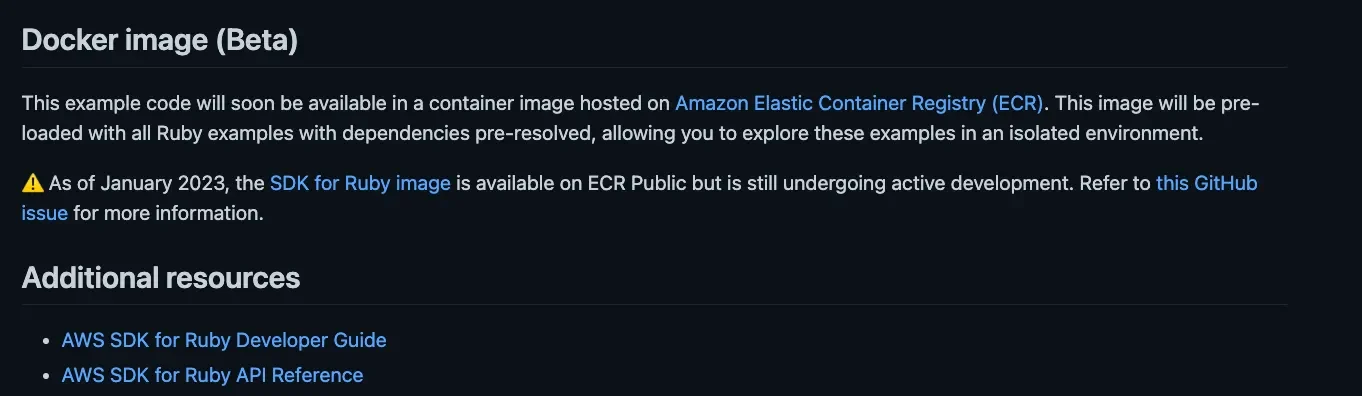
To automate the release of these examples, AWS created a docker-push workflow that runs when a pull request is merged. It identifies which code folder changed (ruby, java and so on), builds the appropriate image, then retrieves AWS credentials to push the image to the public ECR. To do so it assumes a role specified in the workflow.

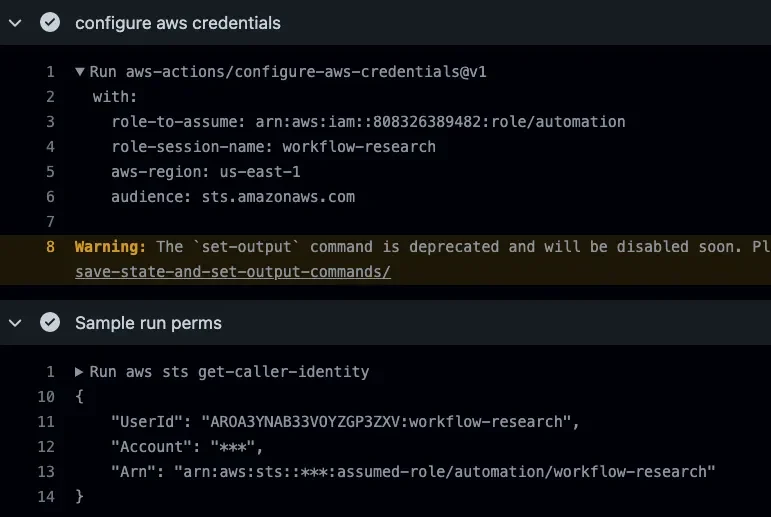
That role was misconfigured and allowed the team to assume it from their own actions.
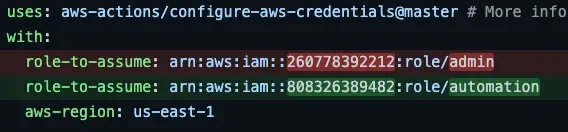
Checking the commit history of the repository, the team also noticed another role used before the one they had identified. They were able to assume that role too. It may have more permissions than the automation role, since it was labelled admin.
A couple more AWS roles were found misconfigured as well. These were reported to AWS's security team once confirmed, and AWS Security responded quickly and mitigated the vulnerabilities. Similar vulnerabilities were found in other organisations and reported; all the vulnerable organisations fixed the issue quickly and investigated to make sure the roles had not been exploited beforehand.
Root cause
The trust relationship is the only thing standing between a GitHub-issued JWT and an AWS role. When the policy omits a condition on sub, a repository outside the organisation can obtain a token and have it accepted. The legitimate repository's identity, which lives in the sub claim, is never checked, so external repositories can assume the role. The secure example in the report pairs a direct string match on the audience with a wildcard match on the subject, which ties the role to a repository namespace; the vulnerable example drops the subject condition entirely.
Impact
An external attacker can assume the misconfigured role and access the resources and permissions configured for it in the victim's AWS account. In the AWS case study this included a role used to push images to public ECR and a second, older role labelled admin that may carry more permissions than the automation role. The report does not enumerate the permissions attached to any of the roles. The exposure applies to any organisation whose role trust policy lacks a subject check.
Fix
Mitigation is straightforward. Depending on the organisation's needs, the trust policy should be set to allow either any repository in the organisation to assume the role or only a specific repository. AWS has remediated the roles reported in its own repositories, and the other affected organisations fixed their configurations and investigated for prior abuse.
For detection, the report recommends checking CloudTrail logs for unauthorised access. A successful role assumption is logged and contains the repository and organisation name in the username attribute.

A black-box assessment tool is available at https://github.com/TinderSec/oidc-scanner-aws; it uses GHA to test multiple roles at once and is recommended when you cannot inspect trust policies directly on the company's infrastructure instances.
Variants to test
- Other CI/CD providers. GitLab and BitBucket support OIDC for assuming roles in a similar way. If an organisation uses GitLab, similar vulnerabilities can exist when the set of repositories allowed to assume IAM roles is not properly validated. A positive result is a pipeline from an unintended project obtaining cloud credentials.
What happened, in plain words
In 2021, GitHub added a feature called OpenID Connect, or OIDC, to GitHub Actions. GitHub Actions is GitHub's built-in automation system: you write a small recipe file, called a workflow, and GitHub runs it for you, for example every time someone merges a change into your code. OIDC lets those automated jobs ask a cloud provider such as Amazon Web Services (AWS) for temporary access, instead of keeping a permanent password (an access key) stored in the repository.
A useful comparison is a hotel. Instead of giving every guest a permanent master key, the front desk checks your booking and hands you a key card that stops working after a few hours. Here, GitHub is the front desk: it checks which repository and branch the job belongs to, then issues a signed note saying so. AWS is the building: it reads the note and, if the note matches the booking, hands out a temporary key card.
The security of the whole exchange rests on one thing: the role's trust policy. An IAM role is a set of permissions in AWS, like a job title that says what a person may do. A trust policy is the rule that says who is allowed to step into that role. If the rule is written loosely, someone from outside the organisation can step into the role and reach its cloud resources.
Tinder Security Labs analysed how organisations set up OIDC between GitHub Actions and AWS. They found that certain trust policy configurations let repositories outside the organisation assume its roles and reach its cloud resources. The team also published a black-box assessment tool that flags vulnerable configurations in AWS environments. Black-box means the tool does not need to see the inside of your AWS account; it tests from the outside, the way an attacker would.
Setup
The GitHub side
On the GitHub side there is nothing to configure in the repository settings. The only requirement is that the workflow or job has id-token permission set to write. Permissions in a workflow are a list of what the job is allowed to do; write here means the job may fetch and hold a JWT ID token from GitHub's OIDC provider.
A JWT, or JSON Web Token, is a small block of text with three parts separated by dots. It carries claims, which are statements such as "this job belongs to this repository on this branch", and a signature that lets the receiver check nobody edited it. Think of it as a sealed, tamper-evident envelope with a few facts written inside.
The job makes a request to an endpoint at https://pipelines.actions.githubusercontent.com, whose address is given by the ACTIONS_ID_TOKEN_REQUEST_URL environment value. An endpoint is simply a web address that a program can send a request to, the same way you type an address into a browser. An environment value (or environment variable) is a named setting that the job can read while it runs, like a label stuck on the job's desk.
The request needs a job JWT, held in the ACTIONS_ID_TOKEN_REQUEST_TOKEN environment value. A token here is a short string that proves the request really comes from this job, much like a wristband at an event proves you paid to get in. The response is a JWT ID token, which is then sent to the OIDC-supporting cloud provider, in this case AWS, in exchange for a short-term session token.
The JWT carries a few required pieces of information:
kid,x5tandalgin the header, which cloud providers use to check the JWT is valid and correctly signed. The header is the first part of the token; these fields tell the receiver which signing key and which signing method were used, so it can verify the seal.subandaudin the payload. The payload is the middle part of the token, where the claims live.audis the audience value specified in the workflow; by default it is the repository URL, orsts.amazonaws.comin the case of actions such asconfigure-aws-credentials. Audience means "who is this token meant for", like the name on a concert ticket. It is customisable.subis the subject claim, which by default contains the repository namespace and branch reference, in a format such asrepo:org_name/repo_name:ref:branch_ref. Subject means "who is this token about", like the name of the ticket holder.
The AWS side
On the AWS side, two things are needed: an IAM role and an identity provider linked to that role. An identity provider is AWS's record of an outside service it trusts to vouch for people; here, that outside service is GitHub. Linking the two is like telling the building's front desk which outside booking agency it should believe.
Creating the identity provider requires a client ID and an identity provider URL. For GitHub the identity provider is linked to https://token.actions.githubusercontent.com, which holds the OpenID configuration on GitHub's end; AWS uses it to confirm the originating request is valid and allowed. The audience value defaults to the URL of the GitHub repository trying to assume the role, for example https://github.com/TinderSec/sample_repo, but it is customisable: the configure-aws-credentials action provided by AWS uses sts.amazonaws.com as its default audience. An action is a ready-made building block for a workflow, so configure-aws-credentials is a prewritten step that handles the AWS login for you.
A sample identity provider configuration therefore looks like this:
Once the identity provider exists, multiple IAM roles can be assigned to it. These roles define what resources and permissions a GitHub Actions job can use in the AWS account. A trust relationship on the role validates the request GitHub sends when asking for the short-lived session token. It can validate two specific keys, aud and sub, which are the values GitHub puts in the job's JWT. aud is the audience string from the workflow (sts.amazonaws.com by default for configure-aws-credentials, or the repository URL for custom usages). sub is the subject payload, which by default contains the repository namespace and branch, for example repo:org_name/repo_name:ref:branch_ref.
A trust policy that does a direct string match on the audience and a wildcard match on the subject looks like this:
That setting ensures the request arrives with an audience of sts.amazonaws.com and that the repository is locked to any repo beginning with repo_name in the org_name organisation. A wildcard is a stand-in character, usually *, that matches any text in its place, like writing "any room on the third floor" instead of listing each room number.
Finding it
The team's analysis showed a common pattern: the trust policy for the IAM role was misconfigured, so external repositories not associated with the organisation could assume the AWS roles and access the configured resources. The most common occurrence was a missing check on the subject claim, with a trust policy similar to this:
In plain terms, the rule checked that the token was meant for AWS, but never checked which repository the token was about. Anyone who could get GitHub to issue a token with the right audience could walk in.
Initially the team did not know how many roles would be misconfigured and hypothesised one or two. Testing began with a workflow built to try the vulnerability manually.
That workflow first identifies the GitHub Actions job's IP address, then attempts to assume the role, and finally validates the access. An IP address is the numeric address a computer uses on a network, roughly like a postal address for a machine; the job looks up its own so the team knows where the request came from. It triggers on a comment in an existing issue and uses the comment text as the role to assume. An issue is GitHub's built-in discussion thread, so the team could type a role name into a comment and have the workflow pick it up, which made repeated manual tests quick.
To find roles worth testing, the team used GitHub's new code search for two cases:
path:.github/workflows configure-aws-credentials, which returns all workflows using the AWS-created actions.path:.github/workflows /AWS_REGEX/, which returns all GitHub workflows containing an AWS role in the workflow file.
Code search is GitHub's search box for source code. The first query limits results to the folder where workflows live and looks for the AWS login action, so it finds every public workflow that logs in to AWS. The second does the same folder restriction but looks for a pattern (a regular expression, a way of describing text to match) that resembles an AWS role identifier, so it finds workflows that mention a role even if they do not use the standard action. Both queries only work because these workflow files are public.
After some testing the hypothesis was quickly shown to be wrong: within the first few hours the team identified multiple GitHub organisations with vulnerable configurations, and the problem was more widespread than expected.
Exploitation
Step 1: Obtain a JWT ID token from GitHub
The job requests a token from the URL in ACTIONS_ID_TOKEN_REQUEST_URL, authenticating with the job JWT in ACTIONS_ID_TOKEN_REQUEST_TOKEN. The response is a JWT ID token, which is then sent to AWS in exchange for a short-term session token. GitHub fills them in, and they describe the attacker's own repository. The whole attack depends on AWS not caring what the sub says.
Step 2: Present the token to AWS STS
The JWT is sent to AWS to be exchanged for a short-term session token for the target role. STS stands for Security Token Service, the AWS part that hands out temporary credentials. AWS validates the token against the identity provider and the role's trust relationship. If the trust policy does not constrain sub, a token issued for an attacker-controlled repository is accepted just as one from the legitimate repository would be. In hotel terms, the front desk checked that the booking was for the right hotel, but never checked the guest's name.
Step 3: Validate the assumed access
The workflow identifies its own IP address, attempts the role assumption, and then validates the access it obtained, confirming the session token works against the account. The workflow identifies its own IP address, attempts the role assumption, and then validates the access it obtained.
Step 4: Repeat at scale
Using the two code searches above, the team found roles to test. Multiple organisations were found vulnerable in the first few hours.
Case study: AWS's own repositories
Among the results, multiple roles for AWS's own accounts, used in AWS repositories, were vulnerable. The team reported the vulnerable roles and repositories to AWS, and they have since been remediated.
One vulnerable role was in the awsdocs/aws-doc-sdk-examples repository. AWS publishes docker images of its SDK examples so users can test the SDK with sample API calls; the images let users supply their own AWS credentials, run the examples and see how each resource or API interacts with their account. An SDK is a set of prewritten code libraries that make it easier to talk to a service. An API is the set of addresses and rules a program uses to ask a service to do something, like a menu you order from. A docker image is a packaged, ready-to-run copy of software, like a sealed meal kit that produces the same dish on any kitchen.
To automate the release of these examples, AWS created a docker-push workflow that runs when a pull request is merged. A pull request is a proposed change to code that someone reviews before it is accepted. It identifies which code folder changed (ruby, java and so on), builds the appropriate image, then retrieves AWS credentials to push the image to the public ECR. ECR is AWS's registry for docker images, a public shelf where the finished packages are stored. To do so it assumes a role specified in the workflow.
That role was misconfigured and allowed the team to assume it from their own actions.
Checking the commit history of the repository, the team also noticed another role used before the one they had identified. Commit history is the list of every saved change to the code, with dates and messages, like the edit history of a shared document. They were able to assume that role too. It may have more permissions than the automation role, since it was labelled admin. A label is just a name someone gave the role; admin suggests broad powers, though the report does not list what it could actually do.
A couple more AWS roles were found misconfigured as well. These were reported to AWS's security team once confirmed, and AWS Security responded quickly and mitigated the vulnerabilities. Similar vulnerabilities were found in other organisations and reported; all the vulnerable organisations fixed the issue quickly and investigated to make sure the roles had not been exploited beforehand.
Root cause
The trust relationship is the only thing standing between a GitHub-issued JWT and an AWS role. When the policy omits a condition on sub, a repository outside the organisation can obtain a token and have it accepted. The legitimate repository's identity, which lives in the sub claim, is never checked, so external repositories can assume the role. The secure example in the report pairs a direct string match on the audience with a wildcard match on the subject, which ties the role to a repository namespace; the vulnerable example drops the subject condition entirely.
A comparison: a bouncer who checks that your invitation is for this club, but never reads whose name is printed on it, will let in anyone holding any invitation to that club.
Impact
An external attacker can assume the misconfigured role and access the resources and permissions configured for it in the victim's AWS account. In the AWS case study this included a role used to push images to public ECR and a second, older role labelled admin that may carry more permissions than the automation role. The report does not enumerate the permissions attached to any of the roles. The exposure applies to any organisation whose role trust policy lacks a subject check.
Fix
Mitigation is straightforward. Depending on the organisation's needs, the trust policy should be set to allow either any repository in the organisation to assume the role or only a specific repository. AWS has remediated the roles reported in its own repositories, and the other affected organisations fixed their configurations and investigated for prior abuse.
For detection, the report recommends checking CloudTrail logs for unauthorised access. CloudTrail is AWS's record of actions taken in an account, like a visitor log at a building entrance. A successful role assumption is logged and contains the repository and organisation name in the username attribute. That means you can search the log for role assumptions and see which repository made them, so an unfamiliar repository name is a signal to investigate.
A black-box assessment tool is available at https://github.com/TinderSec/oidc-scanner-aws; it uses GitHub Actions to test multiple roles at once and is recommended when you cannot inspect trust policies directly on the company's infrastructure instances.
Variants to test
AssumeRoleWithWebIdentityis the AWS request that trades a web identity token for temporary credentials.- Other CI/CD providers. GitLab and BitBucket support OIDC for assuming roles in a similar way. CI/CD stands for continuous integration and continuous delivery, the practice of automatically building and shipping code; GitHub Actions, GitLab and BitBucket are competing services for it. If an organisation uses GitLab, similar vulnerabilities can exist when the set of repositories allowed to assume IAM roles is not properly validated. A positive result is a pipeline from an unintended project obtaining cloud credentials. A pipeline is the automated sequence of steps that builds and ships code.
Glossary
- API: the set of addresses and rules a program uses to ask a service to do something, like a menu you order from.
- ARN: AWS's unique name for a resource, like a full postal address for a role.
- Audience (
aud): the claim in a token saying who the token is meant for, like the name on a ticket. - AWS: Amazon Web Services, the cloud provider whose roles and resources are discussed here.
- Black-box: testing from the outside without seeing the internal configuration.
- CI/CD: continuous integration and continuous delivery, the practice of automatically building and shipping code.
- Claim: a statement inside a token, such as which repository it belongs to.
- CloudTrail: AWS's log of actions taken in an account, like a visitor log.
- Code search: GitHub's search box for source code.
- Commit history: the list of every saved change to a code repository, like a document's edit history.
- Docker image: a packaged, ready-to-run copy of software.
- ECR: AWS's registry where docker images are stored.
- Endpoint: a web address a program can send a request to.
- Environment value: a named setting a running job can read.
- GitHub Actions (GHA): GitHub's built-in automation system that runs workflow files.
- IAM role: a set of permissions in AWS, like a job title saying what may be done.
- Identity provider: AWS's record of an outside service it trusts to vouch for requests, here GitHub.
- IP address: the numeric address a computer uses on a network.
- Issue: GitHub's built-in discussion thread.
- JWT (JSON Web Token): a small signed block of text carrying claims, like a sealed, tamper-evident envelope.
- OIDC (OpenID Connect): a standard that lets one service vouch for a job's identity to another service.
- Pipeline: the automated sequence of steps that builds and ships code.
- Pull request: a proposed change to code that is reviewed before being accepted.
- Regular expression: a way of describing text to match in a search.
- SDK: a set of prewritten code libraries that make it easier to talk to a service.
- Session token: a temporary credential that stops working after a while, like a hotel key card.
- STS (Security Token Service): the AWS part that hands out temporary credentials.
- Subject (
sub): the claim in a token saying who the token is about, like the ticket holder's name. - Token: a short string that proves identity or permission.
- Trust policy: the rule on an IAM role saying who may step into it.
- Wildcard: a stand-in character, usually
*, that matches any text in its place. - Workflow: a recipe file that GitHub Actions runs.