The call is coming from inside the house — DNS rebinding in EOSIO keosd wallet
The EOSIO keosd wallet daemon accepted HTTP requests with any Host header, so a malicious website could use DNS rebinding to reach the local wallet service and sign transactions. An attacker could then issue arbitrary EOS transactions using the victim's unlocked wallet.
 Published on medium.com
I’ve been doing Application Security as a full-time job for about 5 years now, and I’ve been an avid reader of bug bounty responsible disclosure stories way before it became “a thing”, but somehow I never participated in public bug bounties. So this is a first for me and I’m excited to discuss my experience with the…
The full write-up lives on its author's site
It belongs to its author, so we link to it rather than copy it. The other two tabs are our own rewrites, checked against it.
Context
EOSIO ships two command line tools that work together: cleos, which the user drives, and keosd, a daemon that holds the wallet. The private key sits on disk encrypted with a key derived from the user's passphrase. When the user runs cleos wallet unlock and types the passphrase, keosd keeps the wallet unlocked for 15 minutes, so that a series of operations can be performed without re-entering the passphrase. This is the documented default behaviour and can be changed in config.ini.
Because cleos and keosd are separate processes, they talk to each other over a TCP socket on the loopback interface, port 8900 by default. The wallet API exposed there includes /v1/wallet/get_public_keys, and while the wallet is unlocked it accepts EOS signing transactions.
The bug described here was responsibly disclosed and fixed in version 1.0.9 and later of the EOSIO software.
Setup
The researcher had been writing a script to automate tasks such as setting up an EOSIO account with the right multi-sig permissions. He noticed that successive calls to cleos did not prompt for the wallet passphrase every time, and that cleos was spawning a detached keosd process that stayed alive for 15 minutes after the passphrase prompt.
For the test he used:
- A local EOSIO install with a test wallet, unlocked with
cleos wallet unlock. - Wireshark, to inspect the plaintext HTTP traffic on the loopback interface.
- An
/etc/hostsentry mapping a hostname to loopback, to validate the hypothesis withcurl. - A Google Cloud compute instance with a static public IP, running
nginxas a virtual host on port8900, serving the proof of concept HTML and JavaScript. - The
whonowtool (also available as the public service atrebind.network), an authoritative DNS server for the zonerebind.networkthat resolves names according to tokens embedded in the domain itself. - Chrome, as the victim browser.
Finding it
The starting point was a piece of security news: an article about DNS rebinding against IoT devices, and a NorthSec 2018 talk by two Akamai researchers who had released a tool that made DNS rebinding attacks significantly faster and more usable. DNS rebinding is an old vulnerability class (circa 1996) that had become topical again through Tavis Ormandy's reports against Blizzard's daemon and several Torrent clients.
The reasoning was straightforward: if keosd was vulnerable to DNS rebinding, and it accepts EOS signing transactions for 15 minutes after the passphrase prompt, that would be a credible remote attack against whales.
That same afternoon the researcher sniffed the plaintext HTTP requests with Wireshark to see how they were structured. He noticed that while cleos was sending the HTTP request Host header, it was not compliant with RFC7230 section 5.4: the keosd listening port 8900 was not specified in the header.
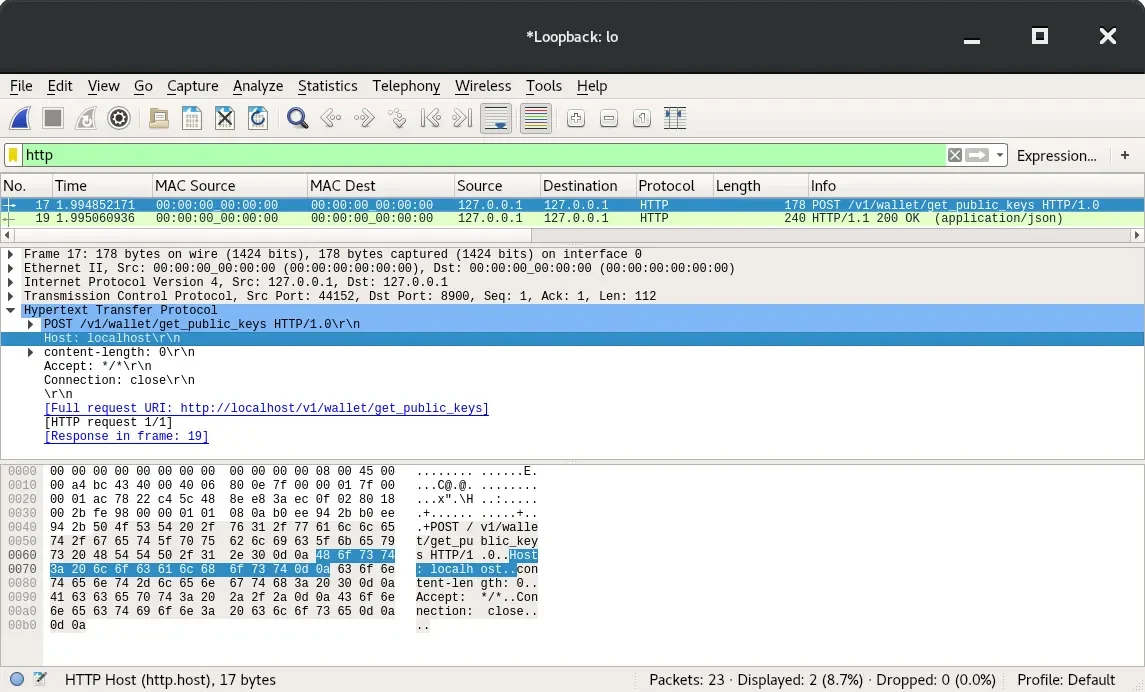
The capture shows the HTTP request between cleos and keosd on the loopback interface.
Exploitation
Step 1: confirm that a foreign Host header is accepted
An /etc/hosts entry for [redacted] example.com was added so the hypothesis could be validated with curl:
$ curl -X POST http://example.com:8900/v1/wallet/get_public_keys["[redacted]"]
The request goes to port 8900 on loopback but carries example.com as the host, and the wallet API answered with the public key for the test wallet. Everything indicated that it was exploitable.
Step 2: build a rebinding hostname
The Akamai tool's public service did not appear to be up, so the researcher used whonow, which offers the same functionality and is readily usable without deploying anything special ahead of time. He spun up a Google Cloud compute instance with a static public IP and crafted a magic hostname whose DNS resolution behaviour is deterministic and configurable:
http://a.35.23.3.13.1time.127.0.0.1.5time.repeat.rebind.network:8900
The tokens specify that the name should resolve to [redacted] once, then resolve to [redacted] (loopback, where keosd waits on port 8900), and repeat in a loop. The service acts as an authoritative DNS server for the zone rebind.network and follows the algorithm encoded in the domain tokens.
Step 3: serve the payload from the attacker host
An nginx virtual host was set up to listen on port 8900, serving a proof of concept page:
<html><body><script>console.log("Loaded from [redacted]:8900");setTimeout(function() { fetch("/v1/wallet/get_public_keys", { method: "POST" }) .then(function(r) { return r.json(); }) .then(function(json) { alert(json); });}, 30000); // Wait 30 seconds </script></body></html>
The page is loaded from the attacker's IP on the first resolution. It waits 30 seconds, then issues a fetch to the relative path /v1/wallet/get_public_keys with POST. Because the URL is relative, the browser keeps the same origin and triggers a second DNS resolution, which now returns [redacted]. The browser rebinds the new IP to the currently visited origin, and the request lands on keosd.
Step 4: run it against an unlocked wallet
The researcher ran cleos wallet unlock once to unlock the keosd wallet for 15 minutes and opened Chrome to test it out.
Hooray!
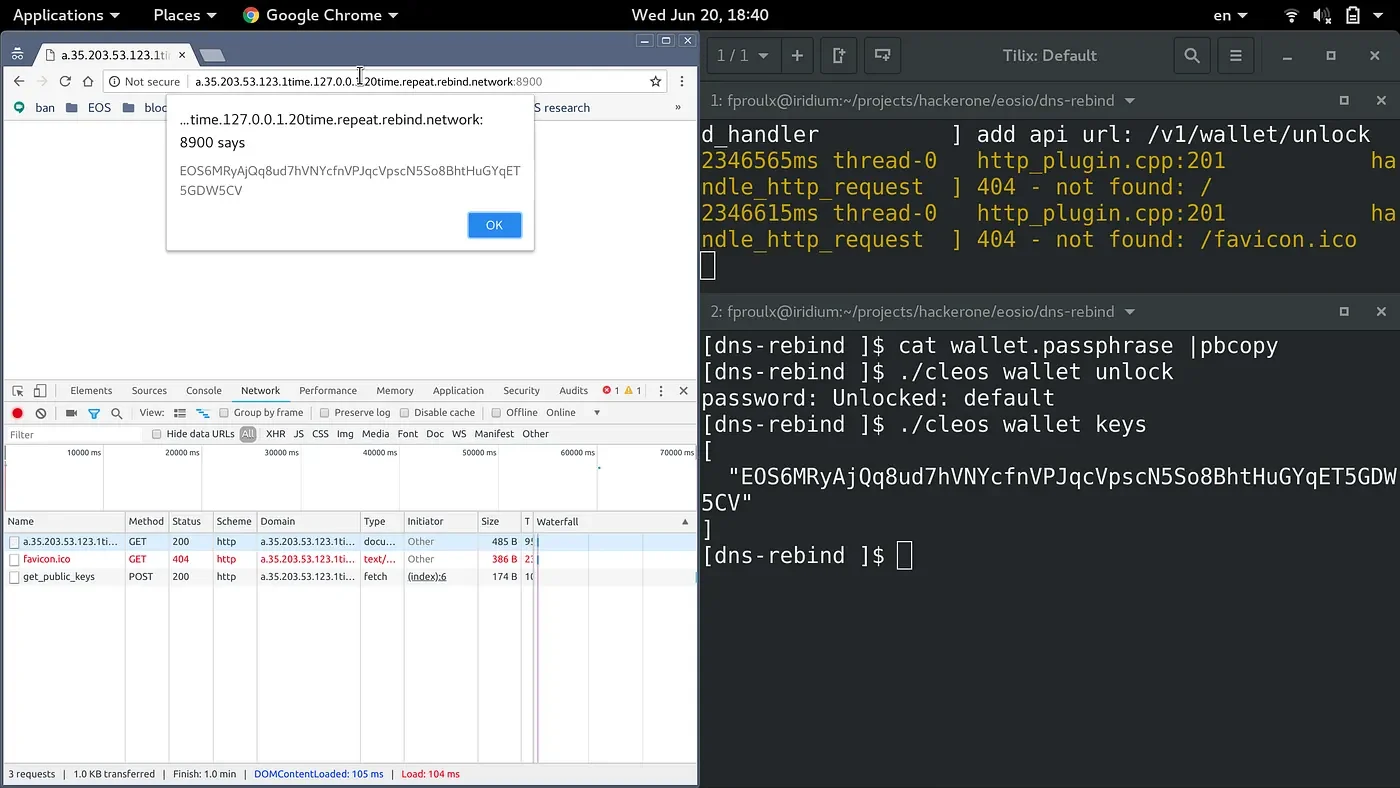
The screenshot shows keosd accepting requests on the right and a successful DNS rebinding in Chrome on the left.
Threat Modeling recap
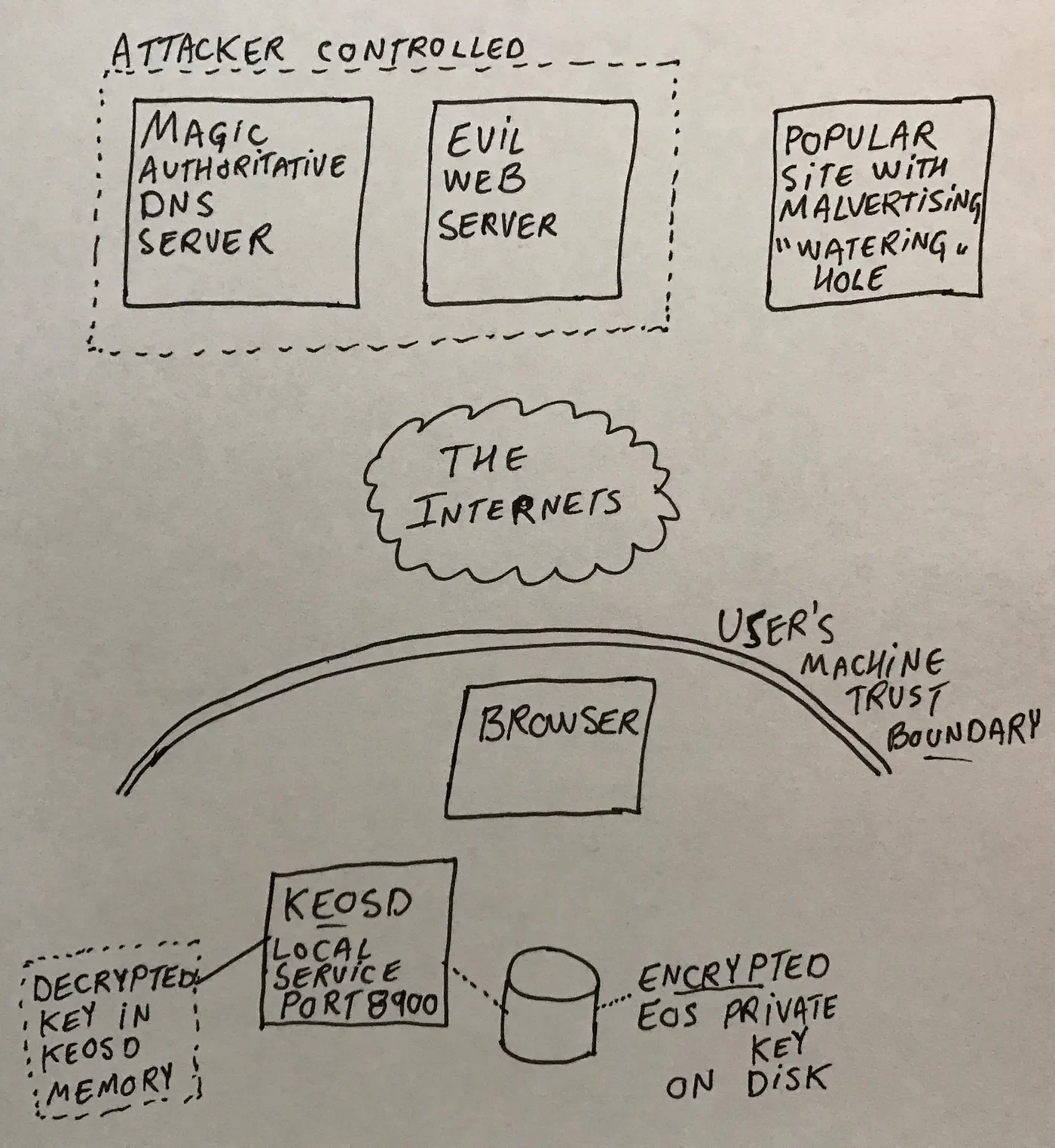
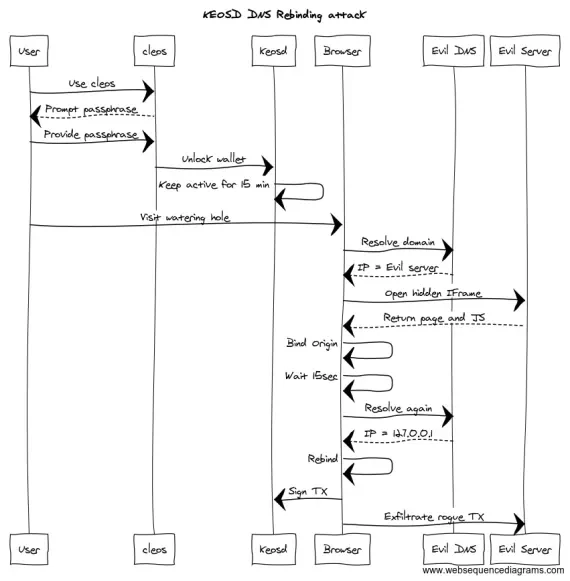
The threat model, in brief:
- The EOS private key sits on disk on the user's machine, encrypted with a key derived from the user's passphrase.
- When the user types the passphrase through
cleos, the wallet gets a 15-minute grace period to perform multiple operations in a row. - The two processes communicate over a TCP socket on the loopback interface, port
8900by default. - All of that is fine if the trust boundary is the user's machine and the machine is fully patched with zero open ports.
- The user, a savvy EOS community member, regularly visits popular blogs. One of them carries a malvertising campaign, or simply a blog post, from the threat actor.
- The JavaScript stealthily opens an
<iframe>which instructs the browser to resolve a domain whoseSOA/NSrecords point to a magic DNS server that first returns the IP of the threat actor's web server. - The browser loads some HTML and JavaScript from that server.
- A few seconds later, the same JavaScript, now associated with the threat actor's
Origin, performs afetchwhich triggers a second DNS resolution, because theTTLof the firstArecord has conveniently already expired. - This time the DNS server returns
[redacted]as theArecord. The browser rebinds this new IP to the currently visited origin. - At that point the threat actor can issue arbitrary EOS transactions using the active wallet on the victim's machine.
The root cause
A well behaved daemon listening on loopback is not automatically exploitable. This one was, simply because it did not follow RFC7230 section 5.4: it did not ensure that it processed HTTP requests and returned 200 responses only for whitelisted Host values such as localhost:8900 or [redacted]:8900. Had it done so, everything would have been fine. That is essentially how the vulnerability was addressed in 1.0.9, though the report notes there might be other options, such as mutual authentication between processes.
Impact
Under the conditions above, a threat actor who can get a victim to visit a page he controls can issue arbitrary EOS transactions using the active wallet on the victim's machine, during the 15-minute window after the passphrase prompt. The report frames this as a credible remote attack against whales. The proof of concept was demonstrated in Chrome with the wallet unlocked.
Fix
The vulnerability was fixed in version 1.0.9 and later of the EOSIO software; the report says this is essentially how it was addressed, by whitelisting Host values. The report recommends updating.
The bug bounty
This was the researcher's first experience participating in a public bug bounty, and he was pleasantly surprised by the level of attention Block One gives to reporters. He reported the bug and they confirmed they could reproduce the proof of concept within less than 24 hours. They exchanged once or twice about how the issue would be addressed and in which release it should be included. The report describes Block One as quite generous in this bug bounty and a good return on investment for them and the EOS community, as it attracts security researchers early on to address the most critical security bugs.
- Other local wallet and signing daemons. Point a rebinding hostname at the daemon's loopback port and send a request with a foreign
Hostheader, as in thecurltest above. A positive result is a200response containing wallet data such as public keys. - Daemons that omit the port from the
Hostheader check. If a service validates the hostname but not the port, try the same hostname on a different port. A positive result is the service answering on a port it should not accept. - Short-TTL rebinding against any loopback HTTP API. Use a magic hostname that alternates between the attacker IP and
[redacted], serve a page that waits for the TTL to expire, thenfetcha relative path. A positive result is the browser delivering the request to the local service under the attacker's origin. - State-changing endpoints, not just reads. Repeat the proof of concept against endpoints that sign or submit transactions while the wallet is unlocked. A positive result is a signed or submitted transaction the user did not initiate.
- Other browsers. The proof of concept was demonstrated in Chrome; try the same page in other browsers to see whether the rebinding is blocked. A positive result is the local service receiving the request from the attacker origin.
What happened, in plain words
A security researcher found a way for a malicious website to talk to a small program running on your own computer, a program that holds the keys to your cryptocurrency wallet. If you had that wallet open and unlocked, a website you visited could ask the wallet program to sign transactions. The researcher reported it to the company behind the software, it was fixed, and this is the story of how he found it.
Before going further, a few words for anyone new to this. A wallet in cryptocurrency is not a physical object: it is a piece of software that stores a private key, a long secret string that proves you own your funds and lets you authorise payments. Whoever has the private key can move the money, so the key is the thing worth stealing. A daemon is a program that runs in the background, without a window you click on, waiting to do a job when something asks it to. A port is a numbered door on a computer that a program listens behind, so other programs know where to knock. The loopback interface is the computer talking to itself: traffic sent to the address [redacted] never leaves the machine, it just goes from one local program to another. And an API is a fixed set of addresses a program accepts requests on, like a restaurant menu: you can only order the dishes listed, but anyone who knows the menu can order.
The two programs involved
EOSIO is a blockchain platform, and it ships two command line tools that work together. cleos is the one the user drives: you type commands into it. keosd is the daemon that actually holds the wallet. The private key sits on disk, encrypted with a key derived from the user's passphrase, so the file on disk is useless without the passphrase.
When the user runs cleos wallet unlock and types the passphrase, keosd keeps the wallet unlocked for 15 minutes. That way a series of operations can be performed without re-entering the passphrase every time. This is the documented default behaviour and can be changed in a configuration file called config.ini.
Because cleos and keosd are separate programs, they talk to each other over a TCP socket on the loopback interface, port 8900 by default. The wallet API exposed there includes /v1/wallet/get_public_keys, and while the wallet is unlocked it accepts EOS signing transactions. An endpoint is one specific address on that menu, for example the one that lists your wallet's public keys. A public key is the shareable half of the key pair: it identifies your wallet without revealing the secret half.
The bug described here was responsibly disclosed and fixed in version 1.0.9 and later of the EOSIO software. Responsible disclosure means telling the vendor privately first, giving them time to fix it, and only then talking about it publicly.
How the researcher got set up
The researcher had been writing a script to automate tasks such as setting up an EOSIO account with the right multi-sig permissions. Multi-sig means an account that needs more than one key to approve an action, like a bank account that needs two signatures on a cheque. While doing this he noticed that successive calls to cleos did not prompt for the wallet passphrase every time, and that cleos was spawning a detached keosd process that stayed alive for 15 minutes after the passphrase prompt. Spawning means starting another program; detached means it keeps running on its own after the first program is done with it.
For the test he used:
- A local EOSIO install with a test wallet, unlocked with
cleos wallet unlock. - Wireshark, a program that records network traffic so you can read it afterwards, to inspect the plaintext HTTP traffic on the loopback interface. Plaintext means not encrypted, so anyone who can see the traffic can read it.
- An
/etc/hostsentry mapping a hostname to loopback, to validate the hypothesis withcurl. The/etc/hostsfile is a small local list that tells the computer which address a name should go to, before it asks any real DNS server.curlis a command line tool for sending web requests by hand. - A Google Cloud compute instance with a static public IP, running
nginxas a virtual host on port8900, serving the proof of concept HTML and JavaScript. A compute instance is a rented computer in a data centre; a static public IP is an address on the internet that does not change;nginxis a web server, a program that hands out web pages; a virtual host is one website configured inside that server. - The
whonowtool (also available as the public service atrebind.network), an authoritative DNS server for the zonerebind.networkthat resolves names according to tokens embedded in the domain itself. DNS is the internet's phone book: it turns a name likeexample.cominto an IP address. An authoritative DNS server is the one that gives the official answer for a domain. A token here means a piece of text inside the domain name that the server reads as an instruction. - Chrome, as the victim browser.
Finding it
The starting point was a piece of security news: an article about DNS rebinding against IoT devices, and a NorthSec 2018 talk by two Akamai researchers who had released a tool that made DNS rebinding attacks significantly faster and more usable. DNS rebinding is the trick at the heart of this story, so here it is from zero.
When your browser loads a page from a website, it remembers which site that page came from, called its origin. The origin is the combination of protocol, hostname and port. The browser then enforces a rule called the same-origin policy: a page from one origin is not allowed to read responses from a different origin. That rule is what normally stops a random website from talking to a service on your own machine. DNS rebinding defeats it by making the browser believe that the attacker's site and your local service are the same origin, because the name stays the same while the address behind it changes.
Here is the everyday comparison. Imagine you have a friend called "the office" saved in your phone. The first time you call, the number connects you to a real office across town. While you are on the call, someone quietly changes the number saved under that name to your own home phone. The next time you dial "the office", you reach your own house, but your phone still shows the same name, so you trust it. DNS rebinding does exactly this with a domain name: the name stays the same, the address it points to changes from the attacker's server to [redacted], and the browser, which only checks the name, keeps trusting it.
DNS rebinding is an old vulnerability class, from around 1996, that had become topical again through Tavis Ormandy's reports against Blizzard's daemon and several Torrent clients. A vulnerability class is a family of bugs that share the same underlying mistake.
The reasoning was straightforward: if keosd was vulnerable to DNS rebinding, and it accepts EOS signing transactions for 15 minutes after the passphrase prompt, that would be a credible remote attack against whales. Whales here means people holding very large amounts of cryptocurrency, the most valuable targets.
That same afternoon the researcher sniffed the plaintext HTTP requests with Wireshark to see how they were structured. He noticed that while cleos was sending the HTTP request Host header, it was not compliant with RFC7230 section 5.4: the keosd listening port 8900 was not specified in the header. Two terms need unpacking. An HTTP header is a small labelled line sent along with every web request, carrying information about it; the Host header says which website the request is meant for. RFC7230 is one of the documents that define how HTTP, the language of the web, is supposed to work, and section 5.4 of it says the Host header should include the port when it is not the default. keosd was accepting requests whose Host header named some other site entirely, which is the crack the whole attack goes through.
The capture shows the HTTP request between cleos and keosd on the loopback interface.
Exploitation
Step 1: confirm that a foreign Host header is accepted
An /etc/hosts entry for [redacted] example.com was added so the hypothesis could be validated with curl. In plain words: he told his own computer that the name example.com lives at [redacted], his own machine, so he could send a request to the local wallet while pretending to be a different website.
$ curl -X POST http://example.com:8900/v1/wallet/get_public_keys["[redacted]"]
Line by line: curl is the tool sending the request. -X POST says to use the POST method, which is the HTTP verb used when you are asking a service to do something rather than just fetch a page. http://example.com:8900 is the address: the name example.com, which the hosts file points at loopback, and port 8900, where keosd listens. /v1/wallet/get_public_keys is the endpoint being called, the menu item that returns the wallet's public keys. The bracketed string at the end is the argument being sent along with the request.
The request goes to port 8900 on loopback but carries example.com as the host, and the wallet API answered with the public key for the test wallet. Everything indicated that it was exploitable. In other words: the wallet program did not care that the request claimed to come from a different website, it answered anyway.
Step 2: build a rebinding hostname
The Akamai tool's public service did not appear to be up, so the researcher used whonow, which offers the same functionality and is readily usable without deploying anything special ahead of time. He spun up a Google Cloud compute instance with a static public IP and crafted a magic hostname whose DNS resolution behaviour is deterministic and configurable:
http://a.35.23.3.13.1time.127.0.0.1.5time.repeat.rebind.network:8900
This is a domain name that reads like a sentence. a starts the list of instructions. [redacted] is the first address to return, the attacker's own server. 1time says to return it once. [redacted] is the second address, the victim's own machine. 5time is a token in the name, and repeat says to start the loop again. repeat says to start the loop again. rebind.network is the zone the service controls, and :8900 is the port to connect to. The tokens specify that the name should resolve to [redacted] once, then resolve to [redacted] (loopback, where keosd waits on port 8900), and repeat in a loop. The service acts as an authoritative DNS server for the zone rebind.network and follows the algorithm encoded in the domain tokens.
Step 3: serve the payload from the attacker host
An nginx virtual host was set up to listen on port 8900, serving a proof of concept page. A proof of concept is a small demonstration that proves the bug is real without doing any harm.
<html><body><script>console.log("Loaded from [redacted]:8900");setTimeout(function() { fetch("/v1/wallet/get_public_keys", { method: "POST" }) .then(function(r) { return r.json(); }) .then(function(json) { alert(json); });}, 30000); // Wait 30 seconds </script></body></html>
Line by line: <html><body> open an ordinary web page. <script> starts a block of JavaScript, the language web pages use to run code in your browser. console.log("Loaded from [redacted]:8900") writes a note into the browser's developer console, so the researcher can see the page really came from his server. setTimeout(function() { ... }, 30000) says: wait 30,000 milliseconds, that is 30 seconds, then run the code inside. The comment // Wait 30 seconds says the same thing for a human reader. Inside the timeout, fetch("/v1/wallet/get_public_keys", { method: "POST" }) sends a request to that path on the same site the page came from; because the path is relative, the browser keeps the same origin. .then(function(r) { return r.json(); }) takes the reply and reads it as JSON, a common text format for data. .then(function(json) { alert(json); }) pops up the result in a dialog box so the researcher can see it. The closing tags end the script, the body and the page.
The page is loaded from the attacker's IP on the first resolution. It waits 30 seconds, then issues a fetch to the relative path /v1/wallet/get_public_keys with POST. Two more terms: an A record is the DNS entry that maps a name to an address, and its TTL, time to live, is how many seconds the browser is allowed to remember that answer before asking again. Because the URL is relative, the browser keeps the same origin and triggers a second DNS resolution, which now returns [redacted]. The browser rebinds the new IP to the currently visited origin, and the request lands on keosd. That is the phone book trick from earlier, played out in a browser.
Step 4: run it against an unlocked wallet
The researcher ran cleos wallet unlock once to unlock the keosd wallet for 15 minutes and opened Chrome to test it out. The unlock is the part the victim does innocently: they just use their wallet as normal, and the 15-minute window is the opportunity the attacker waits for.
Hooray!
The screenshot shows keosd accepting requests on the right and a successful DNS rebinding in Chrome on the left.
Threat Modeling recap
A threat model is a short, structured story of who might attack you, what they want, and how they would get it. The threat model, in brief:
- The EOS private key sits on disk on the user's machine, encrypted with a key derived from the user's passphrase.
- When the user types the passphrase through
cleos, the wallet gets a 15-minute grace period to perform multiple operations in a row. - The two processes communicate over a TCP socket on the loopback interface, port
8900by default. - All of that is fine if the trust boundary is the user's machine and the machine is fully patched with zero open ports. The trust boundary is the line around the things you trust; everything inside is assumed safe, everything outside is not.
- The user, a savvy EOS community member, regularly visits popular blogs. One of them carries a malvertising campaign, or simply a blog post, from the threat actor. Malvertising means malicious advertising: an ad slot on a legitimate site that serves code written by an attacker.
- The JavaScript stealthily opens an
<iframe>which instructs the browser to resolve a domain whoseSOA/NSrecords point to a magic DNS server that first returns the IP of the threat actor's web server. An<iframe>is a page embedded inside another page, like a picture frame on a wall.NSrecords say which DNS server is in charge of a domain, andSOArecords hold the administrative details of the zone. - The browser loads some HTML and JavaScript from that server.
- A few seconds later, the same JavaScript, now associated with the threat actor's
Origin, performs afetchwhich triggers a second DNS resolution, because theTTLof the firstArecord has conveniently already expired. - This time the DNS server returns
[redacted]as theArecord. The browser rebinds this new IP to the currently visited origin. - At that point the threat actor can issue arbitrary EOS transactions using the active wallet on the victim's machine. A transaction is a signed instruction to move funds or change something on the blockchain.
The root cause
A well behaved daemon listening on loopback is not automatically exploitable. This one was, simply because it did not follow RFC7230 section 5.4: it did not ensure that it processed HTTP requests and returned 200 responses only for whitelisted Host values such as localhost:8900 or [redacted]:8900. A whitelist is a list of things you allow, with everything else refused. A 200 response is the HTTP status code meaning "OK, here is your answer". Had it done so, everything would have been fine. That is essentially how the vulnerability was addressed in 1.0.9, though the report notes there might be other options, such as mutual authentication between processes. Mutual authentication means both sides of a conversation prove who they are to each other, rather than only one side proving it.
Impact
Under the conditions above, a threat actor who can get a victim to visit a page he controls can issue arbitrary EOS transactions using the active wallet on the victim's machine, during the 15-minute window after the passphrase prompt. The report frames this as a credible remote attack against whales. The proof of concept was demonstrated in Chrome with the wallet unlocked.
Fix
The vulnerability was fixed in version 1.0.9 and later of the EOSIO software; the report says this is essentially how it was addressed, by whitelisting Host values. The report recommends updating.
The bug bounty
A bug bounty is a programme where a company pays researchers for reporting security bugs privately instead of exploiting them. This was the researcher's first experience participating in a public bug bounty, and he was pleasantly surprised by the level of attention Block One gives to reporters. He reported the bug and they confirmed they could reproduce the proof of concept within less than 24 hours. They exchanged once or twice about how the issue would be addressed and in which release it should be included. The report describes Block One as quite generous in this bug bounty and a good return on investment for them and the EOS community, as it attracts security researchers early on to address the most critical security bugs.
- Other local wallet and signing daemons. Point a rebinding hostname at the daemon's loopback port and send a request with a foreign
Hostheader, as in thecurltest above. A positive result is a200response containing wallet data such as public keys. - Daemons that omit the port from the
Hostheader check. If a service validates the hostname but not the port, try the same hostname on a different port. A positive result is the service answering on a port it should not accept. - Short-TTL rebinding against any loopback HTTP API. Use a magic hostname that alternates between the attacker IP and
[redacted], serve a page that waits for the TTL to expire, thenfetcha relative path. A positive result is the browser delivering the request to the local service under the attacker's origin. - State-changing endpoints, not just reads. Repeat the proof of concept against endpoints that sign or submit transactions while the wallet is unlocked. A positive result is a signed or submitted transaction the user did not initiate.
- Other browsers. The proof of concept was demonstrated in Chrome; try the same page in other browsers to see whether the rebinding is blocked. A positive result is the local service receiving the request from the attacker origin.
Glossary
- API: a fixed set of addresses and rules a program accepts requests on, like a menu you can order from.
- A record: the DNS entry that maps a domain name to an IP address.
- Authoritative DNS server: the server that gives the official answer for a domain.
- Bug bounty: a programme that pays researchers for reporting security bugs privately.
- cleos: the command line tool the EOSIO user drives.
- Compute instance: a rented computer in a data centre.
- config.ini: the configuration file where EOSIO settings, including the wallet unlock duration, can be changed.
- curl: a command line tool for sending web requests by hand.
- Daemon: a program that runs in the background waiting to do a job.
- Detached process: a program that keeps running on its own after the program that started it is done.
- DNS: the internet's phone book, turning names into IP addresses.
- DNS rebinding: an attack that keeps a domain name the same while changing the address behind it, so the browser trusts a local service as if it were the attacker's site.
- Endpoint: one specific address on an API, such as
/v1/wallet/get_public_keys. - fetch: the JavaScript function a page uses to send a web request.
- Header: a small labelled line sent with a web request carrying information about it.
- Host header: the header that says which website a request is meant for.
- HTTP: the language web browsers and servers use to talk.
- iframe: a web page embedded inside another page.
- JSON: a common text format for structured data.
- keosd: the EOSIO daemon that holds the wallet.
- Loopback interface: the computer talking to itself, using the address
[redacted]. - Malvertising: malicious advertising, an ad slot serving attacker code on a legitimate site.
- Multi-sig: an account that needs more than one key to approve an action.
- Mutual authentication: both sides of a conversation prove who they are to each other.
- nginx: a web server program that hands out web pages.
- NS record: a DNS record saying which server is in charge of a domain.
- Origin: the combination of protocol, hostname and port that a page came from.
- Plaintext: not encrypted, readable by anyone who can see it.
- Port: a numbered door on a computer that a program listens behind.
- POST: the HTTP method used when asking a service to do something rather than just fetch a page.
- Private key: the long secret string that proves ownership of funds and authorises payments.
- Proof of concept: a small demonstration proving a bug is real without doing harm.
- Public key: the shareable half of a key pair, identifying a wallet without revealing the secret.
- Responsible disclosure: telling the vendor privately first, then talking about it publicly after a fix.
- RFC7230: one of the documents defining how HTTP works; section 5.4 covers the
Hostheader and the port. - Same-origin policy: the browser rule that a page from one origin may not read responses from another.
- SOA record: a DNS record holding the administrative details of a zone.
- Spawning: starting another program.
- Static public IP: an internet address that does not change.
- Threat model: a structured story of who might attack you, what they want and how they would get it.
- Token: here, a piece of text inside a domain name that a DNS server reads as an instruction.
- Transaction: a signed instruction to move funds or change something on the blockchain.
- Trust boundary: the line around the things you trust.
- TTL: time to live, how many seconds a DNS answer may be remembered before asking again.
- Virtual host: one website configured inside a web server.
- Vulnerability class: a family of bugs sharing the same underlying mistake.
- Wallet: the software that stores a private key and signs transactions.
- Whales: people holding very large amounts of cryptocurrency.
- Whitelist: a list of things you allow, with everything else refused.
- whonow: a tool that acts as an authoritative DNS server and resolves names according to tokens in the domain.
- Wireshark: a program that records network traffic so you can read it afterwards.
- 200 response: the HTTP status code meaning "OK, here is your answer".