Able to see location coordinates in any event without permission to do so
The event detail endpoint returned location coordinates even when the host had hidden the address from non-attendees. An attacker could use these coordinates to learn the exact event location.

- Triaged in 14 days
- Fixed in 39 days
- Paid in 39 days
- Disclosed after 2 months
Hi Fetlife team!
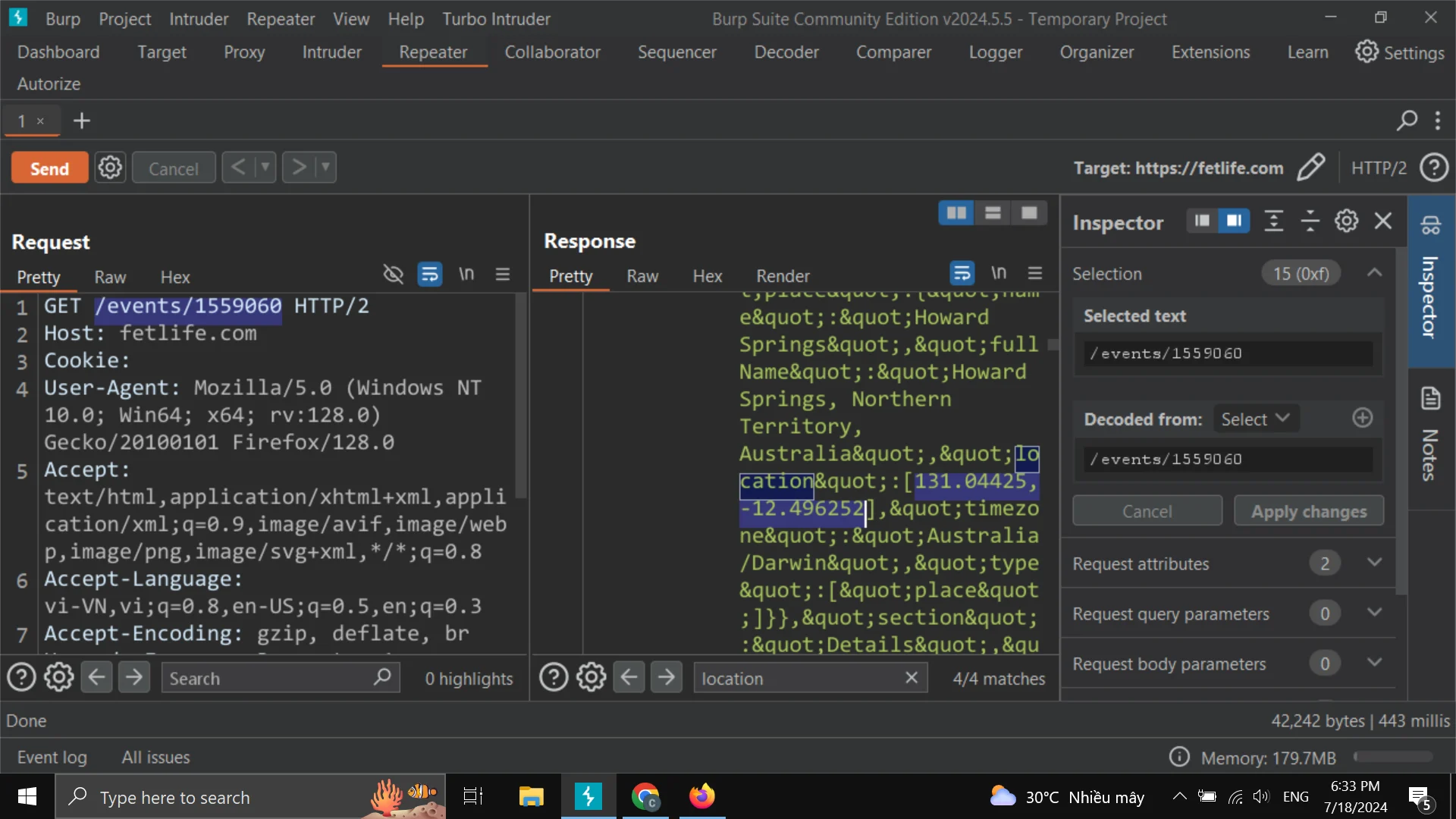
You can see the location coordinates in endpoint https://fetlife.com/events/{event-id} response even though the host event has blocked non-RSVP users (users don't attend the event) from seeing the exact address.
If the event host does not hide the address via privacy setting or the attacker has already attended the event, there's a Google Map link on the right event detail tab.
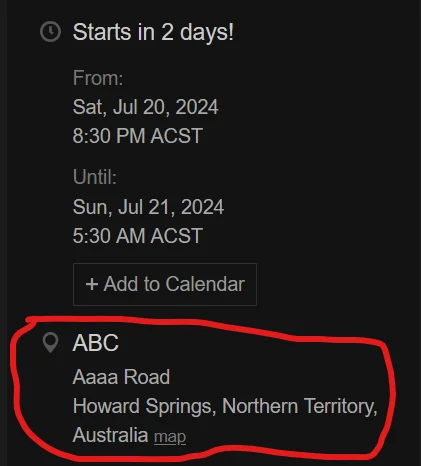
If you check the coordinates from Google Map link, you will see that it is approximately the same as the coordinates you see in the response.
The coordinates in the response are reversed, so when entering them on Google Map you need to reverse them.
131.04425, -12.496252 -> -12.496252, 131.04425
Attack condition/Limitation:
Attackers are not being banned from the event.
Step to Reproduce:
- Open Burp and proxy all HTTP requests.
- Prepare 2 accounts. In this case, I use my 2 accounts: Ezzra1 (attacker), Ezzra2 (victim).
- Victim creates event and goes to the privacy setting, ticks the box
Address & Name of Locationand clicksUpdate Event Privacyto hide the exact address. - Attacker goes to the event
https://fetlife.com/events/{event-id} - Check HTTP history. You will see the Request
GET /events/{event-id} - In Response tab, type in the search box location and now you can see the location coordinates.
Impact
Attackers can see/guess the exact location of the event.
Context
FetLife is a social network built around events. Each event has a detail page at https://fetlife.com/events/{event-id}, and the host can control how much of the venue information other members see. One of the privacy controls is a checkbox labelled Address & Name of Location, applied with an Update Event Privacy button, which is meant to hide the exact address from members who have not RSVP'd to the event.
The report shows that this privacy control is only applied to the rendered page, not to the data behind it. The event detail response still carries the venue's latitude and longitude, so a member who is not allowed to see the address can still read the coordinates out of the HTTP response and recover the location.
Setup
- Two accounts:
Ezzra1as the attacker andEzzra2as the victim. The victim account hosts the event. - Burp Suite configured as a proxy so that all HTTP requests are captured.
- No special role or privilege is needed on the attacker side beyond a normal logged-in account that is not attending the event.
The precondition is an event whose host has ticked Address & Name of Location in the privacy settings, so that the exact address is hidden from non-RSVP users.
Finding it
The researcher looked at the event detail endpoint, https://fetlife.com/events/{event-id}, and noticed that the response contains the location coordinates even when the host has blocked non-RSVP users from seeing the exact address. The page itself hides the address, but the response still includes the coordinate pair.
A second observation makes the leak easy to confirm. If the host has not hidden the address through the privacy setting, or if the attacker has already attended the event, the event detail tab shows a Google Map link on the right-hand side.
The coordinates taken from that Google Map link are approximately the same as the coordinates present in the response. The only wrinkle is that the pair in the response is reversed, so it has to be flipped before it can be entered into Google Maps:
131.04425, -12.496252 -> -12.496252, 131.04425
Exploitation
Step 1: Proxy traffic
Open Burp and proxy all HTTP requests so that the event page load is captured.
Step 2: Prepare the two accounts
Use two accounts, Ezzra1 as the attacker and Ezzra2 as the victim.
Step 3: Hide the address as the host
As the victim, create an event, go to the privacy setting, tick the box Address & Name of Location and click Update Event Privacy. This is the state in which the exact address is supposed to be hidden from members who are not attending.
Step 4: Request the event as the attacker
As the attacker, open the event page:
GET /events/{event-id}
This is the same request any logged-in member makes when viewing an event they have not RSVP'd to.
Step 5: Inspect the request in Burp
In the HTTP history, find the request GET /events/{event-id}. It is an ordinary page load, so nothing about the request itself signals that it returns more data than the UI shows.
Step 6: Search the response for the location
In the Response tab, type location into the search box. The response contains the location coordinates, which the page does not display to this user. Reversing the pair gives a point that matches the Google Map link shown to users who are allowed to see the address.
Root cause
The privacy setting is enforced when the page is rendered, but the event detail response still serialises the venue coordinates. The report does not explain why the coordinates are still sent. The report does not include the server-side code, so the exact place where the filtering is missing is not shown; likely the coordinate fields are added to the event object unconditionally and the template or client-side logic is what hides them.
Impact
An attacker can see or guess the exact location of an event whose host has chosen to hide the address from non-attendees. The report notes one limitation: attackers are not being banned from the event, so the leak is available to any member who can load the event page, not only to someone who has been removed from the guest list.
The researcher frames the outcome as being able to see or guess the exact location of the event.
Fix
The report does not describe a fix or a verification of one.
Variants to test
- A positive result is any value the UI hides but the JSON contains.
- A positive result is coordinates appearing in a context where the address is hidden.
Hunting notes
This kind of bug hides in features where a privacy toggle changes what the page shows but not what the API returns. The quickest check is to enable the restrictive setting on one account, load the object from a second account, and search the raw response for the field names the UI no longer displays.
The researcher made the impact concrete by tying the leaked values to something a user can verify: the coordinates in the response match the Google Map link shown to users who are allowed to see the address, once the pair is reversed.
What happened, in plain words
FetLife is a social network where members create and join events. Every event has its own page, and the address of the event page follows a fixed pattern: https://fetlife.com/events/{event-id}, where {event-id} is a number that identifies that one event, much like a house number identifies a house on a street.
When someone hosts an event, they can decide how much other members get to see about where it takes place. One of the privacy options is a checkbox labelled Address & Name of Location, and it is saved with a button labelled Update Event Privacy. The idea is simple: if the host ticks that box, members who have not said they are coming (people who have not RSVP'd) should not see the exact address.
The problem is that this privacy setting only changes what the page shows on screen. The response the server sent still contained the venue's latitude and longitude. Latitude and longitude are the two numbers that pin a point on the Earth, the same pair you would type into a map service to find a place. So a member who was not allowed to see the address could still read those two numbers out of the data the server sent, and from them work out where the event is.
To make the leak easy to believe, the researcher compared the leaked numbers with something a normal user can see. When the address is not hidden, or when the person viewing has already attended the event, the event page shows a Google Map link on the right-hand side of the detail tab.
The coordinates taken from that Google Map link are approximately the same as the coordinates in the response. The only catch is that the pair in the response is in the opposite order, so it has to be flipped before it can be typed into Google Maps:
131.04425, -12.496252 -> -12.496252, 131.04425
That comparison is what turns a vague "some data leaked" into a concrete "here is the exact place, and here is the proof".
Background you need before the steps
A few ideas come up again and again below, so here they are from scratch.
What a web page really is. When you type an address into your browser and press Enter, the browser sends a request to a server and the server sends back a response. The response is usually a chunk of text in a format called HTML, which the browser turns into the page you see. Think of the HTML as the printed menu and the JSON as the kitchen's order list: the customer sees the menu, but the order list can contain things the menu leaves out.
What an API is. An API is the doorway a program uses to talk to a server, as opposed to the doorway a person uses through a browser. In practice, when your browser loads a page, it is often calling the same API the page's own code uses. The event detail page is served from an endpoint, which is just a specific address on the server that answers a specific kind of request. Here the endpoint is https://fetlife.com/events/{event-id}.
What a proxy is. A proxy sits between your browser and the server and copies every request and response that passes through, so you can read them afterwards. Burp Suite is a well-known tool for this. It is like putting a glass box around the postbox: the letters still get delivered, but you can read every one of them.
What an HTTP request looks like. A request has a method (what you want to do), a path (which thing you want), and headers (extra information such as who you are). GET means "give me this thing". The line GET /events/{event-id} is the request for one event's page.
What information disclosure means. This is the name for a bug where data the user is not supposed to have is still handed to them, even if the screen hides it. It is like a shop that blacks out a price on the label but leaves the receipt in the bag.
What RSVP means. RSVP is the old French-style shorthand for "please reply". On an event site it means saying you will attend. A non-RSVP user is someone who has not said they are coming, and that is exactly the group the privacy setting is meant to protect the address from.
Setup
The researcher used:
- Two accounts:
Ezzra1as the attacker andEzzra2as the victim. The victim account hosts the event. - Burp Suite set up as a proxy, so that all HTTP requests are captured.
- Nothing special on the attacker side beyond a normal logged-in account that is not attending the event.
Why two accounts? Because the whole point is to see what one member can learn about another member's event. If you used a single account, you could not tell whether the address was hidden from you or simply not shown because you were the host. Two accounts let you play both roles: the host who hides the address, and the outsider who should not see it.
The precondition is an event whose host has ticked Address & Name of Location in the privacy settings, so that the exact address is hidden from non-RSVP users.
Finding it
The researcher looked at the event detail endpoint, https://fetlife.com/events/{event-id}, and noticed that the response contains the location coordinates even when the host has blocked non-RSVP users from seeing the exact address. The page itself hides the address, but the response still includes the coordinate pair.
A second observation makes the leak easy to confirm. If the host has not hidden the address through the privacy setting, or if the attacker has already attended the event, the event detail tab shows a Google Map link on the right-hand side.
The coordinates taken from that Google Map link are approximately the same as the coordinates present in the response. The only wrinkle is that the pair in the response is reversed, so it has to be flipped before it can be entered into Google Maps:
131.04425, -12.496252 -> -12.496252, 131.04425
Reading that line: on the left is the pair as it appears in the response, 131.04425, -12.496252. On the right is the same pair with the two numbers swapped, -12.496252, 131.04425. The response stores the pair in the opposite order to what map services expect, so swapping them is all that is needed. The arrow simply means "becomes".
Exploitation
Step 1: Proxy traffic
Open Burp and proxy all HTTP requests so that the event page load is captured.
Why: without the proxy, the browser shows you the finished page and nothing else. The proxy records the raw request and the raw response, which is where the hidden data lives.
Step 2: Prepare the two accounts
Use two accounts, Ezzra1 as the attacker and Ezzra2 as the victim.
Why: one account plays the host who hides the address, the other plays the outsider who should not see it. Keeping them separate is what makes the test meaningful.
Step 3: Hide the address as the host
As the victim, create an event, go to the privacy setting, tick the box Address & Name of Location and click Update Event Privacy. This is the state in which the exact address is supposed to be hidden from members who are not attending.
Why: this is the condition under test. If the address is not hidden, there is nothing to leak. Ticking the box and saving it puts the event into the protected state, and the save button matters because it tells the server to store that choice.
Step 4: Request the event as the attacker
As the attacker, open the event page:
GET /events/{event-id}
Reading that line: GET is the method, meaning "give me this page". /events/{event-id} is the path, meaning "the event whose identifier is this number". {event-id} is a placeholder: in a real request it is replaced by the actual number of the event, for example /events/123456. This is the same request any logged-in member makes when viewing an event they have not RSVP'd to, so nothing unusual is being sent.
Why: the attacker is doing exactly what an ordinary member would do. The question is not whether the attacker can send a strange request, but whether the normal request already returns too much.
Step 5: Inspect the request in Burp
In the HTTP history, find the request GET /events/{event-id}. It is an ordinary page load, so nothing about the request itself signals that it returns more data than the UI shows.
Why: the HTTP history is the proxy's log of everything that passed through it. Finding the event request there gives you the exact response that the browser received, which you can then read in full rather than through the page's rendering.
Step 6: Search the response for the location
In the Response tab, type location into the search box. The response contains the location coordinates, which the page does not display to this user. Reversing the pair gives a point that matches the Google Map link shown to users who are allowed to see the address.
Why search for location? Because field names in the structured data are usually descriptive, and a field holding the venue's position is likely to have a name containing that word. The search box is a quick way to jump straight to the interesting part of a long response instead of reading it all.
Root cause
The privacy setting is enforced when the page is rendered, but the event detail response still serialises the venue coordinates. Serialising here means turning the server's internal data into the text format that is sent to the browser. The report does not explain why the coordinates are still sent. The payload is the body of the response, the part that carries the actual data.
A useful comparison is a restaurant that prints the full recipe on the back of the menu and then covers it with a sticker. The customer is not supposed to read it, but it is still on the paper. The report does not include the server-side code, so the exact place where the filtering is missing is not shown; likely the coordinate fields are added to the event object unconditionally and the template or client-side logic is what hides them. A template is the pattern the server uses to build the page, and client-side logic is code that runs in the browser after the page arrives.
Impact
An attacker can see or guess the exact location of an event whose host has chosen to hide the address from non-attendees. The report notes one limitation: attackers are not being banned from the event, so the leak is available to any member who can load the event page, not only to someone who has been removed from the guest list.
The researcher frames the outcome as being able to see or guess the exact location of the event.
Fix
The report does not describe a fix or a verification of one. In the restaurant comparison, the fix is to stop printing the recipe at all for customers who are not allowed to read it, rather than covering it with a sticker.
Variants to test
These are follow-up checks in the same spirit, for anyone who wants to look further.
- A positive result is any value the UI hides but the JSON contains.
- A presentation flag is a value that tells the page how to display something, rather than what the data is.
- A positive result is coordinates appearing in a context where the address is hidden.
Hunting notes
This kind of bug hides in features where a privacy toggle changes what the page shows but not what the API returns. Recon means the early exploration of a target to see how it is built. A stored flag is a saved on/off value, and a read path is any way the server can be asked to hand the data back.
The quickest check is to enable the restrictive setting on one account, load the object from a second account, and search the raw response for the field names the UI no longer displays. Raw response means the response exactly as the server sent it, before the browser turns it into a page.
The researcher made the impact concrete by tying the leaked values to something a user can verify: the coordinates in the response match the Google Map link shown to users who are allowed to see the address, once the pair is reversed.
Glossary
- API: the doorway a program uses to talk to a server, as opposed to the doorway a person uses through a browser.
- Attacker: in this report, the account trying to see data it should not see.
- Burp Suite: a tool that sits between browser and server and records every request and response.
- Client-side logic: code that runs in the browser after the page has arrived.
- Coordinates: the latitude and longitude pair that pin a point on the Earth.
- Endpoint: a specific address on a server that answers a specific kind of request.
- GET: the HTTP method meaning "give me this thing".
- Header: extra information attached to a request or response, such as who is asking.
- HTML: the text format a browser turns into the page you see.
- HTTP history: the proxy's log of every request and response that passed through it.
- Information disclosure: a bug where data the user is not supposed to have is still handed to them, even if the screen hides it.
- JSON: a structured text format used to carry data between server and page.
- Latitude and longitude: the two numbers that together give a position on the Earth.
- Method: the part of a request that says what you want to do, such as
GET. - Non-RSVP user: a member who has not said they will attend an event.
- Path: the part of a request that says which thing you want, such as
/events/{event-id}. - Payload: the body of a response, the part that carries the actual data.
- Presentation flag: a value that tells the page how to display something rather than what the data is.
- Proxy: a middle point that copies traffic between browser and server so it can be read.
- Raw response: the response exactly as the server sent it, before the browser renders it.
- Read path: any way the server can be asked to hand data back.
- Recon: the early exploration of a target to see how it is built.
- Request: the message a browser sends to a server asking for something.
- Response: the message a server sends back.
- Root cause: the underlying reason a bug exists, as opposed to its visible symptom.
- RSVP: saying whether you will attend an event.
- Serialise: turn internal data into the text format that is sent to the browser.
- Severity: how serious a bug is judged to be.
- Stored flag: a saved on/off value kept by the server.
- Template: the pattern the server uses to build a page.
- Victim: in this report, the account that hosts the event and hides its address.



