How i found a vulnerability that leads to access any users’ sensitive data and got $500
An old Flickr server, still reachable, exposed a search endpoint that returned far more user data than the public site, including hashed passwords and other admin-only fields. An attacker who knew a username or image title could query this endpoint and obtain sensitive information about any user.
 Published on medium.com
Well let’s start, gathering information about your target is the golden key to finding its weak point, first I collected sub domains with common tools like : subfinder، Assassfinder، sublist3r، amass، findomain
The full write-up lives on its author's site
It belongs to its author, so we link to it rather than copy it. The other two tabs are our own rewrites, checked against it.
Context
Flickr is an American image hosting and video hosting service, and an online community. At the time of this research it was a former subsidiary of Yahoo, and it was hosted on many servers, including Amazon servers. The author notes that after Flickr rebooted as an independent and separate organisation from Yahoo, those servers still had full access to Flickr's main server databases.
The feature at the centre of this write-up is the site's search: a visitor types a term into a search box and the site returns matching images together with publisher information such as the publisher's name, ID, image title and other non-sensitive data that any user can see. The interesting part is that a second, older search interface, reachable on a server that was not the main Flickr site, returned far more than the public one.
Setup
No special account or role was needed to reach the vulnerable server. The author created a fake account on the main Flickr site for testing purposes and posted an art picture titled golden_arrow_img, so that there would be a known object to search for.
The tooling used during the research:
- Subdomain enumeration with subfinder, Assassfinder, sublist3r, amass and findomain.
- Live subdomain extraction, followed by screenshots taken with aquatone.
- Shodan, to find servers by certificate subject.
- FFUF, for path fuzzing.
- Burp Suite, to intercept the search request and replay it in Repeater.
Finding it
The author started with reconnaissance, collecting subdomains with the tools listed above, extracting the live ones and taking screenshots with aquatone:
cat live-subs | aquatone -scan-timeout 3000 -threads 5 -silent -screenshot-timeout 50000 -http-timeout 20000 -out screenshots-folder
Checking the screenshots one by one, most of the subdomains turned out to be pages showing only an error message, "We're sorry, Flickr doesn't allow embedding within frames.", and the Flickr logo, nothing else. That was set aside for a while, and the author moved to Shodan with this dork:
ssl.cert.subject.CN:"*.flickr.com"+200
The dork filters servers by certificate subject common name and adds a 200 condition. Among the results were servers with different IP addresses showing the same error message seen on the collected subdomains. The author's curiosity led to a closer look at these servers.
Exploitation
Step 1: fuzz the paths on the strange server
The author decided to check which paths existed on a server that showed the error message, using FFUF. The result was that adding the word start made all the contents of the server appear, at an address of the form:
https://ip-of-strange-server/start
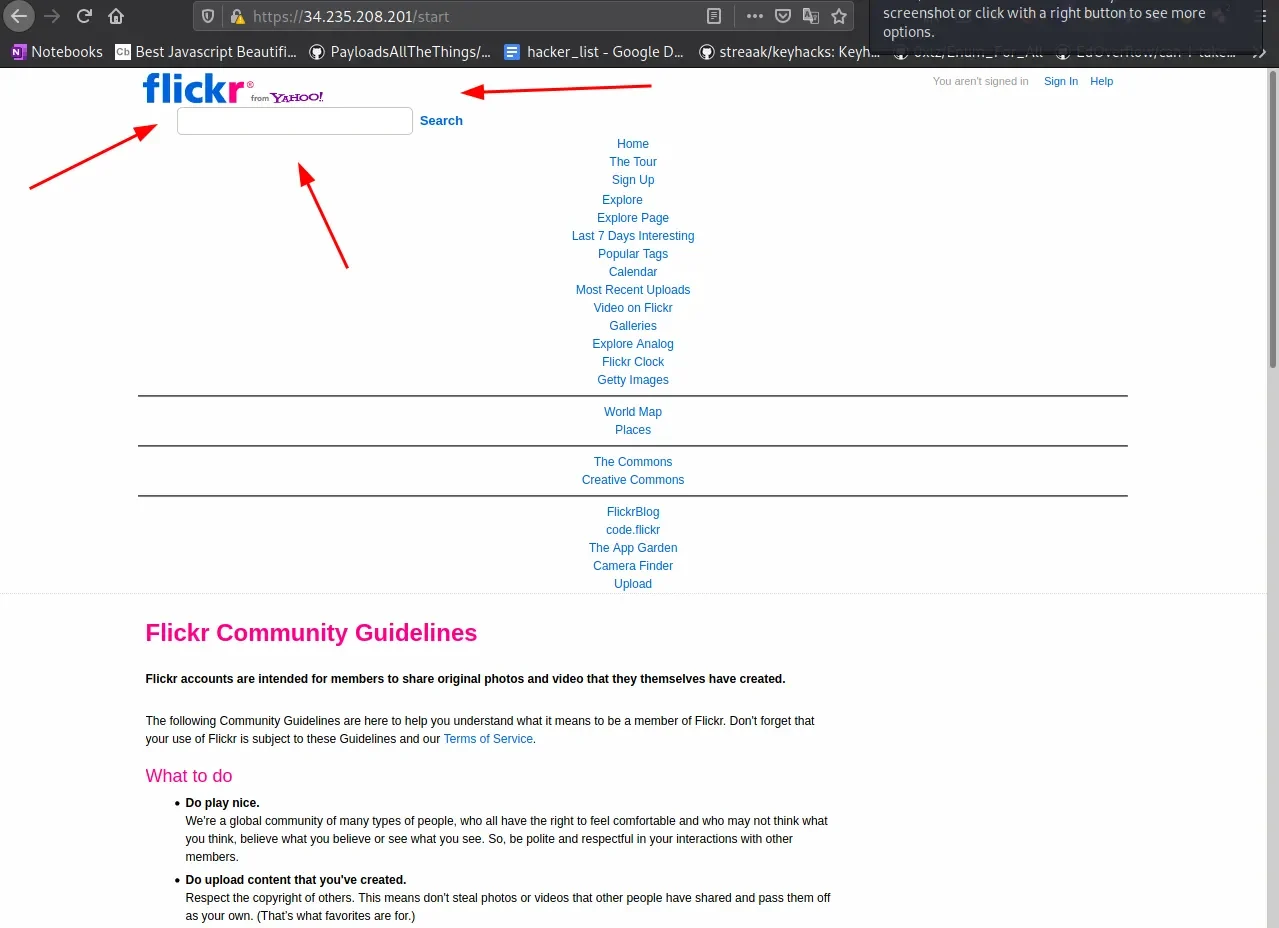
On that page there was a search box and a Yahoo logo next to Flickr. The page appeared for a second and then disappeared quickly, and the same error message came back.
Step 2: learn the public search response shape
On the main Flickr site, the author searched from the search box and the URL structure was:
https://www.flickr.com/search/?text=golden_arrow_img
The response returned the pictures and publisher information such as name, ID, image title and other non-sensitive data that any user can see, in this shape:
"username":"robert.anderson",
"realname":"Robert Anderson",
"ownerNsid":"29454454@N03",
"title":"Golden arrow IMG_0469",
"description":"Land speed record" ,
"license":0
This gave a baseline: the public search exposes identity and image metadata, but nothing private.
Step 3: repeat the search on the strange server
The idea was to search the same way through the strange server. The author went back to https://ip-of-strange-server/start, started Burp Suite and intercepted the request to see the response contents clearly. The search box on that server used a different URL structure:
https://ip-of-strange-server/search?q=golden_arrow_img
The request was sent to Repeater and replayed. The response contained a lot of information about the publisher, information that only the site administrators can see.
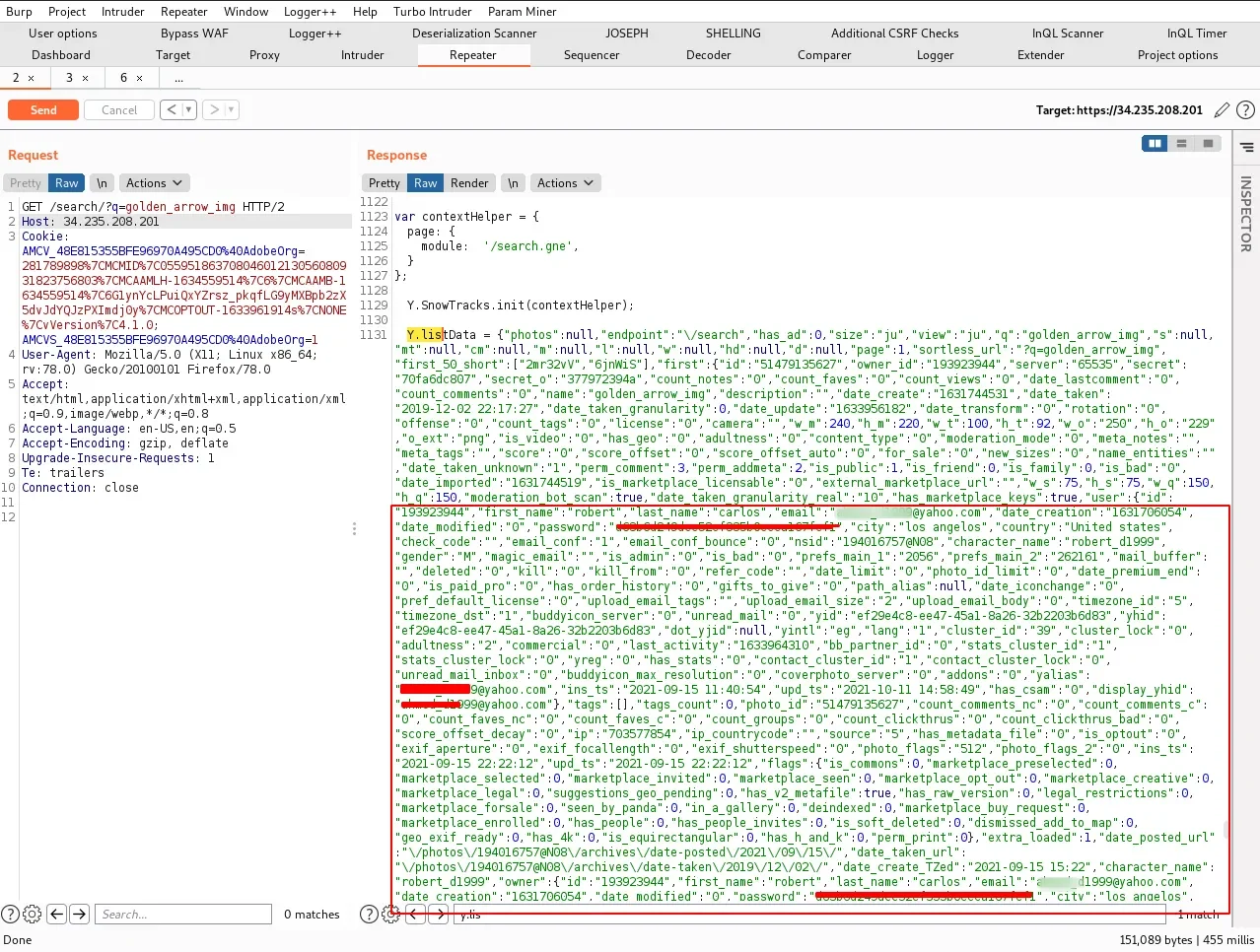

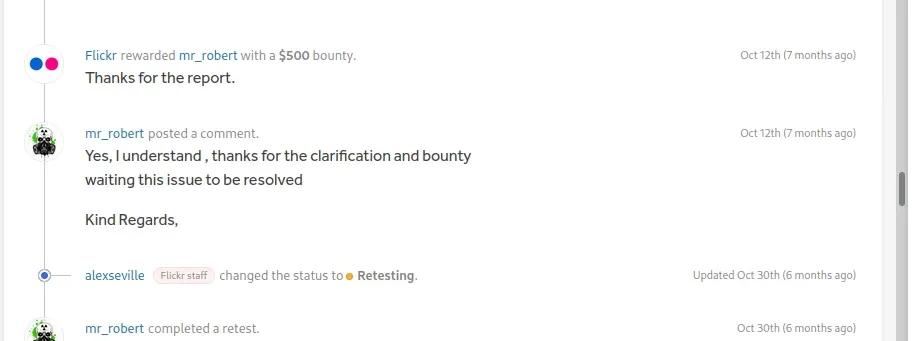
Among that information the author also found the password. It was hashed, of course, but it still seemed to make no sense to expose it. The Flickr team later clarified that the password was not real, that it was present from when Flickr was previously owned by Yahoo, and that authentication data is now stored on isolated servers.
Root cause
The report does not describe the server-side code, so the mechanism can only be inferred. What the evidence shows is that the old search endpoint on the legacy server returned the administrator-level view of publisher data for an ordinary, unauthenticated search query, while the main site's search returned only the public view. The legacy endpoint returned the administrative representation of the record for an ordinary search query, though the report does not explain why.
The author's note about the infrastructure explains why such a server existed at all: after Flickr became independent from Yahoo, servers that had belonged to the Yahoo era still had full access to Flickr's main server databases. The legacy search front end was therefore able to read data it should no longer have been serving.
Impact
An unauthenticated attacker who could reach the legacy server could submit a search query and receive sensitive publisher information that only site administrators should see, including a hashed password value. The report does not enumerate every field returned, so the full set of exposed data is not stated here. The author searched for his own picture title and received the administrative view of that publisher's record.
The password finding is bounded by the vendor's clarification: the value was not a real password, it dated from the Yahoo era, and authentication data is now stored on isolated servers. The author's own framing is that the exposed hash made no sense to expose even so.
Fix
The vendor's clarification, as relayed by the author, is that authentication data is stored on isolated servers now. Beyond that, the measure the finding calls for is to stop the legacy endpoint from returning the administrative representation of publisher records to unauthenticated callers, either by removing the endpoint or by applying the same field filtering and authorisation checks as the main site.
Variants to test
- Certificate-based server discovery: run the same Shodan dork pattern against other wildcard certificates, for example
ssl.cert.subject.CN:"*.example.com"+200, and look for hosts that answer with the same generic error page as the main brand. - Path fuzzing on legacy hosts: run FFUF against a host that returns a generic error page and watch for words that change the response, as
startdid here. A positive result is a path that renders an application interface instead of the error. - Parallel search endpoints: take a query that works on the main site, replay it against the legacy host's own search parameter, and compare the JSON fields. A positive result is any field present in the legacy response that the public response omits.
- Unauthenticated replay: send the legacy search request with no session cookie at all. A positive result is the same rich response coming back to an anonymous client.
- Parameter substitution: swap the search term for other values the endpoint accepts, such as an owner ID or username, and check whether the administrative view is returned for each.
What happened, in plain words
Flickr is a website where people upload and share photos and videos, and where other people can browse, search and comment on them. At the time of this research it was a former part of Yahoo, and it ran on many servers, including servers rented from Amazon. The author of this write-up points out something important: after Flickr became an independent company again, separate from Yahoo, some of the old Yahoo-era servers still had full access to Flickr's main databases. Think of it like an old back door to a building that nobody remembered to lock when the building changed owners.
The feature at the centre of the story is search. You type a word into a search box, and the site shows you matching pictures along with some basic information about the person who published them: their username, their display name, an internal ID number, the title of the picture and a few other details that anyone is allowed to see. That is normal and harmless.
The problem was that there was a second, older search page, sitting on one of those forgotten servers, that was not the main Flickr site. When the author sent it the same kind of search, it answered with far more than the public page did: a whole administrative view of the publisher's record, including a password value. No login was needed. That is the vulnerability: a page that should only show a small public summary was handing out the full private record to anyone who asked.
This kind of bug is called information disclosure: the system does not get broken into or taken over, it simply tells you things it should have kept to itself. The author reported it and received a $500 reward.
Background you need first
A few ideas come up again and again below, so here they are from zero.
A server is just a computer somewhere that answers requests from your browser. When you visit a website, your browser sends a request over the internet to a server, and the server sends back a page.
A subdomain is a name that sits in front of a company's main domain name. If the main site is flickr.com, then something.flickr.com is a subdomain. Big companies have many of them: one for the help pages, one for images, one for internal tools, and so on. Some of them are forgotten and left running for years.
An IP address is the numeric address of a server, the equivalent of a street address for a computer. Several different names can point at the same machine, and one company can own many machines with different addresses.
A certificate is a small digital document a server presents to prove it really is the site it claims to be. Browsers check it before showing the padlock. Certificates contain a name, and that name can be searched for.
Shodan is a search engine for internet-connected machines rather than for web pages. Instead of indexing articles, it indexes what servers answer, including their certificates. You give it a filter and it lists matching machines.
Fuzzing means trying lots of guesses automatically and watching which ones produce a different answer. If you want to know which pages exist on a server, you try a long list of common words as paths and see which ones stop returning an error.
A path is the part of a web address after the domain, for example the /start in https://example.com/start. It is like a room number inside a building.
Burp Suite is a tool that sits between your browser and the server. It lets you pause a request before it leaves, look at exactly what your browser was about to send, change it, and send it again as many times as you like. The part that resends a captured request is called Repeater.
A request is the message your browser sends to a server: which page you want, plus any extra details. A response is what comes back: the page, or data, plus a status code. A status code of 200 means "here you go, everything is fine".
JSON is a common way of formatting data as text so that programs can read it easily. It looks like a list of labels and values, for example "name":"something". When a search page returns results, it often returns them as JSON.
A hash is the result of scrambling a value, such as a password, with a mathematical function. You cannot turn a hash back into the original easily, but you can still recognise it as a password field, and weak passwords can sometimes be cracked from their hash. Storing passwords as hashes is normal; showing those hashes to strangers is not.
Authentication data means anything used to prove who you are: passwords, hashes of passwords, login tokens and similar. It belongs on servers that are locked away from the public internet.
Setup
No special account or permission was needed to reach the vulnerable server. The author did create a fake account on the main Flickr site, purely for testing, and posted an art picture titled golden_arrow_img. The reason is simple: to test a search feature you need something to search for, and you need to know exactly what the correct answer looks like. Having your own known picture in the system gives you a reference point.
The tools used during the research were:
- Subdomain enumeration with subfinder, Assassfinder, sublist3r, amass and findomain. These are programs that take a company name and produce lists of subdomains that may belong to it, by consulting public records and other sources.
- Live subdomain extraction, followed by screenshots taken with aquatone. Many subdomains in a list no longer exist; this step keeps only the ones that actually answer, and takes a picture of each so you can glance at them instead of visiting them one by one.
- Shodan, to find servers by certificate subject. This finds machines even when you do not know their names.
- FFUF, for path fuzzing. This tries many path words against a server and reports which ones behave differently.
- Burp Suite, to intercept the search request and replay it in Repeater.
Finding it
The author started with reconnaissance. Reconnaissance simply means gathering information about the target before touching anything: what exists, what it is called, what it looks like. It is the equivalent of walking around a building and noting the doors before trying any of them.
Subdomains were collected with the tools listed above, the live ones were extracted, and screenshots were taken with aquatone using this command:
cat live-subs | aquatone -scan-timeout 3000 -threads 5 -silent -screenshot-timeout 50000 -http-timeout 20000 -out screenshots-folder
Line by line:
cat live-subsprints the contents of a file calledlive-subs, which holds the list of subdomains that answered.catis a basic command that shows a file's contents.- The vertical bar
|is a pipe. It takes whatever the left side printed and feeds it as input to the program on the right, instead of showing it on screen. aquatoneis the screenshot tool. It receives the list of names and visits each one.-scan-timeout 3000tells it to give up on a scan after 3000 milliseconds, that is three seconds.-threads 5means it works on five subdomains at the same time.-silentkeeps the output quiet, showing only what matters.-screenshot-timeout 50000allows up to 50 seconds for a page to finish loading before the screenshot is taken.-http-timeout 20000allows up to 20 seconds for the server to respond at all.-out screenshots-foldersays where to save the resulting images.
Checking the screenshots one by one, most of the subdomains turned out to be pages showing only an error message, "We're sorry, Flickr doesn't allow embedding within frames.", and the Flickr logo, nothing else. That was set aside for a while, and the author moved on to Shodan with this dork:
ssl.cert.subject.CN:"*.flickr.com"+200
A dork is just a search query written for a specialised search engine. This one has three parts:
ssl.cert.subject.CNmeans "look at the certificate the server presents, and specifically at the subject's Common Name field", which is the name written on the certificate."*.flickr.com"is that name. The asterisk is a wildcard meaning "anything", so this matches certificates issued for any Flickr subdomain.+200requires that the server answer with HTTP status 200, the code for a normal successful response. This filters out machines that are switched off or refusing connections.
Among the results were servers with different IP addresses showing the same error message seen on the collected subdomains. The same error page appearing on machines that were not the main site aroused the author's curiosity.
Exploitation
Step 1: fuzz the paths on the strange server
The author decided to check which paths existed on a server that showed the error message, using FFUF. The idea is that an error page tells you nothing about what else lives on the machine, so you try common words as paths and watch for one that produces a different response. The result was that adding the word start made all the contents of the server appear, at an address of the form:
https://ip-of-strange-server/start
In plain words: instead of the error page, this address served a real application page. On that page there was a search box and a Yahoo logo next to Flickr. The page appeared for a second and then disappeared quickly, and the same error message came back.
The screenshot shows that brief moment: the search box and the Yahoo logo beside Flickr, before the page fell back to the error message.
Step 2: learn the public search response shape
Before touching the strange server's search, the author established what a normal, correct answer looks like. On the main Flickr site, a search from the search box produced this URL structure:
https://www.flickr.com/search/?text=golden_arrow_img
Reading it: https:// is the secure web protocol, www.flickr.com is the main site, /search/ is the search page, and ?text=golden_arrow_img is the query. The question mark starts the query string, the part of a URL that carries the search term, and text is the name of the parameter holding it. The value is the title of the picture the author had posted.
The response returned the pictures and publisher information such as name, ID, image title and other non-sensitive data that any user can see, in this shape:
"username":"robert.anderson",
"realname":"Robert Anderson",
"ownerNsid":"29454454@N03",
"title":"Golden arrow IMG_0469",
"description":"Land speed record" ,
"license":0
Line by line:
"username":"robert.anderson"is the account's short public handle."realname":"Robert Anderson"is the display name shown on the profile."ownerNsid":"29454454@N03"is an internal identifier for the account owner. Every record needs a unique ID so the system can tell people apart."title":"Golden arrow IMG_0469"is the title of the picture."description":"Land speed record"is the description attached to the picture."license":0is a number indicating which licence the picture is published under.
This gave a baseline: the public search exposes identity and image metadata, but nothing private. Knowing the baseline matters, because the whole finding is about a response that contains more than this. Without a reference, you cannot tell what is extra.
Step 3: repeat the search on the strange server
The idea was to search the same way through the strange server. The author went back to https://ip-of-strange-server/start, started Burp Suite and intercepted the request to see the response contents clearly. Intercepting means pausing the request in flight so you can read exactly what your browser sent, rather than guessing from the address bar.
The search box on that server used a different URL structure:
https://ip-of-strange-server/search?q=golden_arrow_img
Here the path is /search rather than /search/, and the parameter is named q rather than text. The value is the same picture title. This is a small but important detail: the old interface speaks a slightly different language from the new one, so you have to use its own parameter name.
The request was sent to Repeater and replayed. Repeater lets you fire the same request again and again, unchanged or edited, and read each response. The response contained a lot of information about the publisher, information that only the site administrators can see.
The two screenshots show that response: a long block of fields about the publisher, far beyond the handful of public fields seen on the main site. This is the moment the bug becomes real. The response contained information that only the site administrators can see.
Among that information the author also found the password. It was hashed, of course, but it still seemed to make no sense to expose it. A hash is not the password itself, but it is still authentication material, and it should never leave the server that stores it.
The Flickr team later clarified that the password was not real, that it was present from when Flickr was previously owned by Yahoo, and that authentication data is now stored on isolated servers. The Flickr team clarified that the password was not real and dated from when Flickr was owned by Yahoo. It does not change the underlying problem, which is that an old page was still serving an administrative view of user records to anyone who asked.
Why it worked
The report does not describe the server-side code, so the mechanism can only be inferred from what was observed. What the evidence shows is that the old search endpoint on the legacy server returned the administrator-level view of publisher data for an ordinary, unauthenticated search query, while the main site's search returned only the public view. The legacy endpoint returned the administrative representation of the record for an ordinary search query, though the report does not explain why.
A useful comparison is a receptionist who is supposed to read out only your name and department when someone asks, but on one old desk reads out your entire personnel file instead. The question asked is identical. The difference is which desk you ask, and what that desk was configured to say.
The author's note about the infrastructure explains why such a server existed at all: after Flickr became independent from Yahoo, servers that had belonged to the Yahoo era still had full access to Flickr's main server databases. The legacy search front end was therefore able to read data it should no longer have been serving.
Impact
An unauthenticated attacker who could reach the legacy server could submit a search query and receive sensitive publisher information that only site administrators should see, including a hashed password value. "Unauthenticated" means simply that no account or login was required: anyone who knew the address could do it. The report does not enumerate every field returned, so the full set of exposed data is not stated here. The author searched for his own picture title and received the administrative view of that publisher's record.
The password finding is bounded by the vendor's clarification: the value was not a real password, it dated from the Yahoo era, and authentication data is now stored on isolated servers. The author's own framing is that the exposed hash made no sense to expose even so.
Fix
The vendor's clarification, as relayed by the author, is that authentication data is stored on isolated servers now. Beyond that, the measure the finding calls for is to stop the legacy endpoint from returning the administrative representation of publisher records to unauthenticated callers, either by removing the endpoint or by applying the same field filtering and authorisation checks as the main site.
In everyday terms: either close the old desk, or give it the same rulebook as the new one so it only reads out what it is allowed to read out.
Variants to test
These are the same techniques applied to other targets. Each one is described with what you do and what a positive result looks like.
- Certificate-based server discovery: run the same Shodan dork pattern against other wildcard certificates, for example
ssl.cert.subject.CN:"*.example.com"+200, and look for hosts that answer with the same generic error page as the main brand. - Path fuzzing on legacy hosts: run FFUF against a host that returns a generic error page and watch for words that change the response, as
startdid here. A positive result is a path that renders an application interface instead of the error. - Parallel search endpoints: take a query that works on the main site, replay it against the legacy host's own search parameter, and compare the JSON fields. A positive result is any field present in the legacy response that the public response omits.
- Unauthenticated replay: send the legacy search request with no session cookie at all. A session cookie is the small piece of data your browser keeps after you log in so the site remembers you; leaving it out proves you are a stranger. A positive result is the same rich response coming back to an anonymous client.
- Parameter substitution: swap the search term for other values the endpoint accepts, such as an owner ID or username, and check whether the administrative view is returned for each.
Glossary
- Server: a computer on the internet that answers requests from browsers and sends back pages or data.
- Subdomain: a name in front of a company's main domain, such as
something.flickr.comunderflickr.com. - IP address: the numeric address of a machine on the internet, like a street address for a computer.
- Certificate: a digital document a server presents to prove which site it is; browsers check it before showing the padlock.
- Shodan: a search engine that indexes internet-connected machines and what they answer, rather than web pages.
- Dork: a search query written for a specialised search engine such as Shodan, using its filter syntax.
- Fuzzing: automatically trying many guesses and watching which ones produce a different response.
- Path: the part of a web address after the domain, such as
/start. - FFUF: a tool that tries many path words against a server and reports which ones behave differently.
- aquatone: a tool that visits a list of subdomains and saves a screenshot of each.
- Burp Suite: a tool that sits between browser and server so you can pause, inspect, edit and resend requests.
- Repeater: the part of Burp Suite that resends a captured request on demand and shows each response.
- Request: the message a browser sends to a server asking for a page or data.
- Response: what the server sends back, including a status code and the content.
- Status code 200: the HTTP code meaning the request succeeded and content is being returned.
- Query string: the part of a URL after the question mark that carries parameters, such as
?text=golden_arrow_img. - Parameter: a named value in a request, such as
textorq, that the server uses to decide what to return. - JSON: a text format for structured data made of labels and values, easy for programs to read.
- Hash: the scrambled output of a mathematical function applied to a value such as a password; hard to reverse, but still sensitive.
- Authentication data: anything used to prove identity, such as passwords, password hashes or login tokens.
- Information disclosure: a vulnerability where a system reveals data it should have kept private, without necessarily being broken into.
- Unauthenticated: done without logging in or presenting any credentials.
- Authorisation: the check that decides whether a given caller is allowed to see or do a particular thing.
- Field filtering: removing certain fields from a response before sending it, so the caller only receives what they are allowed to see.
- Legacy server: an older machine or service left running from a previous era of the company.
- Reconnaissance: the information-gathering phase before testing, finding out what exists and what it looks like.
- Session cookie: a small piece of data a browser stores after login so the site can recognise the user on later requests.



