How i found “Broken Access Control Through out-of-sync setup” and got $1000
A staging login portal shared the same user database as the production portal but did not enforce permission changes made by the root user. A sub-user logged in through the staging portal with 'Remember Me' kept old permissions, including administrative rights, after the root user revoked them, allowing access, modification, deletion of apps and user management actions.
 Published on medium.com
Hello everyone ! , Hope you all are doing well, I would like to share my “Broken Access Control Through out-of-sync setup”
The full write-up lives on its author's site
It belongs to its author, so we link to it rather than copy it. The other two tabs are our own rewrites, checked against it.
Context
The target was a private program on HackerOne, referred to throughout as webapp.com. The product is an advertising platform: through its services you can create advertisements for your Android or iOS application. When you register a new account you attach your previously developed Android application to that account and then create an advertising plan, and so on.
The account owner can create sub-user accounts under the owner's account to perform certain tasks, according to the permissions the administrator has granted through the User Management section of the account. That section is the control panel for sub-user accounts and only appears to administrators. The permissions available are:
- Access to the application and modify its data, erase or hide it
- Read Application Performance Reports
- Administrator permissions, so the administrator can give any or all of these permissions to the sub-users
The application mechanism imposes restrictions if one of these permissions is changed by the administrator or root user, for example preventing access to Application Access and giving access to Read Application Performance Reports instead. The site automatically logs the sub-user out of the sub-user account because of the permissions update. That automatic logout is the behaviour the whole finding turns on.
Setup
The researcher's own recon methodology for subdomain enumeration was:
- Use the most popular subdomain enumeration tools such as findomain, amass, sublist3r and subfinder.
- Extract all live subdomains and take screenshots of each one with the following command:
cat all-subdomains.txt | uniq | httpx -silent -mc 200,302,404,403,401,400 -threads 70 | cut -d "/" -f 3 | uniq | aquatone -scan-timeout 3000 -threads 5 -silent -screenshot-timeout 50000 -http-timeout 20000 -out subdomains-screenshots
The pipeline deduplicates the subdomain list, probes each host with httpx while keeping responses with status 200, 302, 404, 403, 401 and 400, cuts the host out of the URL, deduplicates again, and feeds the result to aquatone for screenshots, with the scan, screenshot and HTTP timeouts and the output directory set by the flags shown.
The scenario involves a root (administrator) account and a sub-user account created from it, with the sub-user logging in through the staging portal with Remember Me selected (expires in 30 days).
Finding it
Reviewing the screenshots one by one, the researcher noticed two different subdomains that served the same login panel:
portal.webapp.comstage-portal.webapp.com
To confirm they were connected, the researcher registered an account on portal.webapp.com, then went to stage-portal.webapp.com and tried to create an account there. An alert appeared saying the account had already been registered. That confirmed the two login portals are connected to the same database.
Exploitation
The scenario the researcher worked out was: create a root account through portal.webapp.com, create a sub-user, and give it the permissions Access to the application and modify its data, erase or hide it and Read Application Performance Reports.
Step 1: log the sub-user in through the staging portal
Log in to the sub-user account through stage-portal.webapp.com with those permissions and select Remember Me (expires in 30 days).
Step 2: change the sub-user's permissions as the root user
As the root user, change the sub-user's permissions, for example preventing access to App Access. On portal.webapp.com this would log the sub-user out automatically. On the staging portal it does not.
Step 3: keep using the revoked permissions
The sub-user can still access, edit, hide and even delete apps. They are not automatically logged out as in the normal case on portal.webapp.com, and their permissions are not changed. The change only takes effect if the sub-user logs out and logs in again.
Step 4: the more dangerous variant
If the root user or administrator gives the sub-user Administrative permissions, and at some point wants to revoke that permission and give only a lesser one such as Read Application Performance Reports, then during the modification made by the root user, if the sub-user is already logged in through stage-portal.webapp.com, the sub-user can still access the User Management section and raise their permissions to the higher permissions again. They can also delete users and do critical damage, and they are not supposed to have these permissions.

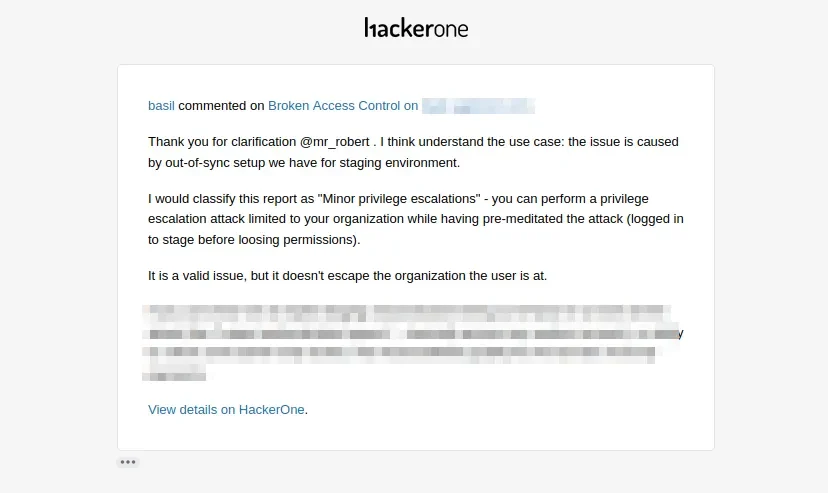
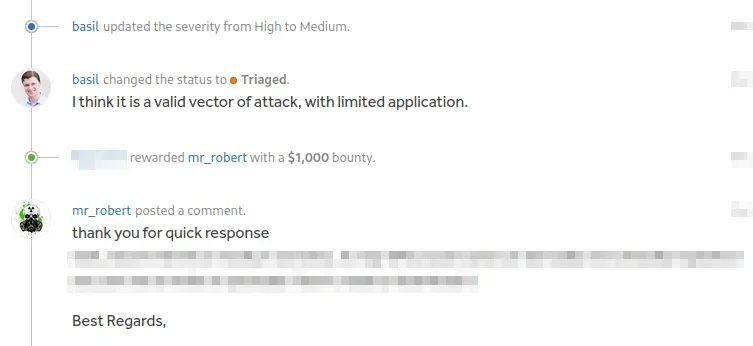
The researcher reported it to the program. The report was triaged after 3 hours as medium severity, with the reasoning that if the sub-user logs out and logs in again, the high permissions will be removed and the attack will fail.
The reward was a $1,000 bounty.
Root cause
The two portals share one database, and the staging portal does not log the sub-user out when permissions change. The staging portal, stage-portal.webapp.com, does not invalidate or refresh the sub-user's session when the administrator changes that user's permissions. On the staging portal the sub-user is not logged out and keeps the old permissions until logging out and in again. The report does not describe the code behind this; the out-of-sync setup between the two portals is the likely cause.
The automatic logout on permission change happens on portal.webapp.com but not on the staging portal. Because the staging portal authenticates against the same user database, it becomes a way around that defence.
Impact
A sub-user whose permissions have been reduced or revoked can keep the old permissions until they log out and log in again. In the first scenario they can still access, edit, hide and delete applications. In the second, more dangerous scenario, a sub-user whose administrative permission was revoked can still reach User Management, raise their own permissions back to the higher level, and delete users, causing critical damage.
The attack requires that the sub-user is already logged in through stage-portal.webapp.com when the permissions are changed, and it fails if the sub-user logs out and logs in again. The program rated it medium severity for that reason.
Fix
The report does not say what was changed. The fix should be to make the staging portal apply the same session invalidation and permission re-evaluation on permission change as the production portal, so that a permission change ends or refreshes every active session for that user regardless of which portal it was created through.
Variants to test
- Other portal pairs on the same database. Look for a production host and a staging or alternate host that accept the same credentials, as here. A positive result is an account created on one host being reported as already registered on the other.
- Permission changes with an active session. As an administrator, change a sub-user's permissions while that sub-user is logged in through each portal in turn. A positive result is the sub-user keeping the old permissions on one portal while being logged out on the other.
- Remember Me and long-lived sessions. Repeat the permission change with Remember Me selected. A positive result is the stale permissions surviving for the lifetime of the remembered session.
- Privilege re-escalation. After revoking administrative permission, check whether the sub-user can still reach the user management section and grant the permission back to themselves. A positive result is the sub-user restoring their own higher permissions.
- Destructive actions after revocation. With the revoked permissions still active, try editing, hiding and deleting applications, and deleting users. A positive result is any of these succeeding after the administrator removed the permission.
What happened, in plain words
A security researcher was looking at a private bug bounty program on HackerOne. A bug bounty program is a deal between a company and independent testers: the company says "try to break our website, and if you find a real problem we will pay you for telling us privately instead of using it or selling it". The company in this story is called webapp.com in the write-up, which is a stand-in name so the real company stays private.
The product is an advertising platform. You sign up, attach your mobile app (Android or iOS) to your account, and then build advertising campaigns for it. The interesting part for security is that one account can have several people in it. The owner of the account is the root user (also called the administrator). The owner can create sub-users: extra logins for colleagues, each with a limited set of permissions chosen in a section called User Management. Permissions are simply the list of things a login is allowed to do.
The three permissions offered are:
- Access to the application and modify its data, erase or hide it
- Read Application Performance Reports
- Administrator permissions, so the administrator can give any or all of these permissions to the sub-users
Normally, when the owner changes a sub-user's permissions, the platform is supposed to react: it logs that sub-user out, so that the next time they sign in they get the new, reduced set of permissions. That automatic logout is the safety net the whole story is about.
The researcher found a second login page, on a staging address, that shares the same user database as the normal one, and where the sub-user is not logged out when permissions change. A staging environment is a copy of a website used by the company for testing before changes go live. Because it shares the same database, an account registered on the normal portal was reported as already registered there. But when the owner reduces a sub-user's permissions, the sub-user who is signed in through the staging page is not logged out, and keeps the old permissions. In the worst case, a sub-user whose administrator rights were taken away can still open User Management and give those rights back to themselves.
The researcher reported it, the report was triaged (accepted as valid and passed to the company's security team) after 3 hours as medium severity, and the reward was $1,000.
Background: what broken access control means
Broken Access Control (often shortened to BAC) is when a website does not properly check whether the person asking is allowed to do what they are asking for. The report's own definition: it happens when an application does not thoroughly restrict user permissions for appropriate access to administrative functionality. The consequences can include viewing content you should not see, modifying or deleting content, or taking over the whole application.
An everyday comparison: a hotel gives guests key cards. A working access control system means your card opens your room and the shared areas, but not other guests' rooms and not the staff office. Broken access control is when the card still opens the staff office after you have checked out, or when the lock was never installed on that one door. Nothing is "hacked" in the movie sense; the door simply does not check the card.
The report lists common examples of this kind of weakness: role based access, poor password management, insecure Id's, forced browsing past access control checks, path traversal, file permissions, and client side caching. You do not need to know all of them to follow this story; the one that matters here is the idea that a permission change should immediately affect what an already signed-in person can do.
Recon: finding the target's addresses
Recon (reconnaissance) means gathering information about the target before testing anything. The researcher says gathering information is the golden key to reaching weak points, and that they enjoy logical vulnerabilities and pay great attention to how the site's features actually work. Logical vulnerabilities are flaws in the rules of the application (who may do what) rather than in low-level code or memory.
A subdomain is a named section of a company's main domain. If the company owns webapp.com, then portal.webapp.com and stage-portal.webapp.com are subdomains of it. Companies often run many of them: one for the main site, one for the admin panel, one for staging, one for an old service nobody remembers. Each one is a separate door into the same building, and sometimes a less guarded one.
The researcher's own method had two steps:
- Use the most popular subdomain enumeration tools such as findomain, amass, sublist3r and subfinder. Enumeration here means listing as many subdomains as possible, using public sources such as certificate records and search engines.
- Extract all live subdomains and take screenshots of each one with the following command:
cat all-subdomains.txt | uniq | httpx -silent -mc 200,302,404,403,401,400 -threads 70 | cut -d "/" -f 3 | uniq | aquatone -scan-timeout 3000 -threads 5 -silent -screenshot-timeout 50000 -http-timeout 20000 -out subdomains-screenshots
Line by line, in plain words:
cat all-subdomains.txtprints the contents of a text file that holds the list of subdomains found in step 1.| uniqremoves duplicate lines, so each subdomain appears once. The vertical bar|means "pass the output of the previous command into the next one".httpx -silent -mc 200,302,404,403,401,400 -threads 70visits each host and keeps only those that answer with one of the listed HTTP status codes. A status code is the short number a web server sends back with every response: 200 means "here is the page", 302 means "the page moved, go here instead", 401 and 403 mean "you are not allowed", 404 means "not found", 400 means "bad request". Keeping all of these means keeping every host that is actually responding, not just the ones showing a normal page.-threads 70means check 70 hosts at the same time, and-silentmeans print only the results, not progress chatter.cut -d "/" -f 3splits each line on the slash character and keeps the third piece. For a URL likehttps://portal.webapp.com/something, the pieces arehttps:, an empty piece, andportal.webapp.com, so this extracts just the host name.| uniqremoves duplicates again, because different URLs can point at the same host.aquatone -scan-timeout 3000 -threads 5 -silent -screenshot-timeout 50000 -http-timeout 20000 -out subdomains-screenshotsopens each host in a headless browser and saves a picture of what it looks like. The flags set how long to wait for the scan, how many to do at once, how long to wait for a screenshot and for the page to respond, and the folder where the pictures go.
Why do this? Because reading a hundred screenshots is much faster than opening a hundred tabs, and the eye catches things a scanner does not: two different addresses showing the same login form, for example.
Discovery: two doors, one lock
The researcher reviewed the results and screenshots one by one until something caught their attention: there were two different subdomains but with the same login panel.
portal.webapp.comstage-portal.webapp.com
A login panel is the form where you type your email and password. Two different addresses showing the same form is a hint that they may be two front doors into the same system, one of them perhaps the test copy.
To check, the researcher registered an account on portal.webapp.com, then went to stage-portal.webapp.com and tried to create an account there. An alert appeared saying the account had already been registered. That is the confirmation: the two login portals are connected to the same database. A database is where the site stores its records, here the list of users. If the second site knows your account already exists, it is reading the same list.
Before going further, the researcher took a step back to understand what the application actually does. Through its services you can make advertisements for your Android application or your iOS application. When you register a new account, you attach your previously developed Android application to your new account and then create an advertising plan and so on. The account owner can create sub-user accounts to perform certain tasks, according to the permissions the administrator has given them through the User Management section, which is the control panel for sub-user accounts and only appears to administrators.
Understanding the normal behaviour first is what makes the abnormal behaviour visible. If you do not know that a permission change is supposed to log the sub-user out, you will not notice that on one address it does not.
Breaking the access control
The scenario the researcher worked out was this. Suppose we create a root account through portal.webapp.com and decide to create a sub-user and give it the permissions:
- Read Application Performance Reports
The application mechanism imposes restrictions if one of these permissions is changed by the administrator or root user, such as preventing access to Application Access and giving access to Read Application Performance Reports instead. The site automatically logs out of the sub-user account because of the permissions update. That automatic logout is the correct behaviour, and it is what the researcher set out to test from the other door.
Step 1: sign the sub-user in through the staging portal
Log in to the sub-user account through stage-portal.webapp.com with those permissions, and select Remember Me (expires in 30 days).
Remember Me is the checkbox on many login forms that keeps you signed in after you close the browser. Technically the site stores a long-lived cookie in your browser: a small piece of data the browser sends back with every request so the site knows who you are without asking for the password again. A cookie is like the wristband you get at an event: you show it at the door instead of your ticket, and it stays valid until it is taken off or expires. Here the wristband is valid for 30 days, which matters later: the longer a session lives, the longer a stale permission can survive inside it.
Step 2: change the sub-user's permissions as the root user
As the root user, change the sub-user's permissions, for example preventing access to App Access. On portal.webapp.com this would log the sub-user out automatically. On the staging portal it does not.
Why does this matter? Because the whole point of revoking a permission is that the person loses the ability to do that thing now, not whenever they next feel like signing out. If the old permission keeps working, the revocation was only a note in a database that nobody is reading.
Step 3: keep using the revoked permissions
The sub-user can still access, edit, hide and even delete apps. They are not automatically logged out as in the normal case on portal.webapp.com, and their permissions are not changed. The change only takes effect if the sub-user logs out and logs in again.
This is the core of the finding. The staging portal and the production portal share the user list, but the staging portal does not log the sub-user out when permissions change. The production portal ends the session when permissions change; the staging portal lets it run on with the permissions it started with.
Step 4: the more dangerous variant
In another scenario, more dangerous than that: if the root user or the administrator gives the sub-user Administrative permissions while not knowing about the vulnerability that currently exists, and then at some point the root user wants to revoke this permission and give only a lesser permission such as Read Application Performance Reports, then during the modification made by the root user, if the sub-user is already logged in through stage-portal.webapp.com, the sub-user can still access the User Management section and raise their permissions to the higher permissions again. They can also delete users and do critical damage, and they are not supposed to have these permissions.
Put simply: the person you just demoted can walk back into the room where demotions are decided and promote themselves again. That is worse than keeping a stale permission, because it turns a temporary mistake into a lasting one.
The researcher's reaction to this scenario, as shown in the screenshot: so literally that was so funny to me.
The same reaction in the Arabic version of the write-up.
The report and the reward
The researcher quickly reported it to the program. The report was triaged after 3 hours as medium severity, with the reasoning that if the sub-user logs out and logs in again, the high permissions will be removed and the attack will fail.
The triage decision as it appeared on the platform.
The same triage decision in the Arabic version.
The reward was a $1,000 bounty.
The bounty award.
The bounty award in the Arabic version.
Why it worked
The two portals share one database, and the staging portal does not log the sub-user out when permissions change. The staging portal, stage-portal.webapp.com, does not invalidate or refresh the sub-user's session when the administrator changes that user's permissions. Invalidating a session means telling the site "this wristband is no longer valid, ask for the password again". On the staging portal the sub-user is not logged out and keeps the old permissions until logging out and in again.
The automatic logout on permission change happens on portal.webapp.com but not on the staging portal. Because the staging portal authenticates against the same user database, it becomes a way around that defence. This is a common pattern in real systems: a safety feature is built into the main site, and a second site built later, or built for testing, reuses the same accounts but not the same safety feature.
What it means in practice
A sub-user whose permissions have been reduced or revoked can keep the old permissions until they log out and log in again. In the first scenario they can still access, edit, hide and delete applications. In the second, more dangerous scenario, a sub-user whose administrative permission was revoked can still reach User Management, raise their own permissions back to the higher level, and delete users, causing critical damage.
The attack requires that the sub-user is already logged in through stage-portal.webapp.com when the permissions are changed, and it fails if the sub-user logs out and logs in again. The program rated it medium severity because if the sub-user logs out and logs in again, the high permissions will be removed and the attack will fail.
How it should be fixed
The report does not say what was changed. The fix should be to make the staging portal apply the same session invalidation and permission re-evaluation on permission change as the production portal, so that a permission change ends or refreshes every active session for that user regardless of which portal it was created through. In hotel terms: when a guest checks out, every door in the building should stop accepting their card, not just the front one.
Things worth testing elsewhere
These are the same ideas applied to other sites, useful if you want to look for similar problems yourself. Only ever do this on programs that explicitly allow it.
- Other portal pairs on the same database. Look for a production host and a staging or alternate host that accept the same credentials, as here. A positive result is an account created on one host being reported as already registered on the other.
- Permission changes with an active session. As an administrator, change a sub-user's permissions while that sub-user is logged in through each portal in turn. A positive result is the sub-user keeping the old permissions on one portal while being logged out on the other.
- Remember Me and long-lived sessions. Repeat the permission change with Remember Me selected. A positive result is the stale permissions surviving for the lifetime of the remembered session.
- Privilege re-escalation. After revoking administrative permission, check whether the sub-user can still reach the user management section and grant the permission back to themselves. A positive result is the sub-user restoring their own higher permissions.
- Destructive actions after revocation. With the revoked permissions still active, try editing, hiding and deleting applications, and deleting users. A positive result is any of these succeeding after the administrator removed the permission.
Glossary
- Bug bounty program: an arrangement where a company pays independent researchers for reporting security problems privately.
- HackerOne: a platform where companies publish bug bounty programs and researchers submit reports.
- Private program: a bug bounty program that is not open to everyone; only invited researchers can take part.
- Subdomain: a named section of a domain, such as
portal.webapp.comunderwebapp.com. - Subdomain enumeration: listing as many subdomains of a target as possible, using public sources and tools.
- Recon (reconnaissance): gathering information about a target before testing it.
- Logical vulnerability: a flaw in the rules of an application (who may do what) rather than in low-level code.
- Broken Access Control (BAC): a weakness where the application does not properly restrict what a user is allowed to do.
- Root user / administrator: the owner of an account, with full control over it and its sub-users.
- Sub-user: an extra login created under an account, with a limited set of permissions.
- Permission: a specific thing a login is allowed to do, such as editing an app or reading reports.
- User Management: the section of the account where administrators create sub-users and set their permissions.
- Staging environment: a copy of a website used by the company for testing before changes go live.
- Database: where the site stores its records, here the list of user accounts.
- Session: the period during which a site remembers that you are signed in.
- Cookie: a small piece of data stored by the browser and sent with requests so the site can recognise you.
- Remember Me: a login option that keeps you signed in after closing the browser, usually for a fixed number of days.
- Session invalidation: ending a session so that the stored login stops working and the user must sign in again.
- HTTP status code: the number a web server returns with each response, such as 200 (OK) or 403 (forbidden).
- Triage: the step where a program reviews a report and decides whether it is valid and how severe it is.
- Severity: a rating of how serious a vulnerability is, here medium.
- Bounty: the money paid for a valid report.
- Privilege escalation: gaining permissions you are not supposed to have, here by giving them back to yourself.
- httpx: a command-line tool that probes hosts and reports which ones respond.
- aquatone: a tool that opens many hosts in a browser and saves screenshots of each.
- Headless browser: a browser that runs without a visible window, used by tools to load pages automatically.


