Forging signed commits on GitHub

A half-year ago, I found a bug in an internal GitHub API that let me trick the internal API into signing commits as any user. So I could create a commit signed by a user I don’t control:
The full write-up lives on its author's site
It belongs to its author, so we link to it rather than copy it. The other two tabs are our own rewrites, checked against it.
Context
GitHub signs commits made through its web interface with its web flow GPG key, so that the commit shows up in the GitHub UI as verified. The committer on such commits is GitHub <[redacted]>. The same signing applies to commits created inside GitHub Codespaces, a service that provides a cloud development environment, when GPG signing is enabled in the Codespaces settings.
The report describes a bug in an internal GitHub API used by Codespaces that let the researcher make that API sign a commit with an arbitrary author line, producing commits that GitHub displays as signed by a user the attacker does not control.
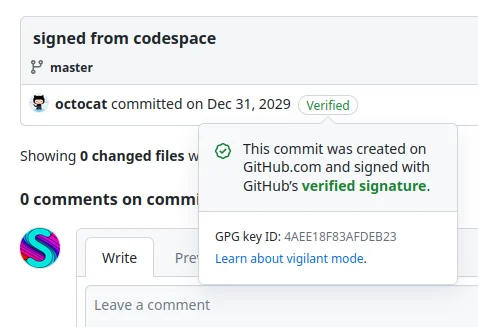
The screenshot shows a commit authored by @octocat, presented as a signed commit.
Git commit internals
Git commits are stored in a custom text-based format:
tree [redacted]
parent [redacted]
author loops <[redacted]> 1678388328 -0500
committer loops <[redacted]> 1678388328 -0500

Commit message
A signed commit carries an extra gpgsig header. The signature covers every line of the commit except the gpgsig header itself:
tree [redacted]
author loops <[redacted]> 1678388328 -0500
committer loops <[redacted]> 1678388328 -0500
gpgsig -----BEGIN PGP SIGNATURE-----

 [redacted]
 [...]
 =756m
 -----END PGP SIGNATURE-----

Legitimate signed commit
Because the signature covers the author line, whoever holds the signing key decides which author a verified commit claims. GitHub holds the web flow key, so if GitHub can be made to sign a commit with an arbitrary author, the result is a commit that GitHub shows as signed but that names someone else.
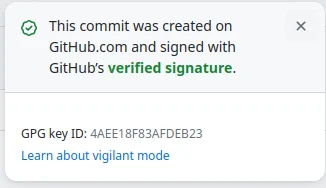
The screenshot shows the GitHub UI indicating that the commit is signed.
Setup
The researcher learned how GitHub internals work by downloading a GitHub Enterprise Server trial VM and deobfuscating the Ruby source code on it. No other accounts, tools or versions are described in the report.
The precondition for the signing path is a Codespace with GPG signing enabled in the Codespaces settings. The gh-gpgsign binary used inside the codespace is closed-source.
Finding it
When a commit is created in a codespace with GPG signing enabled, the following happens:
- git checks the
gpg.programconfig option, which is set to/.codespaces/bin/gh-gpgsign - git calls
/.codespaces/bin/gh-gpgsignwith the raw commit body - The
gh-gpgsignbinary makes an API request tohttps://api.github.com/vscs_internal/commit/signwith the commit body gh-gpgsignreturns the signature returned from the API- git inserts the commit signature into the commit data
The /vscs_internal/commit/sign endpoint accepts arbitrary raw commit data and returns a signature for it, which makes it a natural place to look for a way to control the author line. The endpoint did validate the author: it found the first line matching the regex
/\Aauthor (.+?) <(.+)>/
and checked that the name and email extracted from that match belonged to the logged-in user. The flaw is that this regex does not match author lines with a zero-length name, so such a line is skipped and the next matching line is used instead.
Exploitation
Step 1: craft a commit with two author lines
The researcher supplied commit data whose first author line has an empty name, followed by a second, fake author line:
tree [redacted]
parent [redacted]
author  <[redacted]> 1682188800 +0000
committer GitHub <[redacted]> 1682188800 +0000
author username <[redacted]> 1682188800 +0000

commit message
The first author line has a name of zero characters, so the regex \Aauthor (.+?) <(.+)> does not match it. The endpoint moves on and matches the second author line, the fake one, instead of the first.
Step 2: rely on the parser disagreement
Git ignores extra author lines after the first one. So the endpoint validates the second line, while Git, when it reads the commit, uses the first line: the one naming [redacted]. The signature returned by the endpoint covers the whole commit body, including that first author line, so the resulting commit is signed by GitHub's web flow key and attributes the commit to the chosen author.
Step 3: repeat for any author
Because the endpoint validates the second line against the logged-in user, the first line can carry any name and email. The researcher used this to create commits signed as any user, as in the @octocat commit shown at the top.
Root cause
The endpoint and Git disagreed about which author line is authoritative. The endpoint used a regex to find the first line matching \Aauthor (.+?) <(.+)>, which requires at least one character in the name, and validated that line against the logged-in user. Git accepts an author line with an empty name and uses the first author line in the commit. A commit with an empty-name author line followed by a valid-looking one therefore passed validation on the wrong line and was signed as a whole.
The check was a parsing issue rather than a cryptographic one: the signature was genuine, produced by GitHub's own key, and covered the forged author line.
Impact
GitHub-signed commits could be created with any author name and email, including users the signer does not control. Such commits are displayed by GitHub as signed, which undermines the meaning of the verified badge for anyone who trusts it. The report does not describe any further consequences, such as effects on protected branches or on other GitHub features.
Fix
GitHub fixed the issue by changing the regex to
/\Aauthor ([^<]*)[ ]{0,1}<(.+)>/
which should match all author header lines accepted by git-fsck, so the line the endpoint validates is the same line Git will use.
Timeline
- April 22 2023: the issue is reported to GitHub
- April 24 2023: GitHub closes the issue, saying that being able to impersonate your own account is not an issue
- April 24 2023: the researcher responds that the issue can be used to impersonate other people
- May 2 2023: the researcher responds again, demonstrating that the issue still works
- May 4 2023: GitHub reopens the issue
- May 17 2023: GitHub validates the issue and begins work on a fix
- June 2023: GitHub fixes the issue on GitHub.com
- June 23 2023: GitHub closes the issue and rewards the researcher with $10000
Variants to test
- Duplicate header lines in any format that is validated by a regex and then consumed by a different parser. Send two
authorlines, the first with an empty name, and check whether the signature or validation applies to the second while the consumer uses the first. A positive result is a signed artefact whose displayed author differs from the account that requested the signature. - Other header fields with the same shape, such as
committer,parentortree, where a validation regex and the Git parser could disagree. A positive result is a commit whose metadata is accepted by the validator but interpreted differently by Git. - Whitespace and separator variations around the name and email, for example a name containing
<or trailing spaces before the angle bracket. A positive result is a line that the validator maps to the attacker's identity but that Git renders with a different author. - Any signing service that accepts raw commit data and checks ownership with a regex. Try a commit whose first author line is malformed in a way the regex skips, followed by a valid one, and see whether a signature is returned for the whole body.
What happened, in plain words
GitHub is a website where people store and share code. One of its features lets you make a "commit", which is a saved snapshot of changes to a project, together with a note about who made it. GitHub can also put a digital stamp on a commit, called a signature, which proves the commit really came from GitHub and has not been altered. When a commit carries that stamp, GitHub shows a small "verified" badge next to it, and many people take that badge to mean the commit is genuine.
A researcher found a way to make GitHub put its own genuine stamp on a commit that claims to have been written by somebody else. The stamp was real. The name on the commit was not. GitHub rewarded the researcher with $10,000 for the report.
Here is the commit the researcher produced. It is attributed to @octocat, and GitHub presents it as a signed commit:
To understand how that is possible, you first need to know what a commit actually looks like inside, and what a signature covers.
Git commit internals
Git is the program that keeps track of changes to code. It stores each commit as plain text in a fixed layout. A commit that has not been signed looks like this:
tree [redacted]
parent [redacted]
author loops <[redacted]> 1678388328 -0500
committer loops <[redacted]> 1678388328 -0500

Commit message
Line by line:
treepoints to the snapshot of files this commit contains. Think of it as the folder of the project at that moment.parentpoints to the commit that came before this one, so commits form a chain, like pages in a diary.authorsays who wrote the change: a name, an email in angle brackets, a timestamp and a time zone.committersays who actually recorded the change. Often the same person as the author, but not always.- The blank line separates the headers from the free-text
Commit message.
A signed commit has one extra header, gpgsig, holding a signature. A signature is a short block of characters produced with a secret key; anyone with the matching public key can check that the signature was made by the holder of the secret key and that the text has not changed since. The signature here covers every line of the commit except the gpgsig header itself:
tree [redacted]
author loops <[redacted]> 1678388328 -0500
committer loops <[redacted]> 1678388328 -0500
gpgsig -----BEGIN PGP SIGNATURE-----

 [redacted]
 [...]
 =756m
 -----END PGP SIGNATURE-----

Legitimate signed commit
Line by line:
- The
tree,authorandcommitterlines are the same kind of information as before. gpgsigstarts the signature block. The lines after it are the signature itself, wrapped inBEGIN PGP SIGNATUREandEND PGP SIGNATUREmarkers, with[...]standing in for the middle of the block.- The blank line and
Legitimate signed commitare the commit message.
The important consequence: because the signature covers the author line, whoever holds the signing key decides which author a verified commit claims. GitHub holds its own signing key, so if GitHub can be tricked into signing a commit with any author line, the result is a commit that GitHub shows as signed but that names somebody else.
When you create a commit on GitHub.com, GitHub signs it with its web flow GPG key and sets the committer to GitHub <[redacted]>. The GitHub interface then shows the commit as signed:
Tricking an internal API endpoint into signing our commits
An API is a way for one program to ask another program to do something, over the internet, without a human clicking buttons. You can think of it as a service counter: you hand over a request in a fixed format, and you get back a fixed kind of answer. The researcher learned how some of GitHub's internal machinery works by downloading a trial version of GitHub Enterprise Server, a product that lets organisations run GitHub on their own machines, and reading the Ruby source code on it after making it readable again (the code had been deliberately obscured, a practice called deobfuscation).
GitHub Codespaces is a GitHub service that gives you a development environment in the cloud: a ready-made computer you can write and run code on through your browser. One feature of Codespaces is that commits created inside it are signed with the web flow GPG key, if you switch that on in your Codespaces settings.
When a commit is created in a codespace with GPG signing enabled, this happens:
- git checks the
gpg.programconfig option, which is set to/.codespaces/bin/gh-gpgsign - git calls
/.codespaces/bin/gh-gpgsignwith the raw commit body - The
gh-gpgsignbinary (which is closed-source) makes an API request tohttps://api.github.com/vscs_internal/commit/signwith the commit body gh-gpgsignreturns the signature returned from the API- git inserts the commit signature into the commit data
In plain words: git is the program that builds commits. It has a setting, gpg.program, that names the helper program to run whenever a signature is needed. Here that helper is a small program called gh-gpgsign that lives inside the codespace. Git hands it the commit text, the helper asks GitHub's internal signing service for a signature, and git pastes the answer into the commit. The helper is closed-source, meaning its code is not published.
The /vscs_internal/commit/sign endpoint is interesting because you can give it arbitrary raw commit data and get a signature back. An endpoint is one specific address on an API, like one particular counter in a large office. If that counter will stamp whatever text you bring, the question becomes: what checks does it make before stamping?
It did check the author. It looked through the commit text for the first line matching this pattern, called a regular expression or regex:
/\Aauthor (.+?) <(.+)>/
A regex is a way of describing the shape of text so a program can search for it. Reading this one piece by piece:
\Ameans the match must start at the very beginning of a line.authoris literal text: the word followed by a space.(.+?)captures one or more of any character, as few as possible. This is meant to be the name.<is a literal space and a less-than sign.(.+)captures one or more characters, as many as possible. This is meant to be the email.>is a literal greater-than sign.
The endpoint then checked that the name and email it had captured belonged to the logged-in user. The flaw is that (.+?) requires at least one character, so an author line with an empty name does not match at all. Such a line is skipped, and the next matching line is used instead.
Exploitation
Step 1: craft a commit with two author lines
The researcher sent commit data whose first author line has an empty name, followed by a second, fake author line:
tree [redacted]
parent [redacted]
author  <[redacted]> 1682188800 +0000
committer GitHub <[redacted]> 1682188800 +0000
author username <[redacted]> 1682188800 +0000

commit message
Line by line:
treeandparentare the usual pointers to the snapshot and the previous commit.- The first
authorline has two spaces after the wordauthor: the name is zero characters long, and the email is[redacted]. This is the identity the attacker wants the commit to carry. committeris set toGitHub <[redacted]>, matching what GitHub itself uses on commits it signs.- The second
authorline carries the attacker's own name and email,username <[redacted]>. This is the line the attacker is allowed to sign as. - The blank line and
commit messageare the message text.
Why this shape? The first author line has a name of zero characters, so the regex \Aauthor (.+?) <(.+)> does not match it. The endpoint moves on and matches the second author line, the fake one, instead of the first.
Step 2: rely on the parser disagreement
A parser is the part of a program that reads text and decides what it means. Git ignores extra author lines after the first one. So the endpoint validated the second line, while Git, when it reads the commit, uses the first line: the one naming [redacted]. The signature returned by the endpoint covers the whole commit body, including that first author line, so the resulting commit is signed by GitHub's web flow key and attributes the commit to the chosen author.
This is the heart of the bug: two programs read the same text and disagree about which line counts. The checker looked at one line, the signer stamped the whole text, and the reader later believed a different line. It is like a form where a clerk checks the second signature line but the filing system only ever reads the first.
Step 3: repeat for any author
Because the endpoint validates the second line against the logged-in user, the first line can carry any name and email. The researcher used this to create commits signed as any user, as in the @octocat commit shown at the top.
Root cause
The endpoint and Git disagreed about which author line is authoritative. The endpoint used a regex to find the first line matching \Aauthor (.+?) <(.+)>, which requires at least one character in the name, and validated that line against the logged-in user. Git accepts an author line with an empty name and uses the first author line in the commit. A commit with an empty-name author line followed by a valid-looking one therefore passed validation on the wrong line and was signed as a whole.
The check was a parsing issue rather than a cryptographic one: the signature was genuine, produced by GitHub's own key, and covered the forged author line.
Impact
GitHub-signed commits could be created with any author name and email, including users the signer does not control. Such commits are displayed by GitHub as signed, which undermines the meaning of the verified badge for anyone who trusts it. The report does not describe any further consequences, such as effects on protected branches or on other GitHub features.
Fix
GitHub fixed the issue by changing the regex to
/\Aauthor ([^<]*)[ ]{0,1}<(.+)>/
Reading the changed part:
([^<]*)captures any number of characters that are not a less-than sign, including zero. So an empty name now matches.[ ]{0,1}allows zero or one space before the angle bracket.<(.+)>captures the email as before.
This should match all author header lines accepted by git-fsck, a Git tool that checks a repository for problems, so the line the endpoint validates is the same line Git will use.
Timeline
- April 22 2023: the issue is reported to GitHub
- April 24 2023: GitHub closes the issue, saying that being able to impersonate your own account is not an issue
- April 24 2023: the researcher responds that the issue can be used to impersonate other people
- May 2 2023: the researcher responds again, demonstrating that the issue still works
- May 4 2023: GitHub reopens the issue
- May 17 2023: GitHub validates the issue and begins work on a fix
- June 2023: GitHub fixes the issue on GitHub.com
- June 23 2023: GitHub closes the issue and rewards the researcher with $10000
Variants to test
- Duplicate header lines in any format that is validated by a regex and then consumed by a different parser. Send two
authorlines, the first with an empty name, and check whether the signature or validation applies to the second while the consumer uses the first. A positive result is a signed artefact whose displayed author differs from the account that requested the signature. - Other header fields with the same shape, such as
committer,parentortree, where a validation regex and the Git parser could disagree. A positive result is a commit whose metadata is accepted by the validator but interpreted differently by Git. - Whitespace and separator variations around the name and email, for example a name containing
<or trailing spaces before the angle bracket. A positive result is a line that the validator maps to the attacker's identity but that Git renders with a different author. - Any signing service that accepts raw commit data and checks ownership with a regex. Try a commit whose first author line is malformed in a way the regex skips, followed by a valid one, and see whether a signature is returned for the whole body.
Glossary
- API: a way for one program to send requests to another over the internet in a fixed format and get a fixed kind of answer back.
- Commit: a saved snapshot of changes to a project, stored by Git together with information about who made it and when.
- Git: the program that records and tracks changes to code as a chain of commits.
- GitHub: a website and service for storing and sharing code, built around Git.
- GitHub Codespaces: a GitHub service that gives you a development environment in the cloud, usable through your browser.
- GitHub Enterprise Server: a product that lets organisations run GitHub on their own machines.
- Signature: a block of characters made with a secret key that lets anyone with the matching public key check who produced a piece of text and that it has not changed.
- GPG key: a pair of keys, one secret and one public, used to make and check signatures.
- Web flow GPG key: the key GitHub uses to sign commits made through its website and Codespaces.
- Verified badge: the marker GitHub shows on a commit whose signature it recognises.
- Header: a labelled line at the top of a commit, such as
tree,parent,author,committerorgpgsig. gpgsig: the header in a commit that holds its signature.author: the header naming who wrote the change, with a name, an email in angle brackets and a timestamp.committer: the header naming who recorded the change.tree: the header pointing to the snapshot of files in a commit.parent: the header pointing to the commit that came before.- Endpoint: one specific address on an API that performs one particular job.
- Regex (regular expression): a way of describing the shape of text so a program can search for it.
- Parser: the part of a program that reads text and decides what it means.
- Deobfuscation: making deliberately obscured code readable again.
- Closed-source: software whose code is not published.
gpg.program: the Git setting that names the helper program to run when a signature is needed.gh-gpgsign: the closed-source helper program inside a codespace that asks GitHub's internal API for a signature.git-fsck: a Git tool that checks a repository for problems.- Parsing issue: a bug where a program misreads text, often because two parts of a system read the same text differently.
- Signature bypass: getting a system to accept or produce a signature it should not, without breaking the cryptography itself.



