How I Got $10,000 From GitHub For Bypassing Filtration of HTML tags
GitHub's MathJax integration allowed rendering of restricted HTML tags and style attributes through crafted math expressions, enabling CSS manipulation and potential phishing. An attacker could create a fake login page within a markdown file.
 Published on saajan.bhujel.cyou
In today’s blog, I am going to tell you that, “How I Got $10,000 From GitHub For Bypassing A Filtration oF HTML tags”
The full write-up lives on its author's site
It belongs to its author, so we link to it rather than copy it. The other two tabs are our own rewrites, checked against it.
Context
GitHub added a feature that renders mathematical expressions in Markdown files using the MathJax library, with $$ and $ delimiters. MathJax is an open-source JavaScript display engine for LaTeX, MathML and AsciiMath notation that works in modern browsers and supports assistive technology such as screen readers. The researcher, Saajan Bhujel (@saajanbhujel), saw the announcement tweet and started looking at how the new rendering path handled input.
The work below is about Markdown files rendered on GitHub, where the MathJax integration sits on top of the normal Markdown sanitiser.
Setup
The researcher created a Markdown file in a test repository and iterated on payloads inside it. No special role or account beyond a normal GitHub account is described. The relevant precondition is that the target renders user-controlled Markdown, and that the MathJax integration processes content inside $$...$$ math delimiters.
Finding it
The starting point was prior art: the researcher searched for known XSS or HTML injection CVEs in MathJax and found the known XSS issue affecting versions below 2.7.4. That issue requires the payload to be in a Unicode form:
\unicode{}
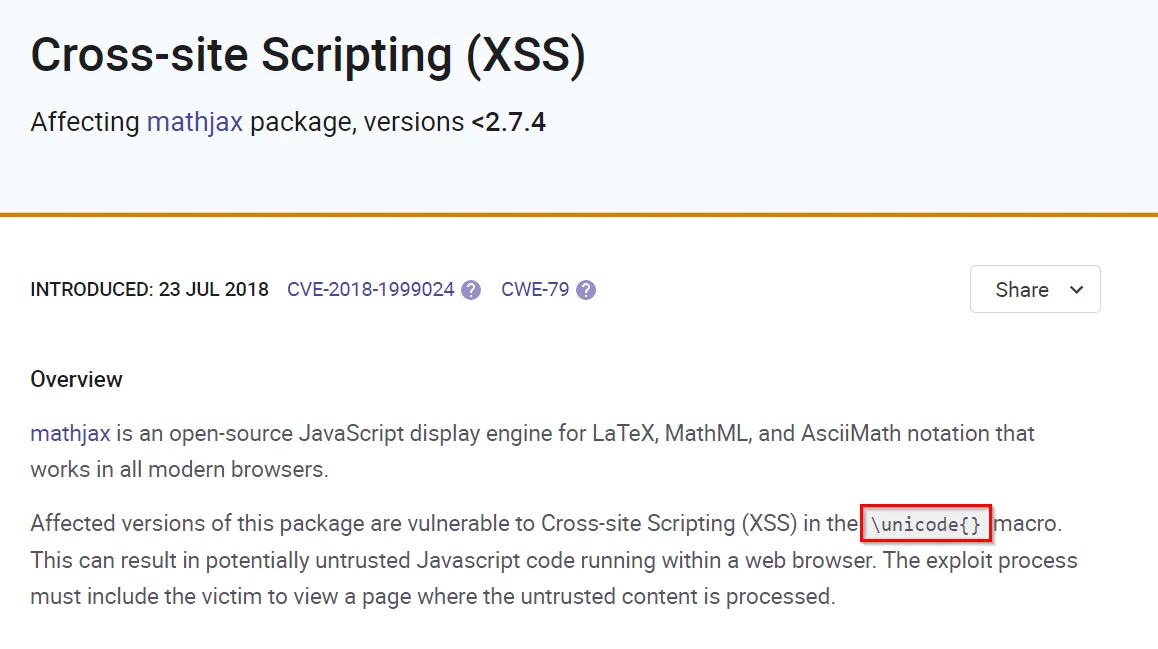
The image shows the known CVE entry for the MathJax library affecting versions below 2.7.4.
The first attempts used that Unicode form inside math delimiters:
$$\\u003cu\\u003eHello\\u003c/u\\u003e{}$$
$$\\u003cu\\u003eWhy\\u003c\uffofu\\u003e{}$$
Here $$...$$ are the math delimiters. Nothing rendered. The researcher's own explanation is that the CVE only affects versions below 2.7.4, while GitHub was running a newer version. So the task became finding a bypass that would render at least basic HTML tags such as <b>, <i> and <u>.
The reasoning for starting with basic tags is worth stating: sites commonly deploy WAFs and filters against advanced tags but leave common tags alone. Once basic tags render through math expressions, the next step is to try to escalate to advanced tags.
Exploitation
Step 1: a backslash before the tag
The researcher tried Unicode, URL encoding and other transformations, none of which worked. What did work was placing a backslash before the tag: when a basic tag follows \, the tag renders without an error and without being filtered.
$$\<u>HELLO</u>{}$$
With basic tags rendering, the next test swapped <u> for advanced tags such as <script>, <iframe> and <style> to see whether more filters existed. They did: advanced tags were filtered, with the exception of <style>. A <style> tag could be added by putting a backslash before it, in the form \<style>{property:value}</style>.
The CSS payloads used in test.md were:
$$\<style>*{display:none}</style>{}$$

$$\<style>div{background-color:#66f3e6}</style>{}$$

$$\<style>*{font-size:23px;}</style>{}$$

$$\<style>body{padding:50px;background-color:#4b6bb7;}</style>{}$$
Each of these injects a stylesheet through the math expression. The first hides every element with display:none, the second recolours div elements, the third changes the font size globally, and the fourth restyles the body. The result was that the CSS of the whole page could be changed.
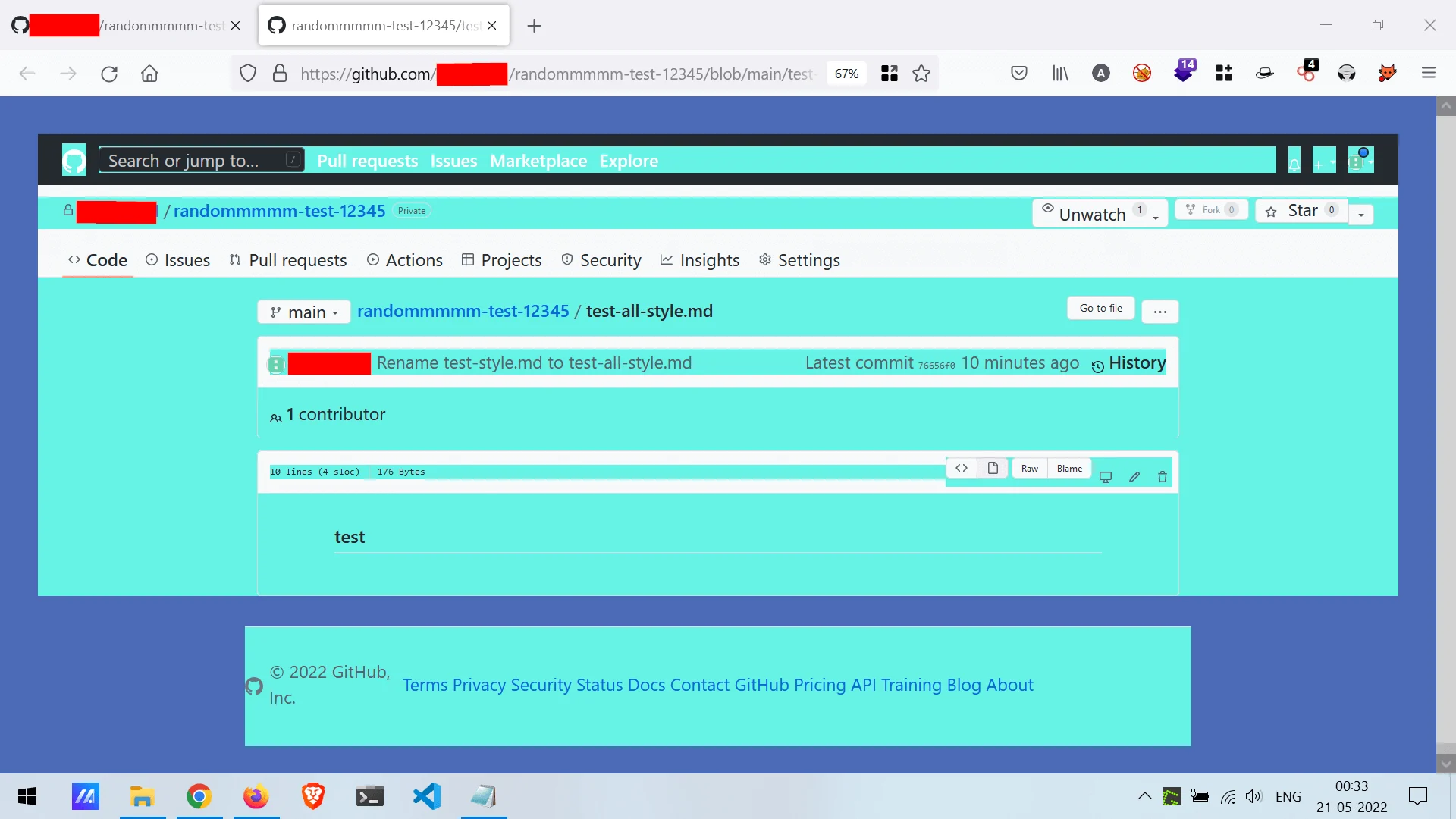
The image shows the page CSS changed through this method.
This first finding was submitted to GitHub's HackerOne program. The report was closed within 5 minutes, saying it was a previously identified issue being tracked internally. The researcher asked whether the quick response came from a bot or a real person, and GitHub's triager confirmed that the report had been reviewed by a real person. The first report to GitHub was closed as a duplicate.
Step 2: the style attribute through math expressions
GitHub fixed the issue within 24 hours. Retesting with the same method and payloads, advanced tags no longer worked. A new way to render tags was found, but this time only normal tags such as <div>, <span>, <section>, <input>, <label> and <button>, not <style> or <script>:
$$<div>Test</div>{}$$

$$<input type=text>{}$$

$$<button>Click Here</button>{}$$
Some of these tags, such as <div>, <span> and <section>, can also be used in Markdown files without math expressions, but tags like <input> and <button> normally cannot be rendered. Being able to use them through math expressions was itself a step forward. It was not reported at that point because there was no impact beyond using restricted tags.
The next goal was to modify CSS again, but <style> was no longer usable after the fix. The remaining option was the style attribute, and GitHub restricts the use of attributes. Markdown files allow class, id and a few other attributes, but not style, because it can change the CSS of the page. Surprisingly, the style attribute could be used with math expressions, and it was effectively impossible to use it in Markdown files without them.
$$<tag style="property:value" acceptedAttribute="True"></tag>{}$$
This payload places a tag inside the math delimiters with a style attribute and an additional attribute. The researcher then built a payload that made the Markdown file page look like a login page:
$$<div style="position:fixed;padding:10%;padding-right:100%;left:-9%;top:-20%;background:white;padding-bottom:100%;"><section style="margin-left:500px;padding:30px;"><h2 style="text-align:center;">Sign in to GitHub</h2><div><label>Username: </label><input type=text style="border-radius:5px;border:1px solid;">
<label>Password: </label><input type=password style="border-radius:5px;border:1px solid;"><div style="text-align:center;"><button style="background:#2da44e;color:white;margin:10px;border-radius:9px;border:none;font-weight:500;padding:4px;padding-right:20px;padding-left:20px;" type=submit>Sign in</button></div></section></div></div><!--{}$$
Inside it, a section holds a heading reading "Sign in to GitHub", a text input labelled Username, a password input labelled Password, and a submit button styled to look like GitHub's.
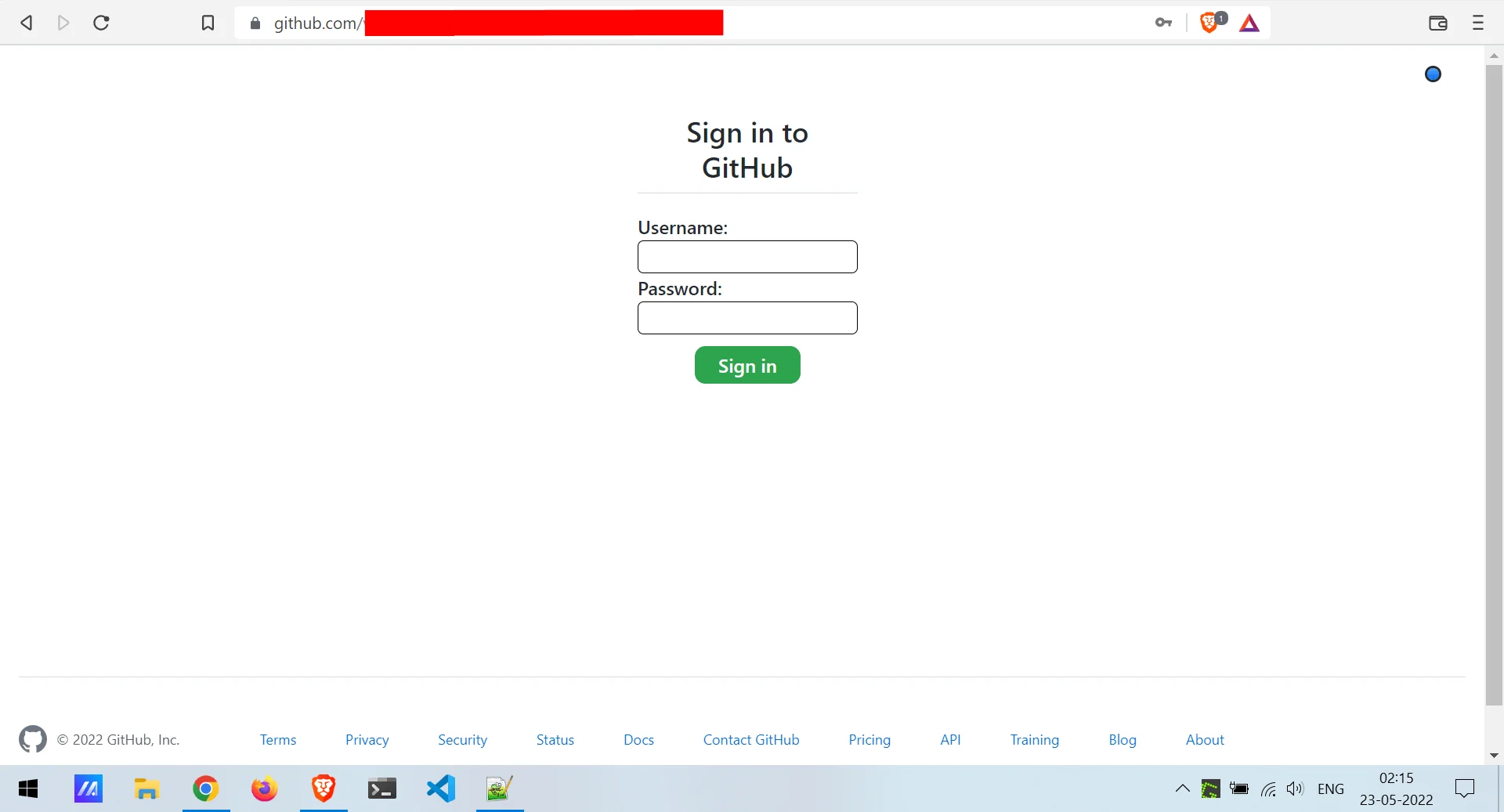
The image shows the bypass of the fix, with tags rendered and CSS changed.
No new report was filed at this point. The bypass was found the day after the previous report, and the team had said they were working on the issue internally, so the researcher expected a duplicate closure. Instead, a comment was left on the last report saying that a bypass had been found that could again change the CSS of the whole page, asking whether the internal team had fixed the issue, noting that the last method could no longer be reproduced, and offering to create a new report as a bypass if the issue was fixed. GitHub staff replied with the statement shown in the image below.

The image shows the GitHub staff reply to the comment on the previous report.
The next day the new payload no longer worked, which showed that the team had fixed the issue again and were indeed working on MathJax internally.
Step 3: a filtered tag before the curly brackets
After the second fix, none of the advanced tags could be rendered with the previous payloads. Looking back at the earlier payloads, the common element was a backslash before the tag, in the form \<tagName>{}. The payload position was changed from $$\<tagName>{}$$ to $$\{<tagName>}$$, but the tags were still filtered. After more time, a method was found to render tags such as <input>, <svg>, <button> and <textarea>:
$$\<script>{<renderTag>}$$
The mechanics, as described:
- The first position after the backslash must be a malicious tag that gets filtered out of the payload, such as
\<script>or\<style>. - The tag that should actually render goes between the curly brackets as
{<renderTag>}, with the greater-than and less-than signs written as HTML entities.
So in $$\<script>{<renderTag>}$$, the <script> written before the curly bracket is filtered out, and MathJax then renders only the tag inside the curly brackets.
The proof-of-concept payloads used in test.md were:
$$\<script>{<div><section><h2>Sign in to GitHub</h2><label>Username: </label><input><br><label>Password: </label><input><br><button>Sign in</button></section></div><!--}$$<br>
## Input tag:
$$\<script>{<input><!--}$$<br>
## Button tag:
$$\<script>{<button>Test Button</button><!--}$$<br>
## Textarea tag:
$$\<script>{<textarea>Write something...</textarea><!--}$$<br>
The following three isolate a single tag each: an input, a button with text, and a textarea with placeholder text.
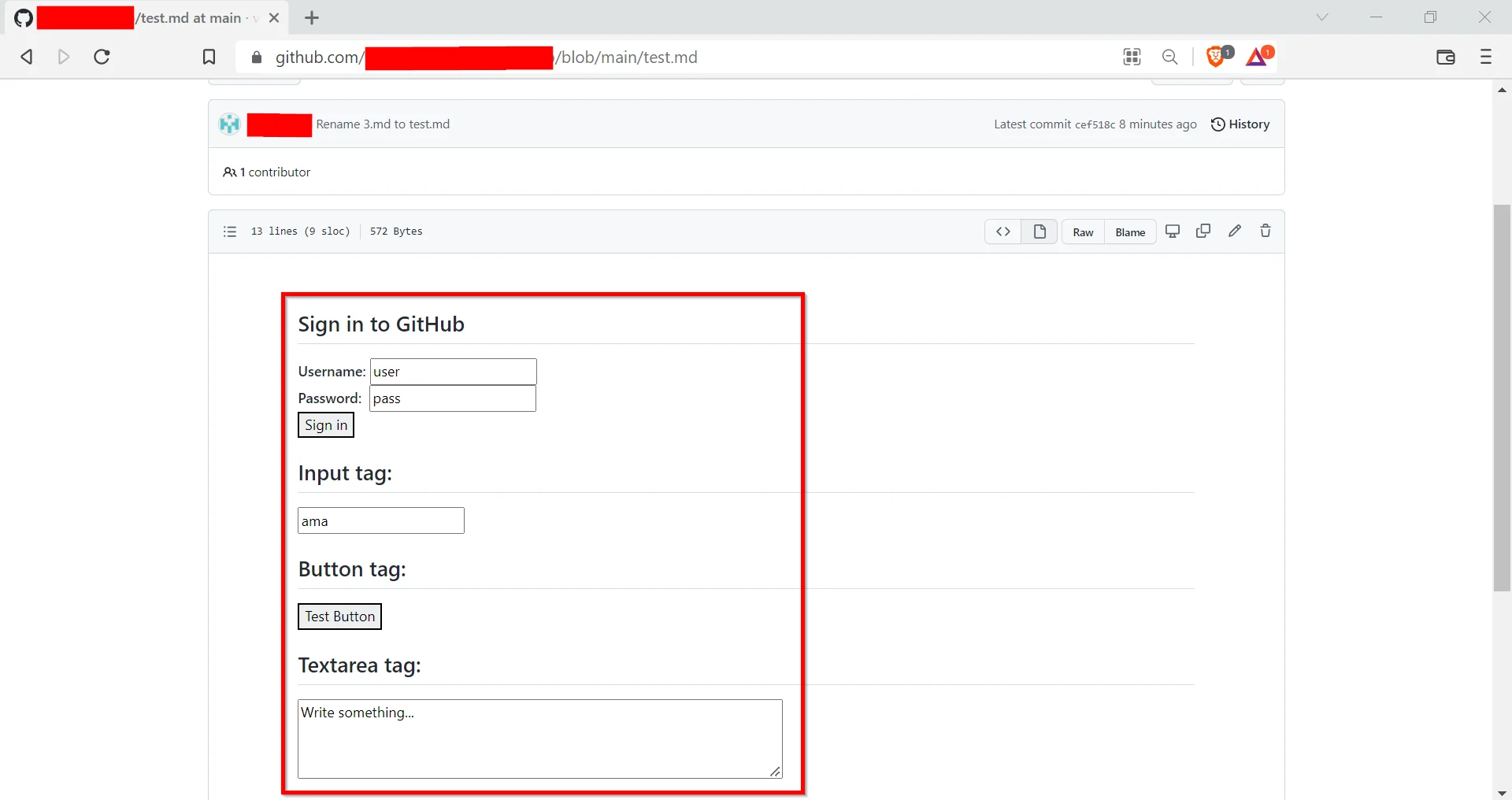
The image shows the advanced tags rendered through math expressions.
Attempts to increase the impact beyond this failed. The issue was reported to GitHub as low severity. GitHub accepted it as medium severity and paid a $10,000 bounty, together with SWAG and GitHub Pro free of charge.
Payload summary
| Method | Payload |
|---|---|
| First | $$\<style>{property:value}</style>{}$$ |
| Second | $$<tag style="property:value" acceptedAttribute="True"></tag>{}$$ |
| Third | $$\<script>{<renderTag>}$$ |
Timeline
| Date | Event |
|---|---|
| May 21st | First report sent to GitHub |
| May 21st | Report closed as duplicate |
| May 24th | Issue reported again with a new bypass |
| May 25th | Report triaged by GitHub |
| Aug 20th | GitHub resolved the issue |
| Aug 20th | $10,000 bounty, SWAG and GitHub Pro awarded |
Root cause
The report frames the underlying problem as a misconfiguration introduced by the new MathJax feature. Each iteration shows a different gap in that path:
- A backslash before a tag caused the tag to render without being filtered, and
<style>was not filtered at all in that position. - After the first fix, tags and the
styleattribute still rendered inside math expressions, even thoughstyleis blocked in ordinary Markdown. - After the second fix, a tag placed before the curly brackets was filtered out, but the entity-encoded tag inside the curly brackets was rendered by MathJax.
The exact implementation mistake is not shown in the report; the pattern is that filtering and rendering disagree about which part of the math expression is markup.
Impact
With the first method, an attacker could change the CSS of the whole page from a Markdown file. With the second, an attacker could render restricted tags such as <input> and <button> and use the style attribute to make the page look like a GitHub login page. With the third, tags such as <input>, <svg>, <button> and <textarea> could be rendered. The researcher tried to escalate the impact further and failed, and reported the third issue as low severity; GitHub rated it medium. The report does not describe script execution in the final state.
Fix
GitHub fixed the issue within 24 hours of the first report, again after the second method was demonstrated, and the timeline lists the final resolution on Aug 20. The report does not describe the code changes.
Variants to test
- Put a backslash before a tag inside math delimiters, for example
$$\<u>text</u>{}$$, and check whether the tag renders. A positive result is a rendered element where the sanitiser would normally strip it. - Try
<style>specifically in that position, for example$$\<style>*{display:none}</style>{}$$. A positive result is a visible change to the page styling. - Try the
styleattribute on a tag inside math delimiters, for example$$<tag style="property:value" acceptedAttribute="True"></tag>{}$$. A positive result is a styled element and an accepted extra attribute. - Try a filtered tag before the curly brackets with an entity-encoded tag inside them, for example
$$\<script>{<input>}$$. A positive result is the inner tag rendering while the outer one is removed. - Try tags that Markdown normally blocks, such as
<input>,<button>,<textarea>and<svg>, inside math delimiters. A positive result is any of them rendering in the page. - Try the same patterns with other delimiters and encodings the renderer supports, and check whether the filtering and the rendering agree on where the markup starts and ends.
What happened, in plain words
GitHub is a website where people store and share code and text files. One of the file types it displays is Markdown, a simple way of writing formatted text: you type **bold** and the site shows it in bold. In May 2022 GitHub added a feature that lets Markdown files show mathematical formulas, using a piece of software called MathJax. A security researcher, Saajan Bhujel (@saajanbhujel), saw the announcement and wondered whether that new feature could be tricked into showing things it should not show, such as HTML tags (the building blocks of web pages) that GitHub normally removes for safety.
Over several rounds he found three different tricks. Each time GitHub fixed the trick, he found another way around the fix. The first two tricks let him change how the page looked. The third let him place form elements such as text boxes and buttons on the page. GitHub accepted the final issue as medium severity and paid a $10,000 bounty, plus some merchandise (SWAG) and a free GitHub Pro subscription.
This article walks through the same steps he took, explaining each idea from scratch. You only need a browser and a computer to follow the reasoning; no special tools are required to understand it.
The background: what Markdown and MathJax are
Markdown in one minute
Markdown is plain text with light punctuation that a website turns into formatted output. A line starting with # becomes a heading, text between ** becomes bold, and so on. Because anyone can put anything in a Markdown file, GitHub does not trust it: before showing the result, it runs the content through a filter (often called a sanitiser) that removes dangerous pieces, especially HTML tags that could run code in a visitor's browser.
MathJax in one minute
MathJax is an open-source JavaScript display engine for LaTeX, MathML and AsciiMath notation. In plain terms, it is a program that runs in your browser and turns typed formulas into nicely drawn mathematics. It works in all modern browsers and has built-in support for assistive technology such as screen readers, so people using those tools can also read the formulas.
GitHub's announcement said formulas could be written between $$ and $ delimiters. A delimiter is just a marker that says "the formula starts here and ends here". So $$x + y$$ tells GitHub: everything between the two $$ signs is a formula, pass it to MathJax.
That last sentence is the important one. The normal Markdown filter and the MathJax program are two different pieces of software looking at the same text. If they disagree about what counts as a formula and what counts as an HTML tag, there may be a gap. Finding such gaps is the whole story here.
What the researcher was looking for
He wanted to find a way to make GitHub display HTML tags that its filter normally removes. The most serious version of that problem is called XSS, short for Cross-Site Scripting: tricking a website into running code written by an attacker, inside the browser of someone who visits the page. A milder but still useful version is HTML injection: getting your own HTML elements onto a page, which can be used to fake a login form and steal passwords (phishing).
He started with a plan: first get the simplest, most boring tags to appear, then work up to the dangerous ones. The reason is practical. Websites often deploy a WAF (Web Application Firewall, a filter that inspects incoming content) and other restrictions aimed at advanced tags such as <script>, but they leave common tags such as <b>, <i> and <u> alone because those seem harmless. If you can get a harmless tag through, you have learned something about the filter, and you can then try to push a dangerous tag through the same gap.
Step 0: looking for known bugs first
Before testing anything himself, the researcher searched for previous security problems in MathJax. This is standard practice: if a library already has a known bug, you check whether the site you are testing is still affected. He found a known XSS issue in MathJax affecting versions below 2.7.4. The report says the payload for that issue has to be in a Unicode form:
\unicode{}
What this means, piece by piece:
{}is where the code would go.- Unicode is the standard numbering system for characters: every letter, digit and symbol has a number. Writing a character by its number is a way of sneaking it past filters that only look for the literal character.
The image shows the known CVE entry for the MathJax library affecting versions below 2.7.4. CVE stands for Common Vulnerabilities and Exposures: a public catalogue where each known security flaw gets an ID number so people can refer to it unambiguously.
Step 1: trying the known bug, and failing
He created a Markdown file in a test repository (a personal storage area on GitHub for files) and put the known payload inside math delimiters. Two attempts are shown:
$$\\u003cu\\u003eHello\\u003c/u\\u003e{}$$
$$\\u003cu\\u003eWhy\\u003c\uffofu\\u003e{}$$
Line by line:
$$opens the math expression and the closing$$ends it. Everything between them is handed to MathJax.\\u003cis a way of writing the<character using its Unicode number, and\\u003eis the same for>. The idea is that a filter looking for a literal<would not notice the encoded version.uand/uare the opening and closing parts of the underline tag, so the intended result was<u>Hello</u>, underlined text.
Nothing rendered. His own explanation is simple: the known bug only affects MathJax versions below 2.7.4, and GitHub was running a newer version. So the known bug was closed off, and the only path forward was to find a new bypass himself.
Step 2: the first method, a backslash before the tag
He tried several transformations: Unicode, URL encoding (writing characters as % followed by numbers, the way web addresses encode special characters) and others. None worked. What did work was much simpler: putting a backslash (\) immediately before the tag.
$$\<u>HELLO</u>{}$$
What this does:
$$starts the math expression.\<u>is a backslash followed by the opening underline tag. The tag rendered without an error and without being filtered.HELLOis the text to be underlined.</u>closes the underline tag.$$closes the math expression.
The result was that the tag rendered without an error and without being filtered. That is the first real finding: a backslash in front of a tag inside a math expression changes how the filter treats it.
Pushing further: advanced tags
With a basic tag working, the obvious next question was whether dangerous tags would also get through. He swapped <u> for <script>, <iframe> and <style> and tested. The answer was mostly no: GitHub filtered the advanced tags, with one exception, <style>.
A <style> tag is how a web page carries CSS, the language that controls colours, sizes, positions and visibility. If you can inject a <style> tag, you can restyle the page. The form that worked was \<style>{property:value}</style>, again with a backslash in front.
The payloads he used in his test.md file were:
$$\<style>*{display:none}</style>{}$$

$$\<style>div{background-color:#66f3e6}</style>{}$$

$$\<style>*{font-size:23px;}</style>{}$$

$$\<style>body{padding:50px;background-color:#4b6bb7;}</style>{}$$
Line by line:
$$\<style>opens the math expression, then a backslash, then the opening style tag. The backslash is the trick that gets it past the filter.</style>closes the style block,{}is the empty brace pair, and$$closes the math expression.
Each of these injects a stylesheet through the math expression. The result was that the CSS of the whole page could be changed from a Markdown file.
The image shows the page CSS changed through this method.
The first report and the duplicate
He submitted this finding to GitHub's bug bounty programme, which at the time ran on HackerOne, a platform where researchers report security issues and companies respond. A bug bounty is a reward paid for finding and reporting a flaw responsibly.
The report was closed within 5 minutes, with the message that it was a previously identified issue already being tracked internally. The researcher asked whether the quick response came from a bot or a real person, and GitHub's triager (the person who reviews incoming reports) confirmed that the report had been reviewed by a real person. The first report to GitHub was closed as a duplicate, meaning it matched something the team already knew about.
Step 3: the second method, the style attribute
GitHub fixed the issue within 24 hours. He retested with the same method and payloads, and advanced tags no longer worked. But he found a new way to render tags. This time only normal tags worked, such as <div>, <span>, <section>, <input>, <label> and <button>, and not <style> or <script>:
$$<div>Test</div>{}$$

$$<input type=text>{}$$

$$<button>Click Here</button>{}$$
Line by line:
$$<div>Test</div>{}$$puts adivblock containing the word Test inside a math expression. Notice there is no backslash this time.$$<input type=text>{}$$puts a text input box on the page.type=textsays it accepts ordinary text.$$<button>Click Here</button>{}$$puts a clickable button labelled Click Here on the page.
Some of these tags, such as <div>, <span> and <section>, can also be used in Markdown files without math expressions. But tags like <input> and <button> normally cannot be rendered, because they are interactive elements that could be used to trick a visitor. Being able to use them through math expressions was itself a step forward. He did not report it at that point, because there was no impact beyond using restricted tags: nothing dangerous could be done with them yet.
The style attribute
The next goal was to modify CSS again, but <style> was no longer usable after the fix. The remaining option was the style attribute. An attribute is an extra piece of information attached to a tag, written inside the opening tag, such as class or id. The style attribute carries CSS directly on a single element.
GitHub restricts the use of attributes. Markdown files allow class, id and a few others, but not style, because it can change the CSS of the page. Surprisingly, the style attribute could be used with math expressions, and it was effectively impossible to use it in Markdown files without them.
$$<tag style="property:value" acceptedAttribute="True"></tag>{}$$
Line by line:
$$opens the math expression.<tagis a placeholder for any tag name.style="property:value"is the style attribute, with a placeholder CSS property and value.acceptedAttribute="True"is an extra attribute in the payload.></tag>closes the opening tag and then the element.{}$$closes the math expression.
He then built a payload that made the Markdown file page look like a login page:
$$<div style="position:fixed;padding:10%;padding-right:100%;left:-9%;top:-20%;background:white;padding-bottom:100%;"><section style="margin-left:500px;padding:30px;"><h2 style="text-align:center;">Sign in to GitHub</h2><div><label>Username: </label><input type=text style="border-radius:5px;border:1px solid;">
<label>Password: </label><input type=password style="border-radius:5px;border:1px solid;"><div style="text-align:center;"><button style="background:#2da44e;color:white;margin:10px;border-radius:9px;border:none;font-weight:500;padding:4px;padding-right:20px;padding-left:20px;" type=submit>Sign in</button></div></section></div></div><!--{}$$
This is a long line, so here is what each part does:
- Inside it, a
<section>holds the content, shifted to the right withmargin-left:500px. <h2 style="text-align:center;">Sign in to GitHub</h2>is a centred heading.<label>Username: </label>followed by<input type=text ...>creates a text box for a username, with rounded corners fromborder-radius:5pxand a thin border.<label>Password: </label>followed by<input type=password ...>creates a password box, which hides what is typed.- The
<button ... type=submit>Sign in</button>is styled with GitHub's green colour (#2da44e), white text, rounded corners and padding, so it looks like the real button. {}$$closes the math expression.
The image shows the bypass of the fix, with tags rendered and CSS changed.
Why he did not file a new report
No new report was filed at this point. The bypass was found the day after the previous report, and the team had said they were working on the issue internally, so he expected a duplicate closure. Instead, he left a comment on the last report saying that a bypass had been found that could again change the CSS of the whole page. He asked whether the internal team had fixed the issue, noted that the last method could no longer be reproduced, and offered to create a new report as a bypass if the issue was fixed. GitHub staff replied with the statement shown in the image below.
The image shows the GitHub staff reply to the comment on the previous report.
The next day the new payload no longer worked. That showed the team had fixed the issue again and were indeed working on MathJax internally.
Step 4: the third method, a filtered tag before the curly brackets
After the second fix, none of the advanced tags could be rendered with the previous payloads. Looking back at the earlier payloads, the common element was a backslash before the tag, in the form \<tagName>{}. He changed the payload position from $$\<tagName>{}$$ to $$\{<tagName>}$$, moving the braces in front of the tag, but the tags were still filtered.
After more time, he found a method to render tags such as <input>, <svg>, <button> and <textarea>:
$$\<script>{<renderTag>}$$
The mechanics, as described:
- The first position after the backslash must be a malicious tag that gets filtered out of the payload, such as
\<script>or\<style>. - The tag that should actually render goes between the curly brackets as
{<renderTag>}, with the greater-than and less-than signs written as HTML entities. An HTML entity is a coded way of writing a character:<means<and>means>. Filters often look for literal angle brackets, so the encoded form can slip past.
So in $$\<script>{<renderTag>}$$, the <script> written before the curly bracket is filtered out, and MathJax then renders only the tag inside the curly brackets.
The proof-of-concept payloads used in test.md were:
$$\<script>{<div><section><h2>Sign in to GitHub</h2><label>Username: </label><input><br><label>Password: </label><input><br><button>Sign in</button></section></div><!--}$$<br>
## Input tag:
$$\<script>{<input><!--}$$<br>
## Button tag:
$$\<script>{<button>Test Button</button><!--}$$<br>
## Textarea tag:
$$\<script>{<textarea>Write something...</textarea><!--}$$<br>
Line by line:
- The first payload rebuilds the fake sign-in form entirely from entity-encoded tags inside the curly brackets: a
div, asection, anh2heading reading "Sign in to GitHub", a Username label and input, a line break (<br>), a Password label and input, another line break, and a Sign in button. is a non-breaking space, a space that will not be collapsed. - The following three isolate a single tag each: an input, a button with text, and a textarea (a multi-line text box) with placeholder text.
- Each ends with
<!--before the closing}$$.
The image shows the advanced tags rendered through math expressions.
Attempts to increase the impact beyond this failed. He reported the issue to GitHub as low severity. Severity is a rough rating of how much harm a flaw could cause. GitHub accepted it as medium severity and paid a $10,000 bounty, together with SWAG and GitHub Pro free of charge.
Payload summary
| Method | Payload |
|---|---|
| First | $$\<style>{property:value}</style>{}$$ |
| Second | $$<tag style="property:value" acceptedAttribute="True"></tag>{}$$ |
| Third | $$\<script>{<renderTag>}$$ |
Timeline
| Date | Event |
|---|---|
| May 21st | First report sent to GitHub |
| May 21st | Report closed as duplicate |
| May 24th | Issue reported again with a new bypass |
| May 25th | Report triaged by GitHub |
| Aug 20th | GitHub resolved the issue |
| Aug 20th | $10,000 bounty, SWAG and GitHub Pro awarded |
Why it worked
The report frames the underlying problem as a misconfiguration introduced by the new MathJax feature. Each iteration shows a different gap in that path:
- A backslash before a tag caused the tag to render without being filtered, and
<style>was not filtered at all in that position. - After the first fix, tags and the
styleattribute still rendered inside math expressions, even thoughstyleis blocked in ordinary Markdown. - After the second fix, a tag placed before the curly brackets was filtered out, but the entity-encoded tag inside the curly brackets was rendered by MathJax.
What an attacker could have done
With the first method, an attacker could change the CSS of the whole page from a Markdown file. With the second, an attacker could render restricted tags such as <input> and <button> and use the style attribute to make the page look like a GitHub login page. With the third, tags such as <input>, <svg>, <button> and <textarea> could be rendered. The researcher tried to escalate the impact further and failed, and reported the third issue as low severity; GitHub rated it medium. The report does not describe script execution in the final state.
How it was fixed
GitHub fixed the issue within 24 hours of the first report, again after the second method was demonstrated, and the timeline lists the final resolution on Aug 20. The report does not describe the code changes.
Things worth trying yourself
If you want to understand this kind of bug, these are the patterns the researcher tested. Each one is a question about whether the filter and the renderer agree.
- Put a backslash before a tag inside math delimiters, for example
$$\<u>text</u>{}$$, and check whether the tag renders. A positive result is a rendered element where the sanitiser would normally strip it. - Try
<style>specifically in that position, for example$$\<style>*{display:none}</style>{}$$. A positive result is a visible change to the page styling. - Try the
styleattribute on a tag inside math delimiters, for example$$<tag style="property:value" acceptedAttribute="True"></tag>{}$$. A positive result is a styled element and an accepted extra attribute. - Try a filtered tag before the curly brackets with an entity-encoded tag inside them, for example
$$\<script>{<input>}$$. A positive result is the inner tag rendering while the outer one is removed. - Try tags that Markdown normally blocks, such as
<input>,<button>,<textarea>and<svg>, inside math delimiters. A positive result is any of them rendering in the page. - Try the same patterns with other delimiters and encodings the renderer supports, and check whether the filtering and the rendering agree on where the markup starts and ends.
Glossary
- Attribute: Extra information attached to an HTML tag, written inside the opening tag, such as
class,idorstyle. - Bot: An automated program that performs actions or replies on a platform without a human typing each time.
- Bug bounty: A reward paid by a company to someone who finds and reports a security flaw responsibly.
- CSS: Cascading Style Sheets, the language that controls how a web page looks: colours, sizes, positions and visibility.
- CVE: Common Vulnerabilities and Exposures, a public catalogue where each known security flaw gets an ID number.
- Delimiter: A marker that shows where a piece of content starts and ends, such as
$$around a math expression. - Duplicate: A report that describes a problem the team already knows about and is already tracking.
- Escape character: A character, often a backslash, that changes how the character after it is treated.
- HackerOne: A platform where security researchers report flaws to companies and companies respond and pay bounties.
- HTML: HyperText Markup Language, the language of web pages, built from tags such as
<div>and<button>. - HTML entity: A coded way of writing a character in HTML, such as
<for<and>for>. - HTML injection: Getting your own HTML elements onto a page you do not control, which can be used to fake forms or content.
- JavaScript: The programming language that runs in web browsers and makes pages interactive.
- Markdown: A simple way of writing formatted text in plain text, which a website converts into formatted output.
- MathJax: An open-source JavaScript display engine for LaTeX, MathML and AsciiMath notation that renders mathematical formulas in the browser.
- Misconfiguration: A setup mistake that leaves a gap, rather than a coding error in the usual sense.
- Phishing: Tricking someone into entering sensitive information, such as a password, into a fake page that looks real.
- Sanitiser: A filter that removes dangerous pieces from user-supplied content before it is shown.
- Severity: A rough rating of how much harm a flaw could cause, often low, medium, high or critical.
- SWAG: Promotional merchandise given as a gift, such as clothing or stickers.
- Tag: A building block of HTML, written between angle brackets, such as
<div>or<button>. - Triager: The person who reviews incoming security reports and decides what happens to them.
- Unicode: The standard numbering system for characters, where every letter, digit and symbol has a number.
- URL encoding: Writing characters in a web address as
%followed by numbers, so special characters can travel safely. - WAF: Web Application Firewall, a filter that inspects incoming content and blocks patterns it considers dangerous.
- XSS: Cross-Site Scripting, a flaw where a website is tricked into running code written by an attacker inside a visitor's browser.



