XSS in GMAIL Dynamic Email (AMP for Email)
Gmail's AMP for Email parser mishandled CSS and HTML in a way that let a crafted email break out of the style block and inject a meta refresh tag. The injected tag could redirect the message to a data URL containing script, but Gmail's strict CSP stopped the script from running.

I found a XSS vulnerability on GMAIL that I reported to Google VRP on January 2023. This issue occurs due to improper HTML parsing in GMAIL Dynamic email (AMP for Email).
The full write-up lives on its author's site
It belongs to its author, so we link to it rather than copy it. The other two tabs are our own rewrites, checked against it.
Context
Gmail Dynamic Email is Gmail's implementation of AMP for Email. AMP for Email lets a sender put a subset of AMPHTML components inside an email so that the recipient can interact with the content directly in the message, rather than being sent to a web page. The format is documented at https://amp.dev/about/email.
A valid AMP email message must:
- start with the doctype
<!doctype html>; - contain a top-level
<html ⚡4email>tag (<html amp4email>is also accepted); - contain
<head>and<body>tags (optional in plain HTML); - contain a
<meta charset="utf-8">tag as the first child of the head tag; - contain a
<script async src="https://cdn.ampproject.org/v0.js"></script>tag inside the head tag; - contain the amp4email boilerplate
<style amp4email-boilerplate>body{visibility:hidden}</style>inside the head tag, to hide the content until the AMP JS is loaded.
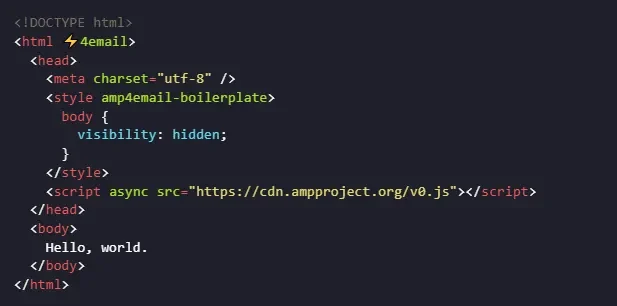
The image shows an example of a valid AMP for Email message with the structure above.
All CSS in an AMP document must live either in a <style amp-custom> tag in the header or in inline style attributes.
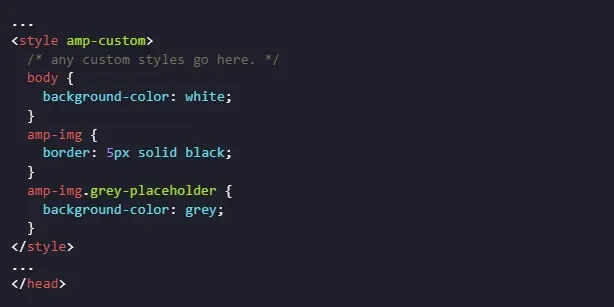
The image shows custom CSS placed in an AMP for Email document.
The bug described here is an XSS in Gmail's handling of these documents, caused by improper HTML parsing. It was reported to the Google VRP in January 2023.
Setup
No special account, role or tooling is described. The work was done against the Gmail AMP playground at https://amp.gmail.dev/playground/, which lets you compose an AMP email and see how it is parsed and rendered. The starting point was two previously disclosed XSS bugs in Gmail AMP:
- one by Michał Bentkowski, written up at
https://research.securitum.com/xss-in-amp4email-dom-clobbering/; - one by Adi "Adico" Cohen, written up at
https://www.adico.me/post/xss-in-gmail-s-amp4email.
After reading both write-ups several times, the goal was to find a bypass of the fix or a new vector.
Finding it
Step 1: replay the previous payload and watch the parser
The first attempt was to send Adico's payload and observe what the HTML parser does after the fix. Adico had found XSS by injecting a </style> closing tag into a CSS selector, encoding the letter y as \000079.

When the message is sent to Gmail, \000079 is decoded back to the letter y, producing a valid </style> close tag. That breaks out of the <style amp-custom> tag and adds an <img> element to the document body.
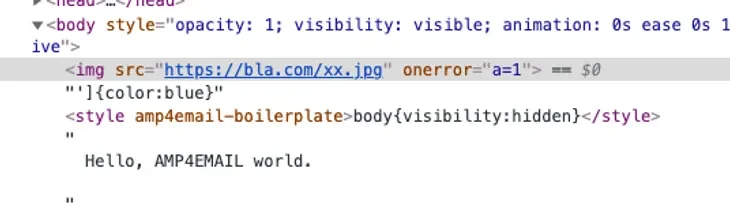
A test payload was then sent and parsed as follows.

The result: <> characters inside a string were encoded to \00003c and \00003e. The sequence \000069 was decoded to the letter i, but \00003c and \00003e were not decoded back to < and >.
A second observation: div>span was fine, and the > character was not encoded to \00003e. The working assumption about Google's fix was therefore that < and > are only encoded when they appear inside a string delimited by " or '. That makes sense, because > is a valid symbol in a CSS selector, used for the element-to-element combinator.
Step 2: move the angle brackets to a different location
With that assumption, <> characters were tried in different locations until a promising spot turned up: a CSS rule set allows any characters right after the property:value declaration.
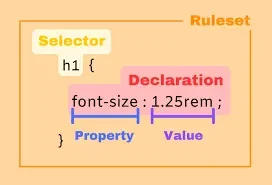
For example, arbitrary text or an HTML tag can be written there.
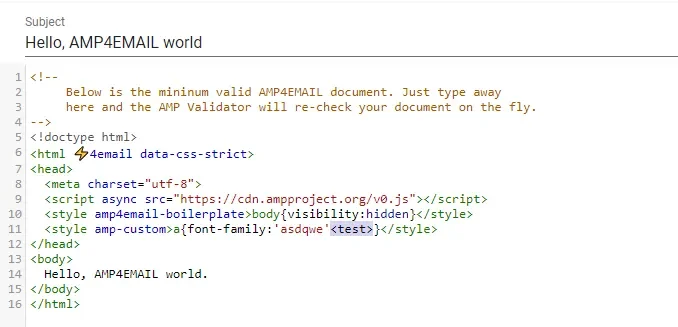
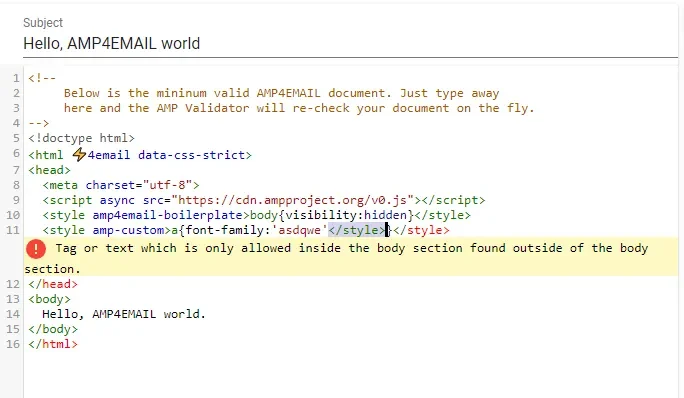
As expected, a </style> closing tag is not allowed in that position.
Step 3: the parser quirk
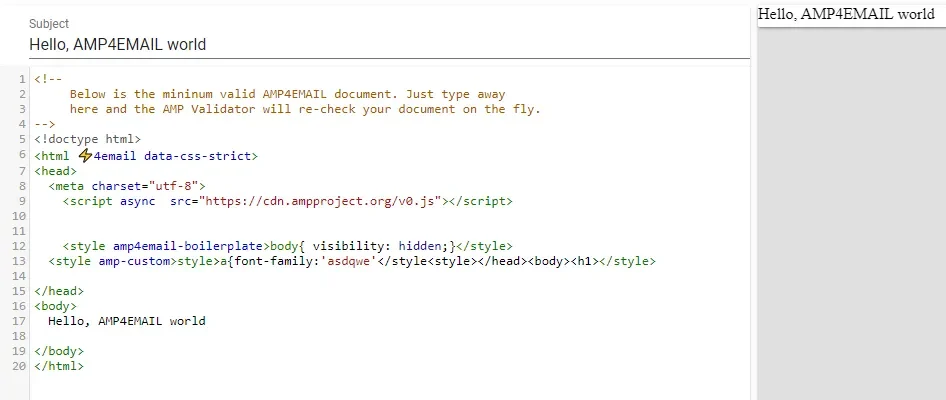
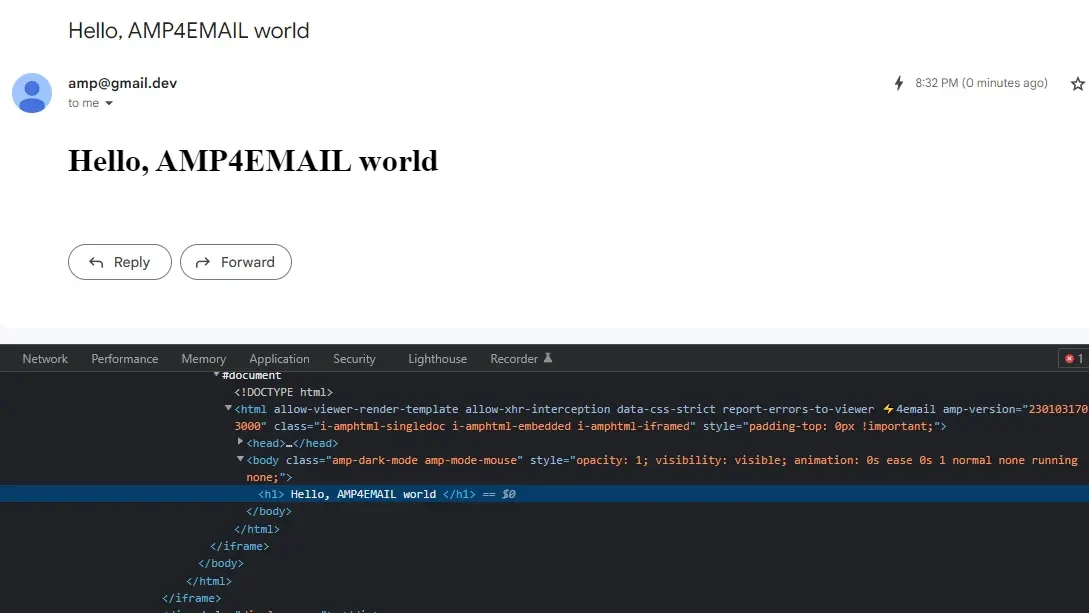
After trying multiple HTML tag combinations, a snippet was found that behaved surprisingly when parsed by Gmail.
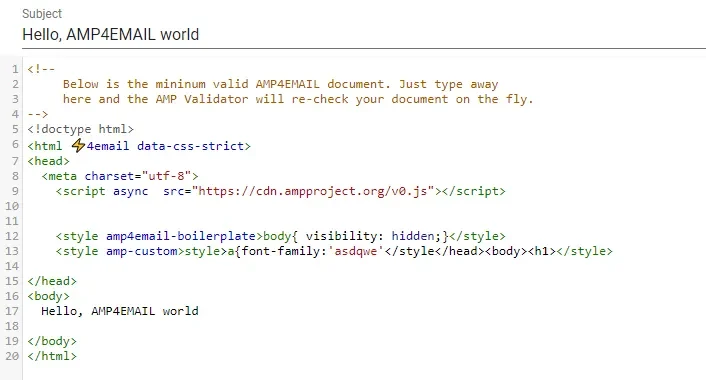
When sent to Gmail, it was parsed as follows.
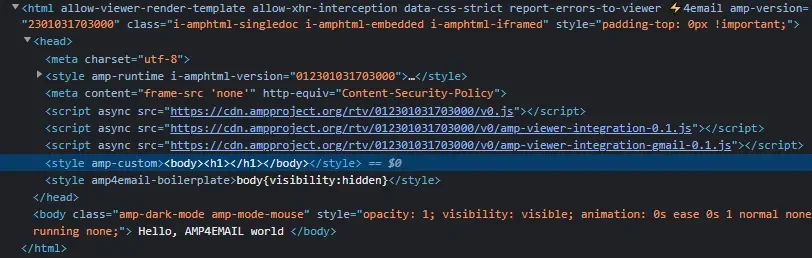
The parser still parses </style even when it has no closing bracket >. It was also noticed that the parser auto-generates a closing tag for each HTML tag. That raised the question of what happens with a <style> tag: will the parser generate the closing tag too? The answer is yes.
Step 4: looking for an executable element
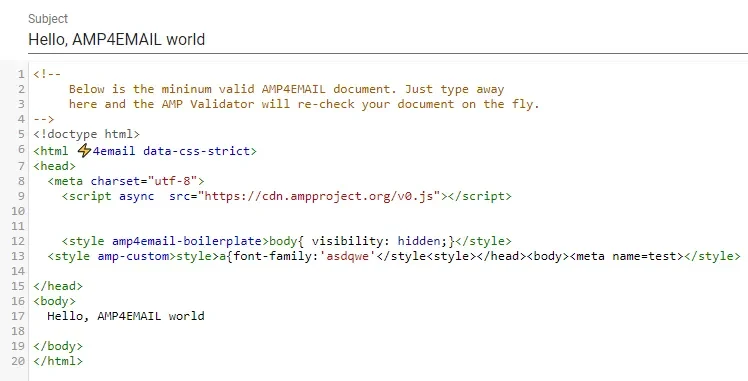
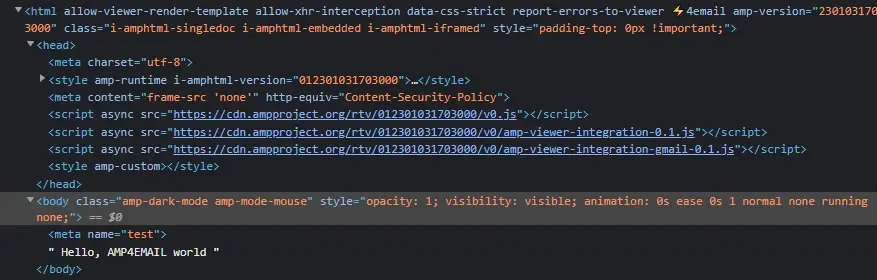
A basic <img> XSS payload was tried next, but nothing appeared in the body element, which suggested another filter had been added to prevent XSS. Every single HTML tag was tried; none worked except <meta>. A <meta> tag with http-equiv = refresh could be injected.
Exploitation
Step 1: the final payload
The final payload combines the CSS rule set position, the unterminated </style that the parser still honours, the auto-generated closing tag, and the <meta http-equiv="refresh"> element:
<style amp-custom>style>a{font-family:’asdqwe’</style</head><body><style/><meta http-equiv=”refresh” content=”10;url=data:text/html,<h1>HELLO!!</h1><script>alert()</script>”/></style>
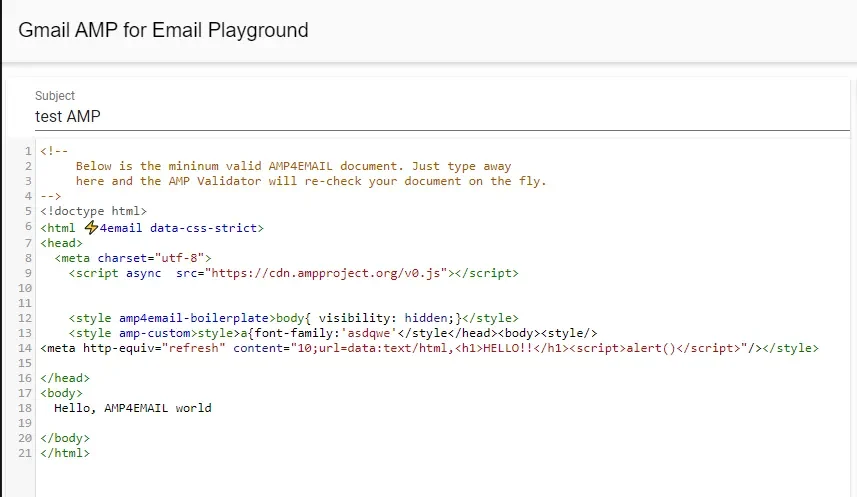
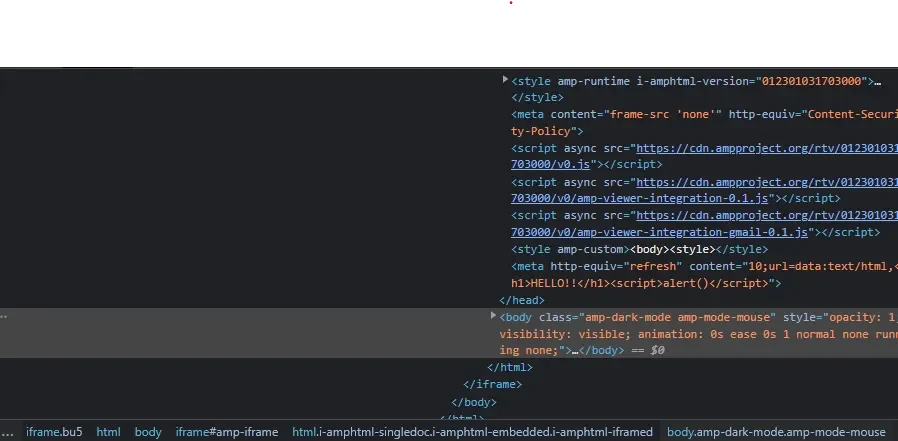
The payload combines the CSS rule set position, the unterminated </style, the auto-generated closing tag and a <meta> refresh whose target is a data:text/html URL containing an <h1> and a <script>alert()</script>. The refresh fires after 10 seconds.
Step 2: the result
After 10 seconds the refresh is triggered.
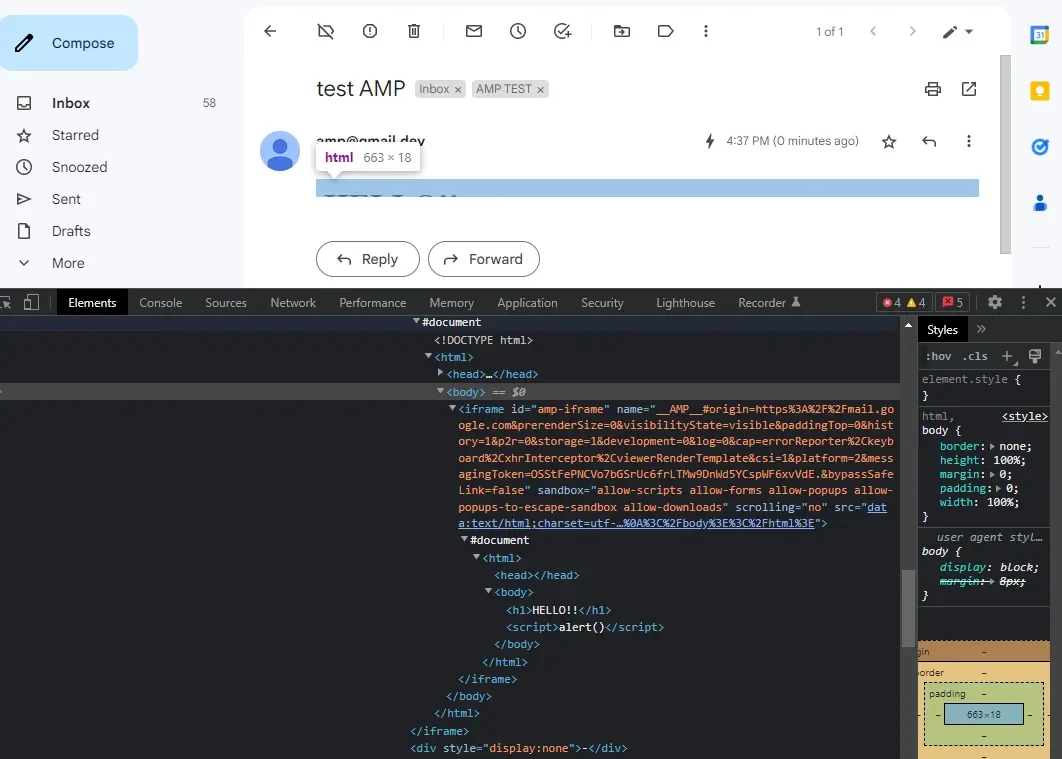

However, Gmail has strict CSP rules in place, so the XSS did not execute. A few attempts were made to find a CSP bypass, without luck.
Root cause
The underlying problem is improper HTML parsing of the AMP email document in Gmail. Two parser behaviours combine:
- A
</stylesequence is treated as a closing tag even without the trailing>, so the CSS context can be exited from a position where a full</style>is rejected. - The parser auto-generates closing tags for HTML tags, so a
<style>opened inside the injected content is closed automatically, which lets the following markup be interpreted as elements.
The researcher's assumption was that the fix encoded < and > only inside quoted strings, leaving the CSS rule set position after a property:value declaration uncovered. The <img> route was blocked by a further filter, but <meta http-equiv="refresh"> was not, allowing a meta refresh to a data:text/html URL to be injected. The final barrier was Gmail's CSP, which prevented the injected script from executing.
Impact
An attacker who can send an AMP email to a Gmail user could inject HTML into the rendered message. In this case the injected element was a <meta> refresh pointing at a data:text/html URL containing a script. Execution was blocked by Gmail's CSP, so the practical impact in this report is limited to the injection itself; the report does not demonstrate script execution. The report does not describe any other impact.
Fix
The report does not state what Google changed in response.
Variants to test
- Unterminated closing tags. Try
</style,</script,</titleand similar sequences without the trailing>in every context where a full closing tag is rejected. A positive result is the parser leaving the current context and interpreting the following bytes as markup. - Auto-generated closing tags. Open a tag such as
<style>or<textarea>inside injected content and see whether the parser supplies the closing tag, then place an element after it. A positive result is that element appearing in the DOM. - CSS rule set position. Place arbitrary characters after a
property:valuedeclaration inside<style amp-custom>and vary the quoting. A positive result is that<and>survive unencoded there while being encoded inside quoted strings. - Tag allow-list probing. Enumerate HTML tags one by one after a successful break-out. A positive result is any tag other than the expected safe set rendering, particularly
<meta http-equiv="refresh">,<base>or<form>. - Navigation-based execution. Where script execution is blocked by CSP, try
meta refreshto adata:text/htmlURL or another scheme. A positive result is the browser navigating and rendering attacker-controlled HTML.
What happened, in plain words
Gmail has a feature called Dynamic Email. Normally an email is a static page: text, pictures, links. Dynamic Email lets the sender put small interactive apps inside the email itself, so you can do things like fill in a form or browse a carousel without leaving your inbox. Under the hood this is a technology called AMP for Email.
Because an email can now contain code-like content, Gmail has to read and interpret that content very carefully. If it gets the reading wrong, a sender can slip in extra content that the sender was never supposed to be able to add. That class of mistake is called XSS, short for cross-site scripting: the attacker manages to get their own HTML or JavaScript into a page that belongs to someone else, and the victim's browser runs it as if the site itself had written it.
The researcher in this report found exactly that kind of reading mistake in Gmail's handling of Dynamic Email. He reported it to Google's bug bounty programme in January 2023 and was paid $6000 ($5000 plus a $1000 bonus). The script did not end up running, because Gmail has a second line of defence called CSP.
This article walks through the whole thing from zero: what AMP for Email is, how the researcher built on two earlier public findings, how he probed Gmail's parser step by step, and what the final payload looked like.
AMP for Email
AMP for Email lets a sender include AMP components inside a rich email, so the recipient can interact with the content directly in the message instead of being sent off to a web page. The format is documented at https://amp.dev/about/email.
A valid AMP email message must:
- start with the doctype
<!doctype html>; - contain a top-level
<html ⚡4email>tag (<html amp4email>is also accepted); - contain
<head>and<body>tags (these are optional in ordinary HTML); - contain a
<meta charset="utf-8">tag as the first child of the head tag; - contain a
<script async src="https://cdn.ampproject.org/v0.js"></script>tag inside the head tag; - contain the amp4email boilerplate
<style amp4email-boilerplate>body{visibility:hidden}</style>inside the head tag, to hide the content until the AMP JavaScript is loaded.
The image shows an example of a valid AMP for Email message with the structure above.
A quick word on the pieces, since they come up again later. HTML is the language web pages and emails are written in: it is a tree of tags, each tag opening (<head>) and usually closing (</head>). The <head> is the part of the document that holds information about the page rather than visible content; the <body> is the visible part. A <style> tag holds CSS, the language that says how things look (fonts, colours, spacing). A <script> tag holds JavaScript, the language that makes a page do things. A doctype is a one-line declaration at the very top that tells the browser which flavour of HTML to expect.
All CSS in an AMP document must live either in a <style amp-custom> tag in the header or in inline style attributes.
The image shows custom CSS placed in an AMP for Email document.
The bug described here is an XSS in Gmail's handling of these documents, caused by improper HTML parsing. Parsing means reading the raw text of a document and turning it into the tree of elements the browser works with. If the parser and the security filter disagree about what the text means, that gap is where bugs live.
Discovery
As far as the researcher knew, two XSS bugs in Gmail AMP had been publicly disclosed before. One was found by Michał Bentkowski, written up at https://research.securitum.com/xss-in-amp4email-dom-clobbering/. The other was found by Adi "Adico" Cohen, written up at https://www.adico.me/post/xss-in-gmail-s-amp4email.
After reading both write-ups several times, the researcher decided to explore Gmail AMP through its playground at https://amp.gmail.dev/playground/, hoping to find a bypass of the fix or a new XSS vector. A playground here means a test page where you can compose an AMP email and see how it is parsed and rendered, without sending anything to a real person.
Step 1: replay the previous payload and watch the parser
The first attempt was to send Adico's payload and observe what the HTML parser does after the fix. Adico had found XSS by injecting a </style> closing tag into a CSS selector, encoding the letter y as \000079.
A CSS selector is the part of a CSS rule that says which elements the rule applies to, for example a for links. The trick here is that CSS has an escape syntax: a backslash followed by a number is a way of writing a character by its code. \000079 is the code for the letter y. So a filter that looks for the literal text </style> would not see it, because the text is written in a disguised form.
When the message is sent to Gmail, \000079 is decoded back to the letter y, producing a valid </style> close tag. That breaks out of the <style amp-custom> tag and adds an <img> element to the document body.
Breaking out means getting the parser to stop treating your text as CSS and start treating it as HTML markup. Once you are out of the style block, you can write tags of your own, and an <img> tag is a classic way to get a script to run (for example through an event attribute).
A test payload was then sent and parsed as follows.
The result: <> characters inside a string were encoded to \00003c and \00003e. The sequence \000069 was decoded to the letter i, but \00003c and \00003e were not decoded back to < and >.
In plain terms: Google's fix had learned to spot the angle brackets < and > when they sat inside a quoted string, and it rewrote them into their numeric escape form so they could not become real tags. But it only did that inside quotes.
A second observation: div>span was fine, and the > character was not encoded to \00003e. The working assumption about Google's fix was therefore that < and > are only encoded when they appear inside a string delimited by " or '. That makes sense, because > is a valid symbol in a CSS selector, used for the element-to-element combinator.
A combinator is just the punctuation that says how two selectors relate; div>span means "a span that is a direct child of a div". If Gmail encoded every > it saw, ordinary CSS like that would break, so the fix had to leave > alone outside quotes. That is the gap the researcher went after.
Step 2: move the angle brackets to a different location
With that assumption, <> characters were tried in different locations until a promising spot turned up: a CSS rule set allows any characters right after the property:value declaration.
A CSS rule set is one rule: a selector, then a pair of braces, then one or more declarations inside. A declaration is a property and a value, like font-family: Arial. The point is that after the value, before the closing brace, the CSS grammar is loose: you can put arbitrary text there and the CSS parser will not complain.
For example, arbitrary text or an HTML tag can be written there.
As expected, a </style> closing tag is not allowed in that position.
So the obvious move, writing a full </style> after the declaration, was blocked. The researcher needed a way to close the style block that the filter did not recognise as a closing tag.
Step 3: the parser quirk
After trying multiple HTML tag combinations, a snippet was found that behaved surprisingly when parsed by Gmail.
When sent to Gmail, it was parsed as follows.
The parser still parses </style even when it has no closing bracket >. It was also noticed that the parser auto-generates a closing tag for each HTML tag. That raised the question of what happens with a <style> tag: will the parser generate the closing tag too? The answer is yes.
Two quirks, then. First, the parser treats </style without the final > as a closing tag, even though the filter that blocks </style> presumably looks for the complete sequence. Second, when the parser sees an opening tag like <style> with no matching close, it supplies the close itself. Together, those two behaviours let the researcher leave the CSS context and then start new elements, all with text the filter did not recognise as dangerous.
Step 4: looking for an executable element
A basic <img> XSS payload was tried next, but nothing appeared in the body element, which suggested another filter had been added to prevent XSS. Every single HTML tag was tried; none worked except <meta>. A <meta> tag with http-equiv = refresh could be injected.
A <meta> tag is a piece of information about the page that lives in the head rather than being visible. The http-equiv="refresh" form tells the browser to reload or navigate after a set number of seconds. It is not a script, so a filter that blocks script-bearing tags like <img> may well let it through, and it can still send the browser somewhere the attacker chooses.
Exploitation
Step 1: the final payload
The final payload combines the CSS rule set position, the unterminated </style that the parser still honours, the auto-generated closing tag, and the <meta http-equiv="refresh"> element:
<style amp-custom>style>a{font-family:’asdqwe’</style</head><body><style/><meta http-equiv=”refresh” content=”10;url=data:text/html,<h1>HELLO!!</h1><script>alert()</script>”/></style>
Line by line, in plain words:
<style amp-custom>opens the custom CSS block, the one AMP allows in the head.style>a{font-family:’asdqwe’is the CSS rule set. The selector isa(links), the declaration isfont-familywith the value’asdqwe’. The oddstyle>at the start is part of the trick: it is text sitting where the CSS grammar is loose.</styleis the unterminated closing tag. The filter does not treat it as a close, but the parser does, so the CSS block ends here.</head><body>closes the head and opens the body, moving the parser into the visible part of the document.<style/>opens a style element that the parser will close automatically, thanks to the auto-generated closing tag behaviour.<meta http-equiv=”refresh” content=”10;url=data:text/html,<h1>HELLO!!</h1><script>alert()</script>”/>is the injected meta refresh. After 10 seconds it sends the browser to adata:text/htmlURL. Adata:URL is a way of putting a whole document inline in a link instead of pointing at a server; here the document is an<h1>heading and a<script>alert()</script>, which would pop up an alert box if it ran.</style>closes the remaining style element.
The payload combines the CSS rule set position, the unterminated </style, the auto-generated closing tag and a <meta> refresh whose target is a data:text/html URL containing an <h1> and a <script>alert()</script>. The refresh fires after 10 seconds.
Step 2: the result
After 10 seconds the refresh is triggered.
However, Gmail has strict CSP rules in place, so the XSS did not execute. A few attempts were made to find a CSP bypass, without luck.
CSP stands for Content Security Policy. It is a set of rules a site sends to the browser saying which sources of script, style and other content are allowed. Even if an attacker gets a <script> into the page, the browser refuses to run it if the policy does not allow it. That is what happened here: the script inside the data: document was not allowed to run.
Root cause
The underlying problem is improper HTML parsing of the AMP email document in Gmail. Two parser behaviours combine:
- A
</stylesequence is treated as a closing tag even without the trailing>, so the CSS context can be exited from a position where a full</style>is rejected. - The parser auto-generates closing tags for HTML tags, so a
<style>opened inside the injected content is closed automatically, which lets the following markup be interpreted as elements.
The researcher's assumption was that the fix encoded < and > only inside quoted strings, leaving the CSS rule set position after a property:value declaration uncovered. The <img> route was blocked by a further filter, but <meta http-equiv="refresh"> was not, allowing a meta refresh to a data:text/html URL to be injected. The final barrier was Gmail's CSP, which prevented the injected script from executing.
Impact
An attacker who can send an AMP email to a Gmail user could inject HTML into the rendered message. In this case the injected element was a <meta> refresh pointing at a data:text/html URL containing a script. Execution was blocked by Gmail's CSP, so the practical impact in this report is limited to the injection itself; the report does not demonstrate script execution. The report does not describe any other impact.
Fix
The report does not state what Google changed in response.
Variants to test
- Unterminated closing tags. Try
</style,</script,</titleand similar sequences without the trailing>in every context where a full closing tag is rejected. A positive result is the parser leaving the current context and interpreting the following bytes as markup. - Auto-generated closing tags. Open a tag such as
<style>or<textarea>inside injected content and see whether the parser supplies the closing tag, then place an element after it. A positive result is that element appearing in the DOM. - CSS rule set position. Place arbitrary characters after a
property:valuedeclaration inside<style amp-custom>and vary the quoting. A positive result is that<and>survive unencoded there while being encoded inside quoted strings. - Tag allow-list probing. Enumerate HTML tags one by one after a successful break-out. A positive result is any tag other than the expected safe set rendering, particularly
<meta http-equiv="refresh">,<base>or<form>. - Navigation-based execution. Where script execution is blocked by CSP, try
meta refreshto adata:text/htmlURL or another scheme. A positive result is the browser navigating and rendering attacker-controlled HTML.
Glossary
- AMP for Email: a format that lets a sender put interactive AMP components inside an email so the recipient can use them directly in the message.
- AMPHTML: the set of HTML components defined by the AMP project; AMP for Email supports a subset of them.
- Boilerplate: a fixed block of markup that every document of a given format must include; in AMP for Email it hides the content until the AMP JavaScript loads.
- Bug bounty programme: a scheme where a company pays researchers for reporting security bugs responsibly.
- Combinator: in CSS, the punctuation that says how two selectors relate, such as
>for a direct child. - CSP (Content Security Policy): rules a site sends to the browser saying which sources of script and other content are allowed to run.
- CSS: the language that describes how HTML looks: fonts, colours, spacing.
- CSS rule set: one CSS rule, made of a selector and a block of declarations in braces.
- CSS selector: the part of a CSS rule that says which elements it applies to.
- Data URL: a URL that carries a whole document inline instead of pointing at a server, written as
data:text/html,.... - Declaration: in CSS, a property and a value pair such as
font-family: Arial. - Doctype: a one-line declaration at the top of an HTML document saying which flavour of HTML it is.
- DOM: the tree of elements a browser builds from an HTML document; the page as the browser sees it.
- Dynamic Email: Gmail's name for its AMP for Email feature.
- HTML: the language web pages and emails are written in, as a tree of tags.
- HTML parser: the part of a browser or mail client that reads raw HTML text and turns it into the element tree.
- HTTP: the protocol browsers and servers use to exchange requests and responses.
- JavaScript: the programming language that makes web pages do things.
- Meta refresh: a
<meta http-equiv="refresh">tag that tells the browser to reload or navigate after a set time. - Payload: the specific piece of input an attacker sends to trigger a bug.
- Playground: a test page where you can compose a document and see how it is parsed and rendered, without sending it to anyone.
- Property and value: the two halves of a CSS declaration, for example
font-familyandArial. - Script: a
<script>tag, or the JavaScript inside it. - Tag: a piece of HTML markup such as
<head>or<img>, usually with an opening and a closing form. - Vector: a route or technique for delivering an attack.
- XSS (cross-site scripting): a bug where an attacker gets their own HTML or JavaScript into a page belonging to someone else, and the victim's browser runs it as if the site had written it.




