Remote Image Upload Leads to RCE (Inject Malicious Code to PHP-GD Image)
The remote image upload feature allowed an attacker to supply a URL to a crafted GIF containing PHP code, and the application saved it with a user-controlled filename ending in .php. This led to remote code execution when the uploaded file was accessed.

I recently came across a web application with two methods for adding images to its media library: local file upload and remote file upload from a stock photo website. My first thought was to check for an SSRF vulnerability through the remote file upload feature, but I decided to start by testing the local file upload.
The full write-up lives on its author's site
It belongs to its author, so we link to it rather than copy it. The other two tabs are our own rewrites, checked against it.
Context
The target was a web application with a media library that offered two ways to add images: a local file upload and a remote file upload that fetched an image from a stock photo website. The remote feature takes a URL and adds the image to the media library. The researcher's first instinct was to look for SSRF in that remote fetch, but started with the local upload instead.
Setup
The work was done against the live application. The tooling used was:
- a PHP script,
gd.php, that recreates an image through PHP-GD; gd-jpeg.pyfrom the dlegs php-jpeg-injector project;vbindifffor binary comparison of images;
No versions of PHP, GD or the application are given.
Finding it
The local upload accepted only image files: .jpg, .png, .gif and .svg. The .svg format could lead to XSS, but that was not the focus.
On the remote upload, intercepting a request while adding an image showed three POST form-data fields: name, url and photoId.
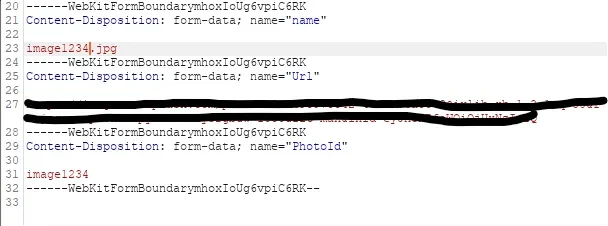
Changing the url to the researcher's own server produced an Internal Server Error and no incoming connection. Removing photoId produced the same error, but this time a connection did arrive at the server. The researcher attributes this to the absence of a valid image file at the supplied URL.
Supplying a URL with a valid jpg image uploaded successfully to the media library. Changing the name form-data to image.html and to image.php also uploaded successfully in both cases, both uploads were successful.
Injecting PHP into image EXIF metadata was ruled out quickly: the application recreates the fetched image with the PHP-GD library, and that processing removes EXIF metadata.
Exploitation
Step 1: try the JPEG injector
Several public articles were consulted, all describing payloads that survive PHP-GD recreation:
fakhrizulkifli/Defeating-PHP-GD-imagecreatefromjpegfakhrizulkifli/Defeating-PHP-GD-imagecreatefromgif- the BookFresh write-up on secgeek.net
These methods are limited to a few characters. There is also a payload injector by dlegs, php-jpeg-injector.
The first attempt used the dlegs tool. The image must first be recreated with PHP-GD, then the payload injected with gd-jpeg.py:
$ php gd.php image.jpg image-gd.jpg
Then the payload is injected into image-gd.jpg:
$ python gd-jpeg.py image-gd.jpg '<?php phpinfo()?>' image-gd-poc.jpg
To check that the injected payload survives, the resulting file is recreated with PHP-GD again:
$ php gd.php image-gd-poc.jpg image-gd-poc-1.jpg
Then the two files are compared:
$ vbindiff image-gd-poc.jpg image-gd-poc-1.jpg
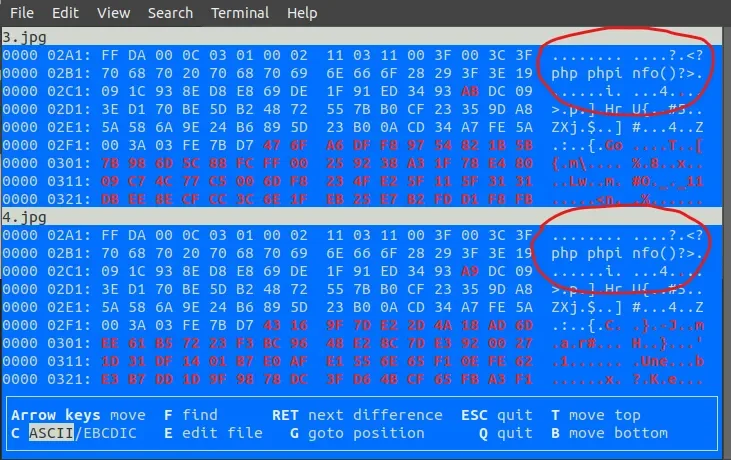
The dlegs injector writes the supplied payload into a .jpg file, and it only works if the target application recreates the image with the default quality (default -1). This attempt failed: the target converted images with a quality setting of 90, which removed the injected payload.
Step 2: switch to a GIF payload
The next attempt used a .gif payload by @ABOUL3LA. The POC.gif file was uploaded and the form-data name was renamed to test.php, which resulted in code execution. The article linked from the write-up provides a POC.gif image already injected with <?phpinfo()?>.
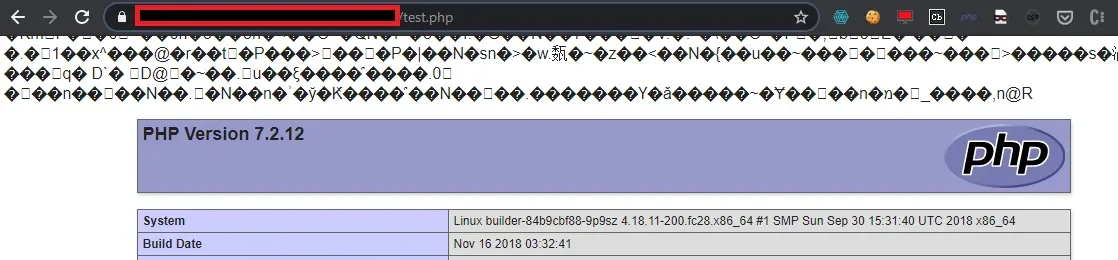
One condition applies to that payload: the target must have short_open_tag=On in php.ini, otherwise the PHP script will not execute and the payload has to be modified to use the <?php ?> tag.
The vulnerability was reported to the bug bounty program, which triaged it within minutes and patched it in just a few hours.
Step 3: understand how many bytes survive
The researcher then explored the PHP-GD library further to find out how many bytes can be injected into an image. After testing different .jpg and .gif images, the conclusion was that a .jpg image can carry a payload of up to 13 bytes, while a .gif image can carry more.
The GIF images that can be injected are those containing null byte blocks. GIF images with a Netscape Looping Application Extension have such blocks. That extension is the most popular application extension block and tells a browser or other GIF viewer to loop the entire animated GIF file.
An example GIF with the Netscape Looping Application Extension is:
https://media2.giphy.com/media/6NjZoOdEbXs1W/source.gif
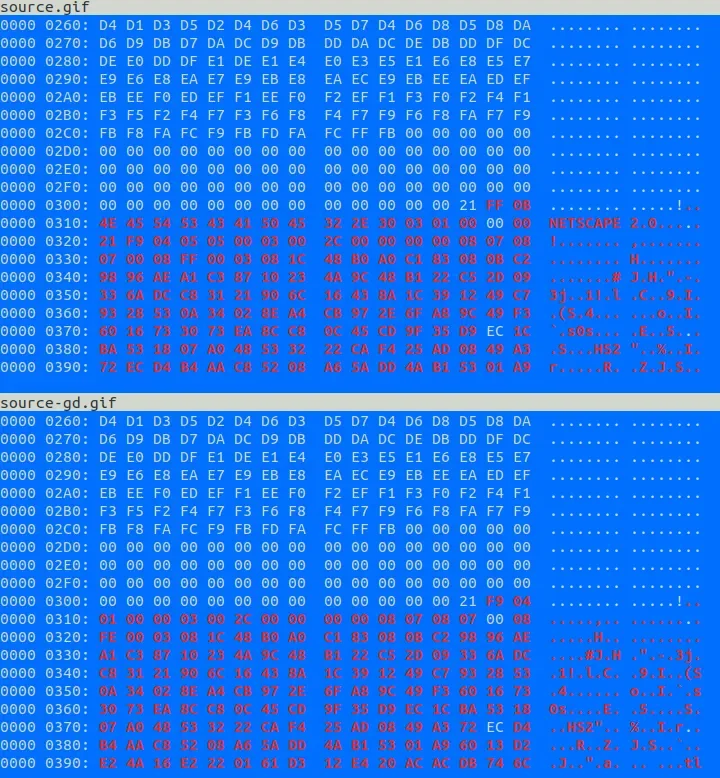
When that GIF is recreated with PHP-GD, the null byte blocks are not removed. The binary comparison between the original GIF and the GD-recreated GIF shows this.
Step 4: inject shellcode into the null byte blocks
PHP shellcode was injected into the null byte blocks and the GIF was recreated with PHP-GD. The binary comparison shows the injected payload still present.
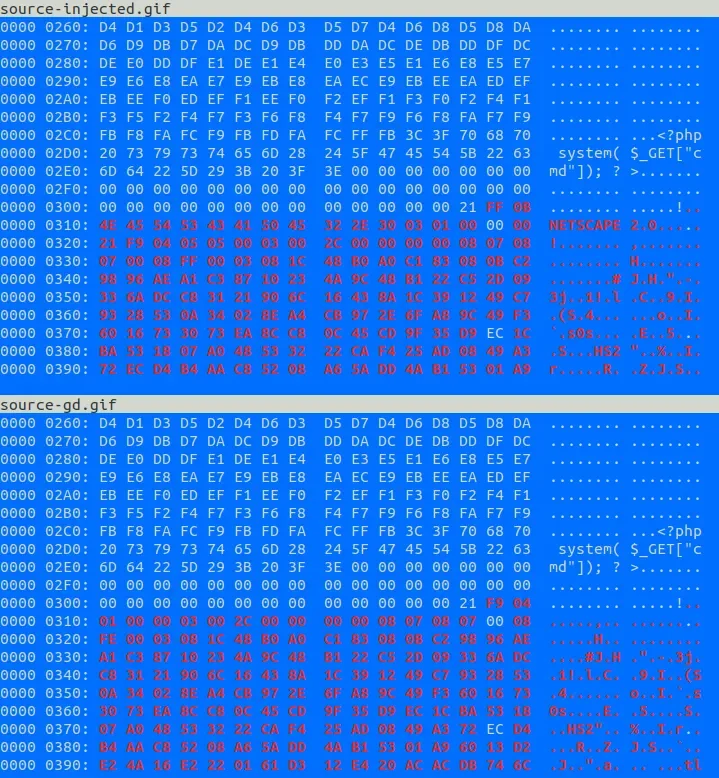
The GIF can then be uploaded to the vulnerable target application.
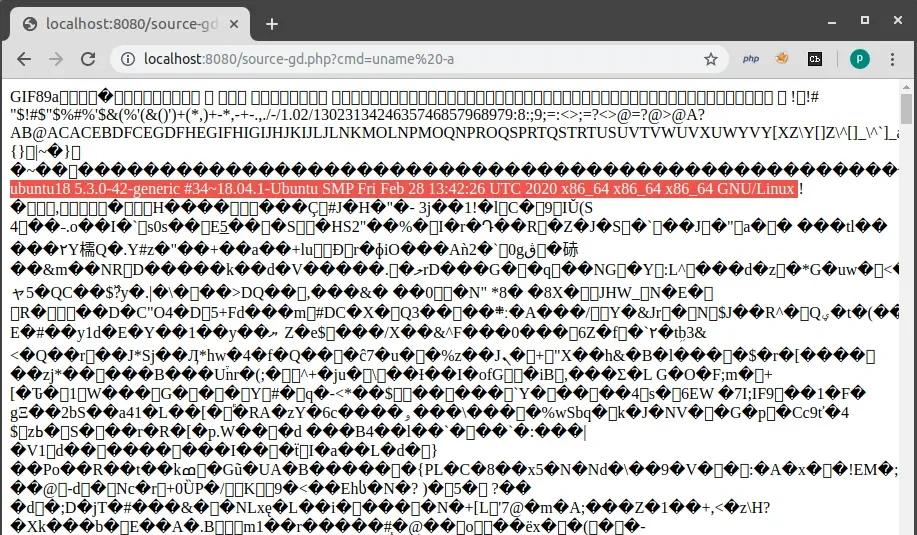
The GIF injector and the other scripts used are published at:
https://gist.github.com/asdqwe3124/[redacted]
Root cause
Renaming the name form-data field to test.php resulted in code execution. It also recreates fetched images with PHP-GD, which removes EXIF metadata but does not strip payload bytes embedded in the image data itself, in particular the null byte blocks of GIFs carrying a Netscape Looping Application Extension. The combination of a user-controlled filename ending in .php and a file that still contains executable PHP gives code execution. The JPEG route failed because the application recreated images at quality 90 rather than the default quality the dlegs injector relies on.
Impact
An attacker able to use the remote image upload can store a file named test.php containing the injected payload and have it executed by the server. The write-up does not describe what privileges the resulting code runs with or what the application's upload directory allows beyond execution. The GIF payload by @ABOUL3LA additionally requires short_open_tag=On on the target.
Fix
The report states that the bug bounty program triaged the issue within minutes and patched it within a few hours. It does not describe the patch itself. Based on the root cause, the filename taken from the name field should not control the stored extension, and uploaded files should not be stored in a location where they can be executed.
Variants to test
- Rename the
nameform-data field tox.php,x.phtmlorx.php5on any remote-fetch upload feature. A positive result is a successful upload response and the file being served or executed under that name. - Drop the
photoIdfield and pointurlat a server you control. A positive result is an incoming connection on your server. - Recreate a candidate JPEG with PHP-GD at the target's quality setting and compare it byte for byte with the injected version. A positive result is the payload still present after recreation.
- Take a GIF with a Netscape Looping Application Extension, inject PHP into its null byte blocks, recreate it with PHP-GD and compare. A positive result is the payload surviving recreation, which is the case the write-up demonstrates.
- Upload a GIF payload using
<?php ?>rather than the short tag, to work on targets whereshort_open_tagis off.
What happened, in plain words
A security researcher found a way to upload an image file that also contained a small PHP program. When the website later ran that file, the program executed on the server. This is called remote code execution (RCE). The researcher reported it to the bug bounty programme, which fixed it quickly. This article explains the whole journey step by step, assuming you know only how to use a browser and a computer.
Background: the application and its features
The target was a web application with a media library. A media library is a place where you store images, videos, and other files for use on the site. The application offered two ways to add images:
- Local file upload: you pick a file from your computer and send it to the server.
- Remote file upload: you give a URL (a web address) pointing to an image on another site, and the server fetches that image and stores it in the library.
The researcher's first idea was to test the remote upload for a vulnerability called SSRF (Server-Side Request Forgery). SSRF happens when an attacker can make the server send requests to arbitrary destinations, potentially reaching internal systems. But the researcher decided to start with the local upload instead.
Testing the local upload
The local upload only accepted image files with these extensions: .jpg, .png, .gif, and .svg. An extension is the part of a filename after the last dot, like .jpg in photo.jpg. The server uses it to guess the file type.
The .svg format is interesting because SVG files are actually XML documents that can contain scripts. If the server displays an uploaded SVG without proper sanitisation, an attacker could inject JavaScript that runs in a victim's browser. That is called cross-site scripting (XSS). However, the researcher chose not to pursue that path this time.
Intercepting the remote upload request
Next, the researcher moved to the remote upload feature. To see exactly what the browser sends to the server, the researcher used a tool to intercept the HTTP request. HTTP is the language browsers and servers use to communicate. When you fill in a form and click submit, your browser sends an HTTP request containing the form data.
The intercepted request had three POST form-data fields: name, url, and photoId. Form-data is a way to encode form fields in the body of a POST request, often used for file uploads. Here is what the request looked like (the exact values are not shown in the original, but the field names are):
Line by line:
POST /upload HTTP/1.1: This is the request line.POSTis the method used to send data to the server./uploadis the path on the server.HTTP/1.1is the protocol version.Host: [redacted]: The domain name of the server (redacted here).Content-Type: multipart/form-data; boundary=----WebKitFormBoundary...: This header tells the server that the body contains multiple parts, separated by a boundary string. The boundary is a unique string that marks the start of each part.- The body consists of several parts, each starting with
------WebKitFormBoundary...(the boundary with two extra hyphens). Each part has aContent-Dispositionheader that gives the field name. The value follows after a blank line. - The first part has
name="name"and valueimage.jpg. This is the filename to be used. - The second part has
name="url"and valuehttps://example.com/photo.jpg. This is the URL of the image to fetch. - The third part has
name="photoId"and value12345. This is likely an identifier for the photo in the stock photo service. - The final
------WebKitFormBoundary...--marks the end of the body.
Manipulating the request
The researcher tried changing the url field to point to a server under their control. The server responded with an Internal Server Error and no incoming connection was observed on the researcher's server.
Then the researcher removed the photoId field entirely. The same error occurred, but this time an incoming connection was received on the researcher's server. The researcher reasoned that the connection happened because the URL did not point to a valid image file. The researcher reasoned this was likely due to the lack of a valid image file at the provided URL.
Next, the researcher provided a URL that pointed to a valid JPG image. The upload succeeded and the image appeared in the media library. Then the researcher changed the name form-data field to image.html and to image.php. Both uploads were successful. Both uploads were successful.
Ruling out EXIF injection
One common technique for hiding PHP code in images is to put it in EXIF metadata. EXIF is a standard for storing extra information in image files, such as camera model, date taken, and sometimes GPS coordinates. If an application saves the uploaded image without processing it, the metadata remains, and if the file is later executed as PHP, the code in the metadata runs.
However, the researcher realised that this application recreates the fetched image using the PHP-GD library. PHP-GD is a graphics library for PHP that can manipulate images: resize, crop, change format, etc. When it recreates an image, it typically strips EXIF metadata because it only copies the pixel data, not the metadata. So injecting PHP into EXIF would not survive.
Public research on bypassing PHP-GD
The researcher found several public articles describing methods to inject PHP code into images that survive PHP-GD recreation:
fakhrizulkifli/Defeating-PHP-GD-imagecreatefromjpegfakhrizulkifli/Defeating-PHP-GD-imagecreatefromgif- The BookFresh write-up on secgeek.net
These methods are limited to a few characters, though. There is also a payload injector created by dlegs, called php-jpeg-injector.
First attempt: JPEG injector
The researcher used the dlegs tool. The process requires first recreating the image with PHP-GD, then injecting the payload with gd-jpeg.py. The commands are:
$ php gd.php image.jpg image-gd.jpg
This command runs a PHP script gd.php that takes an input image image.jpg and outputs a new image image-gd.jpg that has been recreated by PHP-GD. The purpose is to ensure the image is in a format that PHP-GD produces, so that the injector can work reliably.
$ python gd-jpeg.py image-gd.jpg '<?php phpinfo()?>' image-gd-poc.jpg
This runs a Python script gd-jpeg.py that injects the payload <?php phpinfo()?> into image-gd.jpg and writes the result to image-gd-poc.jpg. The payload is a small PHP script that calls the phpinfo() function, which displays information about the PHP configuration. If executed, it would confirm code execution.
To verify that the payload survives recreation, the researcher recreated the injected image with PHP-GD again:
$ php gd.php image-gd-poc.jpg image-gd-poc-1.jpg
Then compared the two files:
$ vbindiff image-gd-poc.jpg image-gd-poc-1.jpg
vbindiff is a tool that shows the differences between two binary files side by side. The researcher used it to see if the payload bytes were still present after recreation.
The dlegs injector writes the payload into a .jpg file, but it only works if the target application recreates the image with the default quality setting (default -1). Unfortunately, this attempt failed because the target application converted images with a quality setting of 90, which removed the injected payload. Quality settings affect how much compression is applied; higher quality means less compression and more data preserved, but the exact behaviour depends on the library.
Second attempt: GIF payload
The next attempt used a .gif payload created by @ABOUL3LA. The researcher uploaded the POC.gif file and renamed the form-data name to test.php. This resulted in code execution. The article linked from the write-up provides a POC.gif image that already contains the payload <?phpinfo()?>.
One condition applies: the target must have short_open_tag=On in php.ini. php.ini is the configuration file for PHP. short_open_tag is a setting that allows the short PHP opening tag <? instead of the full <?php. If it is off, the payload <?phpinfo()?> will not be recognised as PHP code and will not execute. In that case, the payload must be modified to use the full <?php ?> tag.
The vulnerability was reported to the bug bounty programme, which triaged it within minutes and patched it in just a few hours. Triaged means they confirmed the issue and assigned it to be fixed.
Understanding how many bytes survive
The researcher then explored the PHP-GD library further to determine how many bytes can be injected into an image. After testing different .jpg and .gif images, the conclusion was that a .jpg image can carry a payload of up to 13 bytes, while a .gif image can carry more.
The GIF images that can be injected are those containing null byte blocks. A null byte is a byte with value zero. In GIF files, certain blocks can contain null bytes. GIF images with a Netscape Looping Application Extension have such blocks. That extension is the most popular application extension block and tells a browser or other GIF viewer to loop the entire animated GIF file.
An example GIF with the Netscape Looping Application Extension is:
https://media2.giphy.com/media/6NjZoOdEbXs1W/source.gif
When that GIF is recreated with PHP-GD, the null byte blocks are not removed. The binary comparison between the original GIF and the GD-recreated GIF shows this.
Injecting shellcode into the null byte blocks
PHP shellcode was injected into the null byte blocks and the GIF was recreated with PHP-GD. The binary comparison shows the injected payload still present.
The GIF can then be uploaded to the vulnerable target application.
The GIF injector and the other scripts used are published at:
https://gist.github.com/asdqwe3124/[redacted]
Root cause
Renaming the name form-data field to test.php resulted in code execution. So a value such as test.php is accepted. It also recreates fetched images with PHP-GD, which removes EXIF metadata but does not strip payload bytes embedded in the image data itself, in particular the null byte blocks of GIFs carrying a Netscape Looping Application Extension. The combination of a user-controlled filename ending in .php and a file that still contains executable PHP gives code execution. The JPEG route failed because the application recreated images at quality 90 rather than the default quality the dlegs injector relies on.
Impact
An attacker able to use the remote image upload can store a file named test.php containing the injected payload and have it executed by the server. The write-up does not describe what privileges the resulting code runs with or what the application's upload directory allows beyond execution. The GIF payload by @ABOUL3LA additionally requires short_open_tag=On on the target.
Fix
The report states that the bug bounty programme triaged the issue within minutes and patched it within a few hours. It does not describe the patch itself. Based on the root cause, the filename taken from the name field should not control the stored extension, and uploaded files should not be stored in a location where they can be executed.
Variants to test
- Rename the
nameform-data field tox.php,x.phtmlorx.php5on any remote-fetch upload feature. A positive result is a successful upload response and the file being served or executed under that name. - Drop the
photoIdfield and pointurlat a server you control. A positive result is an incoming connection on your server. - Recreate a candidate JPEG with PHP-GD at the target's quality setting and compare it byte for byte with the injected version. A positive result is the payload still present after recreation.
- Take a GIF with a Netscape Looping Application Extension, inject PHP into its null byte blocks, recreate it with PHP-GD and compare. A positive result is the payload surviving recreation, which is the case the write-up demonstrates.
- Upload a GIF payload using
<?php ?>rather than the short tag, to work on targets whereshort_open_tagis off.
Glossary
- API: Application Programming Interface; a set of rules that allows different software programs to communicate with each other.
- Bug bounty programme: A programme where organisations reward security researchers for finding and reporting vulnerabilities.
- Cross-site scripting (XSS): A vulnerability where an attacker injects malicious scripts into web pages viewed by other users.
- EXIF metadata: Data embedded in image files that provides information about the image, such as camera settings and location.
- Form-data: A format for encoding form fields in HTTP requests, often used for file uploads.
- GIF: Graphics Interchange Format; a bitmap image format that supports animation.
- HTTP: Hypertext Transfer Protocol; the foundation of data communication on the World Wide Web.
- Internal Server Error: An HTTP status code (500) indicating that the server encountered an unexpected condition.
- JPEG: A commonly used method of lossy compression for digital images.
- Media library: A feature in web applications for storing and managing media files like images and videos.
- Multipart/form-data: A MIME type used for submitting forms that contain files, non-ASCII data, and binary data.
- Null byte: A byte with the value zero, often represented as
\0. - PHP: A popular general-purpose scripting language especially suited to web development.
- PHP-GD: A PHP extension for creating and manipulating images.
- php.ini: The configuration file for PHP.
- Remote code execution (RCE): A vulnerability that allows an attacker to execute arbitrary code on a remote server.
- Server-Side Request Forgery (SSRF): A vulnerability where an attacker can make a server send requests to an unintended location.
- Shellcode: A small piece of code used as the payload in the exploitation of a software vulnerability.
- short_open_tag: A PHP configuration directive that enables the use of the short opening tag
<?. - SVG: Scalable Vector Graphics; an XML-based vector image format for two-dimensional graphics.
- vbindiff: A visual binary diff tool that shows differences between two files.
- XSS: See Cross-site scripting.


