Password Reset Token Leak via X-Forwarded-Host
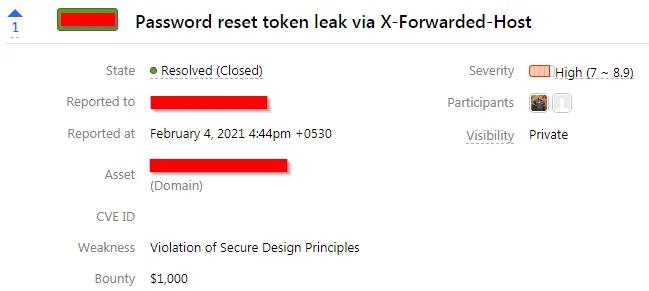
The password reset email built its token link from the X-Forwarded-Host header instead of the real site domain. An attacker who added that header to a reset request for a victim's email could make the victim receive a link pointing to the attacker's server, leaking the reset token and allowing a full account takeover.
 Published on saajan.bhujel.cyou
This is my 1st blog, if you find any spelling mistakes, so please bear with me for the next few minutes. And this blog is about a vulnerability that, I was able to find in the Hackerone’s private program which allows me to take over any user’s account.
The full write-up lives on its author's site
It belongs to its author, so we link to it rather than copy it. The other two tabs are our own rewrites, checked against it.
Context
This is a write-up by Saajan Bhujel (@saajanbhujel) of a vulnerability found in a private HackerOne program, disclosed on 26 February 2021. The target cannot be named because the program is private, so the author refers to it as site.com. The affected feature is the account password reset flow: a user enters their email address, the application sends an email containing a password reset token link, and the user follows that link to set a new password.
The token link the application sends has this shape:
https://site.com/action-token?key=[redacted]
The key parameter carries the reset token. The author later shows that the host in the link can be changed by adding a header to the request. That is the behaviour the author abuses.
Setup
The author was invited to the private program through a HackerOne notification and accepted the invitation. The author intercepted the password reset request and started an ngrok server to receive traffic on a domain he controlled. No versions are given.
Finding it
The author spent five to six days on the program testing Cross-Site Scripting (XSS), IDOR, SQL injection, flaws on the login page, information disclosure and subdomain takeover without finding anything.

After a break, a second pass over the domain turned up a password reset functionality that had not been noticed the first time. The author decided to examine it closely.

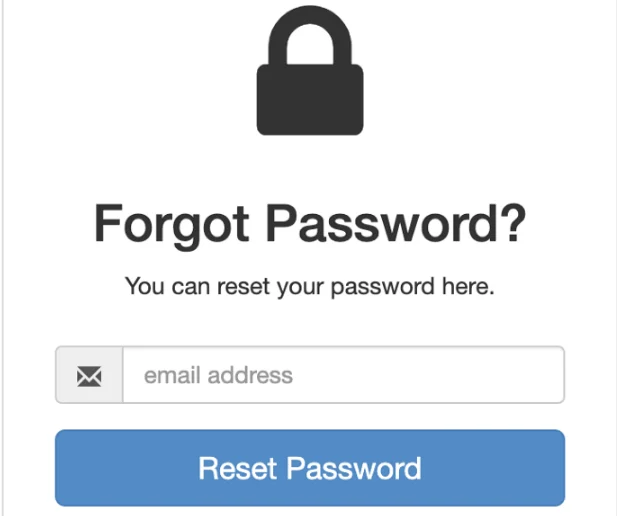
The reset page asks for an email address and, on submission, sends an email containing a password reset token link.
Exploitation
Step 1: Intercept the reset request
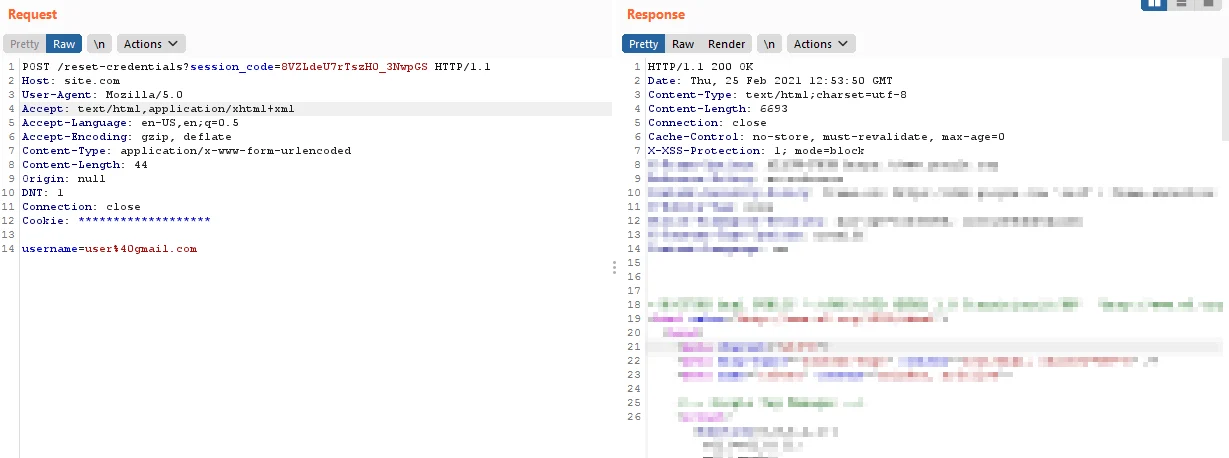
The author intercepted the password reset request in Burp Suite and started an ngrok server in parallel. The original request looks like this:
Step 2: Add the X-Forwarded-Host header
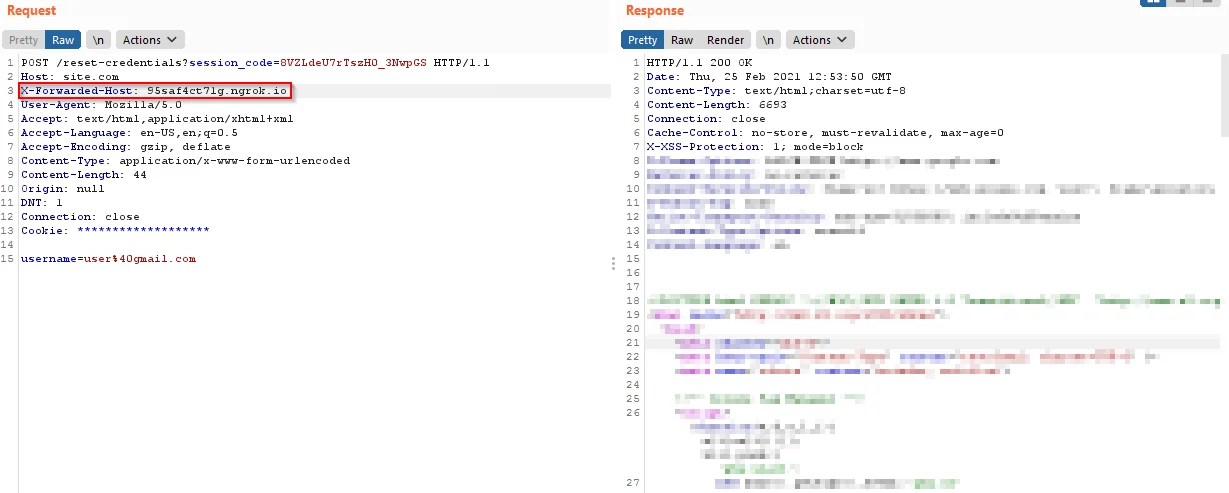
The author added an X-Forwarded-Host header carrying the ngrok domain to the original request. The modified request looks like this:
Step 3: Observe the poisoned link
The reset email arrived again, but this time the token link pointed at the ngrok domain:
https://95saf4ct71g.ngrok.io/action-token?key=[redacted]
This shows that adding X-Forwarded-Host changes the host used in the password reset link.
Step 4: Apply it to a victim
The author then described the attack against another user: enter the victim's email address on the password reset page, intercept that request, and add X-Forwarded-Host with a malicious domain. The victim receives a password reset email whose token link points at the attacker's domain. When the victim clicks the link, they are redirected to the attacker's website and the token leaks to the attacker. The attacker then uses the leaked token to set a new password for the victim's account.

The author states that the impact is a full account takeover, and that anyone with an account on site.com can be taken over this way by resetting their password.
Root cause
The password reset endpoint builds the absolute URL for the token link from a host value supplied by the client. The application accepts X-Forwarded-Host as that value. An attacker can substitute their own domain and have the application send the token to it.
Impact
An attacker who can submit a reset request for a victim's email address can cause the victim to receive a reset link pointing at an attacker-controlled domain. If the victim clicks it, the token is disclosed to the attacker, who can then reset the victim's password and take over the account. When the victim clicks the poisoned link, the token leaks to the attacker. The author describes the impact as a full account takeover of any account on site.com.
Fix
The report does not describe any fix applied by the program.
Variants to test

What happened, in plain words
A security researcher was invited to test a private bug bounty program on HackerOne. A bug bounty program is a scheme where a company pays people to look for security weaknesses in its systems and report them privately, instead of those weaknesses being used against it. "Private" means only invited researchers can take part, and they agree not to name the company publicly. Because of that, the researcher calls the target site.com throughout.
While testing, he found a weakness in the feature that lets a user reset a forgotten password. Normally, when you click "forgot my password" and type your email address, the site emails you a special link. That link contains a long secret code, called a token, which proves the email really belongs to you. Whoever holds that token can set a new password for the account.
The weakness was this: by adding an extra header to the request, the researcher could make the site build the link in that email using a host he supplied, rather than its own address. By adding one extra line to the request, the researcher could make the site send the reset link to a domain he controlled. The researcher reasoned that if a real user then clicked that link, their secret token would arrive at the attacker's server, and the attacker could use it to take over the account. The program paid him 1000.00 USD for the report, and it was disclosed on 26 February 2021.
Before the story, the researcher explains one basic idea: the Host header.
What is the HTTP Host header?
The HTTP Host header is a mandatory request header as of HTTP/1.1. It specifies the domain name that the user wants to access.
Let us unpack that. When your browser loads a web page, it does not send a single command; it sends a small text message called an HTTP request. That message has a first line saying what it wants (for example, "give me the home page"), followed by several lines called headers. Each header is a label, a colon, and a value. Headers carry extra details: what kind of browser you use, what language you prefer, and so on.
One of those headers is called Host. It tells the web server which website name you typed, because a single server can host many different websites at once. Think of a large office building: the street address gets you to the building, but the Host header is the company name you ask for at reception. Without it, reception would not know which company you want.
For example, if a user visits https://example.com, then their browser will make a request containing a Host Header as below:
GET / HTTP/1.1

Host: example.com
Line by line:
GET / HTTP/1.1is the request line.GETmeans "please give me something"./means the main page of the site.HTTP/1.1is the version of the language the browser and server are speaking.- The empty line separates the request line from the headers. In real requests there are usually several headers here; this example shows only the one that matters.
Host: example.comis the header itself. The label isHost, and the value isexample.com, the site name the browser wants.
Why does this matter for the story? Because the value of Host is written by the browser, and a browser can be replaced by a tool that writes anything it likes. If a website trusts that value too much, for example by copying it into a link inside an email, an attacker can put their own domain there instead.
Now let’s start the blog…

Some days ago I got a notification in Hackerone that said that I had been invited into a private program. So I accept that invitation and start hunting on that Private Program. And in the starting of hunting on that private program, I spend 5-6 days finding Cross-Site-Scripting(XSS), IDOR, SQL injection, Flaw on the login page, Information Disclosure, and Subdomain takeover but still, I was not able to find anything.
A quick word on each of those things he tried, since they are the usual suspects in this kind of work:
- Cross-Site Scripting (XSS) is when a site lets an attacker slip their own small program (JavaScript, the language browsers run) into a page, so that it runs inside other visitors' browsers.
- IDOR (Insecure Direct Object Reference) is when a site uses a simple identifier, such as a number in a web address, to decide what you may see, and you can change that number to see someone else's data.
- SQL injection is when input typed into a form is passed to the database (the system that stores the site's data) in a way that lets an attacker give it commands of their own.
- Flaws on the login page covers weaknesses in how a site checks who you are.
- Information disclosure is when a site accidentally reveals something it should keep private, such as error messages full of internal details.
- Subdomain takeover is when a company has a subdomain (like shop.example.com) pointing at a service it no longer uses, and someone else can claim that service and effectively own the subdomain.
Five or six days of trying all of that and finding nothing is normal in this work. Most of the time is spent looking.
After taking some hours of break, again I start hunting on that domain but this time I got an interesting functionality which I did not saw at last time. And that interesting functionality is Password Reset functionality. So I thought to myself let’s play with this Password Reset functionality.
A password reset feature is the "forgot my password" button. You give it your email address, it sends you a link, and the link lets you choose a new password. It exists because people forget passwords, and it has to be careful: the link must only work for the person who owns the email inbox. That is why the link contains a token, a long random-looking string that acts like a temporary key. A token is like the claim ticket you get at a cloakroom: whoever holds the ticket gets the coat, so the ticket must never fall into the wrong hands.
I can’t disclose the name of the target because it’s a private program. So, Let’s suppose that the target is site.com. And their password reset functionality is something like this:
And I noticed that whenever we enter our email and click on reset password. we got an email for changing the password with a password reset token link.
Password Reset Token link looks like this:
https://site.com/action-token?key=[redacted]
Line by line:
https://is the scheme, meaning the connection is encrypted in transit.site.comis the host, the name of the website. This is the part that will turn out to be the problem./action-tokenis the path, the particular page on that site that handles reset links.?key=starts the query string, the part of a web address that carries extra values. Everything after the equals sign is the value ofkey.[redacted]is the token itself, cut short here. It looks like random letters and digits because it is meant to be unguessable.
So the whole link says: "go to site.com, on the action-token page, and present this key". The site checks the key, and if it is valid, lets you set a new password. The important observation is that the host part, site.com, is not typed by a person; the site writes it into the email automatically. The question the researcher asked himself was: where does the site get that host from?
This time I decided to intercept the password reset request and I also started my ngrok server.
The original request is something that looks like this:
Two tools are mentioned here, so let us explain them.
Intercepting means putting a tool between your browser and the website so that the request your browser sends is paused and shown to you before it goes on. You can then read it, change it, and let it continue. The researcher intercepted the request with a tool that pauses and shows it. Think of it as a postal worker who lets you open and rewrite a letter before delivering it.
ngrok is a service that gives your own computer a public web address on the internet, even if your computer sits behind a home router. You run a small program on your machine, it connects out to the ngrok service, and ngrok hands you a domain name like the one in this story. Anything sent to that domain is forwarded to your computer, where you can watch it arrive. In this attack it plays the role of the attacker's website: a place the researcher controls that can receive visitors and record what they send.
Why start ngrok before intercepting? Because the next step is to make the site send its email link to that domain, and the domain has to exist and be listening before you can prove anything arrived.
The screenshot shows the original password reset request.
Then I added another header “X-Forwarded-Host” with my ngrok server domain in the original request. So now the modified request is something that looks like this:
What is X-Forwarded-Host? Many websites sit behind an intermediary, such as a proxy or a load balancer. A proxy is a server that receives visitors' requests first and passes them on to the real web server behind it; a load balancer does the same but also spreads requests across several servers. When a proxy passes a request along, the request it hands over comes from the proxy, not from the visitor, so the original details would be lost. To avoid that, proxies add extra headers recording what the visitor originally asked for. X-Forwarded-Host is one of those: it says "the visitor originally asked for this host name". The X- prefix is a convention for headers that are not part of the official standard.
The catch is that these headers are just text in the request. Unless the server checks them, anyone can add one. The researcher's idea was simple: if the site builds the reset link from whatever host it is told, then tell it a host of my choosing.
Now this time I got an email for changing the password but with my ngrok server domain. And the password reset token link looks like this:
https://95saf4ct71g.ngrok.io/action-token?key=[redacted]
Line by line:
https://95saf4ct71g.ngrok.iois now the host, and it is the researcher's ngrok domain, not site.com./action-tokenis the same path as before, because the site still builds the rest of the link the same way.?key=and the value after it are the same kind of token as before, again shortened here.
The only thing that changed is the host. That shows the site took the host from the request. The word "injection" is used because you are injecting, that is, inserting, your own value into a place the application trusts.
You also can see, I am successfully able to change the Host by simply adding the header “X-Forwarded-Host” in the password reset request.
Then I noticed that If I enter the victim’s email in the password reset page and also intercept that request and if I add another header “X-Forwarded-Host” with my malicious domain. Then victim will get an email of the password reset token link with my malicious domain. And when the victim clicks on that link he will redirect to my website and his all token will leak to me. Then I can change the victim’s password by using his leaked token. Yeah, the Impact of this vulnerability is a full account takeover.
So now I can fully take over anyone’s account who has an account on site.com by resetting their password.
Let us walk through that attack slowly, because it is the heart of the report.
- The attacker opens the password reset page and types the victim's email address, not their own. The site does not yet know who is asking; it only sees an email address.
- The attacker's tool pauses the request before it leaves, and the attacker adds the
X-Forwarded-Hostheader pointing at their own domain. - The site builds the reset email. Because it trusts the header, the link inside points at the attacker's domain, with the victim's real token attached.
- The victim receives an email that looks entirely normal, from the real site, and clicks the link.
- The victim's browser goes to the attacker's domain, carrying the token in the address. The attacker's server records it.
- The attacker now holds a valid token for the victim's account and uses it on the real site to set a new password. The victim is locked out and the attacker is in.
This is called account takeover: gaining control of someone else's account. Notice the one thing the attack depends on: the victim must click the link. The attacker cannot force that. It is a convincing trick because the email is genuine, sent by the real site, and only the destination of the link is wrong.
Why it worked
The password reset page builds the full web address for the token link from a host value supplied by the client. The application accepts X-Forwarded-Host as that value. An attacker can substitute their own domain and have the application send the token to it.
An allow-list, by the way, is simply a list of values that are permitted, with everything else refused. It is the difference between a doorman with a guest list and a doorman who lets in anyone who says a name.
How serious is it
An attacker who can submit a reset request for a victim's email address can cause the victim to receive a reset link pointing at an attacker-controlled domain. If the victim clicks it, the token is disclosed to the attacker, who can then reset the victim's password and take over the account. The attack depends on the victim clicking the poisoned link. The author describes the impact as a full account takeover of any account on site.com.
How to fix it
The report does not describe any fix applied by the program.
In plain terms: the site should decide the address of its own links, not ask the visitor what its address is.
Other places to look
Glossary
- Account takeover: gaining control of another person's account, usually by obtaining their password or a way to change it.
- Allow-list: a list of values that are explicitly permitted, with everything else rejected.
- API: a defined way for one piece of software to ask another for data or actions; here, the web endpoints a site exposes for its features.
- Bug bounty program: a scheme where a company pays researchers to find and privately report security weaknesses.
- Burp Suite: a tool that sits between a browser and a website so requests can be paused, read and modified.
- Cache: a stored copy of a page or response kept to serve future visitors faster.
- Cross-Site Scripting (XSS): slipping attacker-written JavaScript into a page so it runs in other visitors' browsers.
- Database: the system a website uses to store and retrieve its data.
- Domain: a name on the internet, such as example.com, that identifies a website.
- Endpoint: a specific address on a website that performs a particular action, such as handling a password reset.
- Header: an extra labelled line in an HTTP request or response carrying details, such as the host name or browser type.
- Host header: the mandatory HTTP/1.1 header naming the website the visitor wants.
- Host header injection: a weakness where an application accepts a host value from the client and uses it where it should use its own fixed value.
- HTTP: the language browsers and web servers use to exchange requests and responses.
- IDOR: Insecure Direct Object Reference, where changing an identifier in a request lets you reach someone else's data.
- Information disclosure: accidentally revealing data that should stay private.
- Intercept: to pause a request in a tool so it can be inspected or altered before it continues.
- JavaScript: the programming language that browsers run to make pages interactive.
- Load balancer: a server that receives requests and spreads them across several web servers.
- ngrok: a service that gives a computer a public web address and forwards traffic to it.
- Password reset token: a long, unguessable value sent by email that proves the holder may set a new password.
- Path: the part of a web address after the domain that names a particular page, such as
/action-token. - Proxy: a server that receives requests first and passes them on to the real web server.
- Query string: the part of a web address after a question mark that carries extra values.
- SQL injection: feeding input to a database in a way that lets an attacker issue their own database commands.
- Subdomain: a name that sits under a main domain, such as shop.example.com.
- Subdomain takeover: claiming a subdomain that still points at an abandoned third-party service.
- Token: a secret string that acts like a temporary key or claim ticket.
- X-Forwarded-Host: a non-standard header used by proxies to record the host the visitor originally requested.





