Unauthorized access to Codespace secrets in GitHub
An external user who reported a vulnerability via GitHub's Security Advisory feature was automatically added as a collaborator to a private fork in the affected organisation. Because Codespaces were enabled for that fork, the external user could create a Codespace and read organisation-level Codespace secrets in plaintext, including secrets belonging to GitHub itself.
 Published on ophionsecurity.com
Security Disclosures
The full write-up lives on its author's site
It belongs to its author, so we link to it rather than copy it. The other two tabs are our own rewrites, checked against it.
Context
GitHub's Repository Security Advisory feature lets maintainers draft public advisory information about a reported vulnerability. Once an advisory exists, maintainers can start working on a patch by creating a private fork of the repository.
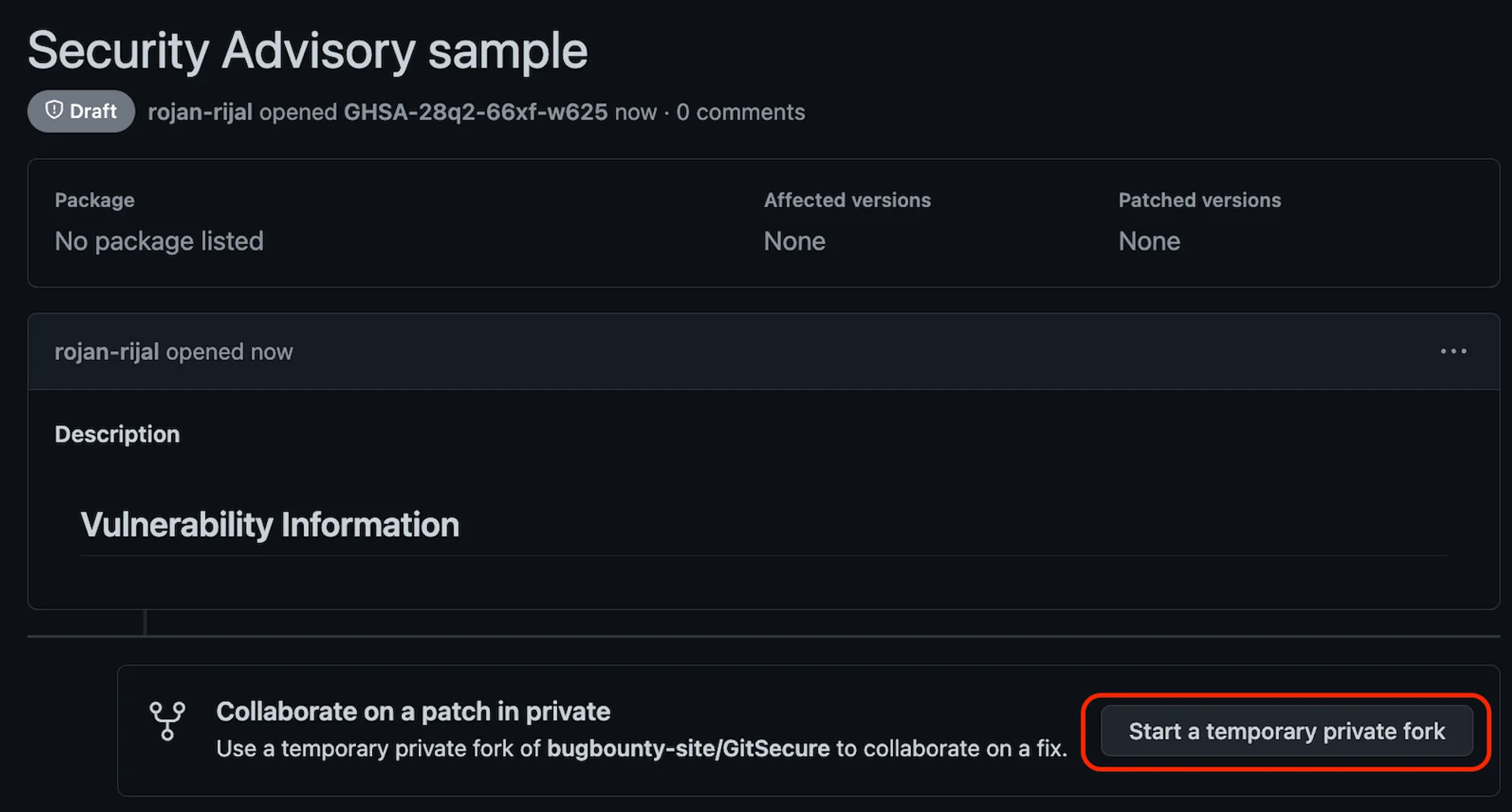
On 09 November 2022, GitHub released a new capability to its beta technical preview: users could report security issues to open-source maintainers, extending the existing Security Advisory feature. The permission model did not change much with the new feature. An advisory stays private until the organisation publicly discloses it, and only owners or maintainers can merge the patch. What did change is who gets access along the way:
- The external reporter is added as a collaborator to the vulnerability report, with limited permissions: commenting on the advisory and accepting the advisory credit.
- When a private fork is made, the external reporter is automatically added as a collaborator to that repository, so they can help patch the vulnerability and open a PR for the maintainer to accept.
The private fork created by a security advisory differs from a regular fork or repository. Issues, projects and discussions are disabled by default. The report shows the workspace repository creation code:
advisory.build_workspace_repository(attributes.merge({
      name: name,
      private: true,
      owner: owner,
      parent: nil,
      network: nil,
      created_by_user_id: actor.id,
      has_issues: false,
      has_wiki: false,
      has_downloads: false,
      has_projects: false,
      repository_license: repository.repository_license&.dup,
    }))
That code indicates that additional access controls are applied to this kind of fork because the content is sensitive. Once the vulnerability is fixed, maintainers can open a private PR against the vulnerability repository to merge later.
GitHub Codespaces is a cloud-based development environment that runs in an isolated virtual machine per user. Codespaces secrets let users and organisations store sensitive strings such as API keys, SSH key pairs and passwords. Secrets exist for three resources:
| Resource | Scope |
|---|---|
| Personal | Created by the user, available in all Codespaces that user creates |
| Repository | Linked to specific repositories, accessible only by those repositories |
| Organisation | Linked to the organisation, and can be linked to specific repositories or to all public and private repositories |
Setup
The researchers enabled vulnerability reporting on one of their own public repositories and used an external account to file a test security issue. With that external account they created a private fork and a Codespace for the associated fork. No special tooling is described beyond the Codespace itself and its shell.
Finding it
The observation was that an external user who reports a vulnerability through Security Advisory is added as a collaborator to the patch repository, and that patch repository lives in the same organisation as the vulnerable repository. On its own this looks low impact: an external collaborator on a single repository has little access, and issues, projects, downloads and actions were disabled on these repositories. But Codespaces was enabled for them.
Because organisation secrets can be configured to be available to all private repositories, the researchers reasoned that a Codespace created inside the organisation's patch fork would receive those secrets. The exploit chain they envisioned:
- An external user creates a vulnerability report.
- The external user is added to the vulnerability report as a collaborator automatically.
- The external reporter creates a private fork for the security patch without admin approval.
- The created private fork is in the affected organisation.
- The external reporter uses a Codespace for the private fork and accesses the organisation-level secrets.
Exploitation
Step 1: File a report from an external account
Vulnerability reporting was enabled on one of the researchers' public repositories, and a test security issue was filed from an external account. The external account was then able to create a private fork and a Codespace for the associated fork.
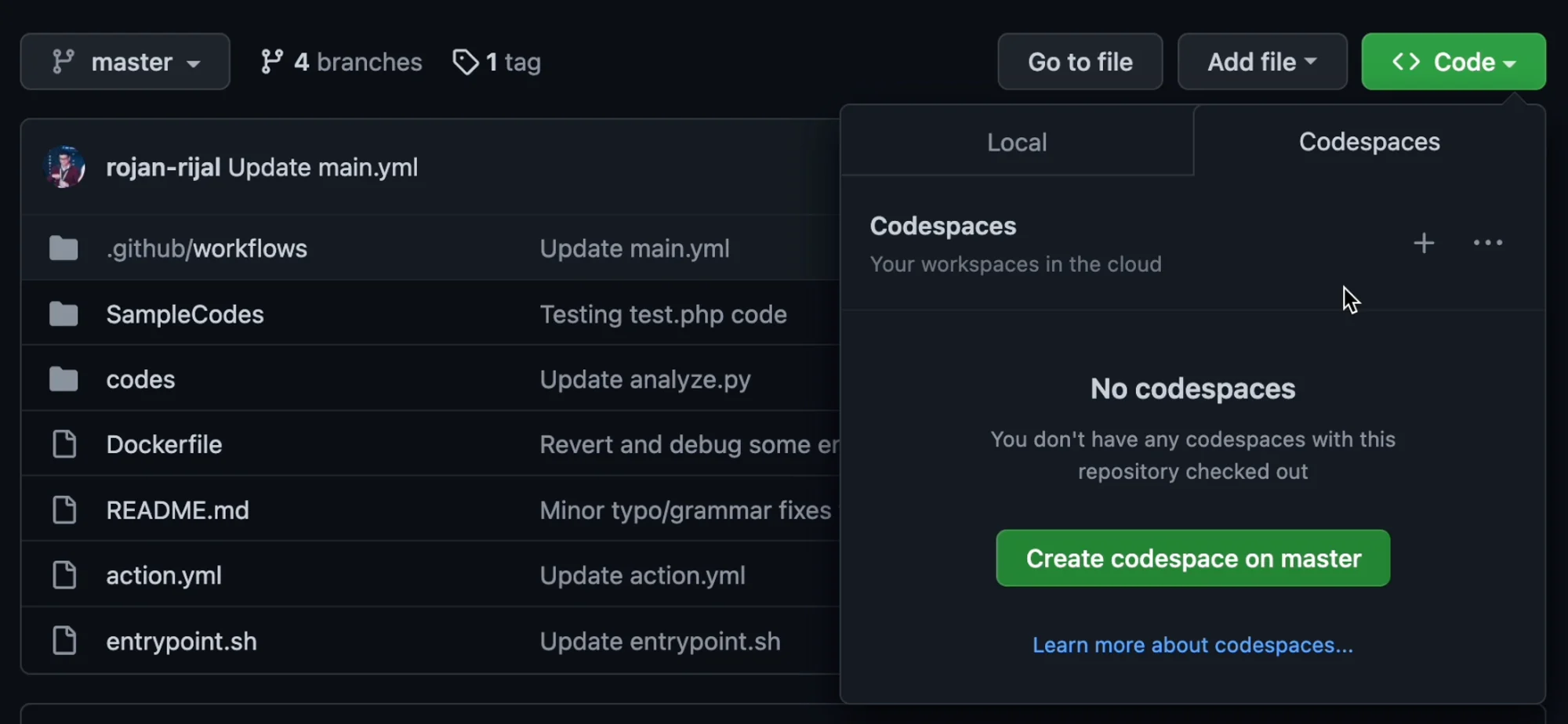
Step 2: Read the environment from the Codespace
Because the Codespace was created in the context of the vulnerable organisation, running the env command printed the environment variables for the Codespace, including the secrets in plaintext. To confirm the finding, the researchers made a "flag" secret available to all private repositories in their organisation and observed it in that output.

Step 3: Escalate to GitHub's own organisation
Access to organisation secrets for any organisation using the beta feature was already a serious issue, but the researchers wanted to escalate further. They attempted it against the github organisation itself. After going through public GitHub repositories, they identified that GitHub Enterprise Importer (github/gh-gei) had the feature enabled. They created a test security issue and a private fork for it, then created a Codespace for the private fork.
This gave access to the organisation secrets of the GitHub organisation. Among the secrets they could read and extract was GOPROXY_TOKEN. The disclosed token was a GitHub user token for gh-containers-bot. Exploring the API further, they called:
https://api.github.com/user/repos
That endpoint lists all repositories accessible to the user behind the token. It returned multiple internal repositories of GitHub with read and write privileges. Once the token's validity and access were confirmed, the researchers reported the issue to GitHub.
Root cause
The design flaw is the combination of automatic collaborator addition and Codespace availability. When an external reporter files an advisory, they are added to the patch repository automatically and can create a private fork without admin approval. That fork is created inside the affected organisation, and Codespaces was left enabled on these repositories even though issues, projects, downloads and actions were disabled. Organisation secrets configured for all private repositories were then available in the Codespace created in that organisation's context, so the external collaborator received them in plaintext. The existing controls on advisory forks covered the obvious collaboration surfaces but not the development environment.
Impact
An external user who can file a security report against a public repository of an organisation using the beta feature could obtain that organisation's Codespace secrets, including secrets scoped to all private repositories. In the GitHub organisation itself, this yielded a token for gh-containers-bot that granted read and write access to multiple internal repositories.
Fix
The report does not describe the code change GitHub made. The timeline records that the researchers internally confirmed the vulnerability was patched on 31 December 2022, that GitHub confirmed the patch on 02 January 2023, and that GitHub concluded its full investigation and the report was resolved on 07 March 2023. The report was filed on 30 December 2022 and GitHub acknowledged it the same day.

- Check whether other repository types created automatically on behalf of external users (advisory forks, template-generated repositories, import targets) have Codespaces enabled while other features are disabled. A positive result is a Codespace that starts in the organisation's context and prints organisation secrets from
env. - Test organisation secrets scoped to all private repositories against any repository an external collaborator can reach. A positive result is the secret value appearing in the Codespace environment of a repository the user was never explicitly granted.
- Look for other features that are enabled by default on sensitive, auto-created repositories, in the same way Codespaces was here. A positive result is any capability that reaches organisation-level resources without an explicit grant.
- Where a token is exposed through such a path, call
https://api.github.com/user/reposwith it to enumerate reachable repositories. A positive result is internal repositories listed with write permission.
What happened, in plain words
GitHub is a website where people and companies keep their computer code. A company can keep some of its code private, so only its own staff can see it. To work on that code, GitHub offers a feature called Codespaces: a ready-made computer in the cloud, with the code already loaded, that you open in your browser. Companies often store passwords and access keys inside Codespaces so their developers do not have to type them every time. Those stored values are called secrets.
In November 2022, GitHub added a feature that lets an outside person report a security problem to the maintainers of a public project. When the maintainers start fixing the problem, GitHub automatically gives the reporter a private copy of the code to work on, called a private fork. The researchers in this report found that Codespaces was enabled on this private copy, and that a Codespace created for it handed the outside reporter the company's secrets in plain text. They proved it on their own company first, then on GitHub's own organisation, where the secrets included a token that opened several of GitHub's internal repositories.
This is a beginner's walkthrough of how they found it and why it worked. Every technical word is explained where it first appears, and there is a glossary at the end.
Background: what the pieces are
What a repository is
A repository (often shortened to repo) is a folder of code stored on a service like GitHub, together with its history of changes. Think of it as a shared document with a full list of every edit ever made. A repository can be public (anyone can read it) or private (only invited people can read it).
What a fork is
A fork is your own copy of someone else's repository. You make changes in your copy, and then you ask the original owner to pull your changes in. That request is called a pull request, or PR: a proposal saying "please take these changes". The owner reviews it and either accepts (merges) it or rejects it.
What a security advisory is
A security advisory is a formal notice about a security problem in a project. GitHub's Repository Security Advisory feature lets maintainers draft that notice in private, work on a fix, and publish the notice later. The report describes it like this: maintainers can draft public advisory information about a reported vulnerability, and once an advisory exists they can start working on a patch by creating a private fork of the repository.
A patch is the set of code changes that fixes a bug. A vulnerability is a weakness in software that someone could abuse to do something the owner did not intend.
What changed in November 2022
On 09 November 2022, GitHub released a new capability to its beta technical preview. A beta or technical preview is a feature that is available to try before it is finished. The new capability let ordinary users report security issues to open-source maintainers, extending the existing Security Advisory feature.
An open-source project is one whose code is public and can be used and improved by anyone. A maintainer is the person who looks after a project and decides what changes go in.
The permission model did not change much with the new feature. A permission model is the set of rules about who is allowed to do what. Two rules stayed the same:
- An advisory stays private until the organisation publicly discloses it.
- Only owners or maintainers can merge the patch.
An organisation on GitHub is a shared account that groups people and repositories, usually for a company or a project team. To merge means to accept a proposed change into the main code.
What did change is who gets access along the way:
- The external reporter is added as a collaborator to the vulnerability report. A collaborator is someone invited to work on a repository. Their permissions here were limited: commenting on the advisory and accepting the advisory credit. The advisory credit is the public thank-you naming the person who reported the problem.
- When a private fork is made, the external reporter is automatically added as a collaborator to that repository, so they can help patch the vulnerability and open a PR for the maintainer to accept.
The word automatically matters. Nobody at the organisation clicks "approve this person". The system does it as part of creating the fork.
How the private fork is built
A private fork created by a security advisory differs from a regular fork or repository. Issues, projects and discussions are disabled by default. Those are GitHub's built-in tools for tracking tasks and chatting about code; turning them off reduces the ways an outsider can interact with the repository. The report shows the code that creates this workspace repository:
advisory.build_workspace_repository(attributes.merge({
      name: name,
      private: true,
      owner: owner,
      parent: nil,
      network: nil,
      created_by_user_id: actor.id,
      has_issues: false,
      has_wiki: false,
      has_downloads: false,
      has_projects: false,
      repository_license: repository.repository_license&.dup,
    }))
Line by line, in plain words:
advisory.build_workspace_repository(...)calls a routine that builds the working copy of the repository for this advisory. "Workspace" here means the private place where the fix will be written.attributes.merge({ ... })takes a set of default settings and overrides some of them with the values listed in the braces.name: namegives the new repository its name.private: truemakes it private, so only invited people can see it.owner: ownersets who owns it. This is the key line for the whole story: the owner is the organisation that received the report, not the outside reporter.parent: nilandnetwork: nilmean this copy is not linked back to the original repository the way a normal fork is.nilis a programming way of saying "nothing".created_by_user_id: actor.idrecords which account triggered the creation.has_issues: false,has_wiki: false,has_downloads: false,has_projects: falseswitch off the issue tracker, the wiki, the downloads section and the project boards.falsemeans off.repository_license: repository.repository_license&.dupcopies the licence information from the original repository, if there is any. A licence states the legal terms for using the code.
That code indicates that additional access controls are applied to this kind of fork because the content is sensitive. Access controls are the rules that decide who may see or change something. Notice what is not in the list: there is no line switching off Codespaces. Once the vulnerability is fixed, maintainers can open a private PR against the vulnerability repository to merge later.
What a Codespace is, and what Codespace secrets are
GitHub Codespaces is a cloud-based development environment that runs in an isolated virtual machine per user. In everyday terms: instead of installing programming tools on your own laptop, you press a button and a fresh computer appears in your browser, already set up for that project. Isolated means it is separated from other users' machines, so what you do there does not affect them.
Codespaces secrets let users and organisations store sensitive strings such as API keys, SSH key pairs and passwords. A secret is a value that must stay hidden, like a password. An API key is a long random string that a program uses to prove its identity to another service, much like a password for software. An SSH key pair is a pair of cryptographic files used to log in to servers without typing a password.
Secrets exist for three resources:
| Resource | Scope |
|---|---|
| Personal | Created by the user, available in all Codespaces that user creates |
| Repository | Linked to specific repositories, accessible only by those repositories |
| Organisation | Linked to the organisation, and can be linked to specific repositories or to all public and private repositories |
Scope means how far a setting reaches. A personal secret follows one person. A repository secret follows one repository. An organisation secret can be set to reach every private repository in the organisation, which is exactly the setting that made this bug dangerous.
Setup: how the researchers prepared
The researchers enabled vulnerability reporting on one of their own public repositories and used an external account to file a test security issue. An external account is a separate GitHub account that is not a member of the organisation, standing in for a stranger.
With that external account they created a private fork and a Codespace for the associated fork. No special tooling is described beyond the Codespace itself and its shell. A shell is the text window where you type commands instead of clicking buttons.
Finding it: the reasoning
The observation was that an external user who reports a vulnerability through Security Advisory is added as a collaborator to the patch repository, and that patch repository lives in the same organisation as the vulnerable repository.
On its own this looks low impact: an external collaborator on a single repository has little access, and issues, projects, downloads and actions were disabled on these repositories. Actions is GitHub's automation feature that runs tasks when code changes. But Codespaces was enabled for them.
Because organisation secrets can be configured to be available to all private repositories, the researchers reasoned that a Codespace created inside the organisation's patch fork would receive those secrets. The exploit chain they envisioned:
- An external user creates a vulnerability report.
- The external user is added to the vulnerability report as a collaborator automatically.
- The external reporter creates a private fork for the security patch without admin approval.
- The created private fork is in the affected organisation.
- The external reporter uses a Codespace for the private fork and accesses the organisation-level secrets.
An exploit chain is a sequence of small steps that, added together, achieve something none of them could do alone. Step 4 is the hinge: the fork is not in the reporter's own account, it is inside the victim's organisation, so anything the organisation shares with its private repositories flows into it.
Exploitation: proving it step by step
Step 1: File a report from an external account
Vulnerability reporting was enabled on one of the researchers' public repositories, and a test security issue was filed from an external account. The external account was then able to create a private fork and a Codespace for the associated fork.
Why this step: they needed to confirm that a stranger, with no invitation from the organisation, could reach the point of owning a private fork. If that failed, nothing further would work.
Step 2: Read the environment from the Codespace
Because the Codespace was created in the context of the vulnerable organisation, running the env command printed the environment variables for the Codespace, including the secrets in plaintext. To confirm the finding, the researchers made a "flag" secret available to all private repositories in their organisation and observed it in that output.
What env does: it lists the environment variables of the machine you are on. An environment variable is a named value that programs read when they start, for example a setting or a credential. Plaintext means readable text, not scrambled or hidden. A flag in testing is a deliberately recognisable value you plant so you can spot it later; here it was a secret named "flag" whose value they knew.
Why this step: seeing their own planted value appear in a stranger's Codespace proved the leak was real and not a display quirk. The Codespace ran "in the context of" the organisation, meaning it was treated as belonging to that organisation, so it was given that organisation's secrets.
Step 3: Escalate to GitHub's own organisation
Access to organisation secrets for any organisation using the beta feature was already a serious issue, but the researchers wanted to escalate further. They attempted it against the github organisation itself. After going through public GitHub repositories, they identified that GitHub Enterprise Importer (github/gh-gei) had the feature enabled. They created a test security issue and a private fork for it, then created a Codespace for the private fork.
A few terms here. The github organisation is GitHub's own account on its own platform. GitHub Enterprise Importer is a tool for moving code into GitHub from other systems. The notation github/gh-gei means "the repository called gh-gei, owned by the organisation called github".
Why this step: if the bug worked on their own small organisation, it should work on any organisation that had the feature switched on, including the one running the platform. Testing on GitHub itself showed the true reach of the problem.
This gave access to the organisation secrets of the GitHub organisation. Among the secrets they could read and extract was GOPROXY_TOKEN. The disclosed token was a GitHub user token for gh-containers-bot. Exploring the API further, they called:
https://api.github.com/user/repos
What this line is: a web address that belongs to GitHub's API. An API is a way for one program to talk to another over the internet, like a waiter taking your order to the kitchen instead of you walking in yourself. This particular address asks GitHub: "list every repository the account behind my token can reach".
A token is a long random string that acts like a password for a program. Whoever holds it is treated as the account it belongs to. gh-containers-bot is the name of an automated account, a bot, meaning software rather than a person.
That endpoint lists all repositories accessible to the user behind the token. It returned multiple internal repositories of GitHub with read and write privileges. Internal repositories are visible across an organisation but not to the public. Read and write privileges mean the token could both view the code and change it.
Once the token's validity and access were confirmed, the researchers reported the issue to GitHub.
Root cause: why it worked
The design flaw is the combination of automatic collaborator addition and Codespace availability. When an external reporter files an advisory, they are added to the patch repository automatically and can create a private fork without admin approval. That fork is created inside the affected organisation, and Codespaces was left enabled on these repositories even though issues, projects, downloads and actions were disabled. Organisation secrets configured for all private repositories are then injected into any Codespace created in that organisation's context, so the external collaborator receives them in plaintext.
A design flaw is a mistake in how a system is planned, not a typo in one line of code. The existing controls on advisory forks covered the obvious collaboration surfaces but not the development environment. In everyday terms: the team locked the front door and the windows but left the side gate open, because nobody thought of the gate as part of the house.
Impact: what an attacker could have done
An external user who can file a security report against a public repository of an organisation using the beta feature could obtain that organisation's Codespace secrets, including secrets scoped to all private repositories. In the GitHub organisation itself, this yielded a token for gh-containers-bot that granted read and write access to multiple internal repositories.
Impact means the harm that becomes possible if the bug is abused. Here it ranged from reading a company's stored credentials to being able to change GitHub's own internal code.
Fix: what happened next
The report does not describe the code change GitHub made. The timeline records that the researchers internally confirmed the vulnerability was patched on 31 December 2022, that GitHub confirmed the patch on 02 January 2023, and that GitHub concluded its full investigation and the report was resolved on 07 March 2023. The report was filed on 30 December 2022 and GitHub acknowledged it the same day.
A timeline here is simply the dated list of events from report to resolution. "Patched" means the hole was closed.
Each one describes what to try and what a positive result looks like.
- Check whether other repository types created automatically on behalf of external users (advisory forks, template-generated repositories, import targets) have Codespaces enabled while other features are disabled. A positive result is a Codespace that starts in the organisation's context and prints organisation secrets from
env. - Test organisation secrets scoped to all private repositories against any repository an external collaborator can reach. A positive result is the secret value appearing in the Codespace environment of a repository the user was never explicitly granted.
- Look for other features that are enabled by default on sensitive, auto-created repositories, in the same way Codespaces was here. A positive result is any capability that reaches organisation-level resources without an explicit grant.
- Where a token is exposed through such a path, call
https://api.github.com/user/reposwith it to enumerate reachable repositories. A positive result is internal repositories listed with write permission.
A variant is the same underlying mistake showing up in a different place. The general lesson: whenever a system creates something automatically for an outsider, list every feature that is switched on by default, and ask what each one can reach.
Glossary
- Access controls: the rules that decide who may see or change something.
- Actions (GitHub Actions): GitHub's automation feature that runs tasks when code changes.
- Advisory credit: the public thank-you naming the person who reported a security problem.
- API: a way for one program to talk to another over the internet, like a waiter carrying orders to the kitchen.
- API key: a long random string a program uses to prove its identity to another service.
- Beta / technical preview: a feature released for testing before it is finished.
- Bot: an automated account run by software rather than a person.
- Codespace: a ready-made development computer in the cloud that you open in a browser.
- Collaborator: someone invited to work on a repository.
- Design flaw: a mistake in how a system is planned, rather than a typo in one line of code.
- Endpoint: a specific web address on an API that performs one job.
- Environment variable: a named value that programs read when they start, such as a setting or a credential.
- Exploit chain: a sequence of small steps that together achieve something none could do alone.
- External account: an account that is not a member of the organisation, standing in for a stranger.
- Flag: a deliberately recognisable value planted in a test so you can spot it later.
- Fork: your own copy of someone else's repository.
- Impact: the harm that becomes possible if a bug is abused.
- Internal repository: a repository visible across an organisation but not to the public.
- Isolated: separated from other users' machines so actions do not affect them.
- Licence: the legal terms for using a piece of code.
- Maintainer: the person who looks after a project and decides what changes go in.
- Merge: to accept a proposed change into the main code.
- Open-source: code that is public and can be used and improved by anyone.
- Organisation: a shared GitHub account that groups people and repositories, usually for a company or team.
- Patch: the set of code changes that fixes a bug.
- Permission model: the set of rules about who is allowed to do what.
- Plaintext: readable text, not scrambled or hidden.
- PR (pull request): a proposal asking an owner to take your changes.
- Read and write privileges: permission to both view and change something.
- Repository (repo): a folder of code stored on a service like GitHub, with its full history of changes.
- Scope: how far a setting reaches, for example one person, one repository or a whole organisation.
- Secret: a value that must stay hidden, such as a password or key.
- Security advisory: a formal notice about a security problem in a project.
- Shell: a text window where you type commands instead of clicking buttons.
- SSH key pair: a pair of cryptographic files used to log in to servers without typing a password.
- Timeline: the dated list of events from report to resolution.
- Token: a long random string that acts like a password for a program; whoever holds it is treated as the account it belongs to.
- Variant: the same underlying mistake appearing in a different place.
- Vulnerability: a weakness in software that someone could abuse to do something the owner did not intend.
- Workspace repository: the private working copy created for fixing a reported vulnerability.






