Customer account takeover in Shopify stores
Shop Pay allowed creating an account with an existing Shop user's email without verifying it, and this unverified account could be used to log in via OAuth to a Shopify store, taking over the customer's account. An attacker could access order history and shipping addresses.
 Published on ophionsecurity.com
Security Disclosures
The full write-up lives on its author's site
It belongs to its author, so we link to it rather than copy it. The other two tabs are our own rewrites, checked against it.
Context
Shopify's Shop application includes a feature called Shop Pay, which lets users buy in most Shopify stores by storing their payment information in their Shop account. Shop accounts do not have Shop Pay enabled by default: a user has to enable it manually in their Shop settings, or when purchasing from a store that supports Shop Pay.
Enabling Shop Pay as a payment provider for a store also enables Shop Pay's OAuth workflow. That workflow lets customer accounts, meaning accounts of users in that specific store, be created directly via the Shop Pay account. Even when a store has not fully enabled and displayed "Sign in with Shop" in its storefront, the Shop Pay OAuth endpoint can be reached directly.
The researcher found this during the Ambassador World Cup held by HackerOne, and the issue was reported to Shopify and patched.
Setup
The proof of concept used a store with Shop Pay enabled. Two identities were involved:
- A victim customer account created on the store's account registration page, with a fictitious shipping address. The account was associated with a new email address,
[redacted](changed for privacy reasons). That email address had a regular Shop account but no Shop Pay account. - An attacker-controlled Shop Pay account, created at
https://shop.app/pay/authentication/loginusing the same email address and a phone number the researcher controlled.
No special tooling is described beyond a browser; the requests shown carry Chrome 109 on macOS user agent strings.
Finding it
While testing the difference between Shop Pay and Shop accounts, the researcher noticed that it was possible to sign up as a Shop Pay user with the email address of an existing Shop user. During that sign-up, Shop Pay checks that the email address has an associated Shop account. If the email exists and does not already use Shop Pay, the user can proceed with account creation. Creating a Shop Pay account requires an email address of a valid Shop account and a phone number used during login.
When a Shop Pay account is created for an existing Shop user, an email verification URL is sent to that address, and the account displays a banner asking the user to verify the email.
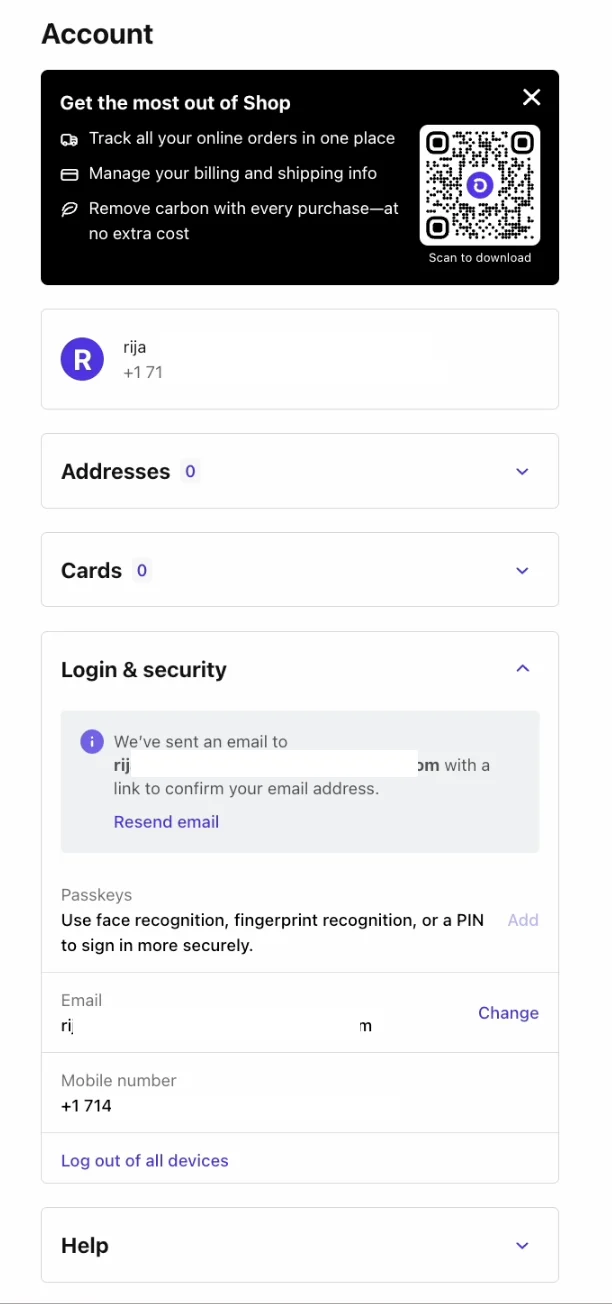
Although the API response marked the email as unverified, nothing prevented the user from logging into the Shop Pay account. That gap is what made an account takeover worth pursuing: the question was whether an unverified Shop Pay account could be used to log in somewhere that mattered.
Exploitation
Step 1: Reach the Shop Pay OAuth endpoint directly
Because enabling Shop Pay as a payment provider also enables Shop Pay's OAuth workflow, the OAuth flow could be reached even though the store did not display "Sign in with Shop". The endpoint used was:
https://STORE.myshopify.com/services/login_with_shop/authorize?target_origin=https%3A%2F%2Fophion-security.myshopify.com&api_key=123&locale=en&analytics_trace_id=d59928be-d6fb-45f2-aba6-1e9cf96f677d&analytics_context=loginWithShopClassicCustomerAccounts&flow=default&email_verification_required=true&sign_up_enabled=false
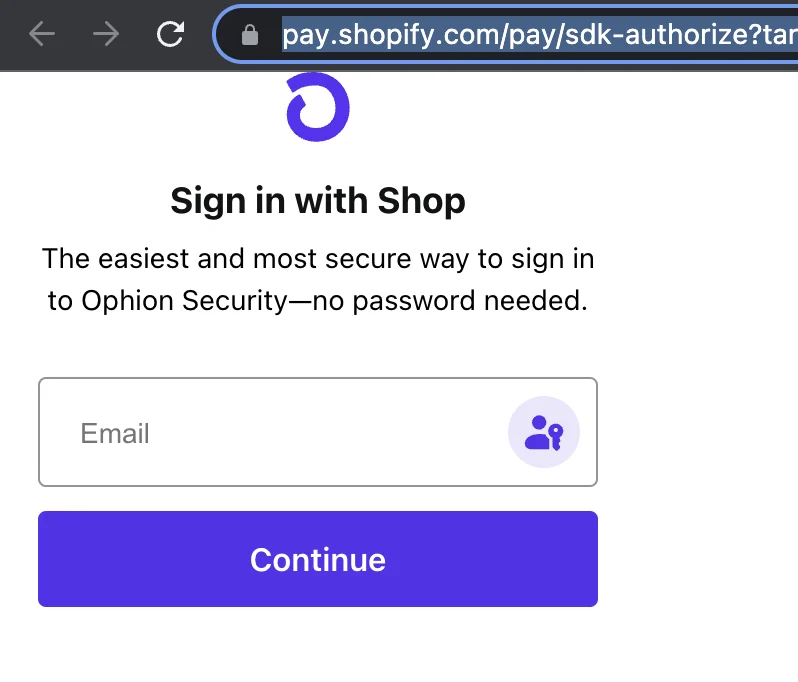
The URL was visited directly and redirected the user to pay.shopify.com OAuth via the Shop Pay SDK. Visiting the URL redirected the user to pay.shopify.com OAuth via the Shop Pay SDK.
Step 2: Create the victim customer account
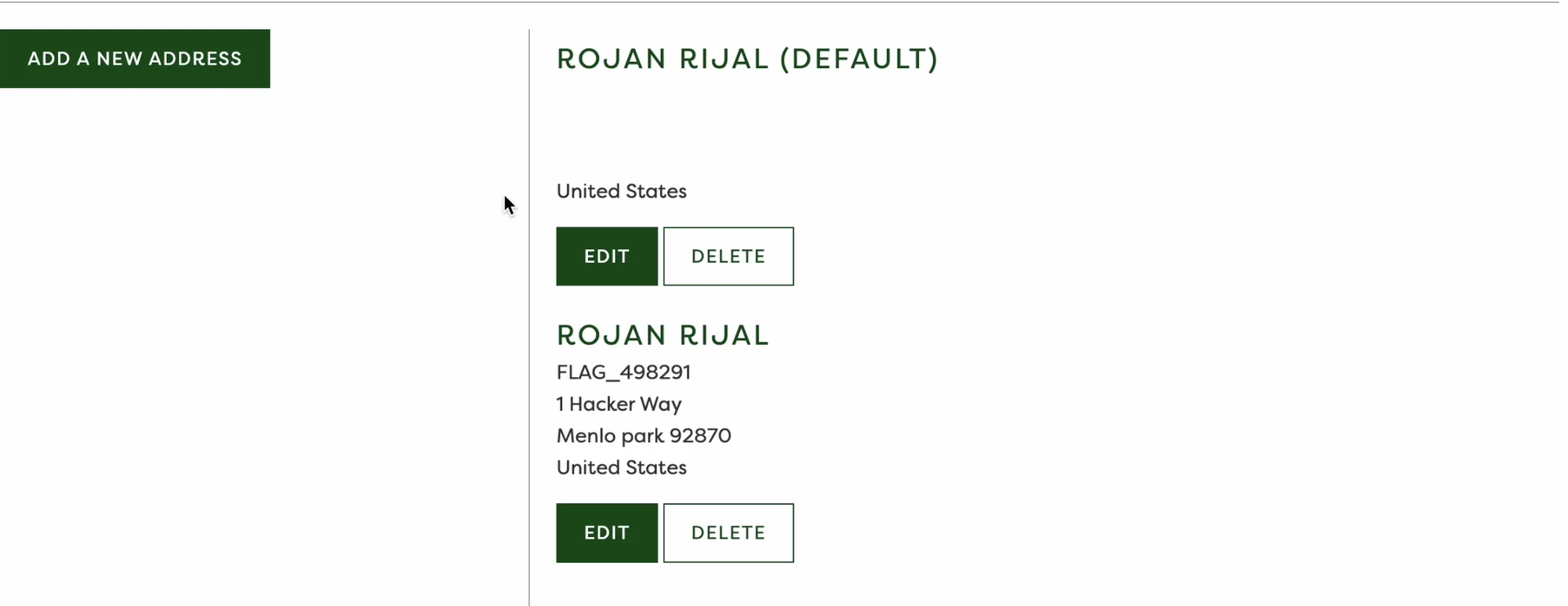
On the store with Shop Pay enabled, the researcher went to the store's account registration page and created a brand-new customer account, then created a fictitious shipping address for it.
Step 3: Create the attacker's Shop Pay account
From the attacker's point of view, the researcher went to https://shop.app/pay/authentication/login and created an account with the email [redacted] and a phone number they controlled. This is the same email as the victim's store customer account, and the Shop Pay account was created without the email being verified.
Step 4: Log in to the store through Shop Pay OAuth
The attacker then logged in with the Shop Pay account against the store via:
https://pay.shopify.com/pay/sdk-authorize?target_origin=https%3A%2F%2FSTORE.myshopify.com&locale=en&analytics_trace_id=ANALYTICS_IDd&analytics_context=loginWithShopClassicCustomerAccounts&flow=default&email_verification_required=true&sign_up_enabled=false&response_mode=form_post&scope=openid+email+phone+pay%3Asession_token&response_type=id_token&client_id=CLIENT_ID&redirect_uri=https%3A%2F%2FSTORE.myshopify.com%2Fservices%2Flogin_with_shop%2Fcallback&state=STATE&version=1
The attacker then logged in with the Shop Pay account against the store via this URL.
Step 5: Exchange the Shop Pay session cookies for a store session
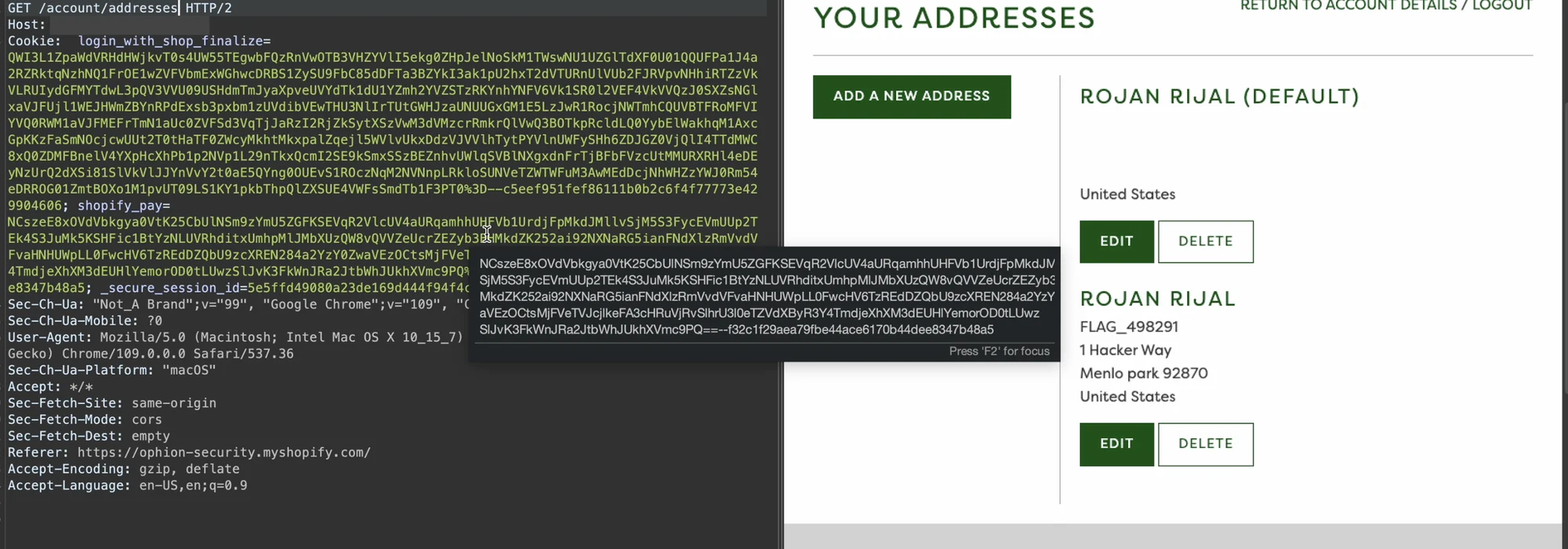
Since the store did not use Shop Pay OAuth by default for customer accounts, the attacker had to retrieve the login_with_shop_finalize and shopify_pay session values. After a successful login to the Shop Pay account, a request is sent to the services/login_with_shop/finalize endpoint to retrieve those cookies. They were then exchanged to get the _secure_session_id, which logs the attacker in as the customer in the store, through this GET request:
GET /services/login_with_shop/finalize HTTP/2
Host: STORE.myshopify.com
Cookie: login_with_shop_finalize=LOGIN_WITH_FINALIZE_COOKIE_HERE; shopify_pay=SHOP_PAY_COOKIE_HERE;
Sec-Ch-Ua: "Not_A Brand";v="99", "Google Chrome";v="109", "Chromium";v="109"
User-Agent: Mozilla/5.0 (Macintosh; Intel Mac OS X 10_15_7) AppleWebKit/537.36 (KHTML, like Gecko) Chrome/[redacted] Safari/537.36
Sec-Ch-Ua-Platform: "macOS"
Accept: */*
Accept-Encoding: gzip, deflate
Accept-Language: en-US,en;q=0.9
The two cookies are the Shop Pay session values; they were then exchanged to get the _secure_session_id. Once the attacker had the _secure_session_id cookie, they could access the Shopify store website as that user and reach past orders and the shipping address of the user.
Root cause
The design flaw is the separation between proving ownership of an email address and being allowed to use it. Shop Pay accepted the email address of an existing Shop account when creating a Shop Pay account, sent a verification email, and marked the address as unverified in the API response, but still allowed login to the Shop Pay account. The OAuth workflow then trusted that Shop Pay identity to log the person in as the store customer with the same email address, without the email ever being verified. In effect, an unverified Shop Pay account created with a customer's email address could be used to obtain a session for their store account.
Impact
A successful exploit allowed an attacker to take over the accounts of Shop users in public Shopify stores, giving access to order history and shipping addresses, that is, users' PII. Exploitation required that the vulnerable user have a Shop App account to track orders. The report does not give a CVSS score or a bounty amount.
Fix
The vulnerability was responsibly disclosed to Shopify's team and has been patched. The report does not describe the change that was made.
Variants to test
- Unverified-email login on other identity providers: create an account with an email that already exists elsewhere in the same ecosystem and check whether login is permitted before verification. A positive result is a usable session while the API still reports the email as unverified.
- OAuth account linking by email: on any "sign in with X" flow, register at the identity provider with a victim's email and complete the OAuth round trip. A positive result is a session on the relying party that shows the victim's data.
- Hidden OAuth endpoints: on stores or apps where the social login button is not displayed, request the authorise endpoint directly, as was done here with
services/login_with_shop/authorize. A positive result is a redirect into the provider's OAuth flow rather than an error. - Cookie exchange endpoints: look for finalize or callback endpoints that trade provider cookies for a local session cookie, such as
services/login_with_shop/finalize, and test whether they accept a session belonging to an account whose email was never verified. A positive result is a_secure_session_idfor the victim's account. - Parameter tampering on the authorise request: vary values such as
email_verification_required,sign_up_enabledandflowand observe whether verification requirements can be relaxed. A positive result is a completed login that bypasses a check the UI would otherwise enforce.
What happened, in plain words
Shopify runs a shopping app called Shop, and inside it there is a payment feature called Shop Pay. Shop Pay stores your card details so you can buy from most Shopify stores without typing them again. A Shop account does not come with Shop Pay switched on: you have to turn it on yourself in your Shop settings, or the first time you buy from a store that accepts Shop Pay.
When a store turns Shop Pay on as a way to take payments, something else gets switched on at the same time: Shop Pay's OAuth login. OAuth is a way for one website to ask another website to confirm who you are, so that you can log in to the first site using your account on the second. Here it means a customer account in a store can be created straight from a Shop Pay account. The important part is that this login route exists even when the store has not put a "Sign in with Shop" button on its pages. If you know the address of the login route, you can open it yourself.
The researcher found this during the Ambassador World Cup, a bug bounty event run by HackerOne. A bug bounty is a programme where companies pay or thank people for reporting security problems instead of exploiting them. The issue was reported to Shopify and has been fixed.
The two accounts used in the test
The proof of concept, meaning a small demonstration that proves the problem is real, used a store that had Shop Pay enabled. Two identities were involved.
- A victim customer account, created on the store's normal account registration page, with a made-up shipping address. It was tied to a new email address,
[redacted], which was changed for privacy reasons. That email address had a regular Shop account but no Shop Pay account. - An attacker-controlled Shop Pay account, created at
https://shop.app/pay/authentication/loginusing the same email address and a phone number the researcher controlled.
The report describes no special tools beyond a browser. The requests it shows carry user agent strings for Chrome 109 on macOS. A user agent is the short line of text a browser sends to say which browser and operating system it is.
Finding it
While comparing Shop Pay with ordinary Shop accounts, the researcher noticed something odd: it was possible to sign up as a Shop Pay user using the email address of someone who already had a Shop account. During that sign-up, Shop Pay checks whether the email address belongs to a Shop account. If the email exists and does not already use Shop Pay, the person can carry on and create the account. To create a Shop Pay account you need two things: an email address that belongs to a valid Shop account, and a phone number, which is used when logging in.
When a Shop Pay account is created for an existing Shop user, an email verification URL is sent to that address. A verification URL is a special link that proves you can read the mailbox. The account also shows a banner asking the user to verify the email.
Here is the gap. The API response marked the email as unverified. An API is the part of a website that answers requests from software rather than drawing pages for people; think of it as the kitchen behind the restaurant, where orders are prepared and results handed back. Despite that unverified mark, nothing stopped the person from logging in to the Shop Pay account. That is what made an account takeover worth chasing. Account takeover means logging in as somebody else and using their account as if it were yours. The question was whether an unverified Shop Pay account could be used to log in somewhere that actually mattered.
Exploitation
Step 1: Reach the Shop Pay OAuth endpoint directly
Because turning on Shop Pay as a payment provider also turns on Shop Pay's OAuth login, the login flow could be reached even though the store did not show a "Sign in with Shop" button. The address used was:
https://STORE.myshopify.com/services/login_with_shop/authorize?target_origin=https%3A%2F%2Fophion-security.myshopify.com&api_key=123&locale=en&analytics_trace_id=d59928be-d6fb-45f2-aba6-1e9cf96f677d&analytics_context=loginWithShopClassicCustomerAccounts&flow=default&email_verification_required=true&sign_up_enabled=false
Line by line, in plain words:
https://STORE.myshopify.comis the store's own web address.STOREstands in for the real store name./services/login_with_shop/authorizeis the path on that server that starts the "log in with Shop" process.authorizeis the first half of an OAuth login: it is where the site asks the identity provider to confirm who you are.- The
%3Aand%2Fare how a colon and a slash are written inside a URL, because those characters have special meanings there.
Visiting the URL redirected the user to pay.shopify.com OAuth through the Shop Pay SDK. A redirect is the server telling the browser "go to this other address instead". An SDK is a ready-made bundle of code that a site drops in to get a feature working, here the Shop Pay login.
Step 2: Create the victim customer account
On the store with Shop Pay enabled, the researcher went to the store's account registration page and created a brand-new customer account, then added a fictitious shipping address to it.
This step builds the victim's side of the story: a normal shopper with a normal store account, an email address and a delivery address on file. Those are exactly the things an attacker would want to reach.
Step 3: Create the attacker's Shop Pay account
Now from the attacker's point of view, the researcher went to https://shop.app/pay/authentication/login and created an account with the email [redacted] and a phone number they controlled. This is the same email as the victim's store customer account, and the Shop Pay account was created without the email being verified.
Step 4: Log in to the store through Shop Pay OAuth
The attacker then logged in with the Shop Pay account against the store via:
https://pay.shopify.com/pay/sdk-authorize?target_origin=https%3A%2F%2FSTORE.myshopify.com&locale=en&analytics_trace_id=ANALYTICS_IDd&analytics_context=loginWithShopClassicCustomerAccounts&flow=default&email_verification_required=true&sign_up_enabled=false&response_mode=form_post&scope=openid+email+phone+pay%3Asession_token&response_type=id_token&client_id=CLIENT_ID&redirect_uri=https%3A%2F%2FSTORE.myshopify.com%2Fservices%2Flogin_with_shop%2Fcallback&state=STATE&version=1
Line by line:
https://pay.shopify.com/pay/sdk-authorizeis the Shop Pay side of the login, the place that actually checks the Shop Pay account.target_origin=https%3A%2F%2FSTORE.myshopify.comagain names the store the person is logging in to.locale=en,analytics_trace_id=ANALYTICS_IDd,analytics_context=loginWithShopClassicCustomerAccounts,flow=default,email_verification_required=trueandsign_up_enabled=falsecarry the same meanings as in Step 1.ANALYTICS_IDdis a placeholder for the tracking identifier.- The
+signs separate the items, and%3Ais a colon. - A token is a short piece of text that stands in for proof, like a cloakroom ticket: whoever holds it gets the coat.
- A callback is the address a service calls back when it is finished.
Step 5: Exchange the Shop Pay session cookies for a store session
A cookie is a small piece of data a website stores in your browser and gets back on every later request, which is how sites remember that you are logged in. Since the store did not use Shop Pay OAuth by default for customer accounts, the attacker had to retrieve the login_with_shop_finalize and shopify_pay session values. After a successful login to the Shop Pay account, a request is sent to the services/login_with_shop/finalize endpoint to retrieve those cookies. They were then exchanged to get the _secure_session_id, which logs the attacker in as the customer in the store, through this GET request:
GET /services/login_with_shop/finalize HTTP/2
Host: STORE.myshopify.com
Cookie: login_with_shop_finalize=LOGIN_WITH_FINALIZE_COOKIE_HERE; shopify_pay=SHOP_PAY_COOKIE_HERE;
Sec-Ch-Ua: "Not_A Brand";v="99", "Google Chrome";v="109", "Chromium";v="109"
User-Agent: Mozilla/5.0 (Macintosh; Intel Mac OS X 10_15_7) AppleWebKit/537.36 (KHTML, like Gecko) Chrome/[redacted] Safari/537.36
Sec-Ch-Ua-Platform: "macOS"
Accept: */*
Accept-Encoding: gzip, deflate
Accept-Language: en-US,en;q=0.9
Line by line:
GET /services/login_with_shop/finalize HTTP/2is the request line.GETmeans "give me this". The path is the finalize endpoint, the last step of the login.HTTP/2is the version of the web protocol being spoken.Host: STORE.myshopify.comsays which website the request is for. One server can host many sites, so it needs to be told which one.Cookie: login_with_shop_finalize=LOGIN_WITH_FINALIZE_COOKIE_HERE; shopify_pay=SHOP_PAY_COOKIE_HERE;sends the two Shop Pay session values obtained in the previous step. The placeholders stand for the real values.Sec-Ch-Ua,User-AgentandSec-Ch-Ua-Platformdescribe the browser and operating system: Chrome 109 on macOS.Accept: */*says any kind of response is fine.Accept-Encoding: gzip, deflatelists the compression formats the browser can unpack.Accept-Language: en-US,en;q=0.9says English is preferred.
The two cookies are the Shop Pay session values from the previous step, and the finalize endpoint turns them into a store session. Once the attacker had the _secure_session_id cookie, they could browse the Shopify store website as that user and reach past orders and the shipping address of the user.
Root cause
The design flaw is the gap between proving you own an email address and being allowed to use it. Shop Pay accepted the email address of an existing Shop account when creating a Shop Pay account, sent a verification email, and marked the address as unverified in the API response, but still allowed login to the Shop Pay account. The OAuth login then trusted that Shop Pay identity to log the person in as the store customer with the same email address, without the email ever being verified. In effect, an unverified Shop Pay account created with a customer's email address could be used to obtain a session for their store account.
A simple comparison: a club checks your name against the guest list, sends an invitation to your home to confirm it is really you, and then lets you in anyway before the invitation is answered. Anyone who knows your name can walk in.
Impact
A successful exploit allowed an attacker to take over the accounts of Shop users in public Shopify stores, giving access to order history and shipping addresses, that is, users' PII. PII stands for personally identifiable information: details that point to a specific person, such as a home address. Exploitation required that the vulnerable user have a Shop App account to track orders. The report gives no CVSS score and no bounty amount. CVSS is a standard scale for rating how severe a vulnerability is.
Fix
The vulnerability was responsibly disclosed to Shopify's team and has been patched. Responsible disclosure means telling the company privately and giving it time to fix the problem before saying anything publicly. The report does not describe the change that was made.
Variants to test
These are the same ideas applied elsewhere, for anyone learning to look for similar mistakes.
- Unverified-email login on other identity providers. Create an account with an email that already exists elsewhere in the same ecosystem and check whether login is permitted before verification. A positive result is a usable session while the API still reports the email as unverified.
- OAuth account linking by email. On any "sign in with X" flow, register at the identity provider with a victim's email and complete the OAuth round trip. A positive result is a session on the relying party, the site you are logging in to, that shows the victim's data.
- Hidden OAuth endpoints. On stores or apps where the social login button is not displayed, request the authorise endpoint directly, as was done here with
services/login_with_shop/authorize. A positive result is a redirect into the provider's OAuth flow rather than an error. - Cookie exchange endpoints. Look for finalize or callback endpoints that trade provider cookies for a local session cookie, such as
services/login_with_shop/finalize, and test whether they accept a session belonging to an account whose email was never verified. A positive result is a_secure_session_idfor the victim's account. - Parameter tampering on the authorise request. Vary values such as
email_verification_required,sign_up_enabledandflowand observe whether verification requirements can be relaxed. Parameter tampering means changing the values in a request by hand. A positive result is a completed login that bypasses a check the interface would otherwise enforce.
Glossary
- Account takeover (ATO): logging in as another person and using their account as if it were your own.
- API: the part of a service that answers requests from software, returning data rather than web pages.
- Bug bounty: a programme that rewards people for reporting security problems instead of exploiting them.
- Callback: the address a service calls back when it has finished a task, such as completing a login.
- Cookie: a small piece of data a site stores in your browser and receives back on later requests, used to remember who you are.
- CVSS: a standard scale for rating the severity of a vulnerability.
- Endpoint: a specific address on a server that performs one job.
- Exploit: using a weakness to make a system do something it should not.
- GET: an HTTP method meaning "give me this resource".
- HTTP/2: a version of the protocol browsers and servers use to exchange web requests and responses.
- Identity provider: a service that confirms who you are so another site can log you in.
- OAuth: a way for one site to ask another site to confirm your identity, so you can log in with an account you already have.
- Parameter: a named value in a URL or request, such as
locale=en. - Parameter tampering: changing those values by hand to see how the server reacts.
- PII: personally identifiable information, details that point to a specific person, such as a home address.
- Proof of concept (PoC): a small demonstration that proves a problem is real.
- Redirect: a server telling the browser to go to a different address instead.
- Responsible disclosure: reporting a problem privately to the company and giving it time to fix it before going public.
- Scope: in OAuth, a permission the site asks for, such as access to your email address.
- SDK: a ready-made bundle of code a site adds to get a feature working.
- Session: the period during which a site remembers you as logged in, usually held together by a cookie.
- Token: a short piece of text that stands in for proof of identity or permission, like a cloakroom ticket.
- User agent: the line of text a browser sends to say which browser and operating system it is.
- Verification URL: a special link sent by email that proves you can read that mailbox.




