Gcash Vulnerability Walkthrough
The GCash Android app had exported activities that accepted deep links without sanitising the scheme, host, or URL, allowing a malicious app to launch arbitrary URLs, perform UXSS, access local files, and bypass the MPIN passcode to transfer money. An attacker could steal credentials and files, and perform unauthorised financial transactions.
 Published on nmochea.medium.com
First of all, I’d like to thank Jaypee Marquez and John Patrick Lita for helping me reach out to the Globe Telecom Team, who responded quickly and handled my reports responsibly.
The full write-up lives on its author's site
It belongs to its author, so we link to it rather than copy it. The other two tabs are our own rewrites, checked against it.
Context
GCash is a mobile wallet: according to the description quoted in the write-up, it turns a phone into a virtual wallet that lets you pay for items and send money as fast as a text message. The research targeted the Android application distributed through the Play Store, and specifically the way its activities handle deep link URIs and intents.
Some GCash activities launch URLs inside the application from deep link URIs. The write-up's central claim is that these activities process the scheme, host and URL without sanitising them first. The same research also covers exported activities reachable through intents, and the authentication flow around the One-Time PIN (OTP) and the MPIN passcode.
The author states that some vulnerabilities and proof-of-concept details are deliberately left out of the write-up for confidentiality reasons, so what follows is the subset that was published.
Setup
The only stated precondition is the app itself: the latest version of GCash, downloaded from the Play Store. The author's general advice is to always test the latest version from Google Play.
The method was static analysis after reversing the app: reading through the source code and the activities one by one, looking for bugs. The author notes this was challenging because some parts were encrypted or written in unreadable code.
To demonstrate the issues, the author built a simple malicious Android application as a proof of concept, and also a crafted webpage. No specific tooling, app version number or device configuration is given.
Finding it
Two separate classes of problem came out of reading the activities.
The first is deep link handling. Activities that accept deep link URIs launch URLs inside the GCash application without sanitising the scheme, host or URL before processing. That opens the door to launching arbitrary URLs, UXSS, file access and bypassing host validation.
The second is exported activities. The write-up restates the Android rule for when an activity is exported:
- If the activity has the attribute
android:exported="true"in its definition. - If
android:exportedis not defined at all, then the activity must have at least one intent-filter.
Every Android app has a file called AndroidManifest.xml, and the author uses a generic example manifest to show the second case.
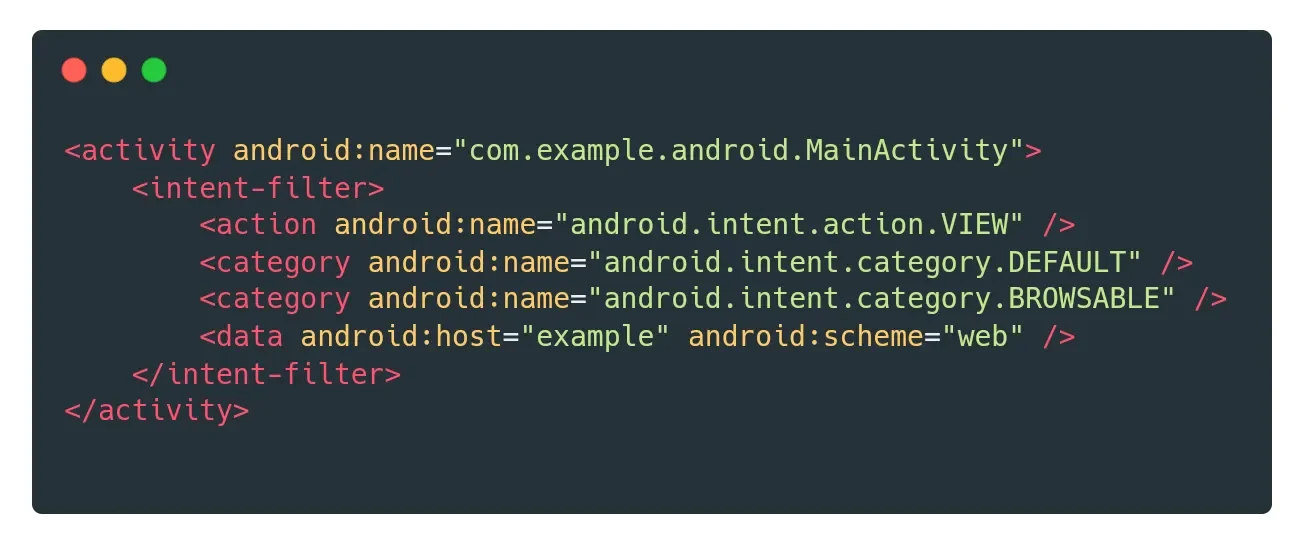
The example activity is com.example.android.MainActivity. The name follows the directory the file sits in, so there is a MainActivity.java in the com/example/android/ directory. Even though android:exported is not set on MainActivity, it is still exported because the activity defines an intent-filter.
Exploitation
Step 1: Redirect the deep link to an arbitrary host
The deep link handling does not validate the host. Instead of redirecting to https://gcash.com, the activity redirects to https://evil.com.
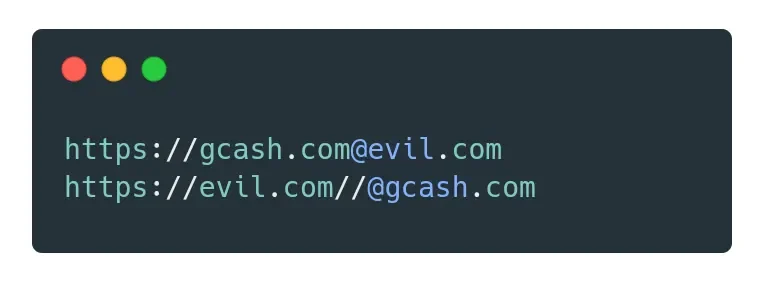
This is the simplest form of the bug: the URL that arrives in the deep link is passed through to the internal web view, so the destination is chosen by whoever crafts the link.
Step 2: Try a dangerous scheme
The scheme is not properly filtered either. The author shows that javascript:// can be supplied, although in this case it does not execute.
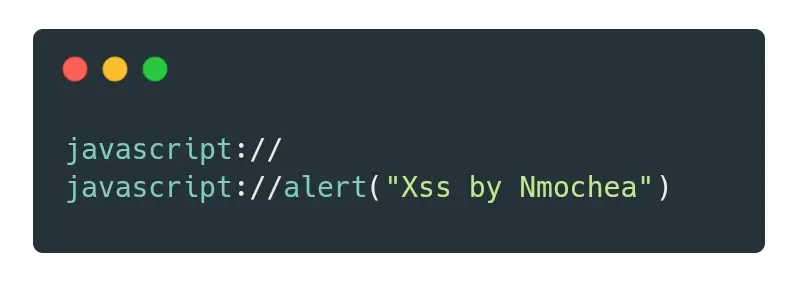
The scheme is not properly filtered: the activity accepts javascript://, although it does not execute in this case.
Step 3: Bypass scheme validation with URL encoding
Scheme validation can be bypassed by using URL encoding to slip through the checks, which in this case triggers an XSS attack.
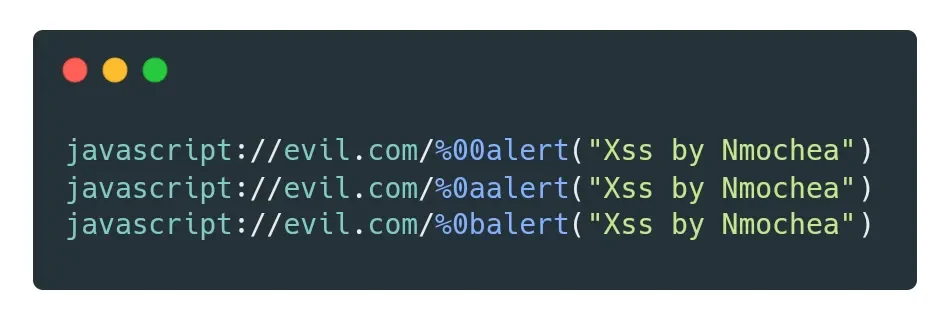
Scheme validation can be bypassed using URL encoding to slip through the checks, which in this case triggers an XSS attack.
Step 4: Bypass file scheme validation
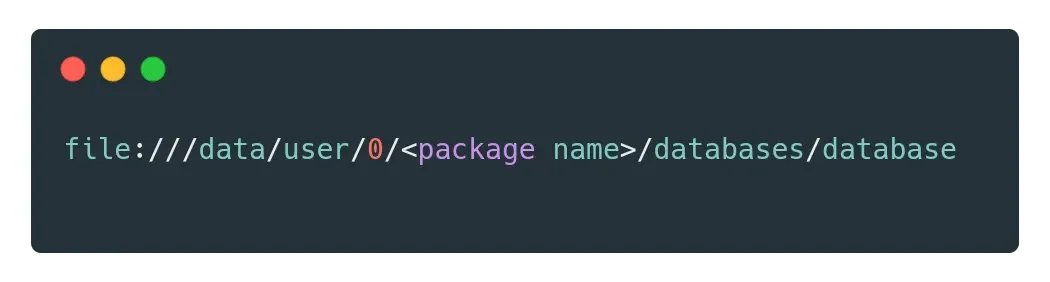
The same pattern applies to the file scheme. To exploit it, the attacker needs to know the correct path inside the GCash application where the databases and sandbox files are located.
Step 5: Deliver it from a webpage
The author also built a crafted webpage that launches arbitrary URLs, UXSS and files.
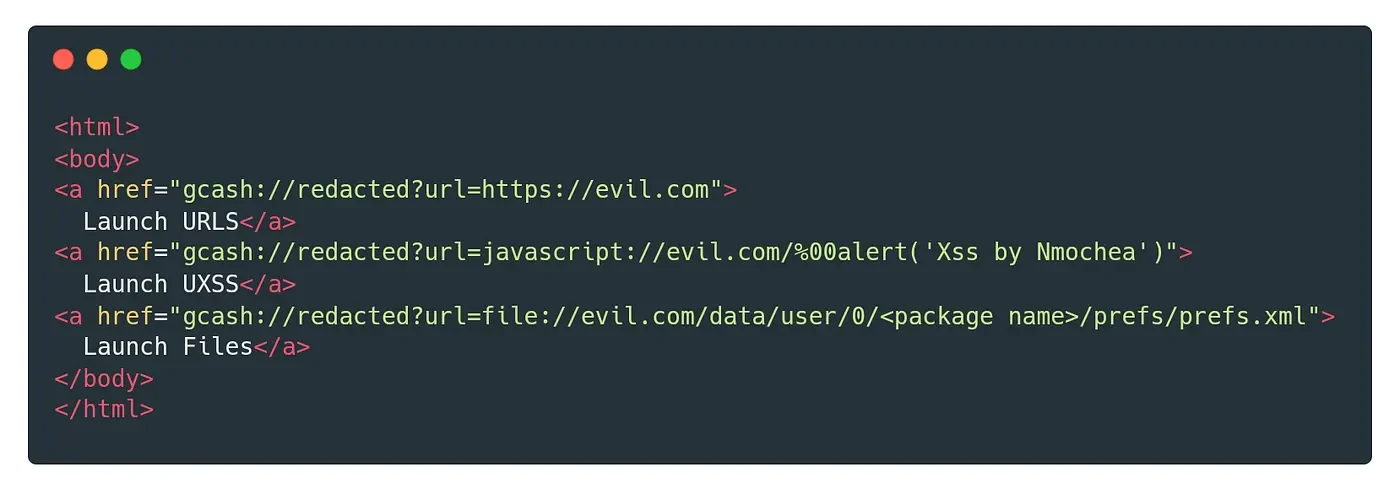
A video proof of concept for this part is linked in the write-up at https://youtu.be/chX4XTjSFhE.
Step 6: The vulnerable code
The relevant GCash code is shown as follows.
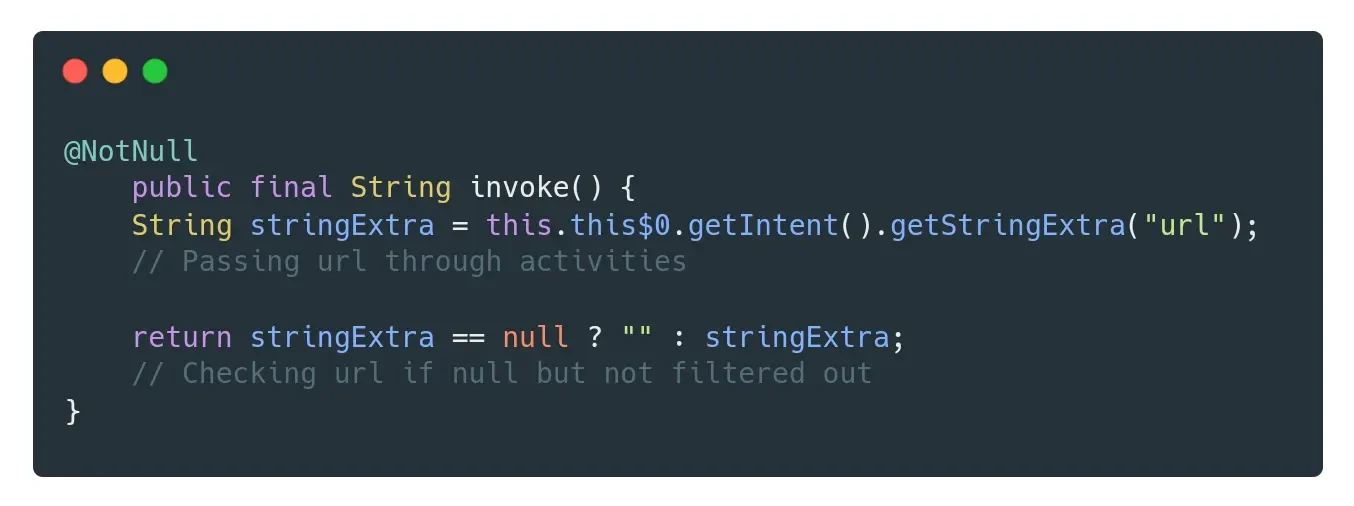
The URL passes through activities without proper sanitisation and validation. That is the whole mechanism: each activity hands the URL on, and no stage in the chain checks what it is handing on.
Step 7: Exploit from a malicious app
With the malicious Android application, the author demonstrates three outcomes.
Arbitrary URLs:
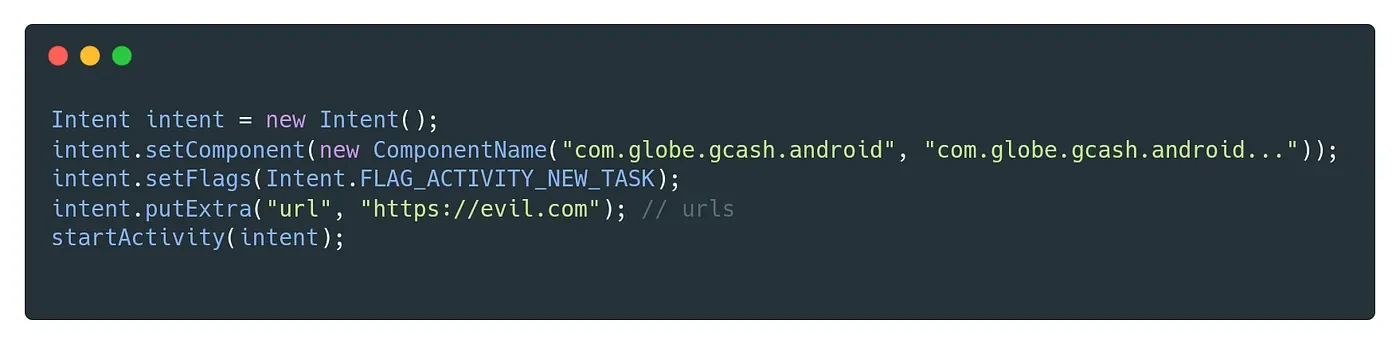
Arbitrary Universal Cross-Site Scripting (UXSS):
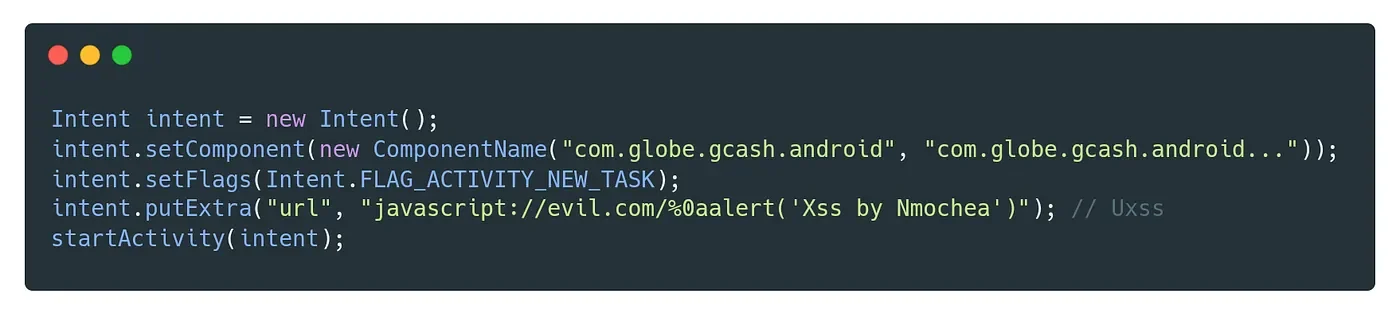
Arbitrary files:
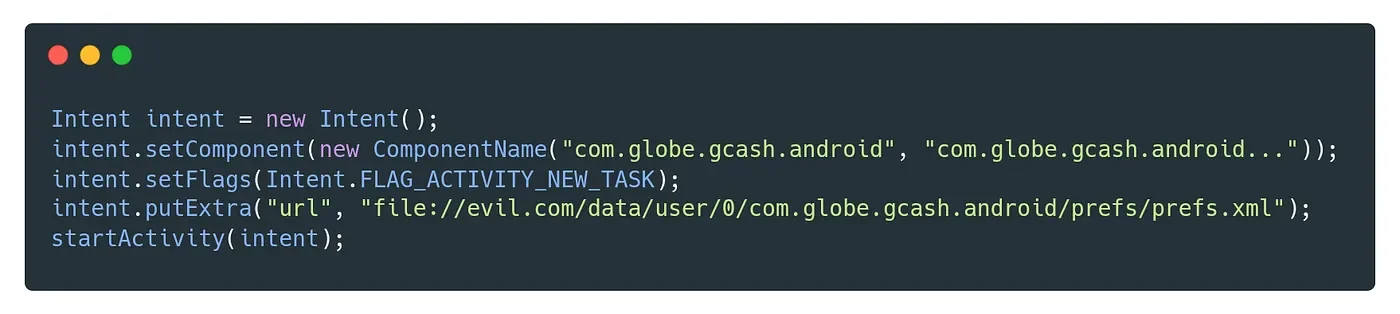
A second video proof of concept is linked at https://youtu.be/StMshiaOWgM.
Step 8: The MPIN bypass
The authentication flow works like this: after passing the One-Time PIN (OTP) security, the user is required to enter their MPIN passcode. If the user has enabled biometric security, they can log in without the MPIN passcode.
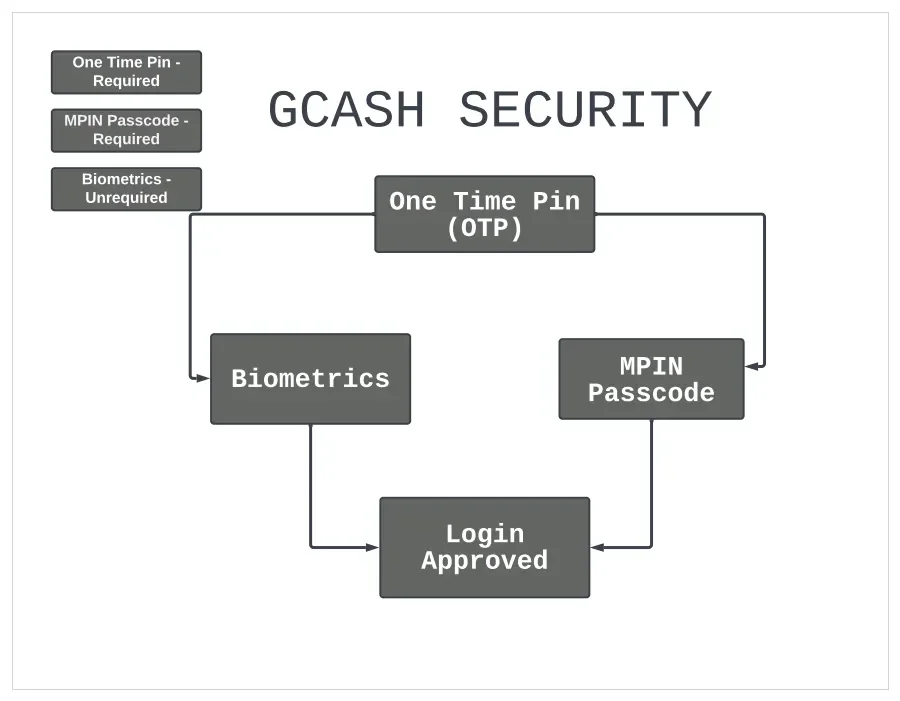
The author found a way to bypass the OTP security, but on its own it was not enough: when trying to transfer money to other GCash accounts it produced an error, and after a few hours the GCash account would automatically log out. That is why the OTP bypass is not listed in the key findings.
Chaining the OTP bypass with the same technique to bypass the MPIN passcode produced a working exploit application. It completely bypasses the MPIN passcode without any errors, and the author was able to transfer money to other GCash accounts without passing the MPIN security.
The write-up links the same video, https://youtu.be/StMshiaOWgM, as the proof of concept for this section.
Root cause
On the deep link side, the mistake is that activities accept a URI and launch it inside the app without sanitising the scheme, host or URL before processing. Because the destination is attacker-controlled, host validation can be bypassed, arbitrary URLs can be opened, and the javascript and file schemes can be reached. Scheme validation can be bypassed using URL encoding to slip through the checks. The file variant additionally depends on the attacker knowing the internal path to the databases and sandbox files.
On the intent side, the mistake is exported activities: activities that can be started by other applications, either because android:exported="true" is set or because the attribute is absent while an intent-filter is present.
On the authentication side, the write-up does not describe the implementation flaw behind the OTP and MPIN bypass; it only states that the same technique was chained to bypass both.
Impact
The key findings list what a malicious actor can do:
- Launch arbitrary URLs, UXSS and files into the internal web of the GCash application, with or without user interaction, using a malicious script or malware application.
- Launch a phishing site directly within the GCash application without the user's knowledge or consent.
- Steal the file system of the GCash application, including user databases and sandbox files, and send it to the attacker's web server by intercepting implicit intents controlled by the attacker.
- Bypass the MPIN passcode of a GCash user account, transfer money to other GCash accounts, withdraw money from bank accounts, connect or disconnect bank accounts, and perform other malicious activities.
- Use the GCash application to steal user credentials, including One-Time PINs (OTP) and MPIN passcodes.
The author frames the stakes plainly: if a vulnerability like this were found by someone with bad intentions, it could lead to millions in losses and have a major impact on both users and the GCash company. The write-up does not include sensitive data, to reduce exposure to the vulnerability.
Fix
The write-up does not describe the code changes Globe made. What it records is the verification: on 2 October 2022, before publishing, the author retested the GCash app to confirm the patch and was not able to reproduce the vulnerability issue. On 10 October 2022 the author received an email that the vulnerability had been fully patched.
In terms of what should be done, the report's own evidence points at the two controls it shows failing: sanitise and validate the scheme, host and URL of deep link URIs before any activity processes them, and do not rely on a scheme check that URL encoding can slip past. Exported activities should be reviewed against the manifest rule above, so that only activities that need to be reachable from other apps are exported.
Variants to test
- Host validation bypass: take a deep link that is supposed to open a fixed host and substitute another host. A positive result is the internal web view loading the substituted host instead of the intended one.
- Scheme substitution: supply
javascript://where an http or https scheme is expected. A positive result is the activity accepting the scheme; whether it executes depends on the context, as it did not in the case shown here. - Encoded scheme: encode parts of the scheme or URL so the validation sees one value and the consumer sees another. A positive result is an XSS firing after the check has passed.
- File scheme with a known path: point a
fileURI at the app's databases or sandbox files. A positive result is the app rendering or otherwise exposing content from its private storage. - Webpage delivery: drive the same deep links from a crafted page rather than an installed app. A positive result is arbitrary URL, UXSS or file access triggered from the browser with no malicious app installed.
- Exported activity reachability: from a separate app, start GCash activities that have an intent-filter but no explicit
android:exportedvalue. A positive result is the activity launching and processing attacker-supplied input. - Implicit intent interception: register to receive implicit intents the app sends. A positive result is the attacker's component receiving data the app intended for its own components.
Disclosure timeline
- 4 September 2022: reported the multiple vulnerability issues to the Globe Team.
- 5 September 2022: the vulnerability issue was confirmed and being processed.
- 8 September 2022: Globe Team sent an appreciation token, a 0917Lifestyle gift.
- 9 September 2022: received the packages of the 0917Lifestyle gift (smartwatch, mouse, router, power bank and headphone).
- 2 October 2022: retested the GCash app before publishing the write-up to confirm the patch; the vulnerability issue could not be reproduced.
- 3 October 2022: Globe Team requested deletion of the write-up post, the main reason being that it was not fully patched and awaiting GCash confirmation while implementing and adding security.
- 10 October 2022: received the email that the vulnerability had been fully patched.
The author thanks Jaypee Marquez and John Patrick Lita for helping reach the Globe Telecom Team, who responded quickly and handled the reports responsibly, and reminds readers not to attempt this without proper knowledge of penetration testing, as it can cause serious damage.
What happened, in plain words
GCash is a mobile wallet app for Android. According to the description quoted in the write-up, it turns your phone into a virtual wallet that lets you pay for items and send money as fast as a text message. The researcher downloaded the latest version from the Play Store, took the app apart, and read through its code and its screens (Android calls them activities) looking for mistakes.
Two kinds of mistake turned up. The first is in how the app handles deep links. A deep link is a web address that, instead of opening in a browser, opens a particular screen inside an app. Think of it as a doorbell with a label on it: press the right label and the app opens the matching room. The problem is that some GCash screens took the address from the deep link and loaded it inside the app without checking where it pointed. The write-up says this can be exploited to launch arbitrary URLs, perform UXSS attacks, access files, and bypass host validation.
The second mistake is that some screens could be started by any other app on the phone, not just by GCash itself. Combined with the first mistake, a small malicious app could push addresses into GCash and get the app to do things on the attacker's behalf.
On top of that, the researcher found a way to get past the login checks: the One-Time PIN (a code sent to you) and the MPIN (the short passcode you type in the app). Chaining the OTP bypass with the same technique to bypass the MPIN passcode let the researcher transfer money to other GCash accounts without passing the MPIN security.
The author says some vulnerabilities and proof-of-concept details are deliberately left out of the write-up for confidentiality reasons, so what follows is only the part that was published. The researcher also reminds readers not to attempt this without proper knowledge of penetration testing, because it can cause serious damage.
Context
GCash is a mobile wallet. The write-up quotes the company's own description: it turns your phone into a virtual wallet, and you can pay for items and send money as fast as a text message. The research targeted the Android application distributed through the Play Store, and specifically two things: the way its activities handle deep link URIs, and the way its activities can be reached through intents.
A few terms from zero, because everything below depends on them:
- Android app: a program installed on a phone running Google's Android operating system. An app is packaged as a file with the extension
.apk. - Activity: one screen of an Android app. When you tap a button and a new screen slides in, that new screen is usually a separate activity. Each activity is a small piece of code with a name.
- URI / URL: a URL is a web address such as
https://gcash.com. A URI is the more general term for an address of a resource; a URL is a kind of URI. In this write-up the two words are used almost interchangeably. - Scheme: the first part of an address, before the
://. Inhttps://gcash.comthe scheme ishttps. Injavascript://the scheme isjavascript. Infile://the scheme isfile. The scheme tells the software what kind of address it is and how to handle it. - Host: the part of the address after the scheme, such as
gcash.cominhttps://gcash.com. It names which server or site you are talking to. - Deep link: a link that opens a specific screen inside an app instead of a page in a browser. If you tap a link in a message and the GCash app opens directly on a payment screen, that link was a deep link.
- Intent: Android's internal message that asks a component to do something. When one app wants another app to open a screen, it sends an intent naming that screen. Think of it as an envelope with a room number written on it; Android delivers it to the matching activity.
- Intent-filter: a declaration inside an app that says "this activity is willing to receive intents of this kind". It is like putting a nameplate on the door so other apps know the room exists.
- Exported activity: an activity that other apps on the phone are allowed to start. If an activity is not exported, only its own app can start it.
- WebView: a small browser built into an Android app. Apps use it to show web pages without leaving the app. When the write-up says a URL is launched "inside the GCash application", it means inside a WebView.
- Sanitise / validate: to check input and clean it before using it. Sanitising means removing or neutralising dangerous parts; validating means checking that the input matches what is expected and rejecting it otherwise. If a form expects a number and you type letters, a validating form refuses; a sanitising form strips the letters out.
- UXSS: Universal Cross-Site Scripting. Cross-Site Scripting (XSS) is when an attacker gets their own script to run inside a page that the victim trusts. UXSS is the broader version where the script runs in the browser or WebView itself, so it can affect any page loaded there, not just one site.
- OTP: One-Time PIN. A short code, usually sent by SMS, that you type once to prove it is you.
- MPIN: Mobile PIN. The short passcode you set for the app and type to confirm actions such as sending money.
- Biometric security: logging in with your fingerprint or face instead of typing a passcode.
- Phishing: a fake page that looks like the real one and tricks you into typing your password or PIN.
- Sandbox: the private storage area Android gives each app. Other apps are not supposed to read it.
- Static analysis: examining an app's code without running it, the way you might read a recipe rather than cook the dish.
- Reverse engineering: taking a compiled app apart to recover readable code and resources.
Some GCash activities launch URLs inside the application from deep link URIs. The write-up's central claim is that these activities process the scheme, host and URL without sanitising them first. The same research also covers exported activities reachable through intents, and the authentication flow around the OTP and the MPIN passcode.
The author states that some vulnerabilities and proof-of-concept details are deliberately left out of the write-up for confidentiality reasons, so what follows is the subset that was published.
Setup
The only stated precondition is the app itself: the latest version of GCash, downloaded from the Play Store. The author's general advice is to always test the latest version from Google Play. The reason is simple: an old version may contain bugs that have already been fixed, so a finding on an old build tells you little about what real users face today.
The method was static analysis after reversing the app: reading through the source code and the activities one by one, looking for bugs. The author notes this was challenging because some parts were encrypted or written in unreadable code. That is normal for a banking app: developers deliberately make the code harder to read so that attackers have a harder time too. The researcher has to work around that.
To demonstrate the issues, the author built a simple malicious Android application as a proof of concept, and also a crafted webpage. A proof of concept is a small demonstration that shows a bug is real rather than theoretical. No specific tooling, app version number or device configuration is given.
Finding it
Two separate classes of problem came out of reading the activities.
The first is deep link handling. Activities that accept deep link URIs launch URLs inside the GCash application without sanitising the scheme, host or URL before processing. That opens the door to launching arbitrary URLs, UXSS, file access and bypassing host validation. In everyday terms: the app takes an address from outside, trusts it completely, and opens it in its own built-in browser. Whoever supplies the address decides what the built-in browser shows.
The second is exported activities. The write-up restates the Android rule for when an activity is exported:
- If the activity has the attribute
android:exported="true"in its definition. - If
android:exportedis not defined at all, then the activity must have at least one intent-filter.
An attribute is a setting written into the app's configuration. The second rule is the surprising one: if the developer forgets to say whether the activity is exported, but the activity advertises an intent-filter, Android treats it as exported anyway. Forgetting the setting is not a safe default.
Every Android app has a file called AndroidManifest.xml, and the author uses a generic example manifest to show the second case. The manifest is the app's master list: it names every activity, says which ones can be started from outside, and declares the intent-filters. Think of it as the building's directory board in the lobby.
The image shows the example manifest the author uses to illustrate the rule.
The example activity is com.example.android.MainActivity. The name follows the directory the file sits in, so there is a MainActivity.java in the com/example/android/ directory. Even though android:exported is not set on MainActivity, it is still exported because the activity defines an intent-filter.
Exploitation
Step 1: Redirect the deep link to an arbitrary host
The deep link handling does not validate the host. Instead of redirecting to https://gcash.com, the activity redirects to https://evil.com.
This is the simplest form of the bug: the URL that arrives in the deep link is passed through to the internal WebView, so the destination is chosen by whoever crafts the link. The step was taken first because it needs no clever encoding: just swap the host and see whether the app notices. It does not.
Step 2: Try a dangerous scheme
The scheme is not properly filtered either. The author shows that javascript:// can be supplied, although in this case it does not execute.
The scheme is not properly filtered: the activity accepts javascript://, although it does not execute in this case. The javascript scheme is dangerous because a browser that follows it runs the text after it as code. Here the app accepted the address but the place it ended up did not run the code, so the researcher moved on to a way of getting past the check itself.
Step 3: Bypass scheme validation with URL encoding
Scheme validation can be bypassed by using URL encoding to slip through the checks, which in this case triggers an XSS attack.
URL encoding is a way of writing characters in an address using a percent sign and two hexadecimal digits, so that characters which would otherwise be special can travel safely inside a URL. For example, a space becomes %20. Scheme validation can be bypassed using URL encoding to slip through the checks, which in this case triggers an XSS attack. This is the step that turns the scheme filter from a mitigation into a speed bump.
Step 4: Bypass file scheme validation
The same pattern applies to the file scheme. To exploit it, the attacker needs to know the correct path inside the GCash application where the databases and sandbox files are located.
The file scheme points at a file on the device rather than at a website. The attacker has to know where the databases and sandbox files sit before the trick is useful.
Step 5: Deliver it from a webpage
The author also built a crafted webpage that launches arbitrary URLs, UXSS and files.
A victim who clicks a link in a message and lands on that page is enough.
A video proof of concept for this part is linked in the write-up at https://youtu.be/chX4XTjSFhE.
Step 6: The vulnerable code
The relevant GCash code is shown as follows.
The URL passes through activities without proper sanitisation and validation. That is the whole mechanism: each activity hands the URL on, and no stage in the chain checks what it is handing on. Picture a parcel passed from desk to desk, with every clerk assuming the previous one already checked the contents.
Step 7: Exploit from a malicious app
With the malicious Android application, the author demonstrates three outcomes.
Arbitrary URLs:
Arbitrary Universal Cross-Site Scripting (UXSS):
Arbitrary files:
A second video proof of concept is linked at https://youtu.be/StMshiaOWgM.
Step 8: The MPIN bypass
The authentication flow works like this: after passing the One-Time PIN (OTP) security, the user is required to enter their MPIN passcode. If the user has enabled biometric security, they can log in without the MPIN passcode.
The author found a way to bypass the OTP security, but on its own it was not enough: when trying to transfer money to other GCash accounts it produced an error, and after a few hours the GCash account would automatically log out. That is why the OTP bypass is not listed in the key findings. Getting past one door is not much use if the next door still holds and the building kicks you out after a while.
Chaining the OTP bypass with the same technique to bypass the MPIN passcode produced a working exploit application. It completely bypasses the MPIN passcode without any errors, and the author was able to transfer money to other GCash accounts without passing the MPIN security.
The write-up links the same video, https://youtu.be/StMshiaOWgM, as the proof of concept for this section.
Root cause
On the deep link side, the mistake is that activities accept a URI and launch it inside the app without sanitising the scheme, host or URL before processing. Because the destination is attacker-controlled, host validation can be bypassed, arbitrary URLs can be opened, and the javascript and file schemes can be reached. Scheme validation can be bypassed using URL encoding to slip through the checks. The file variant additionally depends on the attacker knowing the internal path to the databases and sandbox files.
On the intent side, the mistake is exported activities: activities that can be started by other applications, either because android:exported="true" is set or because the attribute is absent while an intent-filter is present. An implicit intent is one that does not name a specific target app; Android looks for any app that has registered to handle that kind of request. If a malicious app registers for the same kind of request, it can receive data the app meant for its own components.
On the authentication side, the write-up does not describe the implementation flaw behind the OTP and MPIN bypass; it only states that the same technique was chained to bypass both.
Impact
The key findings list what a malicious actor can do:
- Launch arbitrary URLs, UXSS and files into the internal web of the GCash application, with or without user interaction, using a malicious script or malware application.
- Launch a phishing site directly within the GCash application without the user's knowledge or consent.
- Steal the file system of the GCash application, including user databases and sandbox files, and send it to the attacker's web server by intercepting implicit intents controlled by the attacker.
- Bypass the MPIN passcode of a GCash user account, transfer money to other GCash accounts, withdraw money from bank accounts, connect or disconnect bank accounts, and perform other malicious activities.
- Use the GCash application to steal user credentials, including One-Time PINs (OTP) and MPIN passcodes.
The author frames the stakes plainly: if a vulnerability like this were found by someone with bad intentions, it could lead to millions in losses and have a major impact on both users and the GCash company. The write-up does not include sensitive data, to reduce exposure to the vulnerability.
Fix
The write-up does not describe the code changes Globe made. What it records is the verification: on 2 October 2022, before publishing, the author retested the GCash app to confirm the patch and was not able to reproduce the vulnerability issue. On 10 October 2022 the author received an email that the vulnerability had been fully patched.
In terms of what should be done, the report's own evidence points at the two controls it shows failing: sanitise and validate the scheme, host and URL of deep link URIs before any activity processes them, and do not rely on a scheme check that URL encoding can slip past. Exported activities should be reviewed against the manifest rule above, so that only activities that need to be reachable from other apps are exported.
Variants to test
- Host validation bypass: take a deep link that is supposed to open a fixed host and substitute another host. A positive result is the internal WebView loading the substituted host instead of the intended one.
- Scheme substitution: supply
javascript://where an http or https scheme is expected. A positive result is the activity accepting the scheme; whether it executes depends on the context, as it did not in the case shown here. - Encoded scheme: encode parts of the scheme or URL so the validation sees one value and the consumer sees another. A positive result is an XSS firing after the check has passed.
- File scheme with a known path: point a
fileURI at the app's databases or sandbox files. A positive result is the app rendering or otherwise exposing content from its private storage. - Webpage delivery: drive the same deep links from a crafted page rather than an installed app. A positive result is arbitrary URL, UXSS or file access triggered from the browser with no malicious app installed.
- Exported activity reachability: from a separate app, start GCash activities that have an intent-filter but no explicit
android:exportedvalue. A positive result is the activity launching and processing attacker-supplied input. - Implicit intent interception: register to receive implicit intents the app sends. A positive result is the attacker's component receiving data the app intended for its own components.
Disclosure timeline
- 4 September 2022: reported the multiple vulnerability issues to the Globe Team.
- 5 September 2022: the vulnerability issue was confirmed and being processed.
- 8 September 2022: Globe Team sent an appreciation token, a 0917Lifestyle gift.
- 9 September 2022: received the packages of the 0917Lifestyle gift (smartwatch, mouse, router, power bank and headphone).
- 2 October 2022: retested the GCash app before publishing the write-up to confirm the patch; the vulnerability issue could not be reproduced.
- 3 October 2022: Globe Team requested deletion of the write-up post, the main reason being that it was not fully patched and awaiting GCash confirmation while implementing and adding security.
- 10 October 2022: received the email that the vulnerability had been fully patched.
The author thanks Jaypee Marquez and John Patrick Lita for helping reach the Globe Telecom Team, who responded quickly and handled the reports responsibly, and reminds readers not to attempt this without proper knowledge of penetration testing, as it can cause serious damage.
Glossary
- Activity: one screen of an Android app, made of a small piece of code with a name.
- Android app: a program installed on a phone running Google's Android operating system, packaged as an
.apkfile. - AndroidManifest.xml: the file inside every Android app that lists its activities, which ones can be started from outside, and their intent-filters.
- Attribute: a setting written into an app's configuration, such as
android:exported="true". - Biometric security: logging in with a fingerprint or face instead of typing a passcode.
- Deep link: a link that opens a specific screen inside an app rather than a page in a browser.
- Host: the part of an address after the scheme, such as
gcash.cominhttps://gcash.com. - Implicit intent: an intent that does not name a specific target app, so Android looks for any app registered to handle that kind of request.
- Intent: Android's internal message asking a component to do something.
- Intent-filter: a declaration inside an app that an activity is willing to receive intents of a certain kind.
- MPIN: Mobile PIN, the short passcode you set for the app and type to confirm actions such as sending money.
- OTP: One-Time PIN, a short code usually sent by SMS that you type once to prove it is you.
- Proof of concept: a small demonstration that shows a bug is real rather than theoretical.
- Sandbox: the private storage area Android gives each app, which other apps are not supposed to read.
- Sanitise: to clean input by removing or neutralising dangerous parts before using it.
- Scheme: the first part of an address, before the
://, such ashttps,javascriptorfile. - Static analysis: examining an app's code without running it.
- URI: the general term for the address of a resource; a URL is a kind of URI.
- URL: a web address such as
https://gcash.com. - URL encoding: writing characters in an address as a percent sign and two hexadecimal digits, such as
%20for a space. - UXSS: Universal Cross-Site Scripting, where an attacker's script runs in the browser or WebView itself and can affect any page loaded there.
- Validate: to check that input matches what is expected and reject it otherwise.
- WebView: a small browser built into an Android app, used to show web pages without leaving the app.
- XSS: Cross-Site Scripting, where an attacker gets their own script to run inside a page the victim trusts.