How i Find Database Credentials via Mass Recon & Recon Scoping on Gcash
A misconfiguration exposed database credentials on a subdomain of gcash.com, which the author found through mass reconnaissance and scanning. An attacker could use these credentials to access the database, though the text does not specify the extent of access or data impact.
 Published on ph-hitachi.medium.com
so iwill share this second finding on gcash VDP Channel & share tips on some recon methodologies such as subdomain enumation, wappalyzer mapping, mass recon & scopingwith automated tools.
The full write-up lives on its author's site
It belongs to its author, so we link to it rather than copy it. The other two tabs are our own rewrites, checked against it.
Context
This is a write-up of a second finding on the GCash VDP (vulnerability disclosure programme) channel, run by Globe Telecom. Alongside the finding itself, the author documents a repeatable reconnaissance methodology: subdomain enumeration, Wappalyzer-style technology mapping, mass recon and scoping with automated tools. The exposed data was database credentials, surfaced by the custom nuclei configuration where gobuster and dirsearch had not detected them.
The author defines recon scoping as the initial phase of an assessment: identifying and gathering information about the target systems, networks and infrastructure, so that later phases can be aimed at the right places.
Setup
The methodology is split into categories, each with its own directory on the local machine:
mkdir -p gcash.com ~/recon/targets/gcash.com/subdomains/mkdir -p gcash.com ~/recon/targets/gcash.com/endpoints/mkdir -p gcash.com ~/recon/targets/gcash.com/aws/mkdir -p gcash.com ~/recon/targets/gcash.com/dns/
The workflow has three stages:
- Subdomain enumeration
- Information gathering (network, DNS, technology, ports)
- Automated testing
Tools used for subdomain work:
| Tool | Purpose as described |
|---|---|
| subfinder | passive and active methods |
| assetfinder | certificate transparency logs |
| alterx | dynamic and permutation/alterations |
| asnmap | map ASN and find subdomains |
| ffuf | find subdomains on vhosts |
The author notes that not every method works on every target, and that the ones shown are the ones commonly used.
Finding it
Step 1: subdomain enumeration
Each tool writes into the subdomains directory:
# passive & active subdomain enumation using subfindersubfinder -d gcash.com -o ~/recon/targets/gcash.com/subdomains/subfinder.txt
# subdomain enumeration via certificate transparency logs with assetfinderassetfinder --subs-only gcash.com >> ~/recon/targets/gcash.com/subdomains/assetfinder.txt
# dynamic subdomain enumeration with alterxecho gcash.com | alterx -enrich | dnsx > ~/recon/targets/gcash.com/subdomains/alterx-dynamic.txt# for high chance to find subdomain # you can generate patterns based on existing subdomainssubfinder -d tesla.com | alterx | dnsx
# subdomain enumaration via Permutation/Alterations with alterxecho gcash.com | alterx -pp 'word=subdomains-top1million-50000.txt' | dnsx > ~/recon/targets/gcash.com/subdomains/alterx-permutation.txt
# subdomain enumeration via ASMappingasnmap -d gcash.com | dnsx -silent -resp-only -ptr > ~/recon/targets/gcash.com/subdomains/dnsx.txt
# subdomain enumeration via vhostcat subdomains-top1million-50000.txt | ffuf -w -:FUZZ -u http://gcash.com/ -H 'Host: FUZZ.gcash.com' -ac
Step 2: merge and probe
Duplicates from the different tools are merged and removed with anew:
# Merging subdomains from ~/recon/targets/gcash.com/subdomains/* into one file and remove duplicatescat ~/recon/targets/gcash.com/subdomains/*.txt | anew ~/recon/targets/gcash.com/subdomains/subdomains.txt
Live HTTP/HTTPS servers are then filtered with httpx:
# Probe for live HTTP/HTTPS serverscat ~/recon/targets/gcash.com/subdomains/subdomains.txt | httpx -o ~/recon/targets/gcash.com/subdomains/httpx.txt
Step 3: information gathering
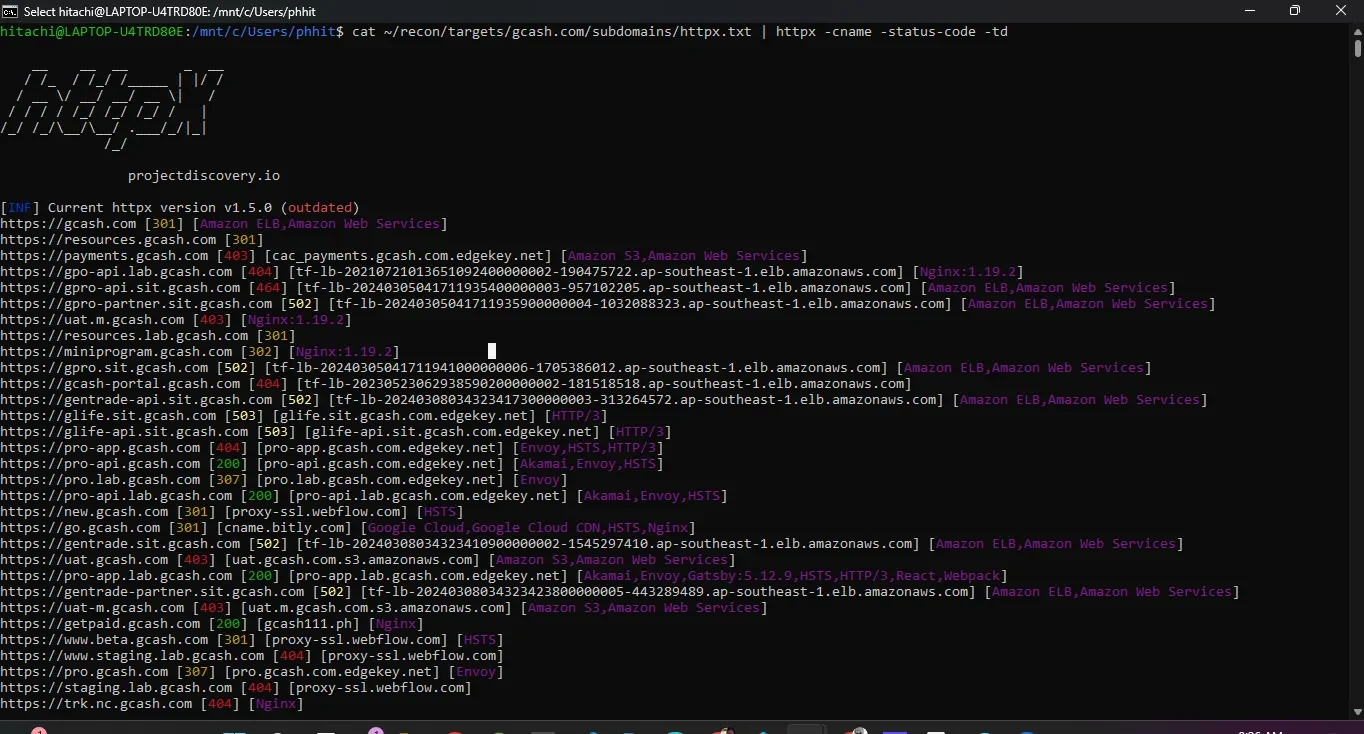
httpx is run again over the live hosts to gather information about the domains, using Wappalyzer mapping techniques to identify the technologies behind each site.
Step 4: automated testing with nuclei
The author quotes the project's description of nuclei: it sends requests across targets based on a template, offers scanning for TCP, DNS, HTTP, SSL, File, Whois, Websocket, Headless and Code, and can model all kinds of security checks through templating.
All subdomains are scanned with a custom configuration:
cat ~/recon/targets/gcash.com/subdomains/httpx.txt | nuclei -config ~/nuclei-templates/config/custom.yml
The custom configuration is built for scoping. It looks for sensitive information such as secret keys, tokens and credentials in configurations and compiled assets like JavaScript, for TCP-level issues such as Docker misconfiguration, and for some fuzzing overall. A custom Wappalyzer configuration can also be used with nuclei to detect technologies.
# nuclei -config ~/nuclei-templates/config/custom.yml -list target_list_to_scan.txtseverity: - critical - high - medium - lowtype: - http - tcp - javascriptinclude-tags: - generic - config - misconfig - exposures - exposure - disclosure - file - logs - traversal - xss - lfi - crlf - cache - takeovers - wordpressexclude-tags: - tech - dos - fuzz - creds-stuffing - token-spray - osint - headers # exlude finding missing HTTP security headers
The configuration restricts severity to critical through low, limits template types to http, tcp and javascript, includes tags around configuration, misconfiguration, exposure, disclosure, file, logs, traversal, XSS, LFI, CRLF, cache, takeovers and WordPress, and excludes tech, DoS, fuzz, credential stuffing, token spraying, OSINT and missing security headers.
Step 5: the result
After the scan finished, the author reviewed the results and found database credentials exposed through misconfiguration.
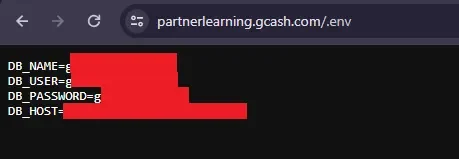
The author notes that this was not detected by gobuster or dirsearch during earlier fuzzing. Mass scanning can take hours depending on the number of domains, the number of templates and internet speed, which is why scoping based on gathered information matters, though the author adds there is nothing wrong with scanning everywhere to find valid bugs. The scan was run inside a private VPS using Docker, so it continued in the background while the author was away or asleep, and the VPS had more bandwidth than a local machine with a poor connection.
Exploitation
Step 6: AWS S3 buckets
Because httpx showed the target uses AWS, the next step filters S3 buckets with nuclei:
#filter s3 buckets and save to ~/recon/targets/gcash.com/aws/butcket.txtcat ~/recon/targets/gcash.com/subdomains/httpx.txt | \nuclei -t technologies/aws/aws-bucket-service.yaml | \awk -F’://’ ‘{print $2}’ | \awk -F’/’ ‘{print $1}’ > ~/recon/targets/gcash.com/aws/butcket.txt
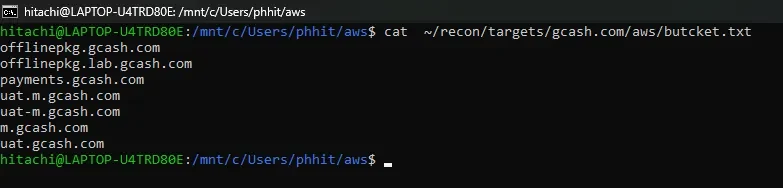
Each candidate is then tested for anonymous listing:
# save open buckets as open_buckets.txt from ~/recon/targets/gcash.com/aws/butcket.txtcat ~/recon/targets/gcash.com/aws/butcket.txt | \xargs -I {} sh -c ‘if aws s3 ls “s3://{}” — no-sign-request 2>/dev/null; \then echo “{}” >> ~/recon/targets/gcash.com/aws/open_buckets.txt; \fi’
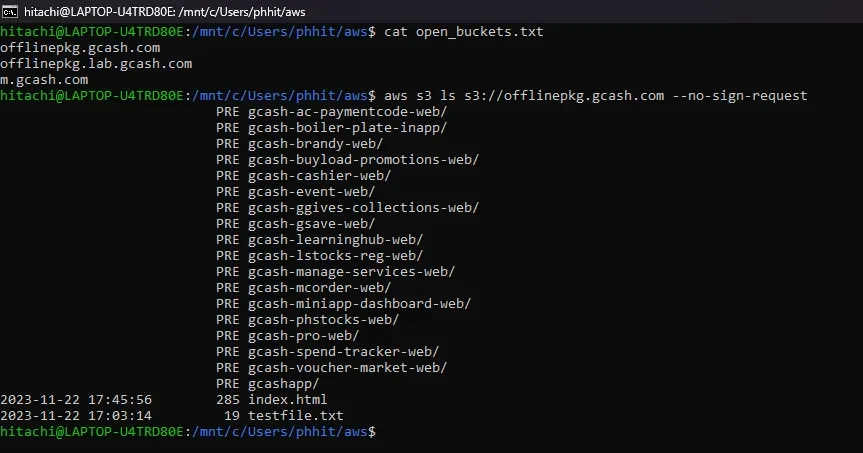
Step 7: passive port scanning
Port scanning uses naabu, which enumerates valid ports for hosts quickly and reliably:
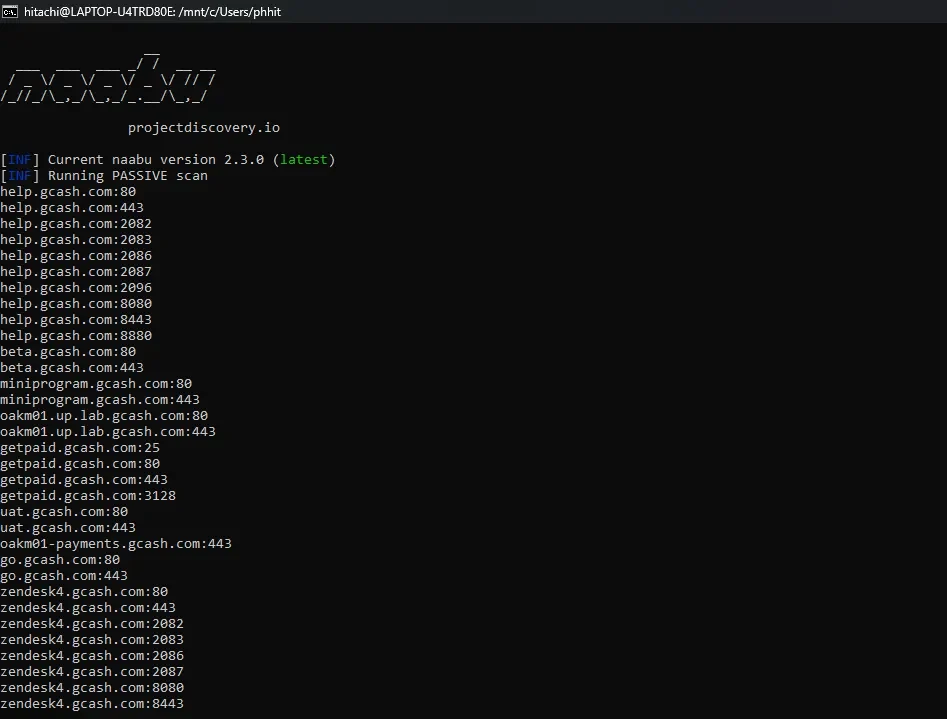
# scan all open ports except on port 80 & 443cat ~/recon/targets/gcash.com/subdomains/subdomains.txt | naabu --passive
Step 8: checking SMTP ports
After the port scan, the author looks for exploitable ports, in particular SMTP ports using SSL or TLS. When such ports are found, email spoofing can be tested against yourself with swaks to produce a proof of concept.

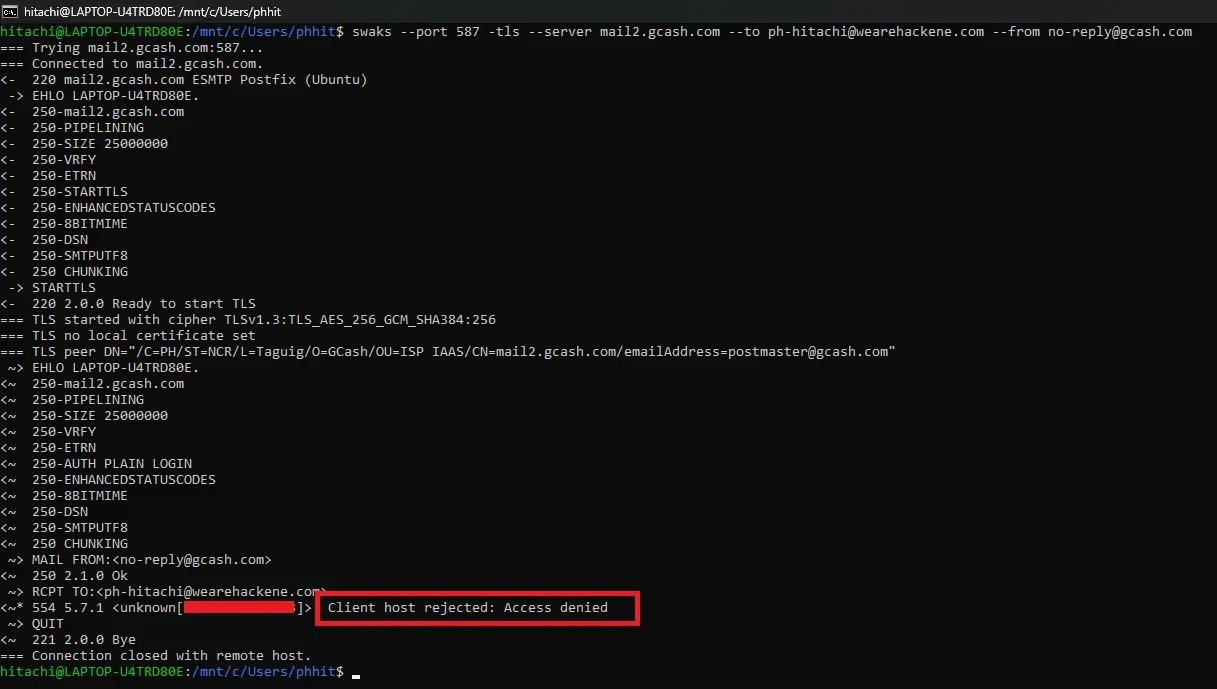
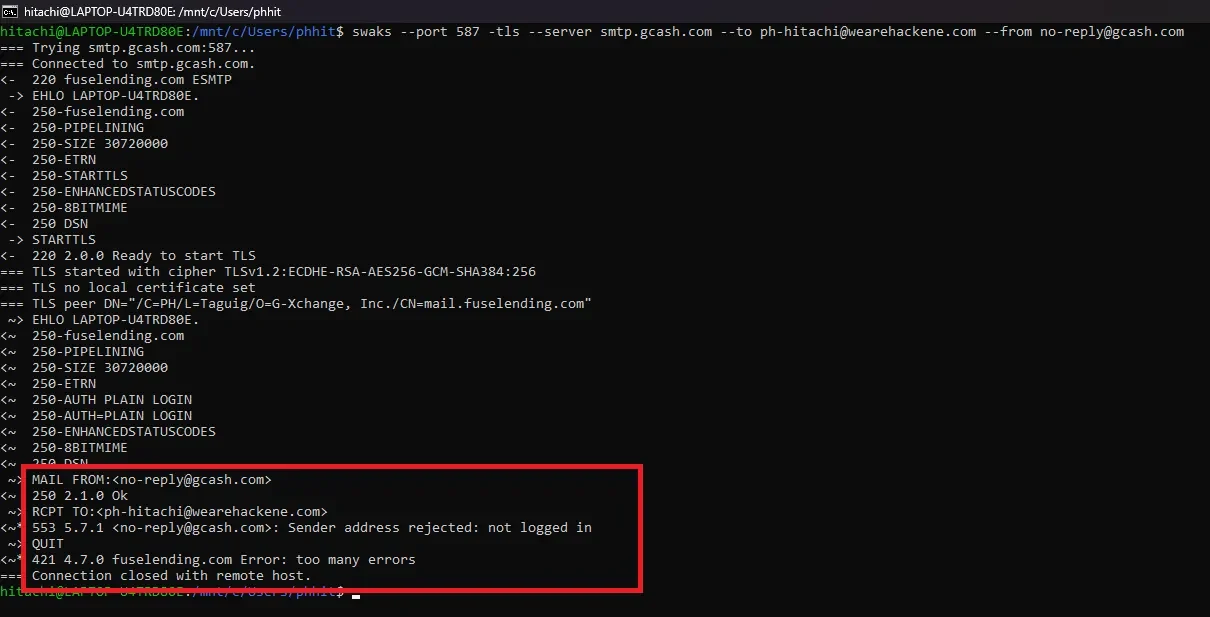
In this case the service was configured correctly: open ports do not mean exploitable, so the author stresses testing before reporting. A second example of a non-vulnerable result:

Root cause
The database credentials were exposed because of misconfiguration. The author does not describe the file or endpoint that held them, only that the custom nuclei configuration surfaced them where gobuster and dirsearch had not. The author also remarks that he is not sure about the credentials: the port was only open on Docker, so without access to the local network the finding could not be escalated.
Impact
The author remarks that the credentials were of uncertain value, since the port was only open on Docker and could not be escalated without local network access. In this case the author states the relevant port was only open on Docker and could not be escalated without local network access, which limits the practical impact. The report does not describe the database contents or the number of records reachable.
Fix
The report does not describe the fix that was applied. The timeline records the finding as fixed on March 27, 2024.
Outcome and timeline
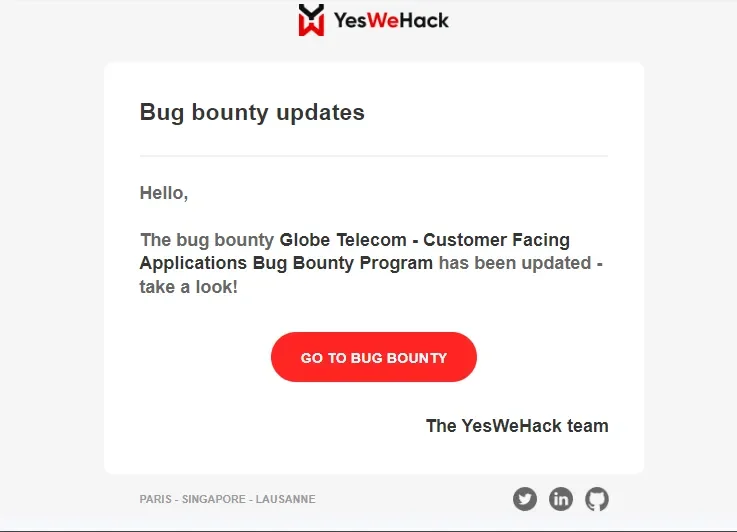
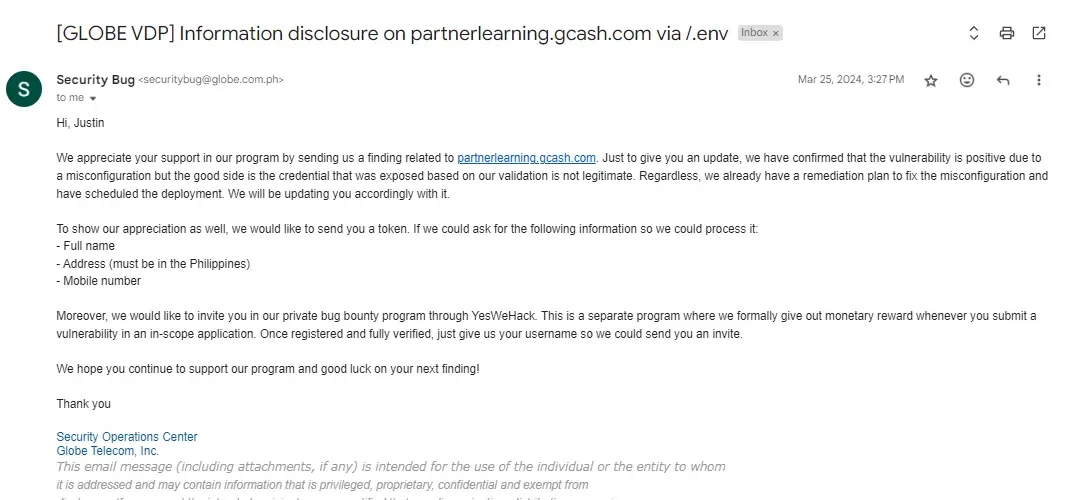
After finding multiple vulnerabilities, the author reported them, received acknowledgement, and was invited to the YesWeHack programme as a private bug bounty programme separate from the VDP channel. Only the BBP carries a monetary reward; the VDP gives tokens or swag as appreciation.
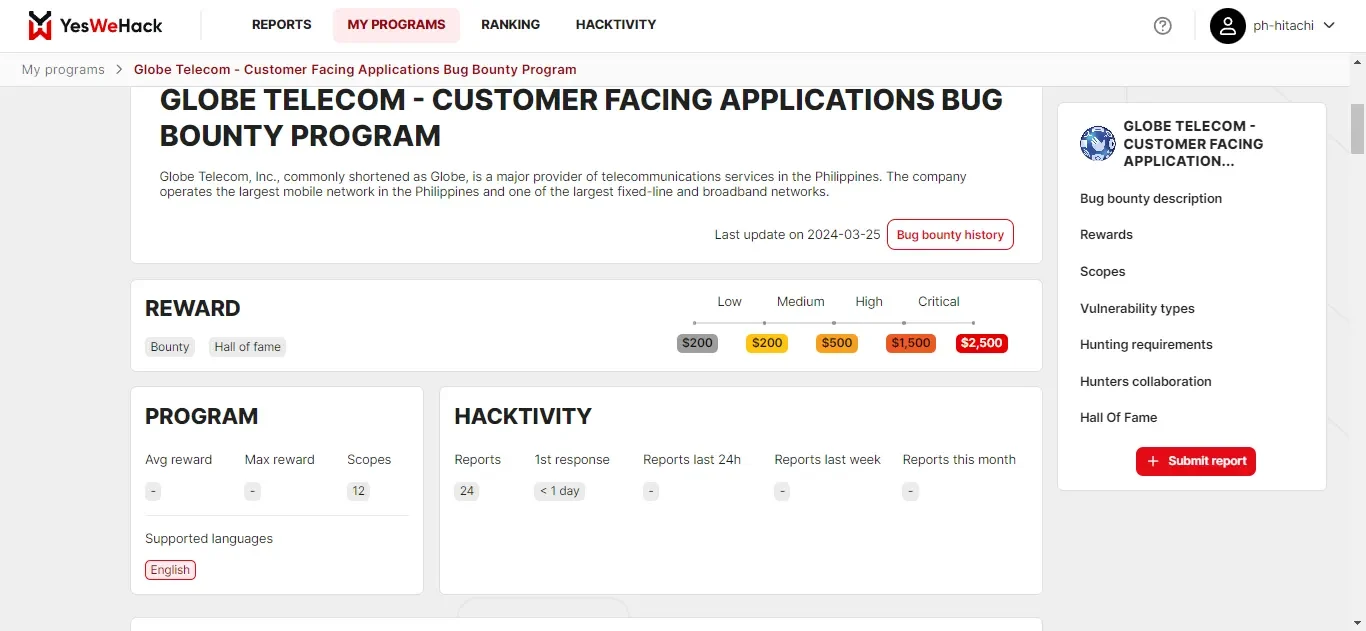
- March 16, 2024: VDP announced
- March 17, 2024: initial report
- March 25, 2024: triaged
- March 27, 2024: fixed
For endpoint and path recon the author points readers to an article by Khaledyassen on finding multiple XSS vulnerabilities with unknown techniques.
Variants to test
- Run the same custom nuclei configuration against other programmes' live hosts, with tags for config, exposure, disclosure and file. A positive result is a template hit containing credentials, tokens or keys in a configuration file or compiled asset.
- Compare nuclei results with directory brute force. Where gobuster and dirsearch return nothing, a template-driven scan may still surface a sensitive file; a positive result is a path that returns configuration content.
- Filter S3 buckets from httpx output and test each with
aws s3 ls --no-sign-request. A positive result is a bucket listing without credentials. - Run naabu in passive mode and inspect SMTP ports with SSL or TLS. A positive result is a mail service that accepts spoofed mail in a self-test with swaks; a correctly configured service will reject it.
- Run the scan from a VPS with Docker so long mass scans continue in the background, and scope templates by the technologies httpx and Wappalyzer mapping reveal.
Contact details in the original report have been omitted here.
What happened, in plain words
A security researcher spent some time looking at GCash, a payments app run by Globe Telecom in the Philippines. GCash runs a vulnerability disclosure programme, usually shortened to VDP. A VDP is a public invitation: if you find a security problem in our systems, tell us, and we will say thank you. It is not the same as a bug bounty programme (BBP), where the company pays money for good reports. On a VDP you usually get a token of appreciation or some branded merchandise instead of cash.
The researcher did not start by guessing passwords or attacking anything directly. He started by drawing a map of everything GCash has on the internet: every subdomain, every server, every technology in use, every open network port. This map-making phase is called reconnaissance, or recon. Once the map existed, he ran an automated scanner over it, and the scanner found database credentials exposed through misconfiguration. A database is the place where an application keeps its data, and its credentials are the keys to that place.
The interesting part is that ordinary directory-guessing tools had already been tried on the same target and found nothing. The automated scanner, pointed at the right places, did. The researcher reported what he found, the company acknowledged it, and invited him to a private bug bounty programme separate from the VDP channel.
This article walks through exactly how that happened, in the same order the researcher did it, explaining every tool and every idea from scratch. You only need to be comfortable using a computer and a browser to follow along.
The idea: recon scoping
Before touching any tool, it helps to understand what the researcher means by recon scoping. He describes it as the first phase of any security assessment. The goal is to identify and gather information about the target's systems, networks and infrastructure, so that you understand the size and shape of what you are allowed to test, and so that later steps can be aimed at the right places instead of fired blindly.
An everyday comparison: imagine you have been asked to check a large office building for fire hazards. You would not start by opening random doors. You would first get the floor plan, find out how many floors there are, which rooms exist, where the electrical cupboards are, and which doors are locked. That plan is your recon. Only then do you walk around with a checklist. Recon scoping is the same idea for computer systems: first the map, then the inspection.
Setting up folders
The researcher keeps his work tidy by giving each category of data its own folder on his own computer. He creates them with one command:
mkdir -p gcash.com ~/recon/targets/gcash.com/subdomains/mkdir -p gcash.com ~/recon/targets/gcash.com/endpoints/mkdir -p gcash.com ~/recon/targets/gcash.com/aws/mkdir -p gcash.com ~/recon/targets/gcash.com/dns/
Line by line, in plain words:
mkdirmeans "make directory", the command that creates a folder.-ptells it to create any missing parent folders along the way, and not to complain if the folder already exists.~/recon/targets/gcash.com/subdomains/is a path. The tilde~is shorthand for your home folder, so this means "a folder called recon, inside it targets, inside that gcash.com, inside that subdomains".- The same pattern repeats for
endpoints/,aws/anddns/, one folder per category of information.
Why bother? Because a recon run produces many files, and mixing them up makes it impossible to know later which file came from which tool. Separate folders mean each tool writes to a predictable place.
The overall workflow has three stages, and the rest of the article follows them in order:
- Subdomain enumeration
- Information gathering (network, DNS, technology, ports)
- Automated testing
Stage 1: finding subdomains
A domain is a name like gcash.com. A subdomain is a name that sits in front of it, like login.gcash.com or api.gcash.com. Companies use subdomains to separate services: the public website on one, the login page on another, an internal tool on a third. Each subdomain can point to a completely different server with completely different software. That is why finding subdomains matters so much: every subdomain you discover is a new front door to look at, and forgotten ones are often the weakest.
The researcher lists five tools he uses for this, each with a different trick:
| Tool | What it does, as described |
|---|---|
| subfinder | passive and active methods |
| assetfinder | certificate transparency logs |
| alterx | dynamic and permutation/alterations |
| asnmap | map ASN and find subdomains |
| ffuf | find subdomains on vhosts |
He adds an important note: not every method works on every target, every time. The ones shown are simply the ones he reaches for most often. That is honest and worth remembering: recon is a pile of overlapping techniques, not a single magic command.
Method 1: subfinder
# passive & active subdomain enumation using subfindersubfinder -d gcash.com -o ~/recon/targets/gcash.com/subdomains/subfinder.txt
subfinderis the tool being run.-d gcash.comsays which domain to investigate.-o ...says where to save the output, here a file calledsubfinder.txtin the subdomains folder.
Subfinder works in two ways. "Passive" means it asks other sources what they already know about the domain, without touching the company's servers at all. "Active" means it makes its own queries to find names. Passive methods are quieter and less likely to be noticed; active methods can find more.
Method 2: assetfinder
# subdomain enumeration via certificate transparency logs with assetfinderassetfinder --subs-only gcash.com >> ~/recon/targets/gcash.com/subdomains/assetfinder.txt
assetfinderis the tool.--subs-onlytells it to return only subdomains, not other kinds of related names.gcash.comis the target.>>means "append to this file" rather than overwrite it.
This tool relies on certificate transparency logs. When a website wants a security certificate (the padlock in your browser), the certificate authority must publish that fact in a public, permanent log. Those logs are searchable, and they contain the names of the sites that requested certificates. So a company that quietly sets up internal-test.gcash.com will usually leak that name into a public log the moment it gets a certificate. Assetfinder reads those logs for you.
Method 3: alterx, generating new names
# dynamic subdomain enumeration with alterxecho gcash.com | alterx -enrich | dnsx > ~/recon/targets/gcash.com/subdomains/alterx-dynamic.txt# for high chance to find subdomain # you can generate patterns based on existing subdomainssubfinder -d tesla.com | alterx | dnsx
echo gcash.comsimply prints the wordgcash.com.- The vertical bar
|is a pipe: it takes the output of the command on the left and feeds it as input to the command on the right. Think of it as passing a bucket along a line of workers. alterx -enrichtakes names and generates variations of them, adding common prefixes and suffixes.dnsxthen checks which of those generated names actually exist in the DNS, the internet's phone book that translates names into addresses.>saves the result to a file.
The second part of the block is a note to himself: you can feed alterx a list of subdomains you already found (the example uses tesla.com) and it will build patterns from them, which raises the chance of guessing real names.
Why generate names at all? Because companies follow habits. If dev.gcash.com exists, then staging.gcash.com, test.gcash.com and dev-api.gcash.com probably do too.
Method 4: alterx with a wordlist
# subdomain enumaration via Permutation/Alterations with alterxecho gcash.com | alterx -pp 'word=subdomains-top1million-50000.txt' | dnsx > ~/recon/targets/gcash.com/subdomains/alterx-permutation.txt
-pp 'word=subdomains-top1million-50000.txt'points alterx at a wordlist, a plain text file full of common subdomain words.- The rest is the same pipe: generate candidates, resolve them with dnsx, save the survivors.
A wordlist is exactly what it sounds like: a long list of likely words. Trying them all is brute force, and it works because people are predictable.
Method 5: asnmap
# subdomain enumeration via ASMappingasnmap -d gcash.com | dnsx -silent -resp-only -ptr > ~/recon/targets/gcash.com/subdomains/dnsx.txt
asnmap -d gcash.commaps the domain to its ASN, an Autonomous System Number. An ASN is a number that identifies a block of internet addresses owned or rented by one organisation. It is like a postcode district for the internet.dnsx -silent -resp-only -ptrthen looks up the reverse records (PTR records) for those addresses. A PTR record answers the question "which name belongs to this address?", the reverse of the usual lookup.-silenthides extra noise,-resp-onlyprints only the answers.
Why this matters: if you know every address block a company owns, you can ask the internet what names live there, and you may find subdomains that no other method reveals.
Method 6: ffuf for virtual hosts
# subdomain enumeration via vhostcat subdomains-top1million-50000.txt | ffuf -w -:FUZZ -u http://gcash.com/ -H 'Host: FUZZ.gcash.com' -ac
cat subdomains-top1million-50000.txtprints the wordlist.ffufis a fuzzing tool: it takes a list of guesses and tries each one automatically.-w -:FUZZsays "read the wordlist from the pipe, and wherever you see the word FUZZ, substitute the next guess".-u http://gcash.com/is the address being contacted.-H 'Host: FUZZ.gcash.com'sets the Host header. The Host header is a small piece of text your browser sends with every request to say which site it wants. One server can host many sites, and it decides which one to serve by reading this header.-acturns on automatic calibration, which helps ffuf tell a real hit apart from a generic "not found" page.
This technique finds virtual hosts: several websites sharing one server address, distinguished only by the name in the Host header. Without this trick you would never see them.
Merging the results
After running several tools you will have the same subdomain written down many times. The researcher merges everything and removes duplicates:
# Merging subdomains from ~/recon/targets/gcash.com/subdomains/* into one file and remove duplicatescat ~/recon/targets/gcash.com/subdomains/*.txt | anew ~/recon/targets/gcash.com/subdomains/subdomains.txt
cat ~/recon/targets/gcash.com/subdomains/*.txtprints the contents of every.txtfile in that folder. The star*is a wildcard meaning "all files matching this pattern".anewis a small tool whose only job is to add lines to a file while skipping any line that is already there.
Why: duplicates waste time. Every later stage will process this list, so a clean list means faster scans and clearer results.
Checking which subdomains are alive
A name in a list does not mean a working website. The researcher probes each one with httpx:
# Probe for live HTTP/HTTPS serverscat ~/recon/targets/gcash.com/subdomains/subdomains.txt | httpx -o ~/recon/targets/gcash.com/subdomains/httpx.txt
catprints the merged list.httpxtries to contact each name over HTTP and HTTPS, the two protocols browsers use to fetch web pages.-osaves the ones that answered tohttpx.txt.
This is the difference between a name in a phone book and a phone that someone actually picks up. Only the live ones are worth further work.
Stage 2: information gathering
Now that there is a list of live sites, the researcher runs httpx again, this time to learn what each site is built from. He uses Wappalyzer mapping techniques, which means fingerprinting: looking at clues a website gives off (file names, headers, page structure) to guess which technologies it uses, such as a particular web framework, a content delivery network, or a cloud provider.
The screenshot follows this step. This matters because the next stage is automated testing, and knowing what software a site runs tells you which tests are worth running. Testing a WordPress site for Docker problems is a waste of everyone's time.
Stage 3: automated testing with nuclei
Nuclei is the scanner at the heart of this story. The researcher quotes the project's own description: it sends requests across targets based on a template, aims for zero false positives, and scans quickly across many hosts. It supports many protocols, including TCP, DNS, HTTP, SSL, File, Whois, Websocket, Headless and Code, and its templating system can model all kinds of security checks.
In plain words: a template is a recipe. Each recipe says "send this kind of request, and if you see this kind of answer, report a finding". Nuclei comes with thousands of recipes written by the community, and you can write your own. Running nuclei is like handing a huge checklist to a very fast, very tireless inspector.
He scans all the live subdomains with his own configuration file:
cat ~/recon/targets/gcash.com/subdomains/httpx.txt | nuclei -config ~/nuclei-templates/config/custom.yml
catprints the list of live hosts.nucleireceives them through the pipe.-config ~/nuclei-templates/config/custom.ymltells nuclei to use his custom settings file instead of the defaults.
The custom configuration
# nuclei -config ~/nuclei-templates/config/custom.yml -list target_list_to_scan.txtseverity: - critical - high - medium - lowtype: - http - tcp - javascriptinclude-tags: - generic - config - misconfig - exposures - exposure - disclosure - file - logs - traversal - xss - lfi - crlf - cache - takeovers - wordpressexclude-tags: - tech - dos - fuzz - creds-stuffing - token-spray - osint - headers # exlude finding missing HTTP security headers
Line by line:
severitylists which seriousness levels to run: critical, high, medium and low. Severity is a rough label for how bad a problem would be if real.typelimits the kinds of templates:http(normal web requests),tcp(raw network connections) andjavascript(checks that read JavaScript files).include-tagsis the interesting part. Tags are labels attached to templates. By includingconfig,misconfig,exposures,disclosureandfile, he is saying: only run recipes that look for exposed configuration, misconfigured services, leaked files and similar. The other tags (xss,lfi,crlf,takeovers,wordpressand so on) widen the net to common web bug classes.exclude-tagsremoves things he does not want:tech(technology detection, already done),dos(denial of service, which could harm the target),fuzz(noisy guessing),creds-stuffingandtoken-spray(password-guessing attacks, which are not appropriate here),osint(open-source intelligence gathering) andheaders(complaints about missing security headers, which are usually low value).
Why customise at all? Because a default scan is broad and slow. Scoping the templates to the kinds of problems that matter for this target makes the scan faster and the results cleaner. This is the "scoping" from the title in action.
The finding
After the scan finished, the researcher reviewed the results and found database credentials exposed through misconfiguration.
The screenshot follows the scan results. Database credentials are the username and password used to log in to a database. If an application leaves them somewhere exposed, anyone who finds them can try to use them.
The researcher notes something striking: gobuster and dirsearch, two well-known tools that guess file and folder names on a website, had not found this during earlier attempts.
He adds practical notes about mass scanning. It can take hours, depending on how many domains you scan, how many templates you run and how fast your internet connection is. That is exactly why scoping based on what you learned earlier matters. He also says there is nothing wrong with scanning everywhere to find valid bugs, so the two approaches are not in conflict.
To make long scans practical, he runs nuclei inside a private VPS using Docker. A VPS is a virtual private server: a computer you rent in a data centre, which runs all the time whether your own laptop is on or not. Docker is a way of packaging software so it runs the same way anywhere. The result: the scan continues in the background while he does other things or sleeps, and the VPS usually has more bandwidth than a home connection.
Stage 4: checking cloud storage buckets
Because the httpx output showed the target uses AWS (Amazon Web Services, a large cloud provider), the next step looks for S3 buckets. An S3 bucket is cloud storage, like a folder in the sky, used to hold files. Buckets are sometimes left open to the public by mistake, and when they are, anyone can list and download what is inside.
#filter s3 buckets and save to ~/recon/targets/gcash.com/aws/butcket.txtcat ~/recon/targets/gcash.com/subdomains/httpx.txt | \nuclei -t technologies/aws/aws-bucket-service.yaml | \awk -F’://’ ‘{print $2}’ | \awk -F’/’ ‘{print $1}’ > ~/recon/targets/gcash.com/aws/butcket.txt
catprints the live hosts.nuclei -t technologies/aws/aws-bucket-service.yamlruns one specific template that detects AWS bucket usage.- The backslash
\at the end of a line means "this command continues on the next line", used only to keep it readable. awk -F'://' '{print $2}'splits each line at://and keeps the second part. Sohttps://example.s3.amazonaws.com/pathbecomesexample.s3.amazonaws.com/path.awk -F'/' '{print $1}'then splits at the slash and keeps the first part, leaving just the hostname.>saves the result to a file.
Two small text-processing steps turn messy URLs into clean hostnames, which is what the next command needs.
The screenshot follows the bucket filtering step.
Next, each candidate is tested to see whether it can be listed without any login:
# save open buckets as open_buckets.txt from ~/recon/targets/gcash.com/aws/butcket.txtcat ~/recon/targets/gcash.com/aws/butcket.txt | \xargs -I {} sh -c ‘if aws s3 ls “s3://{}” — no-sign-request 2>/dev/null; \then echo “{}” >> ~/recon/targets/gcash.com/aws/open_buckets.txt; \fi’
catprints the candidate list.xargs -I {}takes each line and runs a command with that line substituted wherever{}appears.sh -c '...'runs a small shell script for each line.aws s3 ls "s3://{}" --no-sign-requestasks AWS to list the contents of the bucket. The--no-sign-requestflag means "do not send any credentials". If the bucket is private, AWS refuses. If it is open, AWS lists the files.2>/dev/nullthrows away error messages, so only successes matter.if ... then echo "{}" >> ... fimeans: if the listing worked, append the bucket name toopen_buckets.txt.
Why this design? Because it tests many buckets automatically and records only the ones that answered without credentials. Those are the ones worth a closer look.
The screenshot follows the open bucket check.
Stage 5: port scanning
A port is a numbered doorway on a server. One server can run many services, each listening on its own port: web pages usually on 80 and 443, email on 25, 465 or 587, and so on. Port scanning means knocking on each doorway to see which ones answer.
The researcher uses naabu, which enumerates valid ports for hosts quickly and reliably:
# scan all open ports except on port 80 & 443cat ~/recon/targets/gcash.com/subdomains/subdomains.txt | naabu --passive
catprints the subdomain list.naabu --passivescans for open ports using passive techniques, which means it relies on outside sources rather than hammering the target directly.
The screenshot follows the port scan.
Stage 6: looking at email ports
After the port scan, the researcher looks for ports that might be exploitable. In his case he always checks SMTP ports that use SSL or TLS. SMTP is the protocol for sending email; SSL and TLS are the encryption layers that protect it. If a mail server is misconfigured, it may accept email that claims to come from someone it did not come from. That is email spoofing: sending a message that looks like it was sent by someone else.
When he finds such ports, he tests spoofing against himself with swaks, a command-line tool for sending test email, to produce a proof of concept. A proof of concept, or PoC, is a small demonstration that proves a problem is real, without doing harm.
The screenshots follow the SMTP port discussion.
In this case the service was configured correctly. The researcher stresses the lesson: open ports do not mean exploitable. A doorway being open does not mean the lock is broken. Always test before you report, or you will send a report that turns out to be nothing.
He gives a second example of a result that looked interesting but was not vulnerable:
What caused it, and what it meant
The database credentials were exposed because of misconfiguration. The researcher does not describe which file or address held them, only that his custom nuclei configuration surfaced them where gobuster and dirsearch had not.
He also remarks that he is not sure about the credentials. The relevant port was only open on Docker, so without access to the local network the finding could not be escalated. In plain words: he had found keys, but the door they opened was not reachable from the outside, so he could not walk through it. That limits the practical impact. The report does not describe the database contents or how many records were reachable.
The fix
The timeline records the finding as fixed on March 27, 2024.
Outcome and timeline
After finding multiple vulnerabilities, the researcher reported them, received acknowledgement, and was invited to the YesWeHack programme as a private bug bounty programme separate from the VDP channel. Only the BBP carries a monetary reward; the VDP gives tokens or swag as appreciation.
The screenshots follow the outcome.
- March 16, 2024: VDP announced
- March 17, 2024: initial report
- March 25, 2024: triaged
- March 27, 2024: fixed
"Triaged" means the company looked at the report, confirmed it was real, and put it in the queue to be fixed.
For endpoint and path recon, the researcher points readers to an article by Khaledyassen on finding multiple XSS vulnerabilities with unknown techniques.
Things you could try yourself
- Run the same custom nuclei configuration against other programmes' live hosts, with tags for config, exposure, disclosure and file. A positive result is a template hit containing credentials, tokens or keys in a configuration file or compiled asset.
- Compare nuclei results with directory brute force. Where gobuster and dirsearch return nothing, a template-driven scan may still surface a sensitive file; a positive result is a path that returns configuration content.
- Filter S3 buckets from httpx output and test each with
aws s3 ls --no-sign-request. A positive result is a bucket listing without credentials. - Run naabu in passive mode and inspect SMTP ports with SSL or TLS. A positive result is a mail service that accepts spoofed mail in a self-test with swaks; a correctly configured service will reject it.
- Run the scan from a VPS with Docker so long mass scans continue in the background, and scope templates by the technologies httpx and Wappalyzer mapping reveal.
Glossary
- ASN (Autonomous System Number): a number identifying a block of internet addresses owned or rented by one organisation.
- AWS (Amazon Web Services): a large cloud provider that rents out computing and storage.
- BBP (bug bounty programme): a programme that pays money for valid security reports.
- Bucket (S3 bucket): a storage folder in Amazon's cloud, which can be public or private.
- Certificate transparency log: a public, permanent record of every security certificate issued, searchable by anyone.
- Configuration file: a file that holds settings for a program, sometimes including passwords or keys.
- Credentials: a username and password (or similar) used to log in to something.
- Database: the place where an application stores its data.
- Directory brute force: automatically trying a long list of common file and folder names on a website.
- DNS: the internet's phone book, translating names into addresses.
- Docker: a way of packaging software so it runs the same way on any machine.
- Domain: a name like
gcash.comthat identifies a site on the internet. - Email spoofing: sending email that appears to come from someone else.
- Endpoint: a specific address or path on a server that an application responds to.
- Fuzzing: automatically trying many inputs to see how a system reacts.
- Host header: a piece of text sent with every web request saying which site the browser wants.
- HTTP / HTTPS: the protocols browsers use to fetch web pages; HTTPS is the encrypted version.
- Misconfiguration: a setting left wrong, often exposing data by accident.
- Nuclei: an automated scanner that runs templates against targets.
- Passive scanning: gathering information from outside sources without directly touching the target.
- Port: a numbered doorway on a server where a service listens.
- Proof of concept (PoC): a small demonstration that proves a problem is real.
- PTR record: a DNS record that maps an address back to a name.
- Recon (reconnaissance): the phase of gathering information about a target before testing it.
- Recon scoping: deciding what to test and where, based on the information gathered.
- Severity: a rough label for how serious a problem would be.
- SMTP: the protocol for sending email.
- SSL / TLS: encryption layers that protect network connections.
- Subdomain: a name in front of a domain, like
login.gcash.com, often pointing to a separate service. - Swaks: a command-line tool for sending test email.
- Tag (in nuclei): a label attached to a template, used to include or exclude groups of checks.
- Template (in nuclei): a recipe describing a request to send and an answer to look for.
- Triaged: reviewed and confirmed as a real issue by the receiving team.
- VDP (vulnerability disclosure programme): a public invitation to report security problems, usually rewarded with thanks or small gifts rather than money.
- Virtual host: one of several websites sharing a server address, told apart by the Host header.
- VPS (virtual private server): a rented computer in a data centre that runs all the time.
- Wappalyzer mapping: fingerprinting a website to guess which technologies it uses.
- Wordlist: a plain text file full of likely words, used for guessing.
- XSS (cross-site scripting): a class of web bug where an attacker gets their own code to run in someone else's browser.





