Yahoo luminate RCE
The Luminate SiteBuilder desktop application passed an unsanitised hyperlink URL into a command executed through cmd.exe, so a crafted link could run a local program. A separate SQL injection in the web application let an ordinary user obtain an authorised user's credentials and upload a malicious file, so an owner opening the page in SiteBuilder could be attacked.
 Published on sites.google.com
During my recon process, I landed on a website of Luminate where it was showcasing a SiteBuilder software that they had built. With this software, admins & owners could download the source code of their website, edit it and then publish it.
The full write-up lives on its author's site
It belongs to its author, so we link to it rather than copy it. The other two tabs are our own rewrites, checked against it.
Context
Luminate was a Yahoo product that offered website hosting and building tools to its customers. During recon on Luminate's assets, the researcher landed on a site showcasing a SiteBuilder desktop application that Luminate had built. The feature it provided was straightforward: admins and owners of a hosted site could download the source code of their website, edit it locally, and publish it back, which removed the need to log in to Luminate, navigate to web hosting and edit files through the web interface.
The write-up covers a chain that starts in that desktop client and ends with code execution on the machine of whoever used it. It was found jointly with Joel Margolis, who is credited in the report.
Setup
The researcher downloaded the SiteBuilder .exe installer from the Luminate site and installed the program. At first it was not clear how the application ran, so the researcher brought Joel in to work on it together. No account details, versions or operating system builds are given in the report.
Finding it
The first step was breaking open the installer to see what it actually did. During installation the installer requests a .jnlp file, the extension used for Java Web Start programs. Once the program was installed, the team was able to grab the .jar version of it.
With the jar in hand they combined two approaches: source code analysis and UI testing. They decompiled the jar, read the source, formed hypotheses about vulnerabilities, and then confirmed each one through the UI. While reading the source, Joel pointed out a flaw in how hyperlinks were handled.
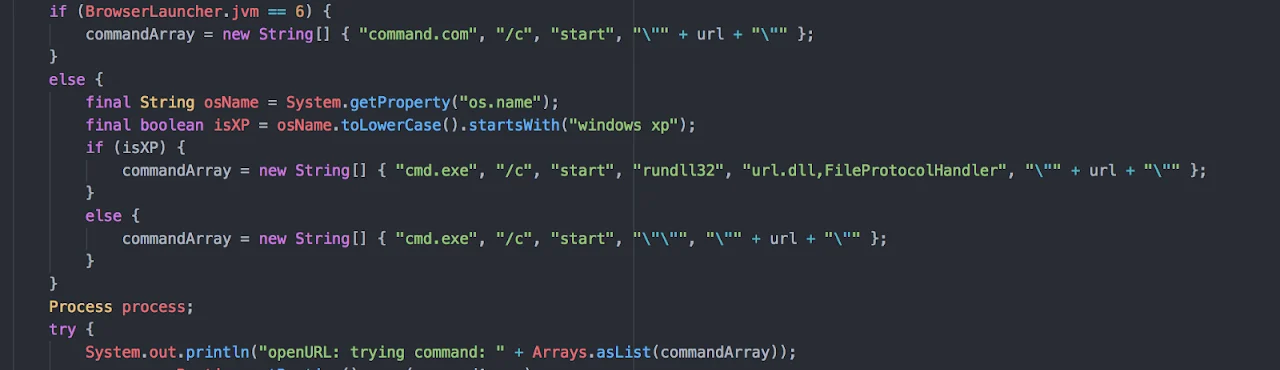
The feature in question is link preview. If a page contained a hyperlink and the owner, admin or user wanted to see where it led, they could preview it. The application loaded a web browser and showed the content of the link. Reading the code showed three things:
- When the link is clicked, the application makes a request to select which browser to open. If the browser is installed on the system, the request is processed.
- To send that request, the application sends a command through
cmd.exe, passing the URL along with it. - The
urlwas not sanitised, so a malicious link could be exploited easily. There were, however, some checks that had to be bypassed first.
Exploitation
Step 1: bypass the URL check
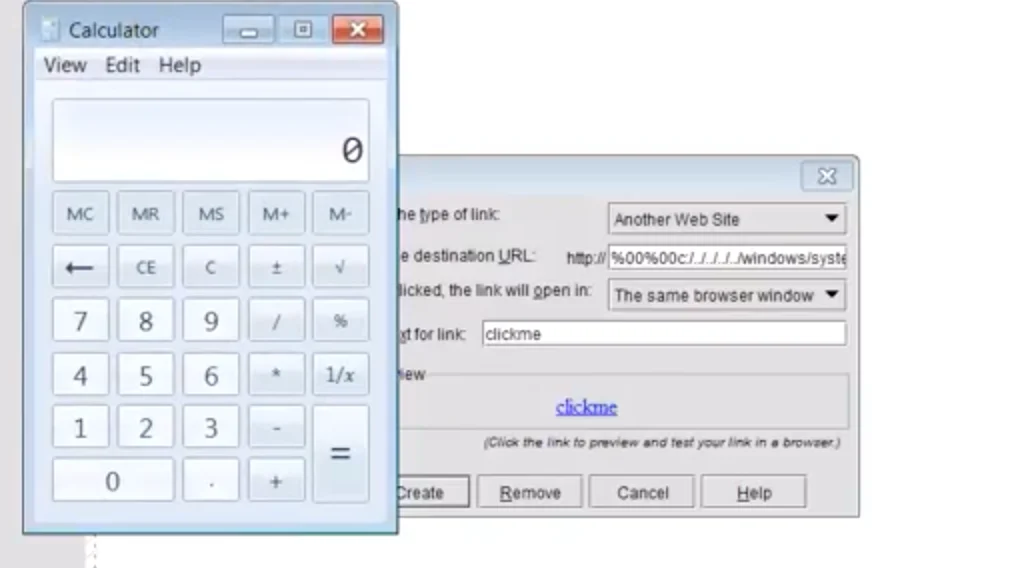
The application applied a simple regex to the link. Any link that did not follow the regular http://[domain.com] example was rejected. Joel found that inserting %00%00 got past it, which produced the following hyperlink:
https://%00%00c:/../../../../windows/system32/calc.exe
When that link was clicked, the calculator opened.
The report shows images at this point but does not describe them. The report does not include the vulnerable code itself, only the heading marking that section.
Step 2: widen the attack from admin to owner
As it stood, the attack required an admin or owner to place the malicious link and preview it. To improve the attack from admin->owner to random user->owner, the team tested Luminate's main website and found vulnerabilities in the web application and the tools it offered in general. Those would let another user grab admin privilege in the installed addons and upload the malicious file.
Step 3: from random user to owner
By default, Luminate gave websites additional features that were vulnerable to attacks such as SQL injection. In this case, SQL injection made it possible to dump a credential for the authorised user and then upload the malicious file. The result is that the payload fires every time an owner opens the site page in the SiteBuilder program.
The report does not include the injection point, the request, or the dumped credential.
Root cause
The core mistake is that the URL from a hyperlink was passed to a command executed through cmd.exe without sanitisation. The only defence was a regex that expected links to look like http://[domain.com], and that check was defeated by the %00%00 sequence. The report does not explain why the null bytes worked, so the exact parsing behaviour behind the bypass is not documented here.
The second half of the chain is a separate weakness: default features on Luminate-hosted sites were open to SQL injection, which allowed credential theft and then file upload into the installed addons.
Impact
An attacker who can get a crafted hyperlink in front of a SiteBuilder user can cause a local program such as the calculator to open when the link is previewed. Combined with the SQL injection and upload path, a random user could escalate to owner-level access in the installed addons and plant the malicious file, so the code execution triggers whenever an owner opens the site page in the program. The report does not state the bounty amount, CVSS score or the exact commands beyond the calculator example.
Fix
Variants to test
- Desktop clients that shell out to
cmd.exefor URLs. Look for preview, open-in-browser or help-link features in decompiled jars or installers. A positive result is a URL that reaches the command line unescaped and launches a local binary such as the calculator. - Regex-only URL validation. Try encoded null bytes, encoded newlines and other control characters before a local path, as in the
%00%00case here. A positive result is a link that fails the intendedhttp://[domain.com]shape but is still accepted. - Java Web Start installers. Pull the
.jnlpand the resulting.jar, decompile, and grep for process execution APIs. A positive result is any user-controlled string concatenated into a command. - Default features on hosted-site platforms. Test addons and tools shipped by default for SQL injection. A positive result is a dump of a credential belonging to an authorised user, which can then be used to upload a file into the addon.
Timeline
| Date | Event |
|---|---|
| 18 September 2017 | Reported to Luminate |
| 18 September 2017 | Report triage and initial bounty paid |
| 2 October 2017 | Information provided that escalated the issue from admin->owner to random_attacker->owner |
What happened, in plain words
A security researcher was looking at websites and tools that Yahoo's Luminate product offered to its customers. Luminate was a service that helped people build and host websites. While exploring, the researcher found a page advertising a desktop program called SiteBuilder. This program let a website owner download the files of their site, edit them on their own computer, and then upload the changes back, without having to log in to Luminate's web interface each time.
The researcher downloaded and installed this program. He then asked a colleague, Joel Margolis, to help investigate. Together they took the program apart, read its code, and found a way to make it open the Windows calculator when a specially crafted link was clicked. They also found a way for a random user to gain admin privilege in installed addons and upload the malicious file. This article explains, step by step, how they did it, for readers who are new to security.
Background: what is Luminate and SiteBuilder?
Luminate was a Yahoo product that provided website hosting and building tools. Customers could create and manage websites through it. One of its features was a desktop application called SiteBuilder. With SiteBuilder, an admin or owner of a hosted site could download the source code of their website, edit it locally on their computer, and then publish it back to the web. This saved them from having to log in to Luminate's website, go to the web hosting section, and edit files through a browser interface.
The researcher was doing reconnaissance, which means exploring a company's public systems to understand what they are and how they work, looking for weaknesses. During this, he found a page on a Luminate website that showcased the SiteBuilder software. He downloaded the installer (a file with the extension .exe, which is a program you run on Windows to install software) and installed it. At first he was not sure how the program worked internally, so he asked Joel to collaborate. The report does not give the version of the software, the operating system, or any account details.
Step 1: Taking the program apart
The first task was to understand what the installer actually did. The researcher "broke" the exe file, meaning he examined its contents and behaviour. During installation, the installer requested a file with the extension .jnlp. JNLP stands for Java Network Launch Protocol; it is a file format used to launch Java programs over the network, often called Java Web Start. In simple terms, it is a way to start a Java application from a web link. Once the program was installed, the team was able to obtain the .jar file, which is the packaged form of a Java program (similar to a .zip file containing code and resources).
With the jar file in hand, they used two approaches together: source code analysis and UI testing. Source code analysis means reading the program's code to find potential security flaws. UI testing means using the program's graphical interface to confirm that a flaw can actually be triggered. To read the code, they decompiled the jar, which means converting the compiled Java bytecode back into a form that humans can read (source code). They then looked for vulnerabilities and tested each one through the user interface.
While reading the source code, Joel noticed a problem in how the program handled hyperlinks (clickable links). The feature in question was link preview: if a page contained a hyperlink and the owner, admin, or user wanted to see where it led, they could preview it. The application would open a web browser and show the content of the link. Reading the code revealed three issues:
- When the link is clicked, the application makes a request to select which browser to open. If the browser is installed on the system, the request is processed.
- To send that request, the application sends a command through
cmd.exe, passing the URL along with it. - The
urlwas not sanitised, meaning that if a malicious link was present, it could be exploited easily. However, there were some checks that had to be bypassed first.
Let us explain these terms. cmd.exe is the Windows command prompt, a program that lets you run commands by typing them. When a program "shells out" to cmd.exe, it means it asks the command prompt to run a command on its behalf. Sanitisation is the process of cleaning input to remove anything dangerous. If a URL is not sanitised, it means the program takes whatever text is in the link and uses it without checking for harmful characters. A regex (regular expression) is a pattern used to match text; here, it was used to check that a link looked like a normal web address.
Step 2: Bypassing the URL check
The application applied a simple regex to the link. Any link that did not follow the regular http://[domain.com] example was rejected. In other words, the program expected links to start with http:// followed by a domain name. If the link did not match that pattern, it would not be allowed.
Joel found that inserting %00%00 got past this check. %00 is the URL-encoded form of a null byte, a character with value zero. In computing, a null byte is often used to mark the end of a string; some programs treat it as a terminator and ignore everything after it. By placing two null bytes after https://, the check may have been confused, but the report does not explain exactly why it worked. The resulting hyperlink was:
https://%00%00c:/../../../../windows/system32/calc.exe
When that link was clicked, the calculator opened. The two images below show the calculator launching after the crafted hyperlink is previewed.
The report does not include the vulnerable code itself, only the heading marking that section.
Step 3: Widening the attack from admin to owner
As it stood, the attack required an admin or owner to place the malicious link and preview it. To improve the attack from admin->owner to random user->owner, the team tested Luminate's main website and found vulnerabilities in the web application and the tools it offered in general. Those would let another user grab admin privilege in the installed addons and upload the malicious file.
In other words, the attacker needed a way to get the malicious link in front of an owner without the owner having to do anything unusual. By finding weaknesses in the main website, they could escalate from being a random user to having admin rights in the addons that were installed. Addons are extra features or plugins that extend the functionality of a website. With admin rights in those addons, an attacker could upload a file, such as the malicious link, that would then be used by the SiteBuilder program.
Step 4: From random user to owner
By default, Luminate gave websites additional features that were vulnerable to attacks such as SQL injection. SQL injection is a type of attack where an attacker inserts malicious SQL code into a query, tricking the database into revealing or modifying data. In this case, SQL injection made it possible to dump a credential for the authorised user and then upload the malicious file. A credential is information like a username and password that proves identity. Dumping a credential means extracting it from the database. With that credential, the attacker could upload the malicious file. The result is that the payload fires every time an owner opens the site page in the SiteBuilder program.
The report does not include the injection point, the request, or the dumped credential.
Root cause
The core mistake is that the URL from a hyperlink was passed to a command executed through cmd.exe without sanitisation. The only defence was a regex that expected links to look like http://[domain.com], and that check was defeated by the %00%00 sequence.
The second half of the chain is a separate weakness: default features on Luminate-hosted sites were open to SQL injection, which allowed credential theft and then file upload into the installed addons.
Impact
An attacker who can get a crafted hyperlink in front of a SiteBuilder user can cause a local program such as the calculator to open when the link is previewed. Combined with the SQL injection and upload path, a random user could escalate to owner-level access in the installed addons and plant the malicious file, so the code execution triggers whenever an owner opens the site page in the program.
Fix
Variants to test
- Desktop clients that shell out to
cmd.exefor URLs. Look for preview, open-in-browser or help-link features in decompiled jars or installers. A positive result is a URL that reaches the command line unescaped and launches a local binary such as the calculator. - Regex-only URL validation. Try encoded null bytes, encoded newlines and other control characters before a local path, as in the
%00%00case here. A positive result is a link that fails the intendedhttp://[domain.com]shape but is still accepted. - Java Web Start installers. Pull the
.jnlpand the resulting.jar, decompile, and grep for process execution APIs. A positive result is any user-controlled string concatenated into a command. - Default features on hosted-site platforms. Test addons and tools shipped by default for SQL injection. A positive result is a dump of a credential belonging to an authorised user, which can then be used to upload a file into the addon.
Timeline
| Date | Event |
|---|---|
| 18 September 2017 | Reported to Luminate |
| 18 September 2017 | Report triage and initial bounty paid |
| 2 October 2017 | Information provided that escalated the issue from admin->owner to random_attacker->owner |
Glossary
- API: Application Programming Interface; a set of rules that lets one program talk to another.
- Addon: An extra piece of software that adds features to a larger program.
- Bounty: A reward, often money, paid by a company to a security researcher who reports a vulnerability.
- cmd.exe: The Windows command prompt, a program that runs commands typed by the user.
- Credential: Information such as a username and password that proves identity.
- CVSS: Common Vulnerability Scoring System; a standard way to rate the severity of a security vulnerability.
- Decompile: To convert compiled code back into a human-readable form.
- Exe: A file extension for an executable program on Windows.
- Hyperlink: A clickable link that takes you to another page or resource.
- Jar: A Java Archive file; a package containing Java code and resources.
- JNLP: Java Network Launch Protocol; a file format used to launch Java programs over the network.
- Null byte: A character with value zero, often used to mark the end of a string; in URLs it is encoded as
%00. - Payload: The part of an attack that performs the malicious action.
- Recon: Reconnaissance; exploring a system to gather information about it.
- Regex: Regular expression; a pattern used to match text.
- RCE: Remote Code Execution; a vulnerability that lets an attacker run commands on a remote machine.
- Sanitise: To clean input by removing or escaping dangerous characters.
- SQL injection: A type of attack where malicious SQL code is inserted into a query to manipulate a database.
- UI: User Interface; the part of a program that the user interacts with.
- URL: Uniform Resource Locator; the address of a resource on the web.
- Vulnerability: A weakness in a system that can be exploited to cause harm.




