Extracting Clear-Text Credentials Directly From Chromium’s Memory
Chromium-based browsers keep passwords and session cookies in clear text in process memory, and a standard non-elevated local process can read that memory to recover them. An attacker with code running as the same user could steal credentials and session cookies, allowing account hijacking that bypasses MFA.
 Published on cyberark.com
This research was initiated accidentally. After “mini-dumping” all active Chrome.exe processes for another research project, I decided to see if a password that I recently typed in the browser appears in any of these dumps.
The full write-up lives on its author's site
It belongs to its author, so we link to it rather than copy it. The other two tabs are our own rewrites, checked against it.
Context
Chromium-based browsers keep a great deal of sensitive material in their process memory while they run: credentials typed into sign-in forms, records from the built-in password manager, and the cookies that keep a session alive. The research described here examines how that data is laid out in memory and whether a normal, non-elevated process on the same machine can pull it out in clear text.
The target is Chrome (with Microsoft Edge showing similar behaviour), and the work was reported to Google as a Chromium issue. The author, Zeev Ben Porat, frames the whole thing around the "assume breach" paradigm: if you accept that an attacker may already have a foothold on the endpoint, then the way Chromium-based browsers treat credential data in memory becomes a major security risk, and mitigation has to address all of those weaknesses rather than one.

Setup
The research started by accident. While "mini-dumping" all active chrome.exe processes for a different project, the author checked whether a password he had recently typed into the browser appeared in any of the dumps. It did, in clear text, at several separate locations across the memory of two of those processes. Similar issues had been reported before, for example in a 2015 blog post by Satyam Singh, but he was not aware of those reports at the time.
The main tool used to inspect memory was Process Hacker, written by Wen Jia Liu. The proof-of-concept programs were built against two Chrome versions:
| Stage | Chrome version |
|---|---|
| Initial POC program | 91.0.4472.164 |
| POC programs in the demo videos | 96.0.4664.45 |


The attack itself needs only a standard, non-privileged process running on the local machine, performing direct access to Chrome's memory through the OpenProcess and ReadProcessMemory APIs. No administrator rights are required.
Finding it
The first step was simply to confirm that a known string lands in memory. Process Hacker makes this quick:
- Open the target process in
ProcessHacker.exe. - Select the "Memory" option.
- Activate the "Strings" sub-option.
- Select the "Filter" option and key the string you are looking for in the "contains..." frame.
Looking for a known password (changed for the write-up) produced a hit:
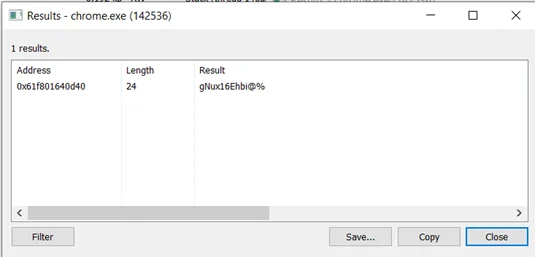
Returning to the memory layout shown under the "Memory" option places that string in a section of type Private:
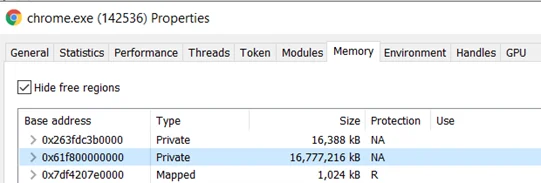
Looking deeper inside that chunk, the password sits in a section of type Private: Commit:
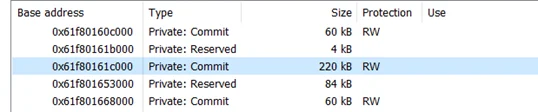
According to MSDN, Private memory (MEMORY_BASIC_INFORMATION with Type=MEM_PRIVATE) is defined as follows:

One might assume that data in such pages is inaccessible to other processes. In practice these pages cannot be part of shared memory, but other processes have no problem reading them via the ReadProcessMemory API. Process Hacker itself is the proof: it ran as a standard process and read the data without difficulty. If the pages were genuinely private, the attack vector described here would not exist, and the author wonders whether the Chromium creators at some point believed sensitive data was safe in Private memory.
The haystack problem
Finding a known string is trivial. The harder question is whether unknown sensitive strings can be located by looking only at process memory, without analysing the open-source code. The Chromium memory layout looks designed as a haystack, and the author also encountered what looked like honeypots created to generate false positives for clear-text passwords. The difficulties he lists are:
- A relatively large number of browser processes (for example several
chrome.exe). - Each process has a large quantity of virtual memory allocated, some with more than 230GB.
- Each process's memory is made up of many, sometimes hundreds, of disjointed small committed sections separated by reserved sections.
- Large composed sections that include many of those disjointed sections but are virtually empty, not really used.
- Strings, or substrings of real strings, that look like passwords or cookie values, whether intentionally or not.
- Items belonging to one logical record (URL + username + password) scattered across distanced memory locations.
It may all be the result of normal operation rather than deliberate obfuscation; the author did not read the code, but gives the developers credit for trying to hide sensitive data.
Exploitation
"Effectively" extracting clear-text credentials here means three things: a reasonable use of CPU and memory, completion in a reasonable time, and true positives that are not drowned out by false positives. The POC programs cover four data types. Source code and the critical functions are deliberately not published, for reasons covered under Fix.
Step 1: username and password typed into a targeted application
The program waits for the user to sign into a specific web application (Gmail, OneDrive, GitHub and so on), then analyses memory snapshots to identify the username and password used. It works like an effective key-logger, with one important difference: passwords already stored in the browser's password manager, which a key-logger that was not running at the time would miss, are also discovered.
The method is to compare snapshots taken before and immediately after sign-in and look for new strings that appear only in the "after" snapshots and that look like a username or password. This was the most complex POC in the research and produced a fair number of false positives, since many new strings appear after sign-in. Filtering is possible, for example by identifying common words that appear during the sign-in process, and can be improved with effort. Ironically, a stronger password is easier to separate from noise: a 10-character string mixing upper and lower case, digits and special signs is more likely to be a password than a seven-character lower-case string.
The corresponding demo is Demo 0-DynamicGmailPasswordCatch.
Step 2: credentials loaded automatically at browser startup
Some entries in the "Login Data" file, where Chromium stores saved passwords, are loaded into memory automatically when the browser starts. Not every entry is necessarily loaded, but the most recently used ones are. Those passwords are DPAPI-encrypted in the database, yet once scattered into memory they are stored in clear text.
Unlike step 1, a single set of snapshots is enough, because the loaded credential data stays statically in memory. The POC extracts it effectively and may produce a small number of false positives; the filtering algorithm can again be improved continuously.
The corresponding demo is Demo 1-AutoLoadedPasswords.
Step 3: every record in Login Data
It is possible to make the browser's Password Manager feature load all of its stored records into memory. The POC extracts all of them. In this case the sensitive data is arranged in a structure that is easy to recognise, so the program has high confidence in what it extracts and in most cases little to no false positives.
Credit for this goes to Anatoly Kardash, a senior director in CyberArk's R&D department, who drew attention to the fact that all saved password records are loaded into Chrome's memory in this case, and who also helped discover and analyse various Chromium memory layouts.
The corresponding demo is Demo 2-AllSavedPasswords.
Step 4: session cookies and hijacking
The program waits for the user to sign into a specific application. While the session is active, it extracts from Chrome's memory all cookies belonging to that session, including session cookies. Those cookies can be uploaded into a browser on a different machine and the session stolen, bypassing any MFA mechanism.
When stolen cookies are used this way, typical applications such as Gmail do not recognise that the connection comes from a new device or location, because the sign-in process is bypassed entirely. Based on the cookie contents, the application assumes a continuation of a previously authenticated session. Some applications actively encourage users not to sign out: Gmail's session cookies, for example, expire two years after they were first generated, and Microsoft OneDrive has recently started suggesting to web users that they need not sign out. An attacker who steals those cookies may share the account with its real owner for a very long time.
As in step 3, confidence is high and false positives are exceedingly rare. The demos are Demo 3-GmailSessionHijacking and Demo 4-OneDriveSessionHijacking.
Root cause
The weakness is in how Chromium-based browsers handle credential material in memory. Passwords that are DPAPI-encrypted at rest in the Login Data file are written into process memory in clear text, and cookie values and properties are likewise held in clear text while the relevant application is active. These pages are marked Private, but that only means they cannot be shared; it does not prevent another process from reading them with ReadProcessMemory.
Google's position, as quoted in the write-up, is that Chromium will not fix issues related to physical local attacks because "there is no way for Chrome (or any application) to defend against a malicious user who has managed to log into your device as you". The author accepts this is probably true in general, especially if the attacker can obtain administrator privileges, but argues it should not be so easy to steal credentials as it is today.
Impact
An attacker with a standard, non-elevated process on the victim's machine can recover, in clear text:
- the URL, username and password entered when signing into a targeted web application;
- the URL, username and password of recently used entries from the password manager, loaded at startup;
- all URL, username and password records stored in Login Data, once the Password Manager has been made to load them;
- all cookies belonging to an active application session, including session cookies.
The cookie theft defeats MFA, because the sign-in step is skipped entirely and the application treats the stolen cookies as a continuing session. The author says sample session hijacking was POC-ed for Gmail, OneDrive and GitHub. The same weaknesses were seen in Microsoft Edge and will presumably be found in other Chromium-based browsers. Gmail's session cookies, for example, have an expiration period of two years from the time they were first generated.
Fix
No fix was shipped. The report was sent to Google on July 29, 2021, including a detailed POC of Gmail session hijacking and the source code of the program that extracts cookies from Chrome's memory.

Chromium.org closed the issue with a WontFix status very quickly:

The author notes this is not very surprising, since similar responses have been received for other "assume breach" reports. Fourteen weeks later, Chromium made the report public:

Over time the author observed changes that may have been mitigation attempts:
- About one month after disclosure, his program failed to extract cookie data. The general memory layout had been modified, in Chrome as well as in Edge.
- He generalised the program to accommodate this and similar changes. Some two months later it failed again, this time because the location of the sensitive data had changed, again for Chrome and Edge simultaneously.
- After many months of successful cookie-stealing research, he found that for some cookies, apparently selected at random, elements of the cookie definition were scattered in memory like the Login credential elements.
Whether these were specific mitigations or part of a continuous effort to make memory access harder, they are weak, since generalising an accessing program for such modifications is simple.
The author's own recommendation is a mitigation method, to be described in his next blog post, that is general and protects against a wide range of attack techniques, including direct memory extraction. He also argues that all the weaknesses in how Chromium-based browsers treat sensitive credential data should be treated as a major security risk and mitigated together.
On disclosure of the POC: since the vulnerability is not planned to be fixed, publishing a POC or source code would not promote awareness but could cause harm or elevate related threats, so the POC was withheld. CyberArk may share the POC programs, including source code, with other security vendors and browser maintainers interested in improving how Chromium-based browsers handle credentials. The research and full POC details were shared with CrowdStrike, whose blog covers them, and the endpoint protection products of both companies were improved through that collaboration. The author thanks Emmanuel Ouanounou from the CyberArk Labs team for his support.
Variants to test
- Other Chromium-based browsers. Repeat the Process Hacker string search against any Chromium derivative. A positive result is a known password or cookie value appearing in a Private: Commit section readable by a non-elevated process.
- Other credential stores. Check whether other applications that decrypt secrets at rest keep the plaintext in readable process memory after use. A positive result is the decrypted value persisting in a private section after the operation completes.
- Startup-loaded records. Restart the browser and snapshot memory without signing in anywhere. A positive result is recently used Login Data entries appearing in clear text.
- Password Manager bulk load. Trigger the feature that loads all saved records and compare snapshots. A positive result is a recognisable structure containing every saved URL, username and password.
- Session cookie portability. Take cookies extracted from one machine's browser memory and load them into a browser elsewhere. A positive result is access to the account without any sign-in or MFA prompt, and no new-device or new-location warning from the application.
- Layout drift. Re-run an extraction program after browser updates. A positive result is that a small generalisation restores extraction, showing that layout changes alone are not a durable mitigation.
What happened, in plain words
When you use a web browser such as Chrome, the browser keeps a lot of information in its working memory while it runs. That includes the username and password you type into a sign-in form, the passwords the browser has saved for you, and the small files called cookies that keep you logged in to a website. This research looked at how that information sits in the browser's memory, and whether an ordinary program running on the same computer, with no special administrator rights, can pull it out and read it in plain text.
The answer was yes. The author, Zeev Ben Porat, found that passwords and cookies sit in Chrome's memory unencrypted, and that a normal program can read them. He built small demonstration programs (called proof-of-concept, or POC, programs) that pulled out credentials and cookies, and showed that stolen cookies could be used to take over a Gmail, OneDrive or GitHub account without knowing the password and without passing any two-factor check. He reported it to Google, which runs the Chromium project behind Chrome. Google closed the report as WontFix, meaning it would not be fixed, and later made the report public.
The author frames the whole thing around a way of thinking called "assume breach". It means: assume an attacker is already on the computer. If you accept that, then the way Chromium-based browsers handle credential data in memory becomes a major security risk, and any fix has to deal with all of those weaknesses, not just one.
The starting point
The research began by accident. The author was working on a different project and was "mini-dumping" all active chrome.exe processes. A memory dump is a copy of everything a running program currently holds in its working memory, saved to a file so it can be examined later. While doing that, he checked whether a password he had recently typed into the browser appeared in any of those dumps. It did, in clear text, in several separate places across the memory of two of those processes.
Similar issues had been reported before, for example in a 2015 blog post by Satyam Singh, but he did not know about those earlier reports at the time.
The main tool he used to look inside memory was Process Hacker, written by Wen Jia Liu. Process Hacker is a free utility that shows you the processes running on a Windows machine and lets you inspect their memory. The demonstration programs were built against two versions of Chrome:
| Stage | Chrome version |
|---|---|
| Initial POC program | 91.0.4472.164 |
| POC programs in the demo videos | 96.0.4664.45 |
The attack itself needs only a standard, non-privileged process running on the local machine. "Non-privileged" means it runs with the same rights as any normal program you start, not as an administrator. It reaches into Chrome's memory directly using two Windows functions, OpenProcess and ReadProcessMemory. An API, short for application programming interface, is simply a set of functions that one program can call to ask the operating system or another program to do something. OpenProcess asks Windows for a handle, a kind of permission slip, to a running process. ReadProcessMemory then uses that handle to copy bytes out of the other process's memory. No administrator rights are required for this.
Finding it
The first step was simply to confirm that a known string lands in memory. A string here means a piece of text, such as a password. Process Hacker makes this quick:
- Open the target process in
ProcessHacker.exe. - Select the "Memory" option.
- Activate the "Strings" sub-option.
- Select the "Filter" option and key the string you are looking for in the "contains..." frame.
If you already know a password that was typed in, you can search for it. If it shows up, you know the browser is holding it in readable form. The "Strings" view lists text found in memory, and the filter narrows that list to entries containing the text you supply.
Looking for a known password (changed for the write-up) produced a hit:
Returning to the memory layout shown under the "Memory" option places that string in a section of type Private:
Looking deeper inside that chunk, the password sits in a section of type Private: Commit:
Memory is divided into pages, and each page has a type. "Commit" means the page is actually backed by real memory and holds data, as opposed to being reserved but unused. According to MSDN, Microsoft's developer documentation, Private memory (MEMORY_BASIC_INFORMATION with Type=MEM_PRIVATE) is defined as follows:
You might assume that data in such pages cannot be read by other programs. In practice these pages cannot be part of shared memory, but other processes have no problem reading them via the ReadProcessMemory API. Process Hacker itself is the proof: it ran as a standard process and read the data without difficulty. If the pages were genuinely private, the attack described here would not exist. The author wonders whether the Chromium creators at some point believed sensitive data was safe in Private memory.
The haystack problem
Finding a known string is trivial. The harder question is whether unknown sensitive strings can be located by looking only at process memory, without analysing the open-source code. The Chromium memory layout looks designed as a haystack, meaning a large pile of data in which the interesting items are hard to spot. The author also encountered what looked like honeypots, decoy items placed to generate false positives. A false positive is a hit that looks like a password but is not one. The difficulties he lists are:
- A relatively large number of browser processes (for example several
chrome.exe). - Each process has a large quantity of virtual memory allocated, some with more than 230GB.
- Each process's memory is made up of many, sometimes hundreds, of disjointed small committed sections separated by reserved sections.
- Large composed sections that include many of those disjointed sections but are virtually empty, not really used.
- Strings, or substrings of real strings, that look like passwords or cookie values, whether intentionally or not.
- Items belonging to one logical record (URL + username + password) scattered across distanced memory locations.
A URL is the address of a web page, such as the address you see in the browser's address bar. A logical record here means the three pieces that belong together: which site, which username, which password. The point of listing all this is to explain why the problem is not as simple as it first looks. It may all be the result of normal operation rather than deliberate obfuscation. Obfuscation means deliberately making something hard to understand. The author did not read the code, but gives the developers credit for trying to hide sensitive data.
Exploitation
"Effectively" extracting clear-text credentials here means three things: a reasonable use of CPU and memory, completion in a reasonable time, and true positives that are not drowned out by false positives. A true positive is a real hit, an actual password or cookie. The POC programs cover four data types. Source code and the critical functions are deliberately not published, for reasons covered under Fix.
Step 1: username and password typed into a targeted application
The program waits for the user to sign into a specific web application (Gmail, OneDrive, GitHub and so on), then analyses memory snapshots to identify the username and password used. A snapshot is a copy of memory taken at one moment in time. It works like an effective key-logger, a program that records every key you press, with one important difference: passwords already stored in the browser's password manager, which a key-logger that was not running at the time would miss, are also discovered.
The method is to compare snapshots taken before and immediately after sign-in and look for new strings that appear only in the "after" snapshots and that look like a username or password. Anything new that appears right after sign-in is a candidate. This was the most complex POC in the research and produced a fair number of false positives, since many new strings appear after sign-in. Filtering is possible, for example by identifying common words that appear during the sign-in process, and can be improved with effort. Ironically, a stronger password is easier to separate from noise: a 10-character string mixing upper and lower case, digits and special signs is more likely to be a password than a seven-character lower-case string.
The corresponding demo is Demo 0-DynamicGmailPasswordCatch.
Step 2: credentials loaded automatically at browser startup
Some entries in the "Login Data" file, where Chromium stores saved passwords, are loaded into memory automatically when the browser starts. Not every entry is necessarily loaded, but the most recently used ones are. Those passwords are DPAPI-encrypted in the database, yet once scattered into memory they are stored in clear text. DPAPI, the Data Protection API, is a Windows feature that encrypts data so that only the same user account on the same machine can decrypt it. Encryption at rest means the data is scrambled while stored on disk. The point here is that the protection exists on disk but not in memory.
Unlike step 1, a single set of snapshots is enough, because the loaded credential data stays statically in memory. Statically here means the loaded data stays in memory, so one set of snapshots is enough. The POC extracts it effectively and may produce a small number of false positives; the filtering algorithm can again be improved continuously.
The corresponding demo is Demo 1-AutoLoadedPasswords.
Step 3: every record in Login Data
It is possible to make the browser's Password Manager feature load all of its stored records into memory. The POC extracts all of them. In this case the sensitive data is arranged in a structure that is easy to recognise, so the program has high confidence in what it extracts and in most cases little to no false positives. The report says the sensitive data is arranged in a structure that is easy to recognise.
Credit for this goes to Anatoly Kardash, a senior director in CyberArk's R&D department, who drew attention to the fact that all saved password records are loaded into Chrome's memory in this case, and who also helped discover and analyse various Chromium memory layouts.
The corresponding demo is Demo 2-AllSavedPasswords.
Step 4: session cookies and hijacking
The program waits for the user to sign into a specific application. While the session is active, it extracts from Chrome's memory all cookies belonging to that session, including session cookies. A cookie is a small piece of data a website asks the browser to store and send back with each request. A session cookie is the one that proves you are logged in, so the site does not ask for your password on every page. Those cookies can be uploaded into a browser on a different machine and the session stolen, bypassing any MFA mechanism. MFA, multi-factor authentication, is the extra check beyond a password, such as a code from your phone.
When stolen cookies are used this way, typical applications such as Gmail do not recognise that the connection comes from a new device or location, because the sign-in process is bypassed entirely. Based on the cookie contents, the application assumes a continuation of a previously authenticated session. Some applications actively encourage users not to sign out: Gmail's session cookies, for example, expire two years after they were first generated, and Microsoft OneDrive has recently started suggesting to web users that they need not sign out. An attacker who steals those cookies may share the account with its real owner for a very long time.
As in step 3, confidence is high and false positives are exceedingly rare. The demos are Demo 3-GmailSessionHijacking and Demo 4-OneDriveSessionHijacking.
Root cause
The weakness is in how Chromium-based browsers handle credential material in memory. Passwords that are DPAPI-encrypted at rest in the Login Data file are written into process memory in clear text, and cookie values and properties are likewise held in clear text while the relevant application is active. These pages are marked Private, but that only means they cannot be shared; it does not prevent another process from reading them with ReadProcessMemory. A same-user process is one running under your own Windows account, which is exactly what any program you start does.
Google's position, as quoted in the write-up, is that Chromium will not fix issues related to physical local attacks because "there is no way for Chrome (or any application) to defend against a malicious user who has managed to log into your device as you". The author accepts this is probably true in general, especially if the attacker can obtain administrator privileges, but argues it should not be so easy to steal credentials as it is today.
Impact
An attacker with a standard, non-elevated process on the victim's machine can recover, in clear text:
- the URL, username and password entered when signing into a targeted web application;
- the URL, username and password of recently used entries from the password manager, loaded at startup;
- all URL, username and password records stored in Login Data, once the Password Manager has been made to load them;
- all cookies belonging to an active application session, including session cookies.
The cookie theft defeats MFA, because the sign-in step is skipped entirely and the application treats the stolen cookies as a continuing session. The author says sample session hijacking was POC-ed for Gmail, OneDrive and GitHub. The same weaknesses were seen in Microsoft Edge and will presumably be found in other Chromium-based browsers. Gmail's session cookies, for example, have an expiration period of two years from the time they were first generated.
Fix
No fix was shipped. The report was sent to Google on July 29, 2021, including a detailed POC of Gmail session hijacking and the source code of the program that extracts cookies from Chrome's memory.
Chromium.org closed the issue with a WontFix status very quickly:
The author notes this is not very surprising, since similar responses have been received for other "assume breach" reports. Fourteen weeks later, Chromium made the report public:
Over time the author observed changes that may have been mitigation attempts:
- About one month after disclosure, his program failed to extract cookie data. The general memory layout had been modified, in Chrome as well as in Edge.
- He generalised the program to accommodate this and similar changes. Some two months later it failed again, this time because the location of the sensitive data had changed, again for Chrome and Edge simultaneously.
- After many months of successful cookie-stealing research, he found that for some cookies, apparently selected at random, elements of the cookie definition were scattered in memory like the Login credential elements.
Whether these were specific mitigations or part of a continuous effort to make memory access harder, they are weak, since generalising an accessing program for such modifications is simple. Generalising here means adjusting the program so it does not depend on one exact layout, and therefore keeps working when the layout shifts.
The author's own recommendation is a mitigation method, to be described in his next blog post, that is general and protects against a wide range of attack techniques, including direct memory extraction. He also argues that all the weaknesses in how Chromium-based browsers treat sensitive credential data should be treated as a major security risk and mitigated together.
On disclosure of the POC: since the vulnerability is not planned to be fixed, publishing a POC or source code would not promote awareness but could cause harm or elevate related threats, so the POC was withheld. CyberArk may share the POC programs, including source code, with other security vendors and browser maintainers interested in improving how Chromium-based browsers handle credentials. The research and full POC details were shared with CrowdStrike, whose blog covers them, and the endpoint protection products of both companies were improved through that collaboration. The author thanks Emmanuel Ouanounou from the CyberArk Labs team for his support.
Variants to test
These are ways to check whether the same weakness shows up elsewhere. Each one states what a positive result looks like, so you know what you are looking for.
- Other Chromium-based browsers. Repeat the Process Hacker string search against any Chromium derivative. A positive result is a known password or cookie value appearing in a Private: Commit section readable by a non-elevated process.
- Other credential stores. Check whether other applications that decrypt secrets at rest keep the plaintext in readable process memory after use. A positive result is the decrypted value persisting in a private section after the operation completes.
- Startup-loaded records. Restart the browser and snapshot memory without signing in anywhere. A positive result is recently used Login Data entries appearing in clear text.
- Password Manager bulk load. Trigger the feature that loads all saved records and compare snapshots. A positive result is a recognisable structure containing every saved URL, username and password.
- Session cookie portability. Take cookies extracted from one machine's browser memory and load them into a browser elsewhere. A positive result is access to the account without any sign-in or MFA prompt, and no new-device or new-location warning from the application.
- Layout drift. Re-run an extraction program after browser updates. A positive result is that a small generalisation restores extraction, showing that layout changes alone are not a durable mitigation.
Glossary
- API: a set of functions one program can call to ask the operating system or another program to do something.
- Assume breach: a way of thinking that starts from the assumption that an attacker is already on the machine.
- Chromium: the open-source browser project that Chrome and Edge are built on.
- Clear text: data stored or sent in readable form, not scrambled by encryption.
- Commit: a memory page state meaning the page is backed by real memory and holds data.
- Cookie: a small piece of data a website asks the browser to store and send back with each request.
- DPAPI: the Windows Data Protection API, which encrypts data so only the same user account on the same machine can decrypt it.
- Encryption at rest: scrambling data while it is stored on disk.
- False positive: a hit that looks like a password or cookie but is not one.
- Handle: a kind of permission slip the operating system gives a program to refer to another process.
- Honeypot: a decoy item placed to attract and mislead someone searching.
- Key-logger: a program that records every key you press.
- Login Data: the file where Chromium stores saved passwords.
- MFA: multi-factor authentication, an extra check beyond a password, such as a code from your phone.
- Memory dump: a copy of everything a running program currently holds in its working memory, saved to a file.
- MEM_PRIVATE: the memory type label meaning a page is private and cannot be shared.
- Mini-dump: a smaller memory dump, typically containing the most relevant parts of a process's memory.
- MSDN: Microsoft's developer documentation.
- Non-privileged / non-elevated: running with the same rights as any normal program, not as an administrator.
- Obfuscation: deliberately making something hard to understand.
- OpenProcess: a Windows function that asks for a handle to a running process.
- POC: proof of concept, a small program built to demonstrate that an attack works.
- Private memory: a memory page type that cannot be shared with other processes.
- Process: a running program.
- Process boundary: the separation between one running program and another.
- Process Hacker: a free Windows utility for inspecting running processes and their memory.
- ReadProcessMemory: a Windows function that copies bytes out of another process's memory.
- Reserved memory: memory that has been set aside but is not yet backed by real memory.
- Same-user process: a process running under your own Windows account.
- Session cookie: the cookie that proves you are logged in to a site.
- Session hijacking: taking over an already logged-in session by stealing its cookies.
- Snapshot: a copy of memory taken at one moment in time.
- String: a piece of text.
- True positive: a real hit, an actual password or cookie.
- URL: the address of a web page, as shown in the browser's address bar.
- Virtual memory: the address space a process sees, which may be larger than the physical memory installed.
- WontFix: the status a bug tracker uses when a report is closed without a fix.




