How I found a 5000 Google maps XSS by fiddling with protobuf
A Google Maps endpoint served binary map data with a text/html content type, and request fields allowed disabling encryption and compression while injecting arbitrary strings as map markers. An attacker could craft a URL that caused JavaScript to execute on the www.google.com domain.
 Published on medium.com
A few months ago, I used Google Maps. Or maybe Google Street View, I love Street View, it’s like a retrofuturistic way to teleport.
The full write-up lives on its author's site
It belongs to its author, so we link to it rather than copy it. The other two tabs are our own rewrites, checked against it.
Context
Google Maps stopped using plain query strings for its state sometime in 2014. Since then the address bar carries a mash of alphanumeric characters separated by exclamation points, with no public documentation. The same encoding shows up in the AJAX API requests the page makes, and some responses are images while others are a novel signature followed by cryptic binary data. That combination, an undocumented, reverse-engineerable protocol used by people every day, is what made the target interesting.
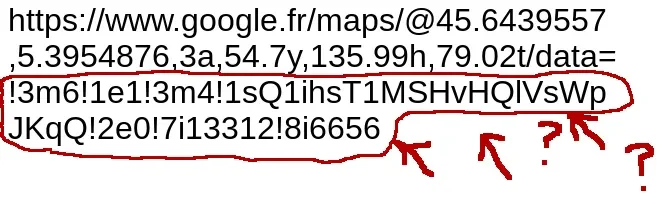
The Google Maps URL parameter format.
The page itself is about 3.2 MB of minified JavaScript. It renders 3D graphics with WebGL, uses large tiles, and implements request and display caching plus scheduling and planning modules in JavaScript. Google Maps loads about eight JavaScript files, some inside workers and through XMLHttpRequest, with line breaks only to separate modules. Modules are designated by two or three letter codes in the URLs, and the code is minified with Closure Compiler, which inlines functions and folds statements into conditional expressions separated by commas.
Setup
The tooling is a browser with a debugger and a scripting language that can talk to it. Chrome exposes a debugger API that powers its own developer tools, which are themselves HTML and browser JavaScript talking to that API over a WebSocket. Firefox, Safari and Edge have equivalents, but the report notes the API is not perfectly portable and uses Chrome's because it works a bit better. The first script is written in Python; the second uses Python with Qt.
Chrome is launched with the remote debugging flag:
--remote-debugging-port=<port number>
Connecting to that port gives an HTTP server. A request to the /json endpoint lists active tabs and the WebSocket URLs to connect to the debugger API for each. On the socket you exchange JSON request, response and event messages: a request has a constant ID and maps either to a response or an error, and events are enabled with specific requests.
Finding it
Reading minified output is not very hard once you treat it like assembly: search for strings and constants, jump from a referred function to another, take notes, and guess what a function does from a glance. Searching for an exclamation point string immediately lands on the function that does the mysterious URL encoding.
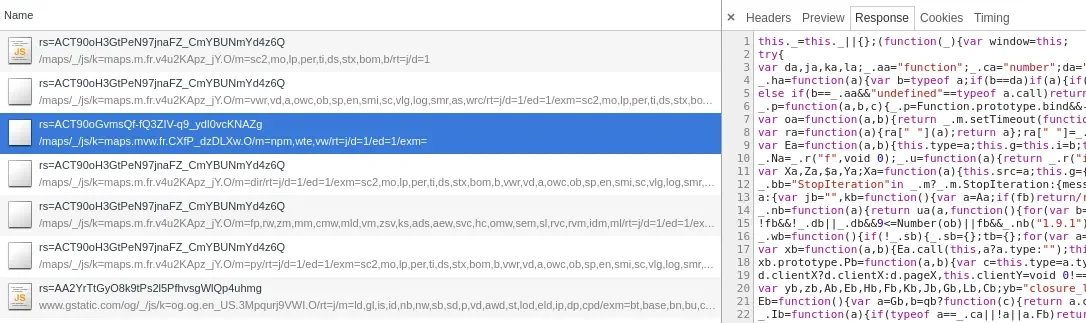
The requests loading Google Maps's source, and some minified code.
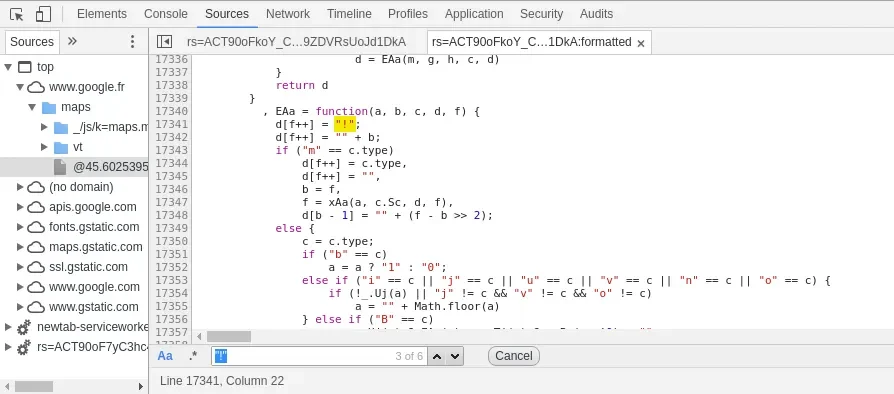
Some of the code of the function that does the mysterious kind of URL encoding, apparently.
Looking at the parameter strings, they repeat indefinitely:
- An exclamation point, the separator.
- A number, which looks like an integer key in a key/value pair.
- A single letter, a type that determines what follows.
sis a string,iis an integer, and there are more. - Either a number or a string, the value in the key/value pair.
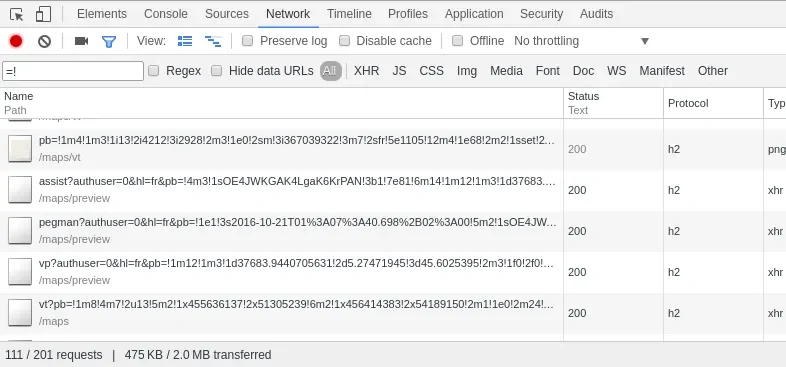
A screenshot from Chrome's web console showing requests to various AJAX endpoints.
After sorting through what the researcher remembered about serialisation formats, the answer was not a novelty: it was Protobuf. Protobuf is used for storing and communicating just about anything at Google. It was developed as version 1 in 2001, made public as version 2 in 2008 to displace XML, improved as version 3 in 2016, and is used more and more in the web frontend parts of Google products now that it is everywhere in Android. Protobuf is mostly transported on the network as binary data, yet here it was in text.
In Protobuf you define, in a .proto file with a slightly C-looking syntax, pairs of key-value fields where each field has a type, a name and a number. Fields live in named blocks called messages, and a field can be an integer, a string, or another message (a nested message).
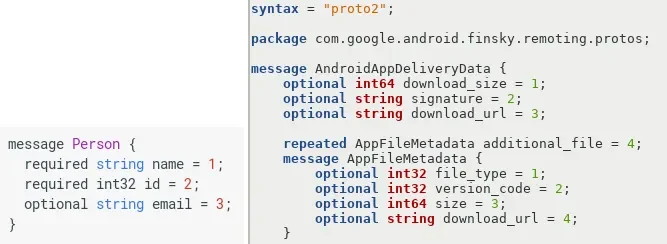
Samples of what Protobuf message definitions look like in .proto format.
You then compile the .proto to code in any language with a binding, which lets you read or write the messages you defined, fast.
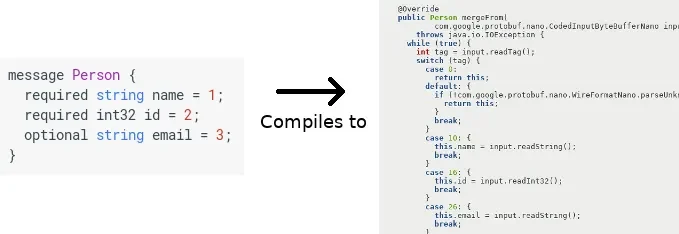
In the example, the Person Protobuf message is turned into a Person Java class.
The programmer sets fields to data through the generated code and tells the library to serialise it in binary form.
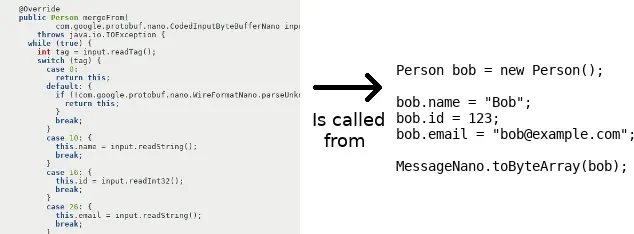
The programmer invokes the Person class and sets data.
The resulting data is encoded as 8-bit tags with 5 bits for the field number and 3 bits for the field data type, followed by the actual data: an integer, string, bytes, message, and so on. There are twelve different integer types, with half as many ways to encode them on the wire.
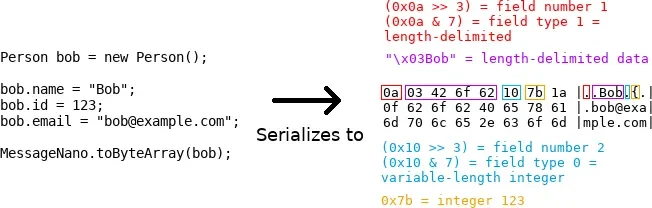
Data is serialised in a binary form.
So could the URL parameter data be the same thing, encoded using text instead?

That would have barely identical meaning, in the format used to encode URL information.
The binary format has only five data types: 0 for a variable-length integer, 1 for fixed 64 bits, 2 for string, bytes or message, 5 for fixed 32 bits, and 3 and 4 for groups, a deprecated way to define messages. That is just enough information to skip content you do not want or know how to read without interpreting it. Google Maps' URL format, by contrast, has 18 different characters that can sit as the letter designating type. The function found in the code says which type character maps to what default field value:
// This function, found in Google Maps' code, says which type character should map to what default field value:dba = function(a) { switch (a) { case "d": case "f": case "i": case "j": case "u": case "v": case "x": case "y": case "g": case "h": case "n": case "o": case "e": return 0; // Those are integers (and enum)... case "s": case "z": case "B": return ""; // Those are string/bytes... case "b": return !1; // This one is boolean... default: return null // And there's also "m" for messages, referenced in further serialization code }};
That is about the number of types you can use when defining fields in a .proto. The open questions are which type maps to which, and whether all the fields used in Google Maps' URLs can be reconstructed into readable .proto definitions so messages can be edited and replayed, and possibly hidden fields found.
The function calls that define Protobuf messages and their fields are scattered across multiple functions in the JavaScript. Scraping them with a bunch of regexes would be hard, and the researcher was lazy that day.
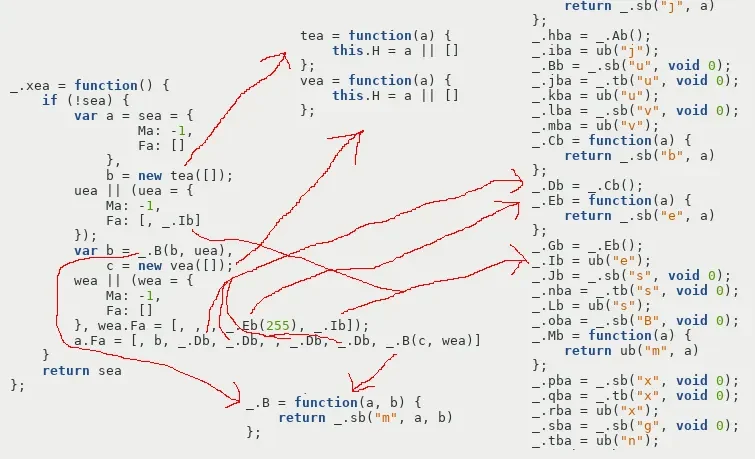
We don't want to make sense of this.
So the approach became dynamic: position ahead of the function that serializes the !-separated URL data, wait for structure information to arrive, and automate the use of the debugger.
Exploitation
Step 1: drive Chrome over the debugger API
The script first calls Runtime.enable to catch the Runtime.executionContextCreated event, which fires when a page's JavaScript execution context is created. It then calls Debugger.enable, enabling the Debugger.scriptParsed event so it can look at each script as it loads and find the functions of interest to break on. Network.enable makes it aware of all HTTP requests, so it can see which ones contain !-encoded data intercepted at JavaScript level and link .proto definitions to HTTP endpoints. Finally Page.navigate tells the browser to go to Google Maps.
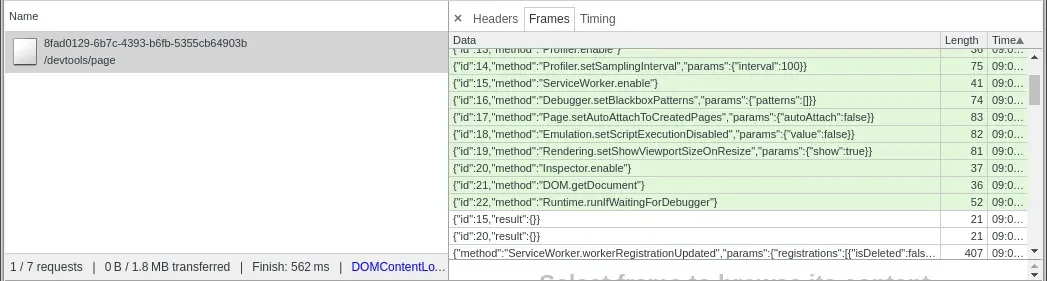
Some WebSocket communication between Chrome and the Chrome developer tools, captured using Chrome developer tools themselves.
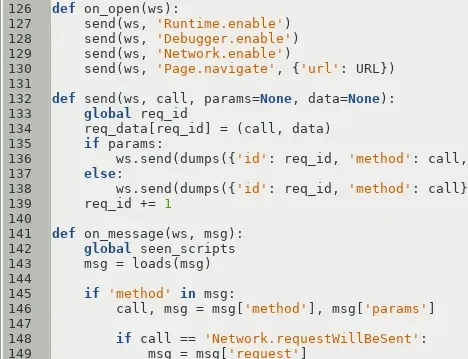
Code snip: some commands sent at WebSocket creation, and the beginning of the event loop.
When a new script is seen, Debugger.scriptParsed fires. The script calls Debugger.pause to avoid race conditions, then Debugger.getScriptSource to get the source, finds the relevant function with a regex or string signature, and calls Debugger.setBreakpoint with the script ID, line and column numbers.
Step 2: break on the serializer
The function to break on is:
_.Eqa.prototype.H = function(a, b) { var c = Array(Fqa(a, b)); Gqa(a, b, c, 0); return c.join("")};
It takes two arguments. b is a JavaScript object that defines the structure of the Protobuf message. a is a simpler object that defines message data, which will be serialised using that structure. It returns c, the raw !-separated data string. Fqa calculates the size of the output array: 4 times the number of fields, each field being four substrings that get joined together, namely separator, field number, type character and field value. Gqa writes to it, and String.prototype.join converts it to a string.
The plan is to look at b, turn it into a readable .proto, and remember c so the request it is sent in can be observed. That means a breakpoint on the last line. Seen from the debugger, the argument data looks like this:
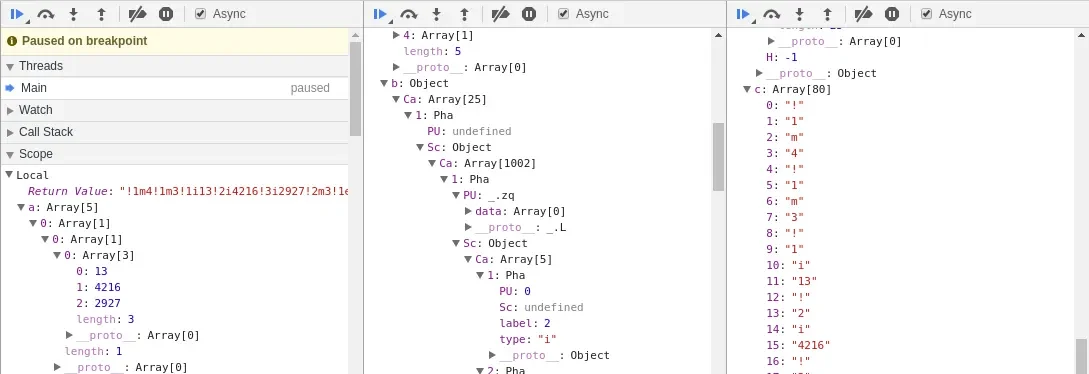
Sample data for the a, b and c local variables, respectively.
After some deduction, the structure of b is concluded to look like this:
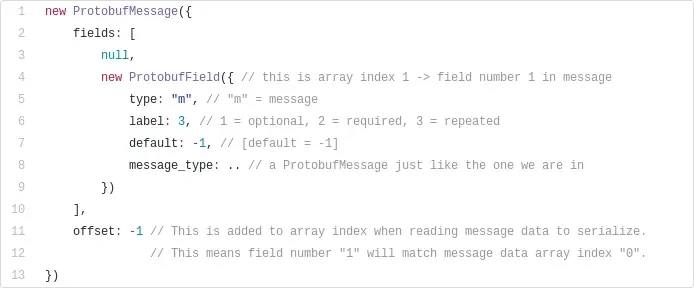
In reality the object is minified: random letters instead of any text names and no comments. Most object attributes are minified and change depending on the minifier run, so regexes on the code are needed to know which attributes correspond to what information.
Step 3: extract the structures
Accessing variables and object attributes directly through the debugger API would be awfully slow. Converting the object to JSON mostly will not work either, because nested messages can refer to their parent, producing circular references. The right solution is to inject JavaScript, let it do the work, and return the string through any medium; the console API is used here.
JavaScript is evaluated locally with Debugger.evaluateOnCallFrame and globally with Runtime.evaluate. Console messages arrive through the Runtime.consoleAPICalled event. In addition to capturing network requests through Network.requestWillBeSent, another bit of JavaScript hooks history.replaceState() so the script knows when the main page changes its URL containing !-separated state data.
After some Google Maps interaction to let the script collect data, two artefacts exist: reconstructed .proto structures, written to disk in their regular form, and samples of URLs with serialised data, written as JSON with samples of requests in arrays for every endpoint.
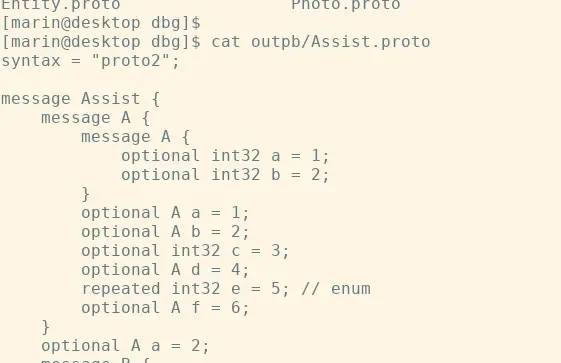
Some of the reconstructed .proto data.
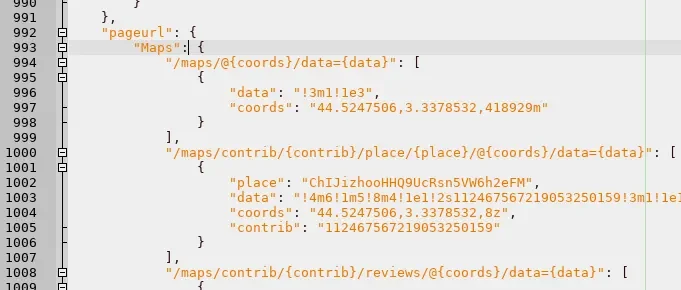
Some of the network endpoints, with captured data samples for each.
Step 4: build an editor and replay tool
The dataset is turned into a control panel. Protobuf messages render naturally as a tree view, and command-line manipulation would be painful. Fields inferred from the structures have no names, so one-letter names are assigned as in the minified code; the goal is to rename them after what they actually do by observing, for example mutating an integer field with the mouse wheel.
The second program is Python with Qt. A QTreeWidget renders the message, each field is a subclassed QTreeWidgetItem with child widgets such as QLabel for text and QSpinBox for integers. The code gets a little entangled because it has to handle repeated fields that duplicate themselves in the UI when one is filled first, and field states such as being checked or present in the request. The output page renders live using QtWebEngine, the Qt module that superseded QtWebKit and integrates Blink as a frame in the application. A text area shows side information such as response hash, size, response code and mimetype.
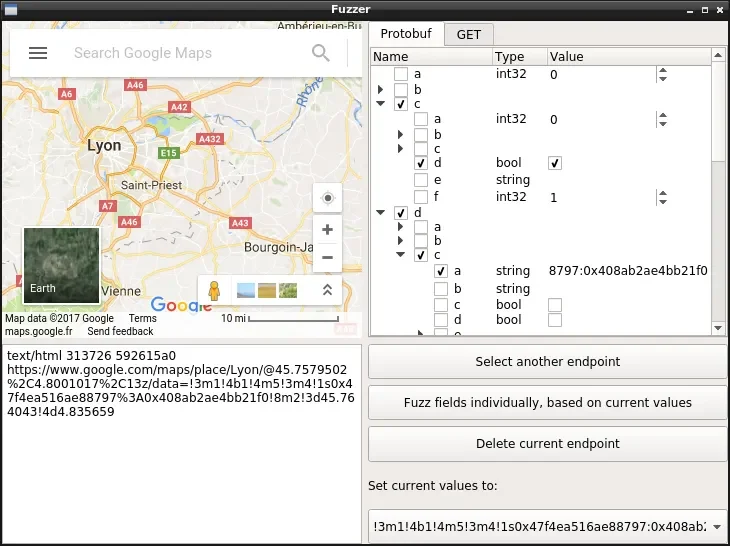
The Protobuf editor, a way to edit and replay network data captured at the previous step.
Step 5: map the tile endpoint
The whole request to the endpoint requesting a Google Maps tile, https://www.google.com/maps/vt, has about 730 fields scattered around 125 messages. From a security point of view that is attack surface: many fields are implicit and hidden, and required reverse engineering to reach, so they are untested by the public.
Most fields did not seem to do anything in the setup tried. Eventually the important parts of the request were sorted out. First, the coordinates on the map: there are multiple ways to describe them, regular decimal WGS84 or a larger and more precise coordinate unit useful for satellite view, plus other ways to define a viewport, for example a map of a given pixel size covering a precise area. There are all kinds of map layers, options to render labels, position markers, draw an itinerary from one direction to another, and cover all Maps features drawn server-side.
More importantly, the endpoint does not only render bitmap. It also renders vector. The Android application used vector for years, the web more recently and for part of the requests. There are multiple proprietary vector formats.
The older one is a regular binary format with signature DRAT, with binary structures convenient to map rendering data and a version number that determines when a field appears, changes meaning or disappears. Its data was obfuscated with a simple RC4 key made out of tile coordinates, a fixed key and a nonce, plus ZLIB. A research paper (p. 71) briefly describes it, with a now outdated decryption key. It is still in use by the Android application.
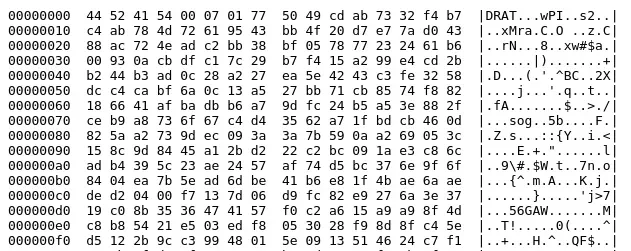
The proprietary DRAT format is used to transport maps in a vector format to the Android client.
The newer one, integrated into the web application, just uses binary Protobuf, a second form of Protobuf in the web app. A single-byte XOR is used instead of RC4. That is the binary data sent through AJAX mentioned earlier, encapsulated in a length-value container format with signature XHR1. Its transmitted data has mostly the same meaning as the old format. A small script was written to mostly render it to SVG just to spend time; it kind of works but would hardly be useful to many people and could attract cease-and-desist letters, so it is left as an exercise.
You can pick any of these format versions, more than a dozen. One of them was interesting: it was output with a Content-Type: text/html header, yet it was plain binary data. It was Protobuf-based like the new format, yet it had the header of the former one, so it had the same RC4 and ZLIB processing. Having a lot of options is interesting in security: there was a field that disabled encryption, and another one for compression. That gave raw map data, including the raw strings for places and markers, served as text/html to the browser.
Step 6: inject a marker
A cool way to inject arbitrary strings into the map is placing markers, and editing other request fields allows that.
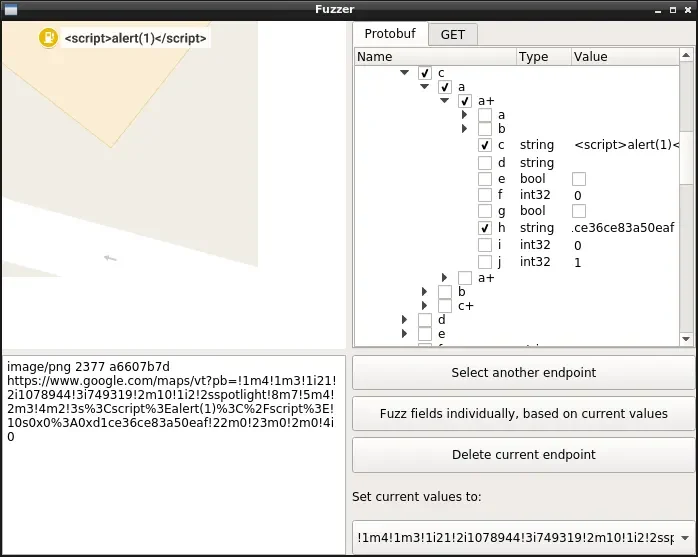
Placing an arbitrarily named marker on the map by editing request information, done here while requesting map tiles in a raster format (PNG).
Once that is done while also setting the fields relevant to enabling the undocumented format, the JavaScript alert box shows up.
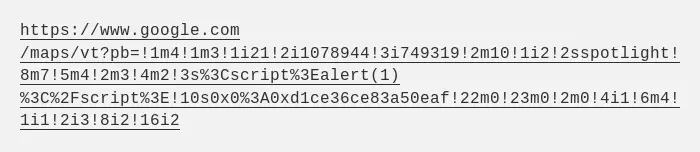
The original XSS payload.
Step 7: evade filters
Browsers such as Chrome have filters that detect and block XSS when HTML is present both in the request and in the response, and Firefox has the same with extensions such as NoScript. The !-separated decoding routine accepts two data types corresponding to strings, even though it is originally one Protobuf type. The s type character encodes strings raw as part of the output string, with only ! and * escaped as *21 and *2A, the corresponding hex codes. The z type character encodes the string as base64, simple flavour without padding. Filter-based XSS defences are rendered useless.

The same payload once the HTML string was base64-encoded.
Obfuscation can go further. The server converts the !-separated data to raw binary Protobuf on the fly, and most types are cast without check. Strings and messages both share the same of the five data types in binary format, so nested messages can be converted to binary and passed as strings, exposing even less what they do.

The same payload once nested messages were converted to wire format and cast to a base64 string.
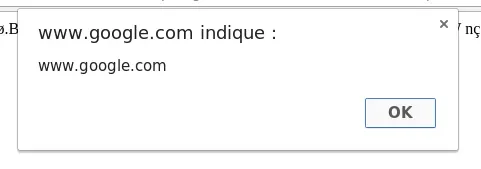
This payload works with anything that accepts JavaScript, Chrome, Firefox, Safari, on the www.google.com domain, since the former maps.google.com was dropped to put the service back on the main domain.
Step 8: an alternative through user-submitted places
Anyone can submit new places to Google Maps, and they may appear on the map with more or less a posteriori moderation. Someone had already submitted a <script>alert(1)</script> place to the map, and one even showed off a hacker face.
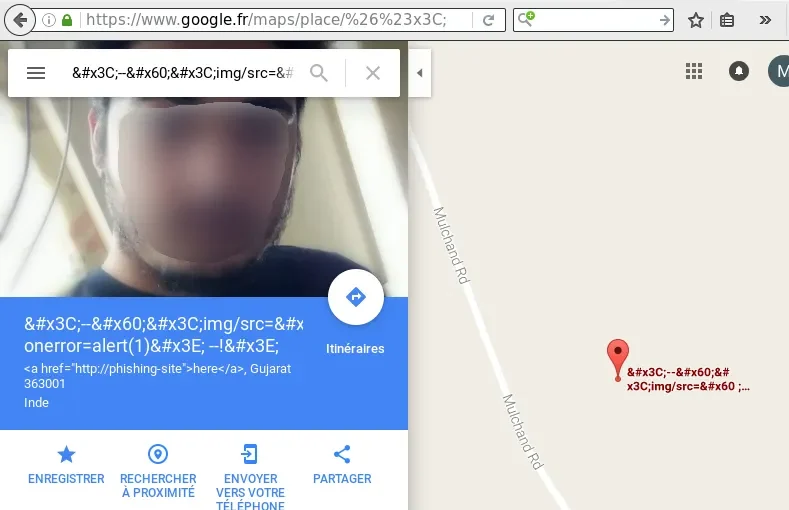
With Google Maps, find nearby hot hackers from your area.

A payload leveraging an existing place on the map.
That makes four ways to exploit the issue.
Root cause
The undocumented tile format version was served with Content-Type: text/html while carrying plain binary data, and it exposed fields that disabled encryption and compression. That left raw map data, including raw strings for places and markers, delivered to the browser as HTML. The !-separated URL decoder accepts two string types, s and z, the second base64 without padding, and the server converts the !-separated data to binary Protobuf on the fly, casting most types without check. Because strings and messages share the same binary data type, a nested message can be passed as a string. These properties are what defeat filter-based XSS defences, which look for HTML in the request and the response.
Impact
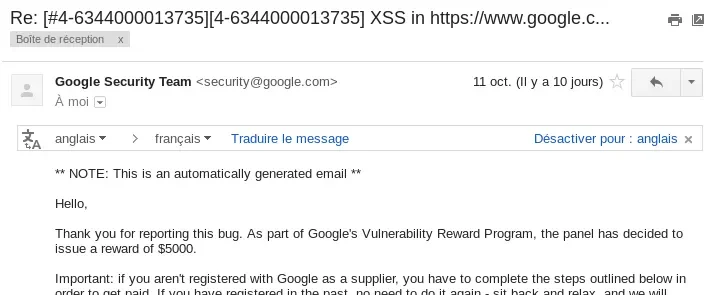
A working XSS payload on the www.google.com domain, executing in anything that accepts JavaScript. The report says there are four ways to exploit it, including one that relies on an existing user-submitted place rather than on editing request fields. A proper XSS on www.google.com will usually trigger a $5,000 bounty under Google's vulnerability reward program.
Fix
Google triaged the report on day 0.54, validated it and filed the bug on day 0.64, and it was fixed around day 1. The report does not describe the change itself.
Variants to test
- Look for undocumented response formats served with
Content-Type: text/htmlthat carry binary data. A positive result is a response whose body is binary but whose header makes the browser render it as HTML. - Enumerate fields that disable encryption or compression in a serialisation format. A positive result is raw, unencrypted data reaching the browser.
- Check whether a text encoding of a binary serialisation accepts multiple string types, including base64. A positive result is a payload that survives a filter looking for HTML in the request.
- Test whether the server casts types without checking, so a nested message can be passed where a string is expected. A positive result is a payload that decodes to the intended string after conversion.
- Look for user-generated content that is rendered on a map or similar surface with only a posteriori moderation. A positive result is a stored payload that executes when the content is displayed.
The tooling that came out of this research is published at https://github.com/marin-m/pbtk, with the main parts being extractors/web_extract.py for the .proto extraction script that launches Chrome and connects to it, views/fuzzer.py for the GUI that edits and replays requests, and utils/pburl_decoder.py for encoding and decoding URL parameters in the !-separated format.
What happened, in plain words
A security researcher spent some time looking at how Google Maps stores information in its web address. He found that the site uses an undocumented way of packing data into the URL, worked out how it is built, built tools to read and change that data, and discovered that one of the map formats could be made to send HTML (the language web pages are written in) back to the browser. That let him run his own JavaScript (the programming language browsers execute) inside the www.google.com page. This kind of bug is called cross-site scripting, or XSS. Google paid a $5,000 bounty for it.
This article walks through the whole story from zero. You only need to know how to use a browser. Every technical word is explained the first time it appears, and there is a glossary at the end.
The starting point: a strange address bar
Sometime in 2014, Google Maps stopped putting its state in the ordinary part of the URL you are used to. Normally a web address looks like example.com/page?name=value&other=value, where everything after the ? is a list of name=value pairs called the query string. Google Maps replaced that with a long mash of letters and numbers separated by exclamation points, and there is no public documentation explaining it.
The same encoding appeared in the background requests the page makes. A request is what your browser sends to a server to ask for something, and an AJAX request is one the page makes quietly in the background without reloading. Some of those responses were ordinary images, but others began with a strange signature followed by unreadable binary data (data made of raw bytes rather than text).
The picture above shows what the Google Maps URL parameter format looks like: the long string of characters separated by exclamation points.
Why does this matter? Because an undocumented format that ordinary people use every day is a puzzle that can be taken apart. Anything a browser can read, a person can study. That is the appeal.
Opening the hood
The Google Maps page is about 3.2 MB of minified JavaScript. Minified means the code has been squashed: spaces, line breaks and long names are removed to make the file smaller and faster to download, which also makes it hard for a human to read. The page draws 3D graphics using WebGL (a browser technology for rendering 3D), loads large map images called tiles, and contains caching (keeping things to avoid fetching them again) and scheduling code.
The page loads about eight JavaScript files, some of them inside workers (background scripts that run separately from the page) and some through XMLHttpRequest (the older browser mechanism for fetching data in the background). The files have line breaks only to separate modules, and modules are named with two or three letter codes in their URLs. The code is minified with Closure Compiler, Google's own minifier, which can inline functions (paste a function's body where it is called) and fold statements into conditional expressions separated by commas.
Above: the requests that load Google Maps's source, and a sample of the minified code.
Reading minified code is not as hard as it looks. The trick is to treat it like assembly (the low-level language a processor runs): search for strings and constants, jump from one function to another, take notes, and guess what a function does from a quick look. Searching for a string containing an exclamation point immediately lands on the function that does the mysterious URL encoding.
Above: part of the code of the function that appears to do the URL encoding.
What the URL data is made of
Looking at the parameter strings, a clear pattern repeats over and over:
- An exclamation point, which acts as a separator between pieces.
- A number, which looks like an integer key in a key/value pair (a label paired with a value, like
colour=red). - A single letter, which is a type that says what kind of value follows.
smeans a string,imeans an integer, and there are more letters. - Either a number or a string, which is the value itself.
Above: a screenshot of Chrome's web console showing requests to various AJAX endpoints, with the same encoded data in them.
After thinking through the serialisation formats he knew, the researcher realised this was not a new invention at all. It was Protobuf.
Protobuf is a format for storing and sending structured data, used for just about anything at Google. It was developed as version 1 in 2001, made public as version 2 in 2008 to displace XML (an older, wordier data format), improved as version 3 in 2016, and is used more and more in the web frontend parts of Google products now that it is everywhere in Android. Protobuf is normally sent over the network as binary data, yet here it was in text form.
To understand Protobuf, imagine a form with numbered boxes. In Protobuf you write a .proto file, which has a slightly C-looking syntax, and in it you define pairs of key-value fields where each field has a type, a name and a number. Fields live inside named blocks called messages, and a field can be an integer, a string, or another message (called a nested message, like a form inside a form).
Above: samples of what Protobuf message definitions look like in .proto format.
You then compile the .proto file into code. Compiling means turning one form of code into another automatically. The result is code in whatever language you want (there are many bindings, meaning ready-made libraries for different languages) that lets you read or write the messages you defined, quickly.
Above: in the example, the Person Protobuf message is turned into a Person Java class.
The programmer then fills the fields with data through the generated code, and tells the library to serialise it, meaning turn it into a stream of bytes.
Above: the programmer invokes the Person class and sets data.
The resulting bytes are laid out as 8-bit tags, where 5 bits hold the field number and 3 bits hold the field data type, followed by the actual data: an integer, a string, bytes, a message, and so on. A bit is a single 0 or 1, and eight bits make a byte. There are twelve different integer types, with half as many ways to encode them on the wire (on the wire means as they travel over the network).
Above: data is serialised in a binary form.
So could the URL parameter data be the same thing, just written as text instead of bytes?
Above: the same idea, written in the format used to encode URL information.
The binary format has only five data types: 0 for a variable-length integer, 1 for a fixed 64 bits, 2 for a string, bytes or message, 5 for fixed 32 bits, and 3 and 4 for groups, a deprecated (no longer recommended) way to define messages. That is just enough information to skip content you do not want or know how to read without interpreting it. Google Maps' URL format, by contrast, has 18 different characters that can sit in the letter position. The function found in the code says which type character maps to what default field value:
// This function, found in Google Maps' code, says which type character should map to what default field value:dba = function(a) { switch (a) { case "d": case "f": case "i": case "j": case "u": case "v": case "x": case "y": case "g": case "h": case "n": case "o": case "e": return 0; // Those are integers (and enum)... case "s": case "z": case "B": return ""; // Those are string/bytes... case "b": return !1; // This one is boolean... default: return null // And there's also "m" for messages, referenced in further serialization code }};
Line by line, in plain words:
- The first line is a comment (text ignored by the computer) saying that this function tells you which type character corresponds to which default value.
dba = function(a) {starts a function nameddbathat takes one input,a, which is the type character.switch (a) {means: look at the value ofaand pick the matching case below.- The long list of
case "d":throughcase "e":groups many letters together. For any of those letters, the function returns0, and the comment says these are integers (and enum, meaning a named integer). case "s":,case "z":andcase "B":return"", an empty string, and the comment says these are string or bytes types.case "b":returns!1, which in JavaScript meansfalse(the!flips the value, and1counts as true). The comment says this one is boolean, meaning true or false.default:catches anything not listed and returnsnull, meaning nothing. The comment notes there is also"m"for messages, handled in other serialisation code.
That is about the number of types you can use when defining fields in a .proto file. Two questions remain: which type maps to which, and can all the fields used in Google Maps' URLs be reconstructed into readable .proto definitions? If they can, messages can be edited and replayed, and possibly hidden fields can be found.
The function calls that define Protobuf messages and their fields are scattered across many functions in the JavaScript. Scraping them out with a bunch of regexes (patterns for matching text) would be hard, and the researcher was lazy that day.
Above: a sample of the code that would have to be understood, which is exactly what the researcher did not want to do by hand.
So the approach became dynamic: instead of reading the code, run it. Position the debugger just ahead of the function that serializes the !-separated URL data, wait for the structure information to arrive, and automate the use of the debugger.
Exploitation
Step 1: drive Chrome over the debugger API
An API is a way for one program to talk to another, like a waiter taking your order to the kitchen. Chrome has a debugger API that powers its own developer tools. Those tools are themselves HTML and browser JavaScript talking to that API over a WebSocket, which is a two-way connection that stays open between browser and server.
Firefox, Safari and Edge have equivalents, but the report notes the API is not perfectly portable (the same commands do not work identically everywhere), so Chrome's is used because it works a bit better. The first script is written in Python, a popular programming language for scripting.
Chrome is launched with the remote debugging flag:
--remote-debugging-port=<port number>
This is a command-line option. A port number is like a numbered door on your computer that a program can listen at. Adding this flag tells Chrome to open such a door so another program can connect and control it.
Connecting to that port gives an HTTP server. A request to the /json endpoint lists active tabs and the WebSocket URLs to connect to the debugger API for each. An endpoint is a specific address a server answers on. On the socket you exchange JSON messages. JSON is a simple text format for structured data, like {"name": "value"}. A request has a constant ID and maps either to a response or an error, and events are enabled with specific requests. An event is a message the browser sends you when something happens, without you asking each time.
Above: some WebSocket communication between Chrome and the Chrome developer tools, captured using the developer tools themselves.
The script first calls Runtime.enable to catch the Runtime.executionContextCreated event, which fires when a page's JavaScript execution context is created (in plain terms, when the page's code starts running). It then calls Debugger.enable, which turns on the Debugger.scriptParsed event so it can look at each script as it loads and find the functions of interest to break on. Breaking on a function means pausing the program at that point so you can inspect it. Network.enable makes the script aware of all HTTP requests, so it can see which ones contain !-encoded data intercepted at JavaScript level and link .proto definitions to HTTP endpoints. Finally Page.navigate tells the browser to go to Google Maps.
Above: a code snippet showing some commands sent when the WebSocket is created, and the beginning of the event loop (the part that keeps waiting for and handling events).
When a new script is seen, Debugger.scriptParsed fires. The script calls Debugger.pause to avoid race conditions (two things happening at once in an unpredictable order), then Debugger.getScriptSource to get the source code, finds the relevant function with a regex or string signature, and calls Debugger.setBreakpoint with the script ID, line and column numbers.
Step 2: break on the serializer
The function to break on is:
_.Eqa.prototype.H = function(a, b) { var c = Array(Fqa(a, b)); Gqa(a, b, c, 0); return c.join("")};
Line by line:
_.Eqa.prototype.H = function(a, b) {defines a function calledHthat takes two inputs,aandb.var c = Array(Fqa(a, b));creates an array (an ordered list) namedc, sized by calling another functionFqawithaandb.Gqa(a, b, c, 0);calls another functionGqathat fills that array with data.return c.join("");glues all the pieces of the array together into one string, with nothing between them, and returns it.
It takes two arguments. b is a JavaScript object that defines the structure of the Protobuf message. a is a simpler object that defines the message data, which will be serialised using that structure. It returns c, the raw !-separated data string. Fqa calculates the size of the output array: 4 times the number of fields, each field being four substrings that get joined together, namely separator, field number, type character and field value. Gqa writes to it, and String.prototype.join converts it to a string.
The plan is to look at b, turn it into a readable .proto, and remember c so the request it is sent in can be observed. That means a breakpoint on the last line. Seen from the debugger, the argument data looks like this:
Above: sample data for the a, b and c local variables, respectively.
After some deduction, the structure of b is concluded to look like this:
Above: the deduced structure of b.
In reality the object is minified: random letters instead of any text names and no comments. Most object attributes are minified and change depending on the minifier run, so regexes on the code are needed to know which attributes correspond to what information.
Step 3: extract the structures
Accessing variables and object attributes directly through the debugger API would be awfully slow. Converting the object to JSON mostly will not work either, because nested messages can refer to their parent, producing circular references (a loop where a child points back to its parent, which points to the child again). The right solution is to inject JavaScript, meaning send code into the page and let it run, and return the string through any medium; the console API is used here. The console is the text output area in the developer tools.
JavaScript is evaluated locally with Debugger.evaluateOnCallFrame and globally with Runtime.evaluate. Console messages arrive through the Runtime.consoleAPICalled event. In addition to capturing network requests through Network.requestWillBeSent, another bit of JavaScript hooks history.replaceState(). Hooking means wrapping a function so your code runs when it is called. history.replaceState() is the browser function a page uses to change its URL without reloading, so hooking it tells the script when the main page changes its URL containing !-separated state data.
After some Google Maps interaction to let the script collect data, two artefacts exist: reconstructed .proto structures, written to disk in their regular form, and samples of URLs with serialised data, written as JSON with samples of requests in arrays for every endpoint.
Above: some of the reconstructed .proto data.
Above: some of the network endpoints, with captured data samples for each.
Step 4: build an editor and replay tool
The dataset is turned into a control panel. Protobuf messages render naturally as a tree view, a display where items can be expanded and collapsed like folders. Command-line manipulation would be painful, so a graphical interface is built instead. Fields inferred from the structures have no names, so one-letter names are assigned as in the minified code; the goal is to rename them after what they actually do by observing, for example mutating an integer field with the mouse wheel and watching what changes on the map.
The second program is Python with Qt, a toolkit for building desktop applications. A QTreeWidget renders the message, each field is a subclassed QTreeWidgetItem with child widgets such as QLabel for text and QSpinBox for integers. A widget is a small interface element like a label or a number box. The code gets a little entangled because it has to handle repeated fields that duplicate themselves in the UI when one is filled first, and field states such as being checked or present in the request. The output page renders live using QtWebEngine, the Qt module that superseded QtWebKit and integrates Blink (the part of Chromium that draws pages) as a frame in the application. A text area shows side information such as response hash (a fingerprint of the response), size, response code and mimetype (the type of the content).
Above: the Protobuf editor, a way to edit and replay network data captured at the previous step.
Step 5: map the tile endpoint
The whole request to the endpoint requesting a Google Maps tile, https://www.google.com/maps/vt, has about 730 fields scattered around 125 messages. A tile is one square image of the map. From a security point of view that is attack surface, meaning the total set of places an attacker can try to break in. Many fields are implicit and hidden, and required reverse engineering to reach, so they are untested by the public.
Most fields did not seem to do anything in the setup tried. Eventually the important parts of the request were sorted out. First, the coordinates on the map: there are multiple ways to describe them, regular decimal WGS84 (the usual latitude and longitude system) or a larger and more precise coordinate unit useful for satellite view, plus other ways to define a viewport, for example a map of a given pixel size covering a precise area. There are all kinds of map layers, options to render labels, position markers, draw an itinerary from one direction to another, and cover all Maps features drawn server-side (drawn by Google's computers rather than by your browser).
More importantly, the endpoint does not only render bitmap, meaning a grid of pixels. It also renders vector, meaning shapes described by coordinates rather than pixels, which stay sharp at any zoom. The Android application used vector for years, the web more recently and for part of the requests. There are multiple proprietary vector formats, meaning formats owned by Google and not publicly documented.
The older one is a regular binary format with signature DRAT. A signature here is a marker at the start of a file that identifies the format. It has binary structures convenient to map rendering data and a version number that determines when a field appears, changes meaning or disappears. Its data was obfuscated with a simple RC4 key made out of tile coordinates, a fixed key and a nonce, plus ZLIB. RC4 is an old encryption method, a key is the secret used to encrypt, a nonce is a value used once to make each encryption different, and ZLIB is a compression method that shrinks data. A research paper (p. 71) briefly describes it, with a now outdated decryption key. It is still in use by the Android application.
Above: the proprietary DRAT format is used to transport maps in a vector format to the Android client.
The newer one, integrated into the web application, just uses binary Protobuf, a second form of Protobuf in the web app. A single-byte XOR is used instead of RC4. XOR is a very simple mathematical operation often used to scramble data. That is the binary data sent through AJAX mentioned earlier, encapsulated in a length-value container format with signature XHR1. A length-value container simply stores how long the data is, then the data itself. Its transmitted data has mostly the same meaning as the old format. A small script was written to mostly render it to SVG (a text format for drawing shapes) just to spend time; it kind of works but would hardly be useful to many people and could attract cease-and-desist letters (formal demands to stop), so it is left as an exercise.
You can pick any of these format versions, more than a dozen. One of them was interesting: it was output with a Content-Type: text/html header, yet it was plain binary data. A header is extra information sent alongside a response, and Content-Type tells the browser what kind of content it is. text/html means the browser will treat it as a web page and run any scripts in it. It was Protobuf-based like the new format, yet it had the header of the former one, so it had the same RC4 and ZLIB processing. Having a lot of options is interesting in security: there was a field that disabled encryption, and another one for compression. That gave raw map data, including the raw strings for places and markers, served as text/html to the browser.
Step 6: inject a marker
A cool way to inject arbitrary strings into the map is placing markers, the pins you see on a map. Editing other request fields allows that.
Above: placing an arbitrarily named marker on the map by editing request information, done here while requesting map tiles in a raster format (PNG).
Once that is done while also setting the fields relevant to enabling the undocumented format, the JavaScript alert box shows up. An alert box is the small popup a browser shows when a page calls alert(), and it proves that the page is running your code.
Above: the original XSS payload. A payload is the piece of code an attacker wants to get executed.
Step 7: evade filters
Browsers such as Chrome have filters that detect and block XSS when HTML is present both in the request and in the response, and Firefox has the same with extensions such as NoScript. An extension is an add-on that changes how the browser behaves. The !-separated decoding routine accepts two data types corresponding to strings, even though it is originally one Protobuf type. The s type character encodes strings raw as part of the output string, with only ! and * escaped as *21 and *2A, the corresponding hex codes. Escaped means replaced with a safe stand-in. The z type character encodes the string as base64, simple flavour without padding. Base64 is a way of writing any bytes using only ordinary letters, digits and a couple of symbols, so binary data can travel as text. Filter-based XSS defences are rendered useless.
Above: the same payload once the HTML string was base64-encoded.
Obfuscation can go further. Obfuscation means making something hard to recognise. The server converts the !-separated data to raw binary Protobuf on the fly, and most types are cast without check. Casting means treating one type of data as another. Strings and messages both share the same of the five data types in binary format, so nested messages can be converted to binary and passed as strings, exposing even less what they do.
Above: the same payload once nested messages were converted to wire format and cast to a base64 string.
Above: another view of the same obfuscated payload.
This payload works with anything that accepts JavaScript, Chrome, Firefox, Safari, on the www.google.com domain, since the former maps.google.com was dropped to put the service back on the main domain. A domain is the part of a web address that identifies the site, such as www.google.com, and it matters because a script running on www.google.com is trusted by everything else on www.google.com.
Step 8: an alternative through user-submitted places
Anyone can submit new places to Google Maps, and they may appear on the map with more or less a posteriori moderation. A posteriori moderation means checking content after it is published rather than before. Someone had already submitted a <script>alert(1)</script> place to the map, and one even showed off a hacker face. <script>alert(1)</script> is a tiny piece of HTML that, if a page runs it, pops up an alert box saying 1.
Above: with Google Maps, find nearby hot hackers from your area.
Above: a payload leveraging an existing place on the map.
That makes four ways to exploit the issue.
Root cause
The undocumented tile format version was served with Content-Type: text/html while carrying plain binary data, and it exposed fields that disabled encryption and compression. That left raw map data, including raw strings for places and markers, delivered to the browser as HTML. The !-separated URL decoder accepts two string types, s and z, the second base64 without padding, and the server converts the !-separated data to binary Protobuf on the fly, casting most types without check. Because strings and messages share the same binary data type, a nested message can be passed as a string. These properties are what defeat filter-based XSS defences, which look for HTML in the request and the response.
Impact
A working XSS payload on the www.google.com domain, executing in anything that accepts JavaScript. The report says there are four ways to exploit it, including one that relies on an existing user-submitted place rather than on editing request fields. A proper XSS on www.google.com will usually trigger a $5,000 bounty under Google's vulnerability reward program. A bounty is a cash reward a company pays for a responsibly reported security bug.
Fix
Google triaged the report on day 0.54, validated it and filed the bug on day 0.64, and it was fixed around day 1. Triaged means the report was read and sorted for priority. The report does not describe the change itself.
Above: the timeline of the report and the reward.
Variants to test
- Look for undocumented response formats served with
Content-Type: text/htmlthat carry binary data. A positive result is a response whose body is binary but whose header makes the browser render it as HTML. - Enumerate fields that disable encryption or compression in a serialisation format. A positive result is raw, unencrypted data reaching the browser.
- Check whether a text encoding of a binary serialisation accepts multiple string types, including base64. A positive result is a payload that survives a filter looking for HTML in the request.
- Test whether the server casts types without checking, so a nested message can be passed where a string is expected. A positive result is a payload that decodes to the intended string after conversion.
- Look for user-generated content that is rendered on a map or similar surface with only a posteriori moderation. A positive result is a stored payload that executes when the content is displayed.
The tooling that came out of this research is published at https://github.com/marin-m/pbtk, with the main parts being extractors/web_extract.py for the .proto extraction script that launches Chrome and connects to it, views/fuzzer.py for the GUI that edits and replays requests, and utils/pburl_decoder.py for encoding and decoding URL parameters in the !-separated format.
Glossary
- AJAX: a way for a web page to fetch data in the background without reloading.
- API: a defined way for one program to talk to another.
- Attack surface: the total set of places an attacker can try to break in.
- Base64: a way of writing any bytes using ordinary letters, digits and a couple of symbols, so binary data can travel as text.
- Binary data: data made of raw bytes rather than readable text.
- Binding: a ready-made library that lets a language use a format such as Protobuf.
- Bit: a single 0 or 1; eight bits make a byte.
- Bounty: a cash reward a company pays for a responsibly reported security bug.
- Breakpoint: a marker that pauses a program at a chosen line so you can inspect it.
- Byte: eight bits, the basic unit of computer data.
- Caching: keeping data so it does not have to be fetched again.
- Casting: treating one type of data as another.
- Cease-and-desist letter: a formal demand to stop doing something.
- Circular reference: a loop where a child object points back to its parent, which points to the child again.
- Closure Compiler: Google's tool for shrinking JavaScript.
- Compile: turn one form of code into another automatically.
- Compression: shrinking data so it takes less space.
- Console: the text output area in a browser's developer tools.
- Content-Type: a response header that tells the browser what kind of content it is.
- Cross-site scripting (XSS): a bug where an attacker gets their own code to run inside someone else's web page.
- Debugger: a tool that lets you pause and inspect a running program.
- Deprecated: no longer recommended, usually because something better exists.
- Domain: the part of a web address that identifies the site, such as
www.google.com. - Encryption: scrambling data with a secret key so only someone with the key can read it.
- Endpoint: a specific address a server answers on.
- Enum: a named integer, used to pick one option from a fixed list.
- Escaping: replacing a character with a safe stand-in so it is not treated specially.
- Event: a message a program sends when something happens, without you asking each time.
- Extension: an add-on that changes how a browser behaves.
- Flag: a command-line option that switches a feature on.
- Header: extra information sent alongside a request or response.
- Hook: wrap a function so your own code runs when it is called.
- HTML: the language web pages are written in.
- HTTP: the protocol browsers and servers use to exchange requests and responses.
- Integer: a whole number.
- JavaScript: the programming language browsers run.
- JSON: a simple text format for structured data.
- Key: the secret used to encrypt or decrypt data.
- Key/value pair: a label paired with a value, like
colour=red. - Message (Protobuf): a named block of fields in a
.protodefinition. - Mimetype: the type of a piece of content, such as an image or a web page.
- Minified: code with spaces, line breaks and long names removed to make it smaller.
- Module: a separate part of a program.
- Nested message: a message defined inside another message, like a form inside a form.
- Nonce: a value used once, to make each encryption different.
- Obfuscation: making something hard to recognise.
- Payload: the piece of code an attacker wants to get executed.
- Port number: a numbered door on a computer that a program can listen at.
- Protobuf: a format for storing and sending structured data, normally as binary.
- Query string: the part of a URL after the
?, holdingname=valuepairs. - Race condition: two things happening at once in an unpredictable order.
- RC4: an old encryption method.
- Regex: a pattern for matching text.
- Request: what a browser sends to a server to ask for something.
- Response: what a server sends back.
- Reverse engineering: working out how something is built by studying it, without its documentation.
- Serialisation: turning structured data into a stream of bytes or text.
- Server-side: done by the company's computers rather than by your browser.
- Signature: a marker at the start of a file that identifies the format.
- SVG: a text format for drawing shapes.
- Tile: one square image of a map.
- Triaged: read and sorted for priority.
- Vector: shapes described by coordinates rather than pixels, so they stay sharp at any zoom.
- WebGL: a browser technology for drawing 3D graphics.
- WebSocket: a two-way connection that stays open between browser and server.
- Widget: a small interface element such as a label or a number box.
- Worker: a background script that runs separately from the page.
- XOR: a very simple mathematical operation often used to scramble data.
- ZLIB: a compression method that shrinks data.



