How I got 6000$ from #Google (Google Cloudshell RCE)
A project name parameter on the Google Cloud console dashboard was passed unsanitised into a client-side bash script that starts Cloud Shell, allowing command injection. An attacker could craft a URL that, when a victim opened it, ran arbitrary commands in the victim's own Cloud Shell VM, such as deleting files or crashing it.
 Published on medium.com
Google Cloud Platform
The full write-up lives on its author's site
It belongs to its author, so we link to it rather than copy it. The other two tabs are our own rewrites, checked against it.
Context
Google Cloud Shell is a browser-accessible shell environment tied to the Google Cloud Console. The report links to the official documentation at https://cloud.google.com/shell/docs/ for background. The feature under test was the Cloud Console dashboard URL that carries a project name in a query parameter; the supplied value was reflected in Cloud Shell.
The researcher describes the bug as a "Client Side command injection", explicitly contrasting it with the "normal Command injection which affects servers". The vulnerable code, according to the report, was a bash script created on the client side in JavaScript. The affected hosts listed are:
https://console.cloud.google.comhttps://console.developer.google.com
Setup
The report does not describe any special account, role, tool or version. Testing was done against console.cloud.google.com using crafted URLs in the browser.
Finding it
The starting point was a URL pattern on the console that carries the project name:
https://console.cloud.google.com/home/dashboard?project="name of the project"
The researcher first tested the project parameter for IDOR by substituting a random project name:
https://console.cloud.google.com/home/dashboard?project=project-1
That was not vulnerable to IDOR, but the supplied project name was reflected in Cloud Shell. The next test was XSS, using an XSS vector as the value:
https://console.cloud.google.com/home/dashboard?project="XSS vector"
That was not vulnerable to XSS either. What it did produce was a syntax error when Cloud Shell was activated.
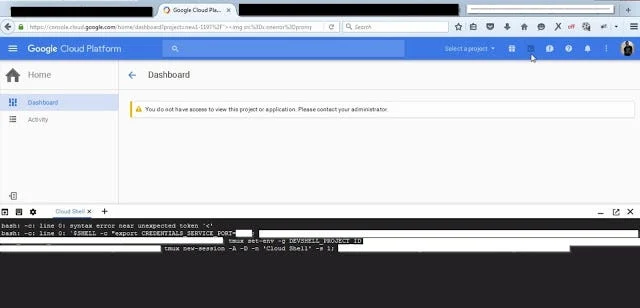
The screenshot shows the syntax error raised when Cloud Shell was activated with the XSS vector in the project parameter.
Exploitation
Step 1: confirm the value reaches a shell parser
Since the value appeared to be interpreted as shell input, the researcher tried a delimiter instead of an XSS payload:
https://console.cloud.google.com/home/dashboard?project=;
With a bare semicolon there was no syntax error and Cloud Shell was created successfully.

The screenshot shows Cloud Shell being created successfully with the semicolon payload.
Step 2: chain a command
The report notes that Linux allows commands to be chained with the semicolon operator, giving the example:
apt-get update; apt-get upgrade

The image shows that example of semicolon command chaining.
Applying the same idea to the parameter:
https://console.cloud.google.com/home/dashboard?project=;ping google.com
This URL created Cloud Shell and pinged google.com.

The screenshot shows the ping output in the Cloud Shell session created from the crafted URL.
Step 3: read a local file
The researcher then read a file:
https://console.cloud.google.com/home/dashboard?project=;cat /etc/passwd
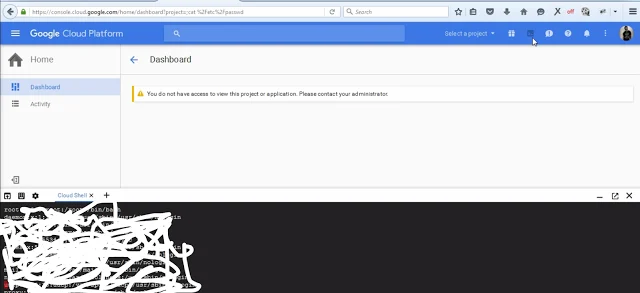
The screenshot shows the contents of /etc/passwd printed in the Cloud Shell session.
At this point the researcher was clear about the limit: the execution was self-execution, running only in his own Cloud Shell. In his words, "I can inject commands which affects my own vm but not Google servers".
Step 4: turn it into an attack on another user
To make the issue exploitable against someone else, the researcher proposed two payloads aimed at the victim's VM.
Crashing the victim's VM:
https://console.cloud.google.com/home/dashboard?project=;sudo cp /dev/zero /dev/mem
Once the victim accesses the URL and clicks "Activate cloud shell", the report says their VM crashes.
Deleting files, which the researcher describes as having more impact than the previous command:
https://console.cloud.google.com/home/dashboard?project=;sudo rm -rf /
This deletes the victim's root directory, which the report says also deletes appengine files.
Step 5: the interaction requirement
According to the researcher's own testing, the victim had to access the crafted URL and then click "Activate cloud shell" for the attack to succeed. The Google Security Team tested the issue and found that no user interaction was needed for the attack to be successful. The report does not explain how the activation was triggered without the click.
Root cause
The report states that the vulnerability existed in a bash script created on the client side in JavaScript. The report states only that the vulnerability existed in a bash script created on the client side in JavaScript.
Impact
An attacker who gets a victim to open a crafted dashboard URL can crash or wipe the victim's Cloud Shell VM. The report demonstrates crashing the VM and deleting its root directory, including appengine files, with sudo. The researcher's initial assessment was that the victim had to click "Activate cloud shell"; Google's testing found that user interaction was not required. The commands run in the victim's own VM, not on Google servers, as the researcher states.
Fix
The report says only that the issue has been patched. The researcher was rewarded 6000$ for the finding, and the Google Security Team featured the vulnerability at #Nullcon.
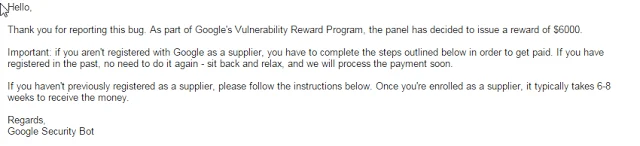
The image accompanies the note that the issue was patched, the 6000$ reward, and the Nullcon feature.
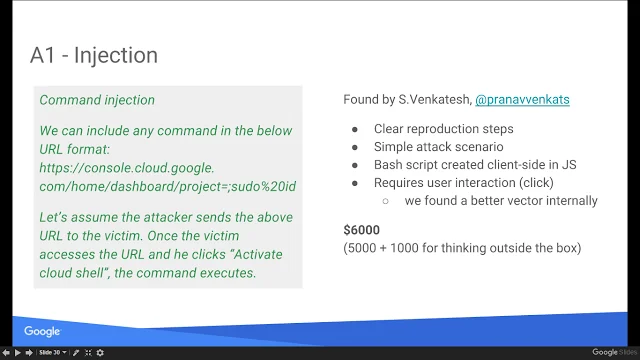
The final image accompanies the summary that the flaw was in a client-side bash script and lists the two affected console hosts.
Variants to test
- Other console parameters that end up in shell setup. Look for parameters whose values are used while provisioning a shell or terminal session, not just displayed. A positive result is a value containing
;or another command separator that changes what runs when the session starts, without a syntax error. - Delimiter probing before payloads. Send a bare
;and compare the behaviour with a plain string. A positive result is a clean session with the delimiter and a syntax error with a quoted string, which suggests the value is concatenated into a command line. - Command chaining with a harmless command. Use a payload such as
;ping google.comand check for its output in the session. A positive result is the command's output appearing in the shell. - File read to confirm arbitrary execution. Use a payload such as
;cat /etc/passwdand check for file contents. A positive result confirms the injected command runs with the session's privileges. - Interaction requirements. Test whether the crafted URL alone triggers the session or whether a click is needed. A positive result is execution without any user action beyond opening the URL.
- Related hosts. Test the same parameter pattern on sibling console hosts, since the report lists two affected hosts. A positive result is the same behaviour on the second host.
What happened, in plain words
A security researcher found a way to make a Google web page run commands in a user's Cloud Shell workspace. The workspace is called Google Cloud Shell: it is a small Linux terminal that opens inside your browser, connected to your Google Cloud account. Normally you open it by clicking a button, and you get a command prompt where you can type commands.
The researcher noticed that one Google Cloud Console web address carried the name of a project in its address, and that name was later used while the Cloud Shell session was being set up. By putting special characters into that name, he could make the setup run extra commands of his choosing. He first proved it on his own account, then showed that a crafted link could crash or wipe another person's Cloud Shell machine. Google fixed the problem and paid him 6000$.
This article walks through the same steps he took, explaining every term from scratch. You only need a browser and a computer to follow the ideas; you do not need to run anything.
Background: what Cloud Shell and the Console are
Google Cloud is Google's collection of paid services for building and running software: virtual machines, storage, databases and so on. You manage them through a website called the Google Cloud Console, at https://console.cloud.google.com. Inside the Console, work is organised into projects: a project is like a folder that groups together the resources belonging to one piece of work, and it has a name.
Google Cloud Shell is a terminal that opens in a browser tab. A terminal (or shell) is a text window where you type commands and the computer runs them; on Linux the shell is a program such as bash. Cloud Shell gives you a small Linux machine of your own, created on demand, with tools already installed. The report links to the official documentation at https://cloud.google.com/shell/docs/ for background.
The feature under test was the Console dashboard page. Its web address can carry the project name as a query parameter: the part of a URL after a ?, written as name=value. A parameter is simply a labelled piece of information passed to a web page, like a note attached to the address. The supplied value was reflected in Cloud Shell.
The researcher calls the bug a "Client Side command injection", and contrasts it with the "normal Command injection which affects servers". Command injection means tricking a program into running commands the author never intended. The "normal" kind happens on a server, the big computer that hosts a website, and can affect everyone. The report says the vulnerable code was a bash script created on the client side in JavaScript. According to the report, the vulnerable code was a bash script created on the client side in JavaScript. JavaScript is the programming language that web pages run inside your browser; a bash script is a list of shell commands saved in a file. The affected hosts listed are:
https://console.cloud.google.comhttps://console.developer.google.com
Setup
The report does not describe any special account, role, tool or version. Testing was done against console.cloud.google.com using crafted URLs in the browser.
Finding it
The starting point was a URL pattern on the console that carries the project name:
https://console.cloud.google.com/home/dashboard?project="name of the project"
Line by line: https://console.cloud.google.com is the Console website; /home/dashboard is the dashboard page; ? starts the query parameters; project= says the parameter is called project; and "name of the project" is the value, here a placeholder for whatever project name you have. The quotes are part of the example, not something you type.
The researcher first tested the project parameter for IDOR. IDOR stands for Insecure Direct Object Reference: it is when a website lets you reach someone else's data just by changing an identifier in the address, for example swapping your project name for a stranger's. Think of a hotel where changing the room number on your key card lets you into any room. He substituted a random project name:
https://console.cloud.google.com/home/dashboard?project=project-1
Here project-1 is a made-up name. If the page had shown him another user's project, that would have been IDOR. It did not: the page was not vulnerable to IDOR. But something else happened: the supplied project name was reflected in Cloud Shell. Reflected means the value you sent comes back and appears somewhere on the page or in what the page produces.
The next test was XSS, which stands for Cross-Site Scripting: tricking a page into running JavaScript that an attacker supplied, usually by putting it in a value the page displays. Think of a noticeboard where someone writes a note that, when read aloud, makes the reader do something. He used an XSS vector as the value:
https://console.cloud.google.com/home/dashboard?project="XSS vector"
An XSS vector is a piece of text designed to become code if a page inserts it carelessly. That was not vulnerable to XSS either. What it did produce was a syntax error when Cloud Shell was activated. A syntax error is the shell saying "I do not understand this line": the words are not arranged in a way the shell can parse. That was a syntax error when Cloud Shell was activated. Plain data means text that is only ever displayed, never interpreted.
The screenshot shows the syntax error raised when Cloud Shell was activated with the XSS vector in the project parameter.
Exploitation
Step 1: confirm the value reaches a shell parser
Since the value appeared to be interpreted as shell input, the researcher tried a delimiter instead of an XSS payload. A delimiter is a character that separates one thing from another. In a shell, the semicolon ; separates one command from the next, so command1; command2 runs both, one after the other. He sent:
https://console.cloud.google.com/home/dashboard?project=;
Line by line: the page is the same dashboard, and the project value is now a single semicolon. With a bare semicolon there was no syntax error and Cloud Shell was created successfully. Concatenated means joined end to end: the page was gluing his value onto the end of a command it had already written. Quoted would mean wrapping the value in quotes so the shell treats it as plain text; that was not happening.
The screenshot shows Cloud Shell being created successfully with the semicolon payload.
Step 2: chain a command
The report notes that Linux allows commands to be chained with the semicolon operator, giving the example:
apt-get update; apt-get upgrade
Line by line: apt-get is a Linux tool for installing and updating software; apt-get update refreshes the list of available software; the ; ends that command; apt-get upgrade then installs the newer versions of what is already installed. The point is that the second command runs after the first, in the same shell, because of the semicolon.
The image shows that example of semicolon command chaining.
Applying the same idea to the parameter:
https://console.cloud.google.com/home/dashboard?project=;ping google.com
Line by line: the project value is now ;ping google.com. The ; ends whatever command the page had built, and ping google.com becomes a second command. ping is a simple network tool that sends small messages to a host and reports whether replies come back; it is a harmless way to prove a command ran. This URL created Cloud Shell and pinged google.com.
The screenshot shows the ping output in the Cloud Shell session created from the crafted URL.
Step 3: read a local file
The researcher then read a file. Arbitrary command execution means running any command you like, not just one the page happens to run. He sent:
https://console.cloud.google.com/home/dashboard?project=;cat /etc/passwd
Line by line: ; ends the page's own command; cat is a Linux command that prints a file's contents to the screen; /etc/passwd is a standard Linux file that lists the user accounts on the machine. Reading it proves the injected command really ran and could read files.
The screenshot shows the contents of /etc/passwd printed in the Cloud Shell session.
At this point the researcher was clear about the limit: the execution was self-execution, running only in his own Cloud Shell. In his words, "I can inject commands which affects my own vm but not Google servers". A VM (virtual machine) is a computer simulated in software; your Cloud Shell runs in one that belongs to you, separate from Google's own servers.
Step 4: turn it into an attack on another user
To make the issue exploitable against someone else, the researcher proposed two payloads aimed at the victim's VM. A payload is the part of the attack that does the damage, here the command after the semicolon.
Crashing the victim's VM:
https://console.cloud.google.com/home/dashboard?project=;sudo cp /dev/zero /dev/mem
Line by line: ; ends the page's command; sudo runs the next command with administrator rights, the Linux equivalent of "run as administrator"; cp copies a file; /dev/zero is a special file that produces an endless stream of zero bytes; /dev/mem is a special file that represents the computer's physical memory. Copying endless zeros into memory overwrites it and crashes the machine. Once the victim accesses the URL and clicks "Activate cloud shell", the report says their VM crashes.
Deleting files, which the researcher describes as having more impact than the previous command:
https://console.cloud.google.com/home/dashboard?project=;sudo rm -rf /
Line by line: sudo gives administrator rights; rm removes files; -rf means recursive (go into every folder) and force (do not ask for confirmation); / is the root, the top of the whole filesystem, so everything on the machine is inside it. This deletes the victim's root directory, which the report says also deletes appengine files. App Engine is one of Google's services for running web applications.
Step 5: the interaction requirement
According to the researcher's own testing, the victim had to access the crafted URL and then click "Activate cloud shell" for the attack to succeed. The Google Security Team tested the issue and found that no user interaction was needed for the attack to be successful. The report does not explain how the activation was triggered without the click.
Root cause
The report states that the vulnerability existed in a bash script created on the client side in JavaScript. The report states only that the vulnerability existed in a bash script created on the client side in JavaScript. Metacharacters are characters with a special meaning to a program, like ; to a shell, as opposed to ordinary letters. HTML is the language web pages are written in; putting a value into HTML is where XSS happens, while putting it into a command line is where command injection happens.
Impact
An attacker who gets a victim to open a crafted dashboard URL can crash or wipe the victim's Cloud Shell VM. The report demonstrates crashing the VM and deleting its root directory, including appengine files, with sudo. The researcher's initial assessment was that the victim had to click "Activate cloud shell"; Google's testing found that user interaction was not required. The commands run in the victim's own VM, not on Google servers, as the researcher states.
Fix
The report says only that the issue has been patched. The researcher was rewarded 6000$ for the finding, and the Google Security Team featured the vulnerability at #Nullcon. Nullcon is a security conference where researchers present their work.
The image accompanies the note that the issue was patched, the 6000$ reward, and the Nullcon feature.
The final image accompanies the summary that the flaw was in a client-side bash script and lists the two affected console hosts.
Variants to test
- Other console parameters that end up in shell setup. Look for parameters whose values are used while provisioning a shell or terminal session, not just displayed. A positive result is a value containing
;or another command separator that changes what runs when the session starts, without a syntax error. - Delimiter probing before payloads. Send a bare
;and compare the behaviour with a plain string. A positive result is a clean session with the delimiter and a syntax error with a quoted string, which suggests the value is concatenated into a command line. - Command chaining with a harmless command. Use a payload such as
;ping google.comand check for its output in the session. A positive result is the command's output appearing in the shell. - File read to confirm arbitrary execution. Use a payload such as
;cat /etc/passwdand check for file contents. A positive result confirms the injected command runs with the session's privileges. - Interaction requirements. Test whether the crafted URL alone triggers the session or whether a click is needed. A positive result is execution without any user action beyond opening the URL.
- Related hosts. Test the same parameter pattern on sibling console hosts, since the report lists two affected hosts. A positive result is the same behaviour on the second host.
Glossary
- API: a defined way for one piece of software to ask another for something, like a menu of requests a program accepts.
- App Engine: a Google service for running web applications, whose files live on the Cloud Shell machine.
- Arbitrary command execution: the ability to run any command you choose, not just one the program intended.
- bash: the standard Linux shell program that reads and runs typed commands.
- bash script: a file containing a list of shell commands to run in order.
- Client side: happening in the user's browser or machine, as opposed to on the website's server.
- Cloud Shell: a Linux terminal that opens in a browser tab and gives you a small machine of your own.
- Command injection: tricking a program into running commands its author never intended.
- Concatenate: join pieces of text end to end.
- Console: the Google Cloud website where you manage your projects and services.
- Delimiter: a character that separates one item from another, such as
;between shell commands. - HTML: the language web pages are written in.
- IDOR: Insecure Direct Object Reference, reaching someone else's data by changing an identifier in a request.
- JavaScript: the programming language web pages run inside your browser.
- Metacharacter: a character with special meaning to a program, such as
;to a shell. - Nullcon: a security conference where researchers present their work.
- Payload: the part of an attack that does the damage.
- ping: a network tool that sends small messages to a host and reports whether replies come back.
- Project: a folder-like grouping of resources in Google Cloud, with a name.
- Query parameter: the
name=valuepart of a URL after the?, carrying information to the page. - Reflected: a value you sent that comes back and appears in what the page produces.
- Root: the top of a Linux filesystem, written
/, containing everything else. - Server: the computer that hosts a website and serves it to visitors.
- Shell: a text window where you type commands and the computer runs them.
- sudo: a Linux command that runs the next command with administrator rights.
- Syntax error: a message saying the input is not arranged in a way the program can understand.
- Terminal: another name for a shell window.
- VM (virtual machine): a computer simulated in software, separate from the physical machine.
- XSS: Cross-Site Scripting, tricking a page into running JavaScript an attacker supplied.
- XSS vector: text designed to become code if a page inserts it carelessly.



