How I Got My First Bounty & Hof From Google (CSRF Lead To Account Delete)
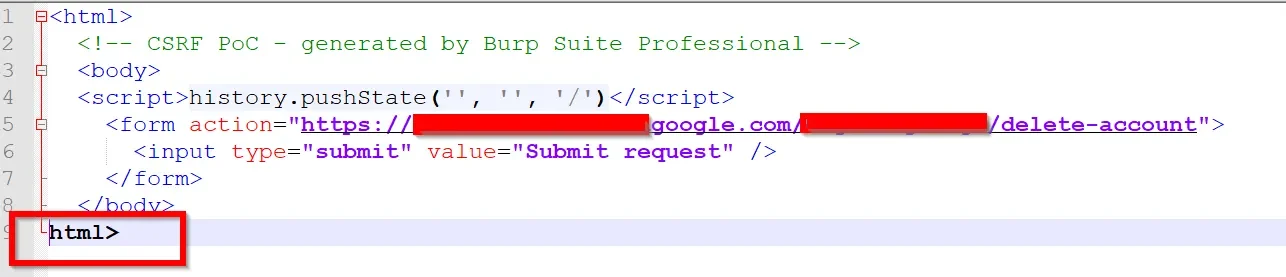
An account deletion endpoint lacked a CSRF token, so an attacker could make a logged-in victim delete their own account by visiting a crafted page. The exploit only fully worked when the HTML tag in the page was left unclosed.
 Published on bhupendra1238.medium.com
I am Bhupendra Rajbhar (Final Year Computer Engineering Student ) I have been started my bug bounty journey from march 2020 it was a really tough situation for everyone due to the Covid-19 virus hope now everyone safe and well Basically in this blog you will come to know how I have Got my first bounty/reward from…
The full write-up lives on its author's site
It belongs to its author, so we link to it rather than copy it. The other two tabs are our own rewrites, checked against it.
Context
This is a first-bounty write-up from Bhupendra Rajbhar, a final-year computer engineering student who began bug hunting in March 2020. After a run of duplicates on another program he moved to Google, and the bug he found there was a cross-site request forgery (CSRF) in an account deletion feature that ended in the permanent deletion of the victim's account.
The report does not name the product or the endpoint. What it does say is that the feature is an account delete button inside the application he was exploring, and that the request behind it could be replayed from another origin without a CSRF token. The write-up's own definition of the class is the standard one: CSRF lets an attacker induce a user to perform an action they did not intend, partly circumventing the same-origin policy that keeps sites from interfering with each other.
Setup
Two accounts were used, one per role:
| Role | Account |
|---|---|
| Victim | [redacted] |
| Attacker | [redacted] |
Burp Suite was the only tool mentioned: it was used to intercept the delete request and to generate the CSRF proof-of-concept HTML from that request. The exploit page was saved as an HTML file and delivered to the victim's browser, where the victim had to click a submit button. The report gives no browser, version or server details.
Finding it
The approach was brute coverage: check every endpoint in the target, having explored the entire application. That surfaced the account delete button. Intercepting the request behind it in Burp and generating the CSRF PoC showed that the CSRF authentication token was not present in the generated code, which is the point at which the finding looked real.
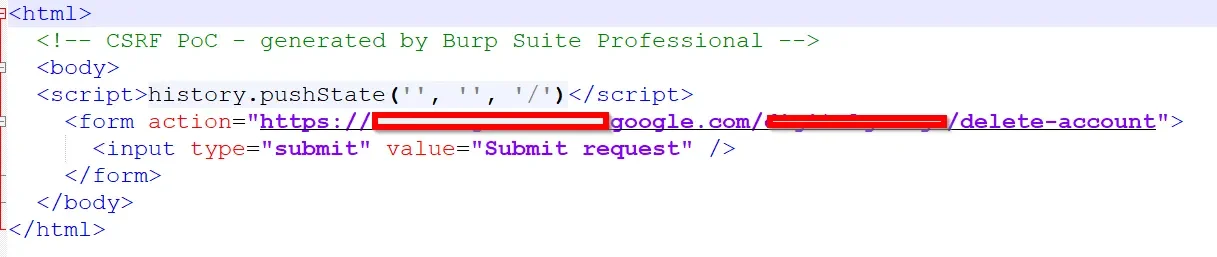
The generated exploit code is shown in the image above; the report does not reproduce it as text, so the exact markup and parameter names are not available here.
Exploitation
Step 1: build the PoC from the intercepted request
With the delete request captured in Burp, the CSRF PoC generator produced an HTML page that replays it. The absence of an anti-CSRF token in that generated code is what made the attack plausible.
Step 2: deliver it and click
The page was saved as an HTML file and sent to the victim's browser. The victim clicks the submit button and the request is issued in their session.
Step 3: observe the partial result
The first version did not delete the whole account. It removed the victim's personal details but left the account itself in place, which the researcher judged would not reach critical severity. He tried more than five times with the same outcome.

Step 4: change the markup
After a break he re-analysed the exploit and decided not to close the HTML tag. The report shows the revised code only as an image; the exact markup is not given in text.
Step 5: full deletion
The revised page was sent to the victim's browser, the submit button was clicked, and the victim's full account was deleted.
Step 6: report and triage
The report went in with a video proof of concept on Aug 6, 2020, 12:29 PM and was triaged on Aug 7, 2020, 12:26 AM.
Step 7: not reproducible
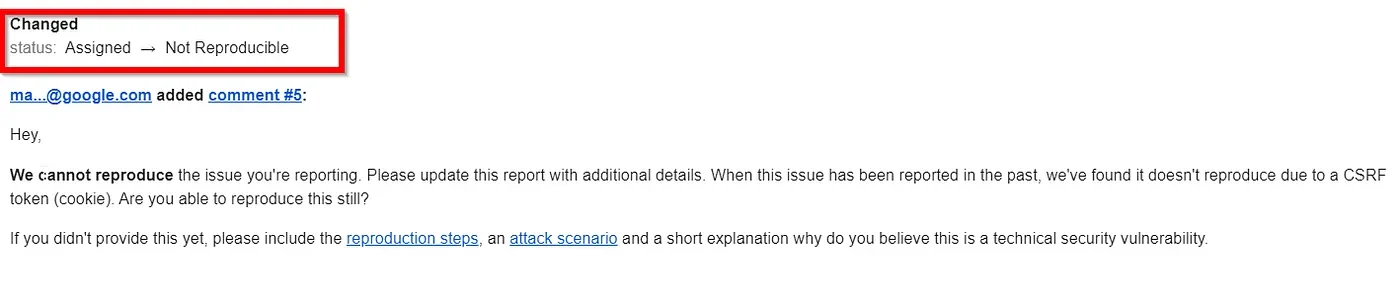
Google came back saying it could not reproduce the issue, despite the video. The researcher was disappointed, since a proper video PoC had been supplied.

Step 8: resubmit with the extra detail
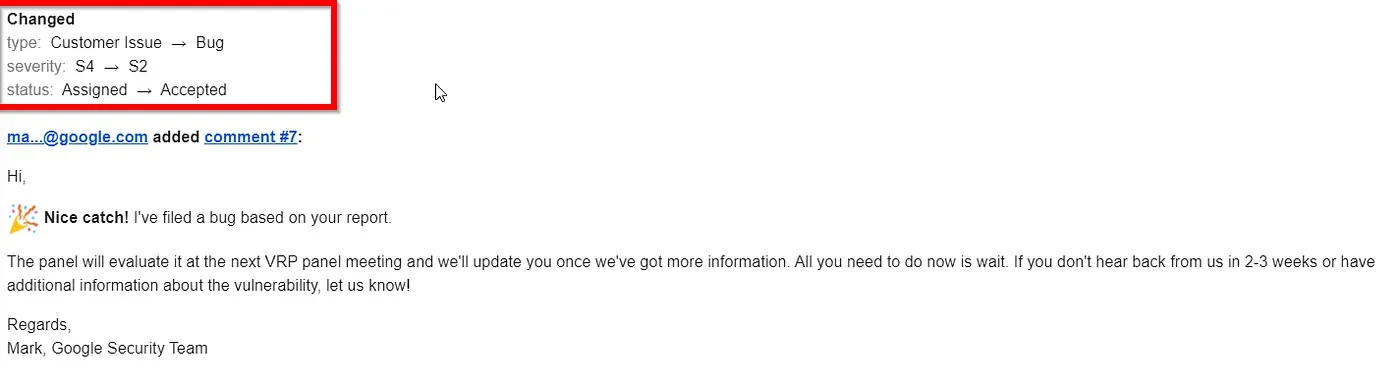
He rebuilt the report with the proof of concept and added the point that the HTML tag should not be closed, so that the triagers could reproduce it. The response was 'Nice catch'.

Reproduction steps as given
- Create two accounts, one for the victim (
[redacted]) and one for the attacker ([redacted]). - Create the CSRF exploit code for the vulnerable endpoint using Burp Suite.
- Save it in an HTML file and send it to the victim's browser.
- When the victim clicks the submit button, the CSRF exploit code executes in the victim's browser.
- The victim's account is permanently deleted.
Timeline
| Event | Time |
|---|---|
| Reported | Aug 6, 2020, 12:29 PM |
| Triaged | Aug 7, 2020, 12:26 AM |
| Not reproduced | Aug 12, 2020, 4:49 AM |
| Reported again | Aug 12, 2020, 10:56 AM |
| Status Assigned to Accepted | Aug 13, 2020, 1:35 PM |
| Bounty | Yes |
The report does not state the bounty amount.
Root cause
The delete request carried no CSRF authentication token, so a page on another origin could replay it with the victim's session. The most likely reading is that the token was simply absent and nothing else compensated for it.
The second half of the story is about the payload rather than the server: the first version removed only personal details, and leaving the HTML tag unclosed changed the outcome to full account deletion.
Impact
An attacker who can get a logged-in victim to load the crafted page and press the submit button can permanently delete that victim's account. The action deletes the victim's account, which is what makes it serious. The preconditions are the usual CSRF ones: the victim must be authenticated, must visit the attacker's page, and must click the button. The report does not claim any variant that fires without interaction.
Fix
The fix implied by the finding is to require and validate an anti-CSRF token on the delete request, and to reject state-changing requests that arrive without it.
Variants to test
- Delete, deactivate and transfer endpoints. Intercept each destructive or ownership-changing action and run it through the Burp CSRF PoC generator. A positive result is generated HTML with no token parameter that still performs the action when loaded in an authenticated browser.
- Token present but unvalidated. Remove the token parameter or send an empty value and replay. A positive result is the action succeeding with a missing or blank token.
- Token tied to a cookie rather than to the user. Send a token from the attacker's own session alongside the victim's cookies. A positive result is acceptance, which means the token is not bound to the account.
- Method override. Where the app accepts
_methodor similar overrides, try turning a GET into a DELETE. A positive result is a state change from a request a browser can issue cross-origin without a preflight. - Markup variations. When a PoC only partially works, try unclosed tags and different form encodings, as happened here. A positive result is the full effect rather than a partial one.
- Reproduction quality. Record a video that shows the request going out and the resulting state change, and state any non-obvious payload detail explicitly in the report, since a triager who cannot reproduce will close the report even with a video attached.
What happened, in plain words
A student called Bhupendra Rajbhar started hunting for bugs in March 2020, during the Covid-19 pandemic. After getting a lot of duplicate reports on another program (a duplicate is when someone else has already reported the same bug, so you get no credit), he decided to look at Google instead. On Google he found a bug in a feature that lets you delete your account. The bug was a Cross-Site Request Forgery, or CSRF. In plain terms: a bad page could make your browser send the delete request for you, without you meaning to, and your whole account would be permanently deleted. He reported it, Google first said it could not reproduce it, he reported it again with one extra detail, and it was accepted and paid.
This article walks through the whole story from zero. You only need to know how to use a browser and a computer. Every technical word is explained the first time it appears, and there is a glossary at the end.
The background ideas, before the story
Before the steps make sense, a few everyday ideas need to be clear.
What a website request is. When you click a button on a website, your browser sends a small message to the website's computer (the server) saying what you want. For example: "please delete my account". The server does the work and sends a reply. This message is called a request. The server's reply is called a response.
What an endpoint is. A website is made of many separate addresses, each one doing one job: one address for the login form, one for the profile page, one for deleting the account. Each of these addresses is called an endpoint. Bug hunters often say they "check every endpoint", meaning they visit and test every one of these addresses to see what each one does.
What a cookie is. When you log in to a website, the server gives your browser a small piece of text to keep, called a cookie. Your browser sends that cookie back with every request you make to that site. That is how the site knows it is still you and does not ask for your password on every click. Think of it like a wristband at a festival: you show it once at the gate, and after that the staff let you in and out without checking your ID again.
What a CSRF token is. Because the cookie is sent automatically, a website needs another way to check that a request really came from its own pages and not from somewhere else. The usual trick is a CSRF token: a random secret value that the site puts inside its own forms. When you submit the form, the token goes with it, and the server checks that the token is correct. A page on a different website cannot know this secret value, so it cannot produce a valid request. Think of it like a cloakroom ticket: the cookie proves you are a customer, but the ticket proves this specific coat is yours. Without the ticket, the staff refuse.
What CSRF is. CSRF is a class of bug where a website accepts a request without that extra proof. An attacker builds a page that quietly sends the request to the victim's site. The victim's browser attaches the victim's cookie automatically, the site sees a logged-in user, and the action happens. The victim did not intend it. The write-up's own definition is the standard one: CSRF lets an attacker induce a user to perform an action they did not intend, and it partly gets around the same-origin policy, which is the browser rule that stops one website from interfering with another.
What Burp Suite is. Burp Suite is a tool that sits between your browser and the website and lets you see and edit every request and response. Bug hunters use it to look at exactly what a button sends. It also has a feature that takes a captured request and writes a small web page that repeats it, called a CSRF proof of concept (PoC).
What a proof of concept is. A PoC is the smallest working demonstration that a bug is real. Here it is an HTML page that, when opened by the victim, sends the delete request.
The setup
Two accounts were used, one for each role:
| Role | Account |
|---|---|
| Victim | [redacted] |
| Attacker | [redacted] |
The victim account is the one that gets attacked. The attacker account is the one the researcher uses to build and test the attack. Having both lets you see the attack from both sides.
Burp Suite was the only tool mentioned. It was used to intercept the delete request and to generate the CSRF PoC page from that request. The exploit page was saved as an HTML file and delivered to the victim's browser, where the victim had to click a submit button. The report gives no browser, version or server details.
Finding it
The method was simple coverage: check every endpoint in the target, after exploring the entire application. This is slow but it works, because you cannot find a bug in a page you never opened. That exploration surfaced the account delete button.
Seeing a delete button is exciting for a bug hunter, because deleting something is a serious action. If a website lets another site trigger that action for you, the damage is permanent.
He opened Burp, intercepted the request that the delete button sends, and used Burp to generate the CSRF PoC from it. The key observation: the CSRF authentication token was not present in the generated code. That is the moment the finding looked real. If the site had been checking a token, the generated page would have contained a token field, and the attack would not work. Its absence suggested the request carried no token.
The generated exploit code is shown in the image above. The report does not reproduce it as text, so the exact markup and parameter names are not available here.
Exploitation
Step 1: build the PoC from the intercepted request
With the delete request captured in Burp, the CSRF PoC generator produced an HTML page that repeats it. The absence of an anti-CSRF token in that generated code is what made the attack plausible. In other words: the page could send the delete request using only the victim's cookie, with no secret value needed.
Step 2: deliver it and click
The page was saved as an HTML file and sent to the victim's browser. The victim clicks the submit button, and the request goes out in the victim's session. The click matters: the report does not claim the attack fires without the victim doing anything.
Step 3: observe the partial result
The first version did not delete the whole account. It removed the victim's personal details but left the account itself in place. The researcher judged that this would not reach critical severity. He tried more than five times with the same outcome.
Step 4: change the markup
After a break (he watched Tom and Jerry on YouTube), he re-analysed the exploit and decided not to close the HTML tag. The report shows the revised code only as an image; the exact markup is not given in text.
Step 5: full deletion
The revised page was sent to the victim's browser, the submit button was clicked, and the victim's full account was deleted.
Step 6: report and triage
The report went in with a video proof of concept on Aug 6, 2020, 12:29 PM and was triaged on Aug 7, 2020, 12:26 AM. Triage is the first check a security team does: someone reads the report and decides whether it is a real, in-scope bug worth passing to the engineers.
Step 7: not reproducible
Google came back saying it could not reproduce the issue, despite the video. The researcher was disappointed, since a proper video PoC had been supplied. "Could not reproduce" means the triager followed the steps and did not see the bug happen on their side.
Step 8: resubmit with the extra detail
He rebuilt the report with the proof of concept and added the point that the HTML tag should not be closed, so that the triagers could reproduce it. The response was 'Nice catch'.
Reproduction steps as given
- Create two accounts, one for the victim (
[redacted]) and one for the attacker ([redacted]). - Create the CSRF exploit code for the vulnerable endpoint using Burp Suite.
- Save it in an HTML file and send it to the victim's browser.
- When the victim clicks the submit button, the CSRF exploit code executes in the victim's browser.
- The victim's account is permanently deleted.
Timeline
| Event | Time |
|---|---|
| Reported | Aug 6, 2020, 12:29 PM |
| Triaged | Aug 7, 2020, 12:26 AM |
| Not reproduced | Aug 12, 2020, 4:49 AM |
| Reported again | Aug 12, 2020, 10:56 AM |
| Status Assigned to Accepted | Aug 13, 2020, 1:35 PM |
| Bounty | Yes |
The report does not state the bounty amount.
Why the bug existed
The delete request carried no CSRF authentication token. So a page on another website could trigger it using the victim's cookie. The report does not describe any other defence, such as checking where the request came from (origin or referrer checking), so whether one existed and failed is not known. The most likely reading is that the token was simply absent and nothing else compensated for it.
The second half of the story is about the payload rather than the server. The first version removed only personal details, and leaving the HTML tag unclosed changed the outcome to full account deletion.
What damage it could do
An attacker who can get a logged-in victim to load the crafted page and press the submit button can permanently delete that victim's account. The action deletes the victim's account, which is what makes it serious. The preconditions are the usual CSRF ones: the victim must be logged in, must visit the attacker's page, and must click the button. The report does not claim any variant that fires without interaction.
How to fix it
The fix implied by the finding is to require and validate an anti-CSRF token on the delete request, and to reject requests that change something when they arrive without it.
Variants to test
- Delete, deactivate and transfer endpoints. Intercept each destructive or ownership-changing action and run it through the Burp CSRF PoC generator. A positive result is generated HTML with no token parameter that still performs the action when loaded in a logged-in browser.
- Token present but unvalidated. Remove the token parameter or send an empty value and replay. A positive result is the action succeeding with a missing or blank token.
- Token tied to a cookie rather than to the user. Send a token from the attacker's own session alongside the victim's cookies. A positive result is acceptance, which means the token is not bound to the account.
- Method override. Where the app accepts
_methodor similar overrides, try turning a GET into a DELETE. A positive result is a state change from a request a browser can issue cross-origin without a preflight. - Markup variations. When a PoC only partially works, try unclosed tags and different form encodings, as happened here. A positive result is the full effect rather than a partial one.
- Reproduction quality. Record a video that shows the request going out and the resulting state change, and state any non-obvious payload detail explicitly in the report, since a triager who cannot reproduce will close the report even with a video attached.
Glossary
- Account deletion: a feature that permanently removes a user's account and its data.
- Attacker: the person trying to make the victim's browser do something the victim did not intend.
- Bounty: a reward, usually money, paid by a company for a valid security report.
- Browser: the program you use to visit websites, such as Chrome or Firefox.
- Burp Suite: a tool that sits between your browser and a website so you can see and edit requests and responses.
- Cookie: a small piece of text a website stores in your browser after you log in, sent back with every request so the site knows it is you.
- CSRF (Cross-Site Request Forgery): a bug where another website can make your browser send a request you did not intend, using your logged-in session.
- CSRF token: a random secret value placed in a site's forms and checked by the server, so requests from other sites cannot succeed.
- Duplicate: a report of a bug that someone else has already reported, so it earns no credit.
- Endpoint: one specific address on a website that performs one job, such as login or account deletion.
- HTML: the language web pages are written in.
- HTML tag: a piece of markup such as
<form>that marks up part of a page; tags are normally closed with a matching end tag. - Method (GET, DELETE): the type of a request; GET usually asks for a page, DELETE asks to remove something.
- Origin: the combination of scheme, host and port that identifies a website; the same-origin policy stops one origin from interfering with another.
- Parameter: a named value sent with a request, such as
id=123. - PoC (proof of concept): the smallest working demonstration that a bug is real.
- Preflight: a check a browser sends before certain cross-origin requests, to ask the server whether the request is allowed.
- Request: the message your browser sends to a server when you do something on a website.
- Response: the server's reply to a request.
- Same-origin policy: the browser rule that stops one website from reading or changing another website's data.
- Session: the period during which a site remembers you as logged in, usually via a cookie.
- Severity: how serious a bug is judged to be, often critical, high, medium or low.
- Triage: the first review of a security report, where the team decides whether the bug is real and in scope.
- Victim: the logged-in user whose browser is made to send the unintended request.

