How I was able to send Authentic Emails as others — Google VRP [Resolved]
The partner contact form on Appsheet allowed an attacker to set the destination email address and the sender's email address arbitrarily, so the application sent emails that appeared to come from any Gmail user. An attacker could send authentic-looking spoofed emails to anyone, bypassing spam filters and potentially enabling phishing or impersonation.
 Published on medium.com
Well I went back to Google VRP after 3 months to rank up on the Hall of Fame. And Google Cloud caught my attention and I decided to hunt bugs there.
The full write-up lives on its author's site
It belongs to its author, so we link to it rather than copy it. The other two tabs are our own rewrites, checked against it.
Context
AppSheet is a Google Cloud product, and the researcher chose it as the target after returning to the Google VRP programme following a three month break, with the aim of ranking up on the Hall of Fame. The feature in question is the partner enrolment form at https://www.appsheet.com/partners, which lets a visitor request that a mail be sent to a partner organisation. The form takes a name, an email address and a request message, and sends that message by mail to the respective organisation.

The author notes that this is not a complicated write-up, but a simple logical vulnerability on a Google Cloud product.
Setup
No special accounts, roles or tooling are described. The work was done against the public partner page on www.appsheet.com, after roughly 20 minutes of getting familiar with the application. The researcher mentions that days spent understanding AppSheet made further hunting easier. A Cloudflare layer sat in front of the back end, which the author says blocked all of the XSS payloads tried.
Finding it
Before the contact form drew attention, the researcher found a couple of IDORs on the application, reported them to Google VRP, and they were resolved. Those are covered in a separate write-up.
The contact form became interesting when the request behind it looked suspicious. The request carried four parameters:
PartnerEmail: the destination partner emailuserName: the submitter's usernameuserEmail: the submitter's emailuserRequest: the submitter's message
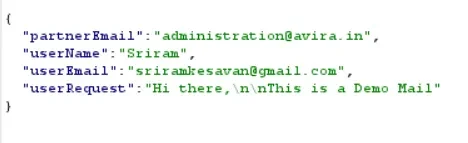
Server-side injection was tried on userRequest without success. HTML injection did work: sending userRequest as <img src="test.png"> caused the image to be reflected in the mail. The author notes that Google would not accept HTML injection on its own unless it could be escalated to XSS, and XSS and SSRF testing were blocked by the Cloudflare layer in front of the back end.
Exploitation
Step 1: replace the destination address
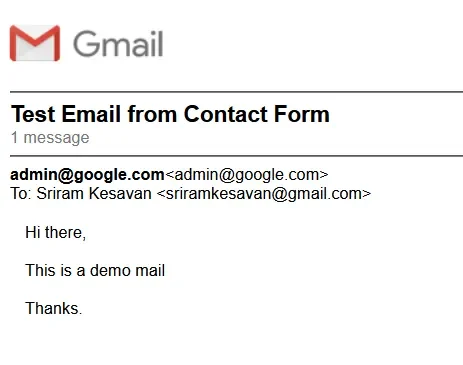
The researcher replaced the partner email with [redacted] and forwarded the request. The expectation was that no mail would arrive. Instead a mail arrived, appearing to come from [redacted], with the message from the form included.

Step 2: replace the sender address
The userEmail parameter could likewise be replaced with any email address. In the author's words, this means emails can be sent as Donald Trump to Kim Jong-un without exposing the sender's identity. The author realised the form was vulnerable to an open mail relay attack.
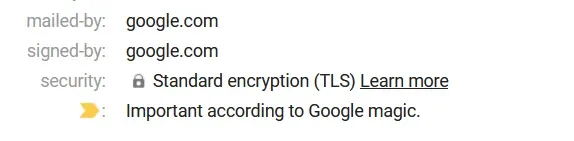
There was no blocking mechanism. The mail passed the Google spam filter without issues, and Google automatically marked it as Important.
Step 3: add authenticity with HTML
Because userRequest was vulnerable to HTML injection, the message body could carry images and href tags, making the spoofed mail look more authentic. The author notes that the mails come from Google systems and are signed by google.com from a Google Cloud product, AppSheet, which is what makes the spoofing convincing.
An attacker only has to fill in the form with the desired details and tamper with the request to send an authentic spoofed mail as any mail user.
Root cause
The request carried PartnerEmail and userEmail as user-controlled values, and changing them changed who the mail appeared to come from and go to. Because the mail came from Google systems and was signed by google.com, the message carried Google's name rather than the attacker's. The HTML injection in userRequest compounded this by allowing markup in the body. The report does not describe the server-side code, so the exact implementation mistake is not stated; the behaviour is consistent with the application passing the submitted addresses straight into the mail send call.
Existing defences did not help: the Cloudflare layer blocked XSS payloads but had no bearing on the mail logic, the spam filter accepted the message, and the message was even flagged as Important.
Impact
An attacker could send email as any Gmail user, or as any address placed in userEmail, to any destination placed in PartnerEmail, without exposing their own identity. The author lists the following consequences:
- Sending mail as any person, for example to have an employee fired from an organisation.
- Phishing and other attacks using the spoofed identity.
- Using the form as a mailbox to run a massive email campaign at no cost.
- No risk of the mails landing in spam, because they originate from Google systems and are signed by
google.com. - Greater authenticity through HTML injection, adding images and
hreftags to the body.
The impact depends on the attacker being able to submit the form and tamper with the request.
Fix
The issue was reported to Google, accepted, and resolved within 48 hours. The report does not describe the change that was made.
Variants to test
- Contact and enquiry forms that send mail on the user's behalf: submit your own address as the recipient and a different address as the sender, then check the
Fromheader of the delivered message. A positive result is a mail arriving with the spoofed sender and passing authentication. - Partner, referral and invitation forms with a destination address parameter: replace the destination with an address you control. A positive result is the message being delivered to the new destination.
- Message body fields on any mail-sending feature: submit
<img src="test.png">and inspect the received mail for the rendered tag. A positive result is the markup appearing in the body. - Forms behind a WAF: repeat the HTML injection with payloads the WAF does not block, since the report shows the WAF stopped XSS but not the mail logic.
- Check whether spoofed mail is marked as important or otherwise boosted by the provider's filtering, as happened here, since that increases the credibility of a phishing message.
What happened, in plain words
A security researcher went back to Google's bug bounty programme, the Google VRP, after a three month break. A bug bounty programme is a scheme where a company pays or credits people who find and report security problems in its products. The researcher's goal was to move up on the Hall of Fame, a public leaderboard of researchers who have reported bugs. He decided to look at Google Cloud, Google's collection of online services, and one product in particular caught his eye: AppSheet.
AppSheet is a tool for building apps without writing code. The researcher spent days learning how it works, and says that this made it easier to find more bugs later. After about 20 minutes of exploring, he found an interesting page at https://www.appsheet.com/partners. That page has a form for enrolling as a partner. You type your name, your email address and a request message, and the site sends that message by email to the respective organisation.
The author is upfront that this is not one of his usual complicated write-ups. It is about a simple, clean logic flaw on a Google Cloud product, and he wanted to share it.
The form and the request behind it
At first the contact form did not interest him much. Instead he found a couple of IDORs on the application. IDOR stands for Insecure Direct Object Reference: it is when a website lets you reach someone else's data just by changing an identifier in a request, for example changing a number in a URL from 100 to 101 and seeing another person's record. He reported those to Google VRP and they were resolved. They are described in a separate write-up, not this one.
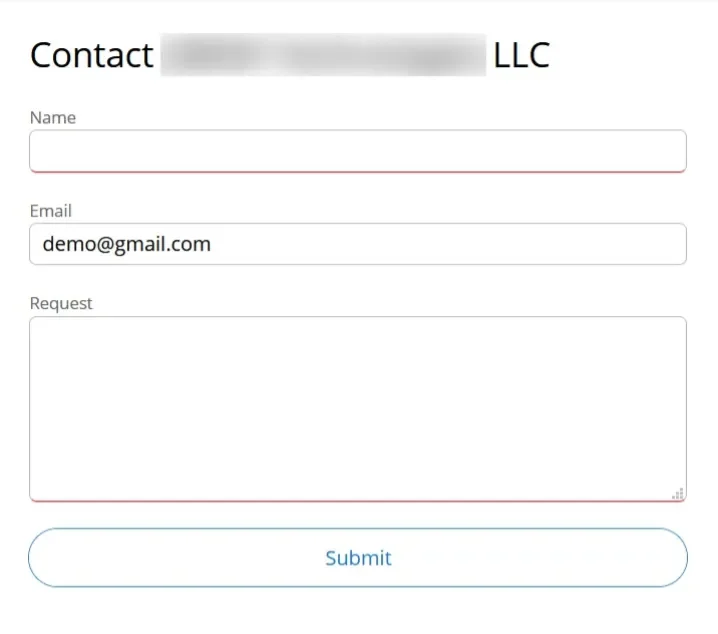
The contact form became interesting when he looked at the request it sends. A request is the message your browser sends to a website's server when you submit a form or load a page. You can see these messages in your browser's developer tools, on the Network tab, which records every request the page makes. The request behind this form carried four parameters. A parameter is a named value sent along with a request, like a labelled field on a paper form: the name tells the server what the value is for, and the value is the content.
PartnerEmail: the destination partner email, meaning the address the message should be sent touserName: the submitter's usernameuserEmail: the submitter's email addressuserRequest: the submitter's message
Why does this matter? Because all four values come from the person filling in the form. The browser sends them, and unless the server checks them carefully, the server will believe whatever it is told. That is the seed of the whole bug.
Testing the message field
First he tried server-side injection on the userRequest parameter. Server-side injection is a broad family of attacks where you put special characters into an input in the hope that the server will treat them as instructions rather than as plain text, for example as part of a database query or a command. It did not work here.
HTML injection did work. HTML is the language used to describe the structure and content of a web page: tags in angle brackets tell a browser what to display, such as an image or a link. When he sent userRequest as:
<img src="test.png">
Here is what that line means, piece by piece:
<imgstarts an image tag, which tells a browser to display a picture.src="test.png"is an attribute, a setting on the tag.srcmeans source, the location of the image file, andtest.pngis the file name given here.>closes the tag.
So the whole line asks a browser to show an image called test.png. The important part is what happened next: the image was reflected in the mail. In other words, the mail did not show the text <img src="test.png"> as characters; it treated the input as HTML and tried to display an image. That is HTML injection: user input being interpreted as page markup instead of as plain text.
The author notes that Google would not accept HTML injection on its own unless it could be escalated to XSS. XSS, cross-site scripting, is when injected markup includes a script that runs in someone else's browser, which is far more serious than a stray image. He could not get XSS to fire, and could not test for SSRF either. SSRF, server-side request forgery, is when you trick a server into making a request to a destination of your choosing. Both were blocked because a Cloudflare layer sat in front of the back end. Cloudflare is a service that filters and inspects traffic before it reaches a website, and the author says it literally blocked all of his XSS payloads. A payload is the piece of input crafted to trigger a vulnerability.
Step 1: changing who the mail goes to
Then he tried something simpler. He replaced the partner email with [redacted] and forwarded the request. Forwarding here means sending the modified request again, for example by intercepting it and editing it before it reaches the server. He had no belief that he would receive an email. To his surprise, one arrived, appearing to come from [redacted], with the message he had typed into the form included.
Why is that surprising? Because the form is supposed to send a message to a partner organisation, not to let a stranger choose any recipient and any sender. The mail looked as if the administrator of google.com had written it, when in fact a visitor to a public form had.
Step 2: changing who the mail appears to come from
The userEmail parameter could likewise be replaced with any email address. In the author's words, this means he could send emails as Donald Trump to Kim Jong-un without exposing his own identity. The point is not the names; it is that the sender shown on the message is entirely under the attacker's control.
He realised the form was vulnerable to an open mail relay attack. A mail relay is a server that accepts mail and forwards it on. An open relay is one that does this for anyone, without checking that the sender is who they claim to be. Here the relay was not a mail server in the traditional sense but a web form that caused Google's own mail systems to send a message with attacker-chosen sender and recipient.
There was no blocking mechanism. The mail passed the Google spam filter without issues, and Google automatically marked it as Important. Spam filters are the systems that try to keep unwanted or fraudulent mail out of your inbox; this message went straight through. The Important label is normally a sign that a message matters, so it made the spoofed mail look even more trustworthy.
Step 3: making the fake mail look real
Because userRequest was vulnerable to HTML injection, the body of the message could carry images and href tags. An href is the attribute on a link tag that holds the address the link points to, so a clickable link can be placed in the mail. That makes the spoofed message look more authentic: a real-looking logo and a real-looking link are exactly what a phishing email needs.
Phishing is the practice of sending a message that pretends to come from someone trusted in order to trick the reader into doing something, such as clicking a link or handing over a password. The author also points out why the mails are convincing: they come from Google systems and are signed by google.com from a Google Cloud product, AppSheet. Mail systems check signatures and sender reputation to decide whether a message is genuine, so a message genuinely sent by Google's infrastructure carries Google's reputation, not the attacker's.
An attacker only has to fill in the form with the details they want and tamper with the request to send an authentic spoofed mail as any mail user. Tampering means editing the request after the browser has built it but before the server receives it.
Why it worked
The request carried PartnerEmail and userEmail as values the visitor controls, and changing them changed who the mail appeared to come from and go to. Both are just fields the visitor controls. Because the mail came from Google systems and was signed by google.com, the message carried Google's name rather than the attacker's. The HTML injection in userRequest made it worse by allowing markup in the body.
The report does not describe the server-side code, so the exact implementation mistake is not stated. The behaviour is consistent with the application passing the submitted addresses straight into the mail send call, that is, using the visitor's values as the real sender and recipient without checking them.
The existing defences did not help. The Cloudflare layer blocked XSS payloads but had no bearing on the mail logic, since it inspects web traffic, not what the application does with an address afterwards. The spam filter accepted the message, and the message was even flagged as Important.
What an attacker could do with it
An attacker could send email as any Gmail user, or as any address placed in userEmail, to any destination placed in PartnerEmail, without exposing their own identity. The author lists these consequences:
- Sending mail as any person, for example to have an employee fired from an organisation.
- Phishing and other attacks using the spoofed identity.
- Using the form as a mailbox to run a massive email campaign at no cost.
- No risk of the mails landing in spam, because they originate from Google systems and are signed by
google.com. - Greater authenticity through HTML injection, adding images and
hreftags to the body.
The impact depends on the attacker being able to submit the form and tamper with the request.
The fix
The issue was reported to Google, accepted, and resolved within 48 hours. The report does not describe the change that was made. Sanitising means cleaning input so that markup is treated as harmless text rather than as instructions.
Similar things to look for
If you want to look for the same kind of problem, here are starting points. Each one is a variation on the same question: does the site believe something the visitor told it?
- Contact and enquiry forms that send mail on the user's behalf. Submit your own address as the recipient and a different address as the sender, then check the
Fromheader of the delivered message. TheFromheader is the line in an email that says who sent it. A positive result is a mail arriving with the spoofed sender and passing authentication. - Partner, referral and invitation forms with a destination address parameter. Replace the destination with an address you control. A positive result is the message being delivered to the new destination.
- Message body fields on any mail-sending feature. Submit
<img src="test.png">and inspect the received mail for the rendered tag. A positive result is the markup appearing in the body. - Forms behind a WAF. A WAF, web application firewall, is the filtering layer that inspects requests and blocks suspicious ones, like the Cloudflare layer here. Repeat the HTML injection with payloads the WAF does not block, since the report shows the WAF stopped XSS but not the mail logic.
- Check whether spoofed mail is marked as important or otherwise boosted by the provider's filtering, as happened here, since that increases the credibility of a phishing message.
Glossary
- Bug bounty programme: a scheme where a company rewards people who find and report security problems in its products.
- Google VRP: Google's Vulnerability Reward Program, the company's bug bounty programme.
- Hall of Fame: a public leaderboard of researchers who have reported bugs to a programme.
- Google Cloud: Google's collection of online services for building and running things on the internet.
- AppSheet: a Google Cloud product for building apps without writing code.
- Request: the message a browser sends to a server, for example when a form is submitted.
- Parameter: a named value sent with a request, like a labelled field on a form.
- IDOR: Insecure Direct Object Reference, when changing an identifier in a request lets you reach someone else's data.
- Server-side injection: an attack that puts special characters into input hoping the server treats them as instructions, such as part of a query or command.
- HTML: the language that describes the structure and content of a web page using tags in angle brackets.
- HTML injection: when user input is interpreted as page markup instead of plain text.
- XSS: cross-site scripting, when injected markup includes a script that runs in someone else's browser.
- SSRF: server-side request forgery, when a server is tricked into making a request to a destination chosen by the attacker.
- Cloudflare: a service that filters and inspects traffic before it reaches a website.
- Payload: the piece of input crafted to trigger a vulnerability.
- Open mail relay: a mail server, or here a web form, that sends mail for anyone without checking that the sender is who they claim to be.
- Spam filter: a system that tries to keep unwanted or fraudulent mail out of an inbox.
- Phishing: sending a message that pretends to come from someone trusted to trick the reader into acting.
- Tampering: editing a request after the browser builds it but before the server receives it.
- Sanitising: cleaning input so that markup is treated as harmless text rather than as instructions.
- WAF: web application firewall, a filtering layer that inspects requests and blocks suspicious ones.
Fromheader: the line in an email that says who sent it.




