Send a Email to me and get kicked out of Google Groups !! — #GoogleVRP — A Feature that almost broke Google Groups !!
A Google Groups feature that lets a member leave by emailing a special unsubscribe address could be abused: an attacker set up an auto-forwarding address so that when a victim replied to an email, the reply was forwarded to the unsubscribe address and the victim was removed from the group. The attacker could remove members from a group without their consent.
 Published on infosecwriteups.com
A lot of people might know what Google Groups is. For people who doesn’t, Google Groups allows users to create a group with multiple users in them and a common mail ID would be provided.
The full write-up lives on its author's site
It belongs to its author, so we link to it rather than copy it. The other two tabs are our own rewrites, checked against it.
Context
Google Groups lets a user create a group with several members and gives that group a shared mail address. Anyone can post to the group by sending an email to that address, and the message is distributed to the members. The author notes that organisations use Google Groups as a ticket tracking system, and that a modified version is used by Google as a payment support system according to the information he gathered.
Every Google Groups address also supports a suffix form for leaving the group. For a group whose address is [redacted], a member who no longer wants to be in the group can send an email to [redacted] and is removed automatically. The author points out that this feature has existed for years and that he had not seen anyone test it, which is why he decided to look at it.
Setup
The researcher created a group called Test Groups, added several of his own test accounts, and was given the shared address [redacted]. For the later demonstration he created a group for his organisation and added friends with their consent. The other ingredient is the address [redacted], to which the victim sends mail. No special tooling is described.
Finding it
While sending messages to the group, the [redacted] suffix in the group address caught his attention. The behaviour is simple: a member sends mail to the suffixed address and is removed from the group automatically.
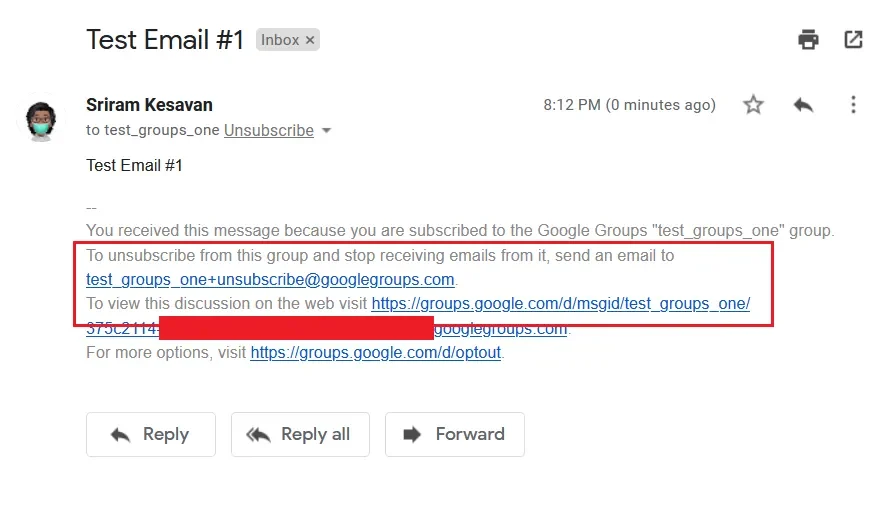
The obvious first idea is email spoofing, and the author explicitly says that was not the issue. He spent more than a week working out how users were removed and how SPF policy behaved in that flow. The conclusion was that removal only requires the victim to send a message to the [redacted] address, so the problem becomes one of getting the victim to reply to that address.
Exploitation
Step 1: point reply-to at the unsubscribe address
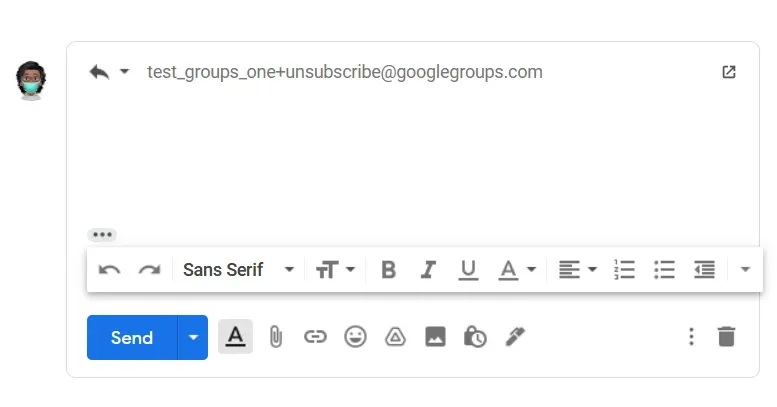
Most mailing services let a sender set a reply-to header. If the attacker sends mail with reply-to set to the group's unsubscribe address, the victim's reply goes there and the victim is removed from the group.
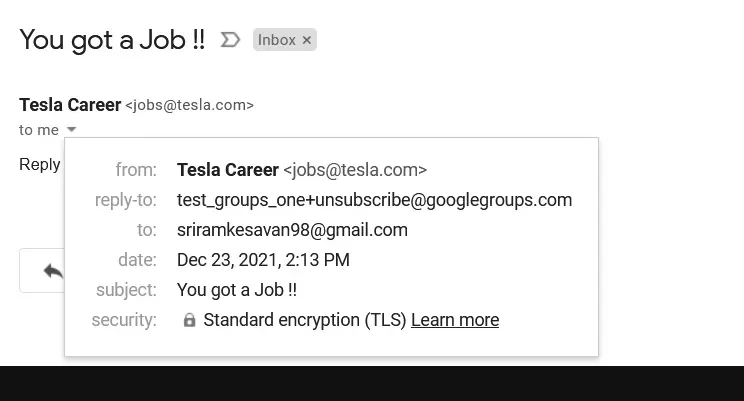
The screenshot shows a spoofed mail whose reply-to is the unsubscribe address. This works, but the author judged it unusable: the victim can visibly see which address they are replying to, and he expected Google to reject the report on that basis. He went back to look for a better scenario.
Step 2: mask the unsubscribe address with auto-forwarding
The next idea was to hide the unsubscribe address behind an address the victim would consider ordinary. Commercial proxy services exist for this, but the author found them too costly and chose a cheaper mechanism: Gmail's auto-forwarding of incoming mail.
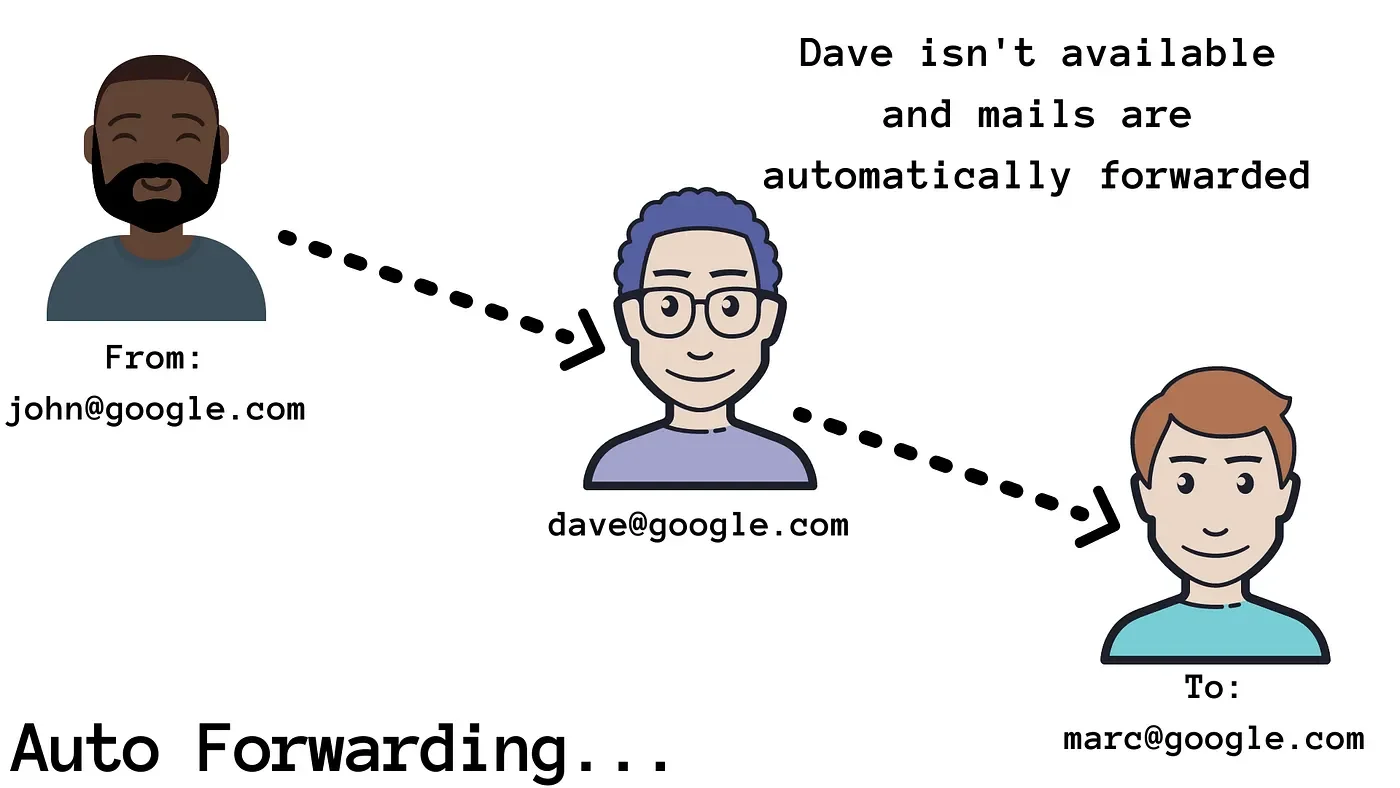
The attacker configures auto-forwarding so that incoming mail is forwarded to [redacted]. The victim never sees the unsubscribe address; they only see the attacker's ordinary Gmail address.
Step 3: get the victim to reply
When the victim sends any email to [redacted], the message is automatically forwarded to [redacted]. The victim is then removed from the group automatically, and the author notes that the system fails to verify it.
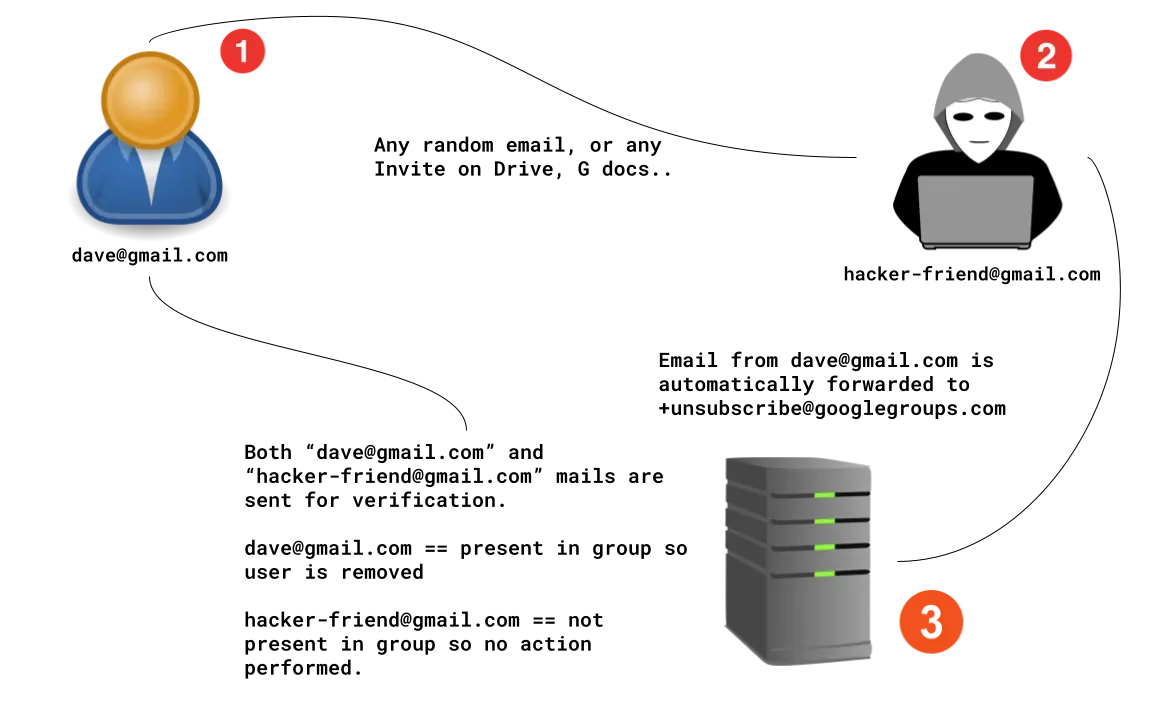
Simplified version of the attack scenario.
He tested this on a group created for his organisation: he added friends with their consent, sent them an email, and as they replied they were removed from the group one by one. A video proof of concept accompanies the write-up.
Root cause
The unsubscribe action is triggered by the arrival of a message at the suffixed address, and the author notes that the system fails to verify it. Because the removal is driven purely by the destination address, any path that delivers a message to [redacted] on the victim's behalf performs the removal. Auto-forwarding provides that path without exposing the unsubscribe address to the victim, so the visible-address weakness of the reply-to approach disappears. The author's wording is that the system "fails to verify it"; the exact check that is missing is not described in the report.
Impact
An attacker who can get the victim to reply to an attacker-controlled mailbox can remove that victim from the group. The removal happens without the victim's intent and without the victim seeing the unsubscribe address. The author demonstrated this against a group of consenting friends, removing them one by one. The report does not describe any effect beyond removal from the group, and it does not discuss scale, privileges or persistence.
Fix
The report states that an initial patch was applied, and that the author also reported a patch bypass which was accepted and was waiting for a Google VRP panel review. The report does not describe what the patch changes.
Disclosure timeline
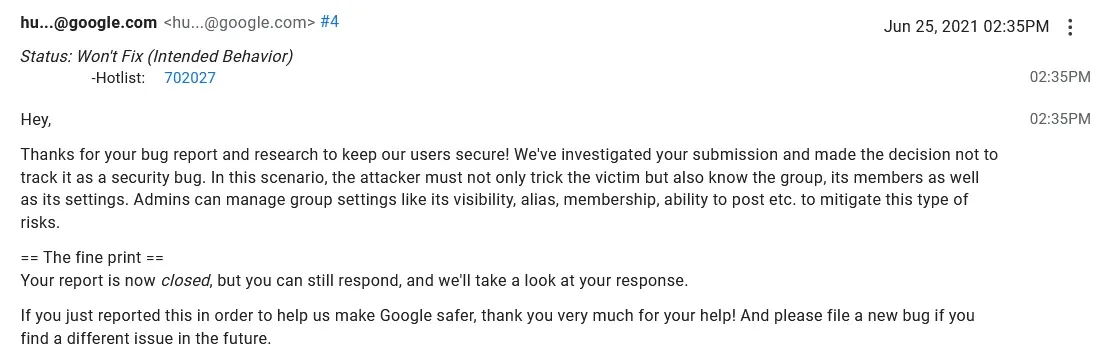
The issue was reported on Jun 26, 2021. It was initially closed as Intended Behaviour. The author then asked for permission to publish a write-up, and after a week received word that the product team was favourable in addressing the issue.

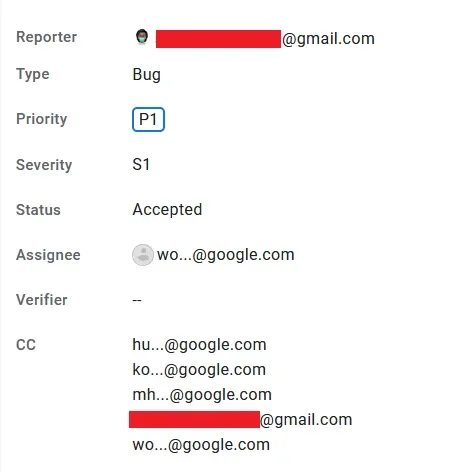
Hoooray !!!
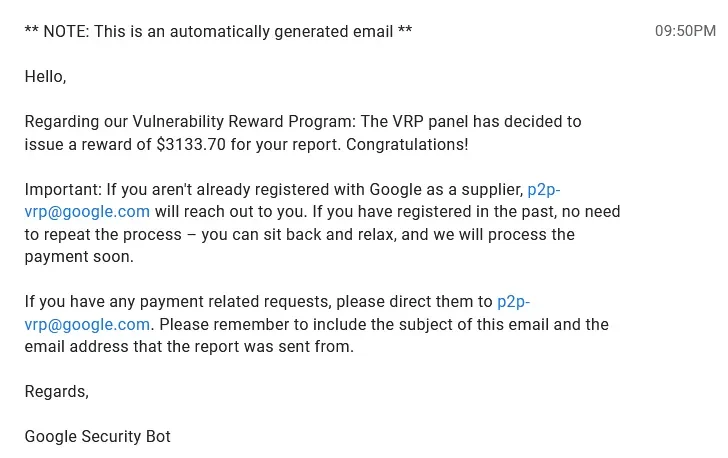
Two weeks later the reward arrived: $3133.7, higher than the author's estimate of $500 or $1337.
Variants to test
- Other suffix actions. Google Groups and similar list products expose other
+suffixcommands besides unsubscribe. Send a message to each suffixed address from a non-member mailbox and observe whether the action is performed without verifying the sender. A positive result is a state change (removal, subscription change, moderation action) triggered by a message the victim did not knowingly send. - Forwarding chains. Instead of a single Gmail auto-forward, chain two or more forwarding rules or aliases so the final destination is a list command. A positive result is the command firing while every address the victim can see belongs to the attacker.
- Reply-to combined with display-name tricks. Set
reply-toto the unsubscribe address but give the header a friendly display name. A positive result is a client that shows only the display name in the reply UI while still routing the reply to the unsubscribe address. - Calendar and other auto-responders. Any feature that sends mail on the user's behalf to an address the attacker controls (out-of-office replies, calendar invitations, shared-document notifications) can be aimed at a forwarding mailbox. A positive result is an automatic message from the victim's account reaching the list command.
- Sender verification assumptions. Test whether the list command checks SPF, DKIM or the
Fromaddress at all by sending from an unrelated mailbox. A positive result is removal of a member whose address does not match the sender.
What happened, in plain words
Google Groups is a service where a group of people share one email address. When someone sends an email to that shared address, everyone in the group receives it. Think of it like a shared noticeboard: you pin a note to the board and every member of the club can read it.
Every Google Groups address also has a special trick built in. If a member no longer wants to be in the group, they can send an email to the group address with +unsubscribe added to the end, and the system removes them automatically. No login, no settings page, just an email.
The researcher noticed that nobody seemed to have tested this unsubscribe feature. He worked out that if he could make a victim send an email to that special unsubscribe address, the victim would be removed from the group without meaning to. The first attempt used a trick called reply-to, but the victim could see the unsubscribe address in their email client, so it was too obvious. The second attempt hid the unsubscribe address behind a normal Gmail address using automatic email forwarding. The victim replied to what looked like an ordinary email, the message was forwarded to the unsubscribe address, and the victim was removed from the group.
He reported it to Google's bug bounty programme. It was first closed as intended behaviour, but after he asked to publish a write-up, the product team said they would address it. He was paid $3133.7.
Background: what Google Groups is
Google Groups lets a user create a group with several members and gives that group a shared email address. Anyone can post to the group by sending an email to that address, and the message is delivered to every member. The author notes that organisations use Google Groups as a ticket tracking system, and that a modified version is used by Google as a payment support system according to the information he gathered.
If you have never used a mailing list, imagine a club with a single postal address. Any member can post a letter to that address, and the club secretary copies it and sends it to every member. Google Groups is the digital version of that.
The unsubscribe feature
Every Google Groups address also supports a suffix form for leaving the group. For a group whose address is [redacted], a member who no longer wants to be in the group can send an email to [redacted] and is removed automatically.
The author points out that this feature has existed for years and that he had not seen anyone test it, which is why he decided to look at it.
A suffix here means extra text added after a plus sign in the email address. Email systems treat [redacted] as a variant of [redacted], and Google Groups reads the +unsubscribe part as an instruction: remove the sender from the group.
Setting up a test group
The researcher created a group called Test Groups, added several of his own test accounts, and was given the shared address [redacted]. For the later demonstration he created a group for his organisation and added friends with their consent. The other ingredient is the address [redacted], to which the victim sends mail. No special tooling is described.
Why create your own group first? Because testing on your own accounts means you cannot harm anyone, and you can see exactly what happens when a member leaves. The friends in the second group were added with their consent, so the demonstration was controlled.
Noticing the unsubscribe suffix
While sending messages to the group, the [redacted] suffix in the group address caught his attention. The behaviour is simple: a member sends mail to the suffixed address and is removed from the group automatically.
The key observation is that the removal is triggered by an email arriving at a particular address, not by the member clicking a button or logging in.
Ruling out email spoofing
The obvious first idea is email spoofing, and the author explicitly says that was not the issue. Email spoofing means sending an email that pretends to come from someone else, like writing a fake return address on an envelope. He spent more than a week working out how users were removed and how SPF policy behaved in that flow.
SPF, or Sender Policy Framework, is a way for a receiving mail server to check whether an email really came from the domain it claims to come from. It is like a bouncer checking ID at the door: the server looks up a list of allowed sending machines for that domain and rejects mail that does not match. The author's conclusion was that removal only requires the victim to send a message to the [redacted] address, so the problem becomes one of getting the victim to reply to that address, not of faking the sender.
Step 1: point reply-to at the unsubscribe address
Most mailing services let a sender set a reply-to header. A header is a line of information attached to an email, like the label on a parcel. The reply-to header tells the recipient's email program which address to use when they press Reply. If the attacker sends mail with reply-to set to the group's unsubscribe address, the victim's reply goes there and the victim is removed from the group.
The screenshot shows a spoofed mail whose reply-to is the unsubscribe address. This works, but the author judged it unusable: the victim can visibly see which address they are replying to, and he expected Google to reject the report on that basis. He went back to look for a better scenario.
Why was this a problem? Because most email programs show the reply address somewhere in the compose window. A careful user would notice that they were about to reply to [redacted] instead of the person who wrote to them. The attack depended on the victim not looking, which is not a reliable assumption.
Step 2: mask the unsubscribe address with auto-forwarding
The next idea was to hide the unsubscribe address behind an address the victim would consider ordinary. Commercial proxy services exist for this, but the author found them too costly and chose a cheaper mechanism: Gmail's auto-forwarding of incoming mail.
Auto-forwarding is a setting in Gmail that says: whenever an email arrives at this mailbox, send a copy to another address. Think of it as a mail redirection order at the post office. You give the post office a new address, and every letter that arrives for you is sent on without the sender knowing.
The attacker configures auto-forwarding so that incoming mail is forwarded to [redacted]. The victim never sees the unsubscribe address; they only see the attacker's ordinary Gmail address.
Step 3: get the victim to reply
When the victim sends any email to [redacted], the message is automatically forwarded to [redacted]. The victim is then removed from the group automatically, and the author notes that the system fails to verify it.
Simplified version of the attack scenario.
The diagram shows the chain: the victim writes to the attacker's Gmail address, Gmail forwards the message to the unsubscribe address, and Google Groups removes the victim. The victim only ever saw the first address.
He tested this on a group created for his organisation: he added friends with their consent, sent them an email, and as they replied they were removed from the group one by one. A video proof of concept accompanies the write-up.
Why it worked
The unsubscribe action is triggered by the arrival of a message at the suffixed address, and the author notes that the system fails to verify it. Because the removal is driven purely by the destination address, any path that delivers a message to [redacted] on the victim's behalf performs the removal. Auto-forwarding provides that path without exposing the unsubscribe address to the victim, so the visible-address weakness of the reply-to approach disappears. The author's wording is that the system "fails to verify it"; the exact check that is missing is not described in the report.
In plain terms: the system trusted the envelope, not the sender. It saw a letter arrive at the unsubscribe address and assumed the person named on it wanted to leave. It never asked whether that person had actually sent it.
What an attacker could do with it
An attacker who can get the victim to reply to an attacker-controlled mailbox can remove that victim from the group. The removal happens without the victim's intent and without the victim seeing the unsubscribe address. The author demonstrated this against a group of consenting friends, removing them one by one. The report does not describe any effect beyond removal from the group, and it does not discuss scale, privileges or persistence.
The fix
The report states that an initial patch was applied, and that the author also reported a patch bypass which was accepted and was waiting for a Google VRP panel review. The report does not describe what the patch changes.
A patch bypass means the first fix did not close the hole completely, and the researcher found another way to do the same thing. Reporting that second path is what the author was waiting on when the write-up ends.
How the disclosure went
The issue was reported on Jun 26, 2021. It was initially closed as Intended Behaviour. The author then asked for permission to publish a write-up, and after a week received word that the product team was favourable in addressing the issue.
Hoooray !!!
Two weeks later the reward arrived: $3133.7, higher than the author's estimate of $500 or $1337.
Other things worth testing
- Other suffix actions. Google Groups and similar list products expose other
+suffixcommands besides unsubscribe. Send a message to each suffixed address from a non-member mailbox and observe whether the action is performed without verifying the sender. A positive result is a state change (removal, subscription change, moderation action) triggered by a message the victim did not knowingly send. - Forwarding chains. Instead of a single Gmail auto-forward, chain two or more forwarding rules or aliases so the final destination is a list command. A positive result is the command firing while every address the victim can see belongs to the attacker.
- Reply-to combined with display-name tricks. Set
reply-toto the unsubscribe address but give the header a friendly display name. A positive result is a client that shows only the display name in the reply UI while still routing the reply to the unsubscribe address. - Calendar and other auto-responders. Any feature that sends mail on the user's behalf to an address the attacker controls (out-of-office replies, calendar invitations, shared-document notifications) can be aimed at a forwarding mailbox. A positive result is an automatic message from the victim's account reaching the list command.
- Sender verification assumptions. Test whether the list command checks SPF, DKIM or the
Fromaddress at all by sending from an unrelated mailbox. A positive result is removal of a member whose address does not match the sender.
DKIM, mentioned in the last point, is another email check: it attaches a cryptographic signature to a message so the receiver can confirm the message was not altered in transit. Together with SPF it is one of the standard ways a mail server decides whether to trust a sender.
Glossary
- Auto-forwarding: a mail setting that automatically sends a copy of every incoming message to another address.
- Bug bounty programme: a scheme where companies pay researchers for reporting security problems responsibly.
- DKIM: a cryptographic signature on an email that lets the receiver check the message was not altered.
- Email spoofing: sending an email that pretends to come from a different sender than the real one.
- Google Groups: a Google service that gives a group of people one shared email address so messages reach every member.
- Header: a line of metadata attached to an email, such as the sender, recipient or reply address.
- Intended behaviour: a vendor's judgement that a reported issue is how the product is designed to work, not a bug.
- Mailing list: a system where one address distributes messages to many members.
- Patch: a software update that fixes a bug or a security hole.
- Patch bypass: a way to still perform an attack after the first fix has been applied.
- Proof of concept (POC): a demonstration that an attack works, often a video or a small script.
reply-to: an email header that tells the recipient's mail program which address to use when replying.- SPF (Sender Policy Framework): a DNS record that lists which servers are allowed to send mail for a domain, so receivers can reject forgeries.
- Suffix: extra text added after a plus sign in an email address, used by some services as a command.
- Unsubscribe: the action of leaving a mailing list or group.
- VRP (Vulnerability Reward Program): Google's bug bounty programme.




